
SyncSo MCP server
Commit 16 Okt 2026Memberikan akses real-time bagi AI agent ke berbagai acara di New York City, termasuk musik live, teater, kelas, pasar, dan kehidupan malam.
Juga dikenal sebagai SyncSo-Inc/syncso
- Stars
- 2
- Tools
- —
- Unduhan, 30 hari
- —
- Versi terbaru
- 2.0.0
- Commit terakhir
- 16 Okt 2026
- Lisensi
- MIT
Apa itu SyncSo MCP?
SyncSo adalah MCP server. Memberikan akses real-time bagi AI agent ke berbagai acara di New York City, termasuk musik live, teater, kelas, pasar, dan kehidupan malam.
Ringkasan dibuat dari README proyek
Tentang SyncSo MCP server
SyncSo menyediakan data real-time bagi AI agent mengenai berbagai kegiatan lokal di New York City. Jika model bahasa standar mengandalkan data pelatihan statis yang berfungsi seperti buku panduan, MCP server ini menghubungkan agent ke database live yang berisi informasi musik, teater, komedi, pasar, kelas, dan kehidupan malam. Server ini menyajikan detail spesifik seperti tanggal, waktu, harga, dan link booking untuk acara yang mungkin tidak muncul dalam dataset tradisional.
Developer dapat mengintegrasikan layanan ini ke berbagai environment termasuk Claude Desktop, Claude Code, Cursor, Windsurf, dan VS Code. Koneksi dapat dilakukan melalui remote MCP URL atau dengan menambahkan file skill. Pengguna harus login di syncso.com untuk autentikasi, dan setiap akun menyertakan kuota pencarian gratis setiap bulannya. Sistem ini menggunakan dua tool utama, find_things_to_do dan get_details, untuk mengambil informasi. Saat ini cakupannya terbatas pada New York City, namun layanan ini dirancang untuk ekspansi ke lebih banyak kota di masa mendatang.
Apa yang bisa Anda lakukan dengannya
- 1Merencanakan aktivitas lokal untuk pengunjungMinta agent untuk mencari aktivitas spesifik bagi orang tua yang sedang berkunjung pada hari Selasa.
- 2Menemukan hiburan lokal secara instanMinta daftar acara outdoor gratis yang berlangsung dalam empat jam ke depan.
- 3Menjadwalkan agenda sosial di masa mendatangMinta agent mencari aktivitas yang bisa dipesan oleh pasangan untuk tiga minggu ke depan.
- 4Menemukan acara lokal yang spesifikCari acara skala kecil seperti kelas tembikar atau pasar malam.
Ditulis berdasarkan README proyek. Setiap use case diperiksa terhadap kutipan dari README tersebut.
Cara menginstal SyncSo MCP
Format diverifikasi 10 Nov 2026Tambahkan ke CursorTambahkan ke GooseInstal SyncSo MCP di Claude Code
$ claude mcp add --transport http syncso https://rtdb.syncso.com/partner/mcpInstal SyncSo MCP di Cursor
~/.cursor/mcp.json
{
  "mcpServers": {
    "syncso": {
      "url": "https://rtdb.syncso.com/partner/mcp"
    }
  }
}Instal SyncSo MCP di VS Code
.vscode/mcp.json
{
  "servers": {
    "syncso": {
      "type": "http",
      "url": "https://rtdb.syncso.com/partner/mcp"
    }
  }
}Instal SyncSo MCP di VS Code CLI
$ code --add-mcp '{"name":"syncso","type":"http","url":"https://rtdb.syncso.com/partner/mcp"}'Instal SyncSo MCP di Codex
$ codex mcp add syncso --url https://rtdb.syncso.com/partner/mcpInstal SyncSo MCP di Codex config.toml
~/.codex/config.toml
[mcp_servers.syncso]
url = "https://rtdb.syncso.com/partner/mcp"
Instal SyncSo MCP di Gemini CLI
$ gemini mcp add -s user --transport http syncso https://rtdb.syncso.com/partner/mcpInstal SyncSo MCP di Gemini settings.json
~/.gemini/settings.json
{
  "mcpServers": {
    "syncso": {
      "url": "https://rtdb.syncso.com/partner/mcp",
      "type": "http"
    }
  }
}Pengecekan otomatis
Berjalan 14 Nov 2026Laporan lengkap →Belum diverifikasi. Sebuah server memerlukan skor 80, tidak ada temuan serius, dan data yang cukup untuk kami periksa. Cara kerja checks · Yang perlu diperbaiki untuk menambah poin

- Source repository terhubung dan dapat dijangkausyncso-inc/syncso is public and reachablegithub.com/syncso-inc/syncso ↗Lolos
- Nama paket mencantumkan repositori ini sebagai sumbernyaTidak diperiksa
- Provenance build (atestasi Sigstore)Tidak diperiksa
- Lisensi open source (OSI)MITspdx.org/licenses/MIT.html ↗Lolos
- Ada commit atau release dalam satu tahun terakhirLast commit or release 2026-10-16github.com/syncso-inc/syncso ↗Lolos
- OpenSSF ScorecardTidak diperiksa
- Nama package tidak mirip dengan package populerTidak diperiksa
- Tidak ada advisory kritis pada paket atau dependensinyaTidak diperiksa
- Tidak ada instruksi tersembunyi untuk model0 tool descriptions and the README read; no override phrases, credential paths or hidden charactersLolos
- Tools yang bersifat destruktif telah diberi labelTidak diperiksa
- Endpoint remote merespons handshake MCPHTTPS endpoint answered 401 (sign-in required)Lolos
README
Lihat di GitHubSyncSo
Let your agents understand what's happening locally, in real time.
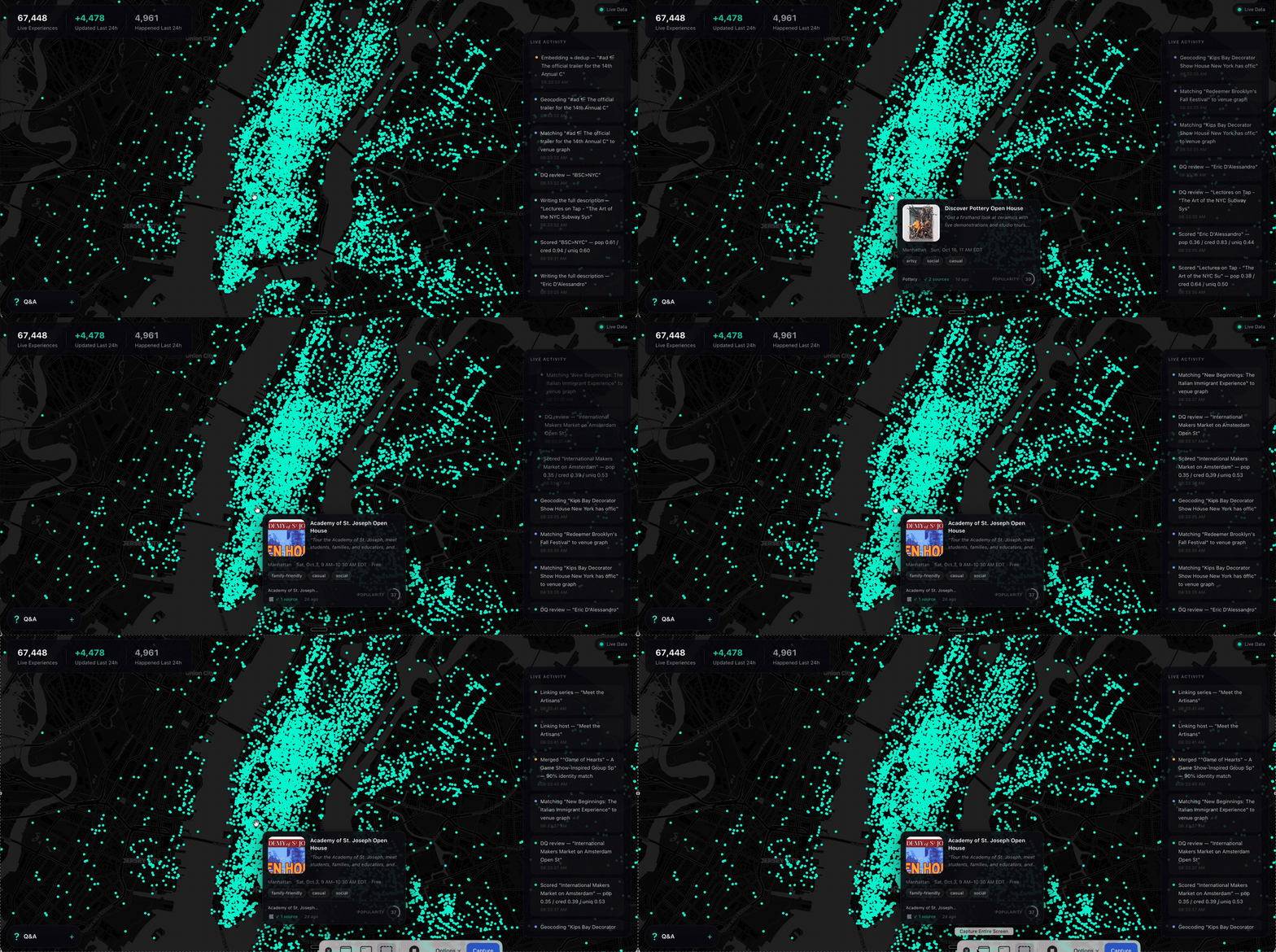
Ask a model what to do in New York and it names the Whitney. It is not wrong. It is just answering from a guidebook, because that is what it has — a city as a list of places, frozen whenever the training run ended.
What it does not have is everything going on inside those places, and the thousand rooms that never make a guidebook. The Tuesday gig. The pottery class with two seats left. The night market under the bridge. Your model has never heard of any of it.
SyncSo is that missing half: live music, theater, comedy, film, art, sports, festivals, markets, food and drink, classes, tours, nightlife — the whole surface of a city, each thing carrying its dates, times, prices, booking links and images. Not one category. Not the famous parts.
Which means your agent can finally take the questions it used to hand back. Where to take a visiting parent on a Tuesday. What a couple could book three weeks out. What is free, outdoors, and happening in the next four hours. Real answers, with a link to book them.
Install
One catalogue, two doors. Assistants that speak MCP connect to
https://rtdb.syncso.com/partner/mcp. Anything else reads the skill file at
https://syncso.com/SKILL.md. Both open the same account: the first search
asks the person to sign in once at syncso.com, and every account starts with
a free monthly allowance of searches.
Claude
In Claude.ai or the Claude desktop app: Settings → Connectors → Add custom connector, paste the MCP URL, and ask. Claude also lists SyncSo in its directory, where it is one click.
In Claude Code, connect the MCP server:
claude mcp add --transport http syncso https://rtdb.syncso.com/partner/mcp
or install the skill as a plugin, which keeps itself current:
claude plugin marketplace add SyncSo-Inc/syncso
claude plugin install syncso@syncso
ChatGPT
Coming to the ChatGPT app directory. Until it is listed: Settings → Apps & Connectors → Advanced → Developer mode, add a connector, paste the MCP URL. Developer mode is not available on every plan.
Cursor, Windsurf, VS Code and other MCP clients
Add SyncSo to the client's MCP configuration:
{
  "mcpServers": {
    "syncso": { "url": "https://rtdb.syncso.com/partner/mcp" }
  }
}
OpenClaw
openclaw skills install @liangstl/syncso
Also on ClawHub, where
clawhub install syncso does the same.
Coding agents that read skill folders
Claude Code, Codex, Cursor, Copilot and the rest, one command:
npx skills add SyncSo-Inc/syncso
Anything else
Tell your assistant:
Set up SyncSo from https://syncso.com/SKILL.md
The file carries the guidance and the tool definitions, works with anything that can call a tool and make an HTTPS request, and the copy at that URL is always the current one. A person using it gets their sign-in code at syncso.com/connect.
Two tools do the work, find_things_to_do and get_details. That is the
whole surface.
Coverage
New York only, for now. More cities over the coming months.
Within it, everything: every category above, from the institutions down to the one-night thing in a room above a bar. Ask about anywhere else and the skill tells your model to say so rather than invent an answer — the same refusal to guess that makes the New York answers worth trusting.
Links
- syncso.com — what SyncSo is
- syncso.com/connect — where your user gets their code
- syncso.com/SKILL.md — the skill itself, always the current copy (also in this repo)
Questions
Something missing, wrong, or not working the way this page says? Open an issue, or email hello@syncso.com. And if there is a city you want open, tell us.
License
MIT. See LICENSE.
Pertanyaan tentang SyncSo MCP
Bagaimana cara menambahkan SyncSo MCP ke Claude Code?
Jalankan claude mcp add --transport http syncso https://rtdb.syncso.com/partner/mcp di terminal Anda. Tambahkan --scope user agar tersedia di semua proyek.
Bagaimana cara menambahkan SyncSo MCP ke Cursor?
Buka ~/.cursor/mcp.json dan tambahkan server di bawah mcpServers, menggunakan config Cursor yang ditunjukkan di bagian instalasi di atas.
Area mana saja yang dicakup oleh SyncSo?
Saat ini, layanan ini hanya mencakup New York, dengan rencana penambahan kota lain dalam beberapa bulan ke depan.
Berapa biaya penggunaannya?
Setiap akun menyertakan kuota pencarian gratis setiap bulannya.
Informasi apa saja yang bisa saya temukan?
Anda dapat menemukan detail mengenai musik live, teater, komedi, film, seni, olahraga, festival, pasar, makanan, minuman, kelas, tur, dan kehidupan malam.