
Memungkinkan AI client untuk menulis, memperbarui, dan melakukan query pada wiki tim self-hosted yang terdiri dari halaman dan tabel dengan workflow review terintegrasi.
Juga dikenal sebagai stuga-dev/stuga, @stuga/mcp
- Stars
- 6
- Tools
- —
- Unduhan, 30 hari
- —
- Versi terbaru
- 0.2.1
- Commit terakhir
- 12 Nov 2026
- Lisensi
- AGPL-3.0
Apa itu Stuga MCP?
Stuga adalah MCP server. Memungkinkan AI client untuk menulis, memperbarui, dan melakukan query pada wiki tim self-hosted yang terdiri dari halaman dan tabel dengan workflow review terintegrasi.
Ringkasan dibuat dari README proyek
Tentang Stuga MCP server
Stuga memungkinkan Anda mengelola wiki tim melalui AI client dengan memberikan kemampuan kepada agent untuk menulis, memperbarui, dan melakukan query pada halaman serta tabel. Solusi self-hosted ini dapat dijalankan di Mac dengan Apple silicon atau melalui Docker di sebuah server. Stuga terhubung ke berbagai MCP client seperti Claude Desktop, Cursor, dan VS Code, menggunakan model milik agent itu sendiri sehingga tidak memerlukan AI keys terpisah untuk node tersebut.
Pengguna dapat mengontrol bagaimana informasi diperbarui melalui tiga level review yang berbeda. Perubahan dapat ditinjau oleh orang yang memintanya, memerlukan persetujuan dari rekan kerja, atau langsung diterapkan ke wiki. Sistem ini menggunakan tools seperti Save to Stuga untuk menyimpan informasi, Ask Stuga untuk melakukan query pada konten yang sudah disetujui, dan Check Stuga untuk mengidentifikasi halaman yang usang atau link yang rusak. Data disimpan secara lokal menggunakan Postgres dan SQLite, memastikan dokumentasi tim Anda tetap berada di bawah kendali Anda.
Apa yang bisa Anda lakukan dengannya
- 1Dokumentasi wiki otomatisAI agent dapat secara otomatis menyimpan catatan rapat atau poin-poin email ke dalam halaman wiki atau baris tabel yang sesuai.
- 2Verifikasi konten kolaboratifTim dapat mengatur workflow di mana saran edit dari AI harus disetujui oleh anggota tim lainnya.
- 3Query pengetahuan terverifikasiDeveloper dapat meminta AI untuk menjawab pertanyaan hanya berdasarkan informasi yang telah disetujui secara resmi.
- 4Pemeliharaan dan pembersihan wikiAI dapat memindai dokumentasi untuk menemukan dan mengusulkan perbaikan pada halaman yang tidak terhubung atau link yang rusak.
Ditulis berdasarkan README proyek. Setiap use case diperiksa terhadap kutipan dari README tersebut.
Cara menginstal Stuga MCP
Format diverifikasi 10 Nov 2026Tambahkan ke CursorTambahkan ke GooseInstal Stuga MCP di Claude Code
$ claude mcp add --env 'STUGA_URL=<STUGA_URL>' stuga -- npx -y @stuga/mcpInstal Stuga MCP di Cursor
~/.cursor/mcp.json
{
  "mcpServers": {
    "stuga": {
      "command": "npx",
      "args": [
        "-y",
        "@stuga/mcp"
      ],
      "env": {
        "STUGA_URL": "<STUGA_URL>"
      }
    }
  }
}Instal Stuga MCP di VS Code
.vscode/mcp.json
{
  "servers": {
    "stuga": {
      "type": "stdio",
      "command": "npx",
      "args": [
        "-y",
        "@stuga/mcp"
      ],
      "env": {
        "STUGA_URL": "<STUGA_URL>"
      }
    }
  }
}Instal Stuga MCP di VS Code CLI
$ code --add-mcp '{"name":"stuga","type":"stdio","command":"npx","args":["-y","@stuga/mcp"],"env":{"STUGA_URL":"<STUGA_URL>"}}'Instal Stuga MCP di Claude Desktop
claude_desktop_config.json
{
  "mcpServers": {
    "stuga": {
      "command": "npx",
      "args": [
        "-y",
        "@stuga/mcp"
      ],
      "env": {
        "STUGA_URL": "<STUGA_URL>"
      }
    }
  }
}Instal Stuga MCP di Codex
$ codex mcp add stuga --env 'STUGA_URL=<STUGA_URL>' -- npx -y @stuga/mcpInstal Stuga MCP di Codex config.toml
~/.codex/config.toml
[mcp_servers.stuga]
command = "npx"
args = ["-y", "@stuga/mcp"]

[mcp_servers.stuga.env]
STUGA_URL = "<STUGA_URL>"
Instal Stuga MCP di Gemini CLI
$ gemini mcp add -s user -e 'STUGA_URL=<STUGA_URL>' stuga npx -- -y @stuga/mcpInstal Stuga MCP di Gemini settings.json
~/.gemini/settings.json
{
  "mcpServers": {
    "stuga": {
      "command": "npx",
      "args": [
        "-y",
        "@stuga/mcp"
      ],
      "env": {
        "STUGA_URL": "<STUGA_URL>"
      }
    }
  }
}Konfigurasi
STUGA_URLWajibThe address you open Stuga at.
| Nama | Deskripsi | Tipe |
|---|---|---|
| STUGA_URL | The address you open Stuga at. | Wajib |
Pengecekan otomatis
Berjalan 12 Nov 2026Laporan lengkap →Lolos checks otomatis kami. Ini bukan audit keamanan: baca kodenya dan berikan server akses paling terbatas yang dibutuhkannya. Cara kerja checks

- Source repository terhubung dan dapat dijangkauLolos
- Lisensi open source (OSI)Lolos
- Ada commit atau release dalam satu tahun terakhirLolos
- Nama package tidak mirip dengan package populerLolos
- Remote endpoint menggunakan HTTPSLolos
- Tools yang bersifat destruktif telah diberi labelTidak diperiksa
- Tidak ada instruksi tersembunyi untuk modelLolos
- Tidak ada advisory kritis pada paket atau dependensinyaLolos
README
Lihat di GitHubStuga
Your AI writes the team wiki. A colleague approves.
A team wiki of pages and tables, on a Mac or server you run. Say Save to Stuga to Claude, Codex or any MCP client, and it files each point on the right page or in the right table row. By default a change to the wiki waits for whoever asked the AI; set a folder to Reviewed by a colleague and someone else approves it. Ask Stuga answers from what is approved, and says what still waits.
Download for Mac (Apple silicon, macOS 15+) · Install with Docker
Install, then create your account and workspace and connect your AI. Help for people using Stuga: stuga.dev/docs.
How the wiki stays right
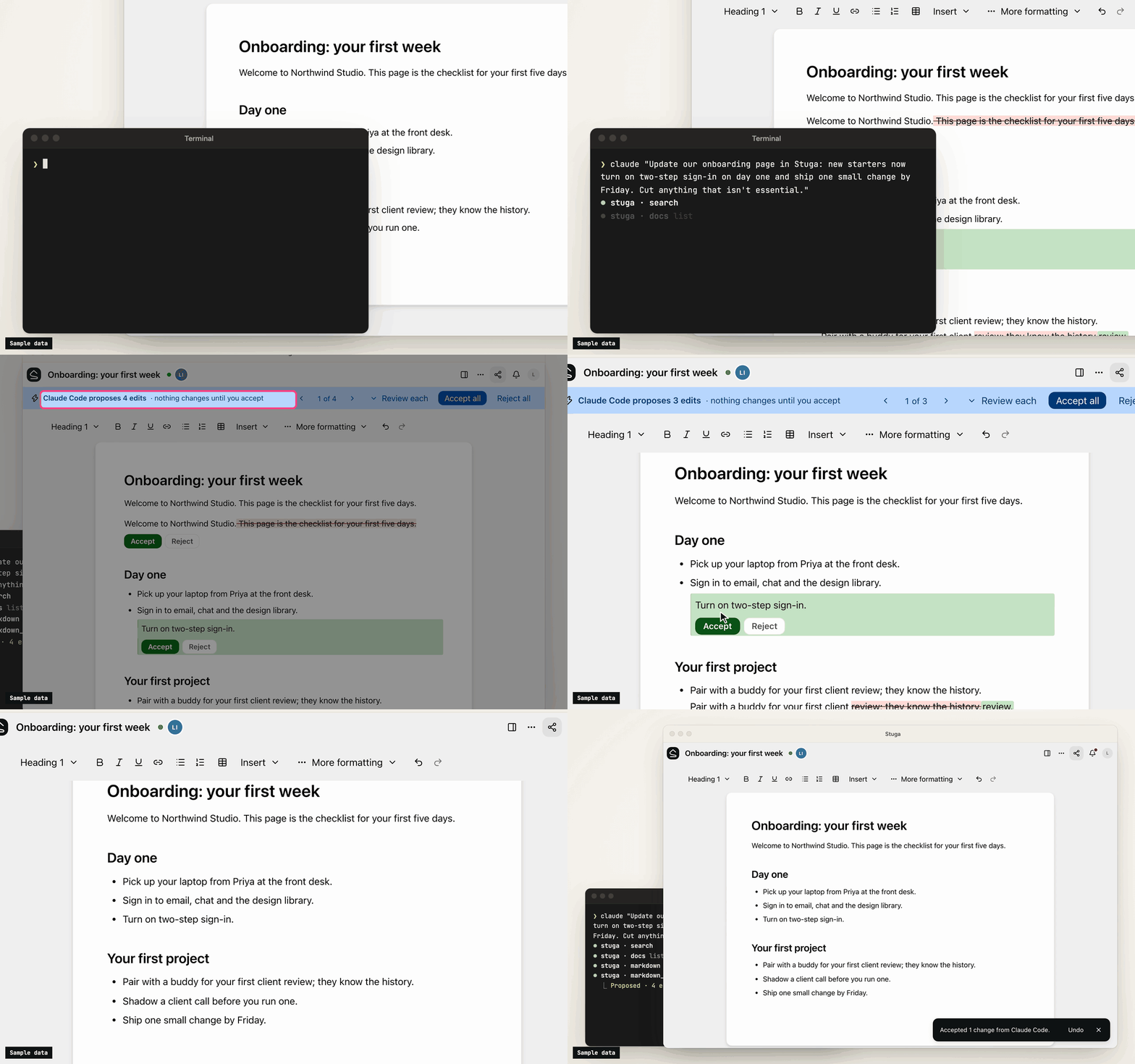
- Save to Stuga. Your AI finds the page and section a point belongs in, or the row a fact fills, and corrects the sentence it changes rather than adding another. It cites the meeting or email a point came from, and tells you what it saved where and what waits. A point no page is about starts a page in the folder it belongs in, or goes in your own My notes.
- Three review levels. In Who reviews AI edits…, a folder, page or database is Reviewed by whoever asked the AI (the default), Reviewed by a colleague (someone else who can edit it, from the folder's approver group if it names one, never the person who asked), or AI edits apply directly (recorded, attributed and revertible). People's own edits go straight in.
- One card per change. Filing a meeting across several pages is one change, reviewed on one card laid out for a phone: each edit in its paragraph, with the sources it cites. Approve all, Ask for changes… or Decline… with a note the AI reads. A folder can post each change that waits for a colleague to a Slack channel.
- Ask Stuga. Your AI answers from the pages and tables, with who last changed each one and when, and what waits: "the page says 14 days; a change to 30 days waits for a colleague".
- Check Stuga. Linked from under each page, Needs checking when a page it cites changes, and Wiki → Index and Wiki → Log. Say Check Stuga and your AI finds stale pages, orphans and broken links, and proposes the fixes as one change.
- Instructions that stack. The workspace, folders, pages and databases can each tell agents what goes where. They advise the model; permissions and review decide what a write does.
What's in it
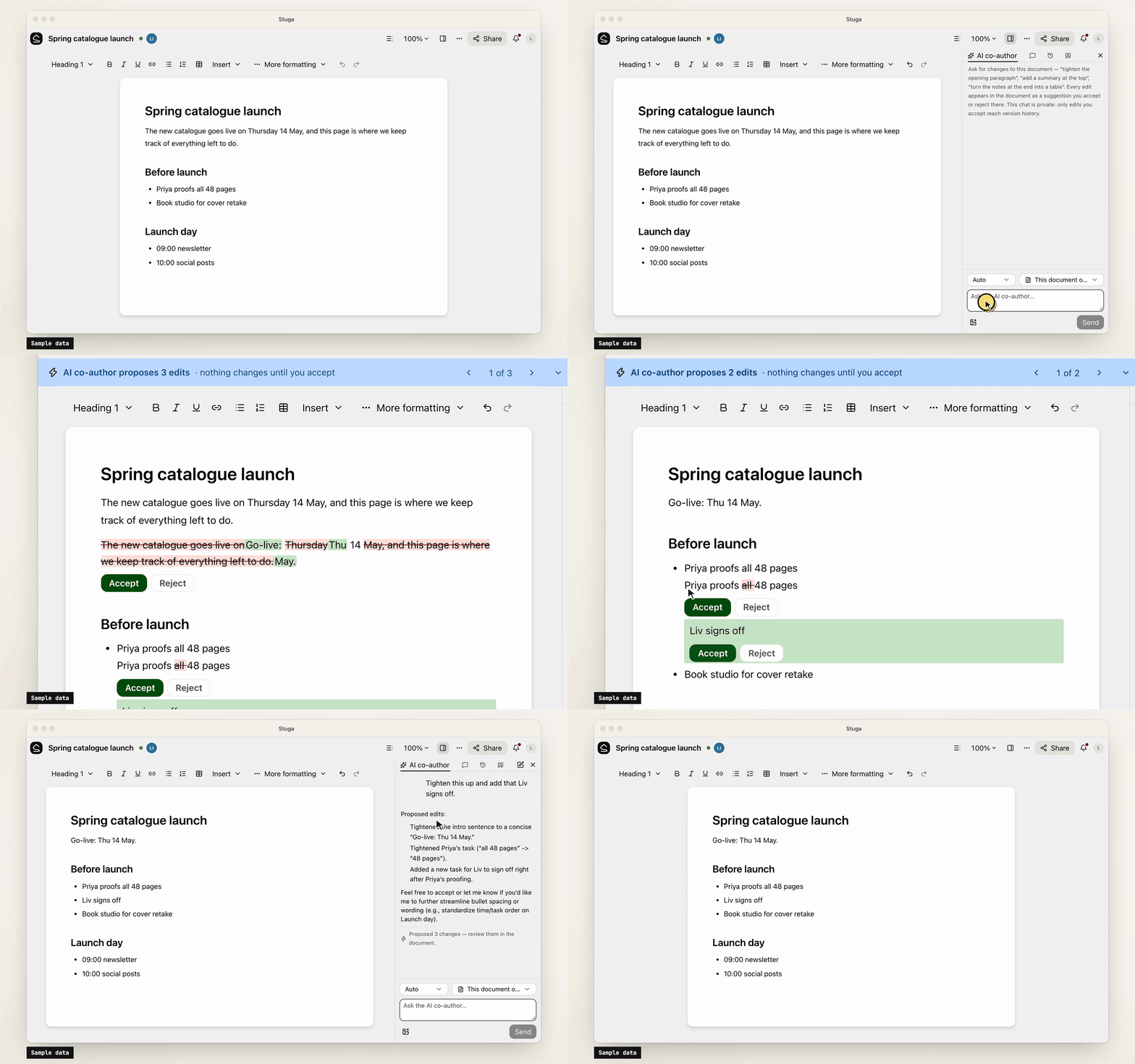
- Pages written together. Real-time editing (Tiptap over a Yjs CRDT) with presence, comments, @mentions and version history.
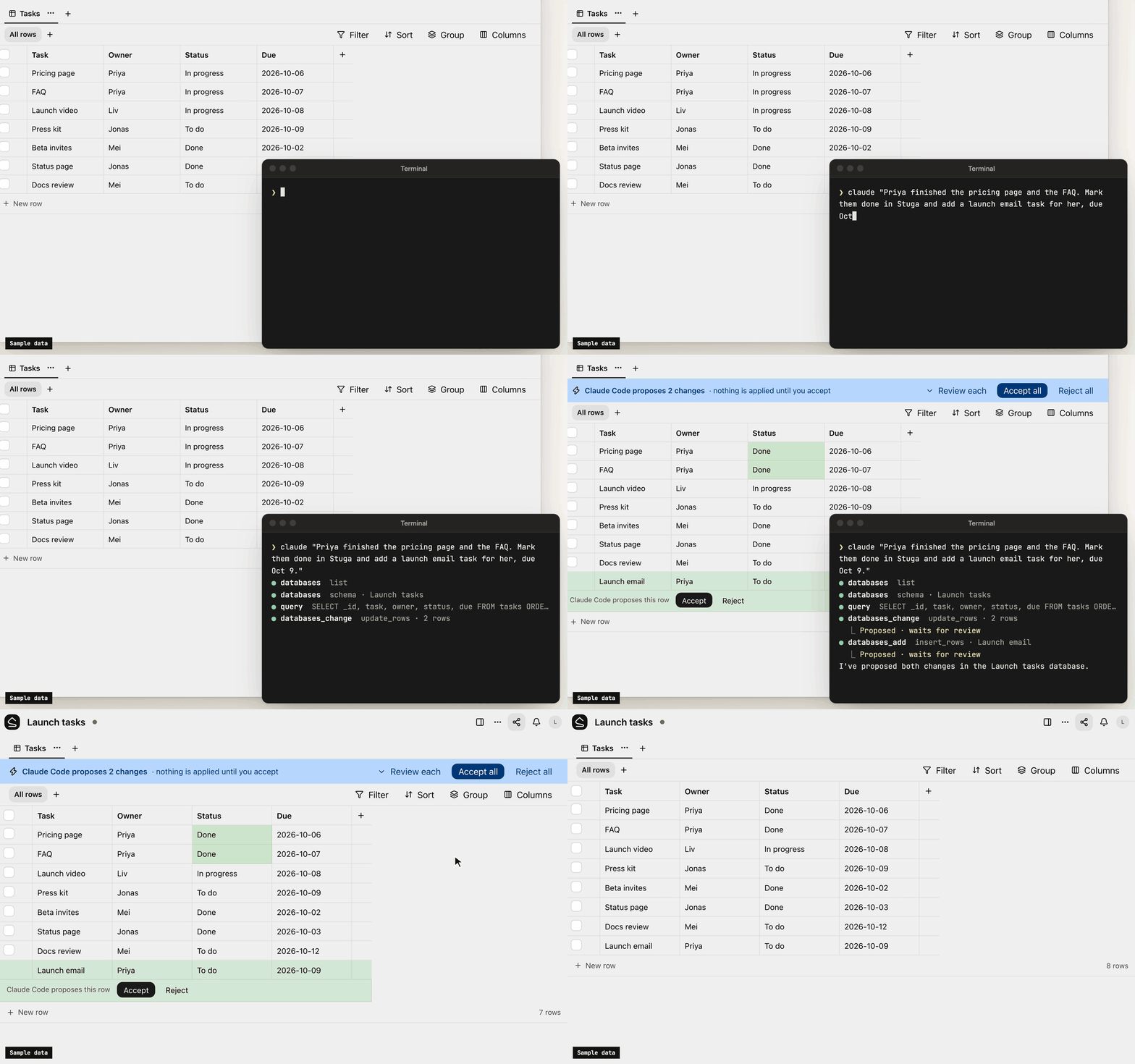
- Tables beside the pages. Typed tables, each database its own SQLite file, with saved views, row pages and CSV import. Agents, Ask and the REST API run read-only SQL on them.
- Search that follows permissions. Keyword (BM25 over Postgres full-text search) and semantic (pgvector) search in one SQL statement, with access checked inside it. Chinese, Japanese, Korean and Thai work without setup.
- Built-in AI, off until set up. A co-author and a table assistant, whose edits are reviewed like an agent's, and Ask, which cites sources. OpenAI, Anthropic, Gemini, DeepSeek and more, or Ollama.
- Sharing and sign-in. Workspaces, folders, per-page sharing, groups and guests. People join by invite link and sign in with a password or your OpenID Connect provider.
- Import and export. A Notion export, or a zipped Obsidian vault or folder of Markdown, becomes a
workspace; a workspace exports as one
.stuga.zipof Markdown, JSON Lines and its files.
Connect your AI
Agents connect over MCP. Settings → Your AI agents gives the setup for Claude Code, Claude Desktop, Codex, Antigravity, Cursor, VS Code, Kiro, Goose, LM Studio, DeepSeek Harness and Pi, with your node's address filled in, and the URL any other MCP client needs (docs/agents.md). Each agent brings its own model, so the node needs no AI key.
- Scoped sign-in. Most clients sign in through the browser, where you tick the workspaces an app may use and choose Read only or Read and suggest changes. Revoke ends its access.
- Narrow keys. A client without sign-in uses an API key, which can be confined to folders, made read-only or given an expiry.
- Content only. Agents change documents and databases. Renaming, moving, deleting, sharing and the review setting stay with people.
- Full audit. Every MCP call, reads included, is in the workspace's audit log. An event feed and signed webhooks report what changed.
Your data
Stuga sends no telemetry, and nothing reaches us unless a node admin turns on remote access. The node makes outbound requests only for features in use, such as an AI provider, and asks GitHub once a day for the list of releases unless a node admin turns that off. docs/privacy.md lists what the node sends and stores.
Install
-
A Mac with Apple silicon, on macOS 15 or later: open the package, or
Stuga-<version>.pkgfrom the latest release. It carries its own Postgres and Node.js (docs/install/macos.md). -
Docker on x86-64 or arm64, such as a Linux server or a NAS:
install.shstarts Postgres and the node with Compose (docs/install/docker.md):curl -fsSL https://github.com/stuga-dev/stuga/releases/latest/download/install.sh | bash
A node is one Node.js process and Postgres with pgvector; people open it in a browser. It backs itself up every day by default and before every upgrade (docs/operations.md). docs/getting-started.md walks through the first hour.
Questions and feedback
Ask a question or share an idea in Discussions; report a bug as an issue.
Contributing
Issues and pull requests are welcome. CONTRIBUTING.md covers running Stuga from source, the tests and the conventions, and RELEASING.md how a release is cut. Contributions are accepted under a Contributor License Agreement (CLA.md); a bot asks on your first pull request. Report a vulnerability privately, as SECURITY.md describes.
License
AGPL-3.0-only, except integrations/, which is MIT; copyright notice in NOTICE. If you modify Stuga and offer it to others over a network, you share your changes under the same terms. The name and logo are not covered by the license: TRADEMARKS.md says how you may use them.
Pertanyaan tentang Stuga MCP
Bagaimana cara menambahkan Stuga MCP ke Claude Code?
Jalankan claude mcp add --env 'STUGA_URL=<STUGA_URL>' stuga -- npx -y @stuga/mcp di terminal Anda. Tambahkan --scope user agar tersedia di semua proyek.
Bagaimana cara menambahkan Stuga MCP ke Cursor?
Buka ~/.cursor/mcp.json dan tambahkan server di bawah mcpServers, menggunakan config Cursor yang ditunjukkan di bagian instalasi di atas.
Bagaimana cara AI memperbarui wiki?
AI akan mencari halaman, bagian, atau baris tabel yang tepat untuk diperbarui dan memperbaiki kalimat yang sudah ada alih-alih hanya menambahkan kalimat baru.
Apakah server memerlukan AI key sendiri?
Tidak, karena setiap agent membawa modelnya sendiri, node ini tidak memerlukan AI key.
Bagaimana cara saya mengimpor catatan yang sudah ada?
Anda dapat mengimpor ekspor Notion atau folder Markdown/Obsidian vault yang di-zip ke dalam workspace.