
Screen Browser MCP server
Commit 13 Nov 2026Memungkinkan coding agent untuk merekam video demo dan tutorial ber-narasi dari aplikasi web dengan mengikuti panduan walkthrough yang dihasilkan.
Juga dikenal sebagai screenbrowser/skill, skill
- Stars
- 3
- Tools
- —
- Unduhan, 30 hari
- —
- Versi terbaru
- 1.3.18
- Commit terakhir
- 13 Nov 2026
- Lisensi
- MIT
Apa itu Screen Browser MCP?
Screen Browser adalah MCP server. Memungkinkan coding agent untuk merekam video demo dan tutorial ber-narasi dari aplikasi web dengan mengikuti panduan walkthrough yang dihasilkan.
Ringkasan dibuat dari README proyek
Tentang Screen Browser MCP server
Screen Browser memungkinkan coding agent untuk membuat video tutorial dan demonstrasi ber-narasi dari aplikasi web. Dengan membaca codebase lokal, agent dapat menulis walkthrough guide yang menggunakan teks asli dari tombol dan field yang ada. Server kemudian merekam sesi browser asli mengikuti instruksi tersebut pada URL yang sudah dideploy, menghasilkan file MP4 lengkap dengan subtitle, chapter, dan efek on-screen.
Layanan ini bekerja dengan berbagai MCP client termasuk Claude Code, Cursor, Codex, dan GitHub Copilot. Pengguna dapat melakukan autentikasi melalui alur OAuth berbasis browser atau dengan menyediakan API key sebagai bearer token. Server di-host di mcp.screenbrowser.com dan mengelola tugas seperti membuat project, mengunggah guide, memulai run, dan mengambil video yang sudah selesai. Layanan ini mendukung perekaman untuk berbagai perangkat seperti iPhone, Android, atau iPad dalam berbagai aspect ratio.
Untuk menggunakan ini, Anda harus menyediakan URL yang sudah dideploy dan akun user demo yang menggunakan autentikasi email dan password. Agent membaca repository Anda secara lokal untuk memahami UI tetapi hanya mengirimkan teks guide yang dihasilkan ke server. Durasi video dibatasi maksimal lima menit.
Apa yang bisa Anda lakukan dengannya
- 1Generate tutorial fiturMinta coding agent Anda untuk membuat video walkthrough dari fitur baru tertentu di aplikasi Anda.
- 2Otomatisasi pembaruan dokumentasiSaat kode aplikasi Anda berubah, Anda dapat memperbarui video guide Anda dengan cepat hanya dengan mengedit satu baris kode.
- 3Validasi langkah walkthroughPeriksa instruksi tertulis untuk sebuah guide secara gratis sebelum memutuskan untuk melakukan perekaman video penuh.
Ditulis berdasarkan README proyek. Setiap use case diperiksa terhadap kutipan dari README tersebut.
Cara menginstal Screen Browser MCP
Format diverifikasi 10 Nov 2026Tambahkan ke CursorTambahkan ke GooseInstal Screen Browser MCP di Claude Code
$ claude mcp add --transport http skill https://mcp.screenbrowser.com/Instal Screen Browser MCP di Cursor
~/.cursor/mcp.json
{
  "mcpServers": {
    "skill": {
      "url": "https://mcp.screenbrowser.com/"
    }
  }
}Instal Screen Browser MCP di VS Code
.vscode/mcp.json
{
  "servers": {
    "skill": {
      "type": "http",
      "url": "https://mcp.screenbrowser.com/"
    }
  }
}Instal Screen Browser MCP di VS Code CLI
$ code --add-mcp '{"name":"skill","type":"http","url":"https://mcp.screenbrowser.com/"}'Instal Screen Browser MCP di Codex
$ codex mcp add skill --url https://mcp.screenbrowser.com/Instal Screen Browser MCP di Codex config.toml
~/.codex/config.toml
[mcp_servers.skill]
url = "https://mcp.screenbrowser.com/"
Instal Screen Browser MCP di Gemini CLI
$ gemini mcp add -s user --transport http skill https://mcp.screenbrowser.com/Instal Screen Browser MCP di Gemini settings.json
~/.gemini/settings.json
{
  "mcpServers": {
    "skill": {
      "url": "https://mcp.screenbrowser.com/",
      "type": "http"
    }
  }
}Pengecekan otomatis
Berjalan 14 Nov 2026Laporan lengkap →Belum diverifikasi. Sebuah server memerlukan skor 80, tidak ada temuan serius, dan data yang cukup untuk kami periksa. Cara kerja checks · Yang perlu diperbaiki untuk menambah poin

- Source repository terhubung dan dapat dijangkauscreenbrowser/skill is public and reachablegithub.com/screenbrowser/skill ↗Lolos
- Nama paket mencantumkan repositori ini sebagai sumbernyaTidak diperiksa
- Provenance build (atestasi Sigstore)Tidak diperiksa
- Lisensi open source (OSI)MITspdx.org/licenses/MIT.html ↗Lolos
- Ada commit atau release dalam satu tahun terakhirLast commit or release 2026-11-13github.com/screenbrowser/skill ↗Lolos
- OpenSSF ScorecardTidak diperiksa
- Nama package tidak mirip dengan package populerTidak diperiksa
- Tidak ada advisory kritis pada paket atau dependensinyaTidak diperiksa
- Tidak ada instruksi tersembunyi untuk model0 tool descriptions and the README read; no override phrases, credential paths or hidden charactersLolos
- Tools yang bersifat destruktif telah diberi labelTidak diperiksa
- Endpoint remote merespons handshake MCPHTTPS endpoint answered 401 (sign-in required)Lolos
README
Lihat di GitHubScreen Browser skill
Narrated demo and tutorial videos of your web app, from a guide or your coding agent.
Ask the agent that knows your codebase for a tutorial video of a feature. It writes the walkthrough in the words your buttons and fields use, Screen Browser records a real browser following it against your deployed app, narrates it, adds the on-screen effects, and the agent hands you the MP4 with a GIF, subtitles and chapters. When the app changes, edit a line and ask again.
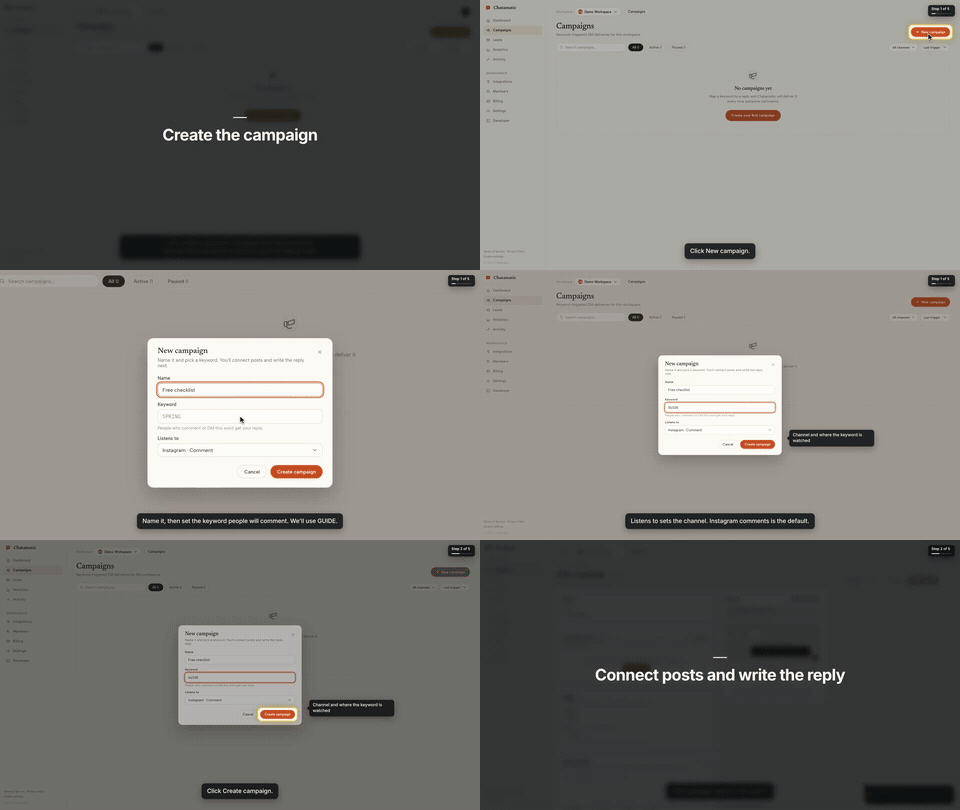
That is the first chapter of a 66-second video made from the request "make a tutorial video of creating a campaign". The whole session, from that sentence to the finished video with the exact prompt and every screen along the way, is in the Claude Code guide.
This repository gives your agent two things:
- The
screenbrowserskill — how to read your codebase and write the two guides Screen Browser needs (the login flow and the walkthrough), which effect fits which moment, how to check a guide for free before recording, and how to review the video before handing it over. - The MCP server configuration — the tools the agent calls: create the project, upload guides,
check them, start the run, poll it, fetch the video. The server itself is part of your Screen
Browser account at
https://mcp.screenbrowser.com.
Claude Code, Codex, Cursor or any MCP client can use it. Sign-in happens in the browser; there is no key to paste.
Install (Claude Code)
Add this repository as a plugin marketplace and install the plugin:
claude plugin marketplace add screenbrowser/skill
claude plugin install screenbrowser@screenbrowser
The first time the agent reaches for a Screen Browser tool, Claude Code opens your browser: sign in
to Screen Browser, approve the connection, and you are done. Nothing to copy. (If it does not
prompt, run /mcp and pick screenbrowser → Authenticate.)
Without the plugin system, register the server yourself and copy the skill:
claude mcp add --transport http screenbrowser https://mcp.screenbrowser.com
cp -r skills/screenbrowser ~/.claude/skills/
With an API key instead
If your agent cannot open a browser to sign in, create a key under Settings → API keys in Screen Browser and pass it as a bearer token:
claude mcp add --transport http screenbrowser https://mcp.screenbrowser.com \
  --header "Authorization: Bearer <your API key>"
Any MCP client works the same way: Streamable HTTP at https://mcp.screenbrowser.com, OAuth 2.1 with
dynamic client registration for interactive sign-in, or Authorization: Bearer <key>.
Other agents
The skill is a plain SKILL.md in the open Agent Skills format, and the server is standard MCP over
HTTP, so the same two pieces work outside Claude Code.
Cursor, VS Code, GitHub Copilot and other Agent Plugins clients — this repository is also an
Agent Plugins package (plugin.json, mcp.json, skills/), so
install it as a plugin from the repository URL and sign in when the client offers. Cursor without
the plugin: add the server to .cursor/mcp.json (or the global one in Cursor settings), click
Sign in next to it, and copy the skill into .cursor/skills/:
{
  "mcpServers": {
    "screenbrowser": { "url": "https://mcp.screenbrowser.com" }
  }
}
mkdir -p .cursor/skills && cp -r skills/screenbrowser .cursor/skills/
OpenAI Codex CLI — add the server to ~/.codex/config.toml, sign in once, and copy the skill
into Codex's skills folder:
[mcp_servers.screenbrowser]
url = "https://mcp.screenbrowser.com"
codex mcp login screenbrowser
mkdir -p ~/.codex/skills && cp -r skills/screenbrowser ~/.codex/skills/
Anything else (Gemini CLI, Windsurf, a custom agent) — register an HTTP MCP server with the URL
the way that tool documents it; a client that supports OAuth will sign you in, one that does not
takes the API key as an Authorization: Bearer header. Give the agent skills/screenbrowser/SKILL.md
as instructions (paste it, or point the tool's rules file at it). The MCP server itself also carries
the guide syntax as a resource and a write-tutorial-guide prompt, so a client with MCP prompts can
work without the skill file at all.
Use
Videos can be recorded on the desktop or as a phone or tablet (device: iphone, android, ipad,
…), in a phone frame on a vertical 9:16 or widescreen 16:9 canvas or as the bare screen; one run is
one device.
Open your app's repository in Claude Code and ask:
Make a tutorial video of creating a campaign.
The agent will check credits, create the project (it will ask you for the deployed URL, a demo user, and the legal attestation), write the guides from your routes and templates, validate them, show them to you, start the run, and give you the video link a few minutes later.
The MCP server also ships a get_guide_instructions tool with the same writing rules, for clients
without this skill, a write-tutorial-guide prompt that walks any client through the same flow, and
two resources: screenbrowser://guide-syntax and screenbrowser://example-guides.
What your app needs
- A demo user that signs in with email and password: no OAuth, no 2FA, no captcha. Seed it with realistic data.
- The deployed URL to record (staging is fine) and every host the app talks to (API subdomain, auth provider, CDN). An app that only runs on your computer works through a tunnel: ngrok or Cloudflare Tunnel (how).
- Confirmation that you are allowed to record the app (yours, a client's with permission, or an internal tool).
What it sends, and where
Everything the plugin does goes to one place: the Screen Browser MCP server at
https://mcp.screenbrowser.com, over HTTPS, signed in with your Screen Browser account. The
skill itself is instructions for the agent; it runs nothing on your machine and fetches nothing.
What the agent sends to Screen Browser when you ask for a video:
- the project's settings: your app's URL, the hosts it talks to, the sign-in check, narration language and voice;
- the guides it writes from your code: plain sentences naming buttons and fields as they appear on screen. Read them before they are saved; the agent shows them to you;
- the demo user's credentials, as project variables. Screen Browser stores them encrypted, uses them only to sign in during a recording, and never returns them through any tool. Values you give the agent pass through its conversation; to keep them out of chat, set them on the project's page in the Screen Browser dashboard instead;
- run commands: start, poll, cancel, and, only if you agree, a failure report with the recorder's screenshot and logs of a run that failed on Screen Browser's side.
It never sends your source code. The agent reads your repository locally to learn the labels; only the guide text leaves the machine. Nothing is sent to any other service. What Screen Browser keeps, and for how long, is in the privacy policy.
What it costs
Plans start at $49 a month, sized in minutes of finished video. Checking a guide before recording is free, and a run that fails is not charged. Videos are capped at five minutes. There is no free plan, but the first 100 accounts get 10 free minutes with no card. Current prices are on the pricing page.
Layout
plugin.json                        Agent Plugins manifest (Cursor, VS Code, Copilot, …)
mcp.json                           Agent Plugins MCP config (the URL; sign-in is OAuth)
.claude-plugin/plugin.json         Claude Code plugin manifest
.claude-plugin/marketplace.json    lets this repo act as its own Claude Code marketplace
.mcp.json                          Claude Code MCP server config
skills/screenbrowser/SKILL.md      the skill
skills/screenbrowser/references/   guide syntax reference, worked example
examples/chatamatic/               a real auth guide + main guide pair
What a guide looks like
Plain language, one step per line, naming things as they appear on screen. Screen Browser turns it into the script — the narration, the highlights, the pacing — and resolves each step against the live page:
Go to https://app.acme.test/campaigns
"Let's create a spring promotion."
Click "New campaign"
Type "Spring promo" into the Name field
Click "Save"
Confirm text "Campaign created" is visible
Ids and name= attributes are allowed when a step needs precision; class names generated by a build
tool are refused. The full reference, including the optional effect directives, is in
skills/screenbrowser/references/guide-syntax.md.
Documentation index for AI agents
The skill carries everything an agent needs to write a guide and run a recording. For anything else — prerequisites, costs, limitations, the API — https://screenbrowser.com/llms.txt is a Markdown index of the public documentation, and https://screenbrowser.com/docs/agents/ is the reference for this integration.
Support
Issues and ideas about the skill are welcome in this repository. Anything about your account or a particular recording: use the contact form at https://screenbrowser.com/contact/.
License
MIT. Screen Browser itself is a hosted service; this repository contains only the agent-facing skill, configuration and examples.
Pertanyaan tentang Screen Browser MCP
Bagaimana cara menambahkan Screen Browser MCP ke Claude Code?
Jalankan claude mcp add --transport http skill https://mcp.screenbrowser.com/ di terminal Anda. Tambahkan --scope user agar tersedia di semua proyek.
Bagaimana cara menambahkan Screen Browser MCP ke Cursor?
Buka ~/.cursor/mcp.json dan tambahkan server di bawah mcpServers, menggunakan config Cursor yang ditunjukkan di bagian instalasi di atas.
Apakah server mengirimkan source code saya ke Screen Browser?
Tidak, agent membaca repository Anda secara lokal untuk mempelajari label, tetapi tidak pernah mengirimkan source code Anda ke layanan tersebut.
Apa saja persyaratan untuk aplikasi web saya?
Aplikasi Anda memerlukan user demo dengan login email/password (tanpa 2FA atau captcha), URL yang sudah dideploy, dan semua host terkait (API, auth, CDN) harus dapat diakses.
Apakah tersedia paket gratis?
Tidak ada paket gratis permanen, tetapi 100 akun pertama mendapatkan 10 menit gratis, dan melakukan pengecekan guide sebelum merekam tidak dipungut biaya.