
Rekam alur browser menggunakan LLM agent dan susun menjadi spec Playwright deterministik yang dapat berjalan tanpa model atau biaya tambahan.
Juga dikenal sebagai restspace/sitelooper
- Stars
- 1
- Tools
- —
- Unduhan, 30 hari
- —
- Versi terbaru
- 0.7.0
- Commit terakhir
- 12 Nov 2026
- Lisensi
- MIT
Apa itu sitelooper MCP?
Rekam alur browser menggunakan LLM agent dan susun menjadi spec Playwright deterministik yang dapat berjalan tanpa model atau biaya tambahan.
Ringkasan dibuat dari README proyek
Tentang sitelooper MCP server
sitelooper memungkinkan developer dan QA engineer untuk merekam alur otomatisasi browser melalui instruksi bahasa Inggris biasa. Dengan menggunakan CLI yang terintegrasi dengan LLM agent, pengguna dapat mendeskripsikan tugas kompleks seperti login atau membuat tiket, yang kemudian dieksekusi oleh agent di browser secara live. Tool ini merekam locator yang tahan lama dan perubahan langkah untuk mengompilasi aksi tersebut menjadi spesifikasi Playwright yang deterministik.
Setelah dikompilasi, pengujian ini dapat berjalan di lingkungan CI tanpa memerlukan LLM, sehingga menghemat biaya token dan latensi model. Sistem ini menyertakan recovery ladder di mana jika sebuah langkah gagal akibat perubahan aplikasi, model dapat mencoba memperbaiki alur dan menetapkan recovery baru. Pengguna memerlukan Node 20+, OpenRouter API key untuk fase perekaman awal, dan package @playwright/test untuk menjalankan spec yang dihasilkan. Pendekatan ini berbeda dari script agentic standar karena berfokus pada kompilasi bukti menjadi kode Playwright yang stabil dan bebas biaya, bukan sekadar memutar ulang aksi berbasis model.
Apa yang bisa Anda lakukan dengannya
- 1Generate test Playwright dari bahasa InggrisDeveloper dapat memberikan satu instruksi untuk merekam user journey tertentu dan mengubahnya menjadi spec test mandiri.
- 2Otomatisasi perbaikan dan healing testSaat UI aplikasi berubah, tool ini menggunakan recovery ladder untuk memperbaiki langkah yang rusak dan memperbarui alur secara otomatis.
- 3Verifikasi state aplikasi dengan assertionPengguna dapat merekam kondisi spesifik yang harus tetap terpenuhi, seperti memeriksa apakah banner error tersembunyi atau apakah total nilai sudah sesuai.
Ditulis berdasarkan README proyek. Setiap use case diperiksa terhadap kutipan dari README tersebut.
Cara menginstal sitelooper MCP
Format diverifikasi 10 Nov 2026Tambahkan ke CursorTambahkan ke GooseInstal sitelooper MCP di Claude Code
$ claude mcp add --env 'OPENROUTER_API_KEY=<YOUR_OPENROUTER_API_KEY>' sitelooper -- npx -y sitelooperInstal sitelooper MCP di Cursor
~/.cursor/mcp.json
{
  "mcpServers": {
    "sitelooper": {
      "command": "npx",
      "args": [
        "-y",
        "sitelooper"
      ],
      "env": {
        "OPENROUTER_API_KEY": "<YOUR_OPENROUTER_API_KEY>"
      }
    }
  }
}Instal sitelooper MCP di VS Code
.vscode/mcp.json
{
  "servers": {
    "sitelooper": {
      "type": "stdio",
      "command": "npx",
      "args": [
        "-y",
        "sitelooper"
      ],
      "env": {
        "OPENROUTER_API_KEY": "<YOUR_OPENROUTER_API_KEY>"
      }
    }
  }
}Instal sitelooper MCP di VS Code CLI
$ code --add-mcp '{"name":"sitelooper","type":"stdio","command":"npx","args":["-y","sitelooper"],"env":{"OPENROUTER_API_KEY":"<YOUR_OPENROUTER_API_KEY>"}}'Instal sitelooper MCP di Claude Desktop
claude_desktop_config.json
{
  "mcpServers": {
    "sitelooper": {
      "command": "npx",
      "args": [
        "-y",
        "sitelooper"
      ],
      "env": {
        "OPENROUTER_API_KEY": "<YOUR_OPENROUTER_API_KEY>"
      }
    }
  }
}Instal sitelooper MCP di Codex
$ codex mcp add sitelooper --env 'OPENROUTER_API_KEY=<YOUR_OPENROUTER_API_KEY>' -- npx -y sitelooperInstal sitelooper MCP di Codex config.toml
~/.codex/config.toml
[mcp_servers.sitelooper]
command = "npx"
args = ["-y", "sitelooper"]

[mcp_servers.sitelooper.env]
OPENROUTER_API_KEY = "<YOUR_OPENROUTER_API_KEY>"
Instal sitelooper MCP di Gemini CLI
$ gemini mcp add -s user -e 'OPENROUTER_API_KEY=<YOUR_OPENROUTER_API_KEY>' sitelooper npx -- -y sitelooperInstal sitelooper MCP di Gemini settings.json
~/.gemini/settings.json
{
  "mcpServers": {
    "sitelooper": {
      "command": "npx",
      "args": [
        "-y",
        "sitelooper"
      ],
      "env": {
        "OPENROUTER_API_KEY": "<YOUR_OPENROUTER_API_KEY>"
      }
    }
  }
}Konfigurasi
OPENROUTER_API_KEYRahasiaAPI key for the default model provider (OpenRouter). Not needed if another provider's key variable is set; run `sitelooper doctor` to see which one is used.
BP_BROWSER_TESTSTEST_TOTP
| Nama | Deskripsi | Tipe |
|---|---|---|
| OPENROUTER_API_KEY | API key for the default model provider (OpenRouter). Not needed if another provider's key variable is set; run `sitelooper doctor` to see which one is used. | Rahasia |
| BP_BROWSER_TESTS | — | |
| TEST_TOTP | — |
Pengecekan otomatis
Berjalan 14 Nov 2026Laporan lengkap →Lolos checks otomatis kami. Ini bukan audit keamanan: baca kodenya dan berikan server akses paling terbatas yang dibutuhkannya. Cara kerja checks

- Source repository terhubung dan dapat dijangkaurestspace/sitelooper is public and reachablegithub.com/restspace/sitelooper ↗Lolos
- Nama paket mencantumkan repositori ini sebagai sumbernyasitelooper names restspace/sitelooper as sourcenpmjs.com/package/sitelooper ↗Lolos
- Provenance build (atestasi Sigstore)No build attestation published for this releaseTidak diperiksa
- Lisensi open source (OSI)MITspdx.org/licenses/MIT.html ↗Lolos
- Ada commit atau release dalam satu tahun terakhirLast commit or release 2026-11-12github.com/restspace/sitelooper ↗Lolos
- OpenSSF ScorecardTidak diperiksa
- Nama package tidak mirip dengan package populerNo popular package one edit away from sitelooperLolos
- Tidak ada advisory kritis pada paket atau dependensinya100 resolved dependencies checked; no critical advisoryosv.dev ↗Lolos
- Tidak ada instruksi tersembunyi untuk model0 tool descriptions and the README read; no override phrases, credential paths or hidden charactersLolos
- Tools yang bersifat destruktif telah diberi labelTidak diperiksa
- Endpoint remote merespons handshake MCPTidak diperiksa
README
Lihat di GitHubsitelooper
Write browser tests in plain English. Run them in CI as plain Playwright. Repair them automatically when the app changes.
sitelooper is a CLI with a small LLM agent inside. You give it one instruction at a time, such as
"sign in as ops@example.com, create a ticket titled 'k7 Bench' and report its id". It works the
live browser and returns one verified result. Every step it gets right is compiled into a
procedure that replays with no model, no tokens and no cost, and can be exported as a
standalone @playwright/test spec.
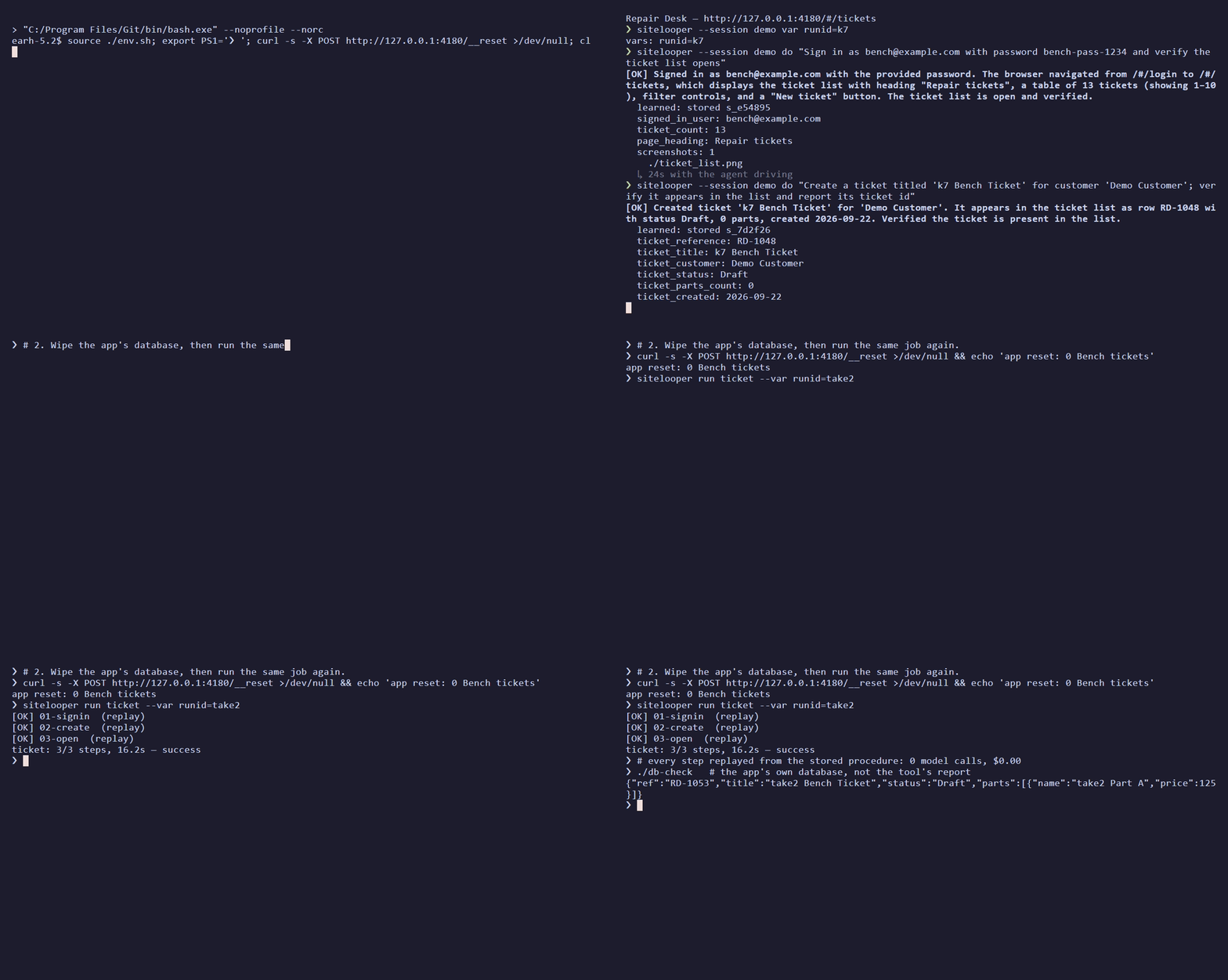
Recorded once against the in-repo repair-desk app (24s, 28s and 42s with the agent driving). The app is reset, the same flow replays in 16s with zero model calls, and then the app's own state is queried.
How it works
- Record. A cheap model follows your instructions. As it works, sitelooper records durable locators, where each value came from, and what each step changed on the page.
- Replay. The recording replays deterministically. If the app has changed under a step, only that step goes back to the model, and a recovery that validates is pinned into the flow, so the flow heals itself over runs.
- Compile.
sitelooper buildemits a Playwright spec with effect checks on every step. It runs in CI with no sitelooper daemon and no model.
Results
Ten self-hosted apps, each job done once to record it, then twice more with no model, then as a compiled Playwright spec. The comparator is agent-browser driven by an LLM, which redoes the job on every run. Every run was scored against the app's own database or API, never against the tool's own report. September 2026:
| app | sitelooper, first run | sitelooper replay ×2 | compiled spec | agent-browser, GPT-6 Luna | agent-browser, GPT-6.1 Sol |
|---|---|---|---|---|---|
| repair-desk | 6/6 · $0.02 · 187s | 6/6 · $0 · 52s | 6/6 | 6/6 · $0.01 | 6/6 · $0.29 |
| Odoo | 6/6 · $0.07 · 589s | 6/6 · $0 · 193s | 6/6 | 3/6 · $0.02 | 6/6 · $0.37 |
| Grafana | 6/6 · $0.09 · 615s | 6/6 · $0 · 145s | pass | 5/6, then 6/6 · $0.04 | 4/6 · $0.33 |
| Kanboard | 6/6 · $0.05 · 357s | 6/6 · $0 · 56s | 4/4 + 2 report-only | 6/6, duplicate comment · $0.005 | 6/6 · $0.23 |
| OpenProject | 7/7 · $0.05 · 377s | 7/7 · $0 · 93-132s | 5/5 + 2 report-only | 7/7, duplicate comment · $0.02 | 7/7 · $0.38 |
| Gitea | 7/7 · $0.04 · 324s | 7/7 · $0 · 76s | 5/5 + 2 report-only | 6/7 · $0.09 | 7/7 · $0.25 |
| Vikunja | 7/7 · $0.04 · 270s | 7/7 · $0 · 76s | 5/5 + 2 report-only | 7/7, duplicate comment · $0.01 | 7/7 · $0.28 |
| EspoCRM | 7/7 · $0.06 · 454s | 7/7 · $0 · 165s | refused to compile | 1/7 · $0.02 | 7/7 · $0.23 |
| Snipe-IT | 7/7 · $0.04 · 298s | 7/7 · $0 · 78s | 5/5 + 2 report-only | 1/7 · $0.02 | 7/7 · $0.25 |
| Ghost | 7/7 · $0.02 · 142s | 7/7 · $0 · 46s | 5/5 + 2 report-only | 7/7 · $0.005 | 7/7 · $0.10 |
- sitelooper verified every objective in all 30 runs, with GPT-6 Luna writing the instructions and DeepSeek V4.1 Flash driving the browser. Every replay ran with zero model calls. Nine of the ten compiled specs pass; EspoCRM's refuses to compile rather than guess.
- agent-browser on the same model was clean on 3 of 11 runs. It failed outright on Odoo, EspoCRM and Snipe-IT, posted duplicate comments on three apps, and twice reported work as done that the app had not saved.
- On GPT-6.1 Sol, about 20× the per-token price, agent-browser was clean on 9 of 10. It still pays that price on every run, and on Grafana it again reported unsaved settings as verified.
Report-only objectives ask a run to state a value in its final report, which a compiled spec does not write.
- bench/RESULTS.md: the protocol, the models, costs, and what the benchmark does not show
- bench/MATRIX-2026-09.md: every run, with its run id, commit and results branch
- bench/SWEEPS.md: one row per sweep, with the cause of every miss
Quick start
You need Node 20+ and an OpenRouter API key for authoring. The compiled
tests need only @playwright/test.
npm install -g sitelooper
npm install -D @playwright/test && npx playwright install chromium
export OPENROUTER_API_KEY=sk-or-...
sitelooper doctor        # shows the provider and models it will use, and why
sitelooper init          # writes sitelooper.config.json
Record one logical outcome per instruction. Use {{env:NAME}} for credentials, and declare
values that should change between runs with var. Here, demo becomes a {{runid}} slot:
sitelooper --session ticket --learn open http://localhost:3000
sitelooper --session ticket var runid=demo
sitelooper --session ticket do "Sign in as {{env:TEST_USER}} using {{env:TEST_PASSWORD}} and verify the dashboard opens"
sitelooper --session ticket do "Create a ticket titled 'demo Test'; verify it appears and report its id"
sitelooper --session ticket assert "the ticket list shows 'demo Test' with status Open"
sitelooper --session ticket stop --save-flow ticket
sitelooper flow export ticket --out .sitelooper/procedures.json
Build the test and run it:
sitelooper build ticket --var runid=test-{n} --reset-cmd "npm run reset:e2e"
# or, if your Playwright fixtures already prepare fresh data:
# sitelooper build ticket --var runid=test-{n} --fixture-isolation
# with a reset command, build converges by default (2 rounds): it re-records the steps a refusal or
# a failing spec names (the model works those steps only). Tune or opt out:
# sitelooper build ticket --var runid=test-{n} --reset-cmd "npm run reset:e2e" --converge 3 [--rerecord-runs 2] [--json]
# sitelooper build ticket --var runid=test-{n} --reset-cmd "npm run reset:e2e" --no-converge
npx playwright test tests/sitelooper/ticket.spec.ts
ticket.flow.ts is generated: it holds the procedures, a typed input/output API, named steps and
effect checks. ticket.spec.ts belongs to you. Add business assertions and fixtures there, and
recompiling will never overwrite it.
Why an agent's own script doesn't rerun
Asking the agent to write a script from what it did fails for structural reasons:
- The run's values are baked in. The script quotes today's record id, so tomorrow it opens yesterday's record, or works the wrong one to completion and reports success.
- The selectors name positions, not things.
tr:nth-of-type(3), generated class names, a textbox named after the current minute. - The waits are gone. Each of the agent's observation turns was a pause the app needed.
- Nobody checks the effect. A click can "succeed" on the wrong element, and a save can be refused by a dialog the script never saw.
sitelooper treats the recording as evidence to compile, not text to replay:
- Locator chains, including role and name, label, test id and a structural path. Candidates are retired by measuring which ones resolve on each replay.
- Parameters, not literals. Typed values become slots, and declared values become
{{runid}}. A value that one step read and a later step used is threaded between them live. An id the app minted is re-read on each run, and anything with no source is left for recovery instead of being guessed. - Effect gates. A step that ran but did not produce its recorded effect stops the replay before the next step acts on the wrong state.
- A recovery ladder. Each step first replays with zero model calls. If that fails, a cheap model recovers it; if that is blocked, a stronger model tries; if that fails too, the run halts and reports per-step state.
- Nothing app-specific in the tool. App knowledge goes in an optional per-session briefing, so a fix for one app never becomes a hack for it.
Using it in a project
Readiness means running the emitted code
build <flow-or-bundle> compiles the flow and runs the readiness gate. check <name.flow.ts> --ready runs the same gate on an existing artifact. Plain compile works offline, and plain
check runs the spec once.
build also converges by default when a reset command is available (--reset-cmd or
resetCommand in the project config): it runs the compiled spec once and, if the compile is
refused, the spec fails, or it passes only through a blocking locator fallback (below), re-records
the step it names (2 rounds; --converge N sets the
count), then runs the readiness gate on the spec that passed. Without a reset command it cannot
check against a clean app, so it compiles and runs readiness exactly as before and prints one line
(and, with --json, a convergence: { skipped: true, why } field) saying convergence was skipped.
Re-recording calls the model: with no API key configured, build compiles and checks once and stops
with status unavailable if a re-record is needed. --no-converge restores compile plus readiness only.
Convergence also redoes work the recording did that the flow left out. An instruction that changed
the app but did not report success is not a flow step (omitted in the flow file, an omitted-work
warning at compile); when nothing later in the flow entered its values again, build puts the
instruction back as a step where it was recorded (04b-… after 04-…, so no existing step id
moves), re-records it with the model, and drops the omission once the step is pinned. Without
convergence build stops before readiness and says which instruction is missing: a spec that passes
without that work does not show the task was done. Plain compile still only warns.
The gate requires three clean executions with retries disabled. Each run starts from state
prepared by the reset command or by declared fixtures, and it uses at least two distinct datasets
({n} becomes 1, 2, 3). No step may be skipped or unresolved, and no locator fallback may
decide what a run acts on or uses: a fallback on an action, or on a read whose value a later step
or assertion uses, blocks. A fallback on a read that only feeds the final report is listed under
warnings in the evidence and does not block. Convergence applies the same rule, so a spec it
calls converged is not refused by readiness for the same fallback. The gate uses your
Playwright config and project (--config, --project). Evidence goes to
<name>.readiness.json, or to --report <file.json>. Three clean runs are an execution gate, not
a statistical guarantee against flakiness.
--negative-spec <file> adds an authored fault-injection test that must fail its outcome
assertion, and it reports failureDetection: verified. See
project fixtures and negative checks.
Assertions: conditions that must hold on every run
do records what the agent did. assert records something you want to be true, and it makes
that check impossible to skip. It takes a sentence and never acts on the page:
sitelooper --session ticket assert "the order total is 370.00"
sitelooper --session ticket assert "no error banner is showing"
The sentence is checked against the page now. Exit 0 means it held, 1 means it did not, and
2 means the check could not run. In a --learn session a passing assert is also recorded as its
own step of the saved flow. A model finds the element once, at record time. After that the step
replays and compiles with no model.
An assert can record seven conditions: an element is visible, an element is hidden, its text equals a value, its text contains a value, a count of matching elements, a form field's value, and the page url contains a value.
The expected value must be written in the sentence. It can be a literal, the value of a declared var, or a value an earlier step reported. A value the agent only read off the page does not count: "the total is correct" would turn into "the total equals whatever it shows", and the page would agree with itself on every run. If the sentence states no value to compare with, the assert fails and says so.
A recorded assert is strict. If it does not hold, or its element cannot be found, there is no recovery ladder, no model call and no re-pin, and nothing may skip it as already done:
- In
sitelooper runthe step's status isassert-failedand the flow halts. - In the compiled spec the test fails with
assertion failed: <your sentence> — <detail>, orassertion could not be checked: <your sentence> — <detail>when no recorded locator found the element.
assert is for conditions a sentence can state. For anything else, such as a computed
comparison or a check against the app's own API, write an expect call in your .spec.ts. That
file is yours, and recompiling never overwrites it. See
choosing between the two.
Project configuration
sitelooper init creates sitelooper.config.json. The nearest ancestor config supplies
defaults, and CLI flags override them. Never put credentials in this file.
{
  "targetUrl": "http://localhost:3000",
  "vars": { "runid": "test-{n}" },
  "requiredVars": ["runid"],
  "resetCommand": "npm run reset:e2e",
  "playwright": { "config": "playwright.config.ts", "project": "chromium" },
  "verificationRuns": 3,
  "outputDir": "tests/sitelooper",
  "snapshotFile": ".sitelooper/procedures.json",
  "style": "runtime"
}
targetUrl may be relative to Playwright's baseURL. A runtime-style spec still expects the
origin it was recorded on: SITELOOPER_TARGET_URL moves only its first page load, and its URL checks
compare the origin exactly. So record on the origin your CI serves, or use --style readable,
whose URLs are relative. fixtureIsolation: true replaces the
reset command. flow export bundles a flow with its pinned procedures so that another machine can
compile it. Commit the bundle, the config and the generated files.
One-time codes
Put a test account's TOTP seed (base32, or the whole otpauth:// URI) in an environment variable
and write {{totp:NAME}} where the code goes. The code is generated when it is typed. Recordings
and compiled specs keep only the marker, never the seed or a code.
export TEST_TOTP=JBSWY3DPEHPK3PXP   # a test user's seed, never a real person's
sitelooper --session ticket do "Enter the authentication code {{totp:TEST_TOTP}} and verify the dashboard opens"
Repair once, review, apply
sitelooper repair tests/sitelooper/ticket.flow.ts --propose ticket-repair.json \
  --var runid=repair-{n} --reset-cmd "npm run reset:e2e"
sitelooper repair apply ticket-repair.json
A proposal does a live triage run and convergence runs, and then checks a staged candidate under
plain Playwright next to your original spec. Review it before you apply it. apply writes exactly
the source that was checked, and it refuses if anything has changed since then. Your .spec.ts is
never rewritten. When a diagnostic points at a bad recording, run rerecord <flow> <step> to
re-record just that step in isolation.
Override flags are kept separate: --allow-demoted accepts a diagnosed demoted procedure, and
--overwrite-spec replaces the user scaffold.
Readable specs
By default compile writes the runtime style: a .flow.ts that carries the recording and the
code that replays it, with fallback locators and drift reporting. It works, but it is large and
nobody reviews it by reading it. --style readable writes plain Playwright code instead, one
function per step and one locator per action, the kind of file you would write by hand:
sitelooper compile .sitelooper/procedures.json --style readable
sitelooper build ticket --var runid=test-{n} --reset-cmd "npm run reset:e2e" --style readable
Use it for code that will be contributed to another project or reviewed by people. The readable
file gives up two things on purpose: there is no locator fallback at run time, and no drift
lines. When the app changes, the test fails at the step that broke, like any hand-written test.
Its URLs are relative, so it runs on whatever origin Playwright's baseURL names, not only the one
it was recorded on.
The recording stays in the bundle (flow export, or the project's snapshotFile). The readable
file names it on a // @sitelooper-source line, and it is still generated: it is rewritten on
every compile, rerecord and repair, so edit the bundle (by re-recording) rather than the file.
Your .spec.ts is unchanged and works with either style.
- A file keeps its style. A recompile writes the style the existing file has, unless you pass
--style."style": "readable"insitelooper.config.jsonsets the style of new files; the default is stillruntime. compile,build,rerecordandrepairaccept the readable<name>.flow.tsitself and find the bundle from it (then the project snapshot, then your user store).rerecord <name.flow.ts> <step>re-records the step into the bundle and recompiles the file.repair <name.flow.ts>on a readable file runs the spec once, re-records the step it fails at, recompiles and checks again (--converge Nrounds). It needs a model key.--propose,--dry-runand--outare not supported for readable files yet; usererecordand thencompile --style readable, and review the diff.checkand readiness work the same way on both styles. A readable file whose bundle has changed since it was compiled is reported as stale (a warning) until you recompile it.--jsonresult documents includestyle.
To hand the file over for good, as code that is yours (or another project's) to maintain, add
--standalone:
sitelooper compile .sitelooper/procedures.json --style readable --standalone
The file then has no regenerate header and no @sitelooper-source link, and nothing in it depends
on sitelooper. It also leaves out what only sitelooper reads: the @step markers, the step log
lines, the metadata exports, the run record, and values no later step uses. The .spec.ts
written beside it is a plain test with no run record; if a .spec.ts written for a generated
file is already there (it uses createFlowRun), compile stops, so pass --overwrite-spec to
replace it. Edit both like any other test. sitelooper won't regenerate them: a later compile
refuses to overwrite a .flow.ts it did not generate, so move the file or pass --out <dir>.
Calling from another agent
--json returns versioned results (schemaVersion, stage, outcome, nextActions as
argument arrays). --report <file.json> writes the same document to a fixed path. Progress goes
to stderr. For multiline instructions, use do --instruction-file <file> or do --stdin.
do returns {report: {status, summary, details?, evidence?}, turns, usage, model}. On a turn or
time cap it also returns actions, the tool calls that ran, so a caller can check state before
resuming. Snapshots, retries and tool chatter stay inside the daemon.
Exit codes: 0 success, 1 agent/recording failure, 2 invalid input, 3 replay convergence
failure, 4 compiled-spec/readiness failure.
Claude Code plugin
The sitelooper plugin teaches Claude to write browser tests, repair them and drive the browser
with this CLI. It has three skills (write-browser-test, fix-browser-test, sitelooper) and no
hooks or servers:
/plugin marketplace add restspace/sitelooper
/plugin install sitelooper@sitelooper
The skills are in plugin/skills/, and they also ship in the npm package. To use
them without the plugin, copy each folder to ~/.claude/skills/. See
plugin/README.md for what the plugin runs and sends.
MCP server
sitelooper mcp is a stdio MCP server. It gives an MCP client tools to open a page, run do and
assert, build and check a flow, and repair or re-record a step. It runs the CLI underneath, so
sessions are shared with your terminal. Set your model key (for example OPENROUTER_API_KEY) in
your own environment. Prefer inheriting it or a prompted input to writing it into a JSON file.
Claude Code:
claude mcp add --transport stdio sitelooper -- npx -y sitelooper@0.8.1 mcp
Add --scope project to share it through .mcp.json, or --scope user for all projects. The key is
inherited from the shell that starts Claude Code. On native Windows, use
-- cmd /c npx -y sitelooper@0.8.1 mcp.
Cursor (.cursor/mcp.json, or ~/.cursor/mcp.json for all projects), Claude Desktop
(claude_desktop_config.json) and Windsurf (mcp_config.json) use the same shape:
{
  "mcpServers": {
    "sitelooper": {
      "command": "npx",
      "args": ["-y", "sitelooper@0.8.1", "mcp"],
      "env": { "OPENROUTER_API_KEY": "${env:OPENROUTER_API_KEY}" }
    }
  }
}
${env:NAME} reads the variable from your environment in Cursor and Windsurf. In Claude Desktop,
leave env out and set the key as a user environment variable before you start the app.
VS Code (.vscode/mcp.json) uses servers and can prompt for the key without storing it:
{
  "inputs": [
    { "type": "promptString", "id": "sl-key", "description": "Model API key", "password": true }
  ],
  "servers": {
    "sitelooper": {
      "type": "stdio",
      "command": "npx",
      "args": ["-y", "sitelooper@0.8.1", "mcp"],
      "env": { "OPENROUTER_API_KEY": "${input:sl-key}" }
    }
  }
}
Tools: open, do, assert, set_var, peek, screenshot, save_flow, list_flows,
build_start, check, repair_propose, repair_apply, rerecord, job_status, sessions,
stop, doctor. Builds and other long runs return a job_id to poll with job_status. The
tools have no style option: they compile in the style the project config or the existing file
sets, so set "style": "readable" in sitelooper.config.json to get readable files. See
docs/mcp.md for inputs, safety rules and troubleshooting.
Reference
Pertanyaan tentang sitelooper MCP
Bagaimana cara menambahkan sitelooper MCP ke Claude Code?
Jalankan claude mcp add --env 'OPENROUTER_API_KEY=<YOUR_OPENROUTER_API_KEY>' sitelooper -- npx -y sitelooper di terminal Anda. Tambahkan --scope user agar tersedia di semua proyek.
Bagaimana cara menambahkan sitelooper MCP ke Cursor?
Buka ~/.cursor/mcp.json dan tambahkan server di bawah mcpServers, menggunakan config Cursor yang ditunjukkan di bagian instalasi di atas.
Bagaimana sitelooper menangani perubahan pada UI aplikasi?
Tool ini menggunakan recovery ladder di mana setiap langkah pertama-tama akan mencoba replay tanpa model; jika gagal, model yang murah akan mencoba recovery, diikuti oleh model yang lebih kuat jika diperlukan.
Apakah spec Playwright yang sudah dikompilasi memerlukan LLM untuk menjalankannya?
Tidak, setelah alur dikompilasi, ia akan berjalan sebagai spec Playwright mandiri tanpa model, tanpa token, dan tanpa biaya tambahan.