
Mengubah sumber web dan dokumen menjadi konteks terverifikasi dengan sitasi dan versi yang dapat dikueri, di-diff, serta diekspor oleh klien AI.
Juga dikenal sebagai raintree-technology/docpull
- Stars
- 29
- Tools
- —
- Unduhan, 30 hari
- 762
- Versi terbaru
- 6.10.0
- Commit terakhir
- 13 Nov 2026
- Lisensi
- MIT
Apa itu DocPull MCP?
DocPull adalah MCP server. Mengubah sumber web dan dokumen menjadi konteks terverifikasi dengan sitasi dan versi yang dapat dikueri, di-diff, serta diekspor oleh klien AI.
Ringkasan dibuat dari README proyek
Tentang DocPull MCP server
DocPull memungkinkan Anda mengubah halaman web dan dokumen menjadi konteks yang memiliki sitasi dan versi untuk AI agent. Tool ini memungkinkan developer untuk menangkap sumber web publik, seperti dokumentasi, repositori GitHub, atau halaman kebijakan, dan mengubahnya menjadi arsip yang dapat direproduksi sehingga AI dapat melakukan kueri dengan rentang sumber yang tepat. Proses ini membantu memastikan bahwa jawaban agent didukung oleh bukti spesifik yang dapat diverifikasi, bukan sekadar konten web yang terus berubah.
Berjalan secara lokal melalui Python stdio server, tool ini tidak memerlukan akun berbayar atau layanan hosted untuk berfungsi. Pengguna dapat mengelola sumber melalui CLI atau mengintegrasikan fungsionalitasnya ke dalam aplikasi menggunakan SDK Python atau TypeScript. Saat terhubung ke MCP client seperti Claude Code, tool ini menyediakan tool bagi agent untuk melakukan fetch, sync, dan diff konten. Sistem ini menggunakan mekanisme lockfile untuk melacak content hashes dan URL sumber, sehingga memudahkan deteksi saat dokumentasi telah berubah dari versi sebelumnya.
Apa yang bisa Anda lakukan dengannya
- 1Mendeteksi perubahan dokumentasiBandingkan dokumentasi web saat ini dengan versi yang disimpan sebelumnya untuk mengidentifikasi pembaruan atau perubahan konten.
- 2Memberikan konteks bersitasi kepada agentAmbil bagian teks spesifik yang sudah ter-deduplikasi dari arsip yang terkunci untuk menjawab pertanyaan dengan sitasi yang presisi.
- 3Ekspor konteks untuk development toolsSiapkan dan pindahkan dokumentasi yang telah dikumpulkan ke dalam format khusus untuk digunakan di berbagai lingkungan AI.
- 4Otomatisasi pengecekan kualitas dokumentasiJalankan automated gates untuk memastikan konteks yang dikumpulkan memenuhi standar spesifik untuk cakupan sitasi dan aktualitas data.
Ditulis berdasarkan README proyek. Setiap use case diperiksa terhadap kutipan dari README tersebut.
Cara menginstal DocPull MCP
Format diverifikasi 10 Nov 2026Tambahkan ke CursorTambahkan ke GooseInstal DocPull MCP di Claude Code
$ claude mcp add docpull -- uvx docpullInstal DocPull MCP di Cursor
~/.cursor/mcp.json
{
  "mcpServers": {
    "docpull": {
      "command": "uvx",
      "args": [
        "docpull"
      ]
    }
  }
}Instal DocPull MCP di VS Code
.vscode/mcp.json
{
  "servers": {
    "docpull": {
      "type": "stdio",
      "command": "uvx",
      "args": [
        "docpull"
      ]
    }
  }
}Instal DocPull MCP di VS Code CLI
$ code --add-mcp '{"name":"docpull","type":"stdio","command":"uvx","args":["docpull"]}'Instal DocPull MCP di Claude Desktop
claude_desktop_config.json
{
  "mcpServers": {
    "docpull": {
      "command": "uvx",
      "args": [
        "docpull"
      ]
    }
  }
}Instal DocPull MCP di Codex
$ codex mcp add docpull -- uvx docpullInstal DocPull MCP di Codex config.toml
~/.codex/config.toml
[mcp_servers.docpull]
command = "uvx"
args = ["docpull"]
Instal DocPull MCP di Gemini CLI
$ gemini mcp add -s user docpull uvx -- docpullInstal DocPull MCP di Gemini settings.json
~/.gemini/settings.json
{
  "mcpServers": {
    "docpull": {
      "command": "uvx",
      "args": [
        "docpull"
      ]
    }
  }
}Pengecekan otomatis
Berjalan 14 Nov 2026Laporan lengkap →Lolos checks otomatis kami. Ini bukan audit keamanan: baca kodenya dan berikan server akses paling terbatas yang dibutuhkannya. Cara kerja checks

- Source repository terhubung dan dapat dijangkauraintree-technology/docpull is public and reachablegithub.com/raintree-technology/docpull ↗Lolos
- Nama paket mencantumkan repositori ini sebagai sumbernyadocpull names raintree-technology/docpull as sourcepypi.org/project/docpull/ ↗Lolos
- Provenance build (atestasi Sigstore)Sigstore attestation for docpullpypi.org/project/docpull/ ↗Lolos
- Lisensi open source (OSI)MITspdx.org/licenses/MIT.html ↗Lolos
- Ada commit atau release dalam satu tahun terakhirLast commit or release 2026-11-13github.com/raintree-technology/docpull ↗Lolos
- OpenSSF ScorecardTidak diperiksa
- Nama package tidak mirip dengan package populerNo popular package one edit away from docpullLolos
- Tidak ada advisory kritis pada paket atau dependensinyathe package checked; no critical advisoryosv.dev ↗Lolos
- Tidak ada instruksi tersembunyi untuk model0 tool descriptions and the README read; no override phrases, credential paths or hidden charactersLolos
- Tools yang bersifat destruktif telah diberi labelTidak diperiksa
- Endpoint remote merespons handshake MCPTidak diperiksa
README
Lihat di GitHubDocPull
Active open-source project · MIT License
DocPull turns changing public web sources into cited, reproducible context for AI agents and retrieval pipelines. Use it when your application needs to know which sources it used, whether they changed, and how to rebuild the same context later.


Install and sync your first source
pip install docpull
docpull init stripe-docs
docpull add https://docs.stripe.com
docpull sync
docpull query "retry policy" --max-tokens 4000
docpull diff
docpull export context-pack --target cursor
The project stores declared sources in docpull.yaml and resolved inputs in
.docpull/context.lock.json. Later syncs produce a hash-based diff while preserving
source URLs, content hashes, run IDs, citations, and export metadata.
docpull query retrieves deduplicated passages from locked archives with version
filters, a response budget, and exact source spans. The same query is available
through the Python SDK and MCP. See Query locked context
for budget semantics and queries across projects.
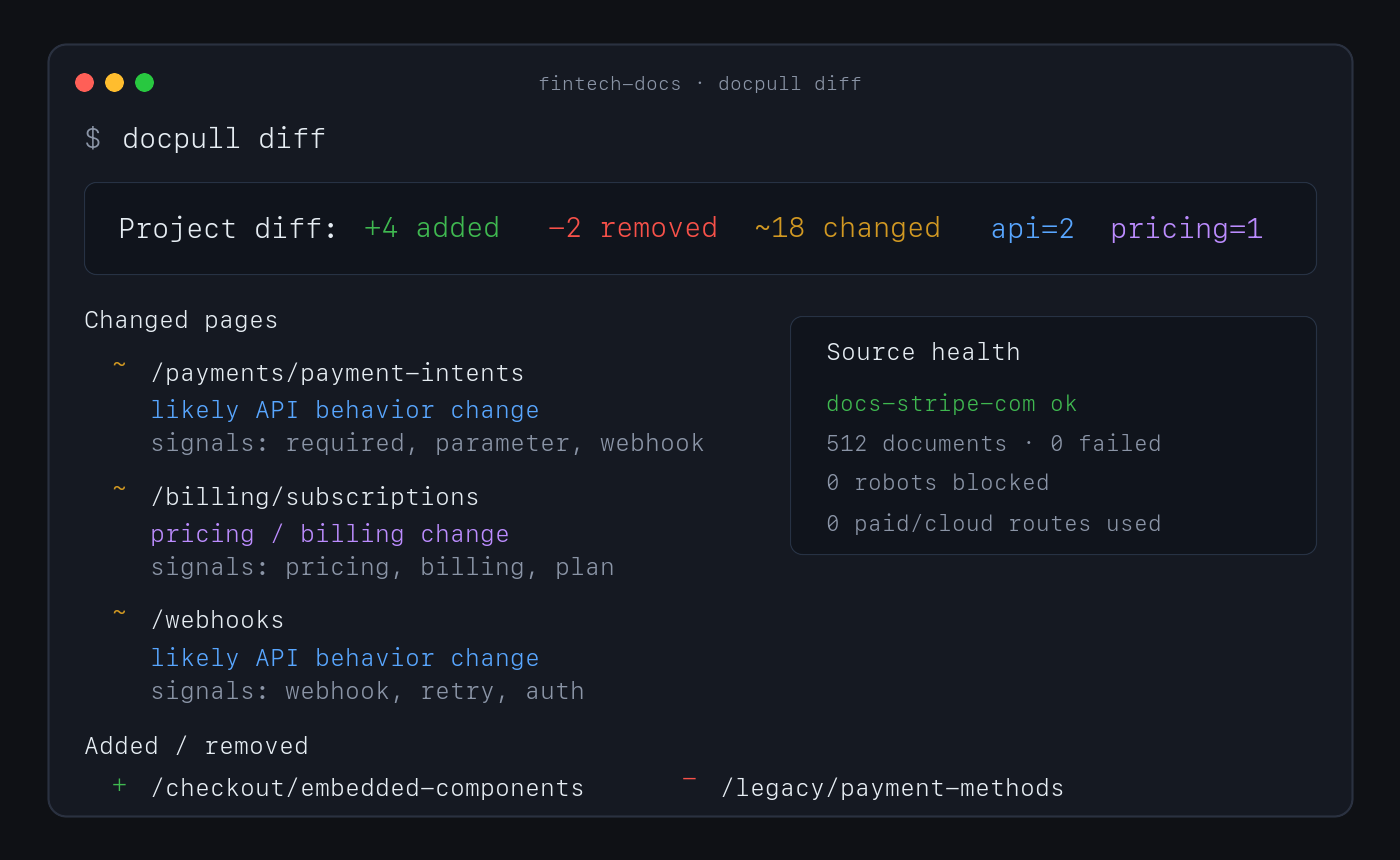
No account or paid API is required for this path. Direct fetching, discovery, extraction, indexing, pack analysis, and diffs run locally.
Why use DocPull
- Reproduce agent context. Stable IDs, hashes, manifests, and lockfiles show which source versions produced an answer or artifact.
- Detect source drift. Sync and diff documentation, product pages, policies, feeds, repositories, packages, standards, and local documents.
- Keep evidence inspectable. Markdown, NDJSON, SQLite, citations, and provenance sidecars remain readable without a hosted service.
- Choose the downstream surface. Export context for agent clients, vector import, data workflows, or a versioned context-pack release.
- Keep expensive routes explicit. Browser and cloud rendering require an explicit choice and can be blocked with a zero-dollar budget.
How it works
declared sources → local acquisition → versioned evidence → diff and validation → export
DocPull's v3 pack contract separates raw extraction, agent-ready context, and eval-grade evidence. Validate the level a downstream system requires:
docpull pack prepare packs/docs --eval-grade
docpull pack validate packs/docs --level eval
docpull ci --prepare
docpull ci checks freshness, citation coverage, pack quality, rights metadata, and
other configured gates. It writes context-ci.report.json and CONTEXT_CI.md, then
exits non-zero when a hard gate fails.
Supported surfaces
| Surface | Use it for | Start here |
|---|---|---|
| CLI | Fetch, sync, diff, validate, and export | docs/cli-recipes.md |
| Python SDK | Embed acquisition in Python applications | docs/surface-contract.md |
| MCP server | Give local agent clients source tools | MCP server |
| TypeScript SDK | Read local packs and invoke the CLI from Node or Bun | sdk/js/README.md |
| Agent plugin | Install the supported MCP workflow in an agent client | plugin/README.md |
Common source shapes include static and server-rendered websites, OpenAPI documents, feeds, papers, public GitHub repositories, npm and PyPI packages, standards, datasets, transcripts, Wikimedia pages, product and policy pages, and local PDF or office files. See context-pack workflows for the complete surface.
MCP server
pip install 'docpull[mcp]'
docpull mcp
Claude Code can register the same local server:
claude mcp add --transport stdio docpull -- docpull mcp
The Python stdio server is the supported MCP server.
Limits and security boundary
DocPull is an evidence-acquisition engine, not a hosted competitive-intelligence product. It owns fetching, explicit rendering adapters, versioning, citations, hashing, validation, replay, and export. Downstream products own scheduling, human review, approved claims, legal conclusions, accounts, and notifications.
The default path does not handle complex interactive browser workflows, CAPTCHAs, stealth scraping, or private dashboards. JavaScript rendering is explicit. Authenticated sources require environment-variable references; DocPull does not persist credential values in project artifacts.
Security defaults include HTTPS-only fetching, robots.txt compliance, SSRF and DNS rebinding protections, redirect guards, XXE protection, and path-traversal checks. Read the web-source boundary, security posture, and evidence-engine decision before extending acquisition behavior.
Documentation and evidence
- CLI recipes — Common commands and advanced workflows.
- Context dependencies — Project and lockfile model.
- Context Pack Contract v3 — Artifact levels and compatibility.
- Public contracts — Schemas and versioning rules.
- Alternatives — Browser automation and hosted extraction tradeoffs.
- JavaScript SDK and loaders — TypeScript client and LangChain/LlamaIndex loaders.
- Dependency security — Locked dependency sets and optional parser support.
- Evaluation lab — Reproducible methods, results, and claim boundaries.
- Changelog — Release history.
Raintree open-source system
DocPull owns evidence acquisition and reproducible agent context. It can be used independently; the sibling projects do not imply a required integration or shared release cycle.
| Project | Responsibility |
|---|---|
| Raintree Standards | Defines governed requirements and evidence. |
| Trellis | Enforces shared JavaScript and TypeScript code policy. |
| HIG Doctor | Audits interface source and provides HIG guidance. |
| PolicyStrata | Tests cross-layer policy behavior. |
See the Raintree open-source portfolio for current lifecycle and distribution links.
Raintree also builds BetterOff, which keeps a household's spending, investments, assets, debts, and net worth in one current record.
Project policies
Contributing · Code of Conduct · Security · Metrics and evidence limits · Source repository · MIT License
Pertanyaan tentang DocPull MCP
Bagaimana cara menambahkan DocPull MCP ke Claude Code?
Jalankan claude mcp add docpull -- uvx docpull di terminal Anda. Tambahkan --scope user agar tersedia di semua proyek.
Bagaimana cara menambahkan DocPull MCP ke Cursor?
Buka ~/.cursor/mcp.json dan tambahkan server di bawah mcpServers, menggunakan config Cursor yang ditunjukkan di bagian instalasi di atas.
Bagaimana cara install dan menjalankan DocPull MCP server?
Install MCP extra menggunakan pip dan jalankan docpull mcp untuk memulai local stdio server yang didukung. Anda juga bisa mendaftarkannya ke Claude Code menggunakan command claude mcp add.
Apakah DocPull memerlukan akun atau API berbayar?
Tidak. Jalur default akan melakukan fetch, ekstraksi, indexing, dan diff secara lokal tanpa memerlukan akun atau API berbayar.
Apakah DocPull bisa mendeteksi perubahan pada sumber data?
Ya. Melakukan sinkronisasi ulang akan menghasilkan hash-based diff yang menunjukkan sumber yang berubah sambil tetap mempertahankan URL, content hashes, run IDs, dan sitasi.
Perlindungan keamanan apa yang dimiliki DocPull?
Secara default menggunakan HTTPS-only fetching dengan kepatuhan terhadap robots.txt, perlindungan SSRF dan DNS rebinding, redirect guards, proteksi XXE, serta pengecekan path-traversal.
Bagaimana cara menangani sumber yang memerlukan autentikasi?
Kredensial harus diberikan melalui referensi environment-variable dan tidak disimpan di dalam project artifacts.