
Plumb MCP server
Commit 10 Nov 2026Memberikan kecerdasan semantik berbasis LSP, pengeditan file secara transaksional, dan koordinasi multi-agent melalui shared daemon untuk coding agent.
Juga dikenal sebagai plumbkit/plumb
- Stars
- 4
- Tools
- —
- Unduhan, 30 hari
- —
- Versi terbaru
- 0.27.0
- Commit terakhir
- 10 Nov 2026
- Lisensi
- MIT
Apa itu Plumb MCP?
Plumb adalah MCP server. Memberikan kecerdasan semantik berbasis LSP, pengeditan file secara transaksional, dan koordinasi multi-agent melalui shared daemon untuk coding agent.
Ringkasan dibuat dari README proyek
Tentang Plumb MCP server
Plumb memberikan kecerdasan semantik kepada coding agent yang biasanya hanya ditemukan di IDE. Plumb berfungsi sebagai MCP server yang menggunakan Language Server Protocol (LSP) dan tree-sitter untuk memberikan akses kepada agent ke definisi simbol, referensi, dan hierarki kode. Hal ini memungkinkan agent untuk memahami struktur kode alih-alih hanya membaca file teks mentah, sehingga meningkatkan efisiensi konteks dan akurasi.
sistem ini beroperasi melalui satu binary tunggal yang menjalankan background daemon. Daemon ini bertindak sebagai layer koordinasi bersama untuk beberapa agent, memungkinkan mereka untuk melihat sesi workspace aktif satu sama lain dan berkomunikasi melalui sistem mailbox. Karena daemon ini digunakan bersama, ia dapat mengelola per-path locking untuk mencegah konflik penulisan konkuren dan menyediakan transaksi multi-file yang bersifat atomic dengan kemampuan rollback untuk memastikan integritas file.
Developer dapat menghubungkan berbagai client seperti Claude Code, Cursor, atau Gemini menggunakan perintah plumb setup. Server ini mendukung integrasi utama untuk Go dan Python, sembari menawarkan navigasi berbasis tree-sitter untuk lebih dari 30 bahasa lainnya. Plumb juga menyertakan fitur keamanan seperti scoped filesystem access dan tiered git gating untuk melindungi repositori selama agent bekerja secara otomatis.
Apa yang bisa Anda lakukan dengannya
- 1Koordinasi beberapa agentSeorang developer dapat menggunakan berbagai agent berbeda untuk mengerjakan proyek yang sama tanpa risiko duplikasi tugas atau saling menimpa pekerjaan satu sama lain.
- 2Eksekusi pengeditan multi-file secara atomicAnda dapat menginstruksikan agent untuk menerapkan perubahan di banyak file dengan jaminan bahwa seluruh operasi akan di-rollback jika ada satu bagian yang gagal.
- 3Mengurangi penggunaan token dengan semantic readsAlih-alih membaca seluruh isi file, agent dapat meminta simbol atau rentang baris tertentu untuk menghemat ruang context window.
Ditulis berdasarkan README proyek. Setiap use case diperiksa terhadap kutipan dari README tersebut.
Pengecekan otomatis
Berjalan 14 Nov 2026Laporan lengkap →Belum diverifikasi. Sebuah server memerlukan skor 80, tidak ada temuan serius, dan data yang cukup untuk kami periksa. Cara kerja checks · Yang perlu diperbaiki untuk menambah poin

- Source repository terhubung dan dapat dijangkauplumbkit/plumb is public and reachablegithub.com/plumbkit/plumb ↗Lolos
- Nama paket mencantumkan repositori ini sebagai sumbernyaTidak diperiksa
- Provenance build (atestasi Sigstore)Tidak diperiksa
- Lisensi open source (OSI)MITspdx.org/licenses/MIT.html ↗Lolos
- Ada commit atau release dalam satu tahun terakhirLast commit or release 2026-11-10github.com/plumbkit/plumb ↗Lolos
- OpenSSF ScorecardTidak diperiksa
- Nama package tidak mirip dengan package populerTidak diperiksa
- Tidak ada advisory kritis pada paket atau dependensinyaTidak diperiksa
- Tidak ada instruksi tersembunyi untuk model0 tool descriptions and the README read; no override phrases, credential paths or hidden charactersLolos
- Tools yang bersifat destruktif telah diberi labelTidak diperiksa
- Endpoint remote merespons handshake MCPTidak diperiksa
README
Lihat di GitHub


IDE intelligence for agents — guardrails for unattended work, coordination for fleets.
Plumb is an MCP server that gives a coding agent the intelligence layer of an IDE — LSP-backed semantics, a tree-sitter code index, and project memory — inside guardrails: atomic, lock-serialised writes with transactional rollback, scoped filesystem and git access, and a daemon that survives its own crashes. And because every agent you run shares that one daemon, plumb is also the coordination layer between them: peers see the writes others made, message each other, and hand off work instead of duplicating it. A single binary; nothing else to install.
Why Plumb
LLM agents usually work by reading whole files into the context window — token-heavy, lossy at scale, blind to symbol semantics, and unsafe to let loose on a real repo. Plumb is built on four pillars, in priority order.
1. Reliability & write-safety
Leaving an agent to edit a codebase for an hour is only viable if writes can't corrupt files and a crash can't wedge your session.
- Atomic I/O — every write is staged in a temp file and renamed into place. No partial writes, ever. Symlink-aware, CRLF-tolerant.
- Per-path locking — the daemon serialises concurrent writes to the same file across every session and chat window. No races.
- Multi-file transactions — apply edits across dozens of files with guaranteed atomic rollback if any step fails.
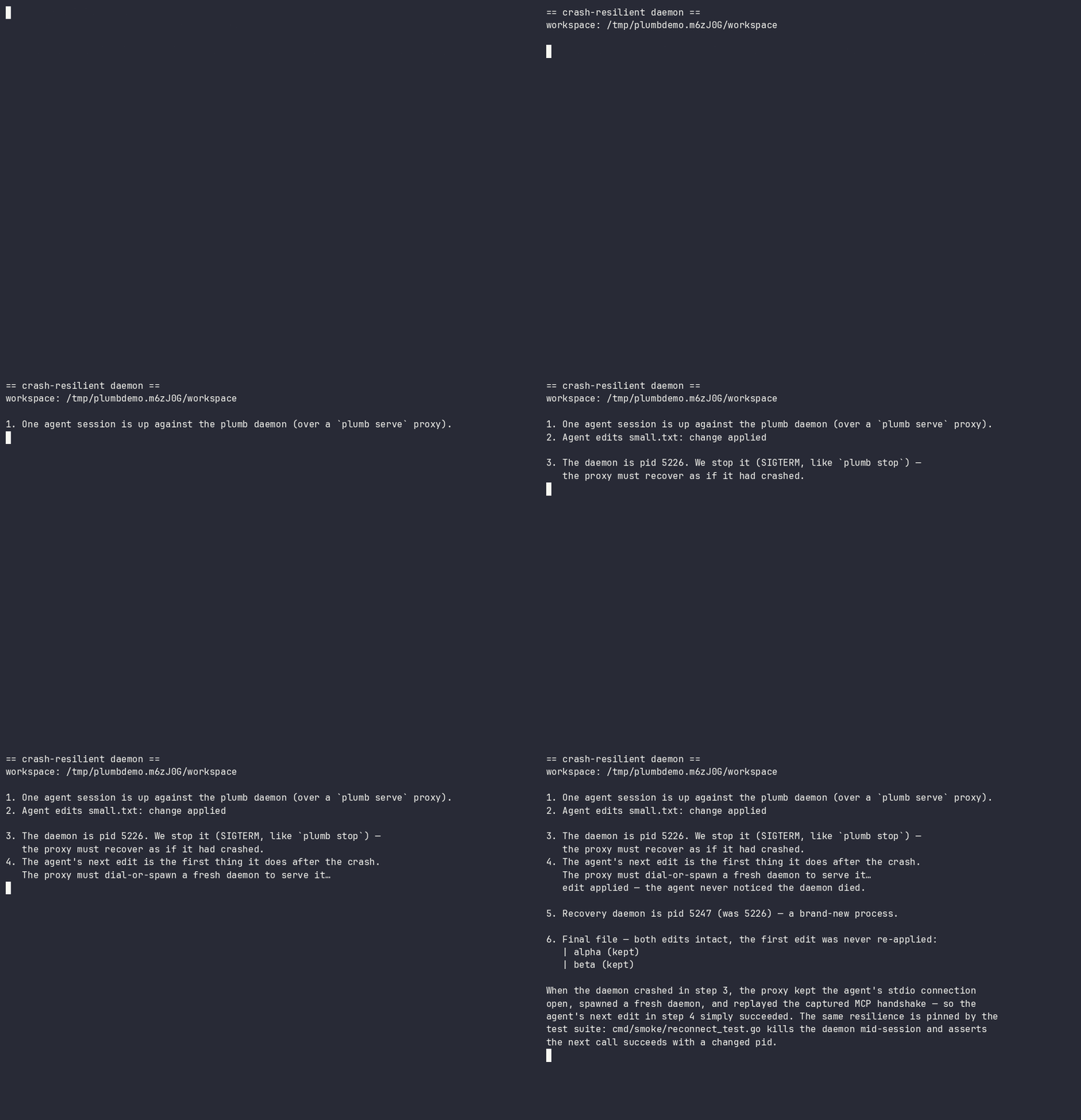
- Crash-resilient daemon —
plumb serveis a reconnecting proxy. If the daemon crashes or hangs, it respawns one and replays the handshake; the agent never notices. In-flight writes are never silently re-run. - Optimistic concurrency — mtime/sha guards catch stale edits before they clobber newer changes.
See it run: docs/demos/ — two-agents-one-file.sh (a stale write is refused, nothing is lost) and daemon-respawn.sh (below — the daemon is killed mid-session; the agent's next edit still succeeds):
2. Multi-agent coordination
One daemon serves every agent you run — which makes it the natural place for agents to see and talk to each other, not merely avoid each other's writes. Locks stop two agents corrupting a file; coordination stops them duplicating a task, rebasing onto a function signature a peer is mid-rewrite of, or shipping a change a peer's in-flight work is about to invalidate.
- Peer awareness (on by default) —
workspace_sessionsnames every active session and the writes it made, as the daemon recorded them. Recorded activity, not another agent's say-so: an agent about to start a task can see that a peer is already in those files. (Read-only operations never appear, and a write that failed or was refused is kept but marked[failed — no change applied]— so "a peer is working here" and "this landed" are distinguishable at a glance.) - An agent-to-agent mailbox (on by default, same workspace) —
leave_note/check_messagesgive sessions a threaded channel: hand a change to the peer already rewriting those files, or ask a peer to measure a behaviour instead of assuming it. Messages ride on ordinary tool results, so a working agent receives them without polling. - Advisory intents (opt-in:
[collab] intents) —share_intentdeclares what an agent is working on; a peer whose write touches a claimed path gets a hint at the moment of the would-be collision. Intents are deliberately labelled as unverified claims, kept distinct from the daemon-recorded activity feed, and never block anything. - Durable findings (opt-in:
[collab] knowledge_handoff) —share_findingsturns what an agent just learned into a searchable, secret-scrubbed project memory immediately, so the knowledge outlives the session that produced it.
Coordination is advisory by design — the write-safety above never depends on agents cooperating. Reference: Cross-agent sharing in the tool docs and the [collab] config section.
3. Semantic intelligence
The same primitives your editor has, exposed as structured tools:
- LSP-backed refactors —
rename_symbol,replace_symbol_body,safe_delete_symbolunderstand scope, types, and references. - Real diagnostics inline — actual
gopls/pyrightoutput is appended to every write, so the agent learns it broke the build immediately. - Symbol search — scoped to your code, no stdlib or dependency noise.
4. Context efficiency & safety controls
- Read only what you need — symbols or line ranges, not 2,000-line files.
- Scoped access you control — a per-connection path allowlist (read-only vs read-write roots) plus tiered git gating (destructive and network operations are off by default and need explicit confirmation). See SECURITY.md.
- One-round-trip bootstrap —
session_startreturns workspace, branch, recent commits, diagnostics, and project memory.
See the measured, reproducible numbers behind this: docs/use-cases.md — reading one function is 2.9×–33.4× less context than the whole file (the ratio is how much of the file you didn't need), and find_references returns the real call sites where a text search is 60% noise. The page publishes the losses too: read_multiple_files costs 1.31× more payload than reading the files natively (down from 1.32×, but still a loss — see Scenario 10 for why it isn't smaller). Every figure is regenerated by scripts/measure-use-cases.py.
Get started
Plumb is a single binary — from zero to your first answer:
1. Install
# Homebrew (macOS + Linux) — recommended
brew install plumbkit/plumb/plumb

# or with Go
go install github.com/plumbkit/plumb/cmd/plumb@latest

# or grab a prebuilt binary: https://github.com/plumbkit/plumb/releases
macOS note: prebuilt binaries are not yet notarised — on first run you may need
xattr -d com.apple.quarantine ./plumb, or right-click → Open. Homebrew installs avoid this.
2. Connect your agent
plumb setup claude-code # also: claude-desktop, codex, gemini, cursor, …
plumb setup writes the MCP config for you — no hand-editing JSON.
3. Open your project and try it
Make sure the language server you need is on your $PATH (gopls for Go,
pyright for Python, …), then point your agent at a real question. In Claude
Code:
cd your/project
claude "Use plumb to orient in this repo (session_start), then show me
everywhere <Handler> is called and what would break if I changed its signature."
Plumb resolves the workspace and runs session_start for orientation, then
answers with real LSP and topology data — actual call sites and blast radius —
instead of guessing from file dumps. It's read-only; nothing is modified. (Any
connected agent works — just paste the prompt.)
No
go.mod/pyproject.tomland not a git repo? Runplumb initonce to pin the workspace root (it also seeds.plumb/context.mdand project config).
Full walkthrough → docs/getting-started.md.
Language support (honest version)
Plumb negotiates LSP capabilities per language and also ships a built-in tree-sitter index for search and navigation with no language server. Support comes in tiers — we'd rather be precise than claim a big number.
| Tier | Languages | What you get |
|---|---|---|
| First-class (CI-tested, real-binary integration) | Go (gopls), Python (pyright) | Full LSP: definitions, references, rename, diagnostics, hierarchies + all write tools |
| Validated | Java (jdtls), Rust (rust-analyzer), Swift (sourcekit-lsp), TypeScript/JS (typescript-language-server), Zig (zls), Kotlin (kotlin-lsp), HTML (vscode-html-language-server) | Full LSP; just put the server on $PATH and it activates automatically (exclude any language with [lsp.<lang>] enabled = false). HTML carries one caveat: that server has no filesystem access, so it answers only from documents already opened |
| Search & navigation (tree-sitter, no LSP needed) | 31+ incl. JS/TS/TSX, Ruby, C, C#, Elixir, Scala, PHP, JSON, CSS, SCSS, XML, Lua, C++, Objective-C, Dart, Bash, SQL, HCL, Dockerfile, TOML, YAML, Markdown | Ranked symbol search, outlines, graph exploration via the Topology index |
Real-binary validation has been exercised on macOS and Linux — as of 2026-08-21, all nine adapters pass their integration tests against real server binaries on both. Details, including three toolchain traps that look like adapter bugs, are in docs/adding-an-lsp.md. Windows is tracked but not yet supported — the daemon's Unix-socket architecture needs a port.
How it works
plumb serve is a thin, reconnecting stdio proxy. The real work happens in one shared background daemon, so language servers stay warm across chats.
flowchart TD
    A1["Claude"] --> S1["plumb serve *"]
    A2["Codex"] --> S2["plumb serve *"]
    A3["Gemini"] --> S3["plumb serve *"]
    S1 --> K["plumb.sock"]
    S2 --> K
    S3 --> K
    K --> D["plumb daemon **"]
    D --> SDB[("stats.db ***<br/>global — all projects")]
    D --> G["gopls → /projects/foo"]
    D --> P["pyright → /projects/bar"]
    G --> F1[("/projects/foo/.plumb/ ***<br/>topology.db · memory.db")]
    P --> F2[("/projects/bar/.plumb/ ***<br/>topology.db · memory.db")]
* plumb serve is a reconnecting proxy — if the daemon crashes or hangs it respawns one and replays the handshake, so your session survives without the agent noticing.
** one shared process, reused across every conversation.
*** SQLite. One global stats.db (tool stats + episodic summaries); two per-project indexes under each workspace's .plumb/ — topology.db (the code graph) and memory.db (memory search). Schema details → docs/architecture.md.
Servers stay warm across chats, per-path locks are shared across every connection, and symbol indexes update live after each write. Full architecture → docs/architecture.md.
Monitoring (TUI)
Run plumb with no arguments for a live dashboard — see what your agent is doing in real time: every tool call as it happens, daemon health, per-tool stats, and streaming logs you can follow and filter. The fastest way to catch a runaway loop or confirm an edit landed.
Core capabilities
Plumb exposes 61 tools. The ones you'll use constantly:
session_start · workspace_symbols · get_definition · find_references · rename_symbol · edit_file · transaction_apply · diagnostics
The rest cover filesystem reads/writes, LSP hierarchies, tiered git, an optional local Topology index (ranked search + blast-radius/route analysis, no language server needed), durable per-project memory, and cross-agent coordination (peer sessions, an agent mailbox, opt-in intents and knowledge handoff). Full API reference: docs/tools.md.
Configuration
Global or per-project config.toml, or environment variables. Run plumb config show to see the resolved config with provenance.
[edits]
strict = true                  # require read_file before edit_file
rate_limit_per_minute = 30     # bound runaway agent loops

[git]
allow_destructive = false      # reset/checkout/rebase off by default
allow_push = false             # push/fetch/pull off by default
Full settings reference: docs/configuration.md.
The hard part
Agents can already read code well enough; writing it unsupervised — concurrently, transactionally, recoverably — is what's still unsolved. Plumb is the bet that this is the half worth getting right first. It's early, and the language coverage says so: a small validated core, the rest clearly marked experimental.
Roadmap
Plumb is pre-1.0. The core — write-safety, the resilient daemon, the topology index, and project memory — is in daily use. The road to 1.0 is mostly about proving it beyond the validated core and smoothing distribution. Issues and ideas welcome.
Shipped
- Concurrency-safe, atomic, transactional writes with rollback
- Crash-resilient reconnecting daemon
- Tree-sitter topology index + per-project memory
- Cross-agent coordination: peer awareness + agent mailbox (default on), intents + knowledge handoff (opt-in)
- Go and Python LSP adapters validated (real-binary)
Getting to 1.0. Rather than jump from 0.9 straight to 1.0, Plumb ships a series of focused minor releases — 0.10 through 0.19 — each with one coherent theme. 0.19.x is the last 0.x release; 1.0 follows it as a deliberate stability commitment. Native Windows support is intentionally a post-1.0 (1.1) item, not a 1.0 gate. The themed plan:
- 0.10 — distribution + honest claims (Homebrew, semantic re-rank → GA)
- 0.11 — validate the experimental LSP adapters on real binaries (zls ✓ validated; Kotlin ✓ validated on JetBrains' kotlin-lsp)
- 0.12 — Swift on Xcode via Build Server Protocol guidance
- 0.13 — daemon robustness (git-write crash safety, liveness probe)
- 0.14 — agent ergonomics + tool surface
- 0.15 — honesty + full config surface
- 0.16 — stabilisation + cross-platform proving
- 0.17 — distribution + discoverability (registries)
- 0.18 — proof + docs
- 0.19 — soak + feedback, the last 0.x (rolling patches, not a formal RC)
- 1.0 — general availability: the stability + validated-core promise
Full detail, rationale, and the post-1.0 items (Windows, tree-sitter cleanup) are in docs/roadmap.md.
Contributing
See CONTRIBUTING.md and AGENTS.md for architecture and code style. We follow Australian English in all prose. By contributing you agree to the Code of Conduct.
License
MIT — see LICENSE.
Pertanyaan tentang Plumb MCP
Bagaimana Plumb memastikan keamanan penulisan saat melakukan pengeditan kode?
Plumb menggunakan atomic I/O di mana penulisan dilakukan di file sementara, per-path locking untuk mencegah race condition, serta transaksi multi-file dengan jaminan rollback.
Apakah beberapa agent bisa bekerja pada codebase yang sama secara bersamaan?
Ya, Plumb bertindak sebagai layer koordinasi di mana agent dapat melihat sesi aktif satu sama lain, bertukar pesan melalui mailbox, dan berbagi temuan.
Apa yang terjadi jika daemon Plumb crash saat sesi berlangsung?
Proxy 'plumb serve' bersifat crash-resilient; ia akan menjalankan ulang daemon dan melakukan replay handshake sehingga agent tidak menyadari adanya gangguan tersebut.
Apakah Plumb mendukung berbagai bahasa pemrograman?
Ya, Plumb mendukung bahasa melalui LSP (seperti Go dan Python) atau melalui index tree-sitter bawaan untuk lebih dari 31 bahasa termasuk JavaScript, Ruby, dan C++.