
Bangun dan kelola mod pack Thunderstore dengan mencari mod, menyelesaikan dependensi, dan mengekspor profil r2modman.
Juga dikenal sebagai packwarden-dev/packwarden, @packwarden-dev/thunderstore-mcp
- Stars
- 0
- Tools
- 5
- Unduhan, 30 hari
- —
- Versi terbaru
- 0.1.0
- Commit terakhir
- 26 Okt 2026
- Lisensi
- MIT
Apa itu PackWarden MCP?
Bangun dan kelola mod pack Thunderstore dengan mencari mod, menyelesaikan dependensi, dan mengekspor profil r2modman. Server ini menyediakan 5 tool, seperti list_communities, search_mods, resolve_dependencies.
Ringkasan dibuat dari README proyek
Tentang PackWarden MCP server
PackWarden memungkinkan developer yang menggunakan AI assistant untuk membangun dan mengelola mod pack Thunderstore untuk game seperti Lethal Company, Risk of Rain 2, atau Valheim. MCP server ini terhubung ke API publik Thunderstore untuk membantu pengguna menemukan mod, mengelola struktur dependensi yang kompleks, dan mengaudit daftar mod yang ada untuk menemukan masalah seperti versi yang usang atau file yang hilang. Server ini berjalan secara lokal via Node.js untuk Claude Desktop dan Cursor, atau dapat dijalankan sebagai layanan remote menggunakan mode streamable HTTP.
Pengguna dapat berinteraksi dengan tool spesifik seperti search_mods untuk mencari konten berdasarkan owner atau kategori, serta resolve_dependencies untuk menghitung seluruh transitive dependency closure. Server ini juga bisa menjalankan check_pack_health untuk mengidentifikasi konflik atau package yang sudah deprecated. Setelah pack siap, export_r2modman_profile akan menghasilkan file .r2z untuk digunakan di r2modman atau Thunderstore Mod Manager. Sistem ini menggunakan cache lokal untuk meningkatkan kecepatan, meskipun komunitas besar seperti Lethal Company memerlukan memori dan waktu awal yang cukup besar untuk proses loading.
Apa yang bisa Anda lakukan dengannya
- 1Selesaikan dependensi yang kompleksHitung setiap package dan versi yang dibutuhkan agar sebuah mod tertentu dapat berjalan dengan lancar.
- 2Audit kesehatan daftar modPeriksa daftar mod untuk menemukan versi yang usang, dependensi yang hilang, atau entri yang duplikat.
- 3Cari konten komunitasTemukan mod dalam komunitas game tertentu menggunakan kata kunci, owner, atau kategori.
Ditulis berdasarkan README proyek. Setiap use case diperiksa terhadap kutipan dari README tersebut.
Cara menginstal PackWarden MCP
Format diverifikasi 10 Nov 2026Tambahkan ke CursorTambahkan ke GooseInstal PackWarden MCP di Claude Code
$ claude mcp add packwarden -- npx -y @packwarden-dev/thunderstore-mcpInstal PackWarden MCP di Cursor
~/.cursor/mcp.json
{
  "mcpServers": {
    "packwarden": {
      "command": "npx",
      "args": [
        "-y",
        "@packwarden-dev/thunderstore-mcp"
      ]
    }
  }
}Instal PackWarden MCP di VS Code
.vscode/mcp.json
{
  "servers": {
    "packwarden": {
      "type": "stdio",
      "command": "npx",
      "args": [
        "-y",
        "@packwarden-dev/thunderstore-mcp"
      ]
    }
  }
}Instal PackWarden MCP di VS Code CLI
$ code --add-mcp '{"name":"packwarden","type":"stdio","command":"npx","args":["-y","@packwarden-dev/thunderstore-mcp"]}'Instal PackWarden MCP di Claude Desktop
claude_desktop_config.json
{
  "mcpServers": {
    "packwarden": {
      "command": "npx",
      "args": [
        "-y",
        "@packwarden-dev/thunderstore-mcp"
      ]
    }
  }
}Instal PackWarden MCP di Codex
$ codex mcp add packwarden -- npx -y @packwarden-dev/thunderstore-mcpInstal PackWarden MCP di Codex config.toml
~/.codex/config.toml
[mcp_servers.packwarden]
command = "npx"
args = ["-y", "@packwarden-dev/thunderstore-mcp"]
Instal PackWarden MCP di Gemini CLI
$ gemini mcp add -s user packwarden npx -- -y @packwarden-dev/thunderstore-mcpInstal PackWarden MCP di Gemini settings.json
~/.gemini/settings.json
{
  "mcpServers": {
    "packwarden": {
      "command": "npx",
      "args": [
        "-y",
        "@packwarden-dev/thunderstore-mcp"
      ]
    }
  }
}Tool PackWarden MCP 5
Terdeteksi dari READMElist_communitiessearch_modsresolve_dependenciescheck_pack_healthexport_r2modman_profile
| list_communities | — | |
| search_mods | — | |
| resolve_dependencies | — | |
| check_pack_health | — | |
| export_r2modman_profile | — |
Konfigurasi
TEST_COMMUNITYTSMCP_EXPORT_DIR
| Nama | Deskripsi | Tipe |
|---|---|---|
| TEST_COMMUNITY | — | |
| TSMCP_EXPORT_DIR | — |
Pengecekan otomatis
Berjalan 13 Nov 2026Laporan lengkap →Lolos checks otomatis kami. Ini bukan audit keamanan: baca kodenya dan berikan server akses paling terbatas yang dibutuhkannya. Cara kerja checks

- Source repository terhubung dan dapat dijangkauLolos
- Lisensi open source (OSI)Lolos
- Ada commit atau release dalam satu tahun terakhirLolos
- Nama package tidak mirip dengan package populerLolos
- Remote endpoint menggunakan HTTPSTidak diperiksa
- Tools yang bersifat destruktif telah diberi labelLolos
- Tidak ada instruksi tersembunyi untuk modelLolos
- Tidak ada advisory kritis pada paket atau dependensinyaLolos
README
Lihat di GitHubPackWarden — Thunderstore Mod-Pack MCP Server (v0.1.0)
PackWarden is not affiliated with or endorsed by Thunderstore. "Thunderstore" is used only to describe compatibility. Mod data comes from the public Thunderstore API (https://thunderstore.io).
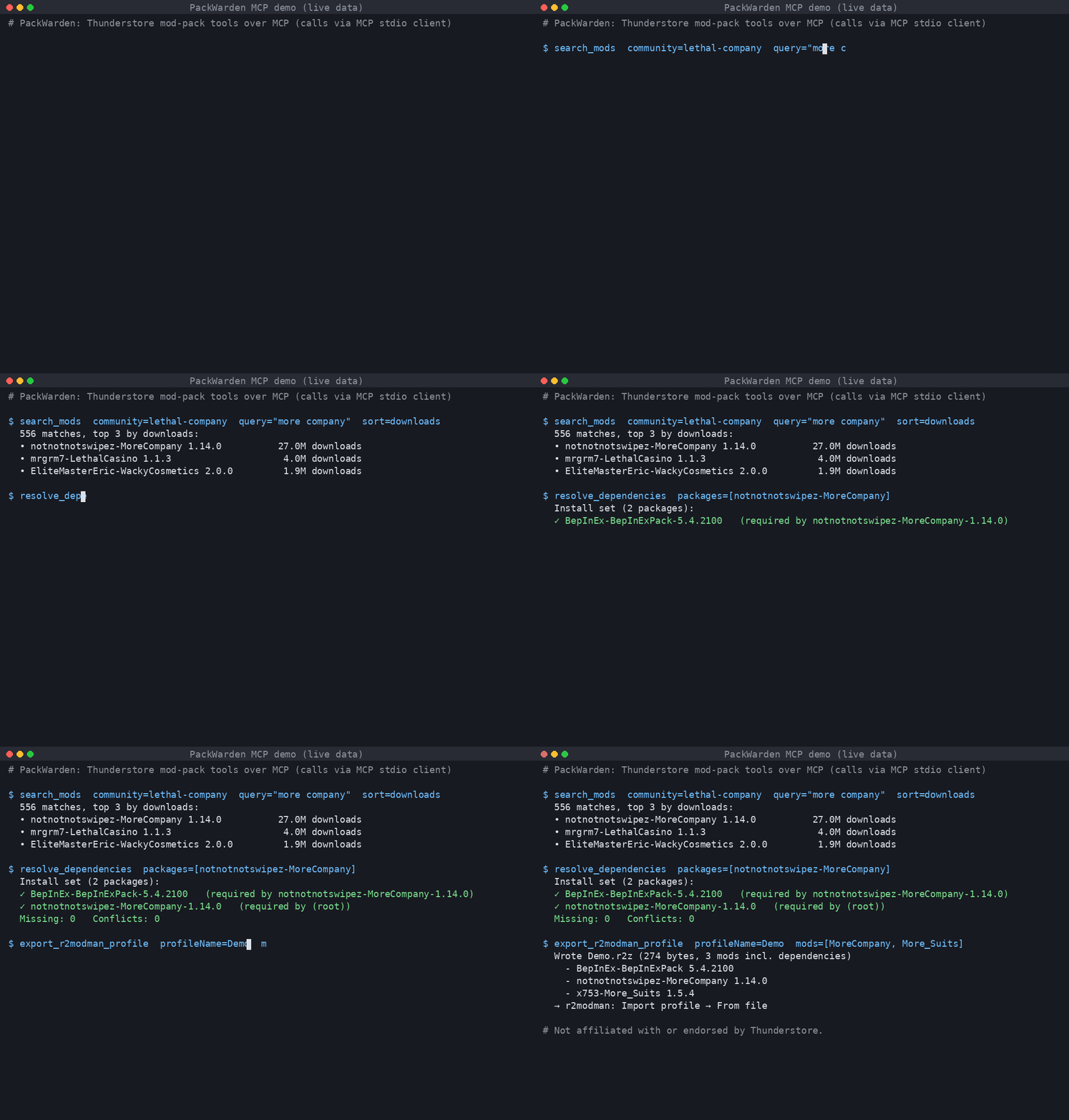
Live output: searching Lethal Company mods, resolving MoreCompany's dependencies, and exporting an r2modman .r2z profile.
An MCP server that helps AI assistants build and maintain Thunderstore mod packs (Lethal Company, Risk of Rain 2, Valheim, and every other Thunderstore community).
Tools
| Tool | What it does |
|---|---|
list_communities |
List Thunderstore game communities (identifier + name). |
search_mods |
Search a community by name/owner/description/category; sort by relevance, downloads, rating, updated. |
resolve_dependencies |
Full transitive dependency closure for one or more packages/versions; final install set, missing deps, multi-version pins, optional tree. |
check_pack_health |
Audit a mod list: not found, removed version, deprecated, outdated, missing deps, dependency version conflicts, duplicates, NSFW. |
export_r2modman_profile |
Write an .r2z profile (r2modman / Thunderstore Mod Manager "Import profile → From file"), optionally with deps and config files. Nothing is uploaded. |
Mods are referenced as Owner-Name (latest) or Owner-Name-1.2.3.
Install
Requires Node.js ≥ 18.17.
git clone <repo> thunderstore-mcp && cd thunderstore-mcp
npm install && npm run build
Claude Desktop
Edit claude_desktop_config.json (macOS: ~/Library/Application Support/Claude/, Windows: %APPDATA%\Claude\):
{
  "mcpServers": {
    "thunderstore": {
      "command": "node",
      "args": ["/absolute/path/to/thunderstore-mcp/dist/main.js"],
      "env": { "TSMCP_EXPORT_DIR": "/absolute/path/for/profiles" }
    }
  }
}
Restart Claude Desktop.
Cursor
~/.cursor/mcp.json (global) or .cursor/mcp.json (project):
{
  "mcpServers": {
    "thunderstore": {
      "command": "node",
      "args": ["/absolute/path/to/thunderstore-mcp/dist/main.js"]
    }
  }
}
Streamable HTTP (remote / self-hosted)
npm run start:http            # http://127.0.0.1:3333/mcp
PORT=8080 HOST=0.0.0.0 node dist/main.js --http
Cursor: { "mcpServers": { "thunderstore": { "url": "http://127.0.0.1:3333/mcp" } } }.
The HTTP mode is stateless (POST-only, JSON responses) and has no auth. Put it behind a reverse proxy with TLS and auth before exposing it.
Configuration (env)
| Var | Default | Meaning |
|---|---|---|
TSMCP_CACHE_DIR |
~/.cache/thunderstore-mcp |
Slim package-index cache |
TSMCP_LIST_TTL_MS |
3600000 (1h) |
Package-list freshness |
TSMCP_MIN_INTERVAL_MS |
1000 |
Minimum gap between outbound requests |
TSMCP_EXPORT_DIR |
./exports |
Where .r2z files are written |
TSMCP_CONTACT |
support@packwarden.dev |
Contact put in the User-Agent. Override if you run your own copy. |
TSMCP_BRAND |
PackWarden |
Brand in server name/User-Agent |
TSMCP_BASE_URL |
https://thunderstore.io |
API base |
Be a good API citizen
- One full package list download per community per TTL, then conditional requests (
If-Modified-Since). Results are cached on disk as a slim index. - Outbound requests are serialized (concurrency 1) and spaced ≥1s apart. On 429/5xx the client backs off and honours
Retry-After. - Identifying User-Agent with a contact address.
- If the network fails, the server keeps serving stale cache.
Tests (live API)
npm test                         # default community: valheim
TEST_COMMUNITY=valheim npm test
Tests cover stdio and streamable HTTP end-to-end against the live Thunderstore API.
Limitations
- Large communities are heavy. The first load of Lethal Company is about 330 MB of JSON, takes about 14 s, and uses about 1.4 GB of RAM. After that, loads from cache take about 3 s.
- Resolution follows r2modman behaviour (highest requested version wins). It does not do semver range solving, because Thunderstore pins exact versions.
- No profile code sharing, which would need an upload to Thunderstore. Only file export is supported.
- Search is local keyword scoring, not Thunderstore's own search ranking.
Pertanyaan tentang PackWarden MCP
Bagaimana cara menambahkan PackWarden MCP ke Claude Code?
Jalankan claude mcp add packwarden -- npx -y @packwarden-dev/thunderstore-mcp di terminal Anda. Tambahkan --scope user agar tersedia di semua proyek.
Bagaimana cara menambahkan PackWarden MCP ke Cursor?
Buka ~/.cursor/mcp.json dan tambahkan server di bawah mcpServers, menggunakan config Cursor yang ditunjukkan di bagian instalasi di atas.
Tool apa yang disediakan PackWarden MCP?
Server ini menyediakan 5 tool, termasuk list_communities, search_mods, resolve_dependencies, check_pack_health, export_r2modman_profile.
Game apa saja yang didukung oleh PackWarden?
PackWarden mendukung semua komunitas Thunderstore, termasuk Lethal Company, Risk of Rain 2, dan Valheim.
Bagaimana cara mengekspor daftar mod saya?
Server ini dapat membuat profil .r2z yang bisa diimpor ke r2modman atau Thunderstore Mod Manager.
Apa persyaratan hardware untuk komunitas besar?
Memuat komunitas besar seperti Lethal Company memerlukan sekitar 1.4 GB RAM dan memakan waktu sekitar 14 detik pada pemuatan pertama.