
OpenStudy MCP server
Commit 24 Okt 2026Memungkinkan AI client untuk mengelola kursus, jadwal, topik studi, tugas (deliverables), task, dan file kuliah dalam sebuah dashboard studi self-hosted.
Juga dikenal sebagai OpenStudy-dev/OpenStudy
- Stars
- 80
- Tools
- —
- Unduhan, 30 hari
- —
- Versi terbaru
- —
- Commit terakhir
- 24 Okt 2026
- Lisensi
- MIT
Apa itu OpenStudy MCP?
OpenStudy adalah MCP server. Memungkinkan AI client untuk mengelola kursus, jadwal, topik studi, tugas (deliverables), task, dan file kuliah dalam sebuah dashboard studi self-hosted.
Ringkasan dibuat dari README proyek
Tentang OpenStudy MCP server
Tujuan utama OpenStudy adalah mengelola kursus semester, jadwal, kuliah, topik studi, deliverables, dan task langsung dari AI client. Dashboard self-hosted ini menyertakan MCP server dengan 44 tools, sehingga apa pun yang bisa Anda lakukan di web UI, Claude juga bisa melakukannya, termasuk create_course, create_schedule_slot, update_exam, create_deliverable, list_study_topics, dan mark_studied. Tool ini ditujukan bagi mahasiswa yang sudah menyimpan materi kuliah di disk atau di LMS dan menginginkan satu tempat terpusat untuk melacak progres.
Endpoint MCP terhubung ke Claude.ai sebagai custom connector dengan OAuth 2.1 lengkap, dan dari sana tools tersebut dapat bekerja di Claude Code pada laptop, claude.ai di browser, serta aplikasi Claude iOS. Claude Code dapat mengakses endpoint melalui localhost, sementara akses browser dan ponsel memerlukan hostname publik yang mengarah ke perangkat Anda. Stack ini berjalan di Docker Compose dengan Postgres, FastAPI, dan frontend statis dalam satu mesin; setup membutuhkan waktu sekitar 15 menit, dan README menyarankan VPS seharga €5/mo sudah cukup. Anda perlu menyediakan email operator, hash password, serta session dan encryption secrets yang telah dibuat.
Yang membedakannya adalah file store: list_course_files dapat menemukan PDF di dalam OpenStudy dan read_course_file merender setiap halaman menjadi PNG sebagai input vision, sehingga file tersebut tidak pernah keluar dari instance Anda. Setiap tabel yang dimiliki menyertakan user_id, dan SIGNUPS_ENABLED=true dapat membuka fitur registrasi.
Apa yang bisa Anda lakukan dengannya
- 1Inisialisasi semester dari catatan kuliahMinta Claude Code untuk membaca setiap course.md dan membuat kursus, slot jadwal rutin, detail ujian, dan deliverables di dalam dashboard.
- 2Menjelaskan slide saat kuliah berlangsungSaat sedang di kelas, minta Claude mengambil slide deck kuliah yang sedang berlangsung dan menjelaskan satu slide spesifik secara mendalam.
- 3Mencatat kuliah yang baru saja diikutiDeskripsikan materi yang dibahas saat Anda keluar kelas dan biarkan Claude membuat catatan kuliah, menambahkan topik studi terkait, dan menandainya sebagai sudah dihadiri.
- 4Mempelajari topik dari slideMinta Claude untuk mengajarkan sebuah topik studi menggunakan definisi dan contoh dari profesor yang ada di slide kuliah, lalu tandai topik tersebut sebagai sudah dipelajari.
- 5Merencanakan tugas untuk minggu iniMinta Claude menampilkan apa saja yang harus dikumpulkan minggu ini dan tambahkan task prioritas tinggi lengkap dengan deadline.
Ditulis berdasarkan README proyek. Setiap use case diperiksa terhadap kutipan dari README tersebut.
Konfigurasi
POSTGRES_DBPOSTGRES_PASSWORDPOSTGRES_USER
| Nama | Deskripsi | Tipe |
|---|---|---|
| POSTGRES_DB | — | |
| POSTGRES_PASSWORD | — | |
| POSTGRES_USER | — |
Pengecekan otomatis
Berjalan 13 Nov 2026Laporan lengkap →Belum diverifikasi. Sebuah server memerlukan skor 80, tidak ada temuan serius, dan data yang cukup untuk kami periksa. Cara kerja checks · Yang perlu diperbaiki untuk menambah poin

- Source repository terhubung dan dapat dijangkauopenstudy-dev/openstudy is public and reachablegithub.com/openstudy-dev/openstudy ↗Lolos
- Nama paket mencantumkan repositori ini sebagai sumbernyaTidak diperiksa
- Provenance build (atestasi Sigstore)Tidak diperiksa
- Lisensi open source (OSI)MITspdx.org/licenses/MIT.html ↗Lolos
- Ada commit atau release dalam satu tahun terakhirLast commit or release 2026-10-24github.com/openstudy-dev/openstudy ↗Lolos
- OpenSSF ScorecardTidak diperiksa
- Nama package tidak mirip dengan package populerTidak diperiksa
- Tidak ada advisory kritis pada paket atau dependensinyaTidak diperiksa
- Tidak ada instruksi tersembunyi untuk model0 tool descriptions and the README read; no override phrases, credential paths or hidden charactersLolos
- Tools yang bersifat destruktif telah diberi labelTidak diperiksa
- Endpoint remote merespons handshake MCPTidak diperiksa
README
Lihat di GitHubA self-hostable personal study dashboard. Track your courses, schedule, lectures, study topics, deliverables, and tasks in one place — and let your Claude subscription use OpenStudy from your browser, phone, desktop, or Claude Code.






Five themes — pick the one that fits your brain
Terminal — mono everywhere, teal-on-black, hacker cockpit:
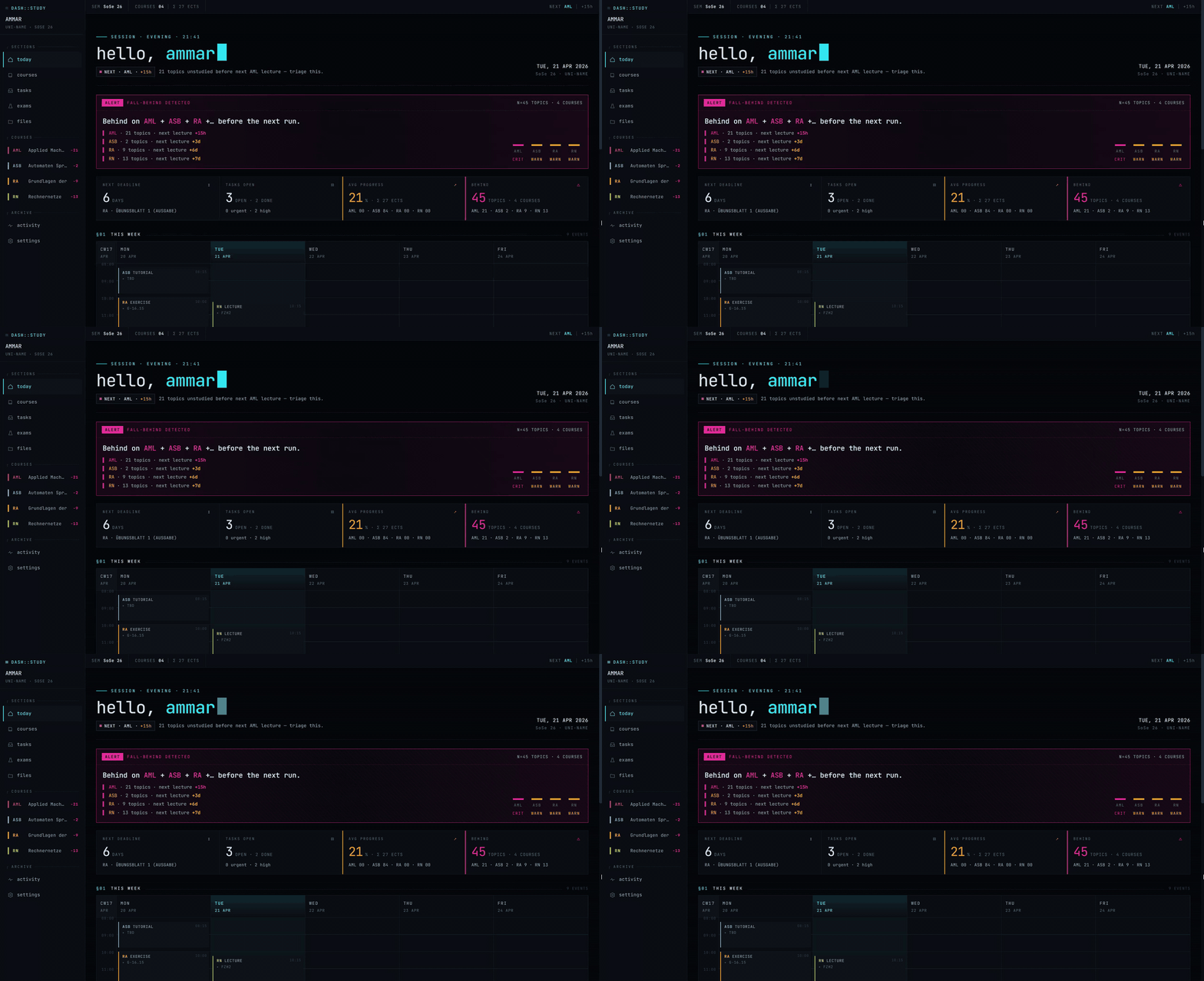
Switch between all five in Settings → Theme. Each one is a full reskin of the dashboard, sidebar, and typography — not just a color palette.
Demo — Claude reading a lecture PDF straight out of OpenStudy
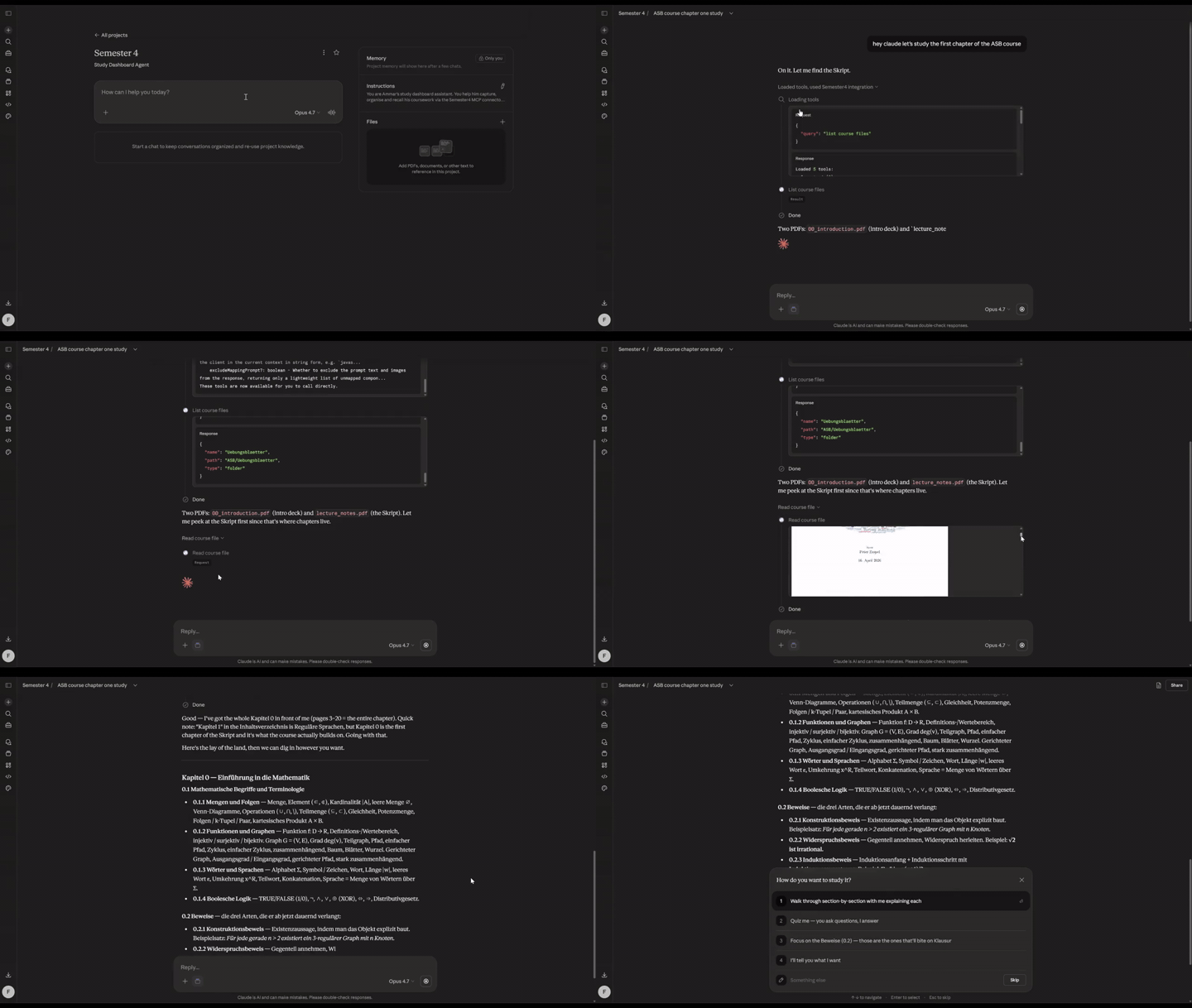
That's claude.ai in the browser, with the OpenStudy MCP server connected as a custom connector. No file was uploaded into the chat — Claude calls list_course_files to find the PDF inside OpenStudy's own file store, then read_course_file renders each page to a PNG and streams it back as vision input. Claude answers questions about the lecture while the PDF never leaves your self-hosted instance.
How I use this
The one-time seed
Before any of the day-to-day stuff, I had to get a semester's worth of courses, schedules, exam rules, and lecture material into the app. I didn't want to do that by hand and I didn't want to write a bespoke import script, so I let Claude Code do it:
-
Pulled everything off my university's LMS (Moodle, in my case) into a local folder. For each course I downloaded the syllabus, schedule, the professor's organizational slides, existing exercise sheets, and the official module catalogue. Structure on disk:
Semester 4/ semester.md # one-liner per course, semester dates, links schedule.md # weekly schedule (my source of truth) module-catalogue.pdf ASB/ course.md # structured source-of-truth (see below) 00_introduction.pdf # prof's org slides exercise-sheets/ Computer-Architecture/ course.md 1 Intro und History.pdf ... ... -
Had Claude Code build one
course.mdper course. It read every PDF, the LMS copy, and the module catalogue entry, and produced a normalized markdown with aMetatable (official name, module code, ECTS, professor, language, exam format, retries, weight), the weekly schedule in the prof's own words, and any grading rules / attendance requirements (e.g. "lab attendance ≥ 75 % for exam admission"). That file became the course's source of truth — everything else downstream pulls from it. -
Seeded the dashboard via the MCP connector. With Claude Code pointed at the running dashboard over MCP, I asked it to walk through each
course.mdand:create_coursewith the meta (code, full name, color, ECTS, professor, language, and afolder_namematching the local folder — so the course-detail Files tab scopes to the right prefix in the bucket)create_schedule_slotfor every recurring slot inschedule.md(kind islecture/exercise/tutorial/lab)update_examwith the exam format + retriescreate_deliverablefor every known exercise sheet / project deadline in the semester- upload every PDF from each course folder into the
course_filesbucket (soread_course_filecan hand them to Claude as vision later)
If you don't want to keep a local
Semester 4/folder at all, every PDF upload can also happen from inside the app — drag-and-drop into the Files view. The local folder is just what works for me because I'm already downloading the files anyway. -
Opened the dashboard → everything was there. Weekly grid populated, four courses with accents, exam info per course, every exercise sheet showing up in the deadlines list.
From then on it's incremental. New lectures land on the LMS, I either drop the PDFs into the corresponding Semester 4/<course>/ folder on my laptop (Claude Code picks them up and uploads) or drag-and-drop them straight into the app's Files view. If the course.md needs an update (new grading rule announced, exam date confirmed, topic added), Claude edits the markdown and pushes the change through the MCP (update_course, update_exam, etc.) so the dashboard and the source-of-truth stay aligned.
A typical week
During the lecture itself. The prof introduces a topic I want more depth on without losing the thread of where the lecture is. I open Claude on my phone: "I'm in ASB lecture 4, slide 12 on the pumping lemma — expand on the intuition for why it works, complement what the prof is saying with more detail." Claude calls list_course_files, finds the ASB lecture 4 slides, uses read_course_file to fetch just page 12, reads the prof's actual definition, and explains from there — in sync with what I'm actually seeing on the projector.
Right after a lecture. Walking out of class, I open Claude on my phone: "We just finished lecture 4 of ASB, covered pumping lemma, closure properties, and non-regularity of aⁿbⁿ." Claude creates the lecture #4, adds the study topics with proper descriptions linked to lecture #4, marks it attended. couple of seconds. The dashboard is caught up.
Later that day, I drop the slides in. I upload the slides of the lecture to the app. Claude can now fetch and read the slides on demand (Through the MCP) and use them to teach me. (it can also fetch only the pages of the slides it needs to teach me, so it doesn't have to read the whole PDF).
Evening, sitting down to actually study. "Am I falling behind in anything?" Claude pulls the fall-behind list — "3 ASB topics unstudied, next lecture in 7h." I pick the first one:
"Walk me through pumping lemma §2.4. Pull the ASB lecture 4 slides and use the actual definition and example from there. Ask me a check question halfway through."
Claude calls list_study_topics to find the topic row, list_course_files + read_course_file to fetch the slides (pages rendered to PNGs — Claude literally sees them, not OCR text), then teaches from the prof's slide wording. When it hits the check question I answer, it either corrects me or moves on. When I confirm I've got it: "mark §2.4 studied," and Claude calls mark_studied.
Then the next topic. Same loop. The "3 unstudied" count on the dashboard ticks down in real time.
Before bed, planning tomorrow. "What's due this week?" One list, sorted by due date. "Add a task: finish ASB Blatt 3 by Monday 16:00, high priority." Done.
On the dashboard itself. Everything Claude did — the lecture, the topics, the mark-studied, the task — is already there when I open the UI. The falling-behind banner only fires when I have unstudied topics and the next lecture on them is close. The weekly grid shows what's coming. Course cards show per-course progress. I don't have to tell the dashboard what I did because Claude already did.
The dashboard is where I see things. Claude is how I edit them. Same database behind both. (You can also use the dashboard UI to edit things, of course, It does have CRUD operations for everything).
What makes it different
The MCP server ships with 44 tools — anything you can do in the UI, Claude can do too. Create a study topic, mark something studied, upload a file, render a PDF as images, whatever.
- Multi-tenant: every owned table carries a
user_idFK. Data isolation is enforced at the service layer (WHERE filters) and the schema layer (composite FKs + RLS policies). Run it solo or flipSIGNUPS_ENABLED=trueto open registration — same codebase, same deploy.
Plug it into Claude.ai as a custom connector (full OAuth 2.1) and those tools are live in Claude Code on your laptop, claude.ai in your browser, and the Claude iOS app on your phone. Open Claude anywhere and it has the same view of your coursework that you do.
You'll need
Before you start, have:
- Docker + Docker Compose v2.30+ (the stack — Postgres, FastAPI, frontend — all run as containers)
- Node 20+ and pnpm (via corepack) for building the frontend
- A public hostname pointing at your box if you want Claude.ai or the Claude iOS app to reach the MCP endpoint (Claude Code can use
localhost) - ~15 minutes for first-time setup
The whole stack — Postgres, the FastAPI backend, and the static frontend — runs on a single box. Anything that runs Docker works: a €5/mo VPS is plenty.
Quick start
Get the full stack running locally. The frontend is built once and served by Caddy in production; for development, run it with pnpm dev against the dockerised backend.
1. Clone + install frontend deps.
git clone https://github.com/openstudy-dev/OpenStudy
cd OpenStudy
cd web && pnpm install && cd ..
2. Generate secrets and write .env files.
Open .env and fill in the required values:
cp .env.example .env

# Set your login email (this becomes your username):
#   OPERATOR_EMAIL=you@example.com

# Hash a password for first login and paste as APP_PASSWORD_HASH:
uv run python -m app.tools.hashpw
# → paste the resulting $argon2id$... string as APP_PASSWORD_HASH

# Generate a session-cookie signing secret:
python3 -c 'import secrets; print(secrets.token_urlsafe(48))'
# → paste as SESSION_SECRET

# Generate the encryption key for per-user secrets (Telegram tokens, etc.):
python3 -c 'from cryptography.fernet import Fernet; print(Fernet.generate_key().decode())'
# → paste as SECRETS_ENCRYPTION_KEY

# Generate a Postgres password and write the Docker-only env file:
cat > .env.docker <<EOF
POSTGRES_USER=openstudy
POSTGRES_PASSWORD=$(openssl rand -hex 24)
POSTGRES_DB=openstudy
EOF
chmod 600 .env .env.docker
.env holds your application secrets. .env.docker holds the Postgres credentials that compose injects into the postgres container. Both are in .gitignore.
3. Bring up the stack.
./deploy.sh
deploy.sh validates compose, builds the openstudy image, applies any pending migrations against the Postgres container, starts everything, then polls GET /api/health for up to 60 s. If health doesn't go green it auto-rolls back to the previously deployed image.
The backend is now live at http://127.0.0.1:8000. Verify:
curl http://127.0.0.1:8000/api/health
# → {"ok":true,"version":"...","db":"ok","storage":"ok ..."}
4. Use it.
The frontend is also a container — ./deploy.sh brought it up at
http://127.0.0.1:8080. Open that in your browser and log in with the
password you hashed. For a public domain, just point your reverse proxy
(Caddy / nginx / etc.) at 127.0.0.1:8080 — the in-container Caddy
handles routing static assets vs. proxying API/MCP traffic.
For local frontend development with Vite hot-reload:
echo "VITE_API_BASE_URL=http://localhost:8000" > web/.env.local
cd web && pnpm dev   # → http://localhost:5173
Stuck or want the production checklist? Full walkthrough is in INSTALL.md.
What you do inside the app
On first boot, everything's empty. You build it up in the UI (or via Claude through the MCP connector):
- Settings → Profile: name, monogram, institution
- Settings → Semester: label (e.g. "Fall 2026"), start/end dates, timezone, locale
- Courses → +: create each course with a short code (ASB, CS101…), a full name, and an accent color
- Course detail: add schedule slots (weekday / time / room), upcoming deliverables, and the study topics you're expected to cover
- Dashboard: lives here. Greeting, falling-behind banner, metric tiles, weekly grid, course cards, deadlines + tasks.
The MCP connector
Prerequisite: the app needs to be reachable at a public URL. Claude.ai and the iOS app can't talk to
localhost— so put the box behind a domain with TLS (Caddy + Let's Encrypt does this in two lines of config). Claude Code is the exception: it can hithttp://localhost:8000/mcpdirectly.
Once the app is live at https://your-domain.tld, it serves a Streamable HTTP MCP endpoint at /mcp, OAuth-gated. One endpoint, every client:
# Claude.ai (browser + iOS app): Settings → Connectors → Add custom connector
#   paste: https://your-domain.tld/mcp

# Claude Code (local CLI, any directory):
claude mcp add --transport http --scope user \
  openstudy https://your-domain.tld/mcp
Both flows open your dashboard's login in a browser for the one-time OAuth consent. After that, the same 44 tools are live wherever you use Claude:
- "list my courses" / "what's due this week?" / "what did we cover in RN last week?"
- "we just finished lecture 3 of ASB, we covered topics X, Y, Z — create the lecture and topics" → Claude calls
create_lecture+add_lecture_topics - "mark chapter §1.4 as studied" →
list_study_topics+mark_studied - "open the ASB lecture 2 slides and tell me what §0.1.3 is about" →
list_course_files+read_course_file(PDFs are rendered to PNGs and streamed back as vision — Claude literally sees the slides) - "I'm falling behind in AML, help me prioritise" →
get_fall_behind+ plan
Claude.ai Projects get a bigger quality boost when you paste a tailored system prompt alongside the connector. Template: docs/claude-ai-system-prompt.md.
Full walkthrough (including curl-based verification): INSTALL.md#7-connect-an-mcp-client.
What's in here
app/                FastAPI + MCP server (Python, uv-managed)
  routers/          HTTP endpoints
  services/         Database queries + business logic
  mcp_tools.py      The MCP tools
  schemas.py        Pydantic models
migrations/         SQL files run by scripts/run_migrations.py at deploy time
  00000000000000_baseline.sql  Initial schema; new migrations stack on top
web/
  src/              Vite + React 19 + Tailwind + shadcn/ui frontend
scripts/
  run_migrations.py Idempotent migration runner with checksum tracking
docker-compose.yml  Postgres + FastAPI on an internal network
Dockerfile          Builds the openstudy:latest image
deploy.sh           Build → migrate → roll → health-gate → rollback-on-fail
docs/
  claude-ai-system-prompt.md    Template + walkthrough for a Claude.ai Project
  examples/                     Real lived-in versions, including the brief that produced this UI
Stack
Three containers behind a single host-side reverse proxy:
- Frontend: Vite + React 19 + TypeScript + Tailwind + shadcn/ui, built into a Caddy:alpine image that serves the SPA and proxies API traffic to the backend on the internal docker network
- Backend: FastAPI (Python 3.12) running as one uvicorn worker, talking to Postgres directly via
psycopgasync pool - Data: Postgres 16 (internal-network only — never exposed to the host)
- Files: plain filesystem under
STUDY_ROOT(default/opt/courses), bind-mounted into the FastAPI container - MCP: Python
mcpSDK, mounted at/mcpover Streamable HTTP with OAuth 2.1 - Hosting: anywhere Docker runs — bring your own outer reverse proxy (Caddy in INSTALL.md) for TLS termination
Design
The visual design was prototyped in Claude Design. The brief that produced this UI is at docs/examples/design-brief-example.md.
License
MIT — do whatever you like. Credit / a star / a link back is appreciated but not required.
Contributing
Yes, please. If you self-host this and something breaks, something feels off, or you wish it did one more thing — open an issue or a PR. No ceremony. Typo fixes, a clearer sentence in INSTALL.md, a new MCP tool you wrote for your own use, a CSS tweak that makes the mobile layout less cramped — all welcome.
If you're unsure whether a bigger change is in scope, a quick "would you take a PR that does X?" issue is the easy way to find out.
Full contributor notes (setup, style, testing, what's likely in vs. out of scope) live in CONTRIBUTING.md.
Ein self-hostbares, persönliches Studien-Dashboard. Behalte deine Kurse, deinen Stundenplan, Vorlesungen, Lernthemen, Abgaben und Aufgaben an einem Ort im Blick — und lass Claude die App aus deinem Browser, vom Handy, vom Desktop oder aus Claude Code heraus bedienen.
Fünf Themes — such dir das aus, das zu deinem Kopf passt
Terminal — Monospace überall, Türkis auf Schwarz, Hacker-Cockpit:
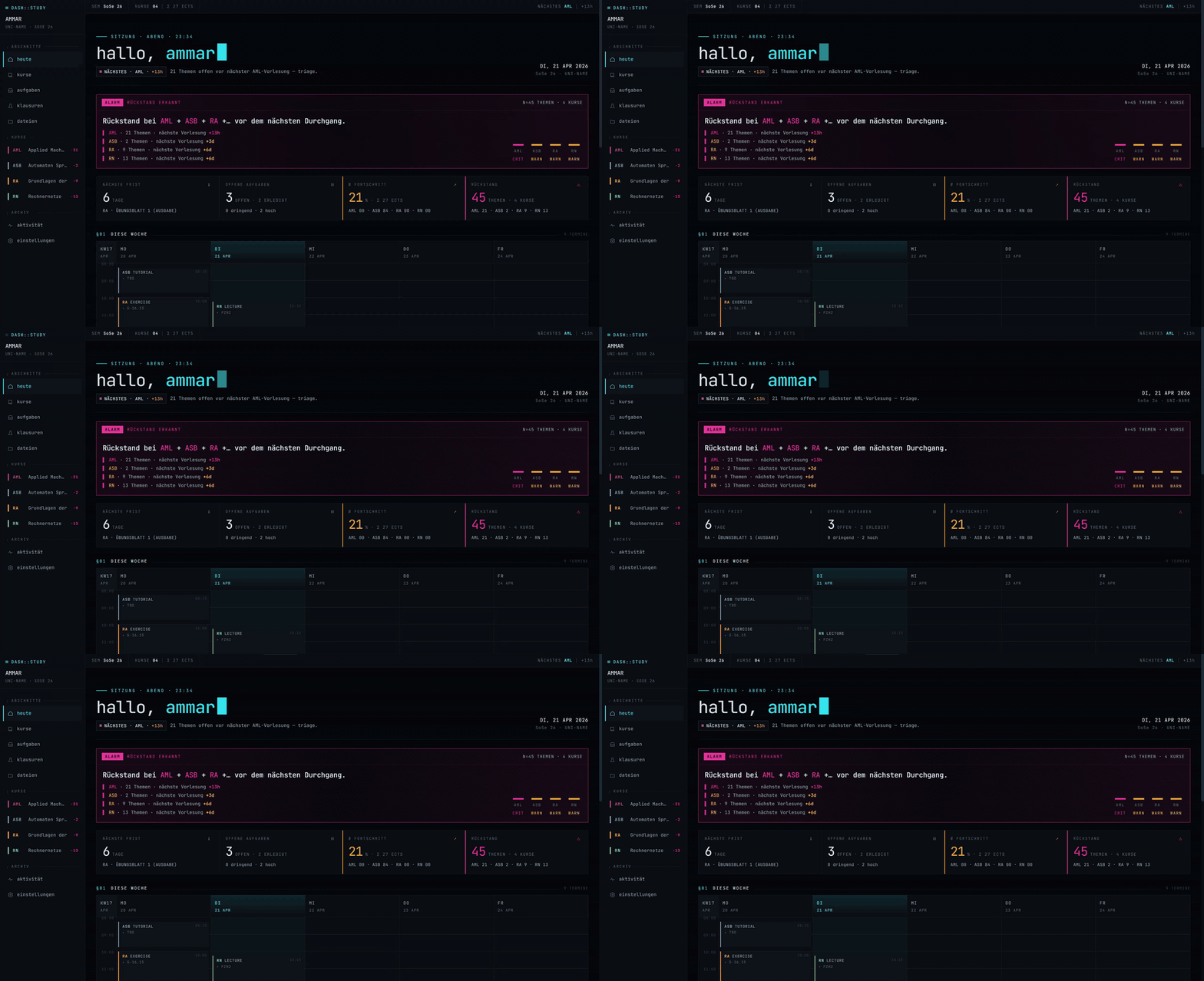
Unter Einstellungen → Theme zwischen allen fünf wechseln. Jedes ist ein vollständiger Reskin von Dashboard, Sidebar und Typografie — nicht bloss eine andere Farbpalette.
Demo — Claude liest ein Vorlesungs-PDF direkt aus OpenStudy
Das ist claude.ai im Browser, mit dem OpenStudy-MCP-Server als Custom Connector angebunden. Es wurde nichts in den Chat hochgeladen — Claude ruft list_course_files auf, um das PDF im Dateispeicher von OpenStudy selbst zu finden, dann rendert read_course_file jede Seite als PNG und schickt sie als Vision-Input zurück. Claude beantwortet Fragen zur Vorlesung, ohne dass das PDF je deine selbst gehostete Instanz verlässt.
Wie ich das benutze
Der einmalige Seed
Bevor der Alltag losgeht, musste ich erst mal ein ganzes Semester an Kursen, Stundenplänen, Prüfungsregeln und Vorlesungsmaterial in die App bekommen. Per Hand hatte ich keine Lust, ein eigenes Import-Skript wollte ich auch nicht schreiben — also hat Claude Code das für mich gemacht:
-
Alles vom LMS der Uni (Moodle, in meinem Fall) in einen lokalen Ordner gezogen. Pro Kurs habe ich die Modulbeschreibung, den Stundenplan, die Organisations-Folien der Professorin, bestehende Übungsblätter und das offizielle Modulhandbuch heruntergeladen. Struktur auf der Platte:
Semester 4/ semester.md # Ein-Zeiler pro Kurs, Semesterdaten, Links schedule.md # Wochenstundenplan (meine Source of Truth) module-catalogue.pdf # (Modulhandbuch) ASB/ course.md # strukturierte Source of Truth (siehe unten) 00_introduction.pdf # Org-Folien der Professorin exercise-sheets/ # (Übungsblätter) Computer-Architecture/ # (Rechnerarchitektur) course.md 1 Intro und History.pdf ... ... -
Claude Code hat pro Kurs eine
course.mdgebaut. Es hat jedes PDF, die LMS-Kopie (Moodle) und den Modulhandbuch-Eintrag gelesen und daraus ein normalisiertes Markdown produziert — mit einerMeta-Tabelle (offizieller Name, Modulcode, ECTS, Dozent:in, Sprache, Prüfungsformat, Versuche, Gewichtung), dem Wochenstundenplan in den eigenen Worten der Professorin und allen Bewertungs- bzw. Anwesenheitsregeln (z. B. „Praktikum-Anwesenheit ≥ 75 % für Klausurzulassung"). Diese Datei wurde pro Kurs zur Source of Truth — alles Weitere zieht daraus. -
Das Dashboard über den MCP-Connector befüllt. Mit Claude Code am laufenden Dashboard angedockt, habe ich es jede
course.mddurchgehen lassen, um:create_coursemit den Metadaten aufzurufen (Kürzel, voller Name, Farbe, ECTS, Dozent:in, Sprache und einfolder_name, der dem lokalen Ordner entspricht — damit der Files-Tab der Kursdetailseite das richtige Präfix im Bucket filtert)create_schedule_slotfür jeden wiederkehrenden Termin ausschedule.md(kindistlecture/exercise/tutorial/lab)update_exammit Prüfungsformat + Versuchszahlcreate_deliverablefür jede bekannte Übungsblatt-/Projekt-Deadline im Semester- jedes PDF aus den Kursordnern in den
course_files-Bucket hochzuladen (damitread_course_filesie Claude später als Vision übergeben kann)
Wenn du den lokalen
Semester 4/-Ordner gar nicht haben willst, kann jedes PDF stattdessen direkt in der App landen — per Drag-and-Drop in die Files-Ansicht. Der lokale Ordner passt für mich nur deshalb, weil ich die Dateien eh schon runterlade. -
Dashboard geöffnet → alles war da. Wochenraster gefüllt, vier Kurse mit eigenen Akzentfarben, Klausur-Infos pro Kurs, jedes Übungsblatt in der Deadline-Liste.
Ab da läuft es inkrementell weiter. Neue Vorlesungen landen auf dem LMS (Moodle), ich lege die PDFs entweder in den passenden Semester 4/<kurs>/-Ordner auf dem Laptop (Claude Code zieht sie rauf) oder schiebe sie direkt per Drag-and-Drop in die Files-Ansicht. Wenn die course.md ein Update braucht (neue Bewertungsregel, fixer Klausurtermin, neues Thema), bearbeitet Claude das Markdown und schickt die Änderung über MCP durch (update_course, update_exam usw.), damit Dashboard und Source of Truth synchron bleiben.
Pertanyaan tentang OpenStudy MCP
Apa yang bisa dilakukan Claude dengan OpenStudy melalui MCP?
MCP server menyediakan 44 tools, jadi apa pun yang bisa Anda lakukan di UI, Claude juga bisa melakukannya, seperti membuat topik studi, menandainya sebagai sudah dipelajari, atau mengunggah file.
Apakah Claude bisa membaca PDF kuliah saya?
Ya. Claude dapat melihat daftar file kursus, menemukan PDF di file store OpenStudy, dan merender halaman sebagai gambar untuk digunakan sebagai input vision.
Bagaimana cara menghubungkan Claude.ai atau aplikasi Claude ke OpenStudy?
Tambahkan sebagai custom connector menggunakan OAuth 2.1 lengkap; diperlukan hostname publik yang mengarah ke perangkat Anda untuk Claude.ai dan aplikasi iOS.
Apakah OpenStudy bersifat self-hosted?
Ya. Seluruh stack yang terdiri dari Postgres, backend FastAPI, dan frontend statis berjalan sebagai container pada satu perangkat.
Apakah OpenStudy mendukung banyak pengguna?
Ya, sistem ini bersifat multi-tenant dengan isolasi data per pengguna, dan Anda dapat membuka registrasi dengan mengatur SIGNUPS_ENABLED=true.