
Element Node MCP server
Commit 14 Okt 2026Memungkinkan AI agent untuk membangun dan mengelola seluruh website melalui CMS visual yang mendukung penyempurnaan manual via editor bergaya Elementor.
Juga dikenal sebagai LorenzArtik/element-node, element-node-mcp
- Stars
- 0
- Tools
- —
- Unduhan, 30 hari
- —
- Versi terbaru
- —
- Commit terakhir
- 14 Okt 2026
- Lisensi
- AGPL-3.0
Apa itu Element Node MCP?
Element Node adalah MCP server. Memungkinkan AI agent untuk membangun dan mengelola seluruh website melalui CMS visual yang mendukung penyempurnaan manual via editor bergaya Elementor.
Ringkasan dibuat dari README proyek
Tentang Element Node MCP server
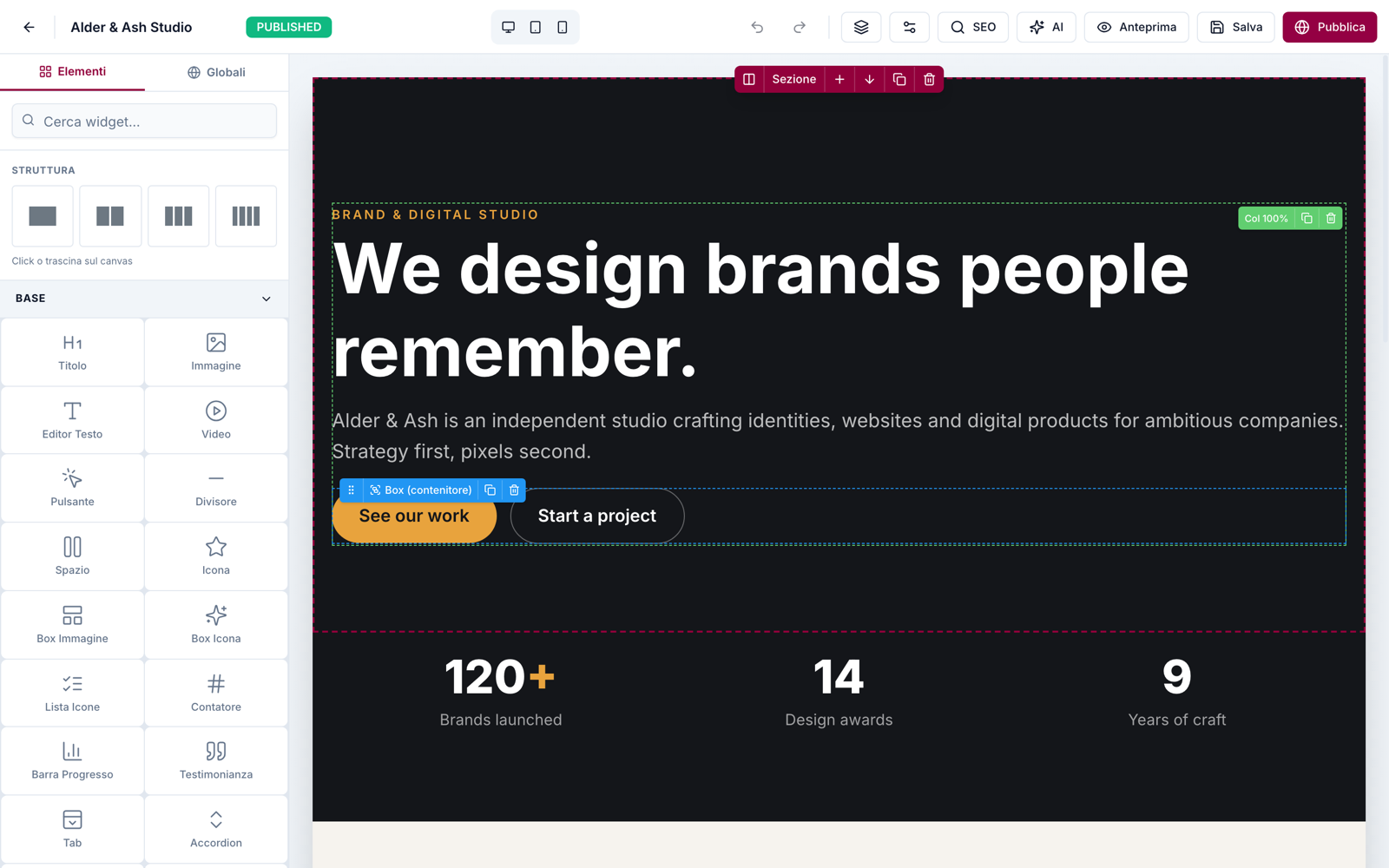
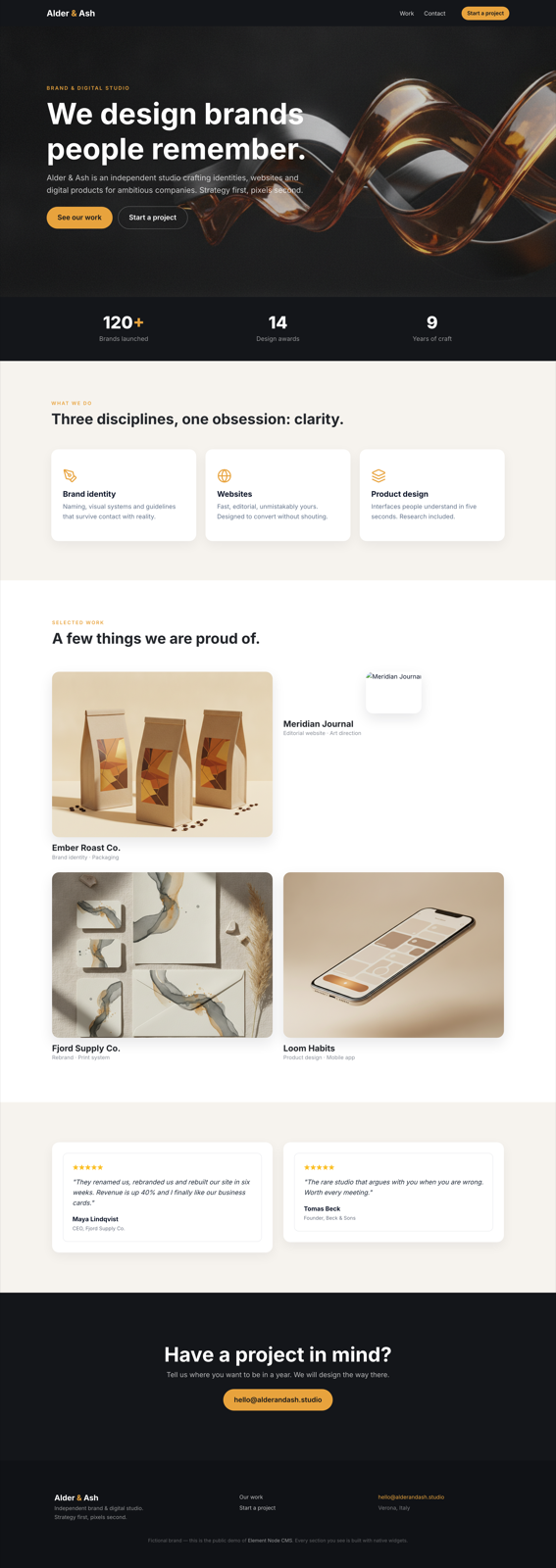
Element Node adalah visual content management system self-hosted yang dirancang agar AI agent dapat membangun dan mengelola website. Sistem ini menggunakan stack Next.js 15, Prisma, dan MySQL untuk menyediakan platform di mana agent dapat membangun seluruh situs dari brief atau hasil cloning. Setelah agent menyelesaikan build awal, pengguna non-teknis dapat mengambil alih menggunakan visual editor bergaya Elementor yang memiliki antarmuka tiga panel dengan kemampuan drag and drop.
Developer dapat terhubung ke sistem melalui MCP server yang kompatibel dengan client seperti Cursor dan Windsurf, atau dengan menggunakan official Claude Code skill. Server ini menyediakan tools untuk mengelola halaman, tema, media, serta import atau export Site Blueprint secara penuh. Sistem ini memerlukan server lokal atau remote yang menjalankan Node.js 20 atau versi lebih tinggi serta database MySQL atau MariaDB. Pengguna juga dapat berinteraksi dengan sistem melalui REST API menggunakan Bearer API keys untuk scope tertentu seperti import atau export situs.
Apa yang bisa Anda lakukan dengannya
- 1Konstruksi website otomatisAI agent dapat membangun website lengkap dari brief teks sederhana atau dengan melakukan cloning pada situs yang sudah ada.
- 2Penyempurnaan konten visualKlien non-teknis dapat mengedit bagian website secara manual menggunakan antarmuka drag and drop setelah agent selesai bekerja.
- 3Migrasi site blueprintDeveloper dapat memindahkan seluruh struktur website antar instance menggunakan fungsi import dan export JSON.
- 4Verifikasi fidelitas visualAgent dapat melakukan perbandingan visual antara screenshot dengan situs yang telah dibangun untuk memastikan akurasi.
Ditulis berdasarkan README proyek. Setiap use case diperiksa terhadap kutipan dari README tersebut.
Cara menginstal Element Node MCP
Format diverifikasi 10 Nov 2026Tambahkan ke CursorTambahkan ke GooseInstal Element Node MCP di Claude Code
$ claude mcp add element-node -- npx -y element-node-mcpInstal Element Node MCP di Cursor
~/.cursor/mcp.json
{
  "mcpServers": {
    "element-node": {
      "command": "npx",
      "args": [
        "-y",
        "element-node-mcp"
      ]
    }
  }
}Instal Element Node MCP di VS Code
.vscode/mcp.json
{
  "servers": {
    "element-node": {
      "type": "stdio",
      "command": "npx",
      "args": [
        "-y",
        "element-node-mcp"
      ]
    }
  }
}Instal Element Node MCP di VS Code CLI
$ code --add-mcp '{"name":"element-node","type":"stdio","command":"npx","args":["-y","element-node-mcp"]}'Instal Element Node MCP di Claude Desktop
claude_desktop_config.json
{
  "mcpServers": {
    "element-node": {
      "command": "npx",
      "args": [
        "-y",
        "element-node-mcp"
      ]
    }
  }
}Instal Element Node MCP di Codex
$ codex mcp add element-node -- npx -y element-node-mcpInstal Element Node MCP di Codex config.toml
~/.codex/config.toml
[mcp_servers.element-node]
command = "npx"
args = ["-y", "element-node-mcp"]
Instal Element Node MCP di Gemini CLI
$ gemini mcp add -s user element-node npx -- -y element-node-mcpInstal Element Node MCP di Gemini settings.json
~/.gemini/settings.json
{
  "mcpServers": {
    "element-node": {
      "command": "npx",
      "args": [
        "-y",
        "element-node-mcp"
      ]
    }
  }
}Pengecekan otomatis
Berjalan 15 Nov 2026Laporan lengkap →Belum diverifikasi. Sebuah server memerlukan skor 80, tidak ada temuan serius, dan data yang cukup untuk kami periksa. Cara kerja checks · Yang perlu diperbaiki untuk menambah poin

- Source repository terhubung dan dapat dijangkaulorenzartik/element-node is public and reachablegithub.com/lorenzartik/element-node ↗Lolos
- Nama paket mencantumkan repositori ini sebagai sumbernyaelement-node-mcp names lorenzartik/element-node as sourcenpmjs.com/package/element-node-mcp ↗Lolos
- Provenance build (atestasi Sigstore)No build attestation published for this releaseTidak diperiksa
- Lisensi open source (OSI)AGPL-3.0spdx.org/licenses/AGPL-3.0.html ↗Lolos
- Ada commit atau release dalam satu tahun terakhirLast commit or release 2026-10-14github.com/lorenzartik/element-node ↗Lolos
- OpenSSF ScorecardTidak diperiksa
- Nama package tidak mirip dengan package populerNo popular package one edit away from element-node-mcpLolos
- Tidak ada advisory kritis pada paket atau dependensinyaTidak diperiksa
- Tidak ada instruksi tersembunyi untuk model0 tool descriptions and the README read; no override phrases, credential paths or hidden charactersLolos
- Tools yang bersifat destruktif telah diberi labelTidak diperiksa
- Endpoint remote merespons handshake MCPTidak diperiksa
README
Lihat di GitHubElement Node
The AI-agent CMS your clients can still edit visually.
Element Node is an open-source visual CMS built on Next.js 15 + Prisma/MySQL. AI agents build entire sites on it — through the official Claude Code skill or the MCP server (Cursor, Windsurf, any MCP client) — and after the agent is done, the site stays in an Elementor-style visual editor that a non-technical client can safely use. Self-hosted: your server, your data.
🇮🇹 Documentazione in italiano: elementnode.cloud/it/docs
Quickstart
bash <(curl -fsSL https://elementnode.cloud/install.sh)
Requirements: Node.js ≥ 20, MySQL/MariaDB. The installer clones the repo, installs dependencies, creates .env and the DB schema, builds, and leaves you at the /install wizard (admin user, site, AI).
Non-interactive mode (for AI agents / provisioning): export DB_NAME, DB_USER, DB_PASS, SITE_URL (optional DB_HOST, DB_PORT) before running — no prompts. For Plesk see PLESK_DEPLOY.md.
One-prompt setup: the entire path — server, CMS, skill and first site — can be driven by a single prompt pasted into Claude Code. Template: elementnode.cloud/it/docs#prompt
Built for AI agents
| Integration | For | What it does |
|---|---|---|
| Official skill | Claude Code / Codex | Builds entire sites: from a brief, or pixel-perfect clones of existing sites verified by a visual-comparison agent (screenshot → diff → fix, until convergence) |
| MCP server | Cursor, Windsurf, any MCP client | Pages, theme, media, full Site Blueprint import/export, always-fresh widget docs |
| REST API | Anything else | Bearer API keys with scopes (site.import, site.export, …) |
Real production numbers (agent build time, human review on top): a 24-page WordPress migration in ~1 hour · a complete bilingual site in half a day · a React SPA cloned at 95/100 automated visual fidelity in ~2 hours. See showcase.
What's in the box
- Visual editor — 3-panel Elementor-style UI: widget library · canvas · properties. Drag & drop, inline text editing, undo/redo, revisions, responsive preview, style controls (spacing, borders, shadows, gradients)
- 51 native widgets — heading, text, button, image, video, icon-box, counters, tabs, accordion, gallery, contact form, posts grid, marquee, nav drawer, nested boxes…
- Theme blocks — global header/footer with display conditions + priority (per-URL-prefix → native multilingual sites)
- Content — pages (nested slugs), posts, custom post types + taxonomies, redirects, popups
- Forms — reusable form entities, submissions in DB, SMTP/Brevo delivery, GDPR consent fields
- Privacy — native cookie consent banner (variants per language, click-to-load embeds), site access modes (public / password / maintenance) with automatic noindex
- AI built in (bring your own Anthropic key) — editor chat that generates and edits sections, one-click SEO (title/description/keyword in the page's language)
- SEO — per-page meta, OG image, sitemap, robots, SEO score panel
- Media — local uploads, sharp-optimized thumbnails (WebP/AVIF), lazy loading
- Ops — 1-click self-update from the panel (with automatic pre-update DB backup), multi-user roles, API keys, health endpoint
- Performance — React Server Components, standalone output, HTTP cache + ISR. No plugin ecosystem needed: it's all native
Stack
Next.js 15 (App Router, standalone output) · Prisma + MySQL · NextAuth v5 · Tailwind · @dnd-kit · TipTap · sharp · Anthropic Claude (optional, BYO key)
Architecture notes
- Public pages render through
PageRenderer(RSC) with a responsive core (columns stack under 768px, opt-out per column) - Content is a JSON tree: sections → columns → widgets (see skill/element-node-builder/references/widget-reference.md)
- Site Blueprint import/export moves whole sites as JSON (merge or replace)
- License validation is fail-open: the CMS works without a license — a license activates managed updates, security patches and support (pricing)
License
- CMS core: AGPL-3.0 — free to use, self-host and modify. Building and running your own sites (or client sites) carries no obligations; the AGPL kicks in only if you modify the CMS and offer it to others as a service.
- Claude Code skill and MCP server: MIT — integrate freely.
Managed updates, security patches, priority support and the white-label agency tier are commercial: elementnode.cloud/en/pricing. For commercial licensing outside AGPL terms, get in touch.
Pertanyaan tentang Element Node MCP
Bagaimana cara menambahkan Element Node MCP ke Claude Code?
Jalankan claude mcp add element-node -- npx -y element-node-mcp di terminal Anda. Tambahkan --scope user agar tersedia di semua proyek.
Bagaimana cara menambahkan Element Node MCP ke Cursor?
Buka ~/.cursor/mcp.json dan tambahkan server di bawah mcpServers, menggunakan config Cursor yang ditunjukkan di bagian instalasi di atas.
Bisakah saya menghostingnya sendiri?
Ya, ini adalah solusi self-hosted di mana Anda mengontrol server dan data Anda sendiri.
Teknologi apa yang digunakan untuk membangunnya?
CMS ini dibangun menggunakan Next.js 15, Prisma, MySQL, NextAuth v5, Tailwind, @dnd-kit, TipTap, dan sharp.
Apakah CMS ini memerlukan lisensi untuk berfungsi?
Core CMS ini berlisensi AGPL-3.0 dan dapat berfungsi tanpa lisensi; lisensi hanya diperlukan untuk mengaktifkan managed updates, security patches, dan support.