
Memungkinkan coding agent untuk mereproduksi kegagalan test yang bersifat intermittent, meminimalkan input reproduksi, dan memverifikasi perbaikan kode dengan bukti empiris.
Juga dikenal sebagai LBarimi/FailTrace
- Stars
- 0
- Tools
- —
- Unduhan, 30 hari
- —
- Versi terbaru
- 1.5.0
- Commit terakhir
- 7 Sep 2026
- Lisensi
- MIT
Apa itu FailTrace MCP?
Memungkinkan coding agent untuk mereproduksi kegagalan test yang bersifat intermittent, meminimalkan input reproduksi, dan memverifikasi perbaikan kode dengan bukti empiris.
Ringkasan dibuat dari README proyek
Tentang FailTrace MCP server
FailTrace menyediakan cara bagi coding agent untuk menangani kegagalan test yang intermittent dengan membuat bukti empiris untuk debugging. Tool ini bekerja melalui local stdio MCP server atau CLI, yang memungkinkan developer untuk menangkap baseline yang gagal, meminimalkan input reproduksi, dan memverifikasi patch kode. Tool ini berjalan secara lokal di mesin Anda menggunakan Node.js 22.12+ dan npm, yang berarti tidak memerlukan AI API eksternal, akun, atau telemetri untuk berfungsi.
Agent dapat menggunakan tujuh MCP tools spesifik untuk mengelola siklus investigasi, termasuk regression search, minimisasi, dan verifikasi. Sistem ini melacak signature kegagalan dan bukti investigasi di berbagai percobaan. FailTrace mendukung test runner dan assertion yang sudah ada, termasuk dukungan khusus untuk NUnit dan Unity EditMode tests. Untuk mencegah penumpukan data, server membatasi penyimpanan stdout dan stderr sebesar 16 MiB per trial dan 256 MiB per proses run atau minimisasi.
Apa yang bisa Anda lakukan dengannya
- 1Minimalkan input reproduksiSeorang agent dapat mereduksi kumpulan input yang kompleks menjadi data terkecil yang diperlukan untuk memicu kegagalan test tertentu.
- 2Verifikasi patch kodeDeveloper dapat menggunakan tool ini untuk memeriksa apakah usulan perbaikan benar-benar menyelesaikan kegagalan target dibandingkan dengan baseline yang telah disimpan.
- 3Identifikasi sumber regresiSistem dapat membantu menemukan perubahan Git spesifik mana yang menyebabkan munculnya test yang gagal melalui proses bisect.
- 4Tangkap kegagalan intermittentUser dapat menjalankan command untuk mengulang test berkali-kali guna menangkap signature kegagalan yang konsisten.
Ditulis berdasarkan README proyek. Setiap use case diperiksa terhadap kutipan dari README tersebut.
Cara menginstal FailTrace MCP
Format diverifikasi 10 Nov 2026Tambahkan ke CursorTambahkan ke GooseInstal FailTrace MCP di Claude Code
$ claude mcp add failtrace -- npx -y failtraceInstal FailTrace MCP di Cursor
~/.cursor/mcp.json
{
  "mcpServers": {
    "failtrace": {
      "command": "npx",
      "args": [
        "-y",
        "failtrace"
      ]
    }
  }
}Instal FailTrace MCP di VS Code
.vscode/mcp.json
{
  "servers": {
    "failtrace": {
      "type": "stdio",
      "command": "npx",
      "args": [
        "-y",
        "failtrace"
      ]
    }
  }
}Instal FailTrace MCP di VS Code CLI
$ code --add-mcp '{"name":"failtrace","type":"stdio","command":"npx","args":["-y","failtrace"]}'Instal FailTrace MCP di Claude Desktop
claude_desktop_config.json
{
  "mcpServers": {
    "failtrace": {
      "command": "npx",
      "args": [
        "-y",
        "failtrace"
      ]
    }
  }
}Instal FailTrace MCP di Codex
$ codex mcp add failtrace -- npx -y failtraceInstal FailTrace MCP di Codex config.toml
~/.codex/config.toml
[mcp_servers.failtrace]
command = "npx"
args = ["-y", "failtrace"]
Instal FailTrace MCP di Gemini CLI
$ gemini mcp add -s user failtrace npx -- -y failtraceInstal FailTrace MCP di Gemini settings.json
~/.gemini/settings.json
{
  "mcpServers": {
    "failtrace": {
      "command": "npx",
      "args": [
        "-y",
        "failtrace"
      ]
    }
  }
}Pengecekan otomatis
Berjalan 15 Nov 2026Laporan lengkap →Lolos checks otomatis kami. Ini bukan audit keamanan: baca kodenya dan berikan server akses paling terbatas yang dibutuhkannya. Cara kerja checks

- Source repository terhubung dan dapat dijangkaulbarimi/failtrace is public and reachablegithub.com/lbarimi/failtrace ↗Lolos
- Nama paket mencantumkan repositori ini sebagai sumbernyafailtrace names lbarimi/failtrace as sourcenpmjs.com/package/failtrace ↗Lolos
- Provenance build (atestasi Sigstore)No build attestation published for this releaseTidak diperiksa
- Lisensi open source (OSI)MITspdx.org/licenses/MIT.html ↗Lolos
- Ada commit atau release dalam satu tahun terakhirLast commit or release 2026-09-07github.com/lbarimi/failtrace ↗Lolos
- OpenSSF ScorecardTidak diperiksa
- Nama package tidak mirip dengan package populerNo popular package one edit away from failtraceLolos
- Tidak ada advisory kritis pada paket atau dependensinya6 resolved dependencies checked; no critical advisoryosv.dev ↗Lolos
- Tidak ada instruksi tersembunyi untuk model0 tool descriptions and the README read; no override phrases, credential paths or hidden charactersLolos
- Tools yang bersifat destruktif telah diberi labelTidak diperiksa
- Endpoint remote merespons handshake MCPTidak diperiksa
README
Lihat di GitHubFailTrace
Reproduce the failure. Check the fix.
A test fails intermittently. Your coding agent changes the code. One passing retry leaves you guessing.
FailTrace repeats the same check, saves a failing baseline, and checks the proposed fix against it. Use the CLI or MCP tools to get trial results, a smaller reproducer, and evidence your agent can inspect before accepting a patch.


Local execution. No AI API, account, or telemetry required. Keep your existing test runner and assertions.
Quick start
With Node.js 22.12+ and npm, run this in any working directory:
npx --yes failtrace demo
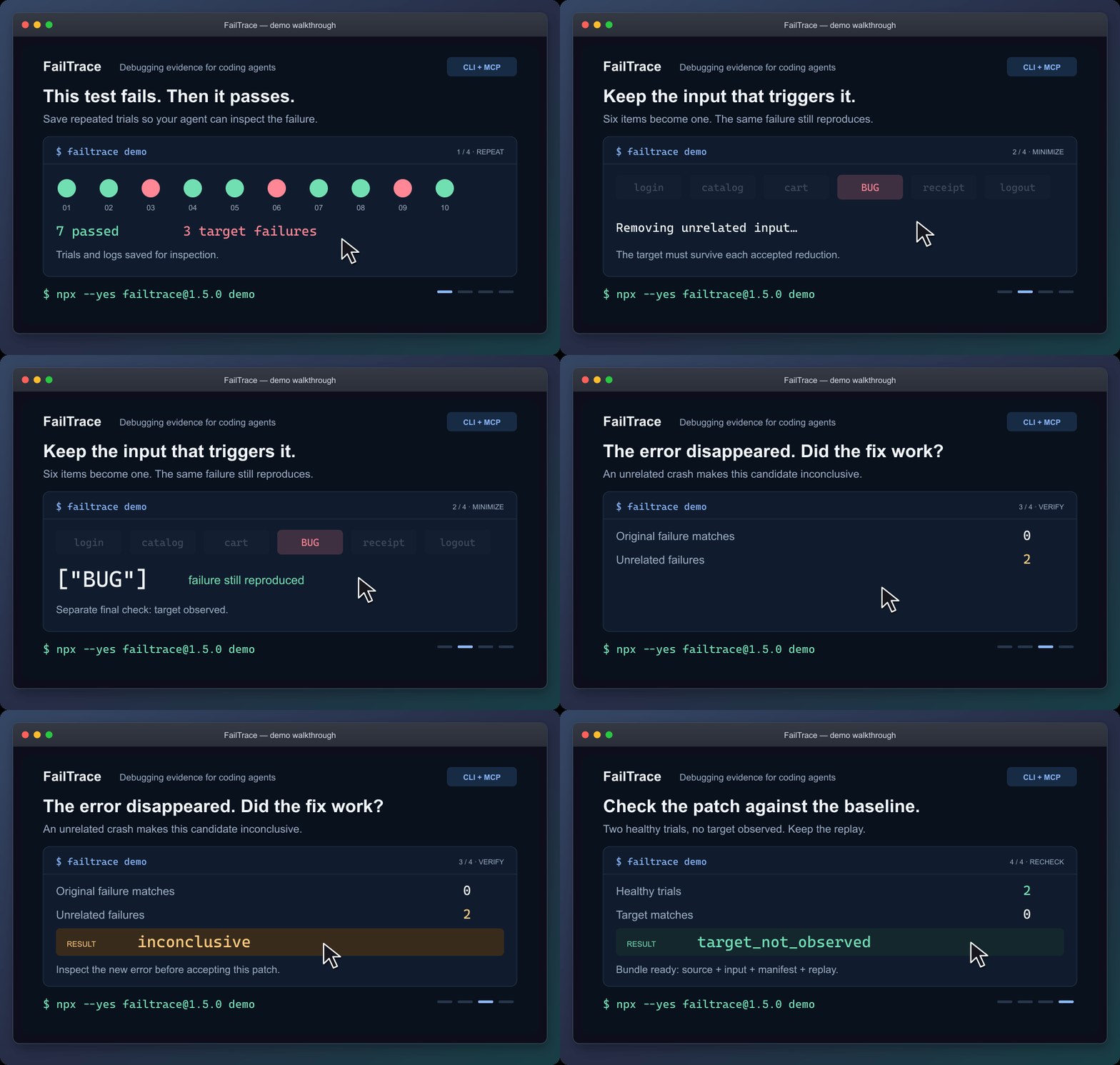
Static walkthrough · Static poster · Demo guide
The demo reduces six input items to ["BUG"], rejects a patch that crashes for another reason, and checks a working patch. It saves the evidence in .failtrace/ and prints a replay command.
For coding agents
Connect the local stdio MCP server through your client's configuration:
npx --yes failtrace@1.5.0 mcp --cwd "/absolute/path/to/your/project"
Copy the MCP configuration and check the connection →
Your client launches this command. Running it alone in a terminal waits for MCP requests. The guide includes Windows setup.
Then ask your agent:
Use FailTrace to capture this test failure before editing. Choose the exact test or failure message, save a bounded baseline, and inspect the matching trial. After the change, verify against that baseline and explain any unrelated errors or incomplete evidence.
The seven MCP tools share the CLI's Core engine. They retain the failure signature and investigation evidence across repetition, comparison, regression search, minimization, verification and replay. Agents can retrieve saved trial and log pages without rerunning the command. Shell-capable agents can also use the CLI with --json.
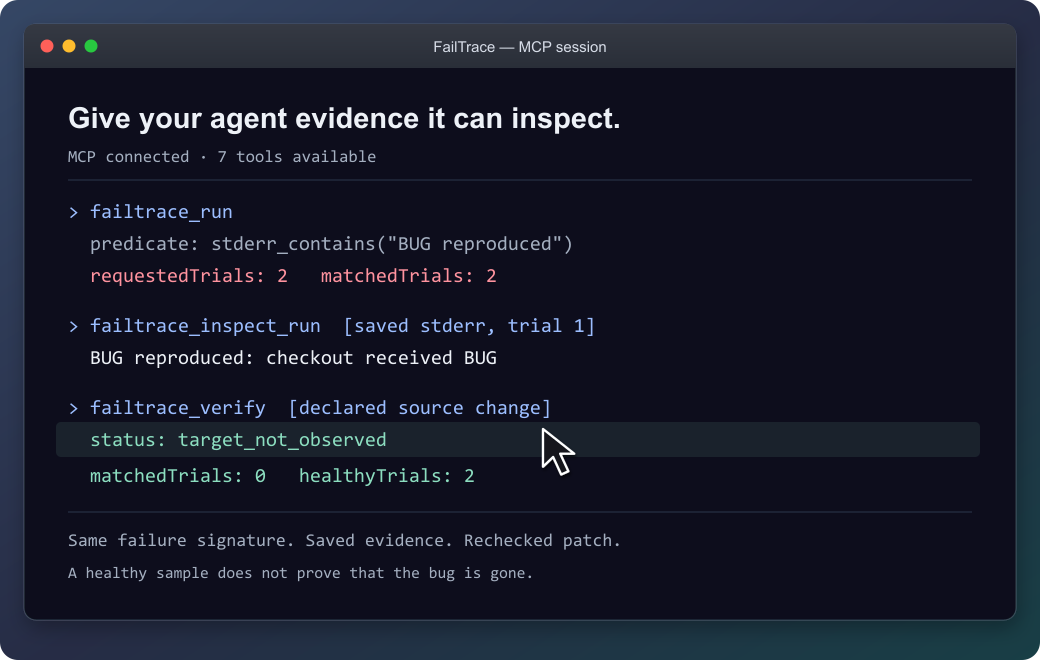
The agent can inspect the saved failure before checking the patch.
Recheck an existing unit test
Follow an exact NUnit or Unity test through a fix. Each attempt gets a fresh NUnit 3 report. Missing or skipped tests and unrelated failures stay inconclusive, so an agent cannot accept them as evidence that the selected test passed.
Connect your test or try the original EditMode example →
NUnit support is included in 1.3.0 through CLI and MCP. The documented Unity validation covers the Windows EditMode example.
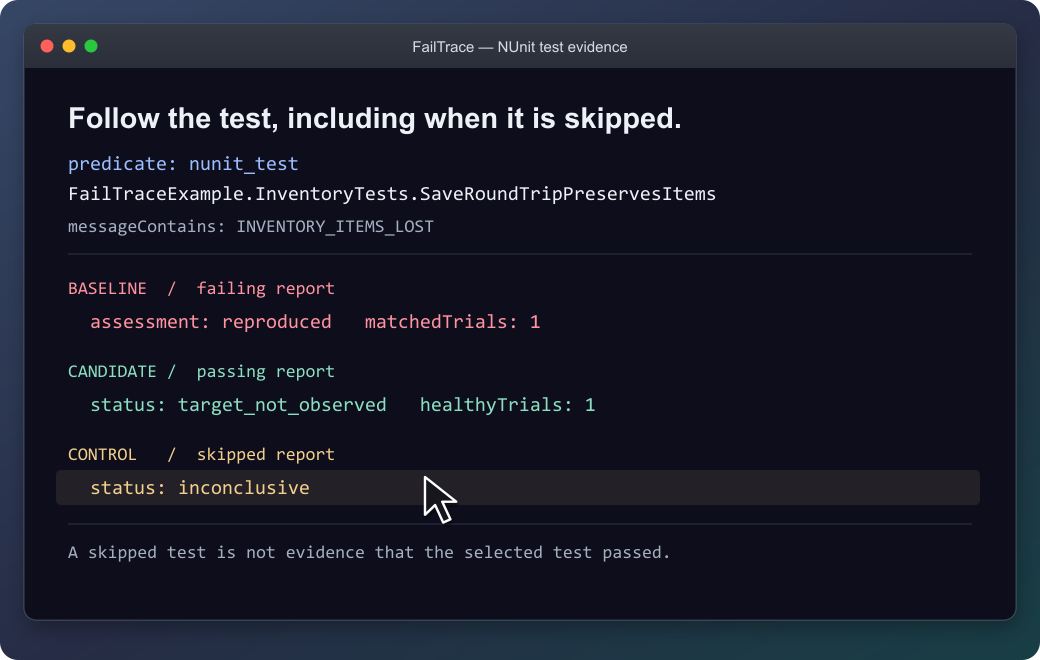
The selected test stays the same; a skipped report is not accepted as a passing test.
Use it on your own failure
From your project, replace the command and message with your own:
npx --yes failtrace@1.5.0 run "npm test -- checkout" --repeat 20 --stderr-contains "checkout failed" --capture-context
Run this before editing in a Git project. --capture-context records source identity for Verify; outside Git, select files with --context-source. Each trial saves its output, and exit 1 can mean the target was captured successfully. Then edit and verify the patch →
| Your next question | Command |
|---|---|
| How often does this failure appear? | run |
| What differs between a healthy and failing trial? | compare |
| Which Git change introduced it? | bisect |
| What input is enough to reproduce it? | minimize |
| What happened after the proposed fix? | verify |
| How can I replay this investigation? | bundle |
Command reference · Literal executable arguments · Reusable project scripts
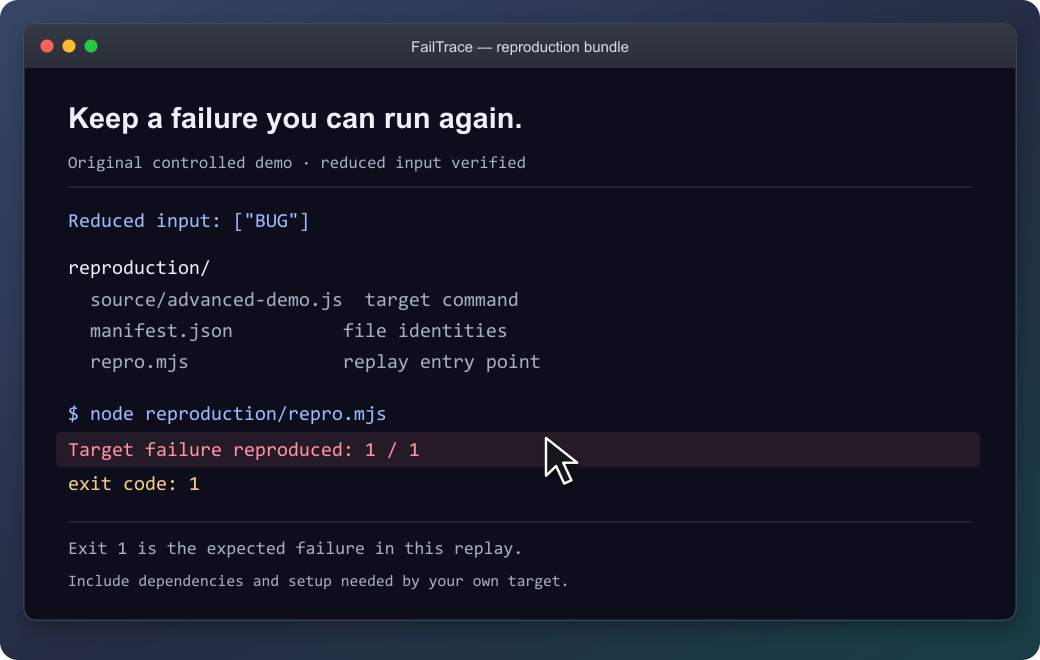
The demo's bundle reproduces its original failure with exit 1. Keep the source, input and replay together; supply the target's prerequisites when packaging your own investigation.
What the results establish
FailTrace reports observations under the chosen settings. Verify separates a target observed, a healthy sample without that target, and inconclusive evidence. Bisect reports a sampled first-parent boundary; minimization rechecks its result without promising the smallest possible input.
The demo shows controlled example outcomes, not performance measurements. A passing sample does not prove a bug is gone.
Commands run with your permissions, and process cleanup is best effort. Retained stdout/stderr is capped by default at 16 MiB per trial and 256 MiB per run or bisect/minimization. Previous investigations accumulate separately. Review logs, commands and selected files before sharing; bundles still require the target's dependencies and setup.
Result and exit-code reference · Resource limits · Storage inventory · Bundle guide
Availability and contributing
The quick start uses npm's latest release; the verified version is 1.5.0. MCP configuration and repeatable installation examples keep that exact version pinned: installation options, GitHub release, and MCP Registry entry.
Version 1.5.0 adds: short run references, Verify readiness and next-step guidance, and intermittent-minimization guidance. See the changelog.
Documentation: choose your next task →
Development instructions · Compatibility · Roadmap · Third-party notices
Pertanyaan tentang FailTrace MCP
Bagaimana cara menambahkan FailTrace MCP ke Claude Code?
Jalankan claude mcp add failtrace -- npx -y failtrace di terminal Anda. Tambahkan --scope user agar tersedia di semua proyek.
Bagaimana cara menambahkan FailTrace MCP ke Cursor?
Buka ~/.cursor/mcp.json dan tambahkan server di bawah mcpServers, menggunakan config Cursor yang ditunjukkan di bagian instalasi di atas.
Apakah FailTrace memerlukan AI API atau akun?
Tidak, FailTrace melakukan eksekusi lokal tanpa memerlukan AI API, akun, atau telemetri apa pun.
Bisakah saya menggunakan FailTrace dengan NUnit tests?
Ya, dukungan NUnit sudah tersedia di versi 1.3.0 ke atas melalui CLI maupun MCP.
Berapa batas resource untuk log?
Penyimpanan stdout/stderr dibatasi maksimal 16 MiB per trial dan 256 MiB per run, bisect, atau proses minimisasi.
Apakah sampel yang berhasil (passing) membuktikan bahwa bug sudah diperbaiki?
Tidak, sampel yang berhasil tidak memberikan bukti mutlak bahwa bug tersebut telah hilang.