
Memungkinkan AI client membuat dan mengedit diagram arsitektur dalam bentuk JSON terstruktur, serta mengekspornya sebagai SVG, PNG, ASCII, GIF, atau MP4.
Juga dikenal sebagai hudsonkit/arc, @hudsonkit/arc-mcp
- Stars
- 17
- Tools
- —
- Unduhan, 30 hari
- 509
- Versi terbaru
- —
- Commit terakhir
- 14 Nov 2026
- Lisensi
- MIT
Apa itu Arc MCP?
Arc adalah MCP server. Memungkinkan AI client membuat dan mengedit diagram arsitektur dalam bentuk JSON terstruktur, serta mengekspornya sebagai SVG, PNG, ASCII, GIF, atau MP4.
Ringkasan dibuat dari README proyek
Tentang Arc MCP server
Arc memungkinkan developer yang menggunakan AI agent untuk membuat dan mengedit diagram arsitektur melalui JSON atau TypeScript terstruktur. Toolkit ini memungkinkan pengguna mendefinisikan sistem, workflow, atau ilustrasi kompleks yang tetap dapat diedit dan dikelola versinya bersamaan dengan kode aplikasi. Dengan menyediakan MCP server, AI client dapat memanipulasi node, koneksi, dan spatial layer untuk membangun penjelasan visual secara dinamis.
Pengguna dapat mengubah definisi deklaratif ini ke berbagai format termasuk SVG, PNG, ASCII, GIF, dan MP4. Untuk rute alur animasi atau ekspor video, sistem memerlukan Chrome/Chromium dan ffmpeg. Server ini juga mendukung impor source Mermaid, yang memungkinkan pengguna mengonversi flowchart, state diagram, atau sequence diagram menjadi diagram Arc yang interaktif. Hal ini menjadikannya alat yang serbaguna untuk mendokumentasikan perilaku sistem, seperti menganimasi jalur request atau menelusuri sequence satu per satu pesan.
Apa yang bisa Anda lakukan dengannya
- 1Generate diagram arsitektur dari teksAI agent dapat mengambil deskripsi sebuah sistem dan mengubahnya menjadi definisi diagram JSON atau TypeScript yang terstruktur.
- 2Konversi diagram Mermaid ke visual interaktifDeveloper dapat mengimpor Mermaid flowchart atau sequence diagram yang sudah ada untuk menggunakan fitur layout dan playback dari Arc.
- 3Ekspor diagram untuk dokumentasiUbah diagram digital menjadi gambar statis atau video animasi untuk digunakan dalam file README atau presentasi.
- 4Animasikan jalur request sistemGunakan tool ini untuk membuat panduan walkthrough yang menunjukkan bagaimana data bergerak melalui berbagai service dan queue.
Ditulis berdasarkan README proyek. Setiap use case diperiksa terhadap kutipan dari README tersebut.
Cara menginstal Arc MCP
Format diverifikasi 10 Nov 2026Tambahkan ke CursorTambahkan ke GooseInstal Arc MCP di Claude Code
$ claude mcp add arc -- npx -y @hudsonkit/arc-mcpInstal Arc MCP di Cursor
~/.cursor/mcp.json
{
  "mcpServers": {
    "arc": {
      "command": "npx",
      "args": [
        "-y",
        "@hudsonkit/arc-mcp"
      ]
    }
  }
}Instal Arc MCP di VS Code
.vscode/mcp.json
{
  "servers": {
    "arc": {
      "type": "stdio",
      "command": "npx",
      "args": [
        "-y",
        "@hudsonkit/arc-mcp"
      ]
    }
  }
}Instal Arc MCP di VS Code CLI
$ code --add-mcp '{"name":"arc","type":"stdio","command":"npx","args":["-y","@hudsonkit/arc-mcp"]}'Instal Arc MCP di Claude Desktop
claude_desktop_config.json
{
  "mcpServers": {
    "arc": {
      "command": "npx",
      "args": [
        "-y",
        "@hudsonkit/arc-mcp"
      ]
    }
  }
}Instal Arc MCP di Codex
$ codex mcp add arc -- npx -y @hudsonkit/arc-mcpInstal Arc MCP di Codex config.toml
~/.codex/config.toml
[mcp_servers.arc]
command = "npx"
args = ["-y", "@hudsonkit/arc-mcp"]
Instal Arc MCP di Gemini CLI
$ gemini mcp add -s user arc npx -- -y @hudsonkit/arc-mcpInstal Arc MCP di Gemini settings.json
~/.gemini/settings.json
{
  "mcpServers": {
    "arc": {
      "command": "npx",
      "args": [
        "-y",
        "@hudsonkit/arc-mcp"
      ]
    }
  }
}Pengecekan otomatis
Berjalan 14 Nov 2026Laporan lengkap →Lolos checks otomatis kami. Ini bukan audit keamanan: baca kodenya dan berikan server akses paling terbatas yang dibutuhkannya. Cara kerja checks

- Source repository terhubung dan dapat dijangkauhudsonkit/arc is public and reachablegithub.com/hudsonkit/arc ↗Lolos
- Nama paket mencantumkan repositori ini sebagai sumbernya@hudsonkit/arc-mcp names hudsonkit/arc as sourcenpmjs.com/package/@hudsonkit/arc-mcp ↗Lolos
- Provenance build (atestasi Sigstore)Sigstore attestation for @hudsonkit/arc-mcpnpmjs.com/package/@hudsonkit/arc-mcp/v/0.14.1#provenance ↗Lolos
- Lisensi open source (OSI)MITspdx.org/licenses/MIT.html ↗Lolos
- Ada commit atau release dalam satu tahun terakhirLast commit or release 2026-11-09github.com/hudsonkit/arc ↗Lolos
- OpenSSF ScorecardTidak diperiksa
- Nama package tidak mirip dengan package populerNo popular package one edit away from @hudsonkit/arc-mcpLolos
- Tidak ada advisory kritis pada paket atau dependensinyaTidak diperiksa
- Tidak ada instruksi tersembunyi untuk model0 tool descriptions and the README read; no override phrases, credential paths or hidden charactersLolos
- Tools yang bersifat destruktif telah diberi labelTidak diperiksa
- Endpoint remote merespons handshake MCPTidak diperiksa
README
Lihat di GitHubArc is a declarative diagram toolkit for creating, presenting, and refining visual explanations with AI agents. Define an architecture, workflow, or illustration in JSON or TypeScript. Turn that source into an interactive walkthrough, an embedded viewer, or a finished figure for your docs.
Author the source yourself, work in the visual studio, or give an agent the Arc skill and MCP tools. The diagram stays editable, typed, and ready to version alongside your code. The live review preview builds on that same format: watch an agent develop the explanation while you review the changes.
Supported Mermaid source can also become an Arc diagram or a playable sequence.
Get started · Live review preview · Examples · Documentation · Open the studio



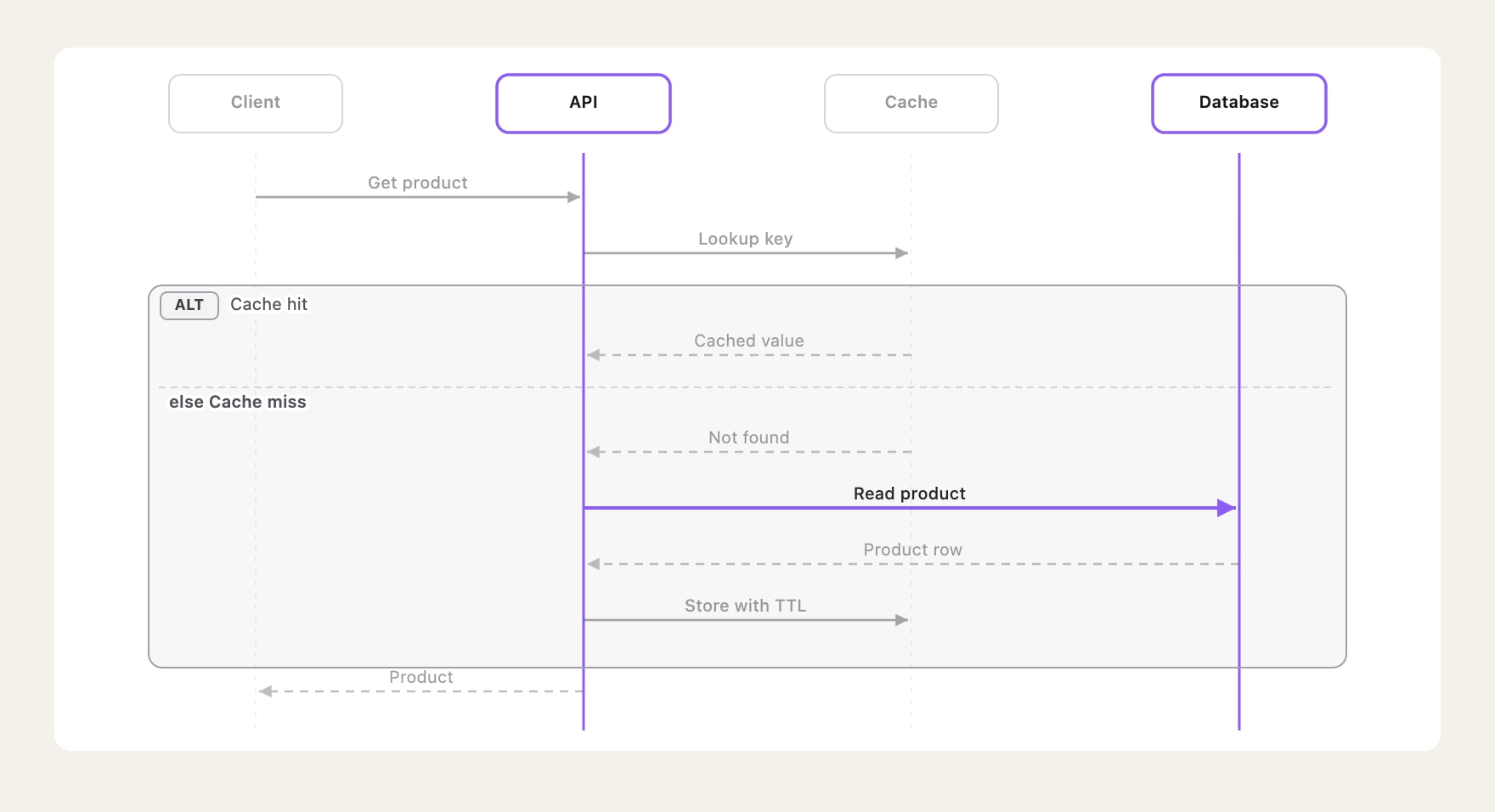
A cache miss, step by step: play the sequence, inspect its Mermaid source, and switch between light and dark.
▶ Watch the 24-second video · Try the interactive demo
- Explain the structure. Use components, connections, groups, and spatial layers to show how a system fits together.
- Explain the behavior. Add guided chapters, animate a request, or step through a Mermaid sequence one message at a time.
- Use the result. Embed a React viewer, edit in the studio, or export an image or flow animation. Keep the source for the next change.
Review the diagram as your agent works
Private preview. Bring the diagram into a live architecture review in the Hudson Kit studio. An agent adds and moves nodes through MCP while you watch the canvas update. A marked work region shows where the agent is working. Nodes and connections transition smoothly as the view fits the changing diagram.
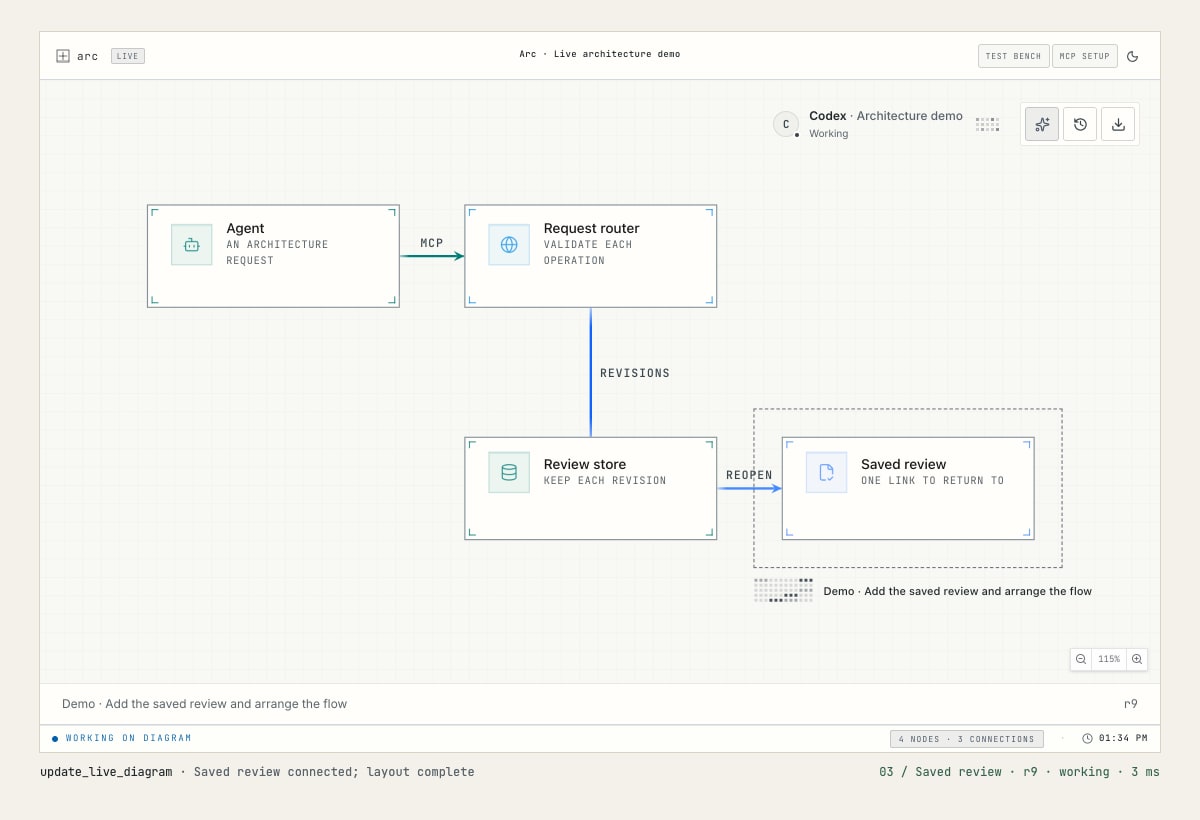
Watch the 22-second demo · Open the 60 fps video
- See work in progress. Presence shows the agent's harness and name when provided. Activity appears over the declared work region and settles when work ends.
- Review together. One agent writes to a review; multiple people can follow it through a private, read-only viewer link.
- Return to the review. Saved architecture reviews retain the baseline, revisions, findings, and decisions. Reopen them on the same private host.
- Keep the source. Live changes use the same declarative Arc data as the renderers. Refine the definition, present it, and produce your final output.
The video shows the private preview, which is not yet included in the published MCP package. The setup below covers the released diagram tools.
Bring your source. Choose your output.
| Start with | What Arc supports |
|---|---|
| Arc JSON / TypeScript | Architecture diagrams, guided views, animated flow routes, and isometric views. |
| Mermaid flowcharts and state diagrams | Import into editable Arc architecture data with importMermaid() from @hudsonkit/arc-viewer. |
| Mermaid sequence diagrams | Native rendering and step-by-step playback with ArcMermaidPlayer from @hudsonkit/arc-viewer. |
| Mermaid source used with Pele or Beautiful Mermaid | Reuse the supported flowchart, state, and sequence syntax through those same Arc APIs. |
Pele and Beautiful Mermaid are Mermaid renderers. Bring the original Mermaid text to Arc; Arc applies its own layout, themes, and interactions. Their rendered SVGs, theme settings, and full diagram catalogs are not imported. Check the import coverage and sequence guide for supported syntax and diagnostics.
| Output | Use it for |
|---|---|
| PNG | Still images for documents, chat, and social posts. |
| SVG | Scalable vector drawings, including animated flow routes. |
| GIF | Looping flow animations for READMEs and demos. |
| MP4 | Flow videos for presentations and announcements. |
| React / HTML | Interactive components, iframe embeds, or a standalone SVG page. |
| ASCII / Unicode | Diagrams in terminals and plain text. |
| JSON / TypeScript | Editable source to version, review, and reuse. |
The file exports above use Arc architecture data. GIF and MP4 render authored flow routes through the CLI or MCP; they require Chrome/Chromium and ffmpeg. Native Mermaid sequence playback is available through the React viewer. Choose an export and see the commands →
Turn the map into a walkthrough
Start with services, databases, queues, and the connections between them. Arc provides semantic node kinds, icons, groups, relationship styles, and automatic layout to give the system a clear structure. Then make that structure explorable.
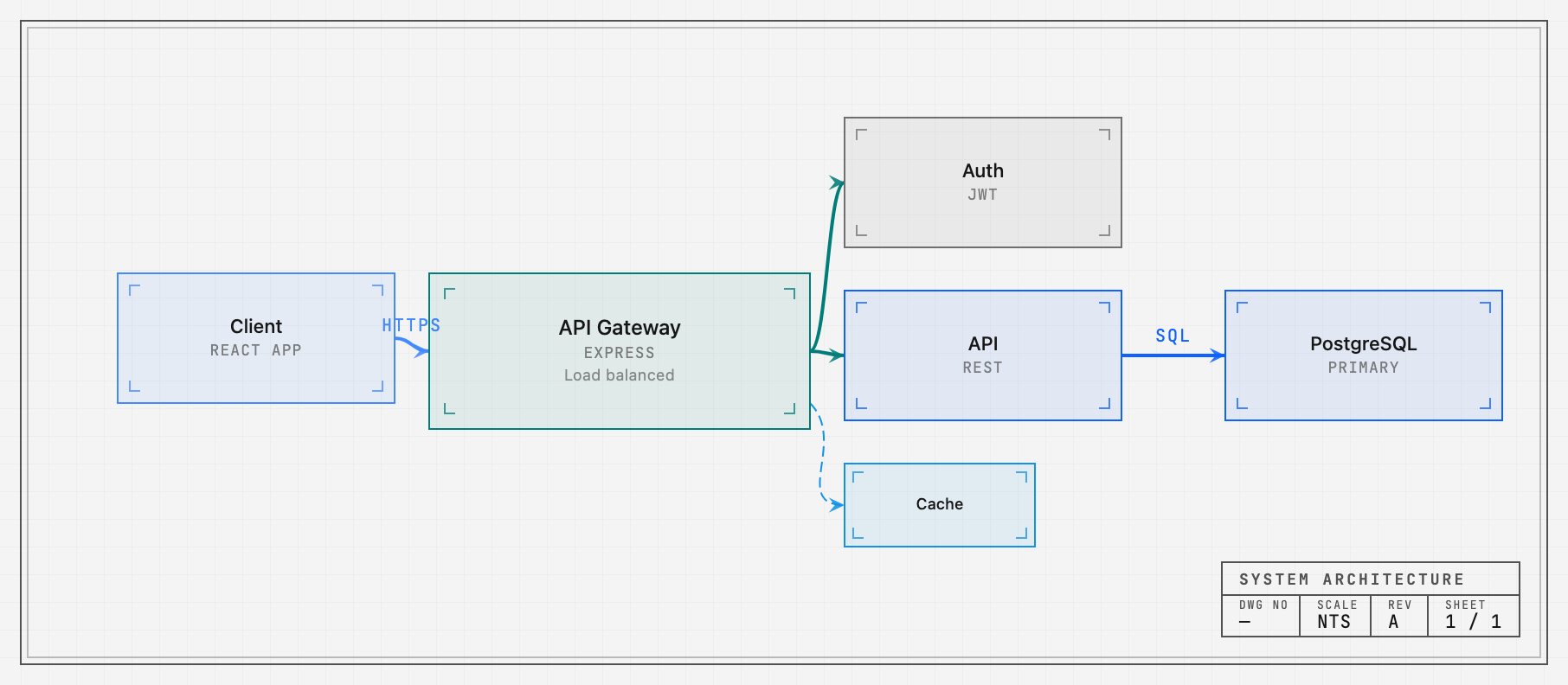
- Focus on the path that matters. Hover or select a component to reveal its relationships. Author a focus story with a caption and steps to explain a whole request path, boundary, or workflow.
- Guide the reader through chapters. Named views frame the relevant region and highlight its nodes and connections. Readers can step through the story or leave it to explore on their own.
- Put requests in motion. Send packets along multi-step routes, pause at a
service, follow the return path, and show trails. Set timing and repeats, or
control the exact instant with
flowTime.
Pan, zoom, fit, minimaps, and legends keep the system navigable. Chapters, focus stories, and animated routes are authored data that can be edited and reviewed alongside the drawing.
Guided views · Focus stories · Flow API · Source for the image
Play the conversation
Arc's native Mermaid sequence player makes an exchange something you can follow one message at a time. Actors, lifelines, self-calls, notes, branches, and loops retain their place in the story. Play the sequence, step backward or forward, focus a participant, or open it fullscreen.
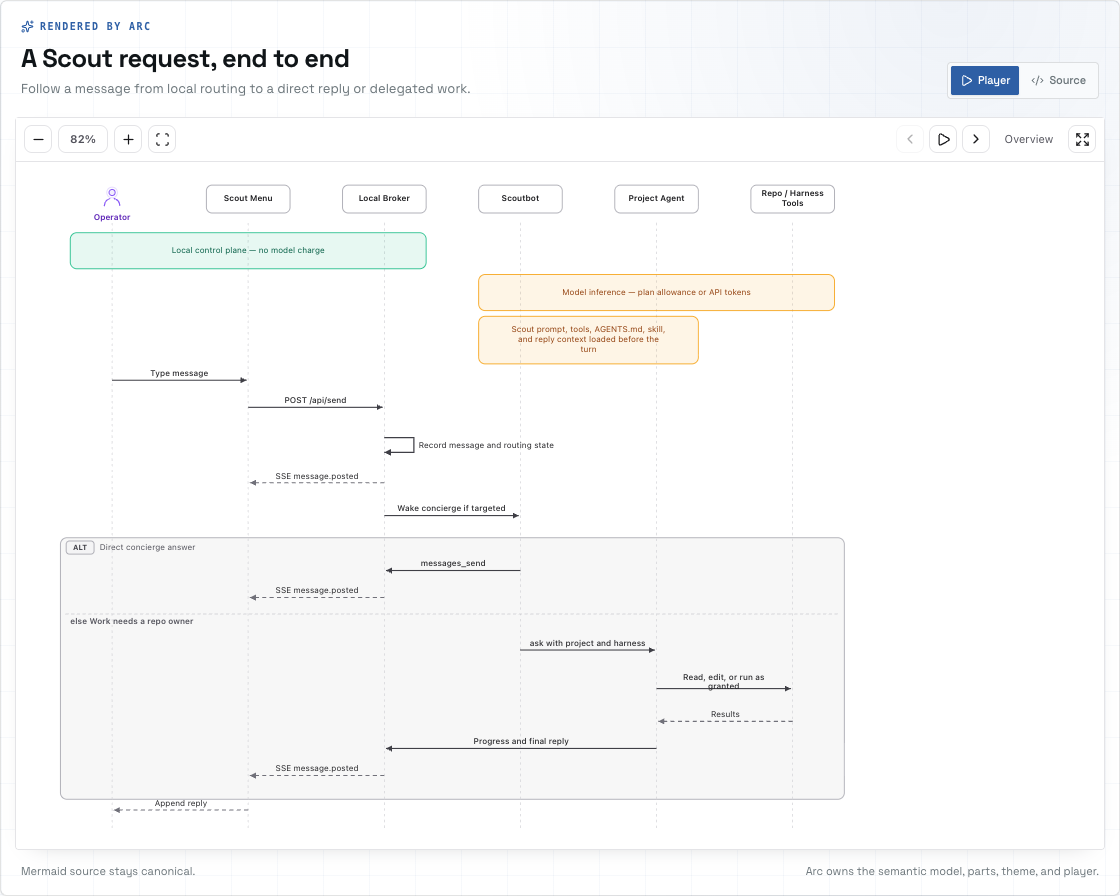
Mermaid text stays the source. Arc owns the typed sequence model, layout, SVG rendering, and playback. You can customize theme tokens and replace individual visual parts to fit your application. Mermaid.js is not required at runtime.
Existing Mermaid flowcharts and state diagrams have a separate import path into Arc's architecture format.
Native sequence guide · Supported Mermaid imports
Give the system depth
Use isometric views to make layers, boundaries, and hierarchy visible. Project an architecture into spatial blocks, or compose a tiered scene with elevated floors, staggered layers, translucent components, and pillars. Hover a layer to lift it out of the stack; use node and layer callbacks to connect the view to your application.
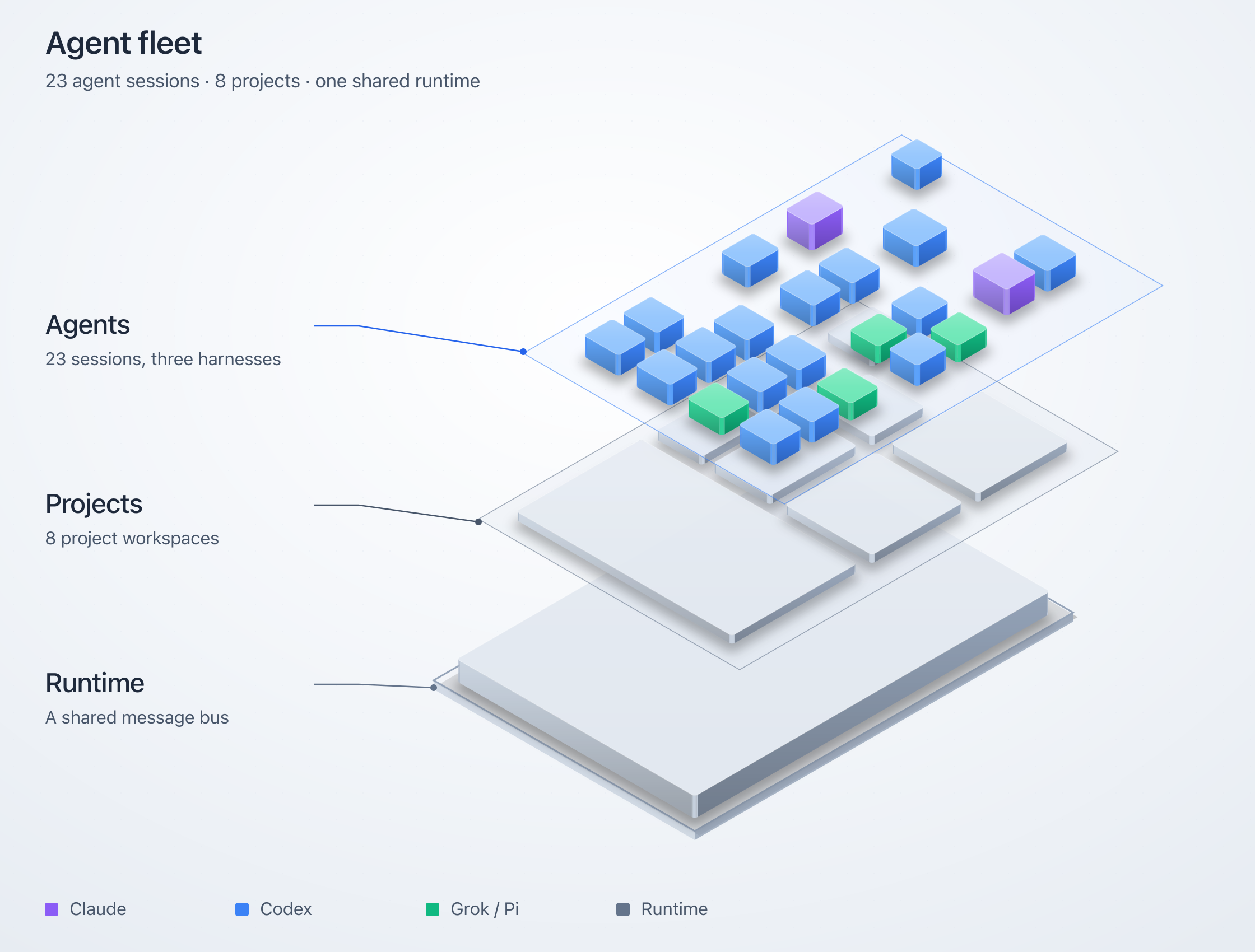
Choose shaded solids, hatched blueprint linework, cyanotype plates, or a retro-print material with mineral inks and deterministic stipple. The tiered renderer has React and static SVG APIs, including a vanilla JavaScript embed.
Isometric types and options · Example fleet composition
Let readers operate the explanation
Turn up demand in the connection-pool explainer. All four database connections fill, and requests start waiting. Step through a handoff to see which request gets the next connection. Stop arrivals and watch the queue drain.
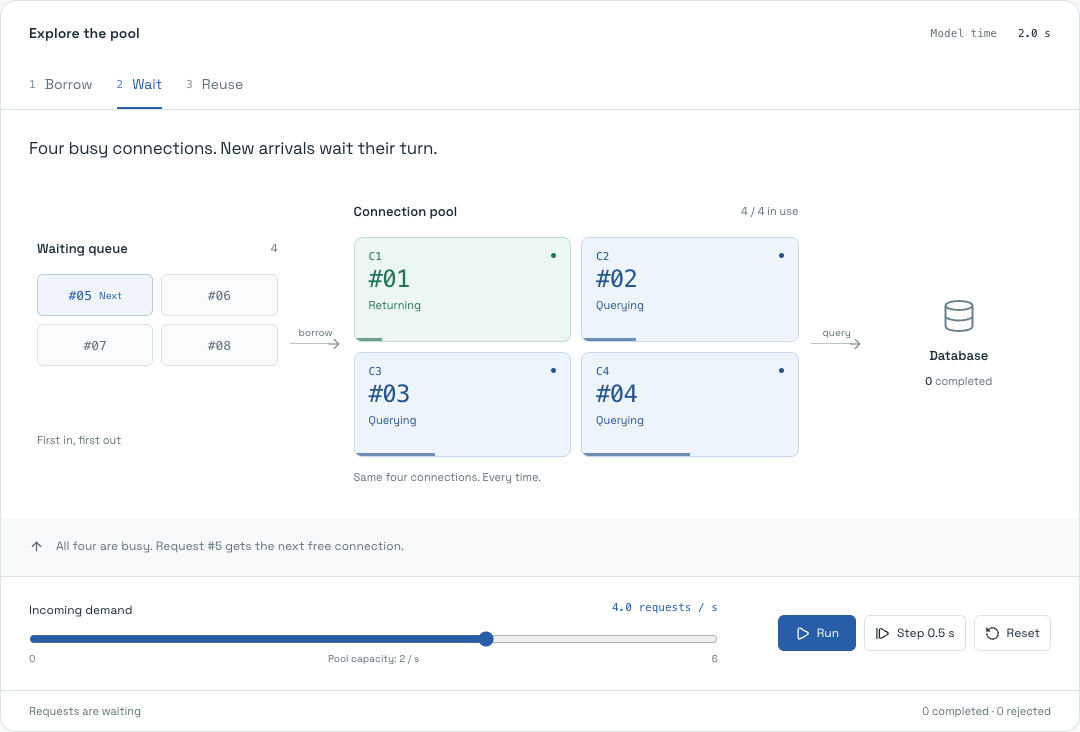
The queue, leases, counts, and handoffs come from the same deterministic model. This working example combines a custom mechanism view with an Arc diagram projection. It shows how to build an explanation that responds to the reader's actions and makes cause and effect visible.
Operate the pool · Read the model · See the Arc projection
Create on the canvas. Refine in code.
The studio puts the drawing and its source side by side. Drag components into place, connect their anchors, shape groups, and refine the result in the inspector. Edit the JSON and the canvas updates. Move a node and the source updates with it.
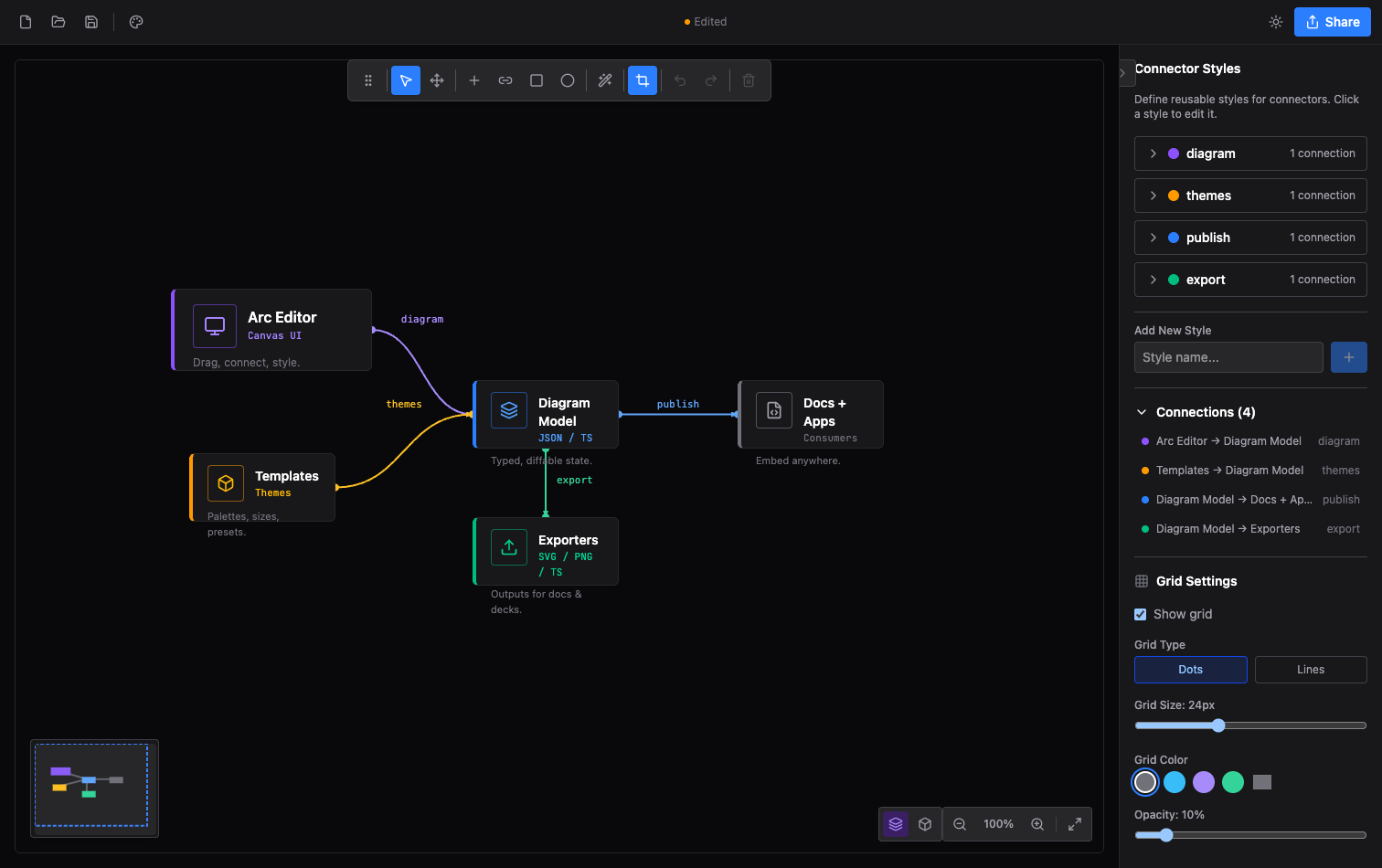
Multi-selection, keyboard shortcuts, undo/redo, templates, image layers, custom dimensions, connector routing, and export crops give you control over the finished composition. Switch between 2D and isometric editing. Save to a file, restore a local browser session, or copy a typed module into your app.
The editor's React components, context, and hooks are available for embedding. The player showcase lets you tune a viewer's appearance and controls, then copy the matching JSX.
Open the studio from Arc, or run it locally.
Give the drawing a visual identity
Eleven themes shape typography, node silhouettes, grids, frames, decoration, and title blocks as well as color. Choose an engineering plate, a quiet workbench, a tactical map, or a mission console. Every theme has light and dark modes; individual nodes and relationships can carry their own styling.
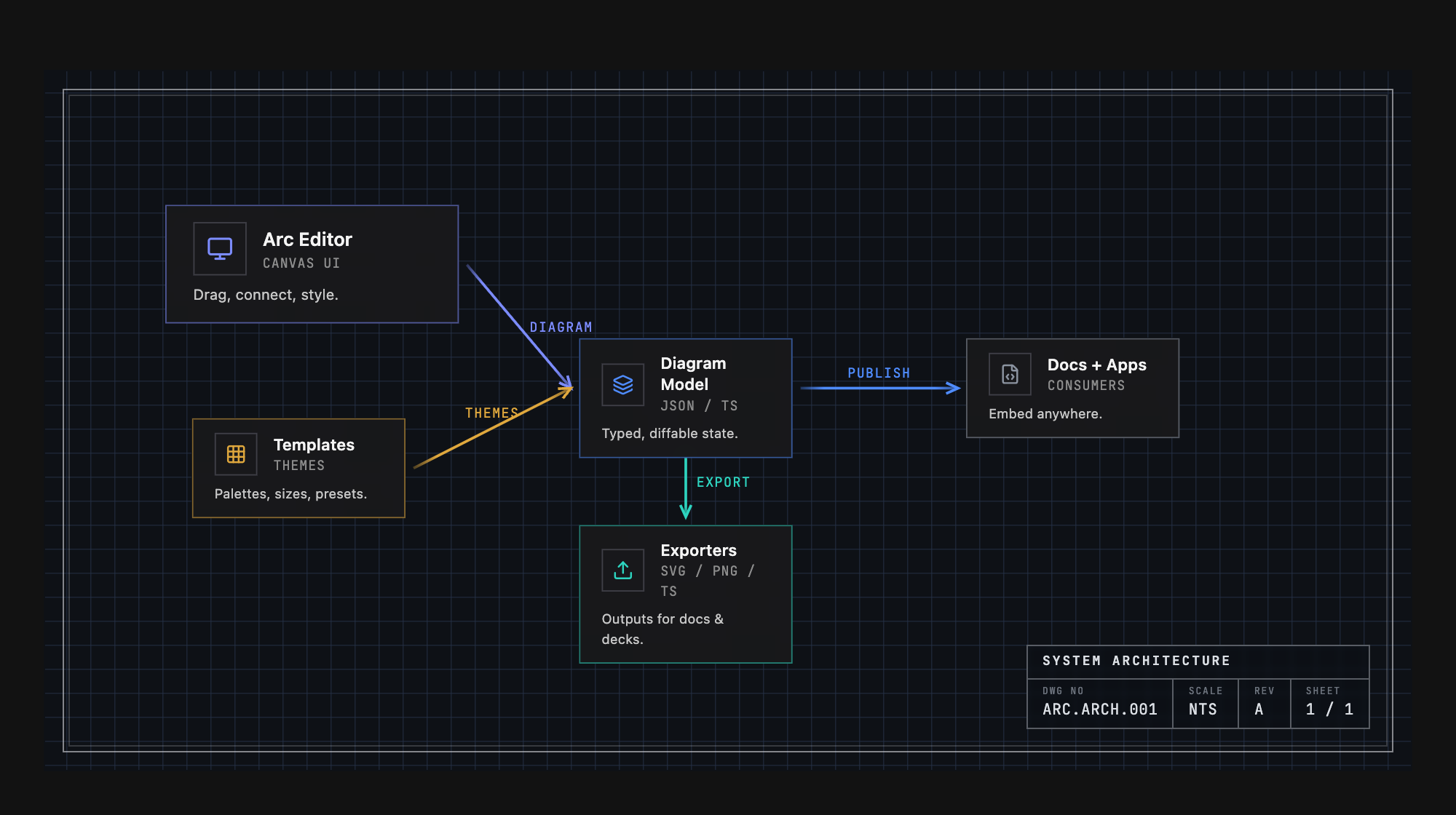
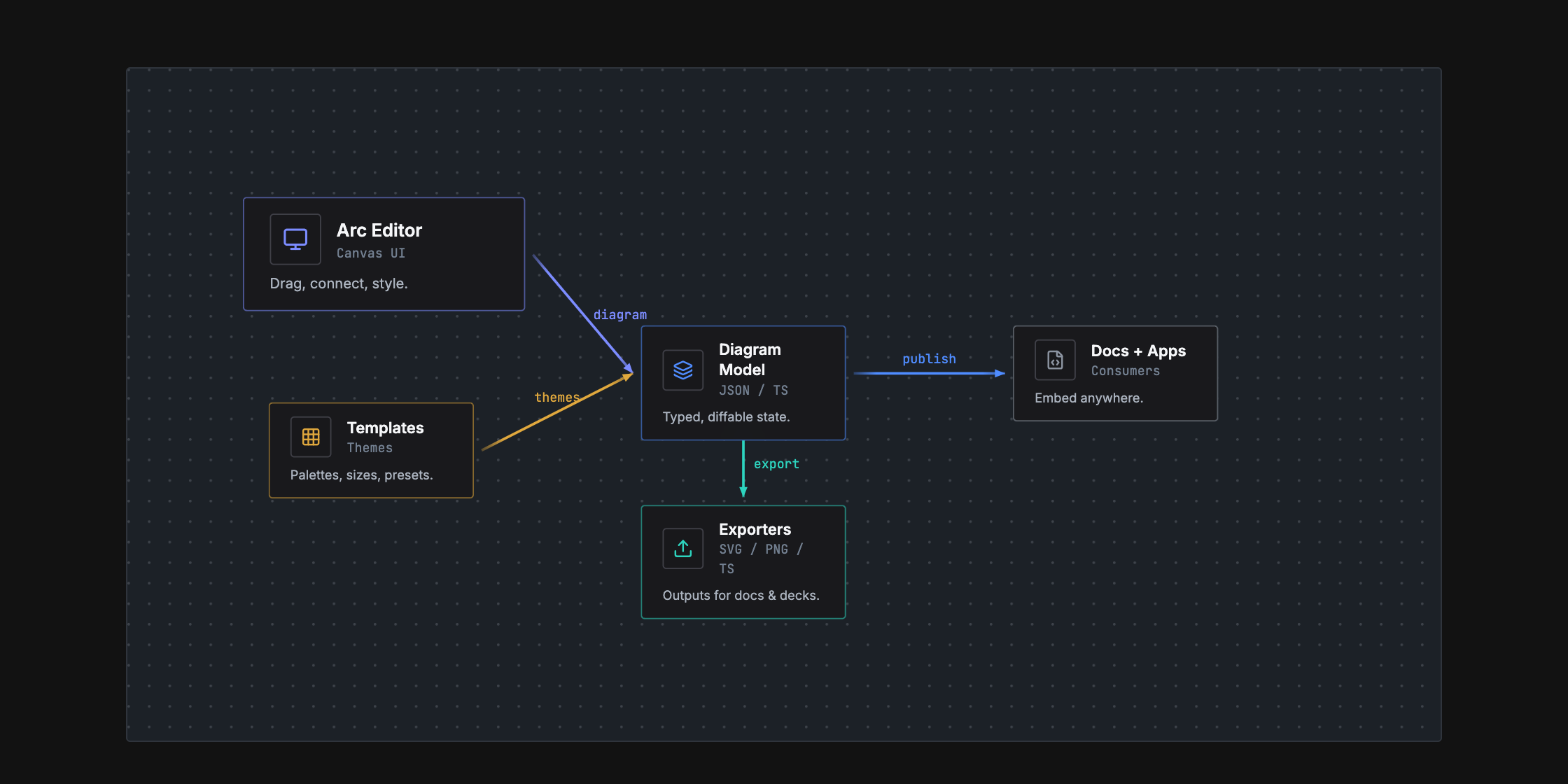
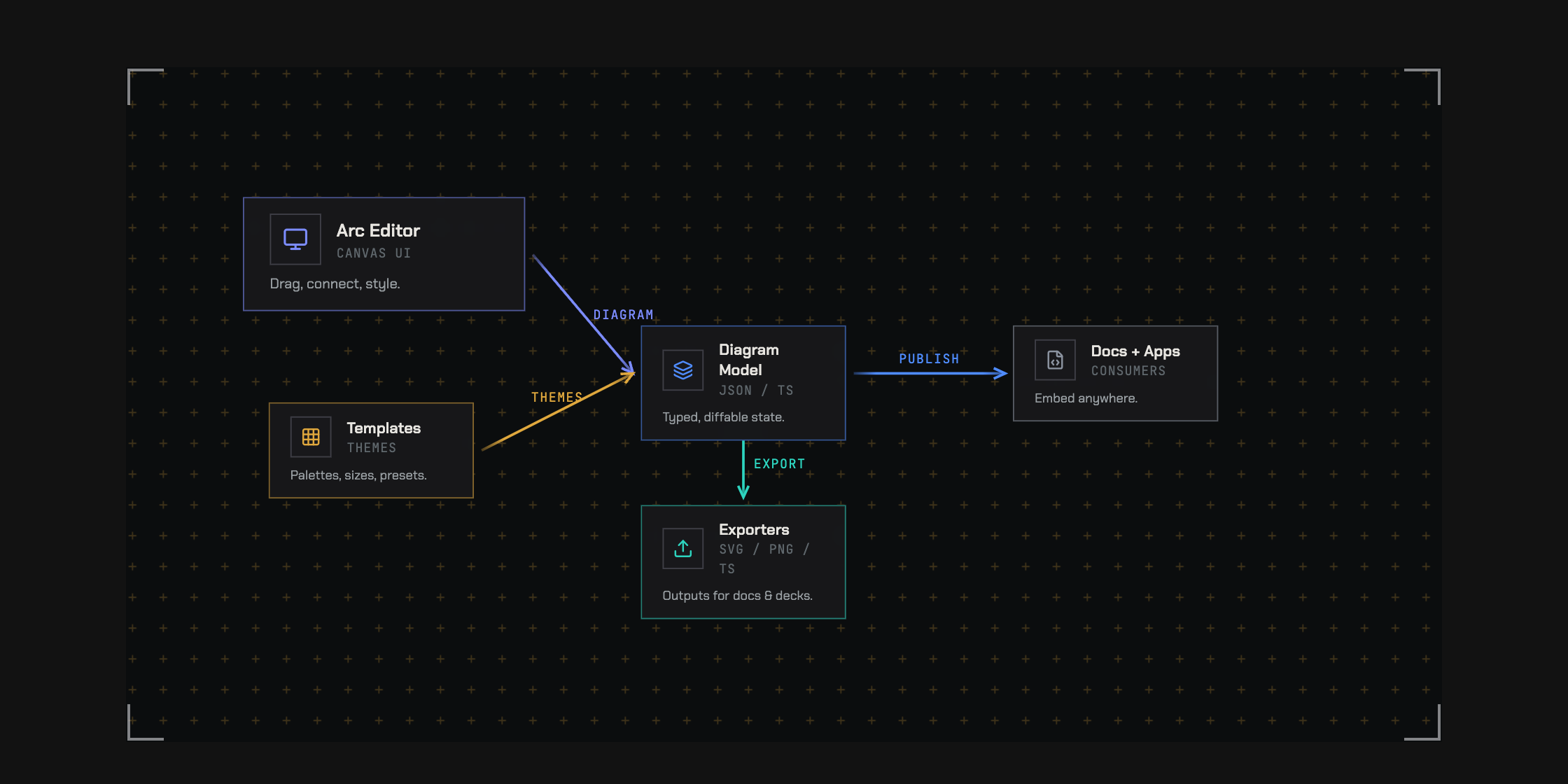
The themes are default, warm, cool, mono, engineering, workbench,
tactical, command, spacex, claude, and codex. Studio shell skins and
interface density are configurable independently of the diagram.
Build with agents. Review with people.
Arc gives agents a concrete authoring loop: write the document, arrange it, check it, render it, and revise it. Typed data and a closed JSON Schema define the format. Coded diagnostics identify problems such as dangling connections, overlaps, and invalid routes, with suggested fixes an agent can act on.
Together, the CLI and MCP server provide validation, automatic layout, rendering, diffs, and a handoff into the visual studio. A person can inspect the result and refine the drawing directly.
The arc-diagrams skill adds composition patterns for request paths, boundaries,
comparisons, and layered illustrations, with editable examples and a render-and-review
loop that checks the result at its intended reading size.
npx skills add hudsonkit/arc --skill arc-diagrams
Attach repository paths, line ranges, and commits to the nodes they describe. Review structural changes on the diagram itself: highlight additions, ghost removed elements, and show where components moved.
import { ArcDiagram, diffDiagram } from '@hudsonkit/arc'

<ArcDiagram data={head} delta={diffDiagram(base, head)} />
That gives a code review both the changed source and a visual explanation of the changed structure.
Structural diffs · Agent guide · Authoring benchmarks
Take the explanation where it belongs
| Destination | What you can use |
|---|---|
| Your product or documentation | Interactive React diagrams, sequence players, and editor components. |
| A design review | Guided views, source references, and structural diff overlays. |
| A page, document, or deck | SVG, PNG, or standalone HTML with the rendered drawing. |
| A demo or announcement | Animated SVG, GIF, or MP4 from authored flow routes. |
| A terminal or Markdown file | ASCII and Unicode diagrams. |
| An agent's workspace | CLI, MCP, schema, authoring skill, and machine-readable diagnostics. |
Flow timing is deterministic. Display an exact instant, export it as a still, or render a repeatable sequence of frames. The studio also copies source and creates URLs carrying diagram data; browser session links reopen work stored in that browser.
Get started
Try the experience: open Arc or operate the connection pool.
Build with React: install the main package in a React 18 or 19 project.
npm install @hudsonkit/arc
Import the stylesheet once and give the diagram a container with a height. This complete example renders a request traveling from an app through an API to a database:
import { ArcDiagram, type ArcDiagramData } from '@hudsonkit/arc'
import '@hudsonkit/arc/arc.css'

const diagram: ArcDiagramData = {
  layout: { width: 640, height: 240 },
  nodes: {
    app: { x: 40, y: 80, size: 'm' },
    api: { x: 250, y: 80, size: 'm' },
    db:  { x: 460, y: 80, size: 'm' },
  },
  nodeData: {
    app: { name: 'Web app', kind: 'frontend' },
    api: { name: 'API', kind: 'service' },
    db:  { name: 'Database', kind: 'database' },
  },
  connectors: [
    { id: 'request', from: 'app', to: 'api', fromAnchor: 'right', toAnchor: 'left', style: 'data' },
    { id: 'query', from: 'api', to: 'db', fromAnchor: 'right', toAnchor: 'left', style: 'data' },
  ],
  connectorStyles: {
    data: { color: 'blue', strokeWidth: 2 },
  },
  flows: [
    { id: 'load', legs: [{ id: 'request' }, { id: 'query' }], duration: 2, marker: 'packet' },
  ],
}

export function Architecture() {
  return (
    <div style={{ height: 360 }}>
      <ArcDiagram data={diagram} theme="engineering" mode="dark" defaultZoom="fit" />
    </div>
  )
}
Arc bundles its other runtime code and CSS. No Tailwind configuration is
required. Use flowTime={1.25} to inspect a specific instant, or add views
and showViews to turn the diagram into a guided walkthrough.
Start with a Mermaid sequence
Install @hudsonkit/arc-viewer for the native sequence player:
npm install @hudsonkit/arc-viewer
import { ArcMermaidPlayer } from '@hudsonkit/arc-viewer'

const source = `sequenceDiagram
  participant App
  participant API
  App->>API: Load architecture
  API-->>App: Typed diagram`

export function RequestStory() {
  return <ArcMermaidPlayer source={source} mode="light" />
}
Connect an agent
Add the MCP server to a client that supports stdio:
{
  "mcpServers": {
    "arc": {
      "command": "npx",
      "args": ["-y", "@hudsonkit/arc-mcp"]
    }
  }
}
The published MCP server provides validation, structural diff, automatic
layout, ASCII/SVG/PNG/animation/HTML rendering, TypeScript generation, and editor
handoff. It also serves the schema, authoring skill, and LLM guide as resources.
Use bun run mcp to run the server from a source checkout. The live review
workflow shown above is a separate private preview.
Use the terminal
The CLI requires Node.js 22 or newer. Run these commands in a project with
@hudsonkit/arc installed:
npx arc check diagram.json --json --strict
npx arc diff base.json head.json --summary
npx arc render diagram.json --out diagram.svg
npx arc render diagram.json --out flow.mp4 --duration 4 --fps 12
npx arc schema
npx arc-ascii diagram.json --charset ascii --max-width 80
arc check reports format, semantic, and composition problems. --strict also
fails on warnings. Render receipts include source and output hashes.
CLI PNG rendering needs Chrome or Chromium; GIF and MP4 also need ffmpeg.
Use ARC_CHROME and ARC_FFMPEG to select executables.
Choose your package
| Package | What it provides |
|---|---|
@hudsonkit/arc |
Main React renderer and editor components, themes, layout, validation, structural diffs, flow helpers, ASCII rendering, and the arc CLI. |
@hudsonkit/arc-viewer |
Lightweight architecture viewer, native Mermaid sequence renderer/player, and Mermaid import. |
@hudsonkit/arc-iso |
Tiered isometric rendering with React and vanilla JavaScript/static SVG APIs. |
@hudsonkit/arc-mcp |
Diagram tools and resources for MCP clients. |
Architecture uses ArcDiagramData; native sequences use ArcSequenceDocument;
tiered isometric scenes use DiagramConfig. Each model preserves the structure
its renderer needs. Animated flow markers, guided camera framing, and visual
delta overlays currently render in 2D. The sequence guide
and import guide document supported Mermaid syntax.
Explore the API
| Area | Reference |
|---|---|
| Nodes, relationships, groups, player controls, and flow timing | Component and CLI API |
| Ordered walkthroughs and node-triggered explanations | Views · Focus stories |
| Automatic placement and group layout | Group layout |
| Native sequence playback and Mermaid migration | Sequences · Import |
| Tiered scenes, materials, and spatial interaction | Isometric API |
| Visual identity and output formats | Themes · Exports |
| Source references, diagnostics, and change review | Schema · Diffs |
| Agent authoring and verification | MCP · Benchmarks |
Where we're going
We want the agents changing a system to maintain its visual explanation in the same workflow. Arc already provides the format, source references, validation, rendering, and structural review. Automatic impact discovery and drift notifications are the next part of that loop.
The agent workflow and roadmap
Example output
The source of the microservices diagram in the walkthrough section:
const diagram: ArcDiagramData = {
  layout: { width: 850, height: 340 },
  nodes: {
    client:  { x: 40,  y: 130, size: 'm' },
    gateway: { x: 220, y: 130, size: 'l' },
    auth:    { x: 460, y: 40,  size: 'm' },
    api:     { x: 460, y: 140, size: 'm' },
    cache:   { x: 460, y: 240, size: 's' },
    db:      { x: 680, y: 140, size: 'm' },
  },
  nodeData: {
    client:  { icon: 'Monitor',  name: 'Client',      subtitle: 'React App', color: 'violet' },
    gateway: { icon: 'Server',   name: 'API Gateway', subtitle: 'Express', description: 'Load balanced', color: 'emerald' },
    auth:    { icon: 'Shield',   name: 'Auth',        subtitle: 'JWT', color: 'amber' },
    api:     { icon: 'Code',     name: 'API',         subtitle: 'REST', color: 'blue' },
    cache:   { icon: 'Zap',      name: 'Cache',       color: 'sky' },
    db:      { icon: 'Database', name: 'PostgreSQL',  subtitle: 'Primary', color: 'blue' },
  },
  connectors: [
    { from: 'client',  to: 'gateway', fromAnchor: 'right',       toAnchor: 'left', style: 'https' },
    { from: 'gateway', to: 'auth',    fromAnchor: 'right',       toAnchor: 'left', style: 'internal' },
    { from: 'gateway', to: 'api',     fromAnchor: 'right',       toAnchor: 'left', style: 'internal' },
    { from: 'gateway', to: 'cache',   fromAnchor: 'bottomRight', toAnchor: 'left', style: 'cache' },
    { from: 'api',     to: 'db',      fromAnchor: 'right',       toAnchor: 'left', style: 'sql' },
  ],
  connectorStyles: {
    https:    { color: 'violet',  strokeWidth: 2, label: 'HTTPS' },
    internal: { color: 'emerald', strokeWidth: 2 },
    cache:    { color: 'sky',     strokeWidth: 1, dashed: true },
    sql:      { color: 'blue',    strokeWidth: 2, label: 'SQL' },
  },
}
Pertanyaan tentang Arc MCP
Bagaimana cara menambahkan Arc MCP ke Claude Code?
Jalankan claude mcp add arc -- npx -y @hudsonkit/arc-mcp di terminal Anda. Tambahkan --scope user agar tersedia di semua proyek.
Bagaimana cara menambahkan Arc MCP ke Cursor?
Buka ~/.cursor/mcp.json dan tambahkan server di bawah mcpServers, menggunakan config Cursor yang ditunjukkan di bagian instalasi di atas.
Format diagram apa yang bisa diimpor oleh Arc?
Arc mengimpor Mermaid flowchart dan state diagram menjadi data arsitektur yang dapat diedit, serta dapat merender dan memutar Mermaid sequence diagram secara native.
Format ekspor apa saja yang didukung oleh Arc?
Arc mendukung ekspor ke format PNG, SVG, GIF, MP4, React atau HTML, ASCII/Unicode, serta JSON atau TypeScript yang dapat diedit.
Apakah Arc membutuhkan Mermaid.js saat runtime?
Tidak. Arc memiliki model sequence, layout, rendering SVG, dan playback sendiri, sehingga Mermaid.js tidak diperlukan.
Bisakah saya mengedit diagram secara visual alih-alih menggunakan kode?
Ya, Arc studio menampilkan gambar dan source code secara berdampingan, sehingga menarik (dragging) sebuah node akan memperbarui JSON, dan mengedit JSON akan memperbarui canvas.
Bisakah AI agent mengerjakan diagram sementara saya melihatnya?
Private preview memungkinkan agent untuk menambah dan memindahkan node melalui MCP dalam sesi architecture review secara live saat canvas diperbarui.