
Rigor MCP server
Commit 13 Nov 2026Memungkinkan tim QA untuk melakukan pengujian deterministik berbasis natural language pada MCP tools, resources, prompts, dan contracts tanpa perlu menulis kode pengujian.
Juga dikenal sebagai FusionOnePlatform/mcprigor
- Stars
- 3
- Tools
- —
- Unduhan, 30 hari
- —
- Versi terbaru
- —
- Commit terakhir
- 13 Nov 2026
- Lisensi
- Apache-2.0
Apa itu Rigor MCP?
Memungkinkan tim QA untuk melakukan pengujian deterministik berbasis natural language pada MCP tools, resources, prompts, dan contracts tanpa perlu menulis kode pengujian.
Ringkasan dibuat dari README proyek
Tentang Rigor MCP server
Tim QA dapat melakukan pengujian deterministik berbasis natural language pada MCP tools, resources, prompts, dan contracts tanpa harus menulis kode pengujian tradisional. Dengan menggunakan sintaks khusus, tester dapat menentukan ekspektasi untuk tool calls, resource reads, dan prompt outputs. Pendekatan ini memastikan pengujian tetap dapat diprediksi karena tidak ada model AI yang digunakan untuk menginterpretasikan instruksi pengujian.
Pengguna dapat menjalankan pengujian terhadap local stdio servers, Python servers, atau remote HTTP servers menggunakan environment variables untuk autentikasi. Sistem ini mendukung berbagai workflow termasuk workspace QA berbasis browser lokal, command-line interface untuk integrasi CI, dan interactive author mode untuk membuat test dari server yang sedang berjalan. Tersedia juga command parity untuk membandingkan perilaku antara lingkungan lokal dan lingkungan yang sudah dideploy.
Developer dapat mengelola kebutuhan pengujian yang kompleks melalui skenario data-driven menggunakan adapter CSV, JSON, atau SQL. Tool ini menyertakan fitur canggih seperti security audits, performance budgeting dengan limit percentile, dan composition checks untuk armada multi-server. Tool ini terintegrasi ke dalam workflow pengembangan melalui ekstensi VS Code dan menyediakan laporan HTML mendetail dengan timeline bukti interaktif.
Apa yang bisa Anda lakukan dengannya
- 1Verifikasi akurasi output toolDeveloper dapat menginstruksikan sistem untuk memanggil tool tertentu dengan argumen yang telah ditentukan dan memeriksa apakah structured content yang dikembalikan sesuai dengan nilai yang diharapkan.
- 2Bandingkan lingkungan lokal dan remoteTim dapat menjalankan skenario pengujian yang sama terhadap server pengembangan lokal dan server QA yang sudah dideploy untuk mengidentifikasi perbedaan semantik.
- 3Otomatisasi pengujian dengan data eksternalTester dapat mengeksekusi tool call yang sama di berbagai baris data yang diimpor dari file seperti Excel atau database SQL.
- 4Generate test dari server yang sedang berjalanAlih-alih menulis file secara manual, pengguna dapat menggunakan proses terpandu untuk menemukan operasi dan secara otomatis membuat file pengujian yang siap ditinjau.
Ditulis berdasarkan README proyek. Setiap use case diperiksa terhadap kutipan dari README tersebut.
Konfigurasi
MCP_TOKEN
| Nama | Deskripsi | Tipe |
|---|---|---|
| MCP_TOKEN | — |
Pengecekan otomatis
Berjalan 14 Nov 2026Laporan lengkap →Belum diverifikasi. Sebuah server memerlukan skor 80, tidak ada temuan serius, dan data yang cukup untuk kami periksa. Cara kerja checks · Yang perlu diperbaiki untuk menambah poin

- Source repository terhubung dan dapat dijangkaufusiononeplatform/mcprigor is public and reachablegithub.com/fusiononeplatform/mcprigor ↗Lolos
- Nama paket mencantumkan repositori ini sebagai sumbernyaTidak diperiksa
- Provenance build (atestasi Sigstore)Tidak diperiksa
- Lisensi open source (OSI)Apache-2.0spdx.org/licenses/Apache-2.0.html ↗Lolos
- Ada commit atau release dalam satu tahun terakhirLast commit or release 2026-11-13github.com/fusiononeplatform/mcprigor ↗Lolos
- OpenSSF ScorecardTidak diperiksa
- Nama package tidak mirip dengan package populerTidak diperiksa
- Tidak ada advisory kritis pada paket atau dependensinyaTidak diperiksa
- Tidak ada instruksi tersembunyi untuk model0 tool descriptions and the README read; no override phrases, credential paths or hidden charactersLolos
- Tools yang bersifat destruktif telah diberi labelTidak diperiksa
- Endpoint remote merespons handshake MCPTidak diperiksa
README
Lihat di GitHubMCP Rigor







Natural-language testing for Model Context Protocol servers.
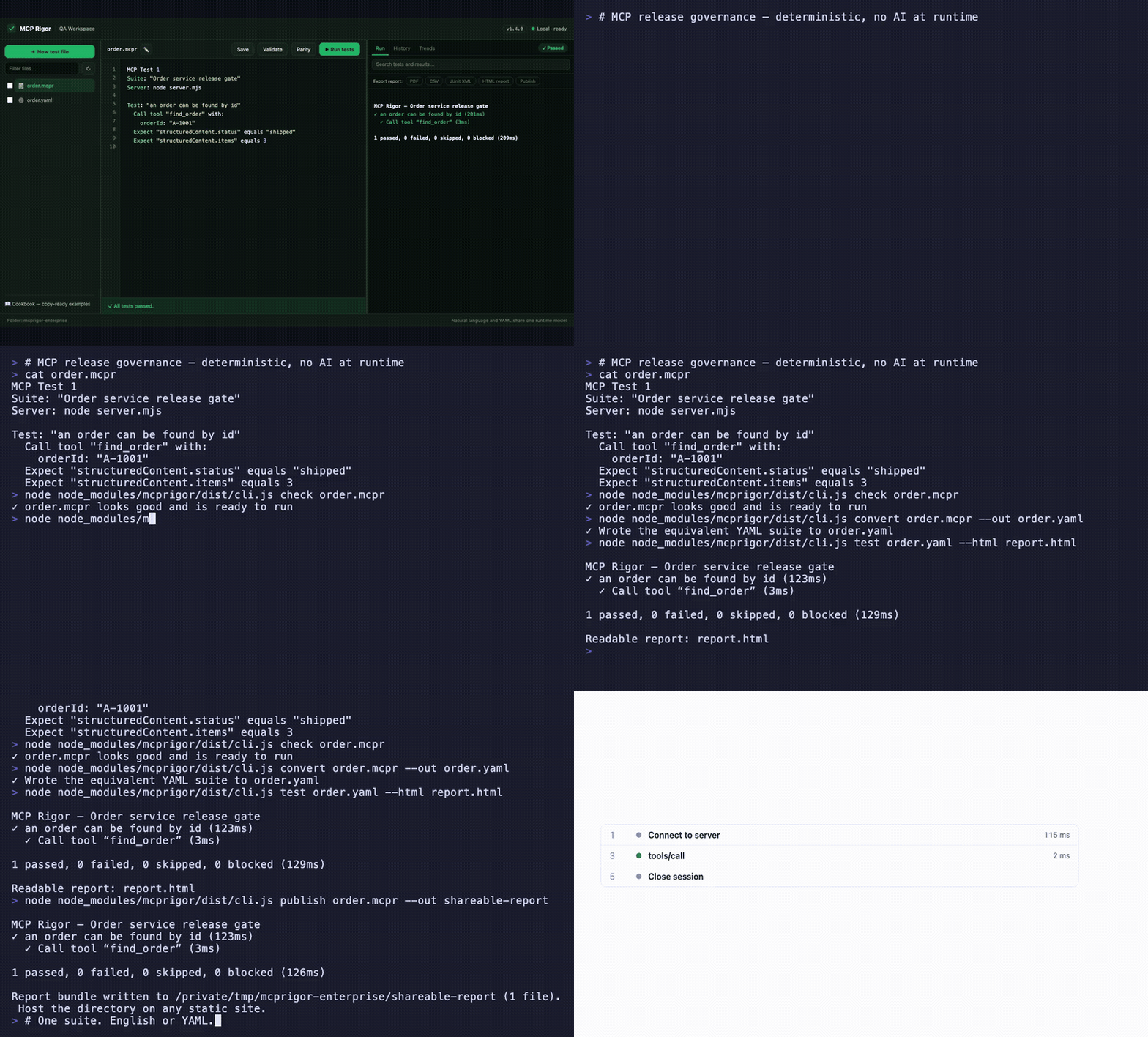
Visual QA workspace · English ⇄ YAML parity · interactive evidence timeline · CLI, CI, and shareable reports — watch the MP4
MCP Rigor lets QA teams test MCP tools, resources, prompts, contracts, and transports without writing test code. Tests are deterministic: no AI model interprets the wording.
Status:
1.5.0stable. Node.js 20 or 22 is required.
Install
MCP Rigor is published on npm as mcprigor. The package ships compiled code, ready to run:
npm install mcprigor
Or try it instantly without installing:
npx mcprigor@latest init tests/acceptance.mcpr
Use npx mcprigor in commands below, or install globally (npm install -g mcprigor) to use mcprigor directly. In a project where tests run only during development or CI, npm install --save-dev mcprigor keeps it out of production dependencies.
Install from source
Only needed if you want to modify MCP Rigor itself:
git clone https://github.com/FusionOnePlatform/mcprigor.git
cd mcprigor
npm ci
npm run check   # build + full test suite
npm link        # optional: use your local build as the global `mcprigor`
Write your first test
Create calculator.mcpr:
MCP Test 1

Suite: "Calculator acceptance tests"
Server: node dist/server.js

Test: "Adding 20 and 22 gives 42"
  Call tool "add" with:
    a: 20
    b: 22

  Expect "structuredContent.sum" equals 42
Check the wording, then run it:
npx mcprigor check calculator.mcpr
npx mcprigor test calculator.mcpr
Create a browser report:
npx mcprigor test calculator.mcpr --html report.html
Expected summary:
✓ Adding 20 and 22 gives 42

1 passed, 0 failed, 0 skipped, 0 blocked
Use the QA workspace
Start the local browser interface:
npx mcprigor workspace .
Or expose MCP Rigor to AI coding agents as an MCP server (docs):
npx mcprigor serve .
Open the printed http://127.0.0.1:... URL. You can select a suite, edit it, validate the wording, run tests, run transport parity, and review results.
The workspace is loopback-only and does not accept arbitrary commands from the browser.
Connect to an MCP server
Local stdio server:
Server: node dist/server.js
Python server:
Server: python -m my_mcp_server
Streamable HTTP server:
MCP URL: https://qa.example.com/mcp

Server options:
  headers:
    Authorization: "Bearer ${env.MCP_TOKEN}"
Run with an environment variable:
MCP_TOKEN="your-token" npx mcprigor test customer.mcpr
Do not place reusable credentials directly in test files.
Common test actions
Call tool "search" with:
  query: "red shoes"

Read resource "catalog://status"

Get prompt "write_summary" with:
  topic: "Release quality"

Expect it succeeds
Expect an error
Expect "structuredContent.total" equals 2
Expect "content[0].text" contains "complete"
Expect "items" has 3 items
See the natural-language cookbook for copy-ready examples.
Compare local and deployed behavior
MCP Test 1
Suite: "Calculator parity"

Compare target "Local": node dist/server.js
Compare target "QA": https://qa.example.com/mcp

Test: "Addition is consistent"
  Call tool "add" with:
    a: 20
    b: 22
  Expect "structuredContent.sum" equals 42
npx mcprigor parity calculator-parity.mcpr
MCP Rigor runs every scenario against both targets and reports semantic differences.
Create a test from a live server
Provide a small .mcpr file containing the target, then run:
npx mcprigor author server.mcpr --out search-customer.mcpr
The guided author discovers operations, asks for inputs, previews a response, and writes a reviewable natural-language test.
Use data-driven tests
Test: "Calculator examples"
  For each row:
    | caseId | a  | b  | expected |
    | basic  | 2  | 3  | 5        |
    | larger | 20 | 22 | 42       |

  Call tool "add" with:
    a: "${row.a}"
    b: "${row.b}"

  Expect "structuredContent.sum" equals "${row.expected}"
CSV, JSON, YAML, Excel, REST, Google Sheets, SQL adapters, typed columns, filters, joins, and deterministic sampling are also supported.
Use in CI
- uses: actions/setup-node@v4
  with:
    node-version: 20
- run: npm ci
- run: npx mcprigor check tests/acceptance.mcpr
- run: npx mcprigor test tests/acceptance.mcpr --junit reports/mcp.xml --evidence .mcprigor/ci-run
Exit codes:
| Code | Meaning |
|---|---|
0 |
Tests passed |
1 |
A test or comparison failed |
2 |
Usage, language, or configuration problem |
3 |
Server, transport, or internal failure |
Main commands
mcprigor workspace [DIRECTORY]        Start the local QA interface
mcprigor init FILE                    Create an example test
mcprigor check FILE                   Validate without connecting
mcprigor test FILE                    Run natural-language or YAML tests
mcprigor author TARGET --out FILE     Build a test interactively
mcprigor parity FILE                  Compare named targets
mcprigor audit FILE                   Run deterministic security probes
mcprigor composition-check FILE       Check a mounted server fleet
mcprigor composition-discover FILE    Save a combined fleet contract
mcprigor composition-drift FILE       Gate fleet contract drift
mcprigor discover FILE                Save the live MCP contract
mcprigor contract-check LOCK --target FILE
mcprigor evidence-show DIRECTORY
Performance and governance features new in 1.5.0:
Expect the call to finish within 800ms, percentile budgets, and--fail-on-regressionmcprigor auditdeterministic security probes with scored PDF/CSV/JSON reports- Multi-server test routing, collision checks, combined fleet locks, and composition drift
- GitHub Action with rich PR reports
- Live MCP surface and schema coverage with
--fail-under - Scheduled HTTP monitoring with failure/recovery webhooks
- Clickable HAR-style session timeline in HTML reports
- Contract drift markdown as a downloadable Action artifact
mcprigor publish— shareable static report URLs
See the complete CLI reference.
Editor support
The VS Code extension in editors/vscode adds syntax highlighting and inline mcprigor check diagnostics for .mcpr files. Package it with npx @vscode/vsce package from that directory, or install a release .vsix with code --install-extension.
Choose your next guide
- New QA user: Getting started
- Writing scenarios: Natural-language cookbook
- Using the browser UI: QA workspace
- Setting up targets and CI: Engineer setup
- Fixing failures: Troubleshooting
- All documentation: Documentation index
Scope and safety
MCP Rigor performs black-box behavior and contract testing. It complements MCP Inspector and official MCP Conformance; it does not provide certification.
Remote data and custom extensions are disabled unless explicitly enabled. Reports and evidence are sanitized, but business response data may still be sensitive. Review security and retention before storing CI artifacts.
Contributing
See CONTRIBUTING.md, then run:
npm ci
npm run check
Apache-2.0 licensed.
Pertanyaan tentang Rigor MCP
Bisakah saya menggunakan MCP Rigor untuk membandingkan lingkungan server yang berbeda?
Ya, command parity memungkinkan Anda membandingkan target lokal dengan target QA untuk melaporkan perbedaan semantik.
Apakah ini mendukung data-driven testing?
Ya, ini mendukung data-driven tests menggunakan berbagai adapter termasuk CSV, JSON, YAML, Excel, REST, Google Sheets, dan SQL.