
Memungkinkan AI agent untuk menulis, memvalidasi, dan memperbaiki definisi form JSON untuk aplikasi React, Vue, Swift, dan Kotlin.
Juga dikenal sebagai formhaus-dev/formhaus, @formhaus/mcp
- Stars
- 8
- Tools
- —
- Unduhan, 30 hari
- 8.002
- Versi terbaru
- —
- Commit terakhir
- 15 Nov 2026
- Lisensi
- MIT
Apa itu formhaus MCP?
Memungkinkan AI agent untuk menulis, memvalidasi, dan memperbaiki definisi form JSON untuk aplikasi React, Vue, Swift, dan Kotlin.
Ringkasan dibuat dari README proyek
Tentang formhaus MCP server
Formhaus menyediakan sistem untuk membuat satu definisi JSON tunggal yang mengelola field, validasi, dan logika branching untuk form. Pendekatan ini memungkinkan developer untuk menulis form satu kali dan merendernya di berbagai platform termasuk React, Vue, Swift, dan Kotlin. Core engine-nya bersifat framework-agnostic dan dapat digunakan di lingkungan Svelte atau vanilla JavaScript.
Developer dapat menggunakan MCP server secara lokal via npx untuk memungkinkan AI agent seperti Claude Desktop, Cursor, atau Claude Code untuk menulis, memvalidasi, dan memperbaiki definisi JSON ini. Bagi yang membutuhkan solusi hosted, Formhaus Cloud menawarkan remote MCP server yang memungkinkan agent untuk mempublikasikan form dan membaca respons secara langsung. Sistem ini mendukung fitur kompleks seperti multi-step branching, conditional fields, dan internasionalisasi melalui katalog translasi.
Apa yang bisa Anda lakukan dengannya
- 1Validasi dan perbaikan definisi JSONDeveloper dapat menggunakan MCP server untuk memastikan JSON form mereka benar secara sintaksis dan logis.
- 2Prototyping form di design toolsDesigner dapat mengubah definisi JSON menjadi prototype interaktif atau flow maps di dalam Figma.
Ditulis berdasarkan README proyek. Setiap use case diperiksa terhadap kutipan dari README tersebut.
Cara menginstal formhaus MCP
Format diverifikasi 10 Nov 2026Tambahkan ke CursorTambahkan ke GooseInstal formhaus MCP di Claude Code
$ claude mcp add formhaus -- npx -y @formhaus/mcpInstal formhaus MCP di Cursor
~/.cursor/mcp.json
{
  "mcpServers": {
    "formhaus": {
      "command": "npx",
      "args": [
        "-y",
        "@formhaus/mcp"
      ]
    }
  }
}Instal formhaus MCP di VS Code
.vscode/mcp.json
{
  "servers": {
    "formhaus": {
      "type": "stdio",
      "command": "npx",
      "args": [
        "-y",
        "@formhaus/mcp"
      ]
    }
  }
}Instal formhaus MCP di VS Code CLI
$ code --add-mcp '{"name":"formhaus","type":"stdio","command":"npx","args":["-y","@formhaus/mcp"]}'Instal formhaus MCP di Claude Desktop
claude_desktop_config.json
{
  "mcpServers": {
    "formhaus": {
      "command": "npx",
      "args": [
        "-y",
        "@formhaus/mcp"
      ]
    }
  }
}Instal formhaus MCP di Codex
$ codex mcp add formhaus -- npx -y @formhaus/mcpInstal formhaus MCP di Codex config.toml
~/.codex/config.toml
[mcp_servers.formhaus]
command = "npx"
args = ["-y", "@formhaus/mcp"]
Instal formhaus MCP di Gemini CLI
$ gemini mcp add -s user formhaus npx -- -y @formhaus/mcpInstal formhaus MCP di Gemini settings.json
~/.gemini/settings.json
{
  "mcpServers": {
    "formhaus": {
      "command": "npx",
      "args": [
        "-y",
        "@formhaus/mcp"
      ]
    }
  }
}Dijalankan oleh HostedMCP pada 16 Nov 2026
Kami menjalankan perintah ini untuk @formhaus/mcp 0.15.3 di container terisolasi tanpa jaringan dan tanpa key. Server menjawab dan mendaftar 12 tool.
Pengecekan otomatis
Berjalan 14 Nov 2026Laporan lengkap →Lolos checks otomatis kami. Ini bukan audit keamanan: baca kodenya dan berikan server akses paling terbatas yang dibutuhkannya. Cara kerja checks

- Source repository terhubung dan dapat dijangkauformhaus-dev/formhaus is public and reachablegithub.com/formhaus-dev/formhaus ↗Lolos
- Nama paket mencantumkan repositori ini sebagai sumbernya@formhaus/mcp names formhaus-dev/formhaus as sourcenpmjs.com/package/@formhaus/mcp ↗Lolos
- Provenance build (atestasi Sigstore)Sigstore attestation for @formhaus/mcpnpmjs.com/package/@formhaus/mcp/v/0.15.3#provenance ↗Lolos
- Lisensi open source (OSI)MITspdx.org/licenses/MIT.html ↗Lolos
- Ada commit atau release dalam satu tahun terakhirLast commit or release 2026-11-08github.com/formhaus-dev/formhaus ↗Lolos
- OpenSSF ScorecardTidak diperiksa
- Nama package tidak mirip dengan package populerNo popular package one edit away from @formhaus/mcpLolos
- Tidak ada advisory kritis pada paket atau dependensinyaTidak diperiksa
- Tidak ada instruksi tersembunyi untuk model0 tool descriptions and the README read; no override phrases, credential paths or hidden charactersLolos
- Tools yang bersifat destruktif telah diberi labelTidak diperiksa
- Endpoint remote merespons handshake MCPTidak diperiksa
README
Lihat di GitHubAdd Formhaus to your coding agent
npx formhaus
Adds the Formhaus MCP server to Claude Code, Codex, Cursor and Claude Desktop. Writes, checks and repairs definitions locally, with no account · Setup for each client
Two independent ways to use it:
-
Use the library. MIT, no account, no key. The core is framework-agnostic and runs the form in any app; React and Vue renderers are ready to use. Your submit handler sends the data wherever you want. CI tests React 18 and 19, and Vue 3.3 and 3.5.
npm install @formhaus/core # plus @formhaus/react or @formhaus/vue -
Use Formhaus Cloud. A hosted form backend: a submission endpoint with server validation, a dashboard and webhooks, plus hosted links, embeds and a visual builder. The first form needs no account.
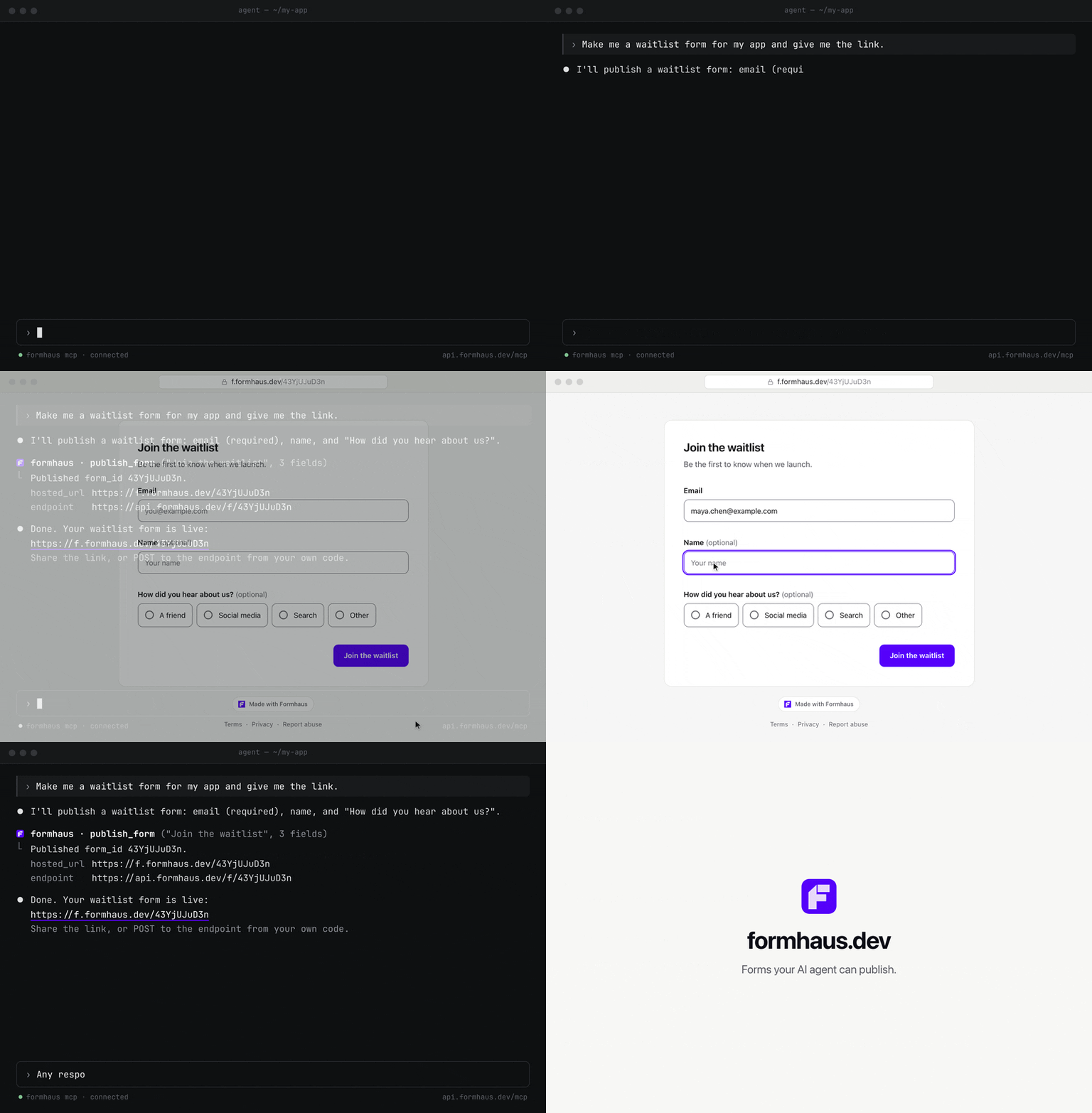
Build in the browser at app.formhaus.dev, or add the remote MCP server and ask your agent: "Make me a waitlist form and give me the link."
claude mcp add --transport http formhaus https://api.formhaus.dev/mcp
What you get
| Feature | |
|---|---|
| One definition | Fields, validation, conditional fields, steps, branching routes, sections and repeatable groups in one JSON file you keep in git |
| React and Vue | Native renderers with accessible defaults, or your own components through components |
| Validation | Built-in rules and custom validators. validateSubmission() checks the same definition on the server |
| Agents | The MCP server writes, validates and fixes definitions. Remote MCP publishes forms and reads responses |
| i18n | Translation catalogs and keys for labels, messages and options |
| Accessibility | Labels, error summary, focus management and live regions built in |
| Small core | Zero dependencies, tree-shakable ESM |
| Figma | The plugin renders mockups, flow maps and prototypes from the same definition |
| Cloud, optional | Hosted links, embeds, a submission endpoint, CSV export and webhooks |
What it's for
- Multi-step forms with branching in React or Vue.
- Rendering a form from JSON with your own components.
- Designing the form in Figma from the same file.
- Generating and checking definitions with AI agents: Claude Code skills, the MCP server (
claude plugin marketplace add formhaus-dev/formhaus && claude plugin install formhaus@formhaus), the JSON Schema and the format specification. - Translated forms with your own catalogs, or with i18next, vue-i18n and Lokalise keys.
- A headless engine for Svelte or vanilla JS.
Example
Business accounts get a company step; everyone converges on review.
{
  "$schema": "https://formhaus.dev/schema/form-definition.json",
  "id": "signup",
  "title": "Sign up",
  "submit": { "label": "Create account" },
  "steps": [
    {
      "id": "account",
      "title": "Account",
      "fields": [
        { "key": "email", "type": "email", "label": "Email", "validation": { "required": true } },
        { "key": "kind", "type": "radio", "label": "Account type", "autoAdvance": true,
          "options": [{ "value": "personal", "label": "Personal" }, { "value": "business", "label": "Business" }] }
      ],
      "routes": [
        { "to": "company", "show": [{ "field": "kind", "eq": "business" }] },
        { "to": "review" }
      ]
    },
    { "id": "company", "title": "Company", "routes": [{ "to": "review" }],
      "fields": [{ "key": "company", "type": "text", "label": "Company name", "validation": { "required": true } }] },
    { "id": "review", "title": "Review",
      "fields": [{ "key": "terms", "type": "checkbox", "label": "I accept the terms", "validation": { "required": true } }] }
  ]
}
import { FormRenderer } from '@formhaus/react';
import definition from './signup.json';

<FormRenderer definition={definition} onSubmit={save} />;
Compare with react-hook-form, react-jsonschema-form, JSON Forms and SurveyJS →
Packages
| Package | Description | npm |
|---|---|---|
@formhaus/core |
Zero-dependency form engine: types, validation, visibility, multi-step | npm i @formhaus/core |
@formhaus/react |
React adapter with native HTML defaults and custom component support | npm i @formhaus/core @formhaus/react |
@formhaus/vue |
Vue 3 adapter with native HTML defaults and custom component support | npm i @formhaus/core @formhaus/vue |
@formhaus/mcp |
MCP server: validate definitions and simulate paths from AI agents | claude mcp add formhaus -- npx -y @formhaus/mcp |
@formhaus/figma generates form mockups on the Figma canvas. It is not on Figma Community yet; build it locally, then import packages/figma/manifest.json.
Svelte, Solid, or anything else: use @formhaus/core directly. See the Svelte recipe.
Install
npm install @formhaus/core
If you need a framework adapter:
npm install @formhaus/core @formhaus/react   # React
npm install @formhaus/core @formhaus/vue     # Vue
Or use @formhaus/core directly with any framework. See the Svelte recipe.
Quick start
Define a form
Write the JSON by hand, or use the /formhaus:formhaus-create-form Claude Code skill to generate it from a text description, a CSV table, or a screenshot of an existing form.
{
  "$schema": "https://formhaus.dev/schema/form-definition.json",
  "id": "contact",
  "title": "Contact Us",
  "submit": { "label": "Send" },
  "fields": [
    {
      "key": "name",
      "type": "text",
      "label": "Name",
      "placeholder": "Your name",
      "validation": { "required": true, "minLength": 2 }
    },
    {
      "key": "email",
      "type": "email",
      "label": "Email",
      "placeholder": "you@example.com",
      "validation": {
        "required": true,
        "pattern": "^[^\\s@]+@[^\\s@]+\\.[^\\s@]+$",
        "patternMessage": "Please enter a valid email address"
      }
    },
    {
      "key": "message",
      "type": "textarea",
      "label": "Message",
      "placeholder": "How can we help?",
      "rows": 4,
      "validation": { "required": true }
    }
  ]
}
React
npm install @formhaus/core @formhaus/react
import { FormRenderer } from '@formhaus/react';
import definition from './contact-form.json';

function ContactPage() {
  async function handleSubmit(values: Record<string, unknown>) {
    await fetch('/api/contact', {
      method: 'POST',
      body: JSON.stringify(values),
    });
  }

  return <FormRenderer definition={definition} onSubmit={handleSubmit} />;
}
Vue
npm install @formhaus/core @formhaus/vue
<script setup lang="ts">
import { FormRenderer } from '@formhaus/vue';
import definition from './contact-form.json';

async function handleSubmit(values: Record<string, unknown>) {
  await fetch('/api/contact', {
    method: 'POST',
    body: JSON.stringify(values),
  });
}
</script>

<template>
  <FormRenderer :definition="definition" @submit="handleSubmit" />
</template>
By default, both adapters render native HTML inputs. A step can hide Next with next: false, and cancellable async hooks run before and after navigation and submission. See lifecycle hooks.
Custom components
Both adapters accept a components prop (a FieldComponentMap) that lets you swap native HTML inputs for your own UI kit.
import type { FieldComponentMap, FieldComponentProps } from '@formhaus/react';

function MyTextInput({ field, value, error, onChange, onBlur }: FieldComponentProps) {
  return (
    <div>
      <label>{field.label}</label>
      <input
        type={field.type}
        value={(value as string) ?? ''}
        placeholder={field.placeholder}
        onChange={(e) => onChange(e.target.value)}
        onBlur={onBlur}
      />
      {error && <span className="error">{error}</span>}
    </div>
  );
}

const components: FieldComponentMap = {
  text: MyTextInput,
  email: MyTextInput,
};

<FormRenderer definition={definition} onSubmit={handleSubmit} components={components} />;
<!-- MyTextInput.vue -->
<script setup lang="ts">
import type { FieldComponentProps } from '@formhaus/vue';

const props = defineProps<FieldComponentProps>();
const emit = defineEmits<{ (e: 'update:modelValue', value: unknown): void }>();
</script>

<template>
  <label>{{ props.field.label }}</label>
  <input
    :value="(props.modelValue as string) ?? ''"
    @input="emit('update:modelValue', ($event.target as HTMLInputElement).value)"
  />
</template>
<!-- Usage -->
<script setup>
import { FormRenderer } from '@formhaus/vue';
import MyTextInput from './MyTextInput.vue';
</script>

<template>
  <FormRenderer
    :definition="definition"
    :components="{ text: MyTextInput, email: MyTextInput }"
    @submit="handleSubmit"
  />
</template>
Each field component receives the full FormField descriptor, the current value, and any validation error. Implement as many or as few field types as you need. Unmapped types fall back to native HTML.
Figma plugin
@formhaus/figma renders form definitions in Figma with built-in Material 3 and iOS-like kits or with your own components. Branching forms get a flow map, multi-step forms a clickable prototype, and a generated form can be selected, edited and updated in place.
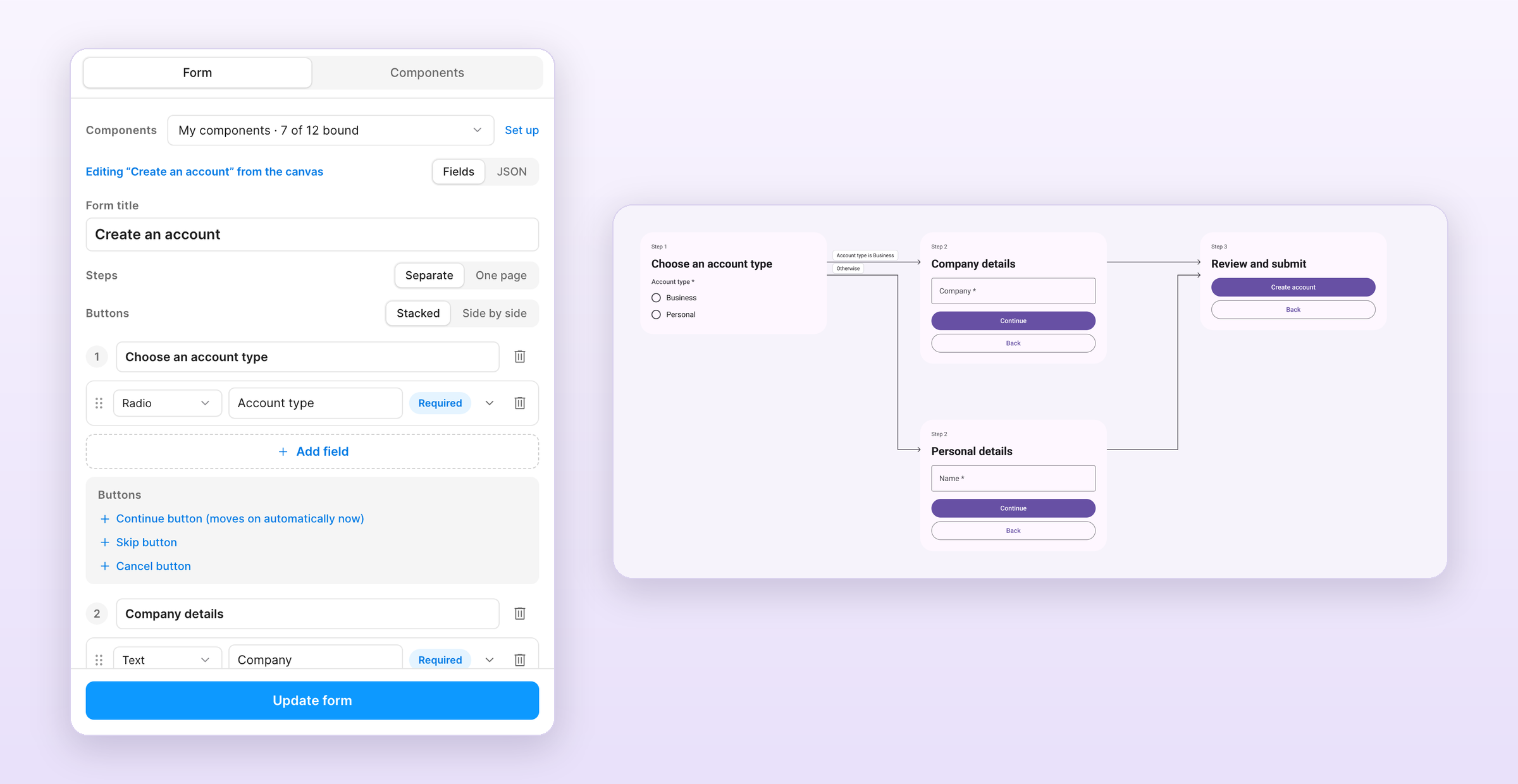
The /formhaus:formhaus-figma-connect Claude Code skill binds your library's components to the plugin. See the plugin guide for local installation.
Contributing
See CONTRIBUTING.md.
License
Pertanyaan tentang formhaus MCP
Bagaimana cara menambahkan formhaus MCP ke Claude Code?
Jalankan claude mcp add formhaus -- npx -y @formhaus/mcp di terminal Anda. Tambahkan --scope user agar tersedia di semua proyek.
Bagaimana cara menambahkan formhaus MCP ke Cursor?
Buka ~/.cursor/mcp.json dan tambahkan server di bawah mcpServers, menggunakan config Cursor yang ditunjukkan di bagian instalasi di atas.
Apa yang bisa dilakukan oleh Formhaus MCP server?
MCP server ini memungkinkan AI agent untuk menulis, memeriksa, dan memperbaiki definisi form secara lokal tanpa memerlukan akun.
Bisakah saya menggunakan Formhaus dengan UI component milik saya sendiri?
Ya, adapter React dan Vue memungkinkan Anda untuk mengganti input HTML bawaan dengan custom component Anda sendiri melalui prop components.
Apakah Formhaus mendukung multi-step forms?
Ya, definisi JSON mendukung multi-step forms termasuk field, validasi, conditional fields, steps, dan branching routes.