
EximAgent MCP server
Commit 13 Okt 2026Memungkinkan AI client untuk melakukan outbound prospecting, analisis data perdagangan, dan pemeriksaan kepatuhan untuk industri ekspor-impor.
Juga dikenal sebagai EximAgent/cursor-plugin, cursor-plugin
- Stars
- 1
- Tools
- —
- Unduhan, 30 hari
- —
- Versi terbaru
- 0.1.1
- Commit terakhir
- 13 Okt 2026
- Lisensi
- MIT
Apa itu EximAgent MCP?
EximAgent adalah MCP server. Memungkinkan AI client untuk melakukan outbound prospecting, analisis data perdagangan, dan pemeriksaan kepatuhan untuk industri ekspor-impor.
Ringkasan dibuat dari README proyek
Tentang EximAgent MCP server
EximAgent menyediakan tim khusus AI agent yang dirancang untuk para profesional di industri ekspor-impor. Layanan ini terhubung ke client seperti Claude, Cursor, dan Claude Code melalui hosted MCP connector atau command-line tool. Pengguna dapat mengintegrasikan layanan ini dengan login menggunakan akun Google via OAuth. Sistem ini bekerja melalui tiga peran agent yang berbeda: Outbound untuk mencari pembeli dan menulis pesan outreach, Analyst untuk memeriksa arus perdagangan dan tren pasar, serta Compliance untuk mengelola persyaratan regulasi.
Developer dan profesional perdagangan menggunakan server ini untuk mengakses catatan pengiriman bea cukai dan data perdagangan yang nyata. Toolset yang tersedia mencakup kapabilitas khusus untuk klasifikasi HS, pencarian tarif, dan penyaringan sanksi OFAC. Meskipun connector menangani data melalui koneksi streamable HTTP, assistant dengan akses terminal juga dapat menggunakan eximagent CLI untuk keperluan script atau daftar yang panjang. Layanan ini gratis untuk memulai dan memerlukan akun EximAgent untuk akses penuh.
Apa yang bisa Anda lakukan dengannya
- 1Identifikasi dan hubungi pembeli baruCari importir barang tertentu dari catatan bea cukai dan buat email outreach yang personal.
- 2Analisis tren perdagangan globalRiset ukuran pasar, tren harga, dan rute perdagangan utama untuk komoditas tertentu.
- 3Verifikasi kepatuhan regulasiPeriksa nama perusahaan terhadap daftar sanksi dan tentukan bea masuk yang berlaku untuk jalur perdagangan tertentu.
- 4Tentukan klasifikasi produkIdentifikasi kode HS yang tepat dan tarif terkait untuk pengiriman barang antar negara.
Ditulis berdasarkan README proyek. Setiap use case diperiksa terhadap kutipan dari README tersebut.
Cara menginstal EximAgent MCP
Format diverifikasi 10 Nov 2026Tambahkan ke CursorTambahkan ke GooseInstal EximAgent MCP di Claude Code
$ claude mcp add --transport http cursor-plugin https://mcp.eximagent.ai/mcpInstal EximAgent MCP di Cursor
~/.cursor/mcp.json
{
  "mcpServers": {
    "cursor-plugin": {
      "url": "https://mcp.eximagent.ai/mcp"
    }
  }
}Instal EximAgent MCP di VS Code
.vscode/mcp.json
{
  "servers": {
    "cursor-plugin": {
      "type": "http",
      "url": "https://mcp.eximagent.ai/mcp"
    }
  }
}Instal EximAgent MCP di VS Code CLI
$ code --add-mcp '{"name":"cursor-plugin","type":"http","url":"https://mcp.eximagent.ai/mcp"}'Instal EximAgent MCP di Codex
$ codex mcp add cursor-plugin --url https://mcp.eximagent.ai/mcpInstal EximAgent MCP di Codex config.toml
~/.codex/config.toml
[mcp_servers.cursor-plugin]
url = "https://mcp.eximagent.ai/mcp"
Instal EximAgent MCP di Gemini CLI
$ gemini mcp add -s user --transport http cursor-plugin https://mcp.eximagent.ai/mcpInstal EximAgent MCP di Gemini settings.json
~/.gemini/settings.json
{
  "mcpServers": {
    "cursor-plugin": {
      "url": "https://mcp.eximagent.ai/mcp",
      "type": "http"
    }
  }
}Pengecekan otomatis
Berjalan 14 Nov 2026Laporan lengkap →Belum diverifikasi. Sebuah server memerlukan skor 80, tidak ada temuan serius, dan data yang cukup untuk kami periksa. Cara kerja checks · Yang perlu diperbaiki untuk menambah poin

- Source repository terhubung dan dapat dijangkaueximagent/cursor-plugin is public and reachablegithub.com/eximagent/cursor-plugin ↗Lolos
- Nama paket mencantumkan repositori ini sebagai sumbernyaTidak diperiksa
- Provenance build (atestasi Sigstore)Tidak diperiksa
- Lisensi open source (OSI)MITspdx.org/licenses/MIT.html ↗Lolos
- Ada commit atau release dalam satu tahun terakhirLast commit or release 2026-10-13github.com/eximagent/cursor-plugin ↗Lolos
- OpenSSF ScorecardTidak diperiksa
- Nama package tidak mirip dengan package populerTidak diperiksa
- Tidak ada advisory kritis pada paket atau dependensinyaTidak diperiksa
- Tidak ada instruksi tersembunyi untuk model0 tool descriptions and the README read; no override phrases, credential paths or hidden charactersLolos
- Tools yang bersifat destruktif telah diberi labelTidak diperiksa
- Endpoint remote merespons handshake MCPHTTPS endpoint answered 401 (sign-in required)Lolos
README
Lihat di GitHubEximAgent plugin
EximAgent is a team of AI agents for the export-import industry, connected to Claude, Cursor and other AI clients through one MCP connector. Outbound finds importers and buyers and writes personalized outreach. Analyst digs into trade data: market size, price trends, trade flows and company profiles. Compliance handles HS classification, tariffs, landed cost and OFAC screening.
An AI sales team for export-import: Outbound, Analyst and Compliance, in Claude Code, Cursor and other AI clients. Free to start.
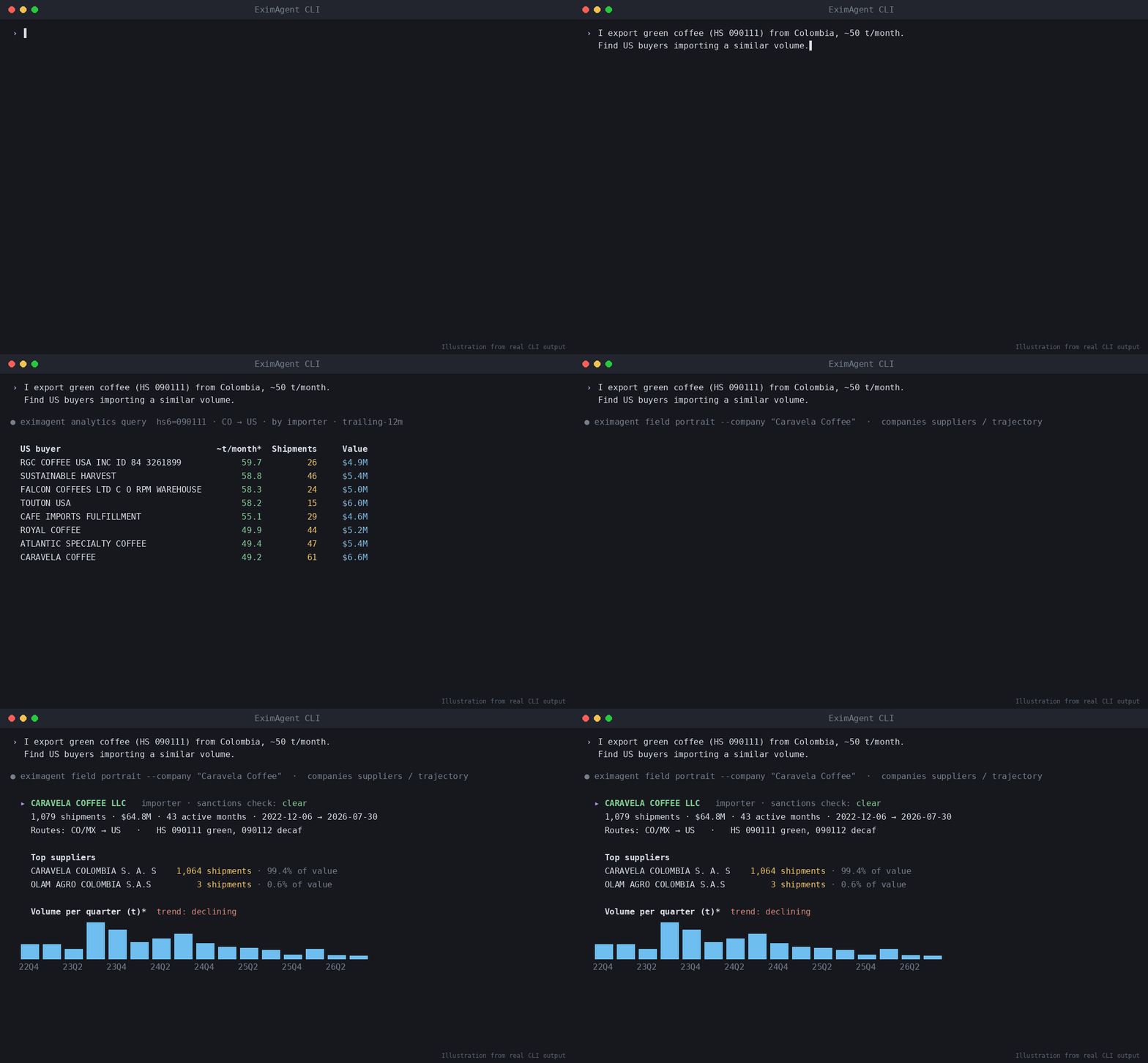
▶ Watch the demo video on YouTube
Ask in plain words, and your assistant uses EximAgent to:
- find importers, buyers and distributors from real customs shipment records
- look up HS codes, tariffs and duties for a trade lane
- screen company or person names against the OFAC sanctions list
- research a company from its website
- write personalized outreach emails to the buyers it finds
What's inside
| Part | What it does |
|---|---|
mcp.json |
Connects to the hosted EximAgent connector at https://mcp.eximagent.ai/mcp (streamable HTTP, OAuth sign-in) |
skills/eximagent |
Teaches the assistant to use the EximAgent connector: which agent and tool to use for prospecting, trade data analysis and compliance checks |
skills/eximagent-cli |
Teaches assistants that have a terminal to install and use the eximagent command-line tool |
Set up (about 2 minutes)
You need an EximAgent account. See pricing.
Cursor
Add the hosted connector to ~/.cursor/mcp.json:
{ "mcpServers": { "eximagent": { "url": "https://mcp.eximagent.ai/mcp" } } }
Then open Cursor's MCP settings, choose Connect on eximagent, and sign in with Google in the browser window that opens.
If you already use the eximagent CLI and are signed in, eximagent connect cursor writes this config for you.
Claude Code
claude mcp add --transport http eximagent https://mcp.eximagent.ai/mcp --scope user
Then run /mcp in Claude Code and sign in with Google. (CLI users who are signed in can run eximagent connect claude-code instead.)
Other assistants
- Grok Bot: open Connect Apps, find EximAgent, choose Add, then sign in with Google.
- Codex:
codex mcp add eximagent --url https://mcp.eximagent.ai/mcp, thencodex mcp login eximagent. - Claude desktop or web: Settings → Connectors → Add custom connector →
https://mcp.eximagent.ai/mcp.
Skills only (any agent that supports Agent Skills)
Add the two EximAgent skills to Claude Code, Codex, Cursor and other agents with the open-source skills CLI:
npx skills add EximAgent/cursor-plugin
To add one skill only, use --skill eximagent (for the connector) or --skill eximagent-cli (for the command-line tool). The skills work together with the EximAgent connector or the eximagent CLI.
Full connector guide: https://eximagent.ai/connectors
What you can ask
Outbound:
- "Find importers of green coffee in Germany from customs shipment records and shortlist the best five."
- "Research this buyer's website and write a personalized first email."
Analyst:
- "How big is the US market for frozen shrimp imports, and who are the top importers?"
- "Show the price trend and main trade routes for cashew nuts shipped into the Netherlands."
Compliance:
- "What HS code fits frozen shrimp, and what duty applies shipping it from Vietnam to Germany?"
- "Screen these three company names against the OFAC sanctions list."
Access
- Lookups (HS codes, tariffs, sanctions, trade questions) only read data.
- The connector reads the account you sign in with and the EximAgent trade data. It does not read your files, your mail or your other connectors.
Use the command-line tool
If your assistant can run terminal commands (for example Grok Bot, Cursor's terminal, Claude Code or Codex), it can also use
the eximagent command-line tool. This helps when the connector isn't set up, or for scripts and long lists. The
eximagent-cli skill tells the assistant how to install it with the official installer,
let you sign in yourself, and run the main commands. You sign in
in your own browser. Never paste a password or token into the chat.
Help
- Docs: https://eximagent.ai/docs
- Contact: brickai@eximagent.ai
- Command-line tool (for developers): https://github.com/EximAgent/cli
If this is useful, a star helps others find it. ⭐
License
The files in this repository (manifest, MCP config, skills and README) are released under the MIT License. See LICENSE. Using the EximAgent service is governed by the EximAgent Terms and Privacy Policy.
Pertanyaan tentang EximAgent MCP
Bagaimana cara menambahkan EximAgent MCP ke Claude Code?
Jalankan claude mcp add --transport http cursor-plugin https://mcp.eximagent.ai/mcp di terminal Anda. Tambahkan --scope user agar tersedia di semua proyek.
Bagaimana cara menambahkan EximAgent MCP ke Cursor?
Buka ~/.cursor/mcp.json dan tambahkan server di bawah mcpServers, menggunakan config Cursor yang ditunjukkan di bagian instalasi di atas.
Apakah connector ini mengakses file pribadi saya?
Tidak, connector ini hanya mengakses akun yang sudah login dan data perdagangan EximAgent, bukan file atau email Anda.