
Memungkinkan AI client untuk membaca dan mengedit halaman wiki berbasis Git, tabel data, dan whiteboard secara real time.
Juga dikenal sebagai evergreen-it-dev/folio
- Stars
- 88
- Tools
- —
- Unduhan, 30 hari
- —
- Versi terbaru
- 0.1.0
- Commit terakhir
- 12 Nov 2026
- Lisensi
- MIT
Apa itu Folio MCP?
Folio adalah MCP server. Memungkinkan AI client untuk membaca dan mengedit halaman wiki berbasis Git, tabel data, dan whiteboard secara real time.
Ringkasan dibuat dari README proyek
Tentang Folio MCP server
Mengelola pengetahuan tim melalui file berbasis Git adalah hal yang dimungkinkan oleh Folio bagi para developer dan technical writer. MCP server ini memungkinkan AI client seperti Claude Code atau Cursor untuk berinteraksi langsung dengan wiki Anda, membaca dan mengedit halaman Markdown, tabel data, serta whiteboard secara real time. Karena konten berada di dalam repositori Git, setiap perubahan yang dilakukan oleh agent akan tercatat sebagai commit standar, sehingga menjaga riwayat yang jelas tentang siapa atau apa yang memodifikasi dokumentasi tersebut.
Pengguna dapat men-deploy server ini secara lokal menggunakan Docker Compose dengan satu perintah. Setelah berjalan, AI agent dapat terhubung melalui personal access token atau OAuth untuk menjalankan tugas di dalam struktur dokumentasi Anda yang sudah ada. Setup ini sangat ideal bagi tim yang menerapkan praktik docs-as-code, karena memungkinkan agent bekerja berdampingan dengan manusia dalam struktur file yang sama. Baik saat Anda memperbarui tabel roadmap, menambahkan release notes, atau memodifikasi diagram Mermaid, agent akan memperlakukan repositori Git Anda sebagai workspace utamanya.
Apa yang bisa Anda lakukan dengannya
- 1Pembaruan dokumentasi otomatisAI agent dapat membaca proses rilis dan secara otomatis menulis release notes baru atau menambahkan baris ke tabel roadmap.
- 2Workflow docs-as-code yang tersinkronisasiDeveloper dapat mengelola dokumentasi di dalam folder docs pada repositori produk, sementara agent mengelola entri tersebut melalui MCP.
- 3Manipulasi tabel dataAgent dapat mengelola pelacakan proyek dengan mengedit tabel data berbasis Markdown.
Ditulis berdasarkan README proyek. Setiap use case diperiksa terhadap kutipan dari README tersebut.
Cara menginstal Folio MCP
Format diverifikasi 10 Nov 2026Tambahkan ke CursorTambahkan ke GooseInstal Folio MCP di Claude Code
$ claude mcp add --transport http folio https://demo.foliowiki.online/mcpInstal Folio MCP di Cursor
~/.cursor/mcp.json
{
  "mcpServers": {
    "folio": {
      "url": "https://demo.foliowiki.online/mcp"
    }
  }
}Instal Folio MCP di VS Code
.vscode/mcp.json
{
  "servers": {
    "folio": {
      "type": "http",
      "url": "https://demo.foliowiki.online/mcp"
    }
  }
}Instal Folio MCP di VS Code CLI
$ code --add-mcp '{"name":"folio","type":"http","url":"https://demo.foliowiki.online/mcp"}'Instal Folio MCP di Codex
$ codex mcp add folio --url https://demo.foliowiki.online/mcpInstal Folio MCP di Codex config.toml
~/.codex/config.toml
[mcp_servers.folio]
url = "https://demo.foliowiki.online/mcp"
Instal Folio MCP di Gemini CLI
$ gemini mcp add -s user --transport http folio https://demo.foliowiki.online/mcpInstal Folio MCP di Gemini settings.json
~/.gemini/settings.json
{
  "mcpServers": {
    "folio": {
      "url": "https://demo.foliowiki.online/mcp",
      "type": "http"
    }
  }
}Pengecekan otomatis
Berjalan 13 Nov 2026Laporan lengkap →Lolos checks otomatis kami. Ini bukan audit keamanan: baca kodenya dan berikan server akses paling terbatas yang dibutuhkannya. Cara kerja checks

- Source repository terhubung dan dapat dijangkauLolos
- Lisensi open source (OSI)Lolos
- Ada commit atau release dalam satu tahun terakhirLolos
- Nama package tidak mirip dengan package populerTidak diperiksa
- Remote endpoint menggunakan HTTPSLolos
- Tools yang bersifat destruktif telah diberi labelTidak diperiksa
- Tidak ada instruksi tersembunyi untuk modelLolos
- Tidak ada advisory kritis pada paket atau dependensinyaTidak diperiksa
README
Lihat di GitHubFolio
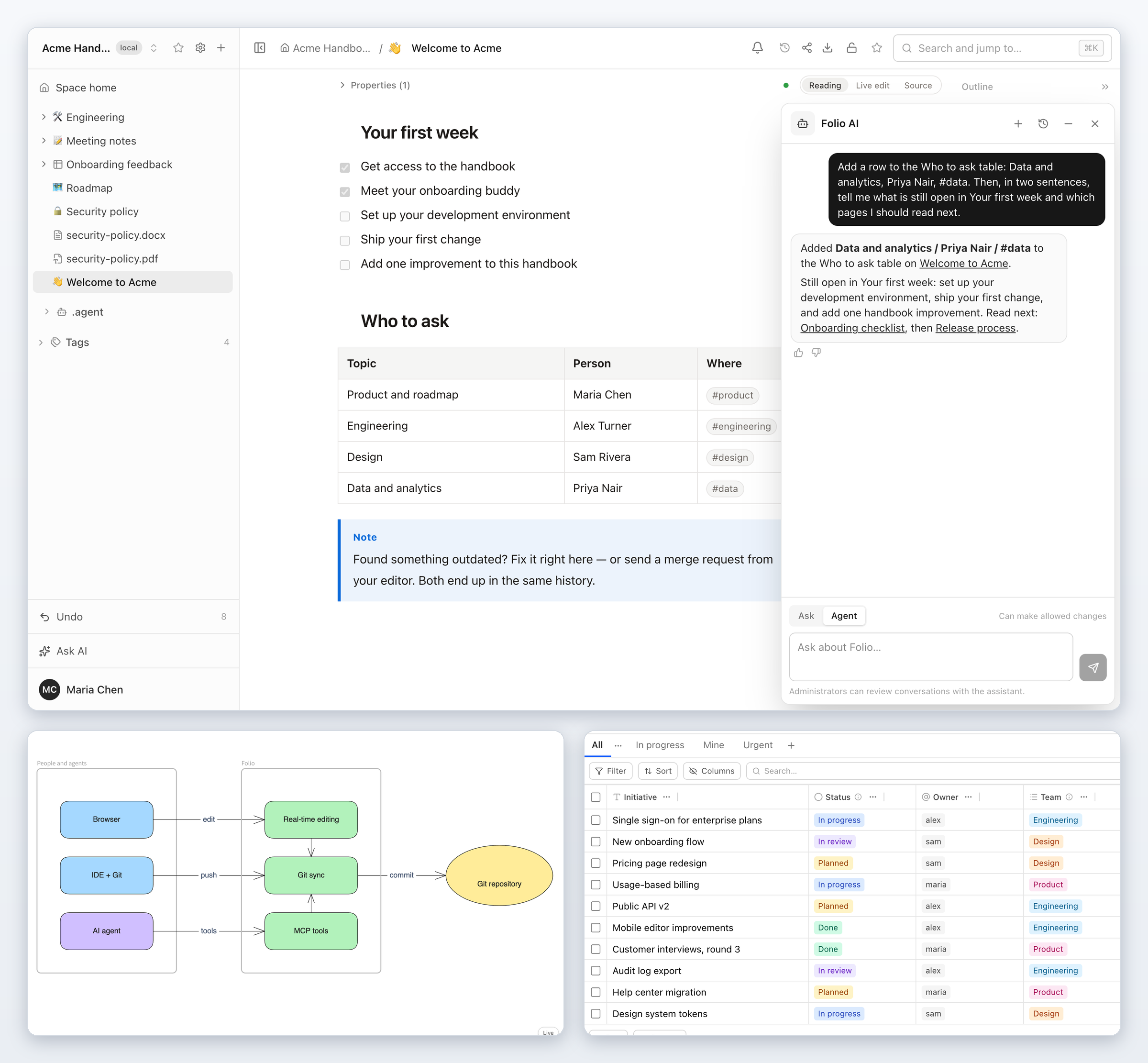
The open-source alternative to Notion and Confluence. Your team's wiki lives in Git. People write in the browser, together, in real time. AI agents read and write the same pages. One command to run it yourself.
Website: https://foliowiki.online · Featured in Self-Host Weekly (9 Oct 2026)
👉 Try the live demo
No install, no sign-up: open it and pick Sam on the sign-in screen. Shared login, data resets every 24 hours; don't enter personal data or API keys.
git clone https://github.com/evergreen-it-dev/folio.git
cd folio
docker compose up -d
Open http://localhost:4870, create the first account, start writing.
Not ready to install? Try the live demo first.
Why Folio
- You own the content. Every page is a plain file in a Git repository you control. No export step, no lock-in: stop using Folio tomorrow and the files are still there, readable in any editor.
- It works the way a wiki should. Real-time editing, a page tree, search, access rights, history, sharing — and it keeps working offline.
- Agents are first-class users. Not a chatbot bolted on the side: a built-in assistant, your own agent in every space, a full MCP server, and Markdown links made for agents.
- Documents, tables, whiteboards, diagrams and files in one tree. A roadmap table next to the spec, next to the architecture board, next to the signed PDF. Obsidian canvases and bases open as pages, too, and so do the interactive artifacts your agents make.
- See how your pages connect. A graph of the space and a local graph beside every page, built from the links your team already writes, and showing only what the reader may open.
- Built for teams. Groups, single sign-on with OpenID Connect and SAML 2.0, SCIM provisioning, an audit log and page restrictions that child pages inherit.
- Publish what should be public. Turn a space into a read-only website, with search and an optional "Ask AI" for visitors, at a path of your instance, on a subdomain or on your own domain.
- One command to run. Docker, and nothing to configure for a first start.
See it in action
Short walkthroughs, no slides. The voice in the videos is synthetic.
- A team wiki that lives in Git — edit a page in the browser, press Sync, and it is a real Git commit; a teammate edits from the terminal and the change shows up on the page (0:37)
- An AI agent updates your wiki over MCP — one request: the agent reads the release process, writes release notes and adds a roadmap row (0:53)
- Onboarding a sales rep with Folio AI — answers from the team's own pages with sources, a weekly check as a form, and the results in a table (1:22)
- Whiteboards that live in Git — draw together, embed the board in a document, and keep every version in history (0:51)
- Docs as code without the IDE — the
docs/folder of a product repository becomes a space; a technical writer edits it by hand and with Folio AI, an agent adds a release entry over MCP, and the developer reads the commits withgit pull(1:36) - Publish a space as a public website, with Ask AI for visitors — one setting makes a space a read-only site on a path, a subdomain or your own domain; visitors search it, download pages and ask Folio AI (1:21)
- The editor and Mermaid diagrams — live Markdown, a source view of the same page, and diagrams you edit visually or as code (1:04)
- Is your wiki's AI assistant helping? Folio AI analytics — instance admins see rated conversations and unanswered questions, add the missing page, and the same question gets an answer with its source (1:21)
- Publish Claude artifacts into your team wiki — one casual line to Claude Code: the dashboard becomes an interactive page of the wiki, keeps the reader's filters after a reload, is a folder in Git, and opens for a guest by a share link (1:33)
Git-first, all the way down
Most wikis keep your content in a database and offer Git as an export. Folio does the opposite: the Git repository is the wiki. The database holds the index, access rights and the state of live editing — never the only copy of your words.
This is what a space looks like on disk:
acme-handbook/
├── index.md
├── welcome-to-acme.md
├── engineering.md
├── engineering/
│   ├── onboarding-checklist.md
│   ├── release-process.md
│   ├── incident-runbook.md
│   └── how-folio-fits-together.excalidraw.svg    ← a whiteboard
├── meeting-notes.md
├── meeting-notes/
│   └── product-sync-september-28.md
├── roadmap.table.md                               ← a data table
├── onboarding-feedback.table.md
├── onboarding-feedback/
│   └── onboarding-feedback.form.md                ← a form
├── security-policy.md
├── security-policy.pdf                            ← files are pages too
└── security-policy.docx
And this is its history — ordinary commits, with the people who made the changes as authors:
$ git log --format='%h  %an  %s'
be529a0  Maria Chen  folio:update
aeac3bb  Maria Chen  folio:update
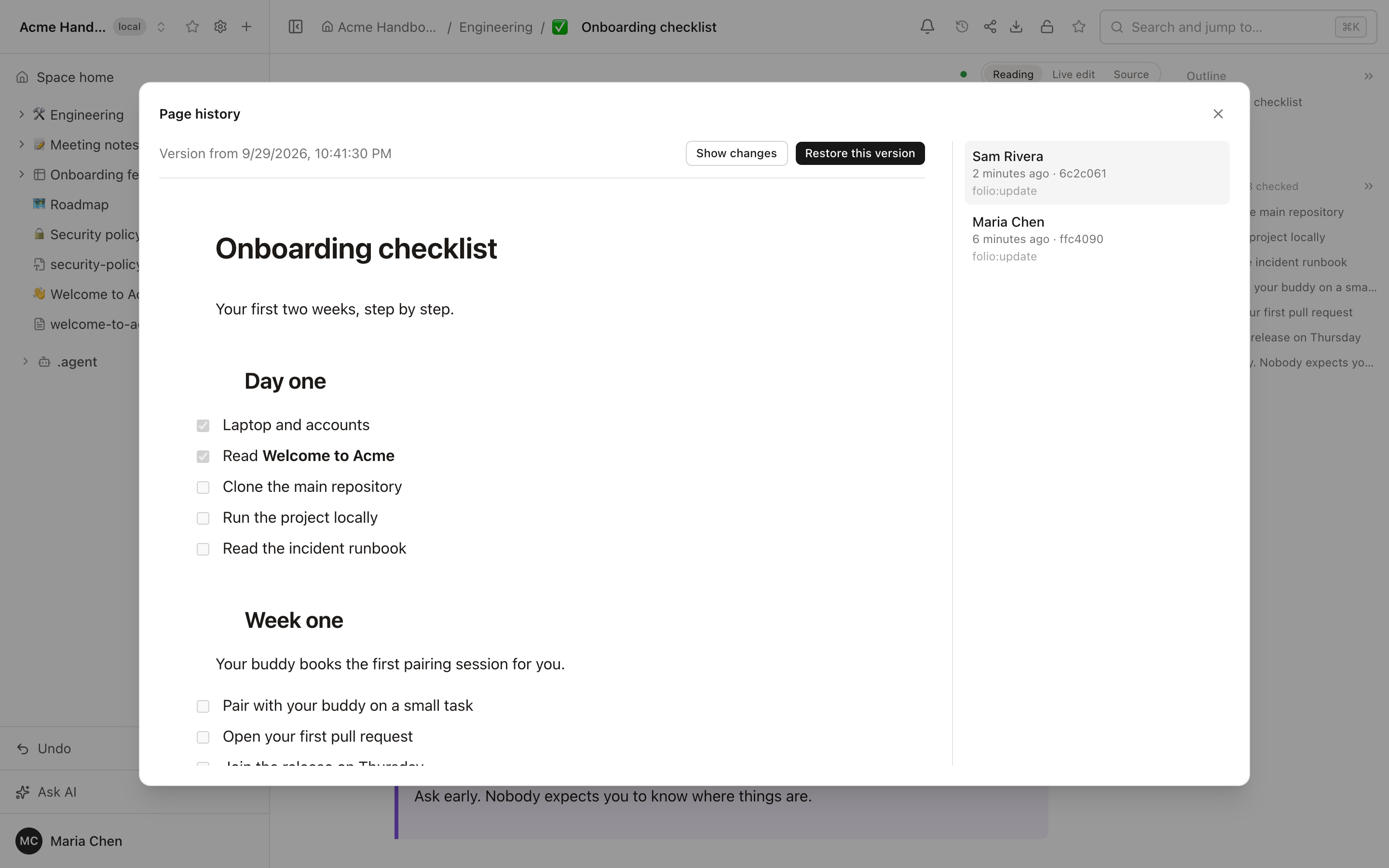
6c2c061  Sam Rivera  folio:update
026d9ec  Maria Chen  folio:update
...
4e9ec49  Folio       init: create space
What that gives you:
- Edit anywhere. Change a page in the browser or in your IDE and push — both land in the same history. Links between pages are ordinary relative Markdown links, not a private dialect.
- Bring your own repository. Start with an empty space, clone an existing repository, or connect one later. Several spaces can share one repository, each in its own folder — so documentation can live right next to the code.
- Review like code. Merge requests, blame, diff and revert work on your wiki because it is a repository.
- Docs-as-code friendly. Front matter keys written by Docusaurus, MkDocs,
Hugo or Jekyll are kept byte for byte; a space bound to a folder such as
docs/writes no ids into your files (a space over a whole repository does); images can be stored in the repository next to the page and linked by a relative path, so GitHub shows them; and moving a page rewrites the links that point to it and the ones inside it, in one commit. A full scenario is in Docs as code, without the IDE. - Nothing is lost quietly. Sync state is always visible — clean, ahead, behind, conflict — and conflicts are listed for the whole space. "Take the version from Git" resets a space to the remote branch and saves what was there into a backup branch first.
- Readable formats. A whiteboard is an SVG that opens in any browser and still carries the editable scene. A data table is one Markdown file — the column types and saved views in the front matter, the rows as a table you can read:
# Roadmap

| Initiative | Status | Owner | Team | Due | Effort, days | Urgent | id |
| --- | --- | --- | --- | --- | ---: | --- | --- |
| Single sign-on for enterprise plans | In progress | @alex | Engineering | 2026-10-09 | 8 | [x] | 1787nfg3 |
| New onboarding flow | In review | @sam | Design | 2026-10-02 | 5 | [ ] | b227mwwh |
| Pricing page redesign | Planned | @sam | Design | 2026-10-16 | 3 | [ ] | ndxvtpa3 |
Docs as code, without the IDE
If your documentation lives in the docs/ folder of a product repository,
Folio can show that folder as a space. Writers edit it in a browser, developers
keep their IDE and read ordinary commits, and an agent works on the same pages.
- Connect the folder, not the repository. Create a space from the
repository URL, choose the branch and pick
docs/as the root path. Only that folder becomes the space: Markdown files are pages; source code and other files are not pages and are never touched. Folio keeps its page ids in its own index, and the only file it adds is a hiddendocs/.<slug>.folio. - A writer edits in the browser. Reading, Live edit or Source (plain Markdown), several people on one page, or a request to Folio AI in the side panel. Folio writes each edit to the file at once and commits after about 90 seconds of quiet, or immediately on Sync, to the branch the space follows.
- A developer sees a commit with the author's name.
git pull,git logandgit blameshow the person who edited as the author; Folio is the committer and the message isfolio:update. Only the last editor in a window is recorded as author. The developer's own commits come back into the space by fetch roughly every three minutes and on every Sync. - An agent updates pages through MCP. Claude Code, Cursor or any MCP client connects with a personal access token or through OAuth, reads and edits the same pages with the rights of the token's owner and no more, and the commit carries that person's name.
- The space can become a docs portal. Make it public and the same pages are served as a read-only website with search and, if you switch them on, downloads and "Ask AI" for visitors, see Publish a space as a website.
Where it stops: a space follows exactly one branch and Folio pushes straight to
it, without pull requests (point the space at a docs branch if you want
review before main; a protected branch makes the push fail and the space
shows git's message). A space over the whole repository, with no root path,
writes an id into every page and a small file into the repository root,
unless an administrator ticks "Light footprint" (a repository with .obsidian/
is detected on its own). Opening a page writes nothing: a file changes only
when someone edits it. A page's title comes from its first # heading, then
from a front matter title:, then from the file name, and Folio does not add a
heading to a page that has none. An id that another tool put in front matter
(Docusaurus and Jest use id: intro) never moves a page between spaces. MDX
files (.mdx: Nimbus, Starlight, Astro, Docusaurus) are pages like .md
ones: import/export lines and JSX components such as <Aside> or <Tabs>
are folded into compact blocks in Live edit, drawn as labelled boxes in Reading,
and saved back byte for byte — Folio does not run MDX, it only keeps it intact.
Pasted images
stay in Folio's asset store until a space administrator turns on "Store images
in the repository". See also What is not there yet.
The walkthrough is in the post Docs-as-code without the IDE: edit your repository's docs in a browser and in the video.
Write together
Documents, data tables and whiteboards are edited by several people at once. You see who is on the page and where their cursor is; changes appear as they are typed. When the page goes quiet, Folio commits — with the person who edited as the author.
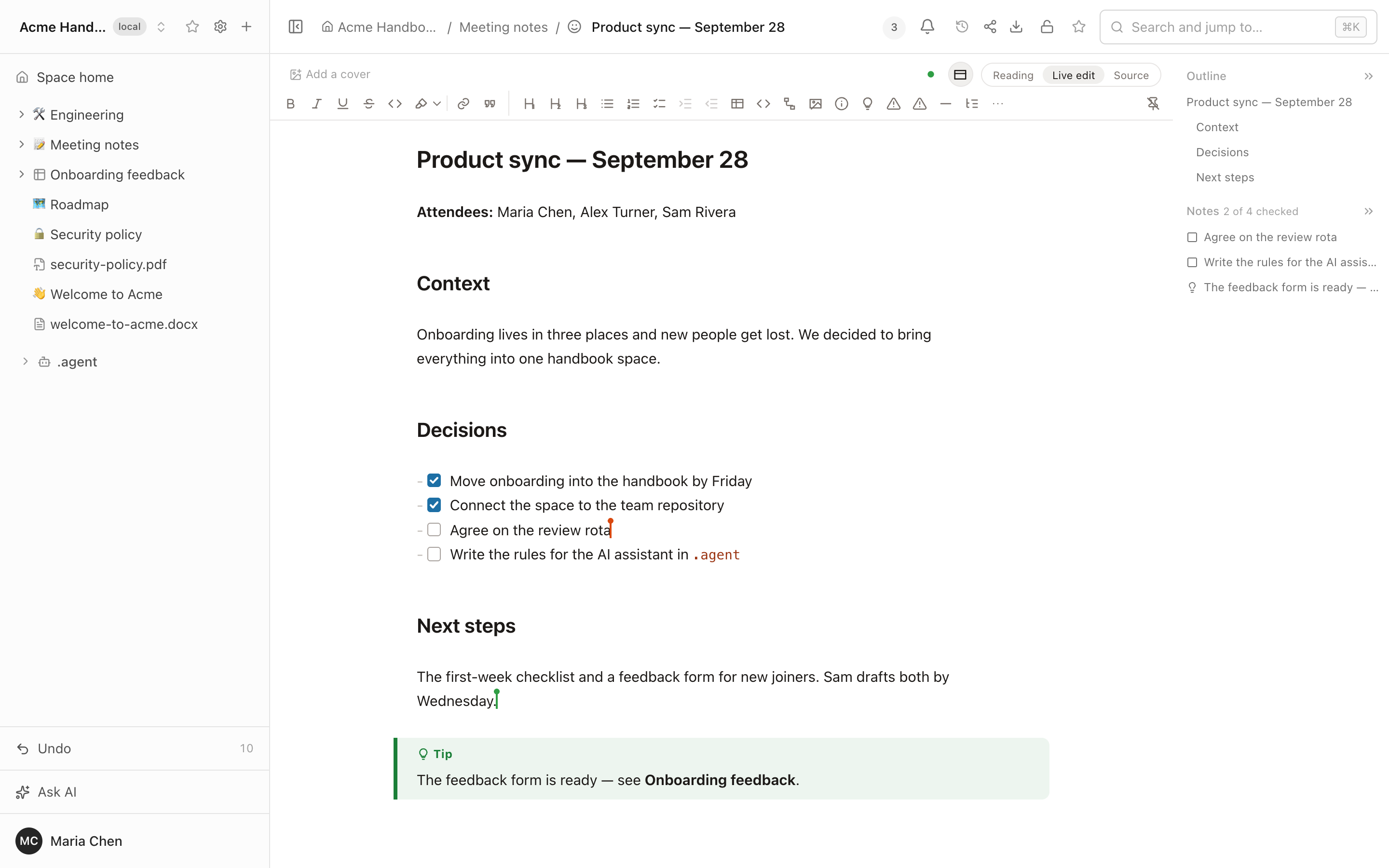
What you type is not lost between Live edit and Reading: the browser keeps a local copy until the server confirms it has your edits. If it cannot confirm them, the header says Not saved and closing the tab asks first.
Comments on text. Select a passage in a document and press Comment: the thread sits beside the page, anyone who can see the page can reply, and an editor (or the person who started it) resolves it. Comments are kept in the database, not in the Markdown, so Git history stays clean. Agents read and answer them through MCP.
Mentions and notifications. Type @ in a comment to pick a person from the
space. The bell reports an @mention and a reply in a thread you took part
in; a comment written by an agent through MCP notifies in the same way. There
is no email. Comments can also be attached to a single element of a whiteboard
or to a cell of a data table; the link in a notification opens the thread and
shows the element or the cell.
Side-by-side comparison
Two translations of one page, this quarter's plan next to last quarter's, a spec next to the draft that should follow it: put up to five pages, or older versions of a page, side by side.
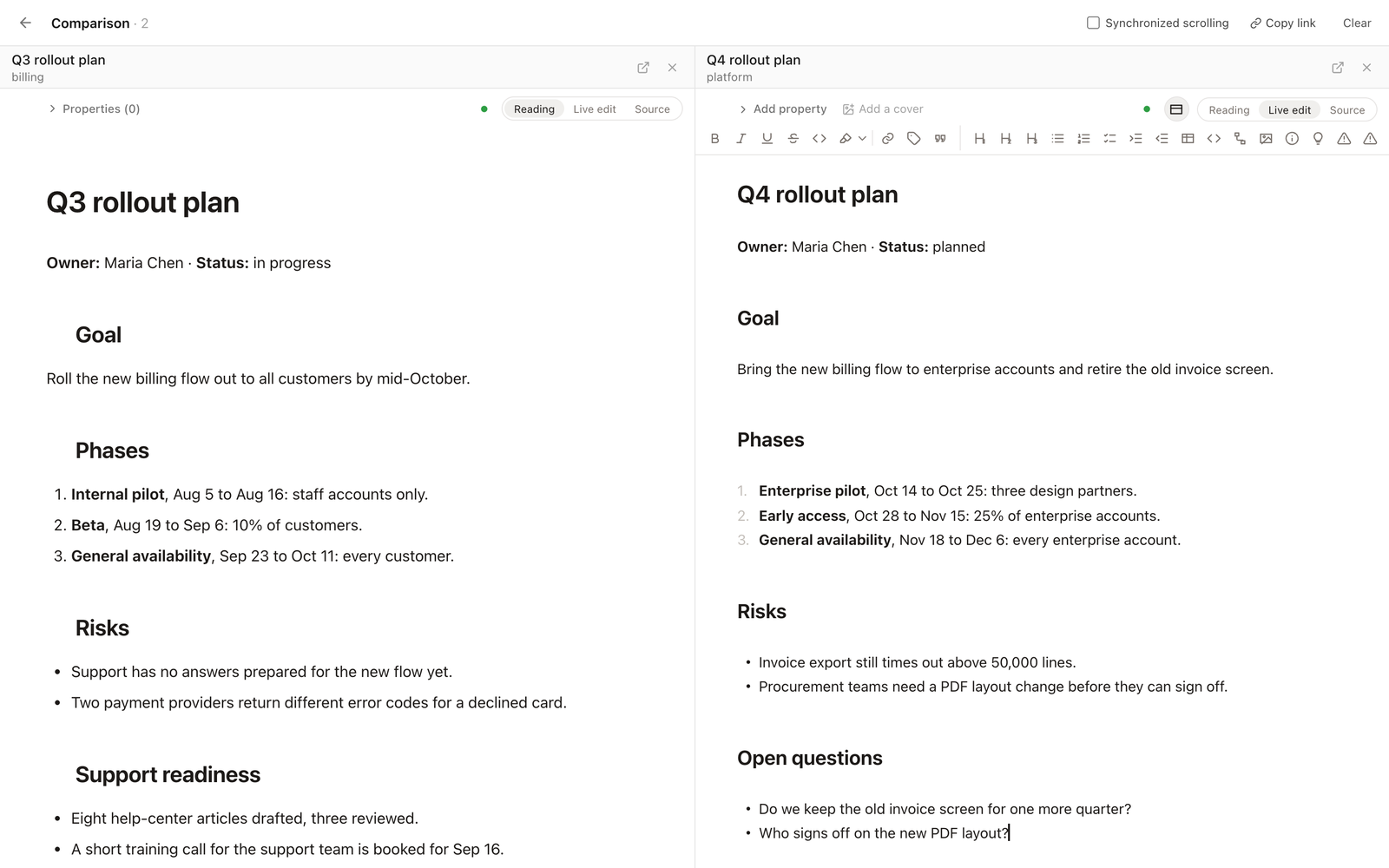
- Collect, then open. "Compare side by side" is in the sidebar menu (also for people who can only read), in the page header and in the history panel. A chip at the bottom of the window holds the list, from any spaces you can open.
- Live columns. A current page is the page itself, with the same editor and live collaboration: type in a column and everyone on the page sees it.
- Versions next to the page. In a page's history, "Compare side by side with current" puts a read-only version beside the live page. "Highlight changes" marks what is new or changed in green and what was removed in red against the leftmost column, and synchronized scrolling keeps the columns together.
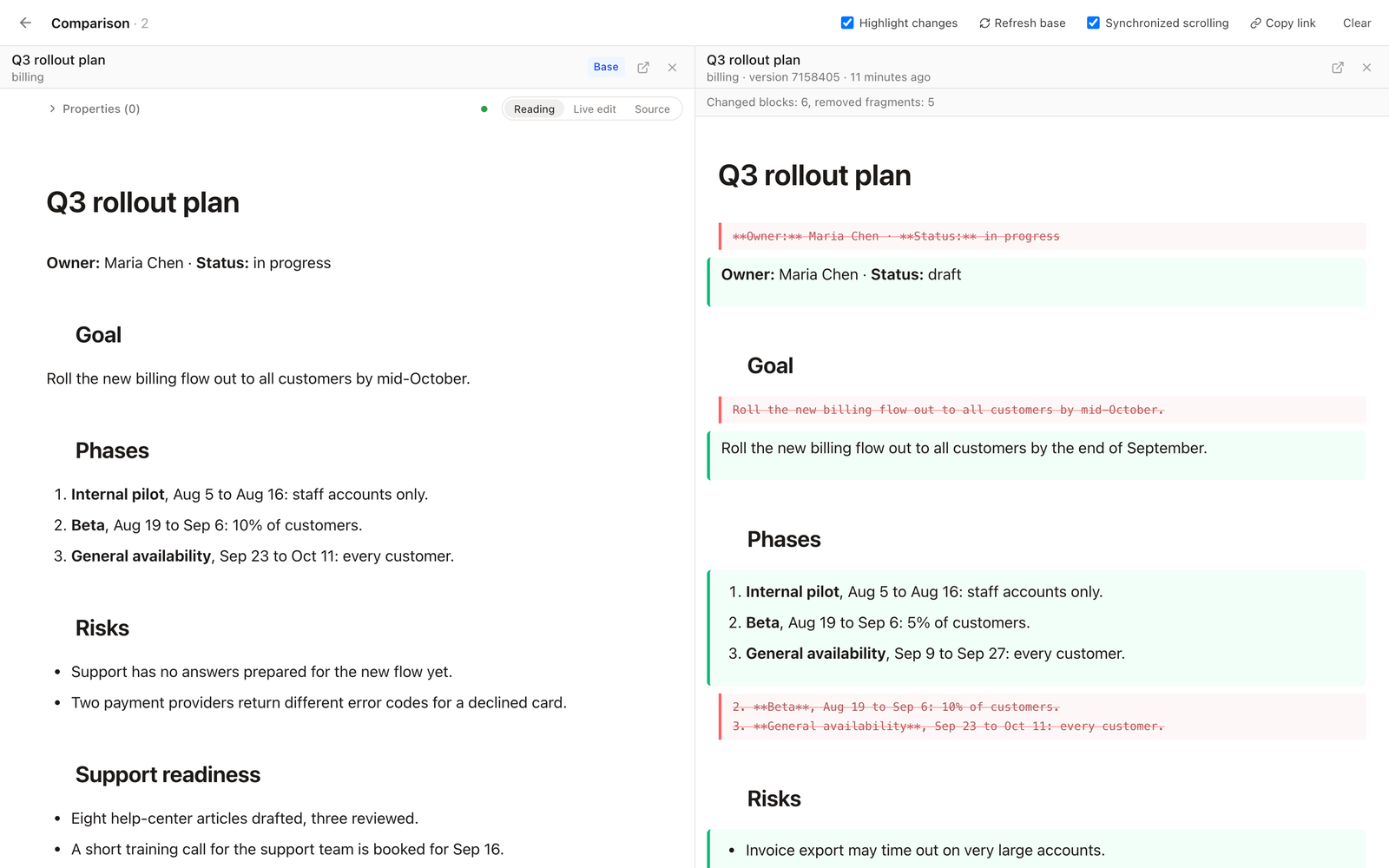
- A link to share. "Copy link" copies an address with only page ids and version numbers; whoever opens it sees each column with their own access.
Highlighting compares text block by block. See docs/LIMITATIONS.md.
Works offline
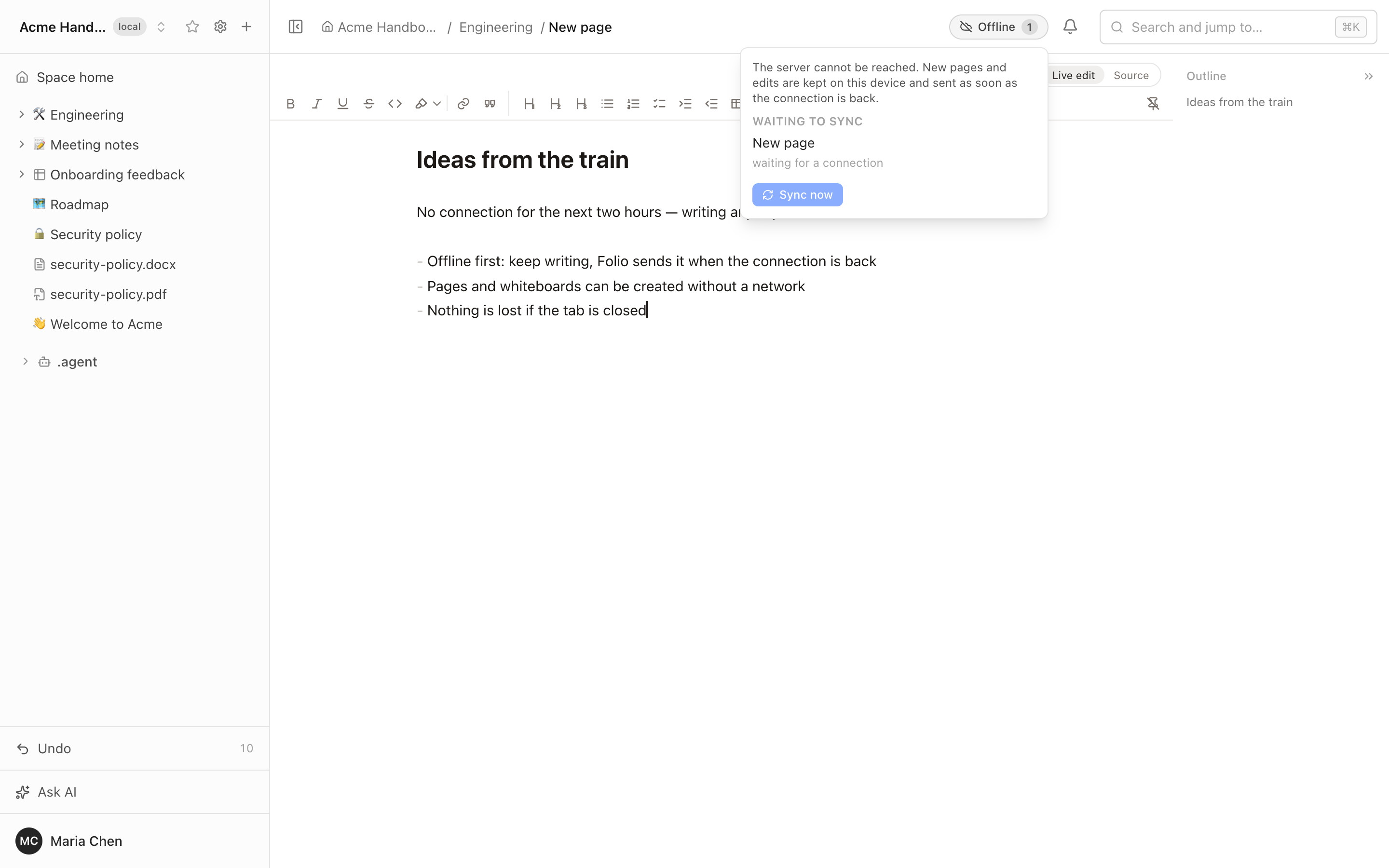
On a train, on a plane, on bad hotel Wi-Fi — keep writing.
- Pages and whiteboards you have opened stay editable without a connection.
- New pages and whiteboards can be created offline and appear in the tree straight away.
- Everything is kept on the device and reaches the server by itself when the connection returns — at the same address, with no duplicates.
- Nothing is lost if you switch pages or close the tab.
- An indicator in the header shows what is waiting to be sent.
Data tables, forms and file uploads need a connection.
Documents
A Markdown editor that does not make you think about Markdown. Three modes — Reading, Live edit and Source — so that writers and engineers are both at home.
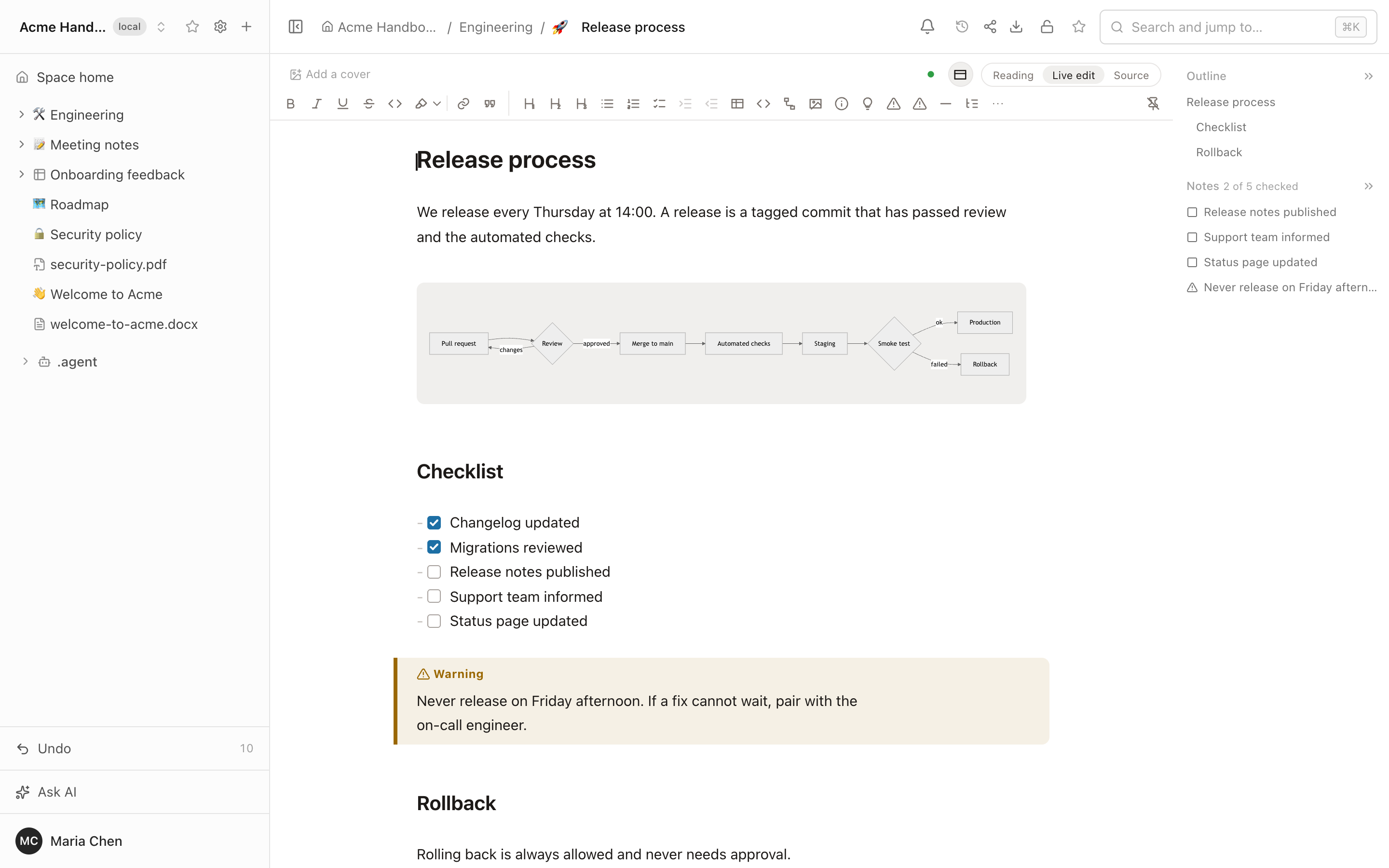
- Callouts, checklists, tables with merged cells and colors, code blocks,
collapsible sections, highlights,
++underline++, and coloured status tags like:status[Done]{color=green}. - Paste from Excel and Google Docs keeps tables and formatting; copying out of Live edit keeps it too.
[[links a page,@mentions a person,/inserts anything.::pagetreeputs a live tree of child pages right into the text.- Outline and notes panel, backlinks, page icons and covers, glossary terms with hover cards.
- Custom templates: any page in
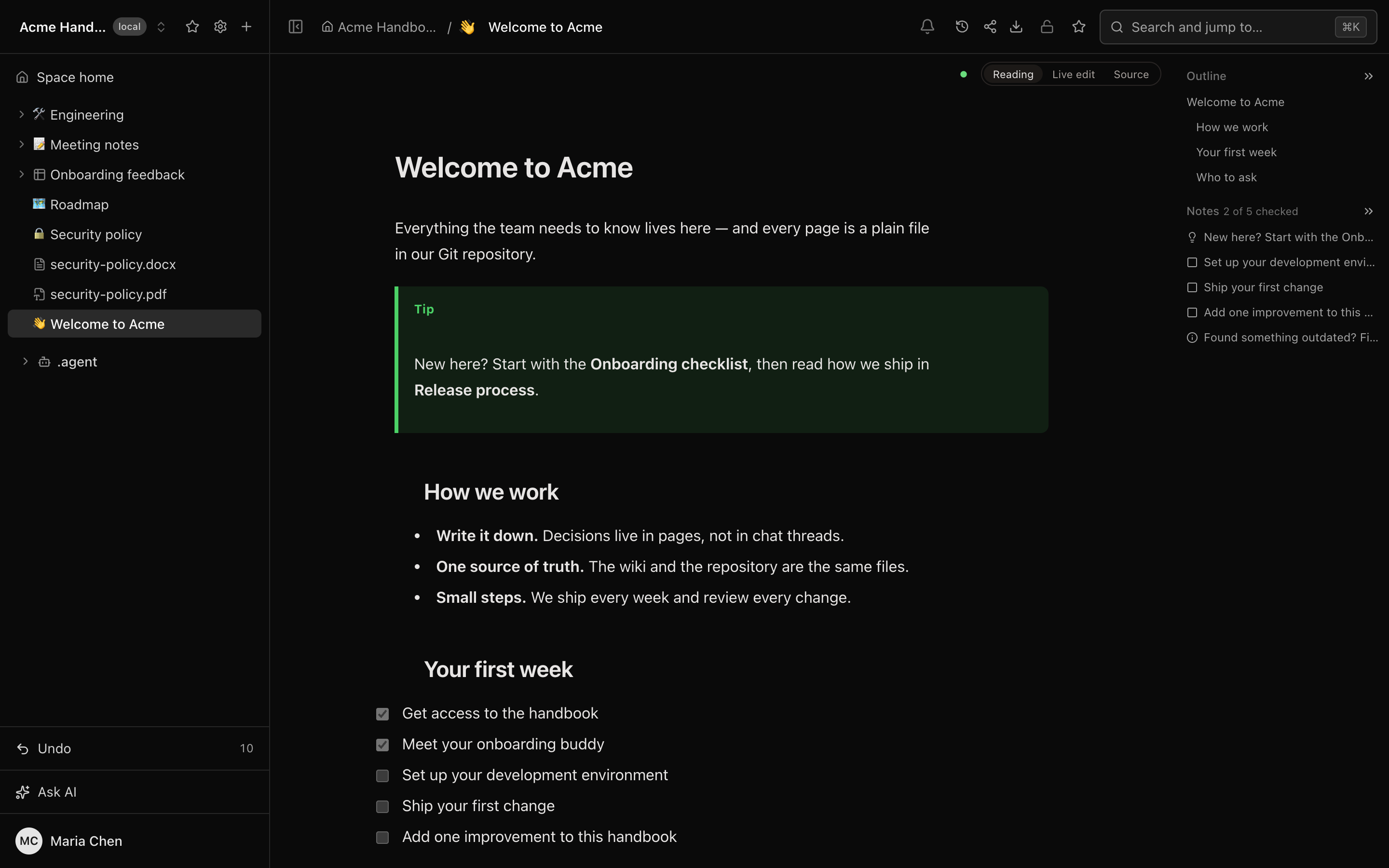
_templates/, even with subpages, becomes a template, with a name and description ("Make template", "From template…"); a new space starts with three. - Light and dark themes, following the system or chosen by hand.
Diagrams you draw, not type
Mermaid diagrams come with a visual editor. You build the diagram on a canvas, and Folio writes the Mermaid code for you — or you type the code and watch the canvas follow. Both sides stay in sync.
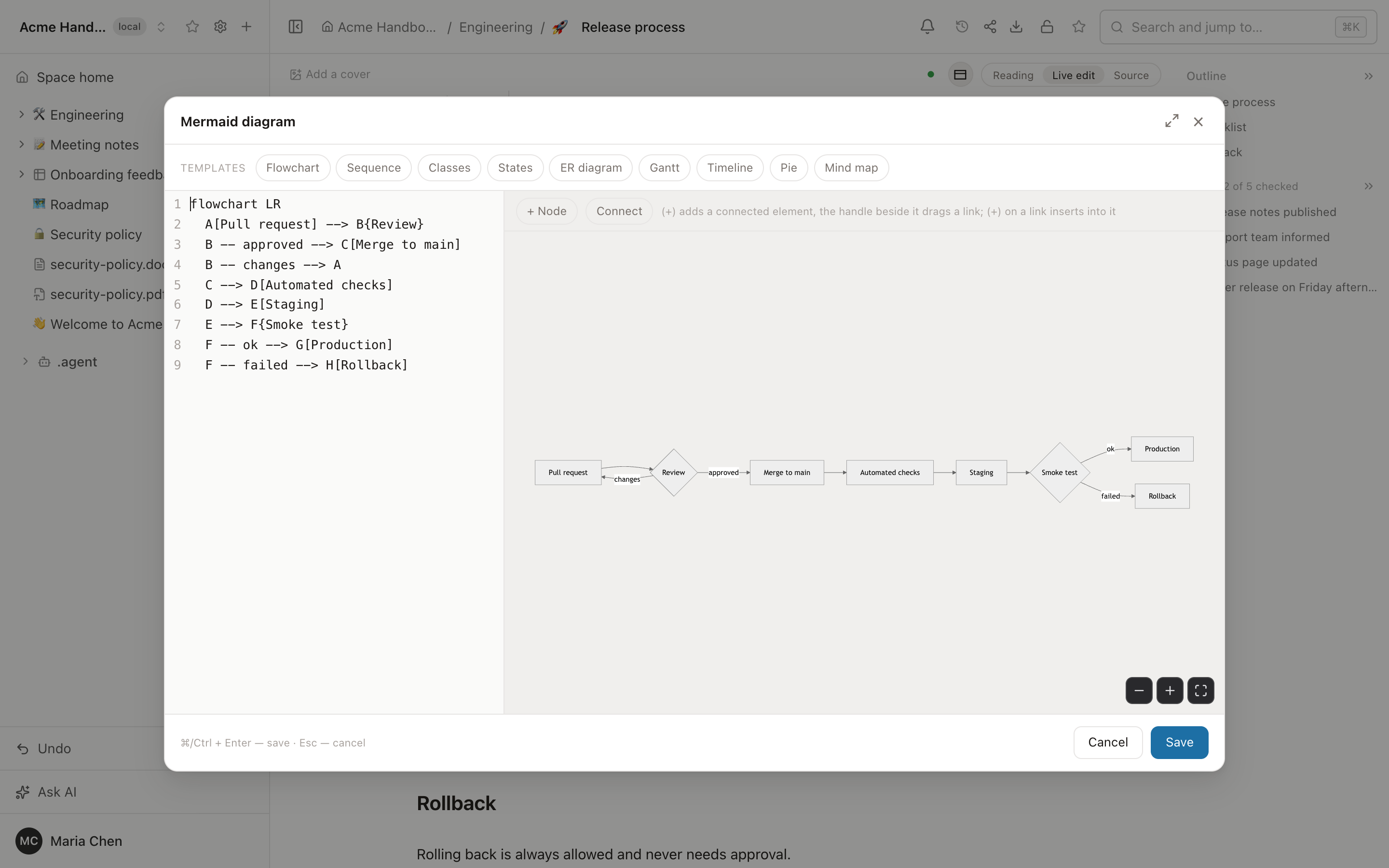
- Click to build. A plus on a node adds a connected one, a plus on a link inserts a node into it, a handle drags a new link from node to node.
- Nine diagram types from templates: flowchart, sequence, classes, states, ER, Gantt, timeline, pie, mind map.
- Code and canvas side by side, full screen when you need room, and a readable message instead of a broken picture when the syntax is wrong.
- Still plain Markdown. The diagram is stored as an ordinary
mermaidcode block, so GitHub and GitLab render it too.
Data tables
Spreadsheets that belong to the wiki: typed columns, saved views, filters and sorting — a small database you can link from any page and query from any agent.
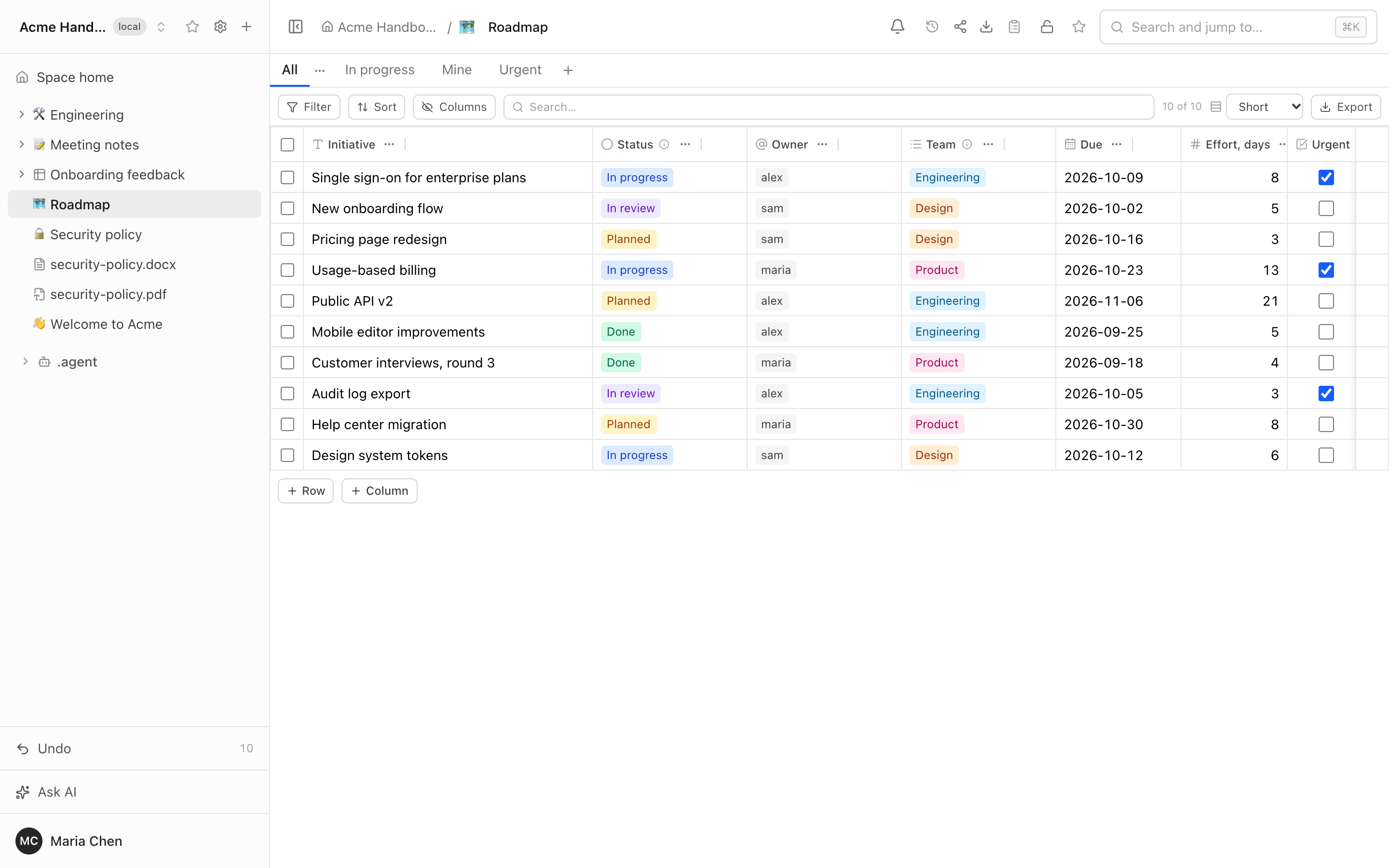
- Column types: text, long text, number, date, checkbox, select, status, user, link.
- Views as tabs, each with its own columns, order, widths, multi-column sort
and
and/orfilters — including "me", "today", "this week". - Edited together in real time, stored as one readable file in Git.
- Import and export; up to 20,000 rows per table.
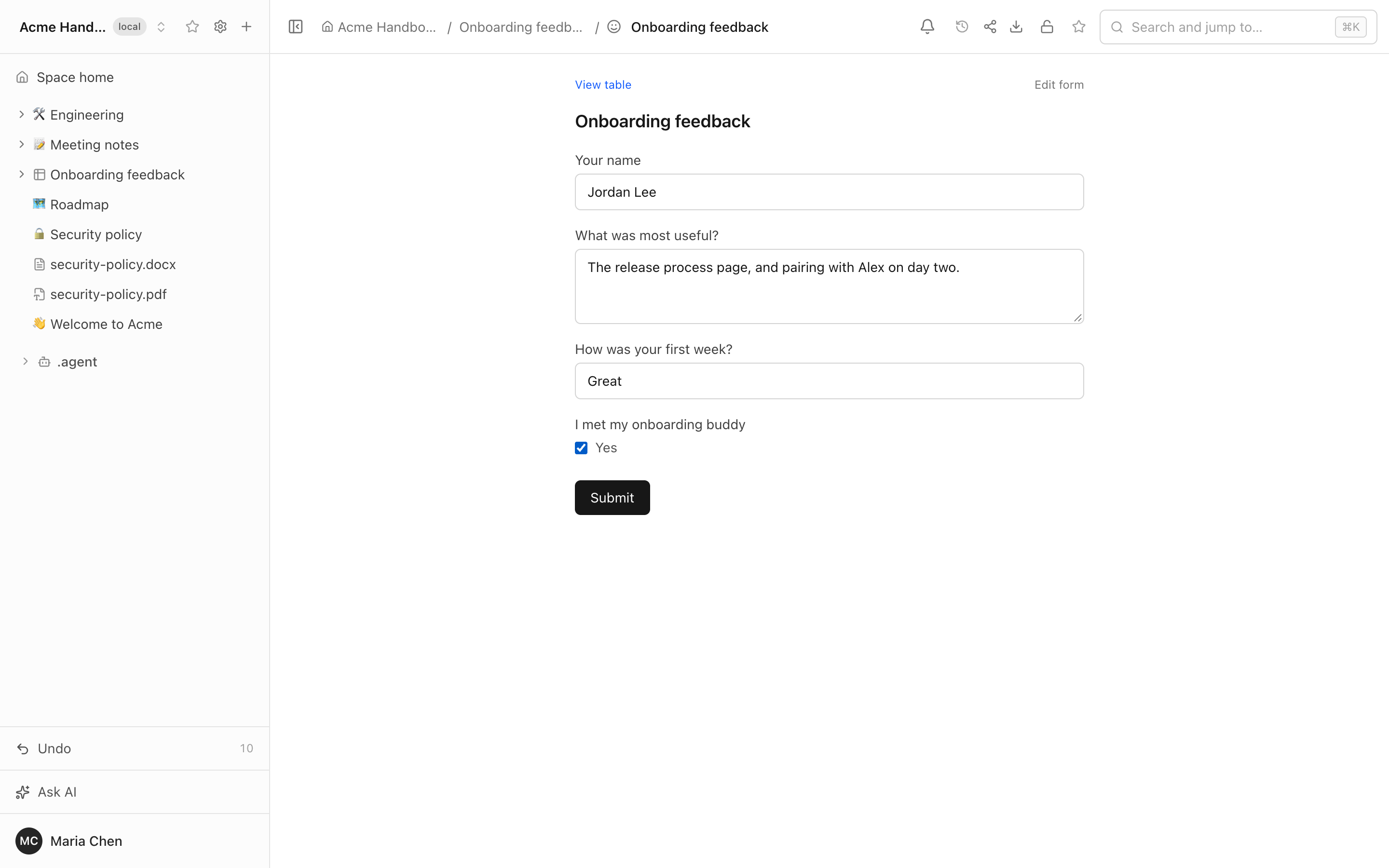
Forms turn a table into a questionnaire: every answer becomes a row. A form can be public, so people answer without an account.
Whiteboards
Excalidraw boards inside the wiki — architecture, flows, workshops. Drawn together in real time and saved as SVG files that render anywhere.
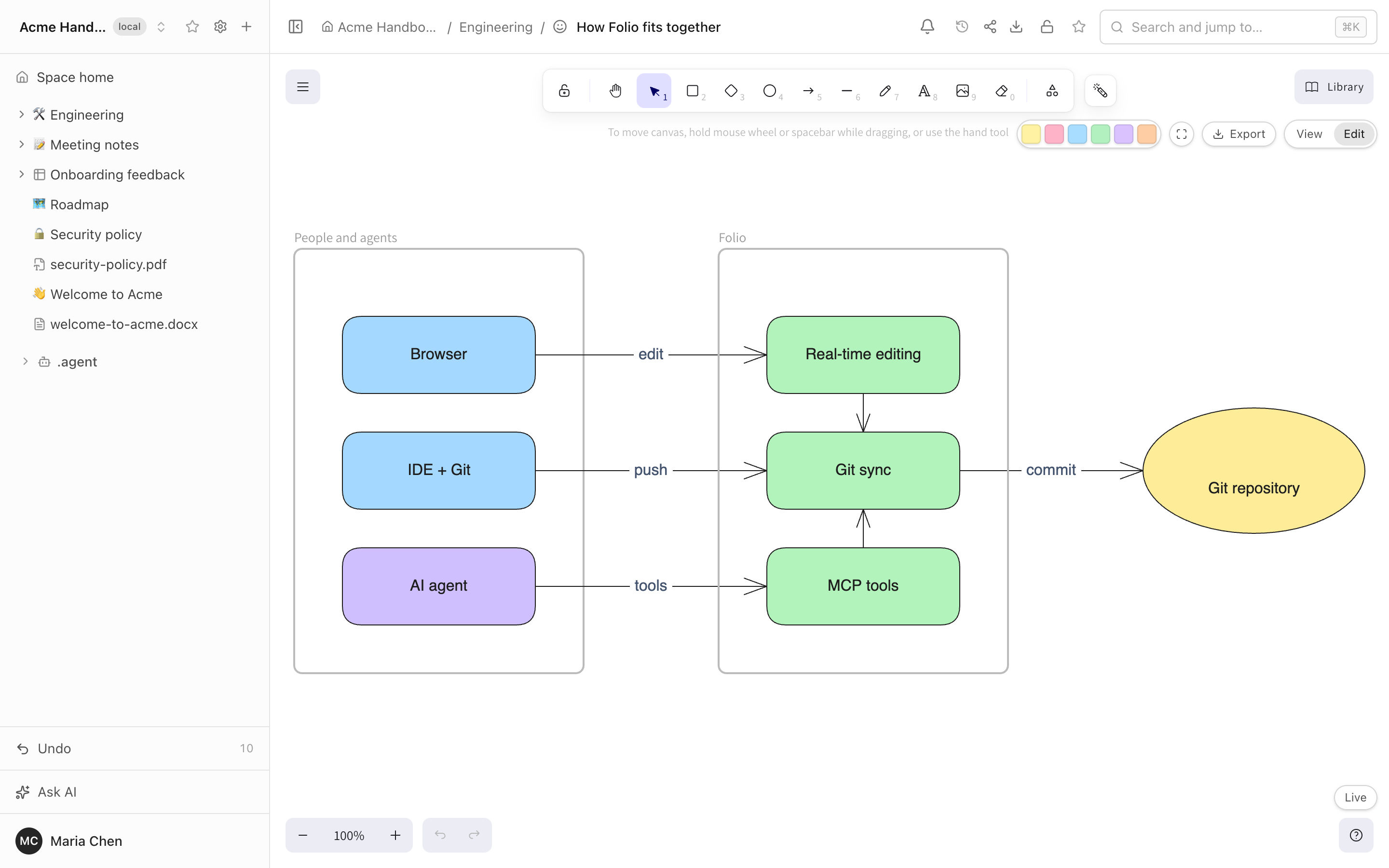
The board above was not drawn by hand. An agent created it through MCP from a short description of boxes and arrows; people then keep editing it like any other board.
Reactions. Select a shape in Edit mode and a small button appears at the corner of its selection frame: pick an emoji (✅ ❌ 🔧 for yes, no and in progress, or 👍 ❤️ 😂 🎉 🤔 👀 🔥 👏) and a counter chip shows under the shape. Click a chip to add or remove your own; point at it to see who reacted. Reactions are live for everyone on the board, and people who can only view it (or are in View mode) see them too but cannot click them. They are kept with the board's live state, not in its SVG file.
Graph
Every link between pages is already in the index, so Folio can draw it. Open Graph under the tag tree and the space appears as a map: pages are nodes, links are edges, and the biggest hubs carry their names.
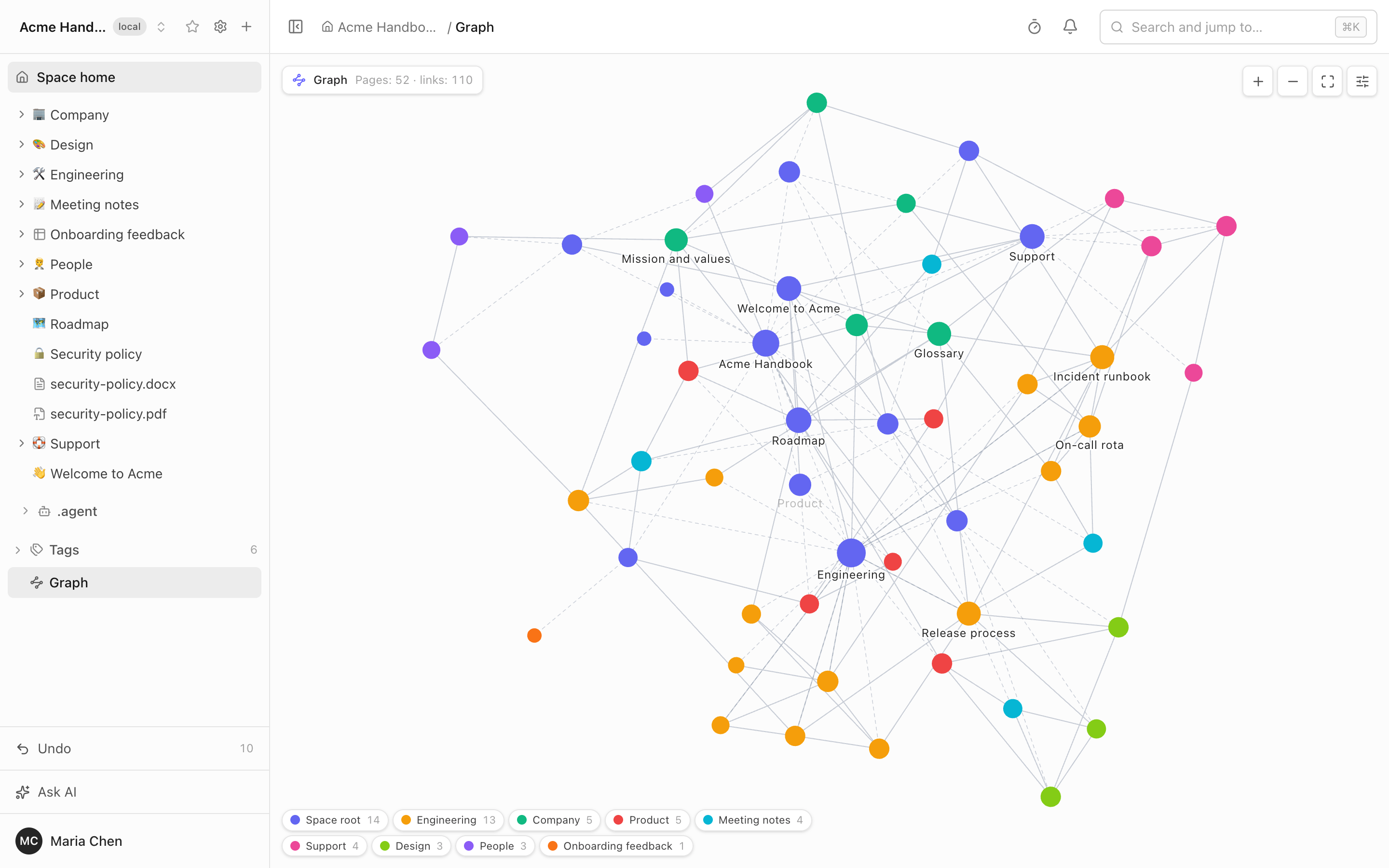
- Labels follow the zoom. At the overview only the top hubs are named; zoom in and more titles fade in, never one on top of another. A hovered or selected page and its neighbours always keep their labels.
- Tree structure included. A "Tree structure" toggle adds the page tree as dashed lines, so a nested space is not a cloud of unconnected dots. A page of another space you may open shows up with its space in its name, in its own colour.
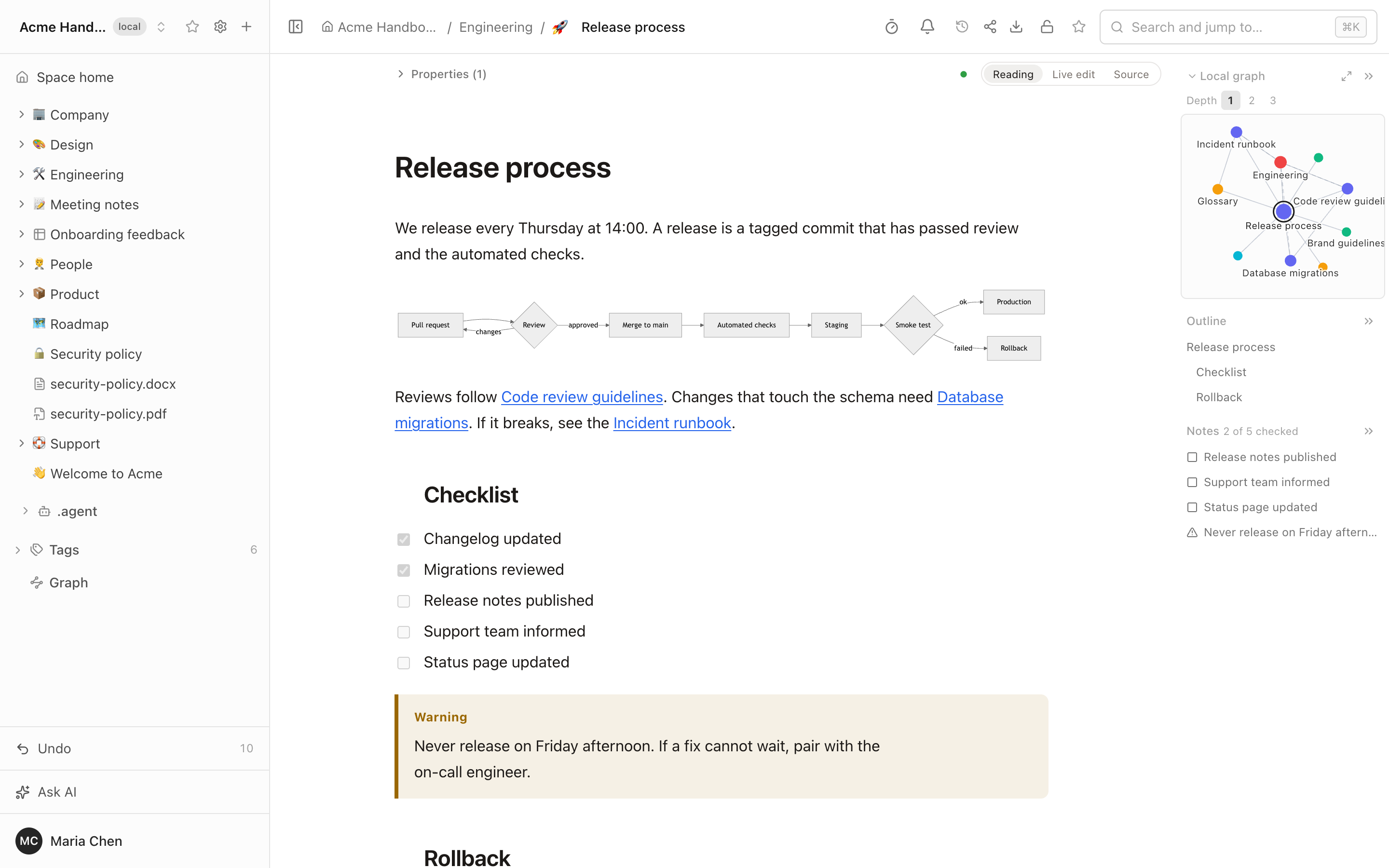
- A local graph beside every document. The page and its neighbours one to three links away, in, out or both, in the right-hand panel; click a node to open the page, or expand it to full size.
- Filters in the search grammar (
tag:,in:,kind:,prop:), colour groups by top folder, page kind, tag or your own query, and the layout forces are settings of the graph, remembered per space. - Access is applied in the query. A page you cannot open is never a node, a ghost or an edge. The graph is built on the server from the page index (5,000 pages in about 150 ms) and the drawing code loads only when a graph is opened.
- Agents can read it too. The MCP tool
get_graphreturns the same graph, and the built-in assistant uses it.
The limits (10,000 pages, no graph on public sites) are in docs/LIMITATIONS.md.
Obsidian canvases and bases
An Obsidian vault is not only Markdown, and Folio now opens two more of its file types as pages.
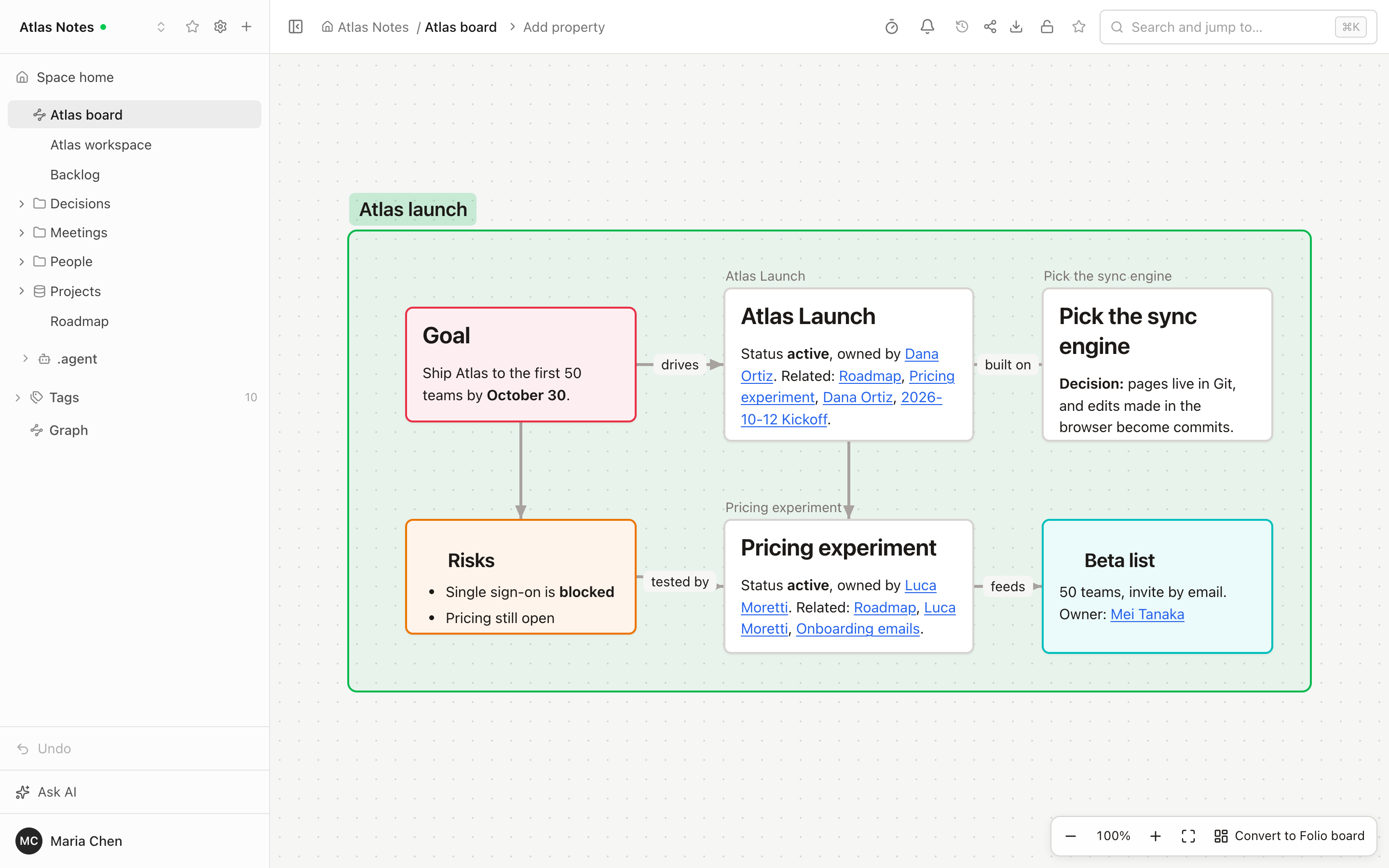
- Canvases (
.canvas). Text cards rendered as Markdown, note cards with the note's start, images, web page cards, groups and connections with arrows and colours, with pan, zoom and fit. A card that points at a page you may not open says "No access". "Convert to Folio board" makes a new, editable whiteboard in one commit and leaves the canvas as it was. - Bases (
.base). A saved query over the pages of a space, shown as a table, cards or a list, with grouping, sorting, formulas and column summaries. An Edit toggle changes a cell in place by changing that page's property, and a visual editor changes views, filters and formulas without disturbing the rest of the file.
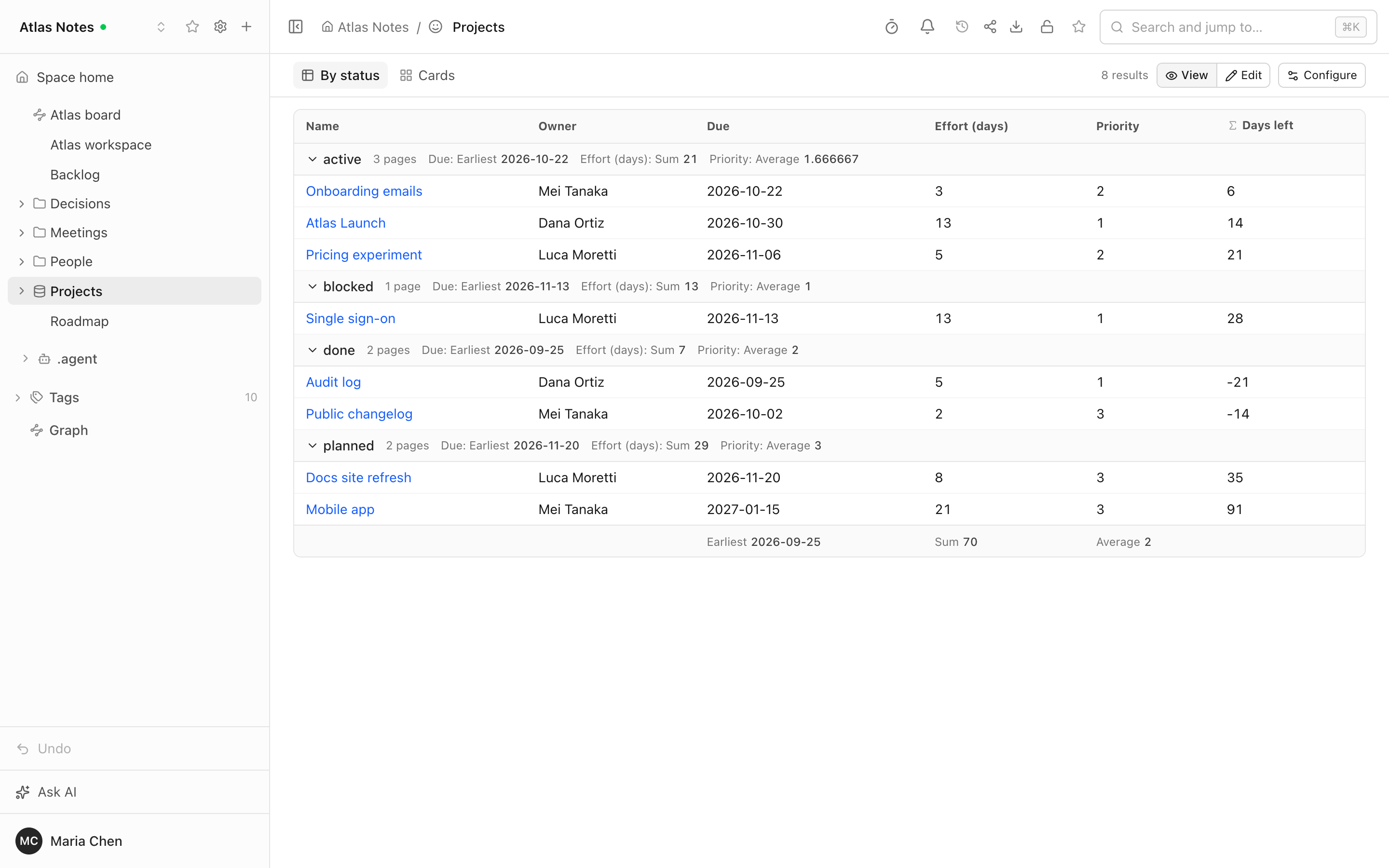
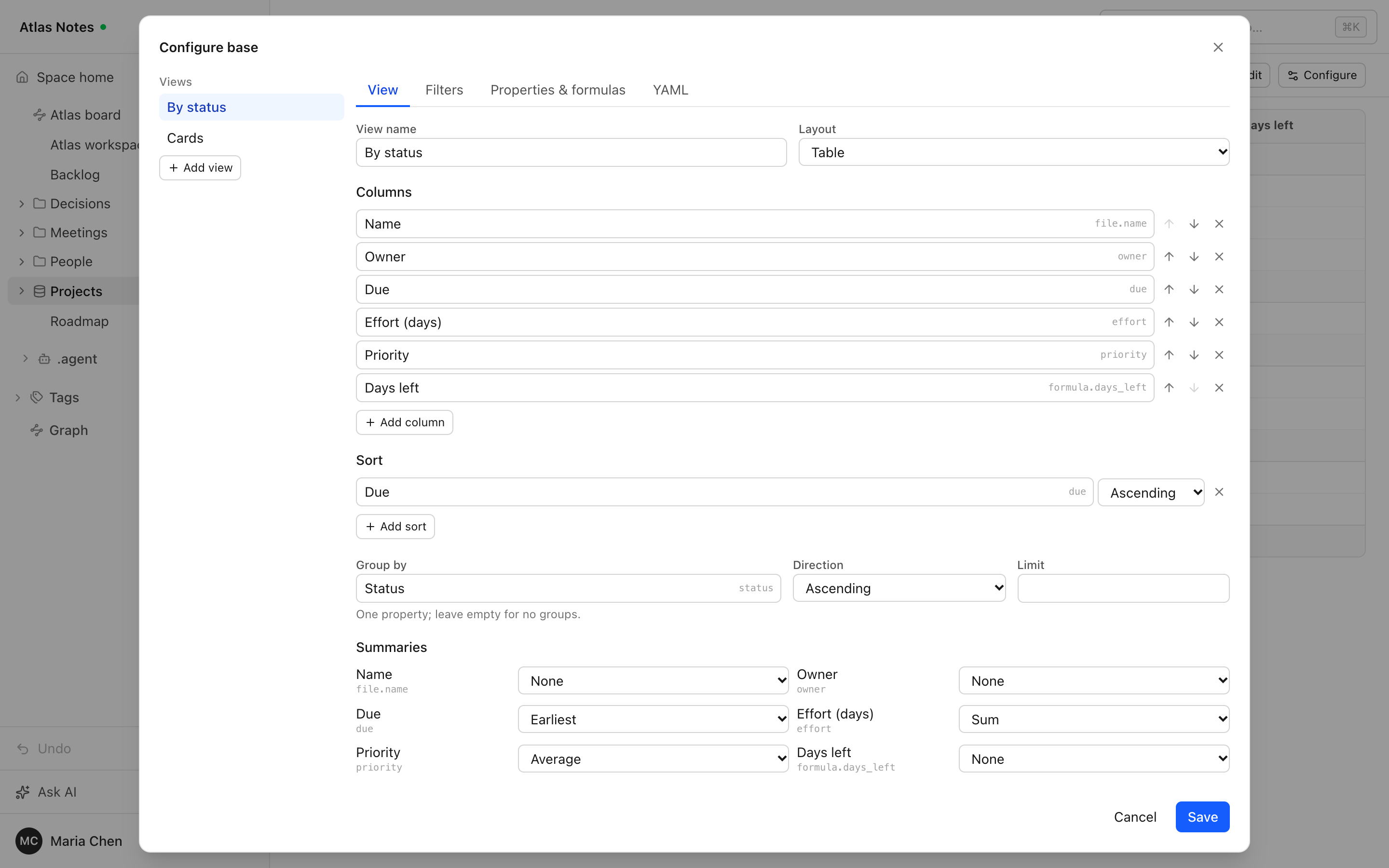
Both follow renames: move a note and the canvas cards and wikilinks that point
at it are rewritten in the same commit. Bases run in a safe evaluator of our own
(no eval); kanban and map views and plugin functions are not supported.
Details and limits: docs/LIMITATIONS.md.
Artifacts: publish Claude artifacts and Cursor canvases
An AI agent builds a dashboard, a calculator or a small tool; usually it lives in a chat and is gone with it. In Folio it becomes a page: in the tree, in search, in Git, under the same access rights as everything else.
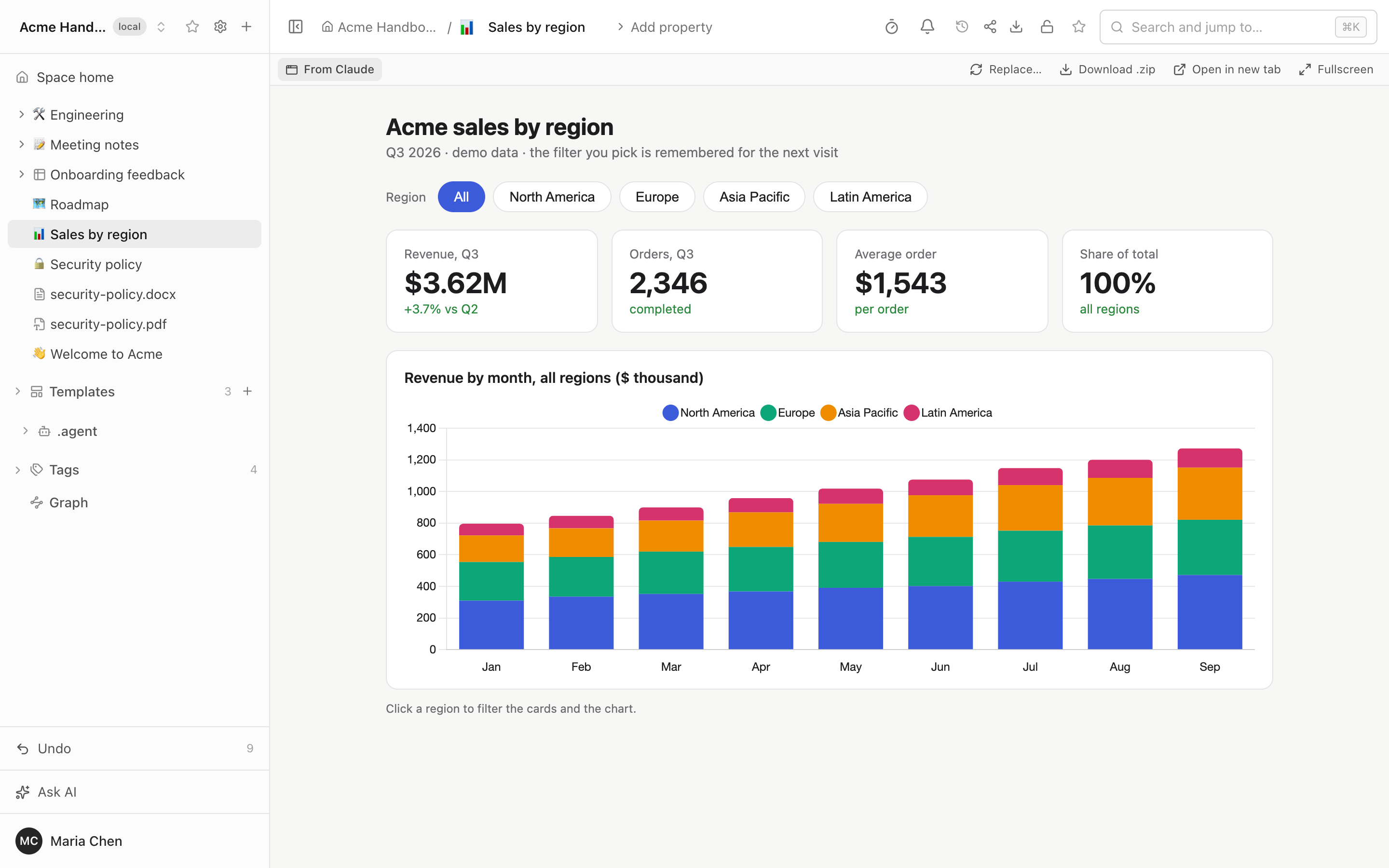
- Interactive, not a screenshot. Filters, tabs, charts and forms work on the page. The page runs in a sandboxed frame with no access to your Folio session or API, and loads scripts and fonts only from a short list of CDNs (cdnjs, jsDelivr, unpkg, esm.sh, Tailwind, jQuery, Google Fonts).
- State survives.
window.storage(the API Claude artifacts use) andlocalStoragework and are kept per reader: in the database for people who are signed in, in the browser for guests. - Publish from the agent. The MCP tool
publish_artifactcreates an artifact page or replaces an existing one, with extra files and the original source (JSX or TSX) kept next to it. In Claude or Cursor with Folio connected, say "publish this artifact to Folio". - Or import it by hand. "Artifact…" in the "+" menu takes a link to an
.html,.zip,.svgor.mdfile, a file from your computer, or pasted HTML. "Show source" and "Download" are on the page; replacing an artifact keeps its link and place in the tree. - Files in Git. An artifact is a folder
<name>.artifact/in the space's repository:index.html, anartifact.yamlmanifest, the source and assets. Move, copy, trash, share links, public sites and history work like for any page.
A short walkthrough: Publish Claude artifacts into your team wiki (1:33).
Folio shows the finished page; it does not build React or TSX itself, so an agent sends HTML that already runs, and calls to Claude, to your own APIs or to connectors are not available inside an artifact. Share links from claude.ai or Cursor are not downloaded: ask the agent to publish through MCP. See docs/LIMITATIONS.md.
Pertanyaan tentang Folio MCP
Bagaimana cara menambahkan Folio MCP ke Claude Code?
Jalankan claude mcp add --transport http folio https://demo.foliowiki.online/mcp di terminal Anda. Tambahkan --scope user agar tersedia di semua proyek.
Bagaimana cara menambahkan Folio MCP ke Cursor?
Buka ~/.cursor/mcp.json dan tambahkan server di bawah mcpServers, menggunakan config Cursor yang ditunjukkan di bagian instalasi di atas.
Bagaimana Folio menangani penyimpanan konten?
Folio berbasis Git, yang berarti setiap halaman adalah file biasa dalam repositori Git yang Anda kendalikan.
Apakah AI agent bisa menggunakan Folio?
Ya, agent adalah pengguna utama dan dapat membaca serta menulis halaman melalui MCP server bawaan.
Jenis konten apa saja yang bisa disimpan dalam ruang Folio?
Folio mendukung dokumen, tabel data, whiteboard, diagram, dan file dalam satu struktur tree tunggal.