
Memungkinkan asisten AI untuk membuat konfigurasi Dev Proxy, mengambil dokumentasi, dan memeriksa versi yang terinstal menggunakan bahasa alami.
Juga dikenal sebagai dev-proxy-tools/mcp, @devproxy/mcp
- Stars
- 4
- Tools
- —
- Unduhan, 30 hari
- 710
- Versi terbaru
- 0.3.1
- Commit terakhir
- 12 Nov 2026
- Lisensi
- MIT
Apa itu Dev Proxy MCP?
Dev Proxy adalah MCP server. Memungkinkan asisten AI untuk membuat konfigurasi Dev Proxy, mengambil dokumentasi, dan memeriksa versi yang terinstal menggunakan bahasa alami.
Ringkasan dibuat dari README proyek
Tentang Dev Proxy MCP server
Server ini memungkinkan developer yang menggunakan asisten AI untuk mengelola pengaturan simulasi API melalui bahasa alami. Server ini menyediakan jembatan antara client yang kompatibel dengan MCP, seperti Visual Studio Code, dan simulator API Dev Proxy. Dengan terhubung via stdio menggunakan npx, AI dapat membantu Anda membangun konfigurasi untuk menguji penanganan error, rate limit, dan respons jaringan yang lambat tanpa perlu mengubah kode aplikasi Anda.
User berinteraksi dengan server ini melalui tool spesifik untuk menyederhanakan workflow pengujian mereka. Tool GetBestPractices memberikan panduan konfigurasi, sementara FindDocs memungkinkan query bahasa alami untuk menemukan dokumentasi yang relevan. Anda juga dapat menggunakan GetVersion untuk memverifikasi apakah instalasi Dev Proxy Anda saat ini kompatibel dengan konfigurasi yang sedang dibuat. Setup ini memerlukan Node.js LTS dan instalasi global Dev Proxy di mesin lokal Anda.
Apa yang bisa Anda lakukan dengannya
- 1Generate simulasi error APIMinta AI untuk membuat konfigurasi yang meniru error API guna menguji bagaimana aplikasi Anda merespons.
- 2Mengambil dokumentasi teknisLakukan query ke asisten untuk menemukan instruksi spesifik tentang cara mensimulasikan berbagai kondisi jaringan.
- 3Menerapkan best practices konfigurasiMinta daftar pengaturan yang direkomendasikan untuk menyiapkan simulator API Anda.
Ditulis berdasarkan README proyek. Setiap use case diperiksa terhadap kutipan dari README tersebut.
Cara menginstal Dev Proxy MCP
Format diverifikasi 10 Nov 2026Tambahkan ke CursorTambahkan ke GooseInstal Dev Proxy MCP di Claude Code
$ claude mcp add mcp -- npx -y @devproxy/mcpInstal Dev Proxy MCP di Cursor
~/.cursor/mcp.json
{
  "mcpServers": {
    "mcp": {
      "command": "npx",
      "args": [
        "-y",
        "@devproxy/mcp"
      ]
    }
  }
}Instal Dev Proxy MCP di VS Code
.vscode/mcp.json
{
  "servers": {
    "mcp": {
      "type": "stdio",
      "command": "npx",
      "args": [
        "-y",
        "@devproxy/mcp"
      ]
    }
  }
}Instal Dev Proxy MCP di VS Code CLI
$ code --add-mcp '{"name":"mcp","type":"stdio","command":"npx","args":["-y","@devproxy/mcp"]}'Instal Dev Proxy MCP di Claude Desktop
claude_desktop_config.json
{
  "mcpServers": {
    "mcp": {
      "command": "npx",
      "args": [
        "-y",
        "@devproxy/mcp"
      ]
    }
  }
}Instal Dev Proxy MCP di Codex
$ codex mcp add mcp -- npx -y @devproxy/mcpInstal Dev Proxy MCP di Codex config.toml
~/.codex/config.toml
[mcp_servers.mcp]
command = "npx"
args = ["-y", "@devproxy/mcp"]
Instal Dev Proxy MCP di Gemini CLI
$ gemini mcp add -s user mcp npx -- -y @devproxy/mcpInstal Dev Proxy MCP di Gemini settings.json
~/.gemini/settings.json
{
  "mcpServers": {
    "mcp": {
      "command": "npx",
      "args": [
        "-y",
        "@devproxy/mcp"
      ]
    }
  }
}Pengecekan otomatis
Berjalan 14 Nov 2026Laporan lengkap →Lolos checks otomatis kami. Ini bukan audit keamanan: baca kodenya dan berikan server akses paling terbatas yang dibutuhkannya. Cara kerja checks

- Source repository terhubung dan dapat dijangkaudev-proxy-tools/mcp is public and reachablegithub.com/dev-proxy-tools/mcp ↗Lolos
- Nama paket mencantumkan repositori ini sebagai sumbernya@devproxy/mcp names dev-proxy-tools/mcp as sourcenpmjs.com/package/@devproxy/mcp ↗Lolos
- Provenance build (atestasi Sigstore)Sigstore attestation for @devproxy/mcpnpmjs.com/package/@devproxy/mcp/v/0.3.1#provenance ↗Lolos
- Lisensi open source (OSI)MITspdx.org/licenses/MIT.html ↗Lolos
- Ada commit atau release dalam satu tahun terakhirLast commit or release 2026-11-12github.com/dev-proxy-tools/mcp ↗Lolos
- OpenSSF ScorecardTidak diperiksa
- Nama package tidak mirip dengan package populerNo popular package one edit away from @devproxy/mcpLolos
- Tidak ada advisory kritis pada paket atau dependensinya99 resolved dependencies checked; no critical advisoryosv.dev ↗Lolos
- Tidak ada instruksi tersembunyi untuk model0 tool descriptions and the README read; no override phrases, credential paths or hidden charactersLolos
- Tools yang bersifat destruktif telah diberi labelTidak diperiksa
- Endpoint remote merespons handshake MCPTidak diperiksa
README
Lihat di GitHubDev Proxy MCP Server


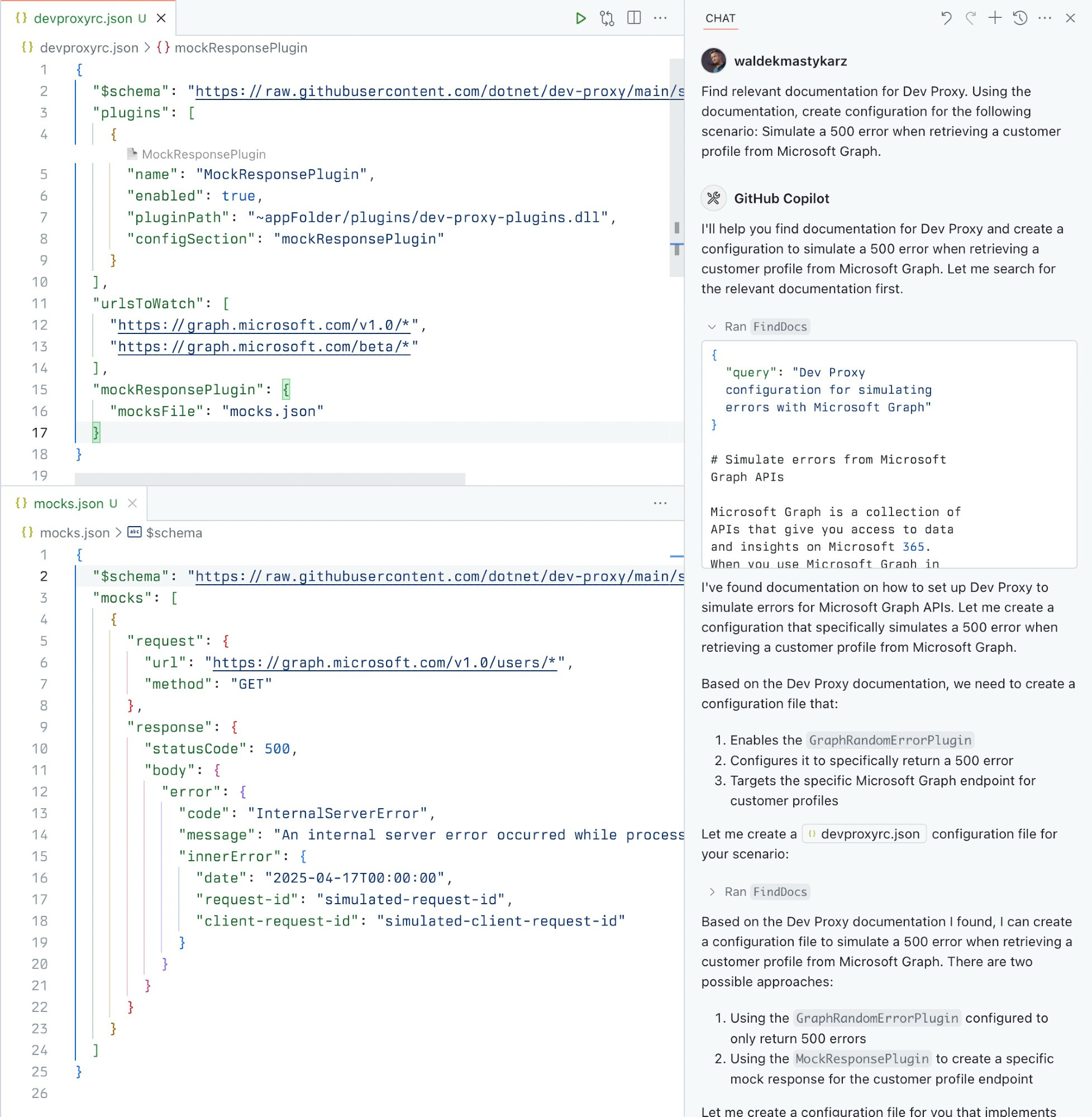
A Model Context Protocol (MCP) server for Dev Proxy that enables AI assistants to interact with Dev Proxy capabilities using the MCP standard. Use this server to:
- Create Dev Proxy configurations using natural language
- Get contextual help for working with Dev Proxy
- Discover Dev Proxy features and capabilities
What is Dev Proxy?
Dev Proxy is an API simulator that helps you effortlessly test your app beyond the happy path. It allows you to:
- Test API error handling: See how your app responds to API errors without changing your code
- Verify rate limit handling: Simulate API rate limits to improve user experience
- Test slow API responses: See how your app handles slow APIs to implement necessary affordances
- Create mock APIs: Quickly stand up mock APIs without writing code you won't ship
Dev Proxy works with any type of app and tech stack as it intercepts network requests at the proxy level.
What This Package Does
This package provides a Model Context Protocol (MCP) server interface to Dev Proxy. It allows AI assistants and other MCP-compatible clients to:
- Find Dev Proxy documentation using natural language queries
- Get the installed Dev Proxy version
Prerequisites
Usage
To set up and use the MCP server, refer to the instructions for your MCP host, such as Visual Studio Code. The Dev Proxy MCP server is published on npm under @devproxy/mcp.
Use the following values:
- Type:
stdio - Command:
npx - Arguments:
-y@devproxy/mcp
- Environment: none
[!TIP] If you want to test the preview version of the server using
@devproxy/mcp@next.
Connect with an MCP Client
This MCP server exposes the following tools:
GetBestPractices
Gets a list of best practices for configuring and using Dev Proxy. Call it for any code generation or operation involving Dev Proxy. These best practices do not change so once it has been called during the current session, you do not need to invoke it again.
_Best practices in markdown_
FindDocs
Finds relevant Dev Proxy documentation related to a specific query.
{
  "query": "How to simulate API errors"
}
GetVersion
Gets the currently installed Dev Proxy version. This is useful to ensure that the generated configuration is compatible with the installed version of Dev Proxy.
{}
Development
# Clone the repository
git clone https://github.com/waldekmastykarz/dev-proxy-mcp.git
cd dev-proxy-mcp

# Install dependencies
npm install

# Build the project
npm run build

# Run the server
npm start

# Run with MCP inspector for debugging
npm run inspect
Contributing
Contributions are welcome! Please feel free to submit a Pull Request.
- Fork the repository
- Create your feature branch (
git checkout -b feature/amazing-feature) - Commit your changes (
git commit -m 'Add some amazing feature') - Push to the branch (
git push origin feature/amazing-feature) - Open a Pull Request
License
This project is licensed under the MIT License - see the LICENSE file for details.
Related Projects
- Dev Proxy - The core Dev Proxy tool
- Model Context Protocol (MCP) - Protocol specification for AI assistant tools
Pertanyaan tentang Dev Proxy MCP
Bagaimana cara menambahkan Dev Proxy MCP ke Claude Code?
Jalankan claude mcp add mcp -- npx -y @devproxy/mcp di terminal Anda. Tambahkan --scope user agar tersedia di semua proyek.
Bagaimana cara menambahkan Dev Proxy MCP ke Cursor?
Buka ~/.cursor/mcp.json dan tambahkan server di bawah mcpServers, menggunakan config Cursor yang ditunjukkan di bagian instalasi di atas.
Apa yang bisa dilakukan Dev Proxy?
Dev Proxy adalah simulator API yang memungkinkan Anda menguji penanganan error API, memverifikasi penanganan rate limit, menguji respons API yang lambat, dan membuat mock API.