
Codebase MCP server
Commit 29 Okt 2026Mengubah Claude Desktop menjadi asisten coding dengan semantic code search, persistent memory, dan pipeline editing berbantuan AI.
Juga dikenal sebagai danyQe/codebase-mcp
- Stars
- 50
- Tools
- 16
- Unduhan, 30 hari
- —
- Versi terbaru
- —
- Commit terakhir
- 29 Okt 2026
- Lisensi
- Apache-2.0
Apa itu Codebase MCP?
Codebase adalah MCP server. Mengubah Claude Desktop menjadi asisten coding dengan semantic code search, persistent memory, dan pipeline editing berbantuan AI. Server ini menyediakan 16 tool, seperti session_tool, memory_tool, git_tool.
Ringkasan dibuat dari README proyek
Tentang Codebase MCP server
Mengubah Claude Desktop menjadi asisten coding khusus adalah apa yang ditawarkan oleh codebase-mcp bagi developer yang ingin menggunakan langganan Claude Pro atau Team mereka tanpa harus membayar tool bulanan tambahan. Dengan terhubung melalui Model Context Protocol, ini menyediakan alternatif open-source untuk layanan berbayar seperti Cursor. Sistem ini menggunakan local embeddings dan indexing FAISS untuk melakukan semantic search dalam waktu kurang dari satu detik pada file Python, JavaScript, dan TypeScript.
User dapat menyiapkan server secara lokal menggunakan Python 3.11 dan package manager uv, serta mengonfigurasi backend FastAPI untuk mengelola engine utamanya. Meskipun sebagian besar pemrosesan tetap dilakukan secara lokal untuk menjaga privasi, tool edit_file memerlukan API key Gemini untuk memfasilitasi modifikasi kode berbantuan AI. Server ini menyediakan 16 tool berbeda, termasuk sistem persistent memory yang mengategorikan pembelajaran arsitektur dan kesalahan, workflow Git berbasis sesi untuk pengembangan fitur yang terisolasi, serta automated quality gates yang menggunakan Black dan Ruff untuk memastikan kode memenuhi standar tertentu sebelum melakukan commit.
Apa yang bisa Anda lakukan dengannya
- 1Implementasi fitur baru dengan konteksMinta AI untuk membuat endpoint API baru sementara ia secara otomatis mencari pola yang sudah ada dan mengelola branch pengembangan khusus.
- 2Melakukan refactoring kode secara cerdasMinta perubahan struktural pada service Anda menggunakan editing berbantuan AI yang memvalidasi perubahan terhadap quality gates.
- 3Menjaga pengetahuan proyek jangka panjangGunakan sistem persistent memory untuk memastikan asisten mengingat keputusan arsitektur sebelumnya dan menghindari pengulangan kesalahan yang sama.
- 4Navigasi codebase yang kompleksLakukan pencarian berbasis semantik atau level symbol untuk menemukan fungsi atau class spesifik di dalam proyek Anda.
Ditulis berdasarkan README proyek. Setiap use case diperiksa terhadap kutipan dari README tersebut.
Tool Codebase MCP 16
Terdeteksi dari READMEsession_toolmemory_toolgit_toolwrite_tooledit_filesearch_toolread_code_toolproject_context_toollist_directory_toolcode_analysis_toollist_file_symbols_toolread_symbol_from_database
| session_tool | — | |
| memory_tool | — | |
| git_tool | — | |
| write_tool | — | |
| edit_file | — | |
| search_tool | — | |
| read_code_tool | — | |
| project_context_tool | — | |
| list_directory_tool | — | |
| code_analysis_tool | — | |
| list_file_symbols_tool | — | |
| read_symbol_from_database | — |
Tampilkan semua 16 toolTampilkan lebih sedikit tool
project_structure_toolfile_toolexecute_toolshow_directory_tree
| project_structure_tool | — | |
| file_tool | — | |
| execute_tool | — | |
| show_directory_tree | — |
Konfigurasi
GEMINI_API_KEY
| Nama | Deskripsi | Tipe |
|---|---|---|
| GEMINI_API_KEY | — |
Pengecekan otomatis
Berjalan 13 Nov 2026Laporan lengkap →Belum diverifikasi. Sebuah server memerlukan skor 80, tidak ada temuan serius, dan data yang cukup untuk kami periksa. Cara kerja checks

- Source repository terhubung dan dapat dijangkauLolos
- Lisensi open source (OSI)Lolos
- Ada commit atau release dalam satu tahun terakhirLolos
- Nama package tidak mirip dengan package populerTidak diperiksa
- Remote endpoint menggunakan HTTPSTidak diperiksa
- Tools yang bersifat destruktif telah diberi labelTidak diperiksa
- Tidak ada instruksi tersembunyi untuk modelLolos
- Tidak ada advisory kritis di paket maupun dependensinyaTidak diperiksa
README
Lihat di GitHubCodebase MCP
Privacy-first AI development assistant via MCP | Turn Claude into your personal coding assistant | Semantic code search • AI-assisted editing • Quality-checked generation • Persistent memory | Free open-source alternative to Cursor & paid AI coding tools | Python, React, TypeScript, FastAPI
Open Source**


Codebase MCP is an open-source AI-powered development assistant that connects Claude Desktop (or any MCP-compatible LLM) to your codebase through the Model Context Protocol. Stop paying for separate coding assistants - if you already have a Claude subscription, that's all you need.
📖 Read Full Documentation | 🏗️ Architecture | 🤝 Contributing
🌟 Why Codebase MCP?
The Problem
Modern AI coding assistants like Cursor, Windsurf, and others charge $20-40+/month on top of your existing LLM subscription. If you already pay for Claude, why pay again for a coding assistant?
The Solution
Codebase MCP turns your existing Claude subscription into a powerful coding assistant:
- ✅ One subscription - Use your existing Claude Pro/Team plan
- ✅ Privacy-first - Local embeddings and processing (except edit operations)
- ✅ Open source - Apache 2.0 license, community-driven
- ✅ Extensible - Works with any MCP-compatible LLM via Model Context Protocol
- ✅ Lightweight - ~100MB memory footprint for medium projects
- ✅ Fast - Sub-second semantic search with local FAISS indexing
⚡ Quick Start
Prerequisites
- Python 3.11+
- Claude Desktop (or any MCP-compatible client)
- Git installed
- uv package manager (recommended)
Installation
1. Clone the repository:
git clone https://github.com/danyQe/codebase-mcp.git
cd codebase-mcp
2. Install globally (recommended):
# Install uv if you haven't
pip install uv

# Create virtual environment and install dependencies
uv venv
source .venv/bin/activate  # On Windows: .venv\Scripts\activate
uv pip install -r requirements.txt

# Install formatters globally (required for code formatting)
pip install black ruff
3. Configure Gemini API (for edit tool):
# Create .env file
cp .env.example .env

# Get free API key from: https://aistudio.google.com/app/apikey
# Add to .env:
GEMINI_API_KEY=your_api_key_here
4. Configure Claude Desktop:
Add to your claude_desktop_config.json:
{
  "mcpServers": {
    "codebase-manager": {
      "command": "/path/to/your/.venv/bin/python",
      "args": [
        "/path/to/codebase-mcp/mcp_server.py"
      ]
    }
  }
}
5. Start the FastAPI server:
# In a separate terminal, navigate to your project directory
python main.py /path/to/your/project

# Server starts on http://localhost:6789
# You can access the web dashboard at: http://localhost:6789
6. Use with Claude Desktop:
- Restart Claude Desktop
- Start chatting - Claude now has access to 16 MCP tools for codebase management!
🎯 Key Features
🔍 Semantic Code Search
- AI-powered code understanding with local embeddings
- Multi-language support (Python, JavaScript, TypeScript)
- Symbol-level indexing (functions, classes, interfaces)
- Fuzzy search and exact matching modes
🧠 Persistent Memory System
- Remember context across chat sessions
- Categorize learnings: progress, mistakes, solutions, architecture
- Semantic memory search with importance scoring
- Never repeat the same mistake twice
🌿 Session-Based Git Workflow
- Isolated development branches for each feature
- Automatic commit tracking in
.codebasedirectory - Separate from user's
.git- track AI changes independently - Auto-merge support with quality gates
✍️ Intelligent Code Writing
- Write Tool: Create new files with auto-formatting and quality scoring
- Edit Tool: AI-assisted editing with Gemini integration (inspired by Cursor)
- Quality Gates: Auto-commit only when code quality ≥ 80%
- Dependency Checking: Prevent code duplication and missing imports
🎨 Auto-Formatting
- Python: Black + Ruff (PEP 8 compliant)
- TypeScript/JavaScript: Prettier (run through npx), plus a few simple lint-style warnings (no ESLint)
- Quality Scoring: Automatic code quality assessment
- Error Recovery: Intelligent retry with corrections
📊 Project Intelligence
- Real-time codebase analysis
- File structure visualization
- Dependency tracking
- Symbol extraction and indexing
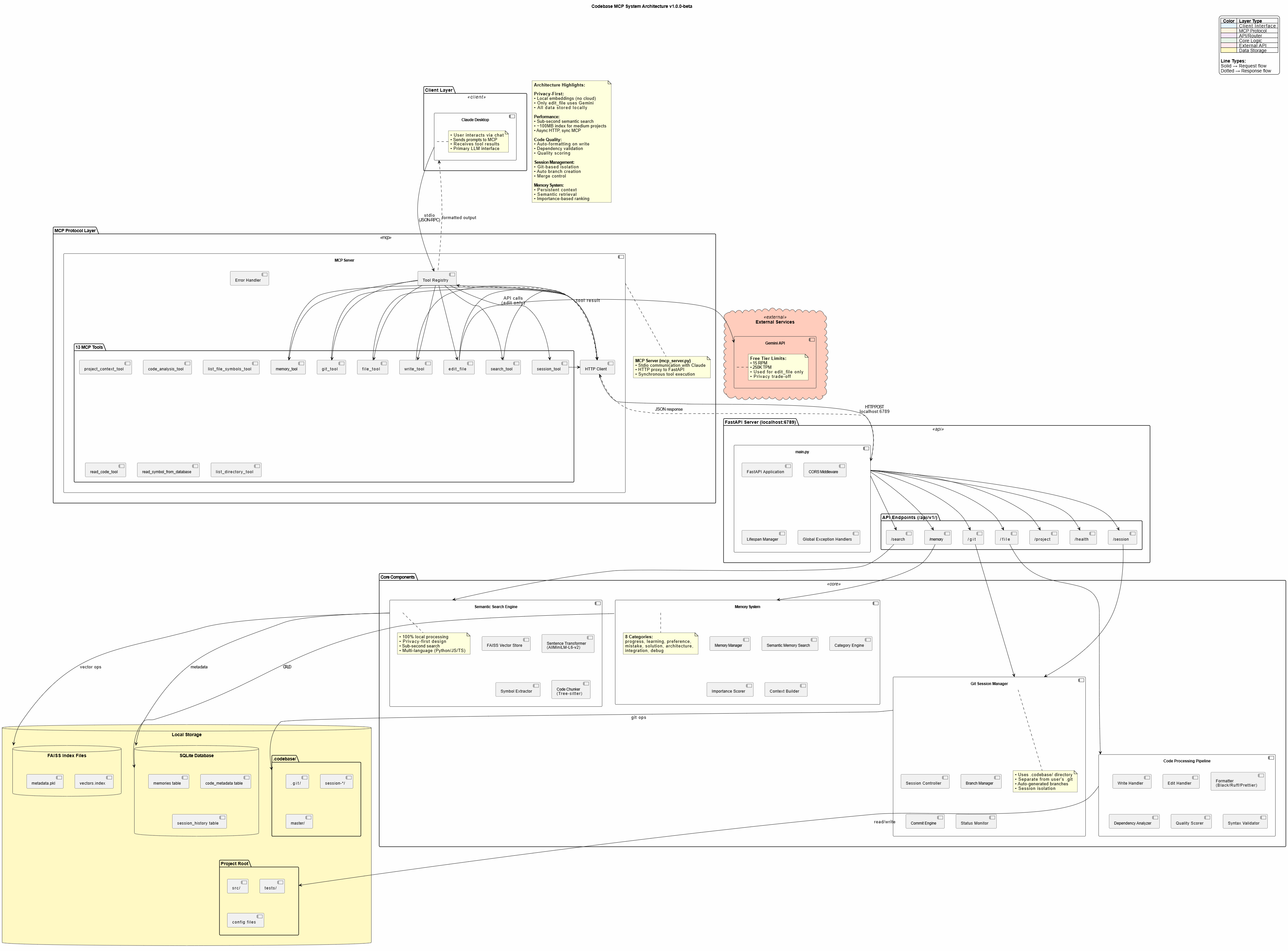
🏗️ Architecture
┌─────────────────┐
│ Claude Desktop  │  User interacts via chat
└────────┬────────┘
         │ MCP Protocol (stdio)
         ↓
┌─────────────────┐
│   MCP Server    │  16 Tools (proxy layer)
│  (mcp_server.py)│  Lightweight, fast
└────────┬────────┘
         │ HTTP/REST
         ↓
┌─────────────────┐
│ FastAPI Server  │  Port 6789 (main.py)
│   Core Engine   │  40+ API endpoints
└────────┬────────┘
         │
    ┌────┴─────┬─────────┬──────────┐
    ↓          ↓         ↓          ↓
┌────────┐ ┌──────┐ ┌────────┐ ┌───────────┐
│Semantic│ │Memory│ │  Git   │ │Code Tools │
│ Search │ │System│ │Manager │ │  Pipeline │
└────────┘ └──────┘ └────────┘ └───────────┘
    │          │         │          │
    └──────────┴─────────┴──────────┘
               ↓
    ┌──────────────────────┐
    │   Local Storage      │
    │ • FAISS (vectors)    │
    │ • SQLite (metadata)  │
    │ • .codebase (git)    │
    └──────────────────────┘
Privacy Note: All processing is local except the edit tool, which uses Google's free Gemini API for AI-assisted code editing. Only the edited file is sent to Gemini - no project context or history.
🛠️ Available Tools
Codebase MCP provides 16 MCP tools for comprehensive development automation:
| Tool | Purpose | Key Features |
|---|---|---|
session_tool |
Manage dev sessions | Create branches, auto-commit, merge |
memory_tool |
Store/retrieve knowledge | Persistent context, semantic search |
git_tool |
Git operations | Status, diff, log, commit, branches |
write_tool |
Intelligent file creation | Auto-format, quality scoring, dependency check |
edit_file |
AI-assisted editing | Gemini-powered, error recovery, format validation |
search_tool |
Semantic code search | 4 modes: semantic, fuzzy, text, symbol |
read_code_tool |
Smart code reading | Symbol-level, line ranges, whole file |
project_context_tool |
Project analysis | Structure, dependencies, overview |
list_directory_tool |
Directory exploration | Tree view, metadata, gitignore support |
code_analysis_tool |
Code quality checks | Syntax, linting, imports, dependencies |
list_file_symbols_tool |
Symbol extraction | Functions, classes, interfaces |
read_symbol_from_database |
DB symbol lookup | Fast indexed retrieval |
project_structure_tool |
Project visualization | Enhanced tree with stats |
file_tool |
Basic file operations (legacy) | Read and write by line range; write_tool is preferred for new code |
execute_tool |
Run a command | Arguments, timeout and working directory |
show_directory_tree |
Compact directory tree | Depth 1 to 5, tuned for LLM context |
📈 Performance
- Semantic Search: Sub-second response for typical codebases
- Memory Footprint: ~100MB for medium projects (<20k lines)
- Indexing Speed: ~30 seconds for 10k lines initial index
- Edit Operations: 5-15 seconds (Gemini API + formatting)
- Optimal Project Size: <20,000 lines (tested and verified)
Note: Edit tool can be slow due to Gemini API latency and code formatting. Claude Desktop may timeout on very large edits (use smaller, focused edits).
🎓 Usage Examples
Creating a New Feature
User: "Create a FastAPI endpoint for user authentication with JWT tokens"

Claude:
✅ Searching for existing auth patterns...
✅ Creating session: feat/user-auth
✅ Writing authentication.py with JWT implementation
✅ Auto-formatted with Black + Ruff
✅ Quality score: 95% - Auto-committed
✅ Storing solution in memory
Refactoring Code
User: "Refactor the user service to use dependency injection"

Claude:
✅ Reading current user service implementation
✅ Searching for DI patterns in codebase
✅ Editing with AI assistance (Gemini)
✅ Validating changes with quality gates
✅ Session: refactor/user-di ready for review
Memory-Driven Development
User: "Continue working on the payment integration"

Claude:
✅ Loading memory context...
✅ Found previous progress: Stripe API setup complete
✅ Found previous mistake: Don't use synchronous requests in async endpoints
✅ Continuing from last checkpoint...
🔐 Privacy & Security
Privacy-First Design
- Local Embeddings: AllMiniLM-L6-v2 runs entirely on your machine
- Local Processing: FAISS vector store, SQLite metadata - all local
- No Cloud Dependencies: Except for Gemini API (edit tool only)
Gemini API Usage
- Scope: Only
edit_filetool uses Gemini - Data Sent: Only the file being edited (no project context)
- Alternative: Contributors can add local LLM support (GPU required)
- Cost: Free tier (15 RPM, 250K TPM, 1K RPD)
Security Best Practices
- Never commit
.envwith API keys - Use
.gitignorefor sensitive files - Review AI-generated code before production deployment
- Keep dependencies updated
🤝 Contributing
We welcome contributions! This project was built to be community-driven and extensible.
Priority Areas:
- 🌐 Language Support: Add Java, Go, Rust, PHP, etc.
- 🧠 Local LLM Integration: Replace Gemini with local models
- 🔍 Search Improvements: Enhanced semantic algorithms
- 📊 UI/UX: Improve web dashboard
- ⚡ Performance: Optimization for larger codebases
See CONTRIBUTING.md for detailed guidelines.
📄 License
This project is licensed under the Apache License 2.0 - see LICENSE file for details.
Credits:
- Edit tool techniques inspired by Cursor
- Built with Claude Sonnet 4 and 4.5
- Powered by Model Context Protocol
🗺️ Roadmap
Current Version: v1.0.0-beta
Upcoming Features:
- Community-driven enhancements
- More language support
- Local LLM alternatives
- Performance optimizations
- Advanced prompt engineering templates
📞 Support
- 📖 Documentation: https://danyqe.github.io/codebase-mcp/
- 🐛 Issues: https://github.com/danyQe/codebase-mcp/issues
- 💬 Discussions: https://github.com/danyQe/codebase-mcp/discussions
- 🌟 Star this repo if you find it useful!
🎉 Acknowledgments
Special thanks to:
- Anthropic for Claude and the Model Context Protocol
- Google for the free Gemini API
- Cursor team for pioneering AI-assisted editing techniques
- Open source community for making this possible
Made with ❤️ by developers, for developers
Stop paying for coding assistants. Start building with your own LLM.
Pertanyaan tentang Codebase MCP
Tool apa yang disediakan Codebase MCP?
Server ini menyediakan 16 tool, termasuk session_tool, memory_tool, git_tool, write_tool, edit_file.
Apakah ini memerlukan langganan terpisah?
Tidak, ini menggunakan paket Claude Pro atau Team Anda yang sudah ada, berfungsi sebagai alternatif open-source untuk tool berbayar seperti Cursor.
Apakah kode saya bersifat pribadi?
Ya, ini menggunakan desain yang mengutamakan privasi dengan local embeddings dan pemrosesan lokal; hanya file spesifik yang sedang diedit yang dikirim ke Gemini API.
Bahasa pemrograman apa saja yang didukung?
Saat ini mendukung Python, JavaScript, dan TypeScript.