
Onlyboxes MCP server
Commit 26 Okt 2026Memungkinkan AI client untuk menjalankan kode Python, menggunakan sesi terminal stateful, dan membaca gambar yang dihasilkan dalam sandbox self-hosted.
Juga dikenal sebagai Coooolfan/onlyboxes
- Stars
- 54
- Tools
- —
- Unduhan, 30 hari
- —
- Versi terbaru
- —
- Commit terakhir
- 26 Okt 2026
- Lisensi
- AGPL-3.0
Apa itu Onlyboxes MCP?
Onlyboxes adalah MCP server. Memungkinkan AI client untuk menjalankan kode Python, menggunakan sesi terminal stateful, dan membaca gambar yang dihasilkan dalam sandbox self-hosted.
Ringkasan dibuat dari README proyek
Tentang Onlyboxes MCP server
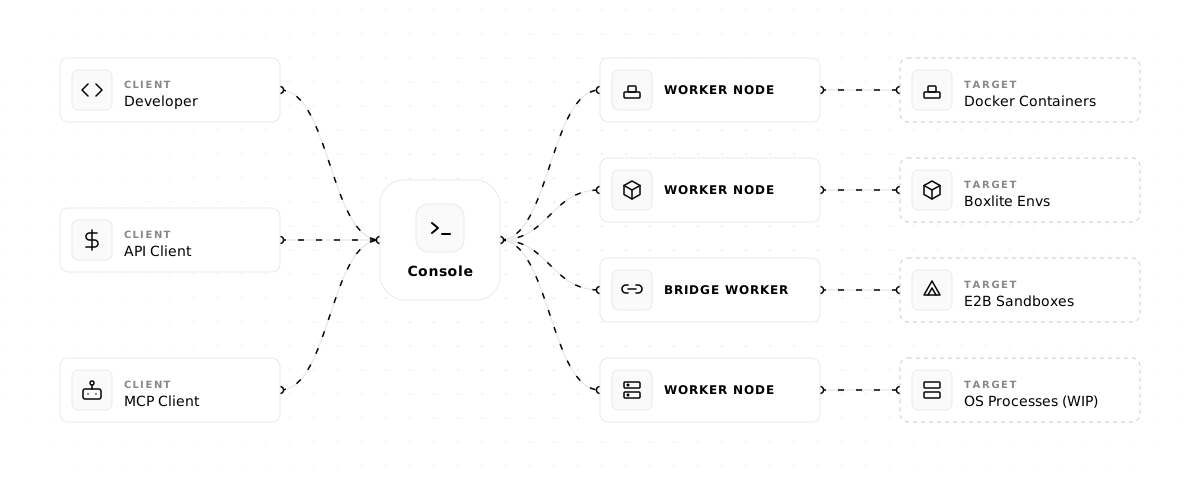
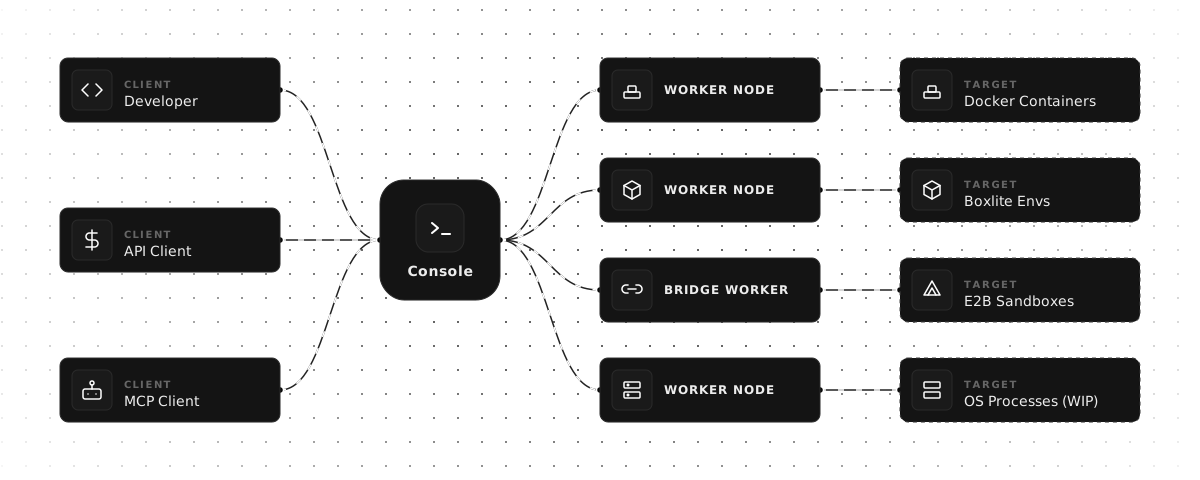
Onlyboxes memungkinkan individu dan tim kecil untuk menyediakan sandbox self-hosted guna eksekusi kode. Sistem ini menggunakan arsitektur terpisah yang terdiri dari control-plane console dan worker nodes yang scalable untuk mengelola tugas. Anda dapat men-deploy sistem ini di Linux menggunakan Docker dan systemd, lalu menghubungkan AI client ke endpoint MCP untuk melakukan tugas komputasi yang kompleks.
Developer dapat menggunakan MCP tools spesifik seperti pythonExec untuk menjalankan kode Python, terminalExec untuk mengelola sesi terminal stateful, dan readImage agar model dapat melihat output visual yang dihasilkan. Platform ini memastikan isolasi resource antar akun yang berbeda melalui container stateful. Karena sistem ini bersifat self-hosted, Anda memegang kendali penuh atas lingkungan eksekusi dan data yang diproses di dalam worker nodes.
Persiapan lingkungan memerlukan satu node console dan setidaknya satu worker node, seperti implementasi worker-docker. Untuk menghubungkan chat client LLM, Anda harus membuat access token dari dashboard web dan menyediakan URL endpoint MCP. Demi keamanan, disarankan untuk menempatkan port HTTP dan gRPC di belakang reverse proxy guna menerapkan TLS.
Apa yang bisa Anda lakukan dengannya
- 1Skalakan resource eksekusiTim dapat memperluas kapasitas komputasi mereka dengan menambahkan lebih banyak worker nodes ke dalam arsitektur.
Ditulis berdasarkan README proyek. Setiap use case diperiksa terhadap kutipan dari README tersebut.
Konfigurasi
WORKER_CONSOLE_GRPC_TARGETWORKER_CONSOLE_INSECUREWORKER_IDWORKER_SECRET
| Nama | Deskripsi | Tipe |
|---|---|---|
| WORKER_CONSOLE_GRPC_TARGET | — | |
| WORKER_CONSOLE_INSECURE | — | |
| WORKER_ID | — | |
| WORKER_SECRET | — |
Pengecekan otomatis
Berjalan 14 Nov 2026Laporan lengkap →Belum diverifikasi. Sebuah server memerlukan skor 80, tidak ada temuan serius, dan data yang cukup untuk kami periksa. Cara kerja checks · Yang perlu diperbaiki untuk menambah poin

- Source repository terhubung dan dapat dijangkaucoooolfan/onlyboxes is public and reachablegithub.com/coooolfan/onlyboxes ↗Lolos
- Nama paket mencantumkan repositori ini sebagai sumbernyaTidak diperiksa
- Provenance build (atestasi Sigstore)Tidak diperiksa
- Lisensi open source (OSI)AGPL-3.0spdx.org/licenses/AGPL-3.0.html ↗Lolos
- Ada commit atau release dalam satu tahun terakhirLast commit or release 2026-10-26github.com/coooolfan/onlyboxes ↗Lolos
- OpenSSF ScorecardTidak diperiksa
- Nama package tidak mirip dengan package populerTidak diperiksa
- Tidak ada advisory kritis pada paket atau dependensinyaTidak diperiksa
- Tidak ada instruksi tersembunyi untuk model0 tool descriptions and the README read; no override phrases, credential paths or hidden charactersLolos
- Tools yang bersifat destruktif telah diberi labelTidak diperiksa
- Endpoint remote merespons handshake MCPTidak diperiksa
README
Lihat di GitHubOnlyboxes
Onlyboxes is a self-hosted code execution sandbox platform for individuals and small teams.
It uses a control-plane (console) and execution-plane (worker) architecture, and exposes both REST APIs and MCP tools.
Key Features
- Self-hosted all components: control node (
console) + worker nodes (worker) - Separated control and execution planes:
- Workers support horizontal scaling
- Workers support multi-language heterogeneous implementations
- Workers support multiple runtimes
- Full account system: resource isolation (stateful containers, sessions) between accounts
- MCP tools:
pythonExec: Python code executionterminalExec: stateful terminal sessionsreadImage: model-readable images
- REST API: all MCP tools also available via HTTP + async task API
[!WARNING]
In the current release, console (gRPC + HTTP) does not provide built-in TLS/mTLS.
workerrejects insecure console endpoints by default; plaintext is allowed only whenWORKER_CONSOLE_INSECURE=trueis explicitly set.Put both console HTTP (
:8089) and gRPC (:50051) endpoints behind your reverse proxy/gateway and enforce TLS for external traffic.
Architecture
One-Click Installer (Linux)
For a single-machine deployment of console + worker-docker, run:
curl -fsSL https://onlybox.es/install.sh | bash
The installer will:
- Check the environment (Linux, Docker, Docker Compose v2, systemd)
- Download and render the compose template with auto-generated credentials
- Start the console via
docker compose up -d - Create a
normalworker - Download the architecture-matched
worker-dockerrelease binary for the default latest version, or your--tagoverride - Generate and enable a systemd service for the worker
- Poll until the worker comes online and print a result summary
Available options:
| Flag | Default | Description |
|---|---|---|
--tag |
latest published release | Optional release version override |
--workdir |
$PWD/onlyboxes |
Working directory |
--yes / -y |
false |
Non-interactive mode, skip confirmations |
--console-http-port |
8089 |
Console HTTP port (host side) |
--console-grpc-port |
50051 |
Console gRPC port (host side) |
--service-name |
onlyboxes-worker-docker |
systemd service name |
Requirements: Linux, systemd, Docker Engine, Docker Compose v2, Python 3.
Quick Start (Manual)
1) Prerequisites
- Control node:
- Docker Engine (binaries are also available in releases — no Docker needed if deploying via binary)
- Worker node:
- Docker Engine (required by
worker-docker)
- Docker Engine (required by
2) Start the console service
-
Create a working directory and a
docker-compose.ymlfile in it:mkdir -p onlyboxes-console && cd onlyboxes-consoleservices: console: image: coolfan1024/onlyboxes:latest container_name: onlyboxes-console restart: unless-stopped environment: CONSOLE_HASH_KEY: "replace-with-long-random-key" CONSOLE_ENABLE_REGISTRATION: "true" CONSOLE_DASHBOARD_USERNAME: "admin" # only for first run CONSOLE_DASHBOARD_PASSWORD: "change-me" # only for first run ports: - "8089:8089" - "50051:50051" volumes: - ./db:/app/db -
Replace at least:
CONSOLE_HASH_KEYCONSOLE_DASHBOARD_PASSWORD
-
Start console:
docker compose up -d
Default endpoints:
- Console Web UI / HTTP REST API / MCP endpoint:
http://127.0.0.1:8089 - gRPC:
127.0.0.1:50051
3) Sign in and create an access token
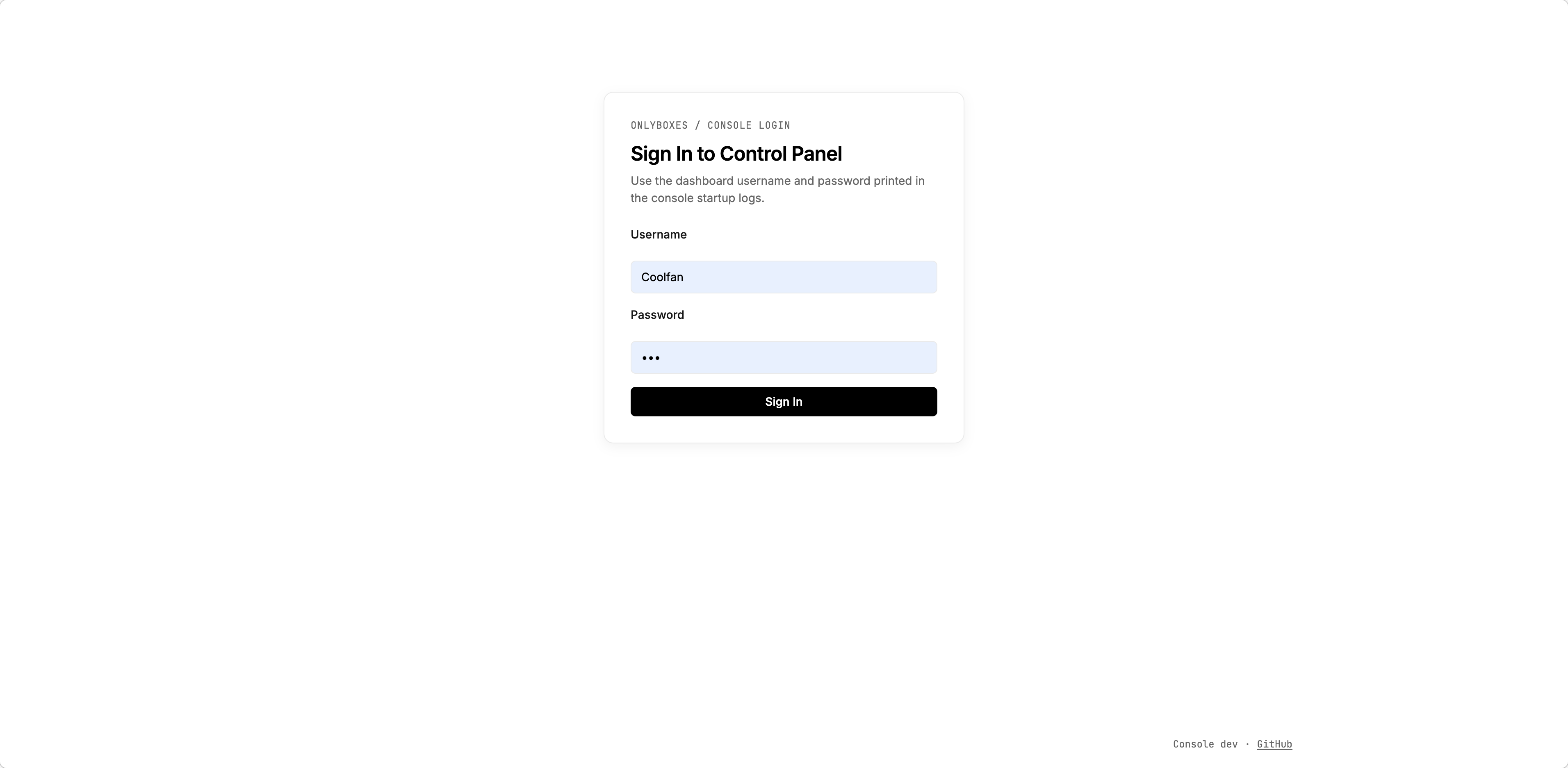
- Open
http://127.0.0.1:8089in your browser. - Sign in with the initialized admin account.
- Go to the token management page and create an access token.
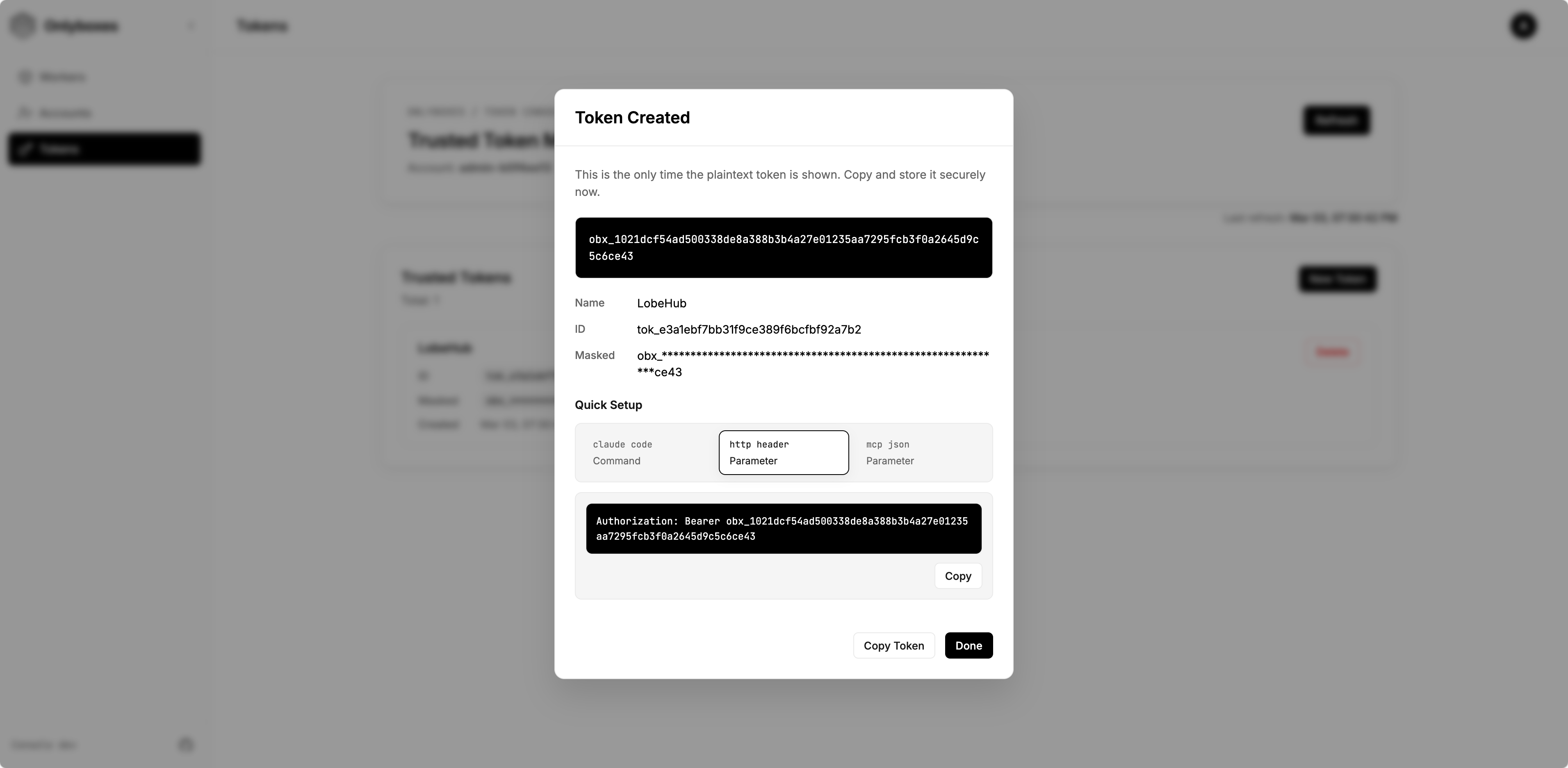
- Save the plaintext token immediately (it is returned only once).
4) Create a worker
- Go to Workers page and create a worker.
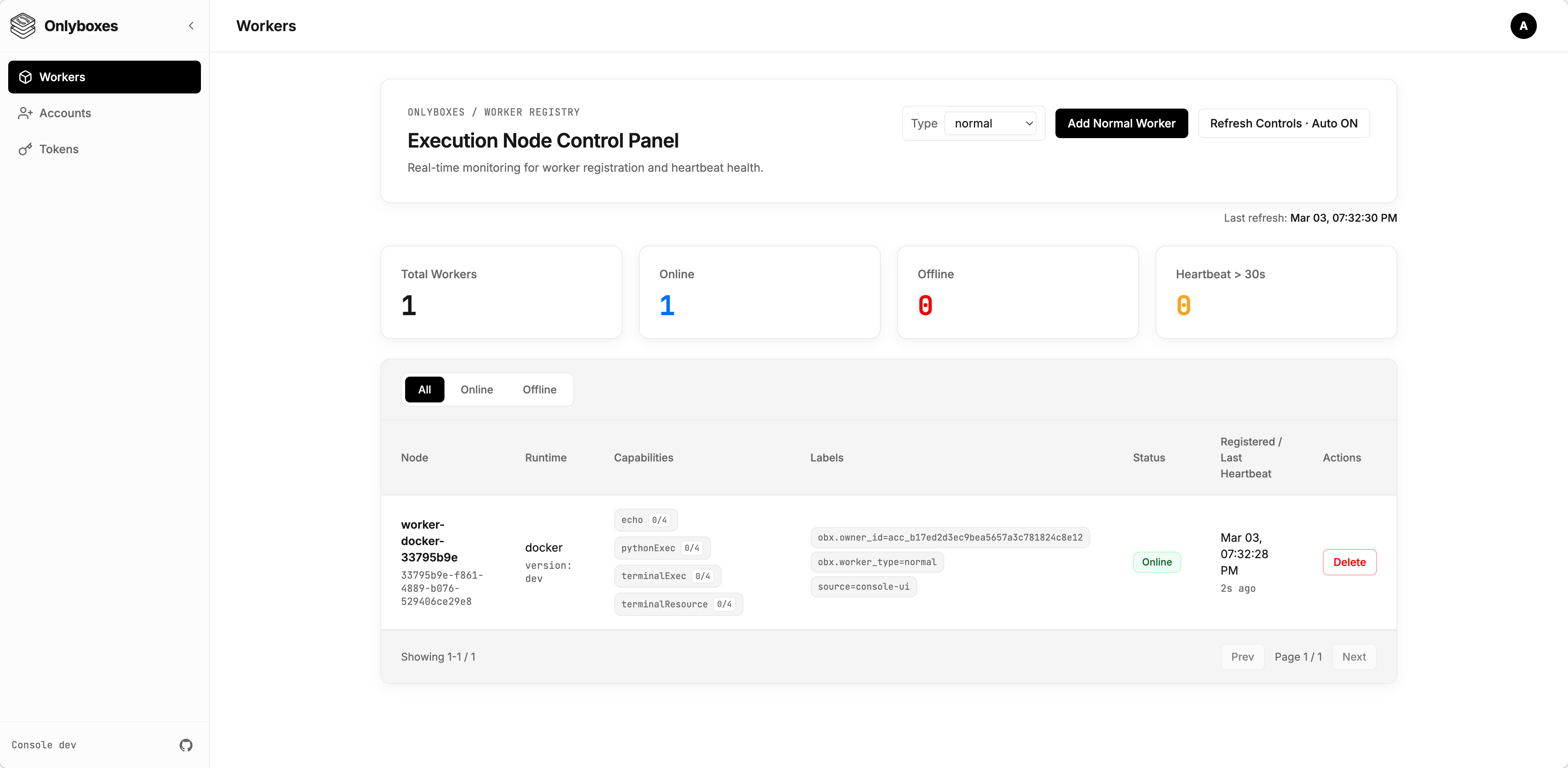
- Copy and securely store the startup command from the creation dialog (
WORKER_SECRETis one-time visible).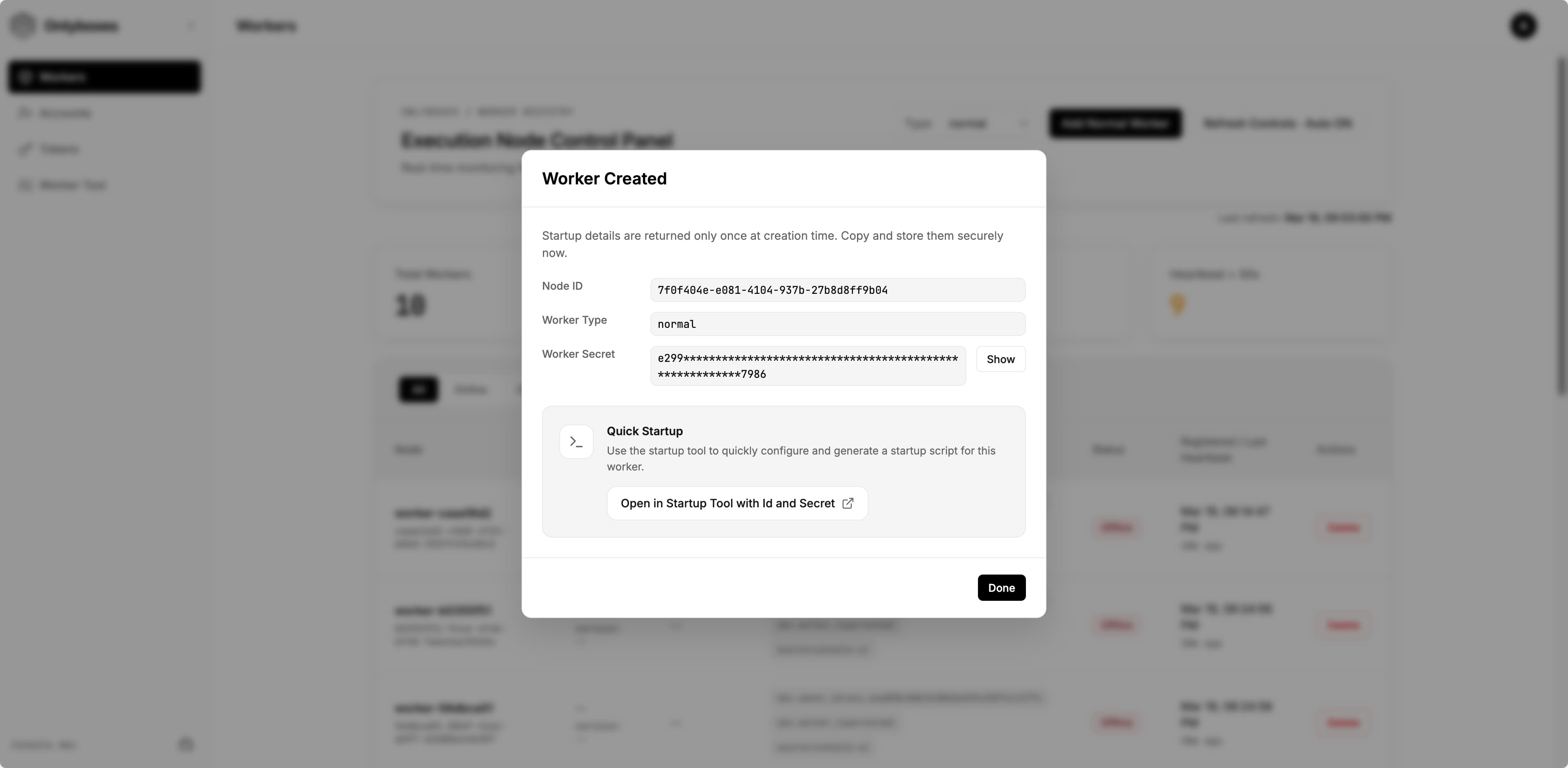
- (Optional) Click
Open in Startup Tool with Id and Secretto open the startup command builder with the worker id and secret pre-filled.- On the opened page, you can edit all available options. The generated startup command appears at the bottom of the page — copy and save it.
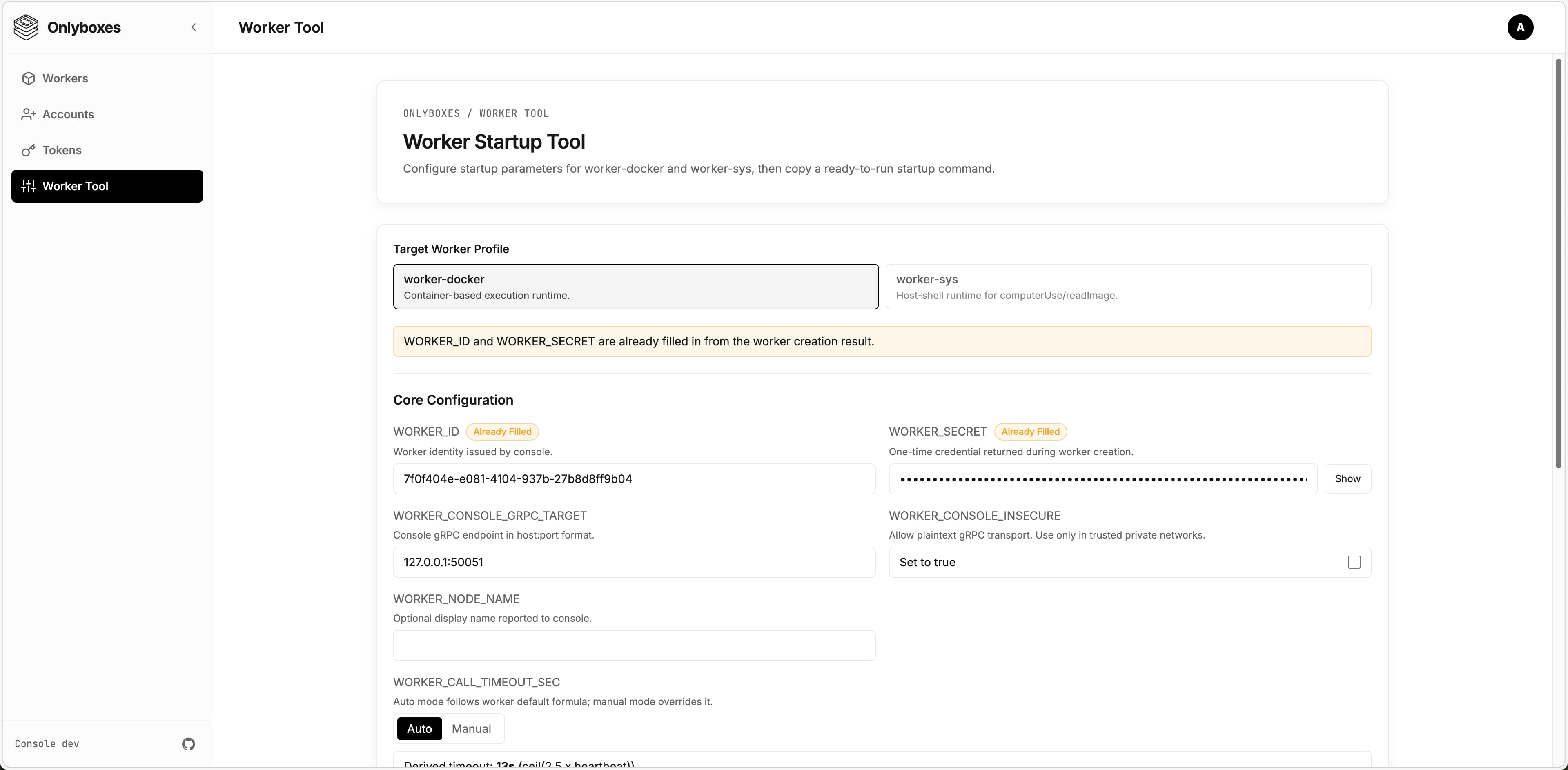
- On the opened page, you can edit all available options. The generated startup command appears at the bottom of the page — copy and save it.
5) Run worker
[!WARNING] Workers support different runtimes and environments. The current release only provides
worker-docker. This section uses the Docker runtime as an example.
-
Log in to the machine where the worker will be deployed.
- Ensure Docker Engine is installed.
- Ensure the worker can reach the console gRPC endpoint.
-
Download the latest
worker-dockerbinary from GitHub Releases:https://github.com/onlyboxes/onlyboxes/releases/latest
-
Use the startup command values from the dashboard, and replace the executable path on the last line with your downloaded binary.
- Workers reject insecure console endpoints by default; set
WORKER_CONSOLE_INSECURE=trueonly to allow plaintext connections.
# Example WORKER_CONSOLE_INSECURE=true \ WORKER_CONSOLE_GRPC_TARGET=127.0.0.1:50051 \ WORKER_ID=<worker_id> \ WORKER_SECRET=<worker_secret> \ /path/to/onlyboxes-worker-docker - Workers reject insecure console endpoints by default; set
6) Verify readiness
- Confirm the worker is
onlineon the dashboard Workers page. - For REST API request examples, see
docs/API.md. - If no tokens are configured,
/mcpand execution APIs return401by design. - Add the MCP endpoint
http://127.0.0.1:8089/mcpin any LLM Chat Client, set the token, and verify it works correctly.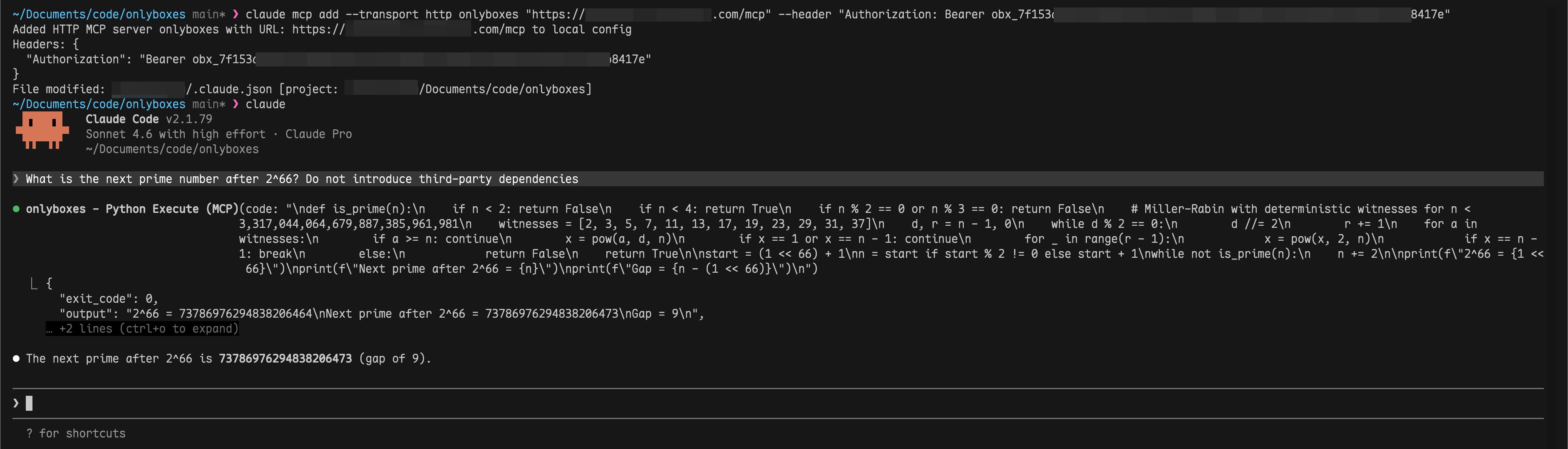
FAQ
-
Q: Worker stays
offlineafter starting? A: Check thatWORKER_CONSOLE_GRPC_TARGETpoints to the correct console gRPC address and verify network connectivity. -
Q: Can a worker be deployed on the same machine as the console? A: Yes.
-
Q: Can a worker run inside Docker? A: In theory, yes. However, it is not recommended because the worker needs access to the host Docker daemon. You would need to handle Docker-in-Docker yourself.
Production Checklist
- Replace all default credentials.
- Use a reverse proxy to enforce TLS for
:8089and:50051. - Persist and back up the SQLite data directory (
CONSOLE_DB_PATH). - Run workers on isolated hosts to avoid sharing the Docker daemon with the console.
- Read the
Configuration Referencebelow for all available options and adjust as needed.
Configuration Reference
Console (console)
| Environment Variable | Default | Notes |
|---|---|---|
CONSOLE_HTTP_ADDR |
:8089 |
Dashboard + REST API listen address |
CONSOLE_GRPC_ADDR |
:50051 |
Worker registry gRPC listen address |
CONSOLE_WORKER_CONNECTION_CONFLICT_POLICY |
REPLACE |
Duplicate Worker connection policy: REPLACE disconnects the existing connection; REJECT rejects the new connection |
CONSOLE_HASH_KEY |
(required) | HMAC key for hashing worker secrets and access tokens |
CONSOLE_DB_PATH |
./db/onlyboxes-console.db |
SQLite database path |
CONSOLE_DB_BUSY_TIMEOUT_MS |
5000 |
SQLite busy timeout |
CONSOLE_TASK_RETENTION_DAYS |
30 |
Retention for completed task records |
CONSOLE_ENABLE_REGISTRATION |
false |
Allow admin to register non-admin accounts |
CONSOLE_DASHBOARD_USERNAME |
(empty) | Used only for first admin initialization |
CONSOLE_DASHBOARD_PASSWORD |
(empty) | Used only for first admin initialization |
Worker (worker-docker)
| Environment Variable | Default | Notes |
|---|---|---|
WORKER_ID |
(required) | Issued by POST /api/v1/workers |
WORKER_SECRET |
(required) | Issued once by POST /api/v1/workers |
WORKER_CONSOLE_GRPC_TARGET |
127.0.0.1:50051 |
Console gRPC target |
WORKER_CONSOLE_INSECURE |
false |
false enforces TLS endpoint; set true only to allow plaintext console gRPC |
WORKER_HEARTBEAT_INTERVAL_SEC |
5 |
Worker heartbeat interval |
WORKER_HEARTBEAT_JITTER_PCT |
20 |
Heartbeat jitter percent |
WORKER_PYTHON_EXEC_DOCKER_IMAGE |
ghcr.io/astral-sh/uv:python3.12-bookworm-slim |
Runtime image for pythonExec |
WORKER_TERMINAL_EXEC_DOCKER_IMAGE |
coolfan1024/onlyboxes-runtime:default |
Runtime image for terminalExec |
WORKER_TERMINAL_OUTPUT_LIMIT_BYTES |
1048576 |
Per-stream output limit |
API Surfaces
- Authentication:
/api/v1/auth/* - Resource management:
/api/v1/accounts*,/api/v1/api-keys*,/api/v1/tokens*,/api/v1/sessions*,/api/v1/workers*,/api/v1/proxy-routes* - Command execution:
/api/v1/commands/* - Task execution:
/api/v1/tasks* - MCP (Streamable HTTP):
POST /mcp
Development
Local dev orchestration
scripts/dev.sh runs console / web / website in a tmux session. Every subcommand returns immediately, and logs land in scripts/.dev/<svc>.log.
scripts/dev.sh start              # start all three
scripts/dev.sh start console web  # console + web only
scripts/dev.sh status             # session, port listeners, window state
scripts/dev.sh logs console       # last 200 log lines
scripts/dev.sh creds              # console admin credentials
scripts/dev.sh stop               # stop everything
Web dev URL defaults to http://127.0.0.1:5178 and proxies /api/* and /mcp to http://127.0.0.1:8089.
Workers are not orchestrated — their startup arguments vary per implementation, so start them manually. Full usage: scripts/README.md.
Useful docs
- Unified API reference:
docs/API.md - Console internals:
console/README.md - Worker internals:
worker/worker-docker/README.md - API/proto guide:
api/README/proto.md - Web app guide:
web/README.md
Release & Images
- GitHub workflow:
.github/workflows/package-release.yml— run it manually from the Actions tab, pick the branch and enter the version (e.g.0.7.2); the tag is created from that branch. Turn offlatestwhen patching an older line so the newest release keeps the label - Website-only deploy:
.github/workflows/deploy-website.yml— manual, independent of a release - Console Docker image:
coolfan1024/onlyboxes:<version>andcoolfan1024/onlyboxes:latest - Terminal runtime images:
coolfan1024/onlyboxes-runtime:<version>-default,<version>-default-cn, and<version>-lobehub; stable aliases aredefault,default-cn,lobehub, andlatest(same asdefault) - Console binary includes embedded web assets
Security and Operational Notes
- Console does not provide built-in TLS/mTLS in this release;
worker-dockerrequires explicitWORKER_CONSOLE_INSECURE=trueto connect over plaintext. - Put console HTTP (
:8089) and gRPC (:50051) behind a reverse proxy/gateway and enforce TLS on public/external links. WORKER_SECRETand access token plaintext values are returned only at creation time.- Dashboard login sessions are in-memory and are invalidated when
consolerestarts.
Links
License
Pertanyaan tentang Onlyboxes MCP
Apa saja MCP tools yang disediakan oleh Onlyboxes?
Onlyboxes menyediakan pythonExec untuk eksekusi kode Python, terminalExec untuk sesi terminal stateful, dan readImage agar gambar dapat dibaca oleh model.
Mengapa worker saya tetap offline setelah dijalankan?
Pastikan WORKER_CONSOLE_GRPC_TARGET mengarah ke alamat gRPC console yang benar dan verifikasi konektivitas jaringan Anda.
Apakah worker bisa dideploy di mesin yang sama dengan console?
Ya, worker bisa berjalan di mesin yang sama dengan console, meskipun panduan produksi menyarankan penggunaan host yang terisolasi.
Apakah Onlyboxes menyediakan TLS secara langsung?
Tidak, rilis saat ini belum memiliki TLS/mTLS bawaan pada console. Letakkan endpoint HTTP dan gRPC console di belakang reverse proxy atau gateway untuk menerapkan TLS.