
Menyediakan layer memori dan kontinuitas berbasis local-first yang memungkinkan berbagai AI coding agent untuk berbagi konteks dan melanjutkan pekerjaan dari titik terakhir agent lainnya.
Juga dikenal sebagai Coder8124/logos, @noeton/logos
- Stars
- 4
- Tools
- —
- Unduhan, 30 hari
- —
- Versi terbaru
- —
- Commit terakhir
- 9 Nov 2026
- Lisensi
- Apache-2.0
Apa itu Logos MCP?
Logos adalah MCP server. Menyediakan layer memori dan kontinuitas berbasis local-first yang memungkinkan berbagai AI coding agent untuk berbagi konteks dan melanjutkan pekerjaan dari titik terakhir agent lainnya.
Ringkasan dibuat dari README proyek
Tentang Logos MCP server
Developer yang menggunakan berbagai AI coding agent dapat menggunakan logos untuk menjaga kontinuitas di berbagai sesi dan tool yang berbeda. Logos bertindak sebagai layer memori local-first di mana agent seperti Claude Code, Cursor, dan Codex berbagi satu vault berisi file markdown yang sama. Setup ini memungkinkan satu agent untuk membuat checkpoint progresnya sehingga model atau tool yang berbeda dapat melanjutkan pekerjaan tepat di tempat agent sebelumnya berhenti.
Sistem ini beroperasi sepenuhnya di mesin Anda, memastikan privasi data dengan menjaga vault tetap lokal. Sistem ini menggunakan SQLite index untuk caching, yang dapat dibangun kembali menggunakan command logos index tanpa kehilangan data. Pengguna dapat menginstalnya via Homebrew di macOS dan Linux atau melalui npm di Windows. Server ini mendukung berbagai host termasuk Claude Desktop, Cline, Devin, dan GitHub Copilot, serta menyediakan CLI untuk agent yang hanya memiliki akses shell.
Selain sekadar melanjutkan pekerjaan, server ini membantu mencegah agent mengulangi pendekatan yang gagal melalui tool before_you_try. Logos juga memungkinkan developer untuk menanyakan alasan di balik perubahan kode tertentu menggunakan command why. Anda dapat mengimpor riwayat proyek yang sudah ada dari sumber seperti git history, Cursor rules, atau CLAUDE.md untuk mengisi memory vault Anda.
Apa yang bisa Anda lakukan dengannya
- 1Melanjutkan tugas coding yang terhentiSerah terima proyek dari satu AI agent ke agent lainnya dengan mengambil state terakhir yang diketahui dan tugas-tugas yang masih terbuka.
- 2Menghindari error coding yang berulangMencegah agent baru mencoba solusi yang sudah terbukti tidak berhasil sebelumnya.
- 3Memahami keputusan kode historisMeminta AI untuk menjelaskan alasan di balik implementasi saat ini pada file tertentu.
- 4Migrasi memori agent yang sudah adaMemindahkan brain vault lama Anda ke dalam sistem logos yang baru.
Ditulis berdasarkan README proyek. Setiap use case diperiksa terhadap kutipan dari README tersebut.
Cara menginstal Logos MCP
Format diverifikasi 10 Nov 2026Tambahkan ke CursorTambahkan ke GooseInstal Logos MCP di Claude Code
$ claude mcp add logos -- npx -y @noeton/logosInstal Logos MCP di Cursor
~/.cursor/mcp.json
{
  "mcpServers": {
    "logos": {
      "command": "npx",
      "args": [
        "-y",
        "@noeton/logos"
      ]
    }
  }
}Instal Logos MCP di VS Code
.vscode/mcp.json
{
  "servers": {
    "logos": {
      "type": "stdio",
      "command": "npx",
      "args": [
        "-y",
        "@noeton/logos"
      ]
    }
  }
}Instal Logos MCP di VS Code CLI
$ code --add-mcp '{"name":"logos","type":"stdio","command":"npx","args":["-y","@noeton/logos"]}'Instal Logos MCP di Claude Desktop
claude_desktop_config.json
{
  "mcpServers": {
    "logos": {
      "command": "npx",
      "args": [
        "-y",
        "@noeton/logos"
      ]
    }
  }
}Instal Logos MCP di Codex
$ codex mcp add logos -- npx -y @noeton/logosInstal Logos MCP di Codex config.toml
~/.codex/config.toml
[mcp_servers.logos]
command = "npx"
args = ["-y", "@noeton/logos"]
Instal Logos MCP di Gemini CLI
$ gemini mcp add -s user logos npx -- -y @noeton/logosInstal Logos MCP di Gemini settings.json
~/.gemini/settings.json
{
  "mcpServers": {
    "logos": {
      "command": "npx",
      "args": [
        "-y",
        "@noeton/logos"
      ]
    }
  }
}Pengecekan otomatis
Berjalan 14 Nov 2026Laporan lengkap →Lolos checks otomatis kami. Ini bukan audit keamanan: baca kodenya dan berikan server akses paling terbatas yang dibutuhkannya. Cara kerja checks

- Source repository terhubung dan dapat dijangkaucoder8124/logos is public and reachablegithub.com/coder8124/logos ↗Lolos
- Nama paket mencantumkan repositori ini sebagai sumbernya@noeton/logos names coder8124/logos as sourcenpmjs.com/package/@noeton/logos ↗Lolos
- Provenance build (atestasi Sigstore)Sigstore attestation for @noeton/logosnpmjs.com/package/@noeton/logos/v/0.5.8#provenance ↗Lolos
- Lisensi open source (OSI)Apache-2.0spdx.org/licenses/Apache-2.0.html ↗Lolos
- Ada commit atau release dalam satu tahun terakhirLast commit or release 2026-11-09github.com/coder8124/logos ↗Lolos
- OpenSSF ScorecardTidak diperiksa
- Nama package tidak mirip dengan package populerNo popular package one edit away from @noeton/logosLolos
- Tidak ada advisory kritis pada paket atau dependensinyaTidak diperiksa
- Tidak ada instruksi tersembunyi untuk model0 tool descriptions and the README read; no override phrases, credential paths or hidden charactersLolos
- Tools yang bersifat destruktif telah diberi labelTidak diperiksa
- Endpoint remote merespons handshake MCPTidak diperiksa
README
Lihat di GitHubLogos
When one coding agent stops, the next one continues the work.











Docs · Quick Start · Benchmark · Site · Issues
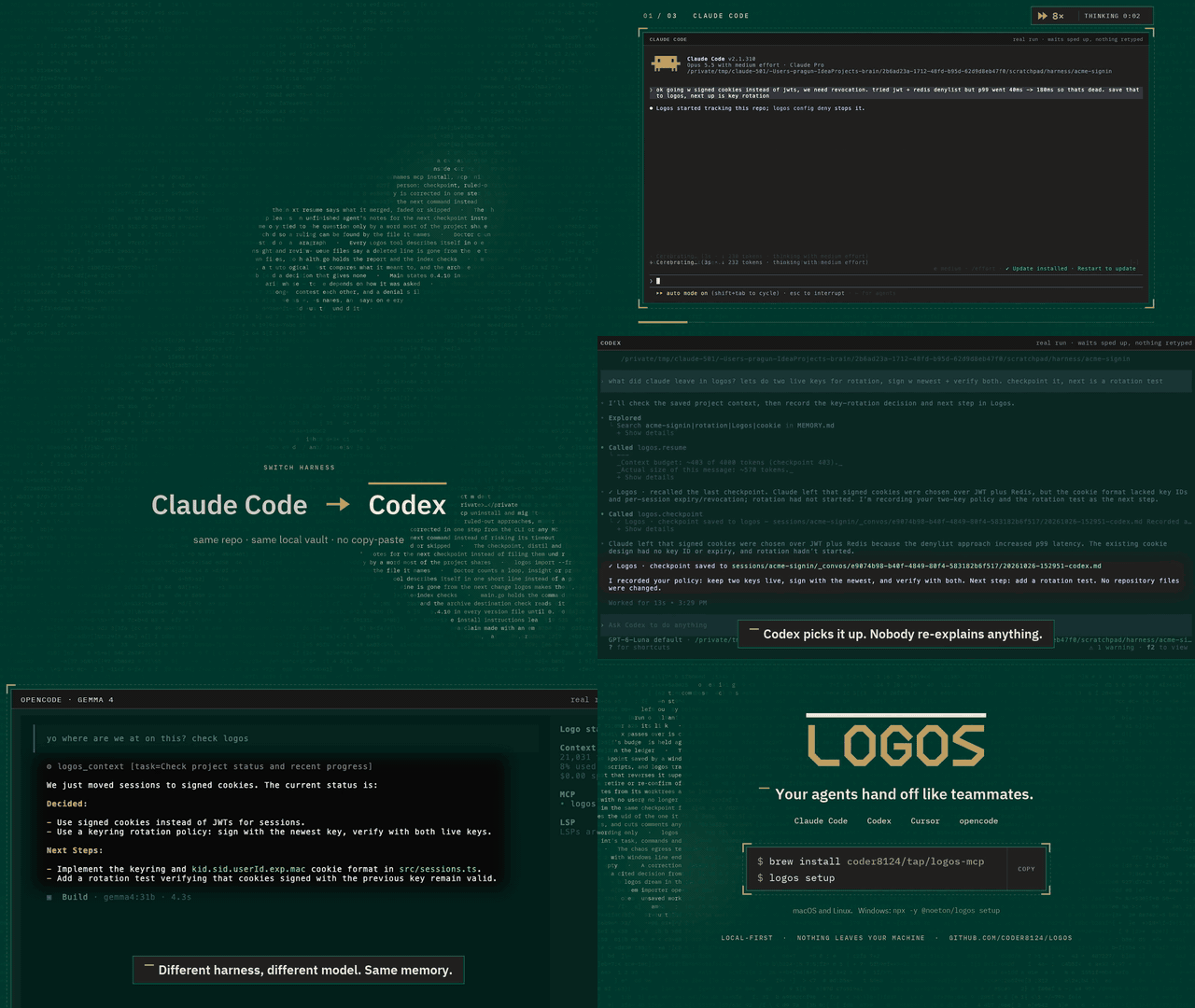
Logos is a local-first memory and continuity layer for coding agents. Claude Code, Codex, Cursor and your own agents share one vault over MCP. An agent checkpoints what it did, and the next one resumes where it stopped, even if it is a different model, in a different tool, on a different day.
Claude Code  ──▶  checkpoint  ──▶  Logos  ──▶  resume  ──▶  Cursor
                                (your vault)
The vault is a folder of markdown files on your machine. Nothing is uploaded,
and the SQLite index beside it is a cache: delete it, run logos index, and you
lose nothing.
Quick start
brew install coder8124/tap/logos-mcp && logos setup    # macOS and Linux
npm i -g @noeton/logos && logos setup                  # Windows
setup picks a vault, shows which agents it would wire, and asks before
touching any of them (--dry-run writes nothing). For Claude Code it also
installs the plugin, so the last handoff is in front of the model before it does
anything.
The formula is logos-mcp: a bare brew install logos installs Logos Bible
Software. Building from source, hand-wiring a host and the one-click buttons are
in Installation.
What it does
- Resume where the last agent stopped.
resumeshows what was done, what was verified and what is still open. - Stop the next agent repeating a dead end. Ruled-out approaches are their
own field, and
before_you_trychecks a plan against them. - Keep "verified" apart from "claimed". Resume marks another agent's verified items as its claim, and flags a command the activity log never saw.
- Answer "why is this code like this?"
why <path>shows what was being decided when a file was last worked on. - Remember what lasts. Decisions, constraints and procedures, reviewed before they become project memory.
- Bring your history. Import CLAUDE.md, AGENTS.md, Cursor rules, claude-mem, Claude Code's auto memory, transcripts or git history.
Every write returns a receipt, so you can see it working. The Handoff Loop shows how an agent uses it, step by step.
Works with
Claude Code, Codex, Cursor, Claude Desktop, Cline, Devin, GitHub Copilot, opencode, Amp, Grok Build, and anything else that speaks MCP. Agents with only a shell get a CLI command for every tool. See Agent Hosts.
Does it work?
On a handoff suite built for this (32 scenarios, nine memory systems, one machine), Logos passes 84.4%. The next best system passes 46.9%.
Every real system retrieves about equally well. What separates them is whether the agent that resumes gets the current answer, or gets it next to the stale one it replaced. Method, per-scenario scores and the cases Logos loses are in the benchmark.
Local, private and durable
- No model required. Search falls back from local embeddings (Ollama) to full-text search, and nothing breaks.
- Nothing is observed. Logos does not watch your screen, browser or files. The vault holds what agents wrote there, plus the Claude Code plugin's activity log, which you can turn off.
- Nothing leaves.
logos doctor --egresslists every address Logos can contact, and when. - Hard to break. It survives SIGKILL mid-write, a full disk, sync-client
conflict copies and two worktrees racing on one vault (
chaos/).
Exactly what is recorded, and every switch for it, is in Settings and Privacy.
Documentation
Everything lives in the wiki.
| Start | Use | Look up |
|---|---|---|
| Installation | The Handoff Loop | CLI Reference |
| Quick Start | Memory | MCP Tools Reference |
| Core Concepts | Importing History | Agent Hosts |
| Troubleshooting | The Vault | Embedding in Go |
Contributing
Contributions are welcome. CONTRIBUTING.md covers the build,
the test tiers and the two load-bearing conventions: the vault is the truth, and
every feature announces itself. Agents working here get the context-connect
and continuity skills from the plugin (plugin/skills/); this repository
dogfoods its own plugin.
Coming from brain? Since 0.5.0 the old names are not read. logos migrate
moves a ~/brain vault; see
Moving a 0.4 vault.
License
Apache 2.0. See LICENSE. Git history satisfies §4(b), so there are no change notices to add and no CLA (details). Prior work that shaped the ideas is in systemmd/CREDITS.md.
Pertanyaan tentang Logos MCP
Bagaimana cara menambahkan Logos MCP ke Claude Code?
Jalankan claude mcp add logos -- npx -y @noeton/logos di terminal Anda. Tambahkan --scope user agar tersedia di semua proyek.
Bagaimana cara menambahkan Logos MCP ke Cursor?
Buka ~/.cursor/mcp.json dan tambahkan server di bawah mcpServers, menggunakan config Cursor yang ditunjukkan di bagian instalasi di atas.
Bagaimana Logos menangani privasi data?
Logos bersifat local-first; vault adalah folder berisi file markdown di mesin Anda dan tidak ada data yang diunggah ke cloud.
Bisakah saya menggunakan Logos dengan AI agent yang berbeda?
Ya, Logos bekerja dengan Claude Code, Codex, Cursor, Claude Desktop, Cline, Devin, GitHub Copilot, dan tool lainnya yang mendukung MCP.
Apa yang terjadi jika saya menghapus file index?
Anda tidak akan kehilangan apa pun; Anda cukup menjalankan command index untuk membangunnya kembali.
Apakah memerlukan LLM untuk berfungsi?
Tidak ada model yang diperlukan untuk fungsionalitas dasar; pencarian akan beralih ke full-text search jika local embeddings tidak tersedia.