
Deploy dan kelola infrastruktur cloud, database, serta layanan lainnya melalui AI coding agent menggunakan platform Bult DevOps.
Juga dikenal sebagai bultcloud/mcp-server, mcp-server, @bultcloud/mcp-server
- Stars
- 2
- Tools
- 24
- Unduhan, 30 hari
- 128
- Versi terbaru
- 1.0.1
- Commit terakhir
- 12 Okt 2026
- Lisensi
- MIT
Apa itu Bult MCP?
Deploy dan kelola infrastruktur cloud, database, serta layanan lainnya melalui AI coding agent menggunakan platform Bult DevOps. Server ini menyediakan 24 tool, seperti list-projects, get-project, create-project.
Ringkasan dibuat dari README proyek
Tentang Bult MCP server
Bult menyediakan cara bagi AI coding agent untuk mengelola infrastruktur cloud dan sumber daya hosting secara langsung melalui platform Bult DevOps. Developer dapat menggunakan MCP server ini dengan client seperti Claude Desktop, Claude Code, Cursor, dan Codex untuk mengotomatiskan deployment GitHub repository, Docker image, serta layanan database. Server ini beroperasi melalui stdio dan memerlukan Bult API token serta Bult API URL agar dapat berfungsi.
Server ini mencakup berbagai tool untuk mengelola seluruh siklus hidup proyek. Anda dapat menggunakan command spesifik untuk melihat daftar atau membuat proyek, mengelola daemon dan layanan database, serta menangani persistent volumes. Server ini juga memungkinkan konfigurasi route dan domain mapping, penerapan project template, serta pengecekan build history.
Selain deployment, server ini memungkinkan troubleshooting aktif dengan menyediakan akses ke log layanan. Hal ini memungkinkan AI agent untuk menyelidiki kegagalan deployment atau memantau perilaku aplikasi. Anda harus menyediakan BULT_API_TOKEN melalui environment variables untuk mengautentikasi request ke Bult API.
Apa yang bisa Anda lakukan dengannya
- 1Deploying code repositoriesAI agent dapat mengambil GitHub repository dan melakukan deploy ke platform cloud Bult.
- 2Troubleshooting deployment failuresAnda dapat meminta AI untuk memeriksa log layanan guna mengetahui penyebab kegagalan deployment.
- 3Managing database servicesDeveloper dapat menginstruksikan agent untuk membuat dan mengonfigurasi layanan database baru.
- 4Configuring network routesAI dapat mengatur public domain atau path mapping untuk layanan tertentu.
Ditulis berdasarkan README proyek. Setiap use case diperiksa terhadap kutipan dari README tersebut.
Cara menginstal Bult MCP
Format diverifikasi 10 Nov 2026Tambahkan ke CursorTambahkan ke GooseInstal Bult MCP di Claude Code
$ claude mcp add --env 'BULT_API_TOKEN=<YOUR_BULT_API_TOKEN>' --env 'BULT_API_URL=<BULT_API_URL>' mcp-server -- npx -y @bultcloud/mcp-serverInstal Bult MCP di Cursor
~/.cursor/mcp.json
{
  "mcpServers": {
    "mcp-server": {
      "command": "npx",
      "args": [
        "-y",
        "@bultcloud/mcp-server"
      ],
      "env": {
        "BULT_API_TOKEN": "<YOUR_BULT_API_TOKEN>",
        "BULT_API_URL": "<BULT_API_URL>"
      }
    }
  }
}Instal Bult MCP di VS Code
.vscode/mcp.json
{
  "servers": {
    "mcp-server": {
      "type": "stdio",
      "command": "npx",
      "args": [
        "-y",
        "@bultcloud/mcp-server"
      ],
      "env": {
        "BULT_API_TOKEN": "<YOUR_BULT_API_TOKEN>",
        "BULT_API_URL": "<BULT_API_URL>"
      }
    }
  }
}Instal Bult MCP di VS Code CLI
$ code --add-mcp '{"name":"mcp-server","type":"stdio","command":"npx","args":["-y","@bultcloud/mcp-server"],"env":{"BULT_API_TOKEN":"<YOUR_BULT_API_TOKEN>","BULT_API_URL":"<BULT_API_URL>"}}'Instal Bult MCP di Claude Desktop
claude_desktop_config.json
{
  "mcpServers": {
    "mcp-server": {
      "command": "npx",
      "args": [
        "-y",
        "@bultcloud/mcp-server"
      ],
      "env": {
        "BULT_API_TOKEN": "<YOUR_BULT_API_TOKEN>",
        "BULT_API_URL": "<BULT_API_URL>"
      }
    }
  }
}Instal Bult MCP di Codex
$ codex mcp add mcp-server --env 'BULT_API_TOKEN=<YOUR_BULT_API_TOKEN>' --env 'BULT_API_URL=<BULT_API_URL>' -- npx -y @bultcloud/mcp-serverInstal Bult MCP di Codex config.toml
~/.codex/config.toml
[mcp_servers.mcp-server]
command = "npx"
args = ["-y", "@bultcloud/mcp-server"]

[mcp_servers.mcp-server.env]
BULT_API_TOKEN = "<YOUR_BULT_API_TOKEN>"
BULT_API_URL = "<BULT_API_URL>"
Instal Bult MCP di Gemini CLI
$ gemini mcp add -s user -e 'BULT_API_TOKEN=<YOUR_BULT_API_TOKEN>' -e 'BULT_API_URL=<BULT_API_URL>' mcp-server npx -- -y @bultcloud/mcp-serverInstal Bult MCP di Gemini settings.json
~/.gemini/settings.json
{
  "mcpServers": {
    "mcp-server": {
      "command": "npx",
      "args": [
        "-y",
        "@bultcloud/mcp-server"
      ],
      "env": {
        "BULT_API_TOKEN": "<YOUR_BULT_API_TOKEN>",
        "BULT_API_URL": "<BULT_API_URL>"
      }
    }
  }
}Tool Bult MCP 24
Terdeteksi dari READMElist-projectsget-projectcreate-projectupdate-projectdelete-projectdeploy-projectcontrol-projectlist-servicesget-servicecreate-serviceupdate-servicedelete-service
| list-projects | — | |
| get-project | — | |
| create-project | — | |
| update-project | — | |
| delete-project | — | |
| deploy-project | — | |
| control-project | — | |
| list-services | — | |
| get-service | — | |
| create-service | — | |
| update-service | — | |
| delete-service | — |
Tampilkan semua 24 toolTampilkan lebih sedikit tool
control-servicecreate-volumeupdate-volumedelete-volumewipe-volumecreate-routeupdate-routedelete-routelist-templatesapply-templateget-service-logslist-builds
| control-service | — | |
| create-volume | — | |
| update-volume | — | |
| delete-volume | — | |
| wipe-volume | — | |
| create-route | — | |
| update-route | — | |
| delete-route | — | |
| list-templates | — | |
| apply-template | — | |
| get-service-logs | — | |
| list-builds | — |
Konfigurasi
BULT_API_TOKENWajibRahasiaBult API token used to authenticate requests.
BULT_API_URLWajibBase URL of the Bult.ai API.
| Nama | Deskripsi | Tipe |
|---|---|---|
| BULT_API_TOKEN | Bult API token used to authenticate requests. | WajibRahasia |
| BULT_API_URL | Base URL of the Bult.ai API. | Wajib |
Pengecekan otomatis
Berjalan 14 Nov 2026Laporan lengkap →Lolos checks otomatis kami. Ini bukan audit keamanan: baca kodenya dan berikan server akses paling terbatas yang dibutuhkannya. Cara kerja checks

- Source repository terhubung dan dapat dijangkaubultcloud/mcp-server is public and reachablegithub.com/bultcloud/mcp-server ↗Lolos
- Nama paket mencantumkan repositori ini sebagai sumbernya@bultcloud/mcp-server names bultcloud/mcp-server as sourcenpmjs.com/package/@bultcloud/mcp-server ↗Lolos
- Provenance build (atestasi Sigstore)No build attestation published for this releaseTidak diperiksa
- Lisensi open source (OSI)MITspdx.org/licenses/MIT.html ↗Lolos
- Ada commit atau release dalam satu tahun terakhirLast commit or release 2026-10-12github.com/bultcloud/mcp-server ↗Lolos
- OpenSSF ScorecardTidak diperiksa
- Nama package tidak mirip dengan package populerNo popular package one edit away from @bultcloud/mcp-serverLolos
- Tidak ada advisory kritis pada paket atau dependensinya99 resolved dependencies checked; no critical advisoryosv.dev ↗Lolos
- Tidak ada instruksi tersembunyi untuk model24 tool descriptions and the README read; no override phrases, credential paths or hidden charactersLolos
- Tools yang bersifat destruktif telah diberi labelTidak diperiksa
- Endpoint remote merespons handshake MCPTidak diperiksa
README
Lihat di GitHub@bultcloud/mcp-server

Official Model Context Protocol (MCP) server for Bult.ai, a DevOps platform and cloud hosting Platform-as-a-Service for deploying apps, GitHub repositories, Docker images, databases, and services with AI agents.
Use Bult MCP with Claude Desktop, Claude Code, Cursor, Codex, and other MCP-compatible clients to deploy apps, manage cloud infrastructure, inspect logs, and troubleshoot deployments through the Bult API.
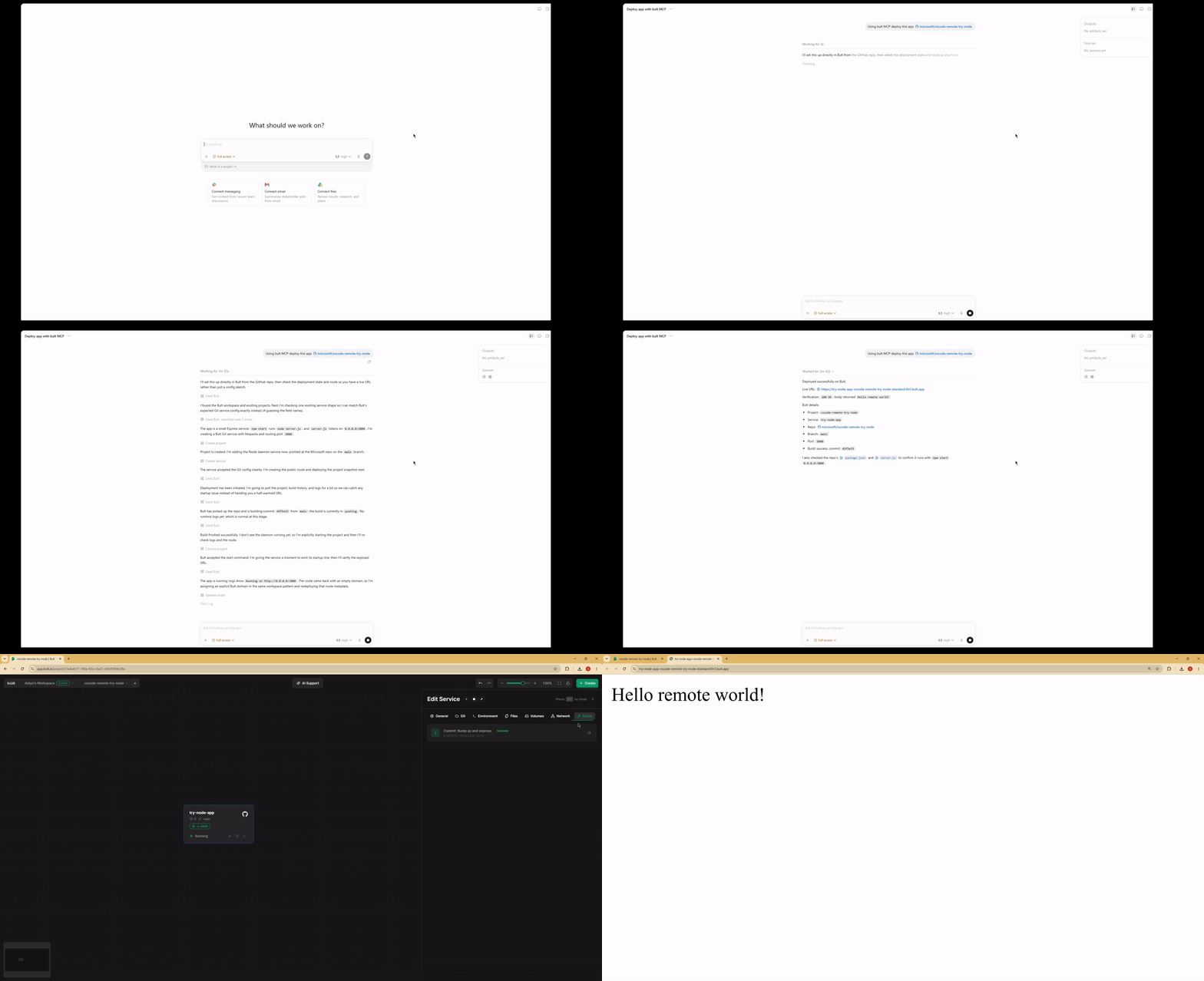
Demo
Features
- Deploy GitHub repositories, Docker images, databases, and app services from MCP-compatible AI agents.
- Project lifecycle tools: list, inspect, create, update, delete, deploy, start, stop, and discard changes.
- Service management for daemon and database services, including Docker image and Git-based deployments.
- Persistent volumes, route/domain mappings, templates, service logs, and build history.
- MCP tool annotations for read-only, idempotent, and destructive operations where supported.
- Works over stdio with Claude Desktop, Claude Code, Cursor, Google Antigravity and other MCP-compatible clients.
When to use Bult MCP
Use Bult MCP when you want an AI coding agent to deploy and operate cloud hosting resources for you. Common workflows include deploying a GitHub repo from Cursor, deploying the current project from Claude Code, launching a Docker image, creating a database service, adding a public route, checking build logs, and debugging failed deployments.
Requirements
- Node.js 18 or newer.
- Bult API token.
Installation
If you install the package globally, use the bult-mcp binary:
npm install -g @bultcloud/mcp-server
bult-mcp
You can also run it with npx from MCP client configs:
npx -y @bultcloud/mcp-server
Configuration
The server reads its configuration from environment variables.
| Variable | Required | Description |
|---|---|---|
BULT_API_URL |
Yes | Bult API base URL, https://app.bult.ai. |
BULT_API_TOKEN |
Yes | API token used for Bearer authentication. |
The server exits during startup if either variable is missing.
MCP Client Setup
Claude Desktop
Add the server to claude_desktop_config.json.
Using npx:
{
  "mcpServers": {
    "bult": {
      "command": "npx",
      "args": ["-y", "@bultcloud/mcp-server"],
      "env": {
        "BULT_API_URL": "https://app.bult.ai",
        "BULT_API_TOKEN": "your-token"
      }
    }
  }
}
Claude Code
Using npx:
claude mcp add bult \
  -e BULT_API_URL=https://app.bult.ai \
  -e BULT_API_TOKEN=your-token \
  -- npx -y @bultcloud/mcp-server
Codex CLI
Using npx:
codex mcp add \
  --env BULT_API_URL=https://app.bult.ai \
  --env BULT_API_TOKEN=your-token \
  bult \
  -- npx -y @bultcloud/mcp-server
Available Tools
Projects
| Tool | Description |
|---|---|
list-projects |
List all projects in the workspace. |
get-project |
Get a project overview with services, volumes, and routes. |
create-project |
Create a new project. |
update-project |
Update a project name. |
delete-project |
Delete a project and all of its resources. |
deploy-project |
Deploy project changes and create a version snapshot. |
control-project |
Start, stop, or discard project changes. |
Services
| Tool | Description |
|---|---|
list-services |
List all services in a project. |
get-service |
Get service details and configuration. |
create-service |
Create a daemon or database service. |
update-service |
Update service configuration. |
delete-service |
Delete a service. |
control-service |
Start, stop, or rebuild a service. |
Volumes
| Tool | Description |
|---|---|
create-volume |
Create a persistent storage volume. |
update-volume |
Update a volume name or size. |
delete-volume |
Delete a volume. |
wipe-volume |
Irreversibly wipe all data from a volume. |
Routes
| Tool | Description |
|---|---|
create-route |
Create a domain or path mapping for a service. |
update-route |
Update route configuration. |
delete-route |
Delete a route. |
Templates
| Tool | Description |
|---|---|
list-templates |
List available project templates. |
apply-template |
Apply a template to a project. |
Logs and Builds
| Tool | Description |
|---|---|
get-service-logs |
Read service logs with cursor-based pagination. |
list-builds |
List build history for a service. |
Example Prompts
- Deploy this GitHub repo to Bult and give me the public URL.
- Deploy the current project to Bult.
- Check why my deployment failed.
- Show the latest logs for my app.
- Set DATABASE_URL and restart the service.
- Deploy this Docker image to Bult.
- List my Bult projects and services.
Development
npm run dev      # run with tsx, no build step
npm run build    # compile TypeScript to dist/
npm run lint     # type-check without emitting files
Project layout:
src/index.ts          MCP server entrypoint
src/client.ts         Bult API client
src/tools/*.ts        MCP tool registrations by resource type
Security
BULT_API_TOKEN grants access to your Bult resources. Keep it out of
source control, shell history, issue reports, and screenshots. Prefer scoped or
rotatable tokens when available.
Some tools can create, delete, deploy, stop, or wipe resources. Review tool calls from your MCP client before approving destructive actions.
Privacy Policy
This MCP server connects your MCP client to Bult.ai using the API token you provide. Requests are sent to Bult.ai to perform actions such as listing projects, deploying services, managing routes and volumes, and reading logs.
The server does not store your API token. Tokens are passed through your MCP client configuration or extension settings. For Bult.ai data handling practices, see the Bult.ai Privacy Policy.
Contributing
Issues and pull requests are welcome at github.com/bultcloud/mcp-server.
Before opening a pull request, run:
npm run lint
npm run build
License
This project is licensed under the MIT License.
Pertanyaan tentang Bult MCP
Bagaimana cara menambahkan Bult MCP ke Claude Code?
Jalankan claude mcp add --env 'BULT_API_TOKEN=<YOUR_BULT_API_TOKEN>' --env 'BULT_API_URL=<BULT_API_URL>' mcp-server -- npx -y @bultcloud/mcp-server di terminal Anda. Tambahkan --scope user agar tersedia di semua proyek.
Bagaimana cara menambahkan Bult MCP ke Cursor?
Buka ~/.cursor/mcp.json dan tambahkan server di bawah mcpServers, menggunakan config Cursor yang ditunjukkan di bagian instalasi di atas.
Tool apa yang disediakan Bult MCP?
Server ini menyediakan 24 tool, termasuk list-projects, get-project, create-project, update-project, delete-project.
Apa yang bisa saya deploy menggunakan Bult MCP?
Anda dapat melakukan deploy GitHub repository, Docker image, database, dan berbagai layanan aplikasi lainnya.
AI client mana saja yang kompatibel dengan Bult MCP?
Bult MCP bekerja dengan Claude Desktop, Claude Code, Cursor, Codex, Google Antigravity, dan client lain yang mendukung MCP.
Apa saja persyaratan sistem untuk instalasi?
Anda memerlukan Node.js versi 18 atau yang lebih baru serta Bult API token yang valid.
Bagaimana cara mengonfigurasi servernya?
Server dikonfigurasi menggunakan environment variables BULT_API_URL dan BULT_API_TOKEN.