
BugTraceAI-CLI MCP server
Commit 30 Okt 2026Sebuah engine web pentesting berbasis agent yang menggunakan investigasi panduan LLM dan specialist tools untuk menemukan serta memvalidasi kerentanan keamanan.
Juga dikenal sebagai BugTraceAI/BugTraceAI-CLI
- Stars
- 184
- Tools
- —
- Unduhan, 30 hari
- —
- Versi terbaru
- —
- Commit terakhir
- 30 Okt 2026
- Lisensi
- Apache-2.0
Apa itu BugTraceAI-CLI MCP?
BugTraceAI-CLI adalah MCP server. Sebuah engine web pentesting berbasis agent yang menggunakan investigasi panduan LLM dan specialist tools untuk menemukan serta memvalidasi kerentanan keamanan.
Ringkasan dibuat dari README proyek
Tentang BugTraceAI-CLI MCP server
Peneliti keamanan dan developer dapat mengotomatisasi penemuan kerentanan web menggunakan engine pentesting berbasis agent ini. Engine ini berfungsi sebagai core scanning yang menggabungkan investigasi panduan LLM dengan specialist tools untuk mengidentifikasi dan memvalidasi celah keamanan. Engine ini mengikuti pipeline terstruktur mulai dari reconnaissance dan discovery hingga ke tahap exploitation, validation, dan reporting.
Anda dapat men-deploy engine ini secara lokal menggunakan Python atau di dalam Docker containers. Engine ini mendukung berbagai provider LLM termasuk Anthropic, OpenRouter, dan Z.ai, yang memerlukan API keys untuk beroperasi. Untuk authenticated testing, sistem ini menerima Bearer tokens atau file login YAML, termasuk dukungan untuk TOTP. Engine ini dapat diakses melalui terminal-based TUI, web interface, atau melalui interface REST dan MCP untuk kebutuhan otomasi.
Cakupan spesialis mencakup pengecekan kerentanan seperti SQL injection, XSS, SSRF, IDOR, LFI, RCE, template injection, XXE, JWT, dan masalah redirect. Sistem ini menyediakan bukti melalui specialist tools maupun browser validation untuk memastikan temuan yang akurat.
Apa yang bisa Anda lakukan dengannya
- 1Authenticated web testingMelakukan audit keamanan pada area website yang terlindungi menggunakan kredensial yang sudah ada.
- 2Agentic security automationMengintegrasikan engine pentesting ke dalam workflow otomatis menggunakan interface MCP.
Ditulis berdasarkan README proyek. Setiap use case diperiksa terhadap kutipan dari README tersebut.
Pengecekan otomatis
Berjalan 14 Nov 2026Laporan lengkap →Belum diverifikasi. Sebuah server memerlukan skor 80, tidak ada temuan serius, dan data yang cukup untuk kami periksa. Cara kerja checks

- Source repository terhubung dan dapat dijangkaubugtraceai/bugtraceai-cli is public and reachablegithub.com/bugtraceai/bugtraceai-cli ↗Lolos
- Paket menyebut repo ini sebagai sumbernyaTidak diperiksa
- Provenance build (atestasi Sigstore)Tidak diperiksa
- Lisensi open source (OSI)Apache-2.0spdx.org/licenses/Apache-2.0.html ↗Lolos
- Ada commit atau release dalam satu tahun terakhirLast commit or release 2026-10-30github.com/bugtraceai/bugtraceai-cli ↗Lolos
- OpenSSF ScorecardTidak diperiksa
- Nama package tidak mirip dengan package populerTidak diperiksa
- Tidak ada advisory kritis di paket maupun dependensinyaTidak diperiksa
- Tidak ada instruksi tersembunyi untuk model0 tool descriptions and the README read; no override phrases, credential paths or hidden charactersLolos
- Tools yang bersifat destruktif telah diberi labelTidak diperiksa
- Endpoint remote menjawab handshake MCPTidak diperiksa
README
Lihat di GitHubBugTraceAI-CLI





Agentic web pentesting with a terminal workspace, specialist tools, browser validation, REST and MCP.
BugTraceAI-CLI is the web-scanning engine in the BugTraceAI suite. It combines LLM-guided investigation with specialist tools and browser validation. Follow a scan and inspect its evidence in the terminal, connect BugTraceAI-WEB for a browser workspace, or automate the engine through REST and MCP.
Install · See the terminal · API and MCP · Explore the suite
Use it only against applications you are authorized to test.
Terminal workspace
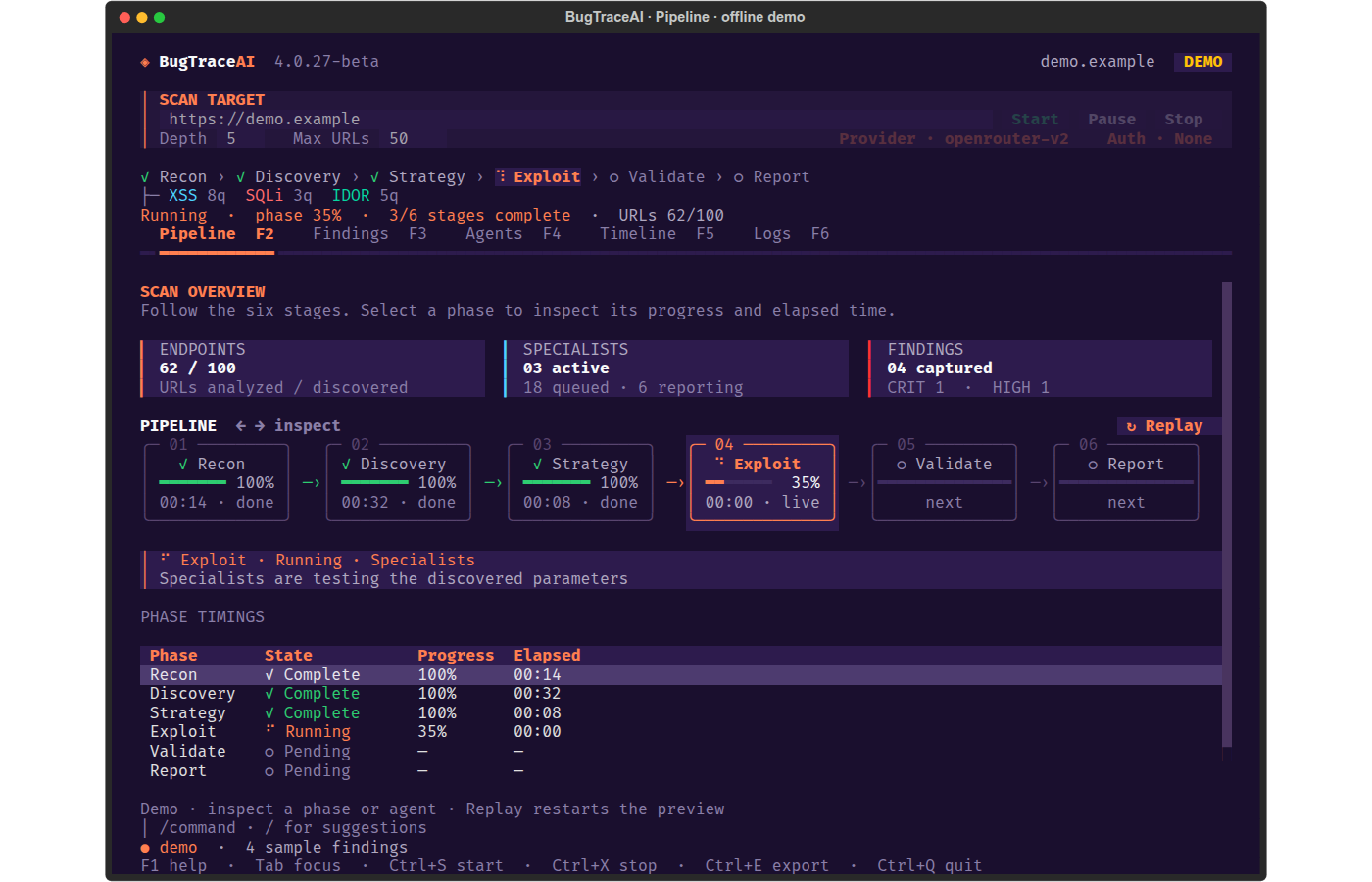
The TUI follows Recon → Discovery → Strategy → Exploit → Validate → Report. Set the target URL, Depth and Max URLs at the top. The phase strip, counters, timings and scan controls stay visible while you switch views.
Pipeline, Findings and Agents captures use the built-in offline demo in 4.0.27-beta. Sample findings illustrate the interface. Provider and Auth captures show the actual setup dialogs without credentials.
Install · Terminal controls · Install with your AI coding agent · API and MCP · Configuration and reports
Scan engine
The shared engine discovers endpoints, analyzes candidate findings, routes work to specialists and collects evidence through the validation/reporting stages. Specialist coverage includes SQL injection, XSS, SSRF, IDOR, LFI, RCE, template injection, XXE, JWT and redirect checks. Tool and browser evidence accompanies the reported findings.
Provider presets include OpenRouter, Anthropic and Z.ai. The WEB connects to the same CLI engine for web scans and report access.
Install
For guided setup, use the universal Launcher (current public release). It can install WEB, CLI and the API-target engine independently or in any combination:
curl -fsSL https://raw.githubusercontent.com/BugTraceAI/BugTraceAI-Launcher/main/install.sh | bash
From a CLI checkout, ./install.sh opens the same menu with CLI suggested.
The component entry point requires Launcher 3.3.14 or newer; use the current public Launcher release for its
provider, Wizard and AI-assisted setup screens. Review the checked
modules and runtime before installing.
In the Launcher, enter and verify the required provider API key first. Then choose Install with Wizard for guided setup, or Install with AI to have the built-in assistant guide installation inside the TUI. The AI assistant uses OpenRouter or Anthropic provider tokens; use Wizard for Z.ai. See the current Launcher guide for supported module combinations and installation options. Enter the provider key locally; never paste it into an AI coding-agent chat.
For a direct installation in this checkout, specify the options explicitly:
git clone https://github.com/BugTraceAI/BugTraceAI-CLI.git
cd BugTraceAI-CLI
./scripts/install-runtime.sh --interface tui --runtime local --global yes
--interface selects the terminal TUI, web-scanning API/MCP, or both.
--runtime selects local Python or Docker. The backend has no selection menu;
--global and --launch default to no. Use --global yes to register btai,
and --launch yes to open the TUI after installation in an interactive terminal.
Direct installation includes only the CLI engine and selected interfaces.
| Profile | Command |
|---|---|
| Local TUI + global command | ./scripts/install-runtime.sh --interface tui --runtime local --global yes |
| Docker API + MCP | ./scripts/install-runtime.sh --interface api --runtime docker --global no |
| Docker API + TUI + global command | ./scripts/install-runtime.sh --interface both --runtime docker --global yes |
| Update or repair the saved profile | ./scripts/install-runtime.sh --reuse |
Local installation needs Python 3.10+. The installer prepares missing Linux pip/venv tools and Docker/Compose for the Docker profile. On macOS, Docker setup uses an existing Docker Desktop or Homebrew/Colima. Some specialist tools also use Docker during local scans. TUI adds Textual; API adds FastAPI, Uvicorn, WebSockets and MCP. Existing environments retain previously installed packages when you change profiles.
Choices are saved in .bugtrace-install.env without API keys. See
INSTALLATION.md for prerequisites and runtime-specific setup.
Explicit legacy ./install.sh options and --standalone [options] delegate
to this backend. Incomplete direct selections fail before installing anything.
See INSTALLATION.md for prerequisites and manual-agent setup.
Open the real TUI
./bugtraceai-cli
# With global registration, open a new terminal and run from any directory:
btai
Configure Provider/F7, enter your target, choose crawl limits and press Start. Opening the workspace does not start a scan. A real scan requires a provider key. In Provider, uncheck Save this key in local .env to keep a new key only for the current session.
Use Auth/F8 for the target website's credentials: a masked Bearer token or a WEB-compatible login YAML, with optional TOTP/2FA. These target credentials stay in the TUI session. Auth can be edited before a scan or after it finishes. The current YAML format and example are in Target authentication.
To open a full interactive scan directly, or explicitly preview sample data:
./bugtraceai-cli full https://target.example
./bugtraceai-cli tui --demo
Docker TUI
# TUI-only Docker profile: interactive scanner, no published server ports
docker compose -f docker-compose.tui.yml run --rm scanner

# Both interfaces installed: open the TUI inside the API container
docker compose exec api python3 -m bugtrace tui
The global btai helper honors the selected local/Docker profile. Keep the
registered checkout at its installation path; rerun registration after moving
it. API-only installations do not offer the global TUI command.
Terminal controls
| View | Key | Purpose |
|---|---|---|
| Pipeline | F2 | Scan stages, progress, counters and elapsed times |
| Findings | F3 | Search, sort, inspect and export vulnerability evidence |
| Agents | F4 | Specialist states, queues, counts and runtime details |
| Timeline | F5 | Scan milestones and alerts |
| Logs | F6 | Search engine output and filter by agent |
| Provider | F7 | LLM provider and masked API-key setup |
| Auth | F8 | Target Bearer token or login YAML |
F1 opens help; Tab moves focus; Ctrl+S starts; Ctrl+X stops;
Ctrl+E exports captured findings; Ctrl+Q quits. Pause takes effect at the
next pipeline checkpoint. The top form accepts the target URL; the lower bar
accepts commands such as /help, /provider, /auth, /pause, /resume,
/stop, /findings and /export.
Install with your AI coding agent
Copy this self-contained prompt into an agent with local terminal access, such as Claude Code, Cursor or Codex. It installs only the CLI module through the universal Launcher, with the terminal TUI enabled:
Install BugTraceAI-CLI only on this machine using the official universal Launcher.

First read:
https://github.com/BugTraceAI/BugTraceAI-CLI#readme
https://github.com/BugTraceAI/BugTraceAI-Launcher#readme

Follow those instructions using the official installer:
https://raw.githubusercontent.com/BugTraceAI/BugTraceAI-Launcher/main/install.sh

Select only BugTraceAI-CLI. Do not select BugTraceAI-API or BugTraceAI-WEB.
Enable the terminal TUI. Use Install with Wizard and let me choose the
runtime and whether to register the global btai command.

Preserve any existing installation, configuration and data. Run the
Launcher in my local interactive terminal. I will enter and verify the
provider API key there, choose ports and review the plan before installation.
Keep credentials out of chat and logs. Do not start a scan.

Verify TUI startup and exit in an interactive terminal. If I enable the
global btai command, check it from a fresh shell. Verify health and MCP
only if those CLI services are enabled.
Report the installation location, launch commands, checks completed
and any checks still pending.
Advanced: direct installation with your agent
For direct setup without the Launcher, use this separate prompt. It installs only the CLI terminal workspace with local Python and the global btai command:
Install BugTraceAI-CLI directly from the official public repository:
https://github.com/BugTraceAI/BugTraceAI-CLI

First read:
https://github.com/BugTraceAI/BugTraceAI-CLI#readme
https://github.com/BugTraceAI/BugTraceAI-CLI/blob/main/INSTALLATION.md

Use an existing checkout of that repository if available; otherwise clone it
into a new directory. Enter that directory and install a standalone terminal
workspace. Use the local Python runtime and register the current-user btai
command. Perform the installation; do not start a scan.

Read README.md and INSTALLATION.md first. Preserve existing configuration,
credentials and uncommitted changes. Do not replace this checkout or switch
its repository or branch silently.

For a fresh install, review the documented CLI options, then run:
./scripts/install-runtime.sh --interface tui --runtime local --global yes

If I ask for Docker or API/MCP, use the corresponding CLI installer options.
Do not install BugTraceAI-WEB or BugTraceAI-API unless I explicitly request
those separate modules.

Handle the required prompts and resolve setup errors using the repository
instructions. Keep system privilege/password prompts in my local terminal.
Never ask me to paste credentials into chat or print existing secrets. I will
configure an LLM provider locally through Provider/F7. Auth/F8 configures
target login separately.

Verify the version, saved profile and installed components. For TUI, verify
startup and quit in an interactive terminal when available; otherwise state
that visual verification is pending. Check btai registration and PATH in a
fresh shell. For servers, check health and MCP on the actual configured
ports. Do not start a scan as part of installation.

Finish with the installation directory, selected profile, checks performed
and exact commands to open the installed interfaces.
See INSTALLATION.md for profiles, Provider/F7, Auth/F8 and troubleshooting. Installation does not require running a scan.
API and MCP
Install the api or both profile to use the engine without opening the TUI.
For local installations:
./bugtraceai-cli serve --port 8000
# In a separate terminal, MCP defaults to STDIO:
./bugtraceai-cli mcp
# Optional HTTP/SSE transport:
./bugtraceai-cli mcp --sse --host 127.0.0.1 --port 8001
The API exposes /health and /docs. For Docker API/both profiles, the
installer starts the API/MCP Compose services and records the selected ports
in .env; use docker compose up -d to start them again. Connect an SSE client
to http://localhost:<MCP_PORT>/sse using the actual configured MCP port.
BugTraceAI-WEB uses the CLI API for scans, progress and reports. MCP clients can control scans through the engine's tools. Configure provider credentials locally before scanning. See API and MCP for details.
Configuration and reports
bugtraceaicli.conf contains the engine settings; provider credentials can be
configured in local .env. The TUI offers Provider/F7 and Auth/F8 for scan setup.
See public custom provider configuration for additional
provider options. Read the selected provider preset rather than relying on
historical model names from older releases.
Reports are written beneath the configured report directory. Scan deliverables
include final_report.md, validated_findings.json, engagement_data.json
and report.html, with evidence and specialist artifacts as available.
Ctrl+E or /export exports the findings captured by the TUI as JSON.
Explicit command-line scans remain available for scripts:
./bugtraceai-cli scan https://target.example
./bugtraceai-cli scan https://target.example --auth-config auth-config.yaml
./bugtraceai-cli --help
Documentation and releases
- Installation, profiles, authentication and terminal controls
- Release notes
- BugTraceAI ecosystem
- Launcher
- WEB dashboard
- DeepWiki
The public CLI is a beta. Use scans only on explicitly authorized targets.
License
Apache-2.0. See LICENSE, LICENSE-HISTORY.md and NOTICE.
Amazon Bedrock (beta)
Bedrock Converse is available for the CLI and its WEB Provider panel. AWS role/profile authentication and optional Bedrock API keys are supported. Setup, routing policy and pending AWS validation.
Pertanyaan tentang BugTraceAI-CLI MCP
Kerentanan apa saja yang bisa dideteksi oleh engine ini?
Engine ini mencakup cakupan spesialis termasuk SQL injection, XSS, SSRF, IDOR, LFI, RCE, template injection, XXE, JWT, dan pengecekan redirect.