
Memungkinkan latihan retrieval bagi coding agent dengan memberikan pertanyaan pilihan ganda mengenai perubahan kode terbaru untuk memperkuat pemahaman.
Juga dikenal sebagai atomicreps/cli, cli
- Stars
- 0
- Tools
- —
- Unduhan, 30 hari
- —
- Versi terbaru
- 0.1.0
- Commit terakhir
- 6 Okt 2026
- Lisensi
- MIT
Apa itu atomicreps MCP?
atomicreps adalah MCP server. Memungkinkan latihan retrieval bagi coding agent dengan memberikan pertanyaan pilihan ganda mengenai perubahan kode terbaru untuk memperkuat pemahaman.
Ringkasan dibuat dari README proyek
Tentang atomicreps MCP server
Atomic Reps adalah tool yang dirancang untuk membantu developer memperkuat pengetahuan coding mereka melalui retrieval practice. Cara kerjanya adalah dengan menyajikan pertanyaan pilihan ganda kepada pengguna segera setelah coding agent menyelesaikan tugas yang melibatkan perubahan file. Proses ini mengubah sesi pengembangan aktif menjadi peluang belajar dengan menguji ingatan terhadap modifikasi kode yang baru saja dilakukan.
Server ini terintegrasi dengan berbagai MCP client termasuk Claude Code, GitHub Copilot, Cursor, Windsurf, dan Codex. Pengguna dapat melakukan setup server melalui terminal wizard menggunakan Node 24 atau versi yang lebih tinggi, yang memerlukan pembuatan akun gratis dan autentikasi melalui browser web. Setelah terhubung, server akan mengelola frekuensi, tingkat kesulitan, dan topik spesifik dari pertanyaan untuk menjaga ritme belajar yang terkontrol.
Developer dapat menyesuaikan pengalaman mereka menggunakan tool seperti rep, answer, me, dan settings. Sistem ini melacak progres melalui streak dan summary, sembari memungkinkan pengguna untuk mematikan topik tertentu atau menyesuaikan tingkat intensitas. Privasi menjadi prioritas karena sistem hanya mengirimkan catalog handles dan metadata, bukan isi kode atau prompt yang sebenarnya.
Apa yang bisa Anda lakukan dengannya
- 1Memperkuat perubahan kode terbaruMinta AI untuk menyajikan pertanyaan pilihan ganda mengenai perbaikan bug atau modifikasi kode yang baru saja selesai dilakukan.
- 2Melacak progres belajarLihat streak belajar, skills, dan summary sesi Anda untuk memantau peningkatan kemampuan.
- 3Menyesuaikan topik studiMatikan topik pemrograman atau sub-skills tertentu yang tidak ingin Anda latih.
- 4Mengelola kesulitan dan frekuensiAtur seberapa sering pertanyaan muncul dan tingkat kesulitan untuk latihan retrieval Anda.
Ditulis berdasarkan README proyek. Setiap use case diperiksa terhadap kutipan dari README tersebut.
Cara menginstal atomicreps MCP
Format diverifikasi 10 Nov 2026Tambahkan ke CursorTambahkan ke GooseInstal atomicreps MCP di Claude Code
$ claude mcp add cli -- npx -y atomicrepsInstal atomicreps MCP di Cursor
~/.cursor/mcp.json
{
  "mcpServers": {
    "cli": {
      "command": "npx",
      "args": [
        "-y",
        "atomicreps"
      ]
    }
  }
}Instal atomicreps MCP di VS Code
.vscode/mcp.json
{
  "servers": {
    "cli": {
      "type": "stdio",
      "command": "npx",
      "args": [
        "-y",
        "atomicreps"
      ]
    }
  }
}Instal atomicreps MCP di VS Code CLI
$ code --add-mcp '{"name":"cli","type":"stdio","command":"npx","args":["-y","atomicreps"]}'Instal atomicreps MCP di Claude Desktop
claude_desktop_config.json
{
  "mcpServers": {
    "cli": {
      "command": "npx",
      "args": [
        "-y",
        "atomicreps"
      ]
    }
  }
}Instal atomicreps MCP di Codex
$ codex mcp add cli -- npx -y atomicrepsInstal atomicreps MCP di Codex config.toml
~/.codex/config.toml
[mcp_servers.cli]
command = "npx"
args = ["-y", "atomicreps"]
Instal atomicreps MCP di Gemini CLI
$ gemini mcp add -s user cli npx -- -y atomicrepsInstal atomicreps MCP di Gemini settings.json
~/.gemini/settings.json
{
  "mcpServers": {
    "cli": {
      "command": "npx",
      "args": [
        "-y",
        "atomicreps"
      ]
    }
  }
}Pengecekan otomatis
Berjalan 15 Nov 2026Laporan lengkap →Lolos checks otomatis kami. Ini bukan audit keamanan: baca kodenya dan berikan server akses paling terbatas yang dibutuhkannya. Cara kerja checks

- Source repository terhubung dan dapat dijangkauatomicreps/cli is public and reachablegithub.com/atomicreps/cli ↗Lolos
- Nama paket mencantumkan repositori ini sebagai sumbernyaatomicreps names atomicreps/cli as sourcenpmjs.com/package/atomicreps ↗Lolos
- Provenance build (atestasi Sigstore)No build attestation published for this releaseTidak diperiksa
- Lisensi open source (OSI)MITspdx.org/licenses/MIT.html ↗Lolos
- Ada commit atau release dalam satu tahun terakhirLast commit or release 2026-10-06github.com/atomicreps/cli ↗Lolos
- OpenSSF ScorecardTidak diperiksa
- Nama package tidak mirip dengan package populerNo popular package one edit away from atomicrepsLolos
- Tidak ada advisory kritis pada paket atau dependensinya1 resolved dependencies checked; no critical advisoryosv.dev ↗Lolos
- Tidak ada instruksi tersembunyi untuk model0 tool descriptions and the README read; no override phrases, credential paths or hidden charactersLolos
- Tools yang bersifat destruktif telah diberi labelTidak diperiksa
- Endpoint remote merespons handshake MCPHTTPS endpoint answered 401 (sign-in required)Lolos
README
Lihat di GitHubatomicreps


One short question about the thing you just built. Works inside Claude Code, GitHub Copilot, Cursor, Windsurf, Codex, or any MCP client.
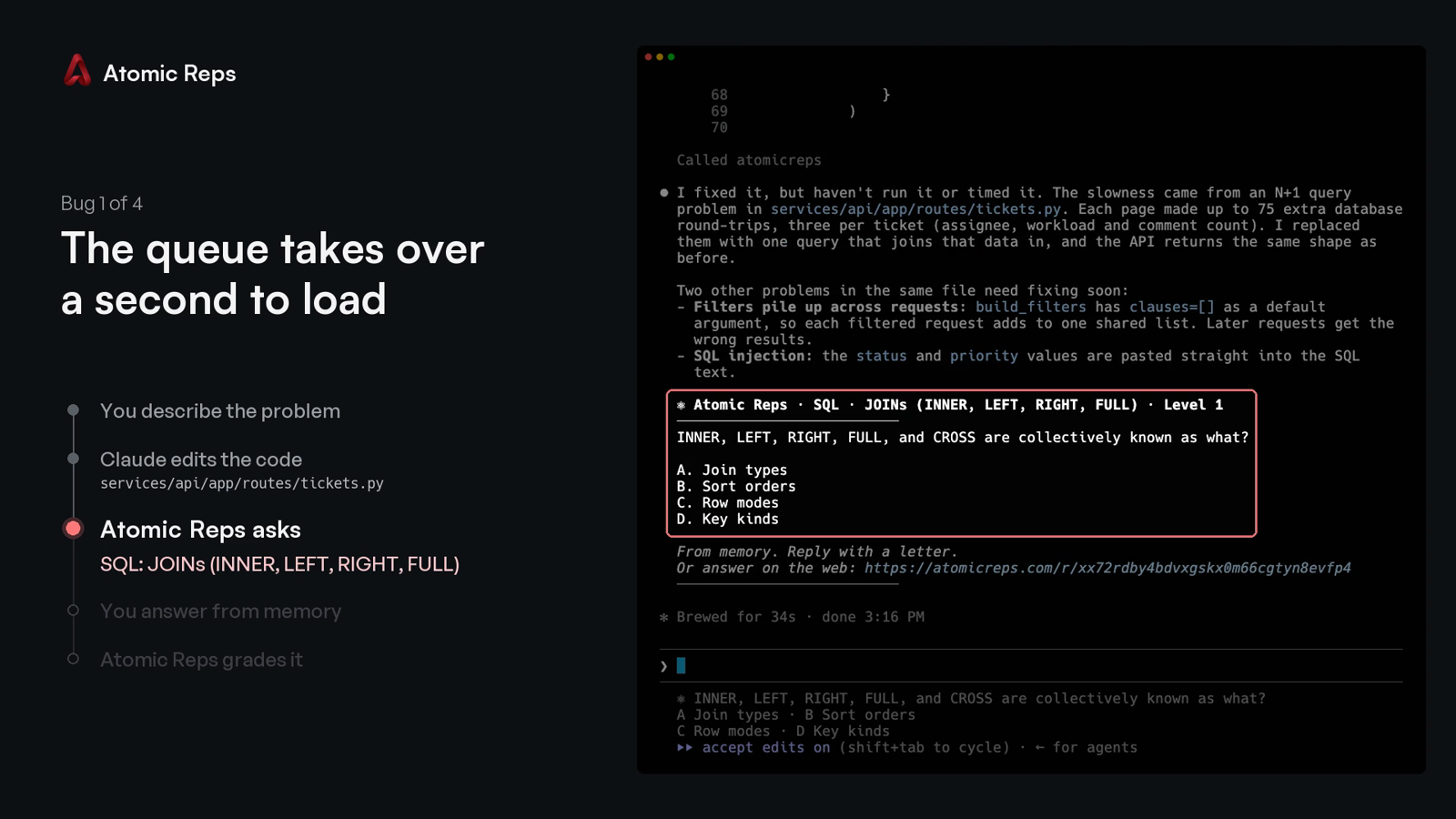
You describe a bug, your coding agent changes the code, and Atomic Reps asks you one multiple-choice question about that change. You answer with a letter, from memory, and the server grades it.
The two-minute demo: four bugs fixed in Claude Code, one question after each.
https://github.com/user-attachments/assets/521c1bb3-9f75-4c25-8b71-ed763de7debc
Quick start
Requires Node 24+ and a free account. On an older Node, every command prints the version it needs instead of starting.
npx atomicreps
The first run is a setup wizard:
- Pick what to practise, how often, and how hard.
- Sign in: the terminal prints a code, and you type it at atomicreps.com/connect.
- Pick your editors.
connectwrites only the entries you tick.
Then go back to work. When your agent finishes a task that changed files, the question appears after its answer:
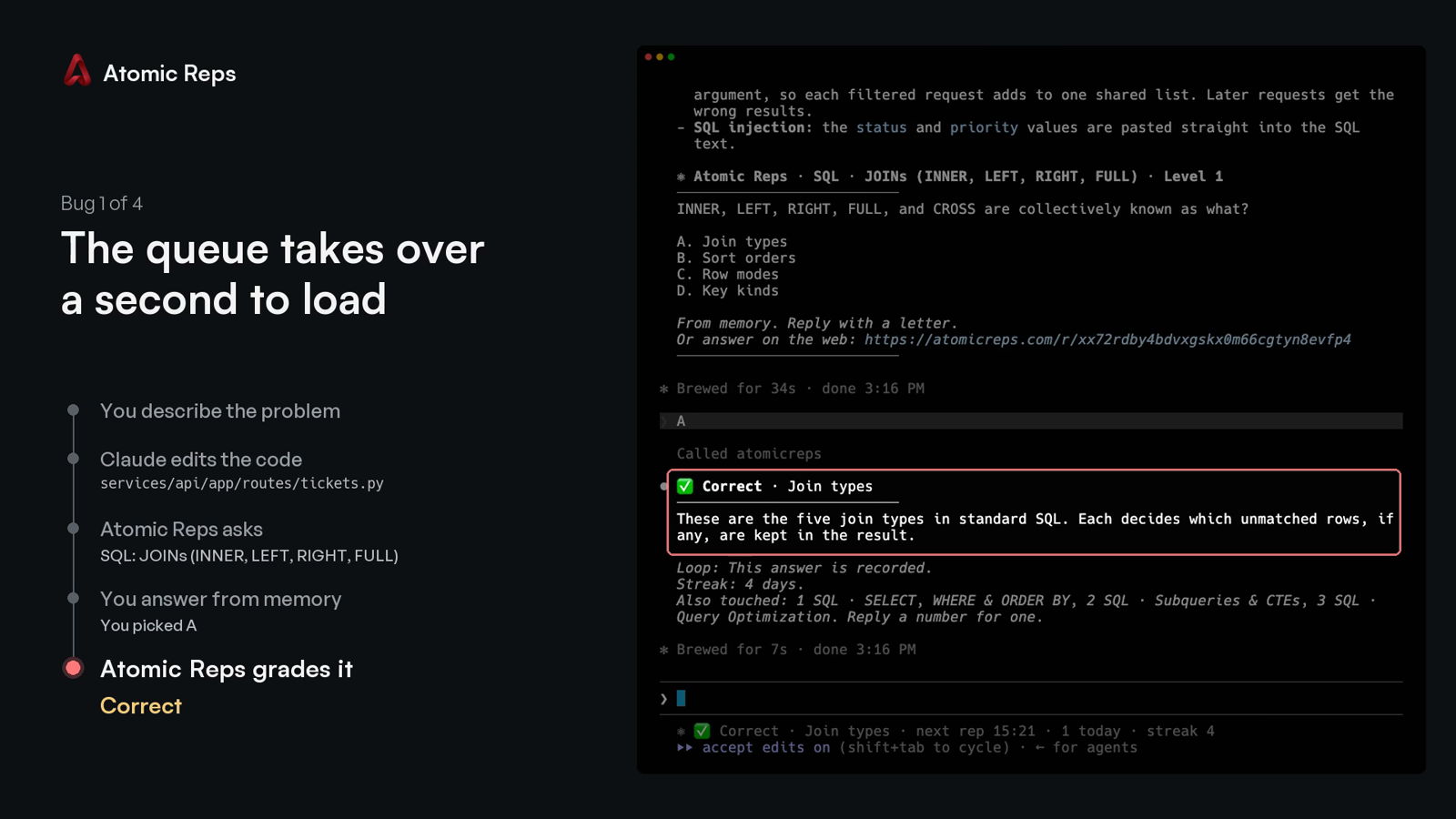
Type the letter. The verdict comes back with a one-line explanation, and the next line names up to three other topics the session touched:
Every run after the first opens the terminal screen: your streak, this session, your topics, mutes and rate.
Commands
npx atomicreps            the terminal screen; the setup wizard on the first run
npx atomicreps setup      the setup wizard again: areas, topics, how often, how hard
npx atomicreps login      sign in from a browser with a typed code
npx atomicreps connect    register the server with your editor
npx atomicreps connect --pin   pin the launch args to this installed version, for a command you can commit
npx atomicreps mcp        the stdio MCP server process (what the editor launches)
npx atomicreps doctor     token, server ping, version, when the next rep may come, allowlist
npx atomicreps why        the last ten times a question could have appeared, and why it did or did not
npx atomicreps logout     forget the token on this machine
npx atomicreps logout --purge   also forget your reps and status, and offer to undo connect
Add --alpha to any command to use staging. It keeps its own token and cache,
so you can be signed in to both staging and production at once.
Plain connect writes npx -y atomicreps mcp, which always resolves to
whatever is latest at launch. connect --pin writes npx -y atomicreps@<version> mcp instead, the version this CLI is running, so an
organisation can review one exact command and commit it rather than trusting
npx to fetch the same thing twice.
Claude Code
npx atomicreps connect offers four Claude Code rows:
- Claude Code registers the server at user scope.
- …and a question at the end of each turn adds a
Stophook and aUserPromptSubmithook to~/.claude/settings.json. When Claude finishes a turn that changed files, the question prints in your terminal without Claude taking an extra turn, and the letter you type next is graded. Hooks you already have stay. - …and allow its four tools adds
rep,answer,meandsettingstopermissions.allow, so the first question does not stop on a permission prompt. - …and a Claude Code status line shows the open question under the prompt. A status line you already have keeps printing first.
Without connect, the server alone:
claude mcp add --scope user atomicreps -- npx -y atomicreps mcp
GitHub Copilot
npx atomicreps connect offers VS Code and Copilot CLI as rows. Without it:
code --add-mcp '{"name":"atomicreps","type":"stdio","command":"npx","args":["-y","atomicreps","mcp"]}'
copilot mcp add atomicreps -- npx -y atomicreps mcp
Copilot in JetBrains, Visual Studio, Xcode and Eclipse reads the same entry
from its own mcp.json (Settings, then MCP). A team can
commit it as .vscode/mcp.json so every clone has it:
{
  "servers": {
    "atomicreps": { "type": "stdio", "command": "npx", "args": ["-y", "atomicreps", "mcp"] }
  }
}
Copilot reads the server's instructions and calls rep when a task ends,
the same as Cursor and Codex. Approve the four tools once and they stay
approved.
Cursor, Windsurf, Codex and other clients
connect adds one entry to ~/.cursor/mcp.json or
~/.codeium/windsurf/mcp_config.json, and runs codex mcp add for Codex.
Anything already in those files stays. By hand:
codex mcp add atomicreps -- npx -y atomicreps mcp
{
  "mcpServers": {
    "atomicreps": { "command": "npx", "args": ["-y", "atomicreps", "mcp"] }
  }
}
Any other MCP client takes the same command: npx -y atomicreps mcp. The
"I'll set it up myself" row in connect prints it and writes nothing.
How a rep is served
When your coding agent finishes a task, it calls rep once with a few words
for what changed. The server picks one question, or nothing, and your agent
shows it to you unchanged. Reply with a letter, or ignore it.
Under the verdict, one line names up to three other things the session touched. A number asks about one of them. "Never Swift" mutes a topic permanently. "Not this topic" mutes it for thirty days. "Unmute Swift" removes the mute. "How am I doing" prints your summary.
The server enforces the pace, not the agent. It sets a minimum gap between
automatic reps, a daily cap, and mute and off. It refuses an answer typed
within seconds of the question. It never includes the answer key in a rep.
Every failure returns no rep rather than an error; doctor says why.
Tools
| tool | what it does |
|---|---|
rep({ touched?, ask?, topic?, kind?, exclude? }) |
one question, one insight, or nothing; ask takes a handle from an offer |
answer({ pick, id? }) |
the verdict, the explanation, and the offer line |
me({ show? }) |
summary, skills, reps, streak or mutes |
settings({ intensity?, topics?, levels?, prefer?, mute?, muteMinutes?, days?, unmute?, dialog? }) |
the rate, the pinned topics, the difficulty range, the preferred areas, mutes, the dialog |
Handles are topic or topic.subskill (react.hooks_core). Fifty sub-skill
slugs repeat across topics, so the topic is always part of the name.
settings({ dialog: true }) asks for the letter in your editor's native
dialog instead of the chat. It blocks the turn, so it is a setting, never the
default.
Privacy
What leaves your machine on a rep call: catalog handles with small weights.
Also package, file extension and folder names the public catalog already
knows. Your agent's touched words are matched to handles on your machine;
the words themselves are never sent. An unknown package name is dropped. A
private name (@acme/react-internal) is sent as its public alias (react).
We never send your code, a file's contents, or a prompt. npx atomicreps setup prints the exact payload for your repo, before you sign in.
npx atomicreps mcp forwards each JSON-RPC message from your editor to the
Atomic Reps server with your token. The answer comes back the same way.
ATOMICREPS_API is honoured only for an Atomic Reps or loopback address,
since your token goes wherever it points. Anything else is ignored and
reported by doctor; set ATOMICREPS_UNSAFE_ORIGIN=1 to override.
Login
npx atomicreps prints a code. Type it at atomicreps.com/connect while
signed in; a forwarded link approves nothing. The token is saved in
~/.config/atomicreps/config.json (mode 0600), prefixed arep_ so secret
scanners find it. You can revoke it from your account page. logout forgets
it; logout --purge also deletes the reps and status this machine cached, then
lists every editor entry connect wrote (both channels) and removes the ones you
leave ticked.
The trust boundary, and how to report a vulnerability: SECURITY.md.
Check it yourself
dist/cli.js is built from these files and nothing else. The package has no
runtime dependencies.
npm install
npm run build    # writes dist/cli.js from src
npm test         # the behaviour described above, as tests
To compare with what npm serves: npm pack atomicreps, then read its
dist/cli.js beside the one you just built. Everything the client sends is in
src/api.ts. Everything it reads from your repository is in src/infer.ts.
MIT.
Pertanyaan tentang atomicreps MCP
Bagaimana cara menambahkan atomicreps MCP ke Claude Code?
Jalankan claude mcp add cli -- npx -y atomicreps di terminal Anda. Tambahkan --scope user agar tersedia di semua proyek.
Bagaimana cara menambahkan atomicreps MCP ke Cursor?
Buka ~/.cursor/mcp.json dan tambahkan server di bawah mcpServers, menggunakan config Cursor yang ditunjukkan di bagian instalasi di atas.
Bagaimana cara kerja Atomic Reps dengan coding agent saya?
Saat agent Anda mengubah kode, server akan mengajukan pertanyaan pilihan ganda tentang perubahan tersebut. Anda menjawab dengan sebuah huruf berdasarkan ingatan Anda dan server akan memberikan penilaiannya.
Apakah server mengirimkan kode asli saya ke layanan tersebut?
Tidak, server tidak pernah mengirimkan kode, isi file, atau prompt Anda. Server hanya menggunakan catalog handles dan nama package/folder untuk mencocokkan topik.
Editor dan AI client apa saja yang didukung?
Alat ini berfungsi dengan Claude Code, GitHub Copilot, Cursor, Windsurf, Codex, dan MCP client lainnya.
Bagaimana cara setup Atomic Reps?
Anda bisa memulainya dengan menjalankan npx atomicreps, yang akan menjalankan setup wizard untuk memilih area latihan, frekuensi, dan tingkat kesulitan.