
OpenCode MCP server
Commit 12 Nov 2026Mendelegasikan tugas berat dari model orchestrator ke subagent OpenCode yang terisolasi untuk menjaga kualitas context window dan mengurangi biaya token.
Juga dikenal sebagai alejandro-technology/opencode-mcp, mcp-server-opencode
- Stars
- 6
- Tools
- 10
- Unduhan, 30 hari
- —
- Versi terbaru
- —
- Commit terakhir
- 12 Nov 2026
- Lisensi
- —
Apa itu OpenCode MCP?
OpenCode adalah MCP server. Mendelegasikan tugas berat dari model orchestrator ke subagent OpenCode yang terisolasi untuk menjaga kualitas context window dan mengurangi biaya token. Server ini menyediakan 10 tool, seperti opencode_start_server, opencode_stop_server, opencode_list_agents.
Ringkasan dibuat dari README proyek
Tentang OpenCode MCP server
Mendelegasikan tugas komputasi yang berat dari orchestrator ke subagent yang terisolasi adalah fungsi utama yang disediakan opencode-mcp bagi developer yang menggunakan Claude Code, Codex, Cursor, Antigravity, atau Pi. Dengan mengalihkan pembacaan file besar, pencarian ekstensif, dan loop pengujian yang berulang ke subagent OpenCode di background, Anda dapat mencegah context window bloat dan mengurangi biaya token. Pendekatan ini menjaga kualitas penalaran lead agent utama Anda dengan menjaga context tetap ramping dan fokus pada orkestrasi.
User harus memiliki Node.js 18+ dan OpenCode 1.x yang terinstall dan terkonfigurasi pada system path untuk menggunakan server ini. Server ini mengelola tugas asynchronous melalui tool spesifik seperti opencode_start_task dan opencode_wait_for_task, yang memungkinkan eksekusi paralel untuk beberapa investigasi. Server ini mendukung menjalankan tugas dalam direktori bersama atau di dalam managed Git worktrees yang terisolasi agar perubahan source code tetap terorganisir. Sistem ini menyediakan laporan penggunaan yang detail, termasuk metrik yang dirinci berdasarkan provider dan model, untuk membantu melacak efisiensi biaya dari sesi yang didelegasikan.
Apa yang bisa Anda lakukan dengannya
- 1Eksekusi tugas paralelKirimkan beberapa tugas investigasi atau implementasi secara paralel tanpa menghambat orchestrator.
- 2Preservasi context windowHindari mengotori context agent utama Anda dengan pembacaan file besar atau output pencarian yang ekstensif.
- 3Debugging subagent iteratifKirimkan prompt lanjutan ke sesi tugas yang sudah ada untuk melakukan pekerjaan iteratif secara bolak-balik dengan subagent.
Ditulis berdasarkan README proyek. Setiap use case diperiksa terhadap kutipan dari README tersebut.
Cara menginstal OpenCode MCP
Format diverifikasi 10 Nov 2026Tambahkan ke CursorTambahkan ke GooseInstal OpenCode MCP di Claude Code
$ claude mcp add opencode-mcp -- npx -y mcp-server-opencodeInstal OpenCode MCP di Cursor
~/.cursor/mcp.json
{
  "mcpServers": {
    "opencode-mcp": {
      "command": "npx",
      "args": [
        "-y",
        "mcp-server-opencode"
      ]
    }
  }
}Instal OpenCode MCP di VS Code
.vscode/mcp.json
{
  "servers": {
    "opencode-mcp": {
      "type": "stdio",
      "command": "npx",
      "args": [
        "-y",
        "mcp-server-opencode"
      ]
    }
  }
}Instal OpenCode MCP di VS Code CLI
$ code --add-mcp '{"name":"opencode-mcp","type":"stdio","command":"npx","args":["-y","mcp-server-opencode"]}'Instal OpenCode MCP di Claude Desktop
claude_desktop_config.json
{
  "mcpServers": {
    "opencode-mcp": {
      "command": "npx",
      "args": [
        "-y",
        "mcp-server-opencode"
      ]
    }
  }
}Instal OpenCode MCP di Codex
$ codex mcp add opencode-mcp -- npx -y mcp-server-opencodeInstal OpenCode MCP di Codex config.toml
~/.codex/config.toml
[mcp_servers.opencode-mcp]
command = "npx"
args = ["-y", "mcp-server-opencode"]
Instal OpenCode MCP di Gemini CLI
$ gemini mcp add -s user opencode-mcp npx -- -y mcp-server-opencodeInstal OpenCode MCP di Gemini settings.json
~/.gemini/settings.json
{
  "mcpServers": {
    "opencode-mcp": {
      "command": "npx",
      "args": [
        "-y",
        "mcp-server-opencode"
      ]
    }
  }
}Tool OpenCode MCP 10
Terdeteksi dari READMEopencode_start_serveropencode_stop_serveropencode_list_agentsopencode_start_taskopencode_continue_taskopencode_cancel_taskopencode_cleanup_workspaceopencode_get_task_statusopencode_get_task_resultopencode_wait_for_task
| opencode_start_server | — | |
| opencode_stop_server | — | |
| opencode_list_agents | — | |
| opencode_start_task | — | |
| opencode_continue_task | — | |
| opencode_cancel_task | — | |
| opencode_cleanup_workspace | — | |
| opencode_get_task_status | — | |
| opencode_get_task_result | — | |
| opencode_wait_for_task | — |
Konfigurasi
MCP_TOOL_TIMEOUTOPENCODE_MCP_SMOKE_MODEL
| Nama | Deskripsi | Tipe |
|---|---|---|
| MCP_TOOL_TIMEOUT | — | |
| OPENCODE_MCP_SMOKE_MODEL | — |
Pengecekan otomatis
Berjalan 13 Nov 2026Laporan lengkap →Belum diverifikasi. Sebuah server memerlukan skor 80, tidak ada temuan serius, dan data yang cukup untuk kami periksa. Cara kerja checks · Yang perlu diperbaiki untuk menambah poin

- Source repository terhubung dan dapat dijangkaualejandro-technology/opencode-mcp is public and reachablegithub.com/alejandro-technology/opencode-mcp ↗Lolos
- Nama paket mencantumkan repositori ini sebagai sumbernyamcp-server-opencode names alejandro-technology/opencode-mcp as sourcenpmjs.com/package/mcp-server-opencode ↗Lolos
- Provenance build (atestasi Sigstore)No build attestation published for this releaseTidak diperiksa
- Lisensi open source (OSI)No licenseTemuan
- Ada commit atau release dalam satu tahun terakhirLast commit or release 2026-11-12github.com/alejandro-technology/opencode-mcp ↗Lolos
- OpenSSF ScorecardTidak diperiksa
- Nama package tidak mirip dengan package populerNo popular package one edit away from mcp-server-opencodeLolos
- Tidak ada advisory kritis pada paket atau dependensinyaTidak diperiksa
- Tidak ada instruksi tersembunyi untuk model10 tool descriptions and the README read; no override phrases, credential paths or hidden charactersLolos
- Tools yang bersifat destruktif telah diberi labelNo tool named like delete, drop or execLolos
- Endpoint remote merespons handshake MCPTidak diperiksa
README
Lihat di GitHubopencode-mcp



Keep your lead agent lean and save tokens by delegating heavy tasks to background subagents.
opencode-mcp is a Model Context Protocol (MCP) server that connects orchestrator hosts (Claude Code, Codex, Cursor, Antigravity, Pi) with OpenCode subagents. Instead of polluting your orchestrator's context window with large file reads, extensive search outputs, and repetitive test runs, you delegate those tasks to isolated subagents and receive only concise, structured results.
Why this matters (Context Window Economics)
- 🧠 Prevent Context Rot & Bloat: Monolithic agents suffer reasoning degradation as the context fills up. Keeping your lead agent as an orchestrator preserves high reasoning quality.
- 💰 Slash Token Costs: Running large exploratory reads or test-fix loops directly inside your primary (Fable/Opus, Astra/Sol) session repeatedly bills for thousands of cached tokens on every follow-up turn. Subagents run in isolated sessions using optimal models.
- ⚡ Asynchronous Parallel Execution: Dispatch multiple investigation or implementation tasks in parallel without blocking the orchestrator.
Quick install
Requires Node.js 18+ and OpenCode 1.x installed and configured (opencode must be on your PATH, with at least one provider/model set up) — this server spawns and drives OpenCode instances.
For Claude Code:
claude mcp add opencode -- npx -y mcp-server-opencode
For Codex:
codex mcp add opencode -- npx -y mcp-server-opencode
See Installation for manual config, and from-source options.
Tools
| Tool | Description |
|---|---|
opencode_start_server |
Start a new OpenCode server instance in the MCP process working directory |
opencode_stop_server |
Stop a running OpenCode server instance |
opencode_list_agents |
List agents/models available on a server instance (optional directory selects a project) |
opencode_start_task |
Delegate a task to an agent by starting a new session and prompt (optional agent / model override) |
opencode_continue_task |
Send a follow-up prompt to an existing task's session for iterative back-and-forth with the subagent |
opencode_cancel_task |
Abort a running delegated task by cancelling its session |
opencode_cleanup_workspace |
Explicitly remove an owned Git worktree after task reports finalize; dirty worktrees require opt-in discard |
opencode_get_task_status |
Poll the status of a delegated task (pending / running / completed / failed / empty / cancelled); optional include_progress adds a partial output snippet and the currently running tool while it's still running |
opencode_get_task_result |
Fetch the final result of a completed task |
opencode_wait_for_task |
Long-poll one or more delegated tasks until they finish (mode: "all" or "any") or the timeout elapses; optional include_progress best-effort enriches unfinished tasks within the same deadline, falling back to the last observed status/progress when time runs out |
Delegation workflow and model-selection guidance are provided through the MCP server instructions.
How it works
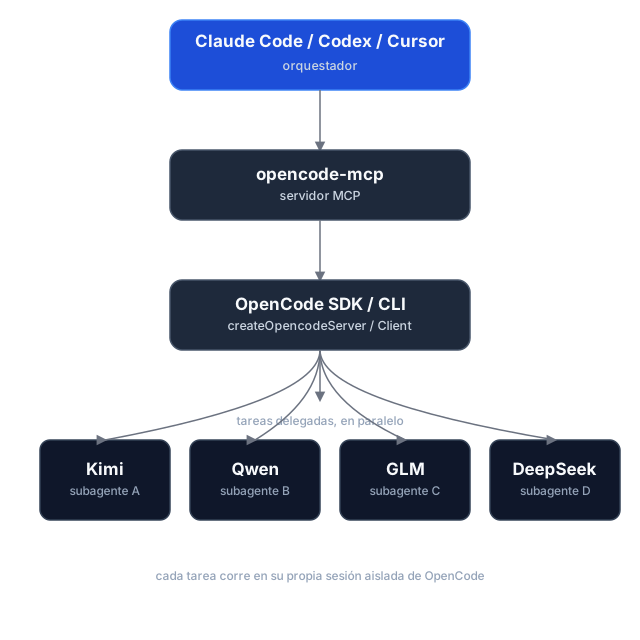
Task delegation is asynchronous: opencode_start_task returns a task_id and run_id without waiting, so hosts can start tasks in parallel. Tasks use the selected directory by default; managed Git worktrees are optional. Poll for status and retrieve results separately. If dispatch is uncertain, use the returned IDs to check or cancel the task instead of retrying it.
Execution reports and caller checks
Start and continuation calls can include expected_changes and checks. Status and result responses report workspace changes, verification, diagnostics, and evidence; pass a run_id to retrieve a historical run. Workspace changes are best-effort evidence, since concurrent writers can make attribution uncertain.
Shared directories and managed worktrees
Tasks run in the selected existing directory (shared, the default), or in an isolated managed Git worktree based on a commit. Worktrees are kept after execution; use opencode_cleanup_workspace with its workspace_id after reports are finalized. Cleanup only removes worktrees managed by this server, and dirty worktrees require explicit discard.
Usage reporting
Status, wait, and result responses include run and session usage snapshots, with metrics broken down by provider and model. Missing metrics remain unknown rather than zero, and cost is OpenCode-reported—not an invoice total. Finalized runs retain their snapshots for historical retrieval.
Task history and workspace ownership are held in memory for the lifetime of the MCP process. Restarting loses these records; retained worktrees are not automatically rediscovered.
Installation
Prerequisites
- Node.js 18+
- OpenCode 1.x installed and configured (
opencodemust be on yourPATH, with at least one provider/model set up) — this server spawns and drives OpenCode instances.
The current adapter uses the OpenCode v1 SDK/API and was validated against OpenCode 1.18.34 , 1.19.5. OpenCode 2.x is not yet supported.
Option 1 — npm (recommended)
The package is published as mcp-server-opencode. No cloning or building needed — point your MCP host at npx:
For Claude Code, one command does it:
claude mcp add opencode -- npx -y mcp-server-opencode
Or manually
{
  "mcpServers": {
    "opencode": {
      "command": "npx",
      "args": ["-y", "mcp-server-opencode"]
    }
  }
}
For Codex, add the server to ~/.codex/config.toml:
[mcp_servers.opencode]
command = "npx"
args = ["-y", "mcp-server-opencode"]
Or install it globally and use the binary directly:
npm install -g mcp-server-opencode
{
  "mcpServers": {
    "opencode": {
      "command": "opencode-mcp"
    }
  }
}
Option 2 — from source
git clone https://github.com/alejandro-technology/opencode-mcp.git
cd opencode-mcp
pnpm install
pnpm build
Then point your MCP host at the built entrypoint:
{
  "mcpServers": {
    "opencode": {
      "command": "node",
      "args": ["/path/to/opencode-mcp/build/src/index.js"]
    }
  }
}
Restart your MCP host after editing the config; the opencode_* tools should appear in its tool list.
Configuration
MCP_TOOL_TIMEOUT
opencode_wait_for_task accepts a timeout_ms input, but it's clamped to a server-side maximum so a single call stays inside the calling host's own MCP request timeout. That maximum defaults to 55000 ms and is configurable via MCP_TOOL_TIMEOUT.
The default is deliberately low: MCP hosts abort long tool requests with MCP error -32001: Request timed out before the tool can answer (observed on OpenCode hosts and the MCP Inspector at 100s+), so a graceful timed_out: true payload at 55s always beats a dead transport. Loop the wait — call opencode_wait_for_task again while timed_out is true — instead of raising timeout_ms. Raise this only when your host demonstrably tolerates longer tool requests.
MCP_TOOL_TIMEOUT can be set two ways:
-
Environment variable — set it in the MCP server config:
{ "mcpServers": { "opencode": { "command": "node", "args": ["/path/to/opencode-mcp/build/src/index.js"], "env": { "MCP_TOOL_TIMEOUT": "1200000" } } } } -
CLI argument — pass
MCP_TOOL_TIMEOUT=<ms>as an extra arg to the server process:{ "mcpServers": { "opencode": { "command": "node", "args": [ "/path/to/opencode-mcp/build/src/index.js", "MCP_TOOL_TIMEOUT=1200000" ] } } }
If both are present, the environment variable takes precedence over the CLI argument. Invalid or non-numeric values fall back to the 55000 ms default.
Permissions and trust
Headless tasks automatically answer permission prompts. Set OPENCODE_MCP_EXTERNAL_DIR to read-only (default), allow, or deny to control external-directory requests. An environment variable takes precedence over an OPENCODE_MCP_EXTERNAL_DIR=<policy> CLI argument; explicit OpenCode deny rules remain in effect.
Use this server only with trusted hosts and repositories. Git worktrees isolate source changes, not OS permissions: agents and caller-provided checks run as your local user, not in a security sandbox.
Development
Project structure
src/
├── index.ts                   # MCP server entrypoint (stdio transport, shutdown handlers)
└── modules/
    ├── tools/                 # One file per MCP tool, registered in index.ts
    └── shared/                # Cross-tool infrastructure (selected modules below)
        ├── server-registry.ts   # Tracks running OpenCode servers
        ├── task-registry.ts     # Task/session identity and per-run history
        ├── opencode-client.ts   # SDK clients, status derivation, and progress
        ├── run-observer.ts      # Background run finalization and result caching
        ├── execution-report.ts  # Workspace evidence and executable checks
        ├── execution-usage.ts   # Run/session usage aggregation
        ├── workspace-manager.ts # Managed Git worktree lifecycle
        ├── permissions.ts       # Headless permission decisions and responses
        ├── instructions.ts      # Delegation workflow and model-selection guidance
        ├── config.ts            # MCP_TOOL_TIMEOUT resolution
        └── mcp-result.ts        # JSON tool result helpers
Each module ships with a *.test.ts Vitest suite under the parallel tests/ tree mirroring src/.
Getting started
Use Node.js 22.18+ for development and smoke tests (native TypeScript execution); CI checks Node.js 22 and 24. The published server retains its Node.js 18+ runtime requirement.
pnpm install
pnpm dev     # runs the server through the MCP Inspector (tsx, no build needed)
Other scripts:
pnpm test           # vitest run
pnpm test:coverage  # vitest run --coverage
pnpm lint           # biome check
pnpm lint:write     # biome check --write
pnpm build          # clean tsc build to ./build (also the source typecheck)
Real OpenCode smoke tests
The opt-in smoke harness starts a real OpenCode server and removes its temporary fixtures afterward. It is not part of default CI.
pnpm smoke --message-id-only   # non-billable message-ID contract probe
pnpm smoke                     # full smoke; requires credentials and may incur model charges
The full smoke covers reports, usage, continuation, cancellation, isolated worktrees, and cleanup. Its default model is openai/gpt-6-luna; override it with an exact enabled model ID:
OPENCODE_MCP_SMOKE_MODEL=provider/model pnpm smoke
Pertanyaan tentang OpenCode MCP
Bagaimana cara menambahkan OpenCode MCP ke Claude Code?
Jalankan claude mcp add opencode-mcp -- npx -y mcp-server-opencode di terminal Anda. Tambahkan --scope user agar tersedia di semua proyek.
Bagaimana cara menambahkan OpenCode MCP ke Cursor?
Buka ~/.cursor/mcp.json dan tambahkan server di bawah mcpServers, menggunakan config Cursor yang ditunjukkan di bagian instalasi di atas.
Tool apa yang disediakan OpenCode MCP?
Server ini menyediakan 10 tool, termasuk opencode_start_server, opencode_stop_server, opencode_list_agents, opencode_start_task, opencode_continue_task.
Bagaimana server ini membantu manajemen context window?
Server ini mencegah context rot dan bloat dengan mendelegasikan pembacaan file besar, pencarian ekstensif, dan pengujian berulang ke subagent yang terisolasi, lalu hanya mengembalikan hasil yang ringkas ke lead agent.
Bisakah saya menjalankan beberapa tugas secara bersamaan?
Ya, delegasi tugas bersifat asynchronous, sehingga Anda dapat mengirimkan beberapa tugas investigasi atau implementasi secara paralel tanpa menghambat orchestrator.
Apa persyaratan sistem untuk instalasi?
Anda memerlukan Node.js 18+ dan OpenCode 1.x yang sudah terinstall dan terkonfigurasi pada PATH Anda.