
Génère des diagrammes structurés tels que des cartes IBIS, des cartes conceptuelles et des diagrammes de boucles causales à partir du texte en Vithanco Graph Language.
Aussi connu sous Vithanco/VGraph, vgraph, @vithanco/vgraph-mcp
- Étoiles
- 0
- Outils
- —
- Téléchargements, 30 jours
- —
- Dernière version
- 1.0.9
- Dernier commit
- 13 nov. 2026
- Licence
- Apache-2.0
Qu'est-ce que VGraph MCP ?
VGraph est un serveur MCP. Génère des diagrammes structurés tels que des cartes IBIS, des cartes conceptuelles et des diagrammes de boucles causales à partir du texte en Vithanco Graph Language.
Résumé généré à partir du README du projet
À propos du MCP server VGraph
Transformer du texte en diagrammes visuels structurés est la mission de vgraph-mcp pour les développeurs et les penseurs. En utilisant le Vithanco Graph Language (VGL), les utilisateurs peuvent définir des graphes de réseaux typés où chaque nœud et chaque arête possède une signification spécifique. Cela permet la création d'outils de raisonnement complexes comme des cartes IBIS, des diagrammes de boucles causales et des modèles C4 via un simple format texte.
Les utilisateurs peuvent exécuter ce serveur localement en utilisant npx @vithanco/vgraph-mcp ou se connecter à une version hébergée. Le moteur restitue ces définitions au format SVG, garantissant que les diagrammes restent cohérents dans différents environnements. Il prend en charge une large gamme de notations intégrées, notamment l'Impact Mapping, les arbres de décision, les chronologies et les arbres d'attaque-défense, tout en permettant la déclaration de notations personnalisées.
Ce que vous pouvez faire avec
- 1Générer des cartes de raisonnement décisionnelCréez une carte IBIS pour visualiser les questions, les réponses, les points positifs et les points négatifs pour une décision produit spécifique.
- 2Visualiser des architectures systèmeConvertissez des descriptions textuelles en diagrammes C4 pour représenter une architecture logicielle.
- 3Modéliser des relations causalesCartographiez des boucles de rétroaction complexes à l'aide de diagrammes de boucles causales.
Extrait du README du projet. Chaque cas d'utilisation est vérifié par rapport à une citation du document.
Comment installer VGraph MCP
Formats vérifiés le 10 nov. 2026Installer VGraph MCP dans Claude Code
$ claude mcp add vgraph -- npx -y @vithanco/vgraph-mcpInstaller VGraph MCP dans Cursor
~/.cursor/mcp.json
{
  "mcpServers": {
    "vgraph": {
      "command": "npx",
      "args": [
        "-y",
        "@vithanco/vgraph-mcp"
      ]
    }
  }
}Installer VGraph MCP dans VS Code
.vscode/mcp.json
{
  "servers": {
    "vgraph": {
      "type": "stdio",
      "command": "npx",
      "args": [
        "-y",
        "@vithanco/vgraph-mcp"
      ]
    }
  }
}Installer VGraph MCP dans Claude Desktop
claude_desktop_config.json
{
  "mcpServers": {
    "vgraph": {
      "command": "npx",
      "args": [
        "-y",
        "@vithanco/vgraph-mcp"
      ]
    }
  }
}Installer VGraph MCP dans Codex
~/.codex/config.toml
[mcp_servers.vgraph]
command = "npx"
args = ["-y", "@vithanco/vgraph-mcp"]
Installer VGraph MCP dans Gemini CLI
~/.gemini/settings.json
{
  "mcpServers": {
    "vgraph": {
      "command": "npx",
      "args": [
        "-y",
        "@vithanco/vgraph-mcp"
      ]
    }
  }
}Vérifications automatisées
Exécuté le 14 nov. 2026Rapport complet →A passé nos vérifications automatisées. Il ne s'agit pas d'un audit de sécurité : lisez le code et donnez au serveur l'accès le plus restreint dont il a besoin. Fonctionnement des vérifications

- Dépôt source lié et accessiblevithanco/vgraph is public and reachablegithub.com/vithanco/vgraph ↗Réussi
- Le paquet cite ce dépôt comme source@vithanco/vgraph-mcp names vithanco/vgraph as sourcenpmjs.com/package/@vithanco/vgraph-mcp ↗Réussi
- Provenance du build (attestation Sigstore)No build attestation published for this releaseNon vérifié
- Licence open source (OSI)Apache-2.0spdx.org/licenses/Apache-2.0.html ↗Réussi
- Commit ou version publiée au cours de l'année écouléeLast commit or release 2026-11-13github.com/vithanco/vgraph ↗Réussi
- OpenSSF ScorecardNon vérifié
- Nom du package non proche d'un package populaireNo popular package one edit away from @vithanco/vgraph-mcpRéussi
- Aucun avis critique dans le paquet ni ses dépendances101 resolved dependencies checked; no critical advisoryosv.dev ↗Réussi
- Aucune instruction cachée destinée au modèle0 tool descriptions and the README read; no override phrases, credential paths or hidden charactersRéussi
- Les outils destructifs sont étiquetésNon vérifié
- L'endpoint distant répond au handshake MCPEndpoint did not answer initialize: HTTP 200Faille
README
Voir sur GitHubVGraph
Vithanco stands for Visual Thinking and Communication. It helps you think in a structured way by drawing typed network graphs. In a typed graph every node and every edge has a meaning of its own: in an IBIS map a Question, an Answer, a Pro and a Con are different things, and the notation says how they may be connected. The drawing becomes a way of reasoning, and a way of explaining that reasoning to someone else.
VGraph is the open-source engine behind it. It lays a typed graph out and draws it as SVG. The Vithanco Graph Language (VGL) is only the how: a small text format in which these diagrams are written down, stored and shared. The same Swift code runs natively and, compiled to WebAssembly, in the browser, in Obsidian, in VS Code and behind an MCP server, so a diagram looks the same everywhere.
vgraph decision: IBIS "Should we ship the plugin?" {
  node q1: Question "Should we ship?";
  node a1: Answer "Yes, soon";
  node p1: Pro "Users have asked for it";
  node c1: Con "Docs are still thin";
  edge q1 -> a1;
  edge a1 -> p1;
  edge a1 -> c1;
}
A notation is the vocabulary of a diagram: it fixes the node and edge types and how they look. Every document names one. These ship with VGraph: IBIS, BBS, Impact Mapping, Concept Map, Current Reality Tree, Evaporating Cloud, Future Reality Tree, Prerequisite Tree, Transition Tree, Attack-Defense Tree, Goal Tree, Causal Loop Diagram, Decision Tree, Timeline, C4 and Arithmetic. A document can also declare notations of its own. The VGL guide has the whole language.
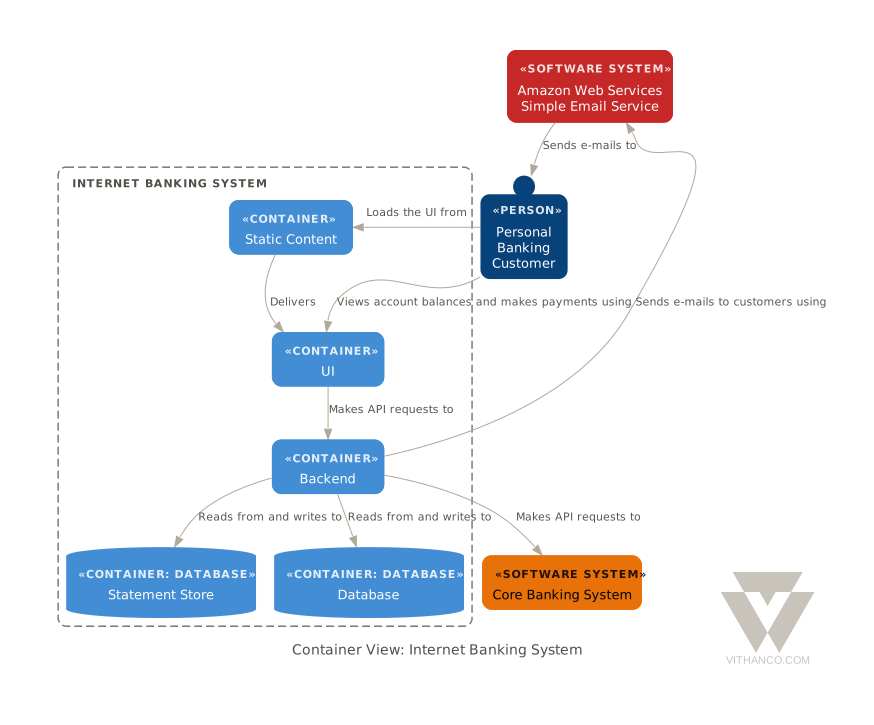
Ways to use it
| Web editor | vithanco.com/editor: write VGL, see the diagram, edit it on the canvas |
| Obsidian | obsidian-vithanco: a vgl code block becomes a diagram |
| VS Code | vscode-vithanco |
| MCP server | npx @vithanco/vgraph-mcp runs it locally; https://mcp.vithanco.com/mcp is hosted. Details |
| Command line | vgraph-cli, built from this repository |
| Swift package | the VGraph, VGLanguage and VGraphSVG libraries |
Building
Two tiers, so a parser fix does not send you through a toolchain install:
- Native only.
swift buildandswift testneed nothing but a Swift 6.4 toolchain. - With the wasm build.
just build,just test, the wasm smoke tests and the editor's browser tests also need Node,jq,binaryen,wabt,justand the Embedded Swift SDK that matches.swift-version.
Install the toolchain with swiftly, then
the SDK. One bundle holds both the plain and the -embedded SDK, and its version
must equal .swift-version. The checksum is per release; take it from
swift.org's WebAssembly guide.
V=$(cat .swift-version)
swiftly install "$V" && swiftly use "$V"
swift sdk install "https://download.swift.org/swift-$V-release/wasm-sdk/swift-$V-RELEASE/swift-$V-RELEASE_wasm.artifactbundle.tar.gz" \
    --checksum <checksum for $V from the guide>
just doctor lists what is missing; a missing SDK is reported but does not fail
it.
just build     # compile everything: wasm, command line, MCP server
just test      # build, then the full suite: Swift, wasm smoke tests, editor browser tests
just           # everything else
For most changes swift test is the quick loop. The Obsidian and VS Code
plugins are separate repositories; just plugins-setup clones them next to this
one, and the build and test recipes use them when they are there.
How it is organised
VGraph is built as hexagons: a pure domain at the centre, ports that name each conversation with the outside, and adapters at the edge. The parser, the SVG renderer and the Graphviz layout are separate targets that know only the core. Why it is shaped this way and where a change goes are written down, as are the decisions behind the design (ADRs) and the visual rules (design guide).
Contributing
Pull requests are welcome, and so are issues. Start with CONTRIBUTING.md.
Licence
Apache-2.0, see LICENSE. Third-party works, among them Graphviz and the DM Sans typeface, are listed in NOTICE. The Vithanco name and logo are not covered by the licence: the artwork is all rights reserved, and a fork should use a name and a logo of its own. See graphics/README.md for what is allowed.
Questions sur VGraph MCP
Comment ajouter VGraph MCP à Claude Code ?
Exécutez claude mcp add vgraph -- npx -y @vithanco/vgraph-mcp dans votre terminal. Ajoutez --scope user pour le rendre disponible dans tous les projets.
Comment ajouter VGraph MCP à Cursor ?
Ouvrez ~/.cursor/mcp.json et ajoutez le serveur sous mcpServers, avec la configuration Cursor indiquée dans la section d'installation ci-dessus.
Quel type de diagrammes VGraph peut-il créer ?
Il prend en charge une grande variété de notations, notamment IBIS, les cartes conceptuelles, les diagrammes de boucles causales, les chronologies, le modèle C4 et les arbres de décision.
Comment est structuré le langage VGraph ?
Le Vithanco Graph Language (VGL) est un format texte léger utilisé pour écrire, stocker et partager des diagrammes.
Puis-je exécuter VGraph localement ?
Oui, vous pouvez l'exécuter localement via npx ou en tant qu'outil en ligne de commande.