
Serveur MCP word-aligner
Commit 11 nov. 2026Crée des diagrammes d'alignement de mots partageables qui connectent visuellement les mots entre différentes langues ou niveaux de traduction.
Aussi connu sous tinygodsdev/bitext-word-alignment, bitext-word-alignment
- Étoiles
- 5
- Outils
- —
- Téléchargements, 30 jours
- —
- Dernière version
- 1.0.0
- Dernier commit
- 11 nov. 2026
- Licence
- MIT
Qu'est-ce que word-aligner MCP ?
word-aligner est un serveur MCP. Crée des diagrammes d'alignement de mots partageables qui connectent visuellement les mots entre différentes langues ou niveaux de traduction.
Résumé généré à partir du README du projet
À propos du MCP server word-aligner
Word Aligner est un outil web conçu pour les apprenants de langues, les enseignants, les linguistes et les créateurs de langues afin de créer des diagrammes visuels de traductions mot à mot. Il permet aux utilisateurs d'empiler plusieurs lignes de texte, telles que des phrases sources, des traductions, de l'IPA ou des glosses, et de connecter manuellement les mots à l'aide de connecteurs courbes. Cette approche manuelle garantit aux utilisateurs un contrôle total sur les liens de type un-à-plusieurs ou plusieurs-à-un, ce qui est très utile pour illustrer les réordonnancements complexes ou les changements grammaticaux.
Les développeurs peuvent intégrer cette fonctionnalité via une API HTTP gratuite ou un MCP server qui fournit un outil create_word_alignment. Lorsqu'il est utilisé comme MCP server, il fonctionne via streamable HTTP sans nécessiter d'authentification. Le serveur renvoie une URL partageable et une image d'aperçu. Les utilisateurs peuvent personnaliser la typographie, la tokenisation et la directionnalité, avec une prise en charge des écritures de droite à gauche et des systèmes d'écriture verticaux comme le tategaki japonais. Les diagrammes finaux peuvent être exportés en fichiers PNG, SVG, PDF ou HTML.
Ce que vous pouvez faire avec
- 1Visualiser le réordonnancement de la traductionMontrez comment les mots d'une phrase source correspondent à une phrase cible, même lorsque l'ordre des mots change.
- 2Créer des glosses linguistiquesGénérez des glosses interlinéaires incluant l'alignement des morphèmes et des annotations IPA pour l'étude académique.
- 3Documenter des langues construitesCartographiez une langue construite sur l'anglais en utilisant des polices de caractères personnalisées et des niveaux d'annotation supplémentaires.
- 4Automatiser les liens d'alignementGénérez par programmation des URL d'alignement partageables en utilisant une requête POST vers l'API.
Extrait du README du projet. Chaque cas d'utilisation est vérifié par rapport à une citation du document.
Comment installer word-aligner MCP
Formats vérifiés le 10 nov. 2026Installer word-aligner MCP dans Claude Code
$ claude mcp add --transport http bitext-word-alignment https://aligner.tinygods.dev/mcpInstaller word-aligner MCP dans Cursor
~/.cursor/mcp.json
{
  "mcpServers": {
    "bitext-word-alignment": {
      "url": "https://aligner.tinygods.dev/mcp"
    }
  }
}Installer word-aligner MCP dans VS Code
.vscode/mcp.json
{
  "servers": {
    "bitext-word-alignment": {
      "type": "http",
      "url": "https://aligner.tinygods.dev/mcp"
    }
  }
}Installer word-aligner MCP dans Codex
~/.codex/config.toml
[mcp_servers.bitext-word-alignment]
url = "https://aligner.tinygods.dev/mcp"
Installer word-aligner MCP dans Gemini CLI
~/.gemini/settings.json
{
  "mcpServers": {
    "bitext-word-alignment": {
      "httpUrl": "https://aligner.tinygods.dev/mcp"
    }
  }
}Vérifications automatisées
Exécuté le 14 nov. 2026Rapport complet →Pas encore vérifié. Un serveur nécessite un score de 80, aucune faille sérieuse et suffisamment de données pour que nous puissions effectuer les vérifications. Fonctionnement des vérifications

- Dépôt source lié et accessibletinygodsdev/bitext-word-alignment is public and reachablegithub.com/tinygodsdev/bitext-word-alignment ↗Réussi
- Le paquet cite ce dépôt comme sourceNon vérifié
- Provenance du build (attestation Sigstore)Non vérifié
- Licence open source (OSI)MITspdx.org/licenses/MIT.html ↗Réussi
- Commit ou version publiée au cours de l'année écouléeLast commit or release 2026-11-11github.com/tinygodsdev/bitext-word-alignment ↗Réussi
- OpenSSF ScorecardNon vérifié
- Nom du package non proche d'un package populaireNon vérifié
- Aucun avis critique dans le paquet ni ses dépendancesNon vérifié
- Aucune instruction cachée destinée au modèle0 tool descriptions and the README read; no override phrases, credential paths or hidden charactersRéussi
- Les outils destructifs sont étiquetésNon vérifié
- L'endpoint distant répond au handshake MCPinitialize answered with protocol 2025-06-18 in 438 msRéussi
README
Voir sur GitHubAligner — word-by-word translation visualizer
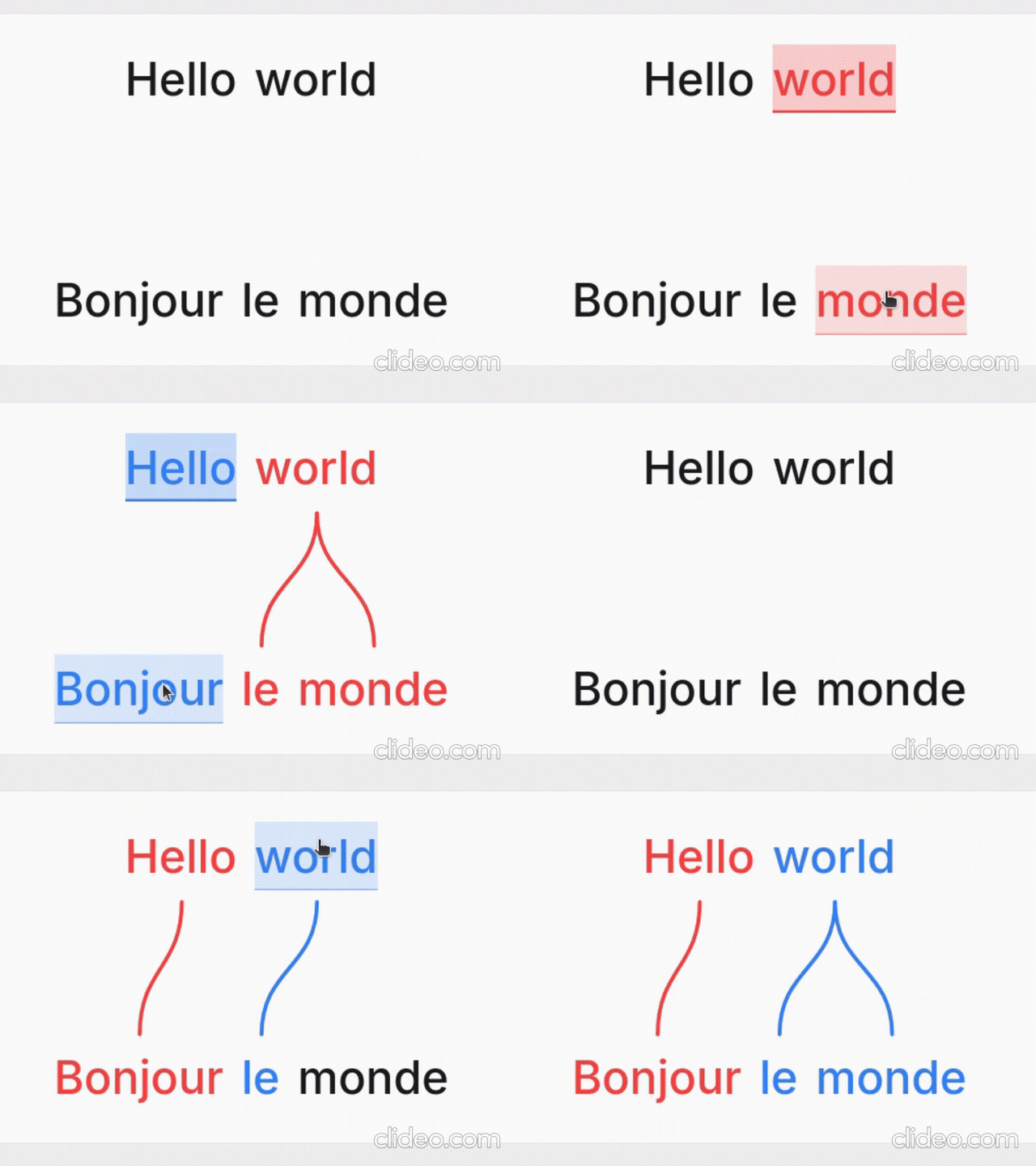
Word Aligner is a free web tool that shows which word matches which across stacked lines of text. Type or paste a sentence and its translation, click a word and then its match on the line above or below, and curved connectors draw the alignment between them. Add extra rows for glosses or IPA, then export the diagram or share it with a link.
No accounts, no machine translation — you stay in control of every link. Great for lessons, social posts, grammar notes, and conlang documentation.
What it's for
- Language learners — see exactly why a translation says what it does: which source word became which target word, what gets dropped, and where word order changes.
- Teachers — build handouts, slides, and flashcards; export a clean PNG or SVG and drop it into a lesson without retyping anything.
- Linguists — produce Leipzig-style interlinear glosses with morpheme alignment, case/agreement tags, and free translations.
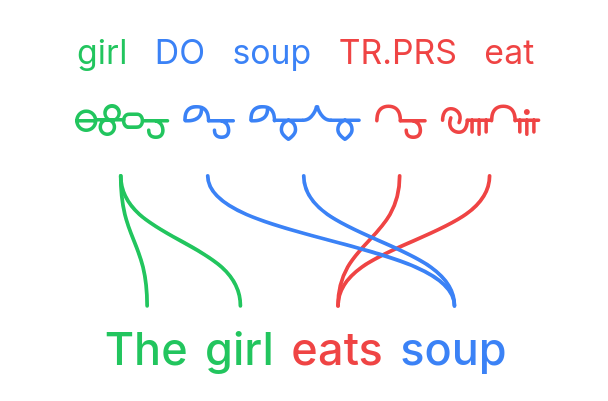
- Conlangers — show how a constructed language maps onto English, with custom script fonts, gloss rows, and IPA.
What it does
- Multi-line alignment — stack as many rows as you need (source, translation, gloss, IPA); links connect vertically adjacent lines.
- Manual word linking — click a word, then its match; supports one-to-many and many-to-one links and freely crossing connectors for reordered translations.
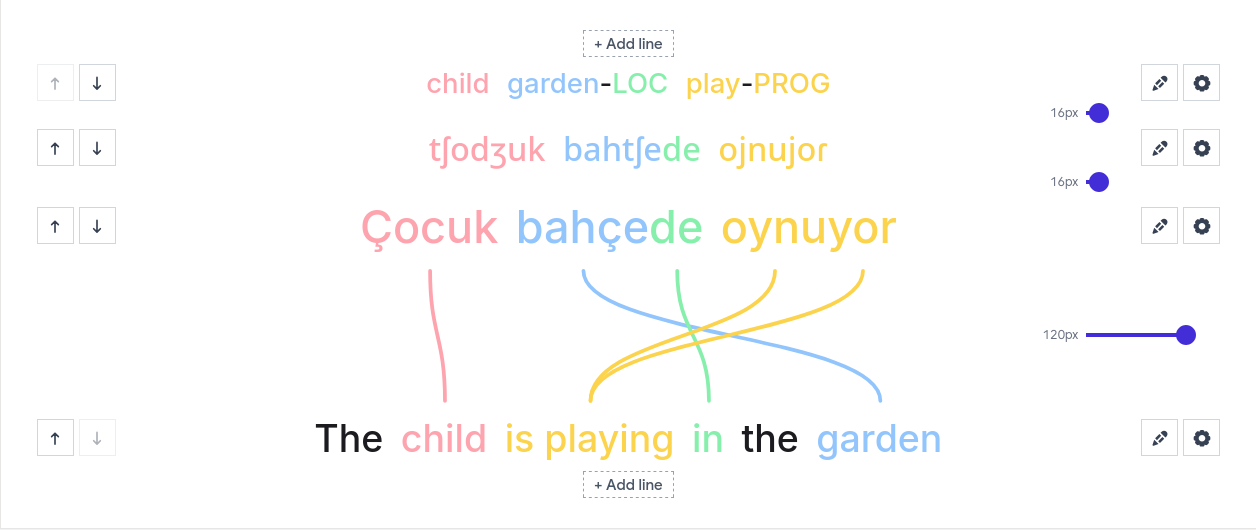
- Interlinear glosses & IPA — add annotation tiers above or below any line.
- Right-to-left scripts — Hebrew, Arabic, and mixed LTR/RTL layouts.
- Vertical writing systems — stand the whole diagram up as columns for Japanese tategaki, Chinese, or traditional Mongolian; characters stack or the line rotates, chosen per line, so a horizontal translation stays readable beside it.
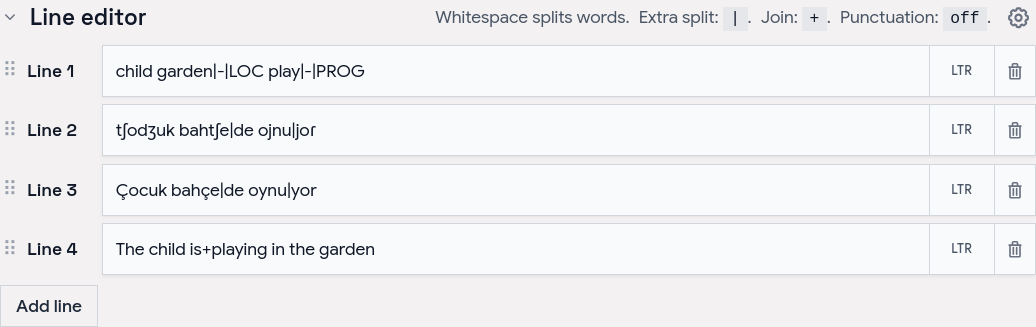
- Tokenization control — choose how text splits into word boxes (split characters, a join marker for fixed expressions, optional punctuation handling).
- Per-line typography — font, size, spacing, and direction per line; custom and Google Fonts.
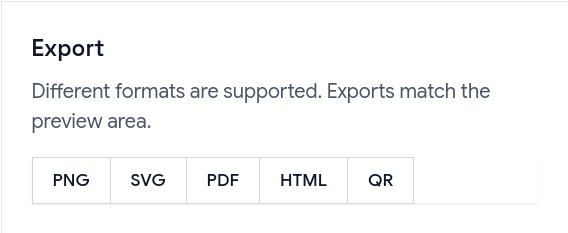
- Exports — PNG, SVG, PDF, and a self-contained HTML file; exports match the preview, including custom-font shaping.
- Shareable URLs — the whole alignment (text, links, and visual settings) is encoded in a
?data=link.
Examples
Browse ready-made examples — bilingual pairs, Turkish interlinear with IPA, RTL scripts, vertical Japanese and traditional Mongolian, Tagalog compounds, Japanese–Chinese–English word order, and more interlinear glosses — at aligner.tinygods.dev/examples. Open any one in the editor to adapt it.
How it works
Edit your lines in the line editor, then link words in the preview.
Tune colors, tokenization, and fonts in settings, then export or share.
Word alignment vs. interlinear vs. parallel text
- Interlinear translation places a gloss directly under each source word — compact, but it hides reordering. Aligner keeps both sentences on their own line and draws connectors, so reorderings, splits, and merges stay obvious.
- Parallel text is side-by-side bilingual reading for long-form study. Aligner focuses on one sentence pair at a time with explicit connectors showing which tokens correspond.
API
Word Aligner has a free HTTP API for generating alignment links programmatically.
POST https://aligner.tinygods.dev/api/align
Content-Type: application/json

{
  "lines": ["Hello world", "Bonjour le monde"],
  "alignments": [[0, 0, 1, 0], [0, 1, 1, 2]]
}
Returns { "url": "https://aligner.tinygods.dev/?data=..." }.
Supports per-line options (font, size, RTL), global visual settings (palette, line style, background), pair-level gap control, and multi-line stacks with selective connectors.
- API docs: aligner.tinygods.dev/api
- OpenAPI schema: aligner.tinygods.dev/api/align/openapi.json
Using Word Aligner as an AI agent tool
The word-aligner-skill/ directory is a ready-to-install skill that teaches AI assistants (Claude, ChatGPT, etc.) how to use the API. Once installed, it enables flows like:
"Translate 'я хочу спать' into English and show me the word alignment."
The agent translates, calls the API, and returns a shareable link.
- For Claude: point your Claude project at this repository or add the contents of
word-aligner-skill/SKILL.mdas a custom instruction. - For ChatGPT: zip
word-aligner-skill/and upload it as a custom Skill.
Install instructions and a downloadable archive are also on the site: aligner.tinygods.dev/skill.
MCP server
There is also an MCP server at https://aligner.tinygods.dev/mcp that exposes a single create_word_alignment tool. It returns a shareable link plus a preview image, and runs inside the same app over Streamable HTTP with no auth. Connect it in Claude:
claude mcp add --transport http word-aligner https://aligner.tinygods.dev/mcp
See docs/mcp-server.md for ChatGPT Developer Mode setup and the tool schema.
Learn more
- App: aligner.tinygods.dev
- About / documentation: aligner.tinygods.dev/about
- Privacy: aligner.tinygods.dev/privacy
Created by Dani Polani. See other tools for linguistics and conlanging.
Questions sur word-aligner MCP
Comment ajouter word-aligner MCP à Claude Code ?
Exécutez claude mcp add --transport http bitext-word-alignment https://aligner.tinygods.dev/mcp dans votre terminal. Ajoutez --scope user pour le rendre disponible dans tous les projets.
Comment ajouter word-aligner MCP à Cursor ?
Ouvrez ~/.cursor/mcp.json et ajoutez le serveur sous mcpServers, avec la configuration Cursor indiquée dans la section d'installation ci-dessus.
À quoi puis-je utiliser Word Aligner ?
Il est utilisé par les apprenants de langues pour visualiser les correspondances de mots, par les enseignants pour créer des supports pédagogiques, par les linguistes pour les glosses interlinéaires et par les créateurs de langues (conlangers) pour cartographier des langues construites.
Puis-je exporter les diagrammes ?
Oui, vous pouvez exporter vos alignements au format PNG, SVG, PDF ou sous la forme d'un fichier HTML autonome.
Comment partager mon travail ?
Vous pouvez partager votre alignement via un lien qui encode l'ensemble du texte, des liens et des paramètres visuels.