
Serveur MCP ArchScript
Commit 11 nov. 2026Permet à un client IA de planifier, modifier et réviser des diagrammes d'architecture logicielle en utilisant l'approche architecture-as-code via l'application ArchScript pour Mac.
Aussi connu sous schlummer13/archscript-mcp, archscript-mcp
- Étoiles
- 0
- Outils
- —
- Téléchargements, 30 jours
- —
- Dernière version
- 1.0.0
- Dernier commit
- 11 nov. 2026
- Licence
- MIT
Qu'est-ce que ArchScript MCP ?
ArchScript est un serveur MCP. Permet à un client IA de planifier, modifier et réviser des diagrammes d'architecture logicielle en utilisant l'approche architecture-as-code via l'application ArchScript pour Mac.
Résumé généré à partir du README du projet
À propos du MCP server ArchScript
ArchScript MCP connecte les clients IA tels que Claude Desktop et Claude Code à l'application ArchScript pour Mac. Cela permet à un assistant IA de gérer l'architecture logicielle via une approche architecture-as-code. Au lieu de réécrire des fichiers entiers, l'assistant utilise des opérations structurées pour ajouter, renommer ou déplacer des éléments tels que des clusters, des serveurs et des conteneurs. Cette méthode préserve vos commentaires et votre formatage existants tout en proposant des mises à jour en direct du diagramme rendu.
Les utilisateurs doivent avoir installé ArchScript pour Mac sur macOS 14+ pour utiliser ce serveur exclusivement local. La configuration nécessite l'activation du paramètre de l'assistant IA dans l'application afin de générer un jeton d'accès personnel pour l'authentification. Le serveur fonctionne sur localhost et ne collecte aucune télémétrie, garantissant que vos données architecturales restent privées. La boîte à outils comprend des fonctions spécifiques pour valider des modèles par rapport à des règles, réviser les scores d'architecture et exporter des conceptions vers des formats tels que Terraform, Mermaid ou PlantUML.
Ce que vous pouvez faire avec
- 1Revue d'architecture automatiséeDemandez à l'IA d'analyser la conception actuelle de votre système pour identifier d'éventuelles violations des règles d'architecture établies.
- 2Expansion itérative du systèmeDonnez instruction à l'assistant d'ajouter de nouveaux composants, comme des workers en arrière-plan ou des conteneurs spécifiques, à votre infrastructure existante.
- 3Génération de code d'infrastructureDemandez la conversion de votre modèle d'architecture visuel en code Terraform fonctionnel pour un déploiement cloud.
- 4Prototypage rapideLaissez l'IA générer une architecture complète orientée événements ou en microservices à partir d'une simple description textuelle.
Extrait du README du projet. Chaque cas d'utilisation est vérifié par rapport à une citation du document.
Configuration
ARCHSCRIPT_TOKENRequisSecretAccess token from ArchScript → Settings → AI
| Nom | Description | Type |
|---|---|---|
| ARCHSCRIPT_TOKEN | Access token from ArchScript → Settings → AI | RequisSecret |
Vérifications automatisées
Exécuté le 14 nov. 2026Rapport complet →Pas encore vérifié. Un serveur nécessite un score de 80, aucune faille sérieuse et suffisamment de données pour que nous puissions effectuer les vérifications. Fonctionnement des vérifications

- Dépôt source lié et accessibleschlummer13/archscript-mcp is public and reachablegithub.com/schlummer13/archscript-mcp ↗Réussi
- Le paquet cite ce dépôt comme sourceNon vérifié
- Provenance du build (attestation Sigstore)Non vérifié
- Licence open source (OSI)MITspdx.org/licenses/MIT.html ↗Réussi
- Commit ou version publiée au cours de l'année écouléeLast commit or release 2026-11-11github.com/schlummer13/archscript-mcp ↗Réussi
- OpenSSF ScorecardNon vérifié
- Nom du package non proche d'un package populaireNon vérifié
- Aucun avis critique dans le paquet ni ses dépendancesNon vérifié
- Aucune instruction cachée destinée au modèle0 tool descriptions and the README read; no override phrases, credential paths or hidden charactersRéussi
- Les outils destructifs sont étiquetésNon vérifié
- L'endpoint distant répond au handshake MCPNon vérifié
README
Voir sur GitHub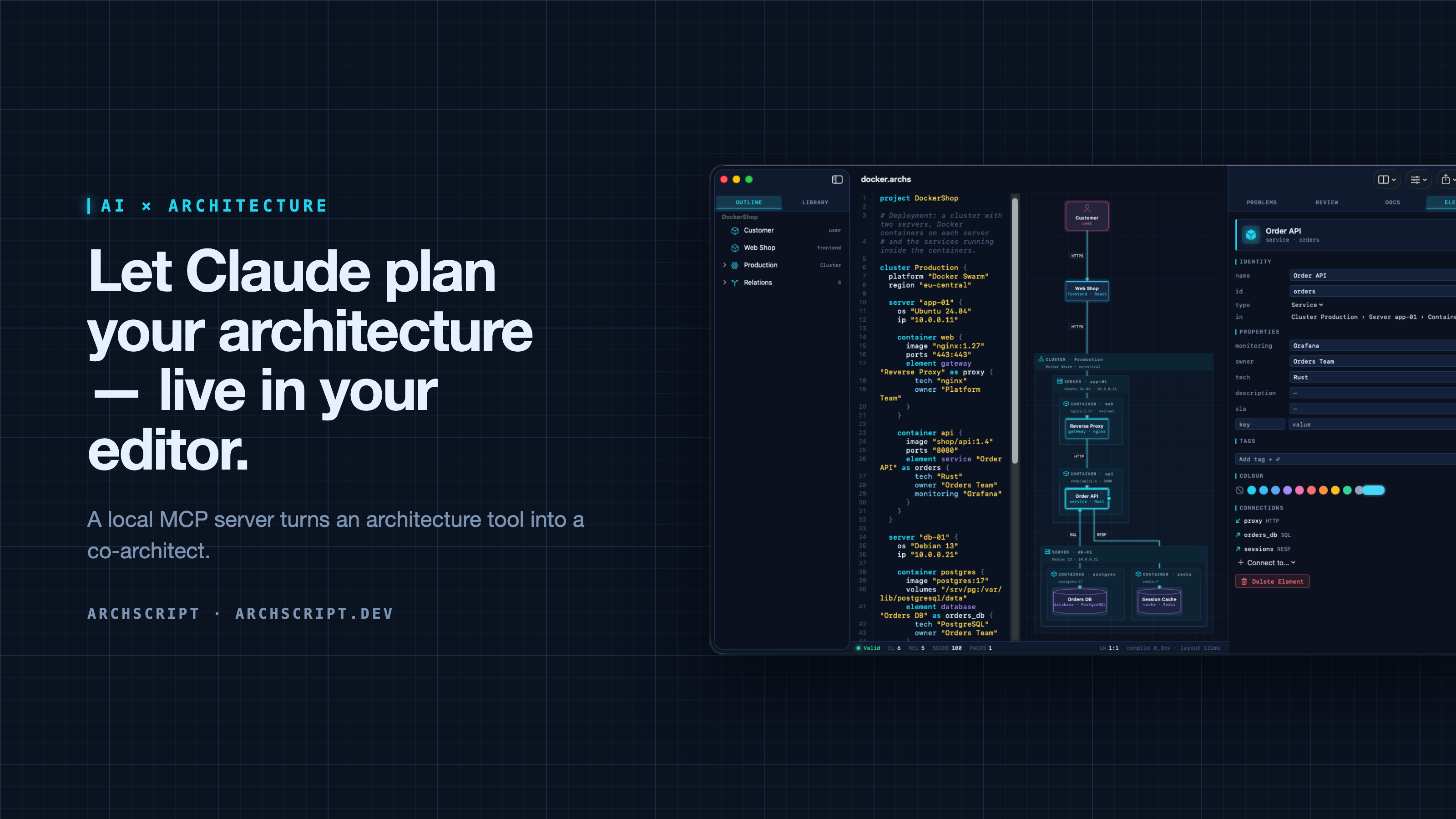
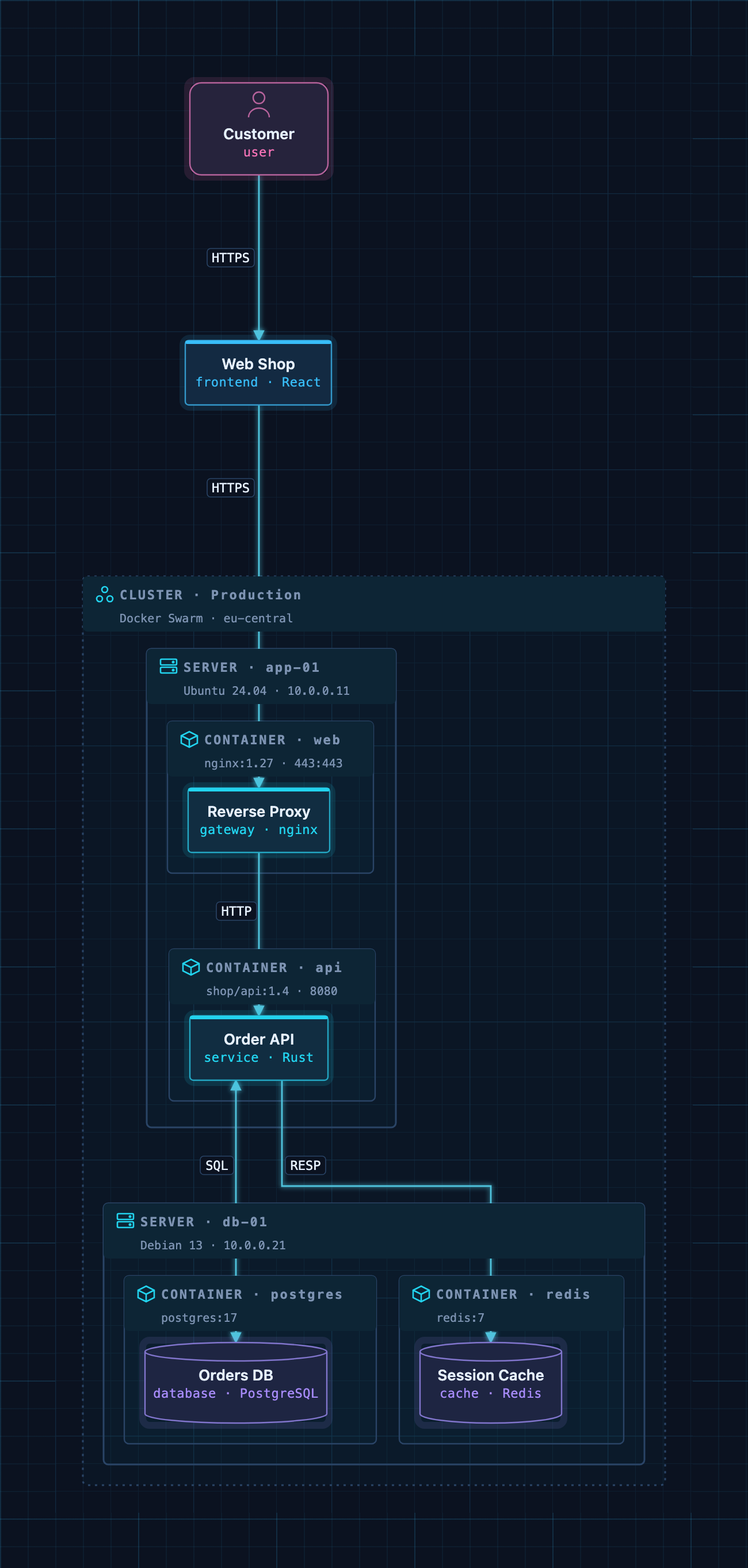
ArchScript is an architecture-as-code tool. You describe a system — domains, services, databases, queues, and deployments as cluster → server → Docker container — in a small language. ArchScript draws the diagram, checks the model against architecture rules and exports documentation, a PDF report, Mermaid, PlantUML and Terraform.
ArchScript for Mac includes an MCP server. Claude Desktop, Claude Code and other MCP clients can read the architectures you have open, change them with precise, structured edits, validate them and look at the rendered diagram. Every change appears live in the window and can be undone.
This repository contains the documentation, configuration examples, example models and a small open-source stdio bridge (
server/) for the ArchScript MCP server. ArchScript itself is a closed-source app, available on the Mac App Store. The browser Playground is free.
What Claude can do
| Tool | What it does |
|---|---|
archscript_guide |
Learns the language, element types and rules |
list_documents |
Lists the open documents (id, name, validity) |
get_document |
Reads a document with line numbers and a structure outline |
create_document |
Creates a new architecture from ArchScript source |
set_document_source |
Replaces a document's source |
edit_document |
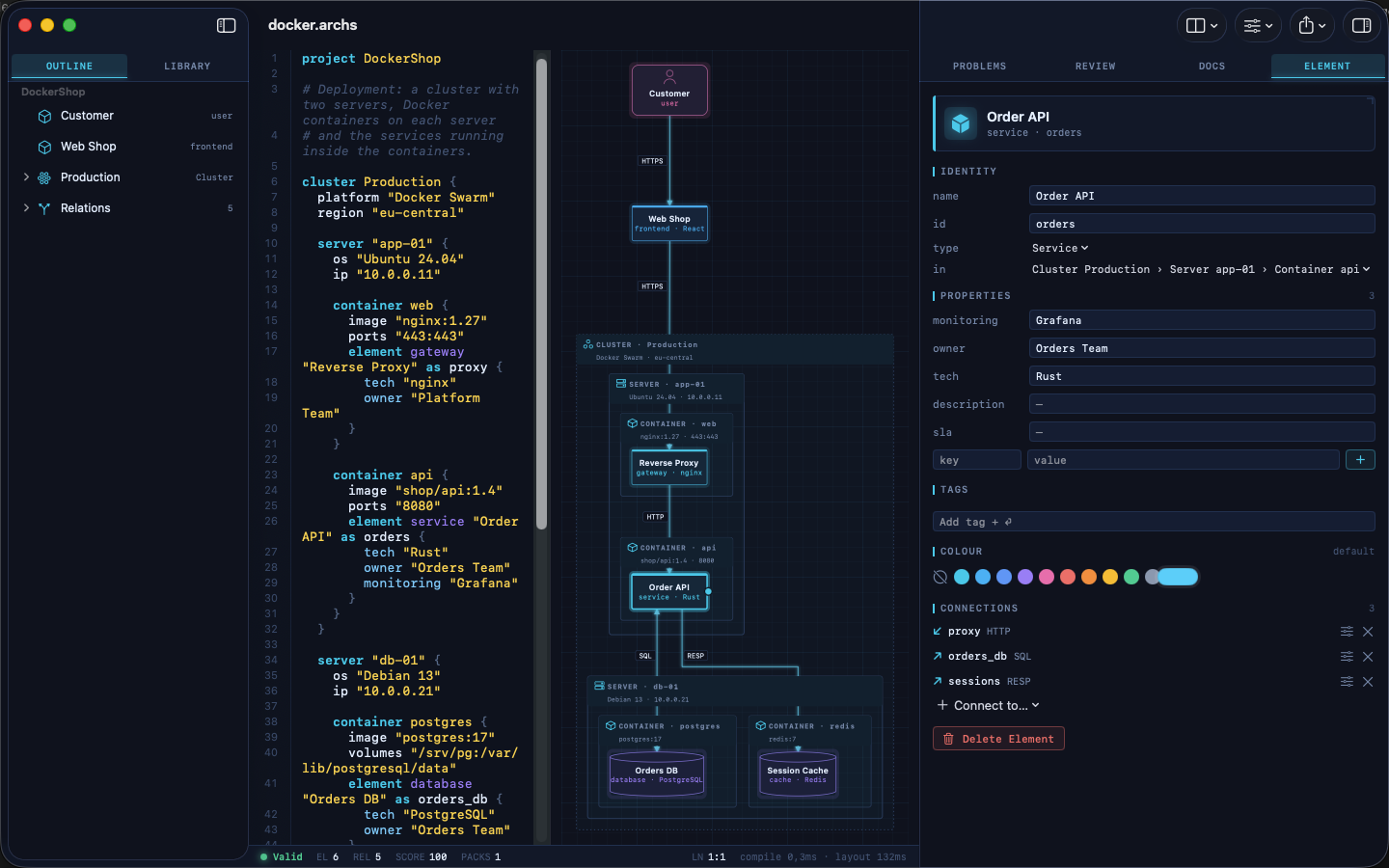
Structured edits: add, rename, move and delete elements, relations and containers, and set properties, tags and colours |
validate |
Returns diagnostics |
review |
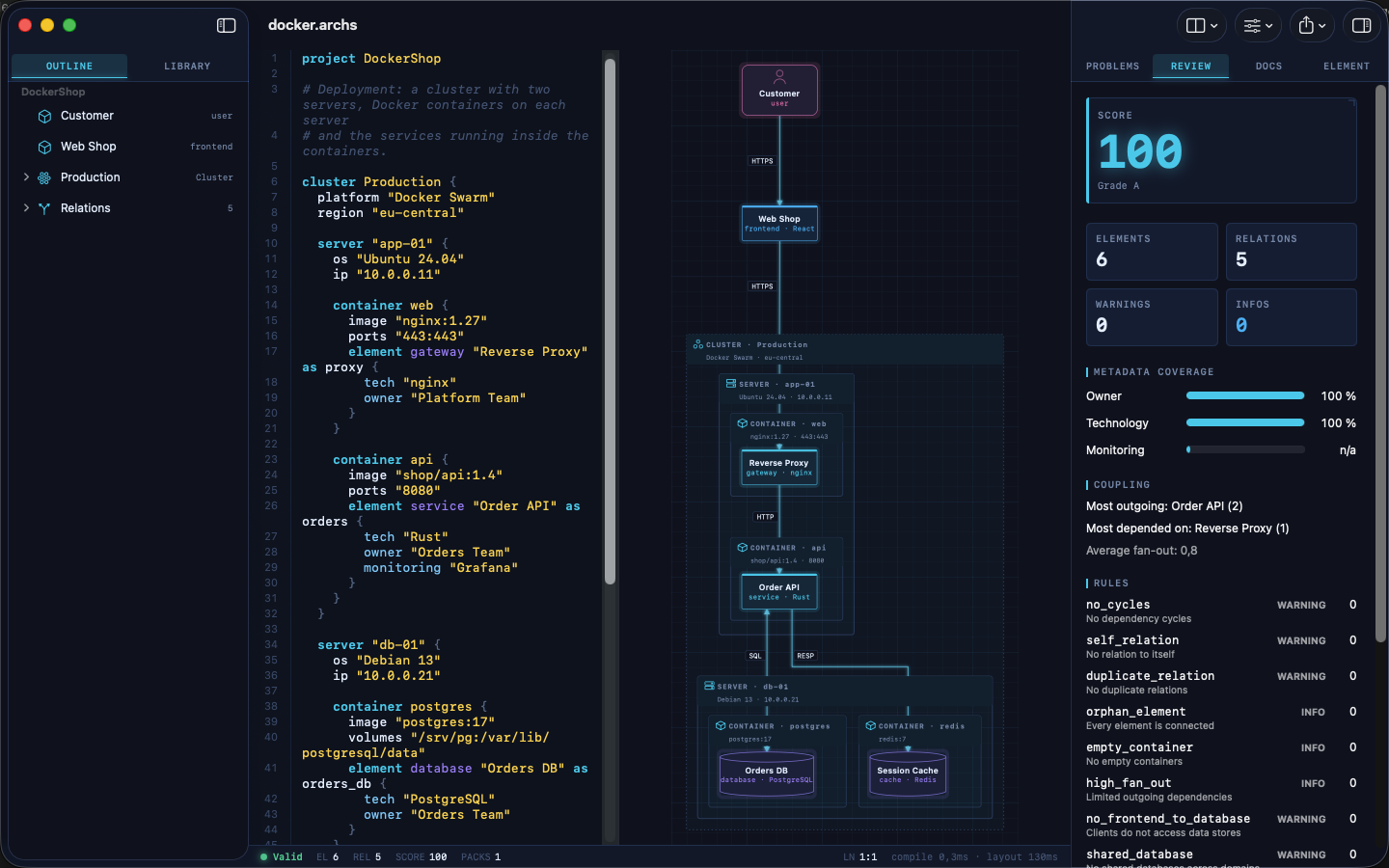
Returns the review score, grade and rule findings |
render_diagram |
Returns the diagram as an image, so the assistant can see the result |
export |
Exports Mermaid, PlantUML, Markdown, JSON or Terraform |
The assistant doesn't rewrite your file. It sends small operations (for example
add_element into cluster:Production/server:app-01/container:api). The
ArchScript core turns those into minimal text edits, so comments and formatting
stay intact. After each change the assistant gets the validation result and
review score back, the same feedback loop a human architect uses.
Example prompts
- "Read my architecture and tell me which rules it violates."
- "Add a background worker that sends order emails. Put it in its own container on app-01 and connect the Order API to it."
- "Create an event-driven architecture for a ticket shop with a payment provider and a read model."
- "Export the current model as Terraform for AWS and list what wasn't mapped."
Setup
Requirements: ArchScript for Mac (macOS 14+) with ArchScript Pro (14-day free trial).
- Open ArchScript → Settings → AI and turn on Allow AI assistants (MCP).
- Copy the snippet for your client from that screen. It already contains your personal access token.
Claude Desktop: one-click install (recommended)
- Download archscript.mcpb from the latest release.
- Double-click it, or drag it into Claude Desktop → Settings → Extensions.
- Paste the access token from ArchScript → Settings → AI.
The extension contains no ArchScript code. It holds a manifest and a small
launcher script (mcpb/server/archscript-mcp)
that finds ArchScript for Mac and starts its bundled helper.
Claude Code
claude mcp add --transport http archscript http://127.0.0.1:47621/mcp \
  --header "Authorization: Bearer <token from Settings → AI>"
Claude Desktop (manual)
Add the snippet to claude_desktop_config.json, then restart Claude:
{
  "mcpServers": {
    "archscript": {
      "command": "/Applications/ArchScript.app/Contents/MacOS/archscript-mcp",
      "args": ["--token", "<token from Settings → AI>", "--port", "47621"]
    }
  }
}
The bundled archscript-mcp helper bridges stdio to the app and starts
ArchScript when Claude needs it.
Other MCP clients
Any client that supports Streamable HTTP can connect to
http://127.0.0.1:47621/mcp with the header Authorization: Bearer <token>.
Clients that only support stdio can use the helper as shown above, or the
open-source Node bridge in server/ (Node 18+, no dependencies):
{
  "mcpServers": {
    "archscript": {
      "command": "node",
      "args": ["/path/to/archscript-mcp/server/index.js"],
      "env": { "ARCHSCRIPT_TOKEN": "<token from Settings → AI>" }
    }
  }
}
Privacy and security
- Local only. The server listens on
127.0.0.1and is never reachable from the network. - Token required. Every request needs your access token. You can regenerate it at any time in Settings → AI.
- Off by default. Nothing runs until you turn it on.
- No telemetry. ArchScript collects no data and sends nothing anywhere. Your AI client only sees what it reads through the tools.
- The helper is sandboxed and only forwards stdio to the local server.
Screenshots
| Visual editing | Review and rules |
|---|---|
 |
 |
| Inspector | Element library |
 |
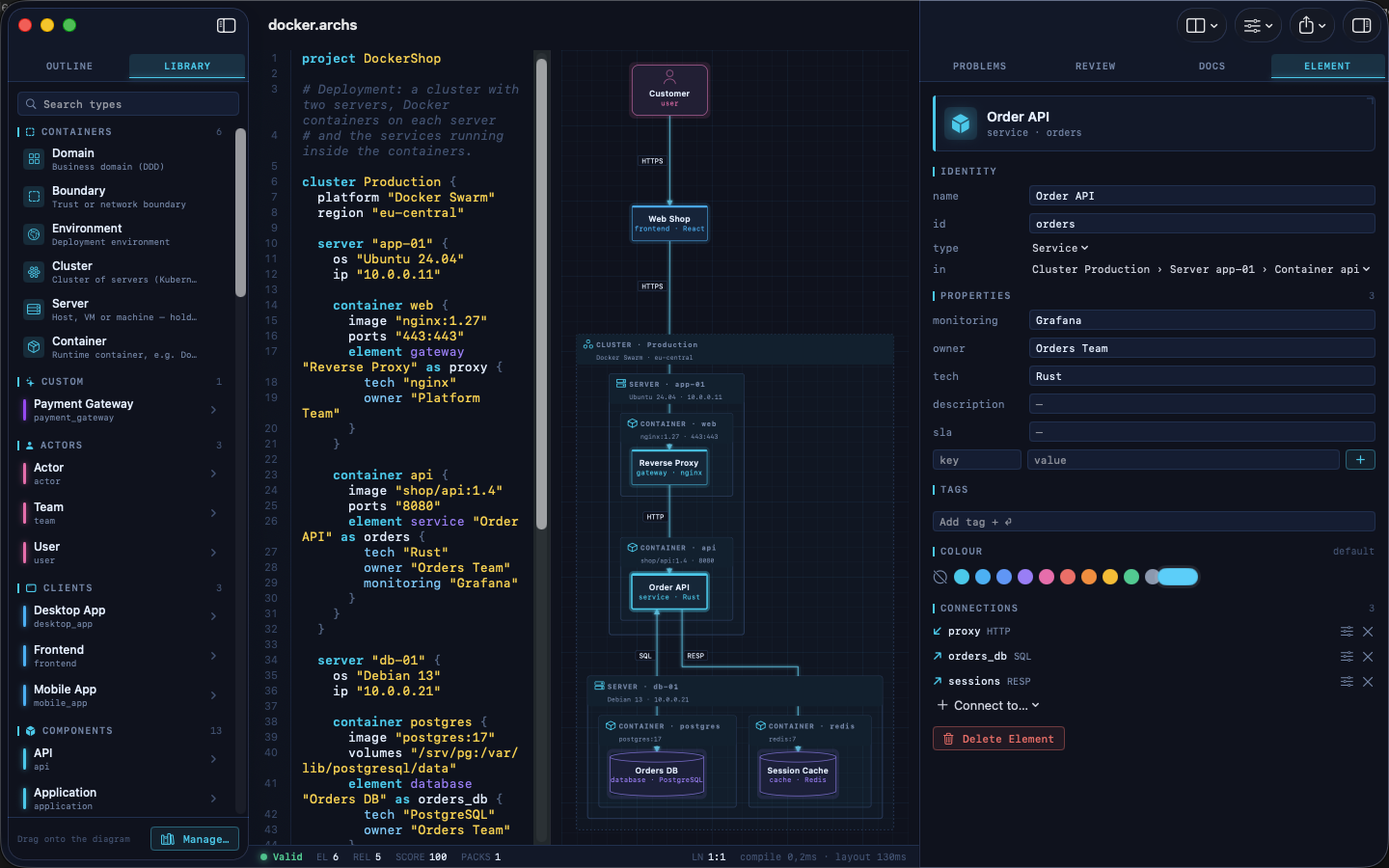 |
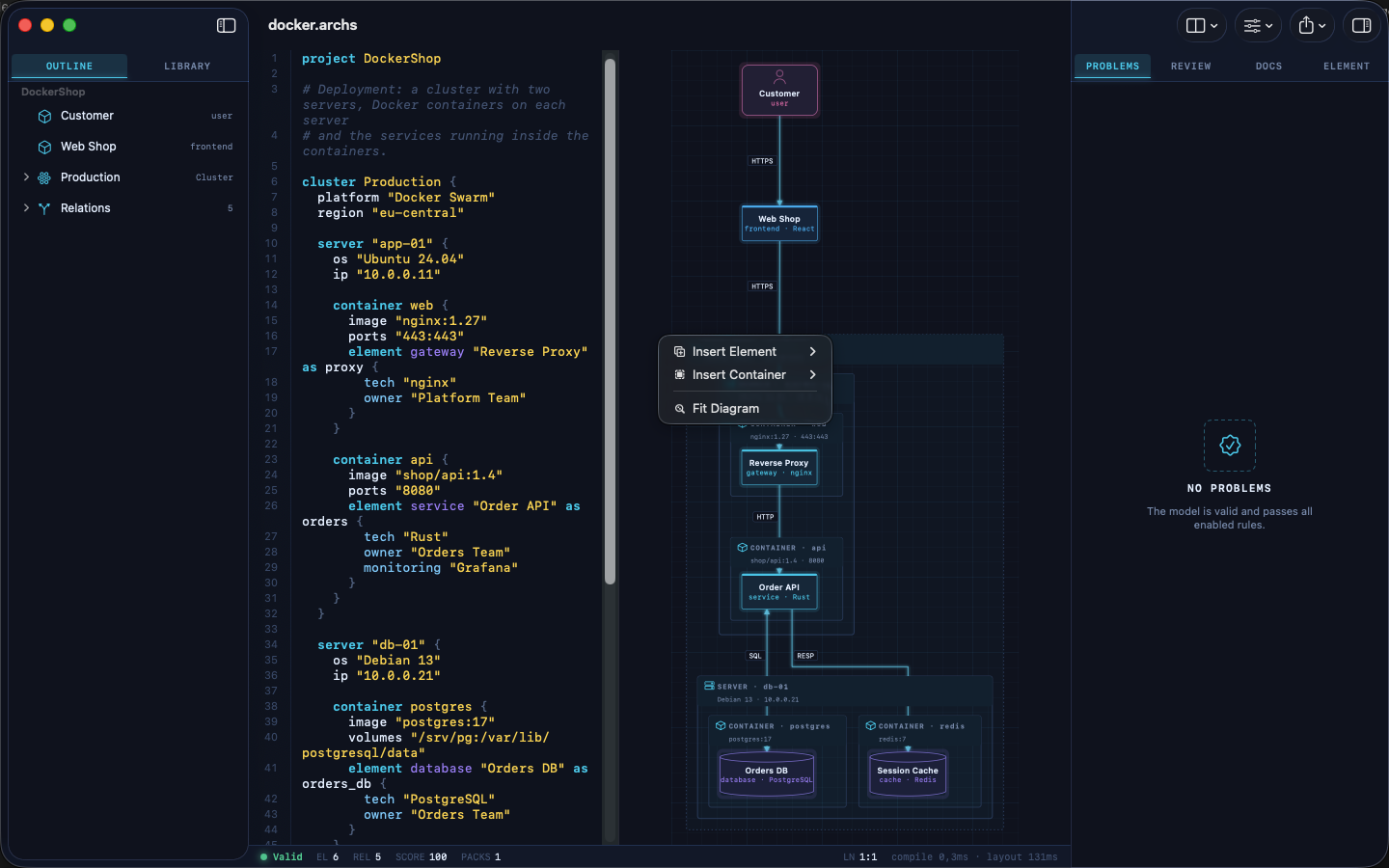
A Docker deployment as code: cluster → servers → containers → services.
Example models
The examples/ folder contains ready-to-use architectures. Open one
in ArchScript for Mac, or paste it into the
Playground:
| File | Architecture |
|---|---|
basic.archs |
The smallest useful model |
customer-management.archs |
One domain with web app, API and database |
webapp.archs |
Classic web application with boundaries |
microservices.archs |
Services with their own databases and an event bus |
ddd.archs |
Bounded contexts (domain-driven design) |
event.archs |
Event-driven, CQRS-style flow |
saas.archs |
Production SaaS with gateway and identity provider |
docker.archs |
Docker Swarm cluster, servers and containers |
A taste of the language:
project DockerShop

cluster Production {
  platform "Docker Swarm"

  server "app-01" {
    container api {
      image "shop/api:1.4"
      element service "Order API" as orders { tech "Rust"; owner "Orders Team" }
    }
  }
}

element frontend "Web Shop" as shop
relation shop -> orders : HTTPS
The full language reference is at archscript.dev/docs.
Feedback
Found a bug in the MCP integration or have an idea for a tool? Please open an issue. Feature requests for ArchScript itself are welcome too.
License
The documentation, configuration snippets, example models and the bridge in
server/ are available under the MIT License. ArchScript for Mac and the
ArchScript core are proprietary software.
Questions sur ArchScript MCP
Que peut faire Claude avec ArchScript ?
Claude peut lire des architectures ouvertes, effectuer des modifications structurées comme l'ajout ou le renommage d'éléments, valider des modèles par rapport à des règles, réviser les scores d'architecture et exporter des diagrammes vers des formats tels que Terraform ou Mermaid.
Mes données sont-elles privées lors de l'utilisation du MCP server ArchScript ?
Oui, le serveur est exclusivement local, écoute sur 127.0.0.1 et ne collecte aucune télémétrie ni n'envoie de données vers l'extérieur.
Quels sont les prérequis système pour l'installation ?
Vous devez disposer d'ArchScript pour Mac fonctionnant sur macOS 14+ avec ArchScript Pro.