
Serveur MCP Codebase
Commit 29 oct. 2026Transforme Claude Desktop en un assistant de programmation doté de la recherche sémantique de code, d'une mémoire persistante et d'un pipeline d'édition assisté par IA.
Aussi connu sous danyQe/codebase-mcp
- Étoiles
- 50
- Outils
- 16
- Téléchargements, 30 jours
- —
- Dernière version
- —
- Dernier commit
- 29 oct. 2026
- Licence
- Apache-2.0
Qu'est-ce que Codebase MCP ?
Codebase est un serveur MCP. Transforme Claude Desktop en un assistant de programmation doté de la recherche sémantique de code, d'une mémoire persistante et d'un pipeline d'édition assisté par IA. Il expose 16 outils, comme session_tool, memory_tool, git_tool.
Résumé généré à partir du README du projet
À propos du MCP server Codebase
Transformer Claude Desktop en un assistant de programmation spécialisé est ce que permet codebase-mcp pour les développeurs qui souhaitent utiliser leurs abonnements Claude Pro ou Team existants sans payer pour des outils mensuels supplémentaires. En se connectant via le Model Context Protocol, il offre une alternative open-source aux services payants comme Cursor. Le système utilise des embeddings locaux et l'indexation FAISS pour effectuer des recherches sémantiques en moins d'une seconde sur les fichiers Python, JavaScript et TypeScript.
Les utilisateurs installent le serveur localement en utilisant Python 3.11 et le gestionnaire de paquets uv, en configurant un backend FastAPI pour gérer le moteur principal. Bien que la majeure partie du traitement reste locale pour garantir la confidentialité, l'outil edit_file nécessite une clé API Gemini pour faciliter les modifications de code assistées par IA. Le serveur propose 16 outils distincts, incluant un système de mémoire persistante qui catégorise les apprentissages architecturaux et les erreurs, un workflow Git basé sur les sessions pour le développement de fonctionnalités isolées, ainsi que des barrières de qualité automatisées utilisant Black et Ruff pour s'assurer que le code respecte des standards spécifiques avant le commit.
Ce que vous pouvez faire avec
- 1Implémenter de nouvelles fonctionnalités avec contexteDemandez à l'IA de créer un nouvel endpoint API pendant qu'elle recherche automatiquement les modèles existants et gère une branche de développement dédiée.
- 2Effectuer un refactoring de code intelligentDemandez des changements structurels à vos services en utilisant l'édition assistée par IA qui valide les modifications par rapport aux barrières de qualité.
- 3Maintenir la connaissance d'un projet à long termeUtilisez le système de mémoire persistante pour garantir que l'assistant se souvienne des décisions architecturales précédentes et évite de répéter les erreurs passées.
- 4Naviguer dans des bases de code complexesEffectuez des recherches sémantiques ou au niveau des symboles pour trouver des fonctions ou des classes spécifiques au sein de votre projet.
Extrait du README du projet. Chaque cas d'utilisation est vérifié par rapport à une citation du document.
Outils MCP Codebase 16
Détectés depuis le READMEsession_toolmemory_toolgit_toolwrite_tooledit_filesearch_toolread_code_toolproject_context_toollist_directory_toolcode_analysis_toollist_file_symbols_toolread_symbol_from_database
| session_tool | — | |
| memory_tool | — | |
| git_tool | — | |
| write_tool | — | |
| edit_file | — | |
| search_tool | — | |
| read_code_tool | — | |
| project_context_tool | — | |
| list_directory_tool | — | |
| code_analysis_tool | — | |
| list_file_symbols_tool | — | |
| read_symbol_from_database | — |
Afficher les 16 outilsAfficher moins d'outils
project_structure_toolfile_toolexecute_toolshow_directory_tree
| project_structure_tool | — | |
| file_tool | — | |
| execute_tool | — | |
| show_directory_tree | — |
Configuration
GEMINI_API_KEY
| Nom | Description | Type |
|---|---|---|
| GEMINI_API_KEY | — |
Vérifications automatisées
Exécuté le 13 nov. 2026Rapport complet →Pas encore vérifié. Un serveur nécessite un score de 80, aucune faille sérieuse et suffisamment de données pour que nous puissions effectuer les vérifications. Fonctionnement des vérifications · Ce qu'il faut corriger pour gagner des points

- Dépôt source lié et accessibleRéussi
- Licence open source (OSI)Réussi
- Commit ou version publiée au cours de l'année écouléeRéussi
- Nom du package non proche d'un package populaireNon vérifié
- L'endpoint distant utilise HTTPSNon vérifié
- Les outils destructifs sont étiquetésNon vérifié
- Aucune instruction cachée destinée au modèleRéussi
- Aucun avis critique dans le package ou ses dépendancesNon vérifié
README
Voir sur GitHubCodebase MCP
Privacy-first AI development assistant via MCP | Turn Claude into your personal coding assistant | Semantic code search • AI-assisted editing • Quality-checked generation • Persistent memory | Free open-source alternative to Cursor & paid AI coding tools | Python, React, TypeScript, FastAPI
Open Source**


Codebase MCP is an open-source AI-powered development assistant that connects Claude Desktop (or any MCP-compatible LLM) to your codebase through the Model Context Protocol. Stop paying for separate coding assistants - if you already have a Claude subscription, that's all you need.
📖 Read Full Documentation | 🏗️ Architecture | 🤝 Contributing
🌟 Why Codebase MCP?
The Problem
Modern AI coding assistants like Cursor, Windsurf, and others charge $20-40+/month on top of your existing LLM subscription. If you already pay for Claude, why pay again for a coding assistant?
The Solution
Codebase MCP turns your existing Claude subscription into a powerful coding assistant:
- ✅ One subscription - Use your existing Claude Pro/Team plan
- ✅ Privacy-first - Local embeddings and processing (except edit operations)
- ✅ Open source - Apache 2.0 license, community-driven
- ✅ Extensible - Works with any MCP-compatible LLM via Model Context Protocol
- ✅ Lightweight - ~100MB memory footprint for medium projects
- ✅ Fast - Sub-second semantic search with local FAISS indexing
⚡ Quick Start
Prerequisites
- Python 3.11+
- Claude Desktop (or any MCP-compatible client)
- Git installed
- uv package manager (recommended)
Installation
1. Clone the repository:
git clone https://github.com/danyQe/codebase-mcp.git
cd codebase-mcp
2. Install globally (recommended):
# Install uv if you haven't
pip install uv

# Create virtual environment and install dependencies
uv venv
source .venv/bin/activate  # On Windows: .venv\Scripts\activate
uv pip install -r requirements.txt

# Install formatters globally (required for code formatting)
pip install black ruff
3. Configure Gemini API (for edit tool):
# Create .env file
cp .env.example .env

# Get free API key from: https://aistudio.google.com/app/apikey
# Add to .env:
GEMINI_API_KEY=your_api_key_here
4. Configure Claude Desktop:
Add to your claude_desktop_config.json:
{
  "mcpServers": {
    "codebase-manager": {
      "command": "/path/to/your/.venv/bin/python",
      "args": [
        "/path/to/codebase-mcp/mcp_server.py"
      ]
    }
  }
}
5. Start the FastAPI server:
# In a separate terminal, navigate to your project directory
python main.py /path/to/your/project

# Server starts on http://localhost:6789
# You can access the web dashboard at: http://localhost:6789
6. Use with Claude Desktop:
- Restart Claude Desktop
- Start chatting - Claude now has access to 16 MCP tools for codebase management!
🎯 Key Features
🔍 Semantic Code Search
- AI-powered code understanding with local embeddings
- Multi-language support (Python, JavaScript, TypeScript)
- Symbol-level indexing (functions, classes, interfaces)
- Fuzzy search and exact matching modes
🧠 Persistent Memory System
- Remember context across chat sessions
- Categorize learnings: progress, mistakes, solutions, architecture
- Semantic memory search with importance scoring
- Never repeat the same mistake twice
🌿 Session-Based Git Workflow
- Isolated development branches for each feature
- Automatic commit tracking in
.codebasedirectory - Separate from user's
.git- track AI changes independently - Auto-merge support with quality gates
✍️ Intelligent Code Writing
- Write Tool: Create new files with auto-formatting and quality scoring
- Edit Tool: AI-assisted editing with Gemini integration (inspired by Cursor)
- Quality Gates: Auto-commit only when code quality ≥ 80%
- Dependency Checking: Prevent code duplication and missing imports
🎨 Auto-Formatting
- Python: Black + Ruff (PEP 8 compliant)
- TypeScript/JavaScript: Prettier (run through npx), plus a few simple lint-style warnings (no ESLint)
- Quality Scoring: Automatic code quality assessment
- Error Recovery: Intelligent retry with corrections
📊 Project Intelligence
- Real-time codebase analysis
- File structure visualization
- Dependency tracking
- Symbol extraction and indexing
🏗️ Architecture
┌─────────────────┐
│ Claude Desktop  │  User interacts via chat
└────────┬────────┘
         │ MCP Protocol (stdio)
         ↓
┌─────────────────┐
│   MCP Server    │  16 Tools (proxy layer)
│  (mcp_server.py)│  Lightweight, fast
└────────┬────────┘
         │ HTTP/REST
         ↓
┌─────────────────┐
│ FastAPI Server  │  Port 6789 (main.py)
│   Core Engine   │  40+ API endpoints
└────────┬────────┘
         │
    ┌────┴─────┬─────────┬──────────┐
    ↓          ↓         ↓          ↓
┌────────┐ ┌──────┐ ┌────────┐ ┌───────────┐
│Semantic│ │Memory│ │  Git   │ │Code Tools │
│ Search │ │System│ │Manager │ │  Pipeline │
└────────┘ └──────┘ └────────┘ └───────────┘
    │          │         │          │
    └──────────┴─────────┴──────────┘
               ↓
    ┌──────────────────────┐
    │   Local Storage      │
    │ • FAISS (vectors)    │
    │ • SQLite (metadata)  │
    │ • .codebase (git)    │
    └──────────────────────┘
Privacy Note: All processing is local except the edit tool, which uses Google's free Gemini API for AI-assisted code editing. Only the edited file is sent to Gemini - no project context or history.
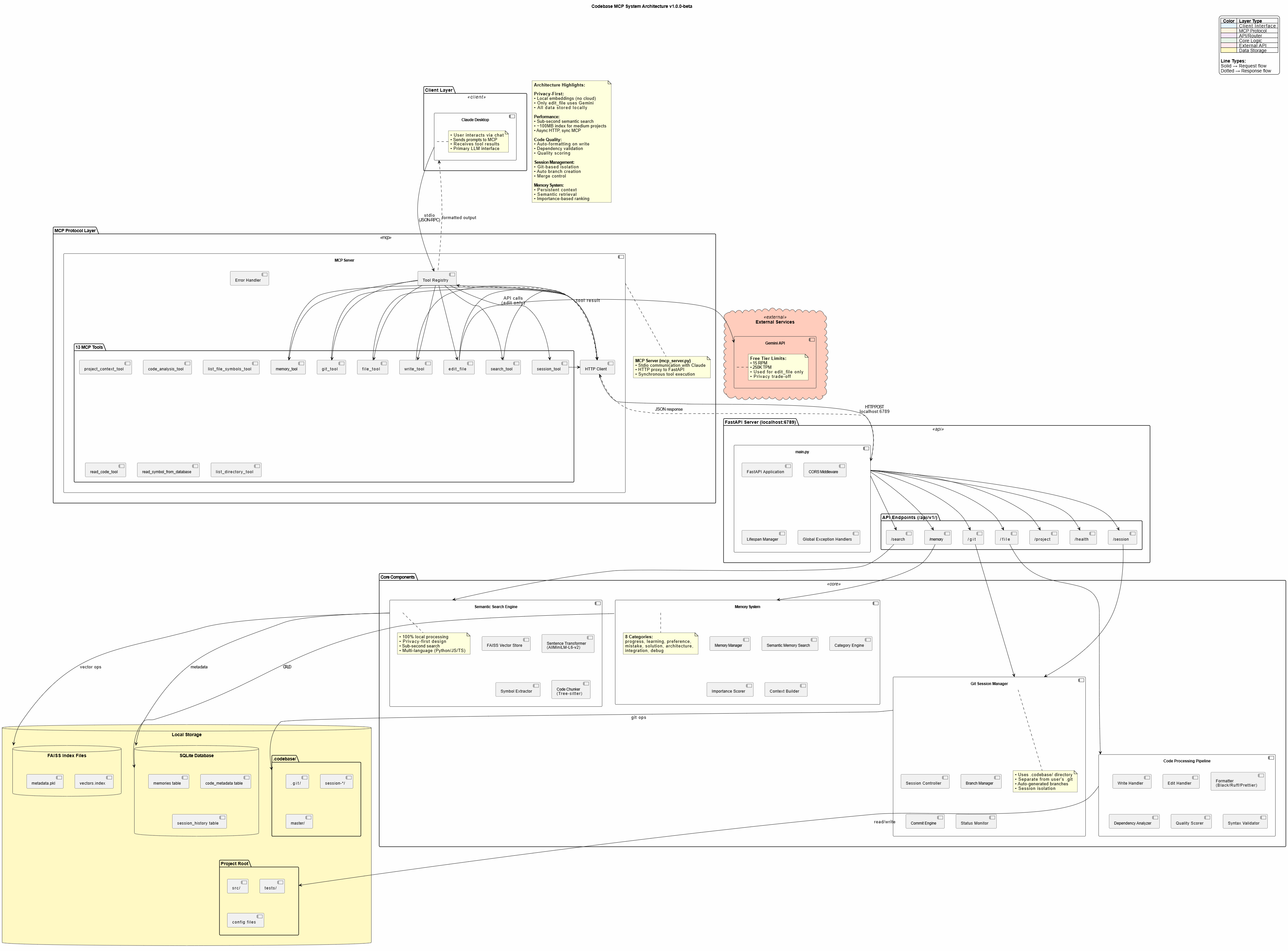
🛠️ Available Tools
Codebase MCP provides 16 MCP tools for comprehensive development automation:
| Tool | Purpose | Key Features |
|---|---|---|
session_tool |
Manage dev sessions | Create branches, auto-commit, merge |
memory_tool |
Store/retrieve knowledge | Persistent context, semantic search |
git_tool |
Git operations | Status, diff, log, commit, branches |
write_tool |
Intelligent file creation | Auto-format, quality scoring, dependency check |
edit_file |
AI-assisted editing | Gemini-powered, error recovery, format validation |
search_tool |
Semantic code search | 4 modes: semantic, fuzzy, text, symbol |
read_code_tool |
Smart code reading | Symbol-level, line ranges, whole file |
project_context_tool |
Project analysis | Structure, dependencies, overview |
list_directory_tool |
Directory exploration | Tree view, metadata, gitignore support |
code_analysis_tool |
Code quality checks | Syntax, linting, imports, dependencies |
list_file_symbols_tool |
Symbol extraction | Functions, classes, interfaces |
read_symbol_from_database |
DB symbol lookup | Fast indexed retrieval |
project_structure_tool |
Project visualization | Enhanced tree with stats |
file_tool |
Basic file operations (legacy) | Read and write by line range; write_tool is preferred for new code |
execute_tool |
Run a command | Arguments, timeout and working directory |
show_directory_tree |
Compact directory tree | Depth 1 to 5, tuned for LLM context |
📈 Performance
- Semantic Search: Sub-second response for typical codebases
- Memory Footprint: ~100MB for medium projects (<20k lines)
- Indexing Speed: ~30 seconds for 10k lines initial index
- Edit Operations: 5-15 seconds (Gemini API + formatting)
- Optimal Project Size: <20,000 lines (tested and verified)
Note: Edit tool can be slow due to Gemini API latency and code formatting. Claude Desktop may timeout on very large edits (use smaller, focused edits).
🎓 Usage Examples
Creating a New Feature
User: "Create a FastAPI endpoint for user authentication with JWT tokens"

Claude:
✅ Searching for existing auth patterns...
✅ Creating session: feat/user-auth
✅ Writing authentication.py with JWT implementation
✅ Auto-formatted with Black + Ruff
✅ Quality score: 95% - Auto-committed
✅ Storing solution in memory
Refactoring Code
User: "Refactor the user service to use dependency injection"

Claude:
✅ Reading current user service implementation
✅ Searching for DI patterns in codebase
✅ Editing with AI assistance (Gemini)
✅ Validating changes with quality gates
✅ Session: refactor/user-di ready for review
Memory-Driven Development
User: "Continue working on the payment integration"

Claude:
✅ Loading memory context...
✅ Found previous progress: Stripe API setup complete
✅ Found previous mistake: Don't use synchronous requests in async endpoints
✅ Continuing from last checkpoint...
🔐 Privacy & Security
Privacy-First Design
- Local Embeddings: AllMiniLM-L6-v2 runs entirely on your machine
- Local Processing: FAISS vector store, SQLite metadata - all local
- No Cloud Dependencies: Except for Gemini API (edit tool only)
Gemini API Usage
- Scope: Only
edit_filetool uses Gemini - Data Sent: Only the file being edited (no project context)
- Alternative: Contributors can add local LLM support (GPU required)
- Cost: Free tier (15 RPM, 250K TPM, 1K RPD)
Security Best Practices
- Never commit
.envwith API keys - Use
.gitignorefor sensitive files - Review AI-generated code before production deployment
- Keep dependencies updated
🤝 Contributing
We welcome contributions! This project was built to be community-driven and extensible.
Priority Areas:
- 🌐 Language Support: Add Java, Go, Rust, PHP, etc.
- 🧠 Local LLM Integration: Replace Gemini with local models
- 🔍 Search Improvements: Enhanced semantic algorithms
- 📊 UI/UX: Improve web dashboard
- ⚡ Performance: Optimization for larger codebases
See CONTRIBUTING.md for detailed guidelines.
📄 License
This project is licensed under the Apache License 2.0 - see LICENSE file for details.
Credits:
- Edit tool techniques inspired by Cursor
- Built with Claude Sonnet 4 and 4.5
- Powered by Model Context Protocol
🗺️ Roadmap
Current Version: v1.0.0-beta
Upcoming Features:
- Community-driven enhancements
- More language support
- Local LLM alternatives
- Performance optimizations
- Advanced prompt engineering templates
📞 Support
- 📖 Documentation: https://danyqe.github.io/codebase-mcp/
- 🐛 Issues: https://github.com/danyQe/codebase-mcp/issues
- 💬 Discussions: https://github.com/danyQe/codebase-mcp/discussions
- 🌟 Star this repo if you find it useful!
🎉 Acknowledgments
Special thanks to:
- Anthropic for Claude and the Model Context Protocol
- Google for the free Gemini API
- Cursor team for pioneering AI-assisted editing techniques
- Open source community for making this possible
Made with ❤️ by developers, for developers
Stop paying for coding assistants. Start building with your own LLM.
Questions sur Codebase MCP
Quels outils Codebase MCP fournit-il ?
Il expose 16 outils, dont session_tool, memory_tool, git_tool, write_tool, edit_file.
Cela nécessite-t-il un abonnement séparé ?
Non, il utilise votre abonnement Claude Pro ou Team existant, agissant comme une alternative open-source aux outils payants comme Cursor.
Mon code est-il privé ?
Oui, il repose sur une conception axée sur la confidentialité avec des embeddings et un traitement locaux ; seul le fichier spécifique en cours d'édition est envoyé à l'API Gemini.
Quels langages de programmation sont pris en charge ?
Il prend actuellement en charge Python, JavaScript et TypeScript.