
Fournit aux agents de codage IA un contexte de dépôt pertinent pour la tâche et des bundles de fichiers étayés par des preuves afin d'améliorer la précision et de réduire la consommation de tokens.
Aussi connu sous codeledgerECF/codeledger, @codeledger/cli
- Étoiles
- 8
- Outils
- —
- Téléchargements, 30 jours
- 4 468
- Dernière version
- 0.10.82
- Dernier commit
- 11 nov. 2026
- Licence
- —
Qu'est-ce que CodeLedger MCP ?
CodeLedger est un serveur MCP. Fournit aux agents de codage IA un contexte de dépôt pertinent pour la tâche et des bundles de fichiers étayés par des preuves afin d'améliorer la précision et de réduire la consommation de tokens.
Résumé généré à partir du README du projet
À propos du MCP server CodeLedger
CodeLedger offre un contrôle de contexte axé sur le local pour les agents de codage IA, afin d'améliorer la précision et de réduire la consommation de tokens. Il fonctionne en scannant un dépôt pour identifier des signaux tels que la structure des dépendances et les fichiers de test, afin de sélectionner un ensemble limité de fichiers pertinents pour la tâche. Ces informations sont écrites dans un artefact spécifique à l'emplacement .codeledger/active-bundle.md, que des agents comme Claude Code, Cursor ou GitHub Copilot peuvent lire avant de commencer leur travail.
Les développeurs utilisent le CLI pour initialiser les dépôts et se préparer à des tâches spécifiques via la commande ready. L'outil effectue l'analyse localement par défaut et n'envoie pas le code source via la télémétrie. Il inclut un MCP server qui peut être lancé via la ligne de commande pour s'intégrer aux clients compatibles. Les utilisateurs peuvent également exécuter une commande compare pour mesurer les améliorations de performance selon des métriques telles que l'utilisation des tokens et les taux de réussite des tests.
Ce que vous pouvez faire avec
- 1Préparer un contexte spécifique à une tâcheUn agent IA peut recevoir un bundle ciblé de fichiers pertinents pour la correction d'un bug spécifique ou une demande de fonctionnalité.
- 2Vérifier les modifications de l'agentLes utilisateurs peuvent examiner ce qu'un agent a modifié grâce aux résumés de session et aux reçus.
Extrait du README du projet. Chaque cas d'utilisation est vérifié par rapport à une citation du document.
Comment installer CodeLedger MCP
Formats vérifiés le 10 nov. 2026Installer CodeLedger MCP dans Claude Code
$ claude mcp add codeledger -- npx -y @codeledger/cliInstaller CodeLedger MCP dans Cursor
~/.cursor/mcp.json
{
  "mcpServers": {
    "codeledger": {
      "command": "npx",
      "args": [
        "-y",
        "@codeledger/cli"
      ]
    }
  }
}Installer CodeLedger MCP dans VS Code
.vscode/mcp.json
{
  "servers": {
    "codeledger": {
      "type": "stdio",
      "command": "npx",
      "args": [
        "-y",
        "@codeledger/cli"
      ]
    }
  }
}Installer CodeLedger MCP dans Claude Desktop
claude_desktop_config.json
{
  "mcpServers": {
    "codeledger": {
      "command": "npx",
      "args": [
        "-y",
        "@codeledger/cli"
      ]
    }
  }
}Installer CodeLedger MCP dans Codex
~/.codex/config.toml
[mcp_servers.codeledger]
command = "npx"
args = ["-y", "@codeledger/cli"]
Installer CodeLedger MCP dans Gemini CLI
~/.gemini/settings.json
{
  "mcpServers": {
    "codeledger": {
      "command": "npx",
      "args": [
        "-y",
        "@codeledger/cli"
      ]
    }
  }
}Vérifications automatisées
Exécuté le 14 nov. 2026Rapport complet →A passé nos vérifications automatisées. Il ne s'agit pas d'un audit de sécurité : lisez le code et donnez au serveur l'accès le plus restreint dont il a besoin. Fonctionnement des vérifications

- Dépôt source lié et accessiblecodeledgerecf/codeledger is public and reachablegithub.com/codeledgerecf/codeledger ↗Réussi
- Le paquet cite ce dépôt comme source@codeledger/cli names github:codeledgerECF/codeledger as its sourcenpmjs.com/package/@codeledger/cli ↗Faille
- Provenance du build (attestation Sigstore)No build attestation published for this releaseNon vérifié
- Licence open source (OSI)No licenseFaille
- Commit ou version publiée au cours de l'année écouléeLast commit or release 2026-11-11github.com/codeledgerecf/codeledger ↗Réussi
- OpenSSF ScorecardNon vérifié
- Nom du package non proche d'un package populaireNo popular package one edit away from @codeledger/cliRéussi
- Aucun avis critique dans le paquet ni ses dépendances1 resolved dependencies checked; no critical advisoryosv.dev ↗Réussi
- Aucune instruction cachée destinée au modèle0 tool descriptions and the README read; no override phrases, credential paths or hidden charactersRéussi
- Les outils destructifs sont étiquetésNon vérifié
- L'endpoint distant répond au handshake MCPNon vérifié
README
Voir sur GitHubCodeLedger
Give AI coding agents the right repo context before they start - then verify what changed.
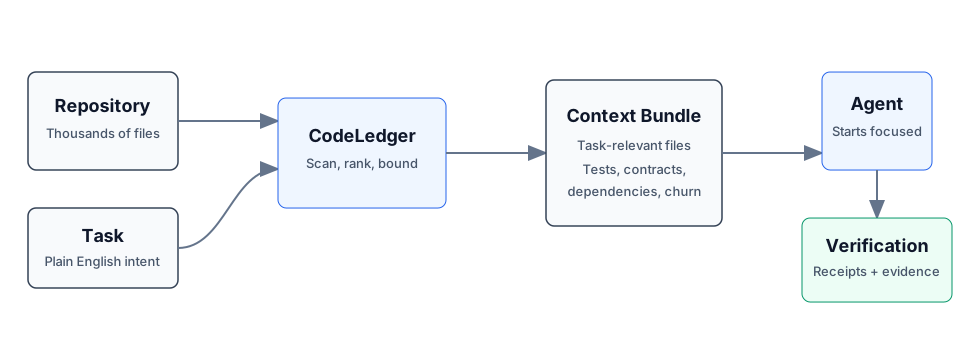
CodeLedger is local-first context control for AI coding agents. It scans a repository, selects a bounded task-relevant set of files, and writes an evidence-backed context bundle before the agent begins work.
Works with Claude Code, Codex, Cursor, GitHub Copilot, Gemini CLI, and other CLI or MCP-compatible coding agents.
Try It
npm install -g @codeledger/cli
cd your-project
codeledger ready --task "Fix null handling in user service"
CodeLedger initializes the repo if needed, refreshes the index, and creates the
task-specific bundle at .codeledger/active-bundle.md. Your agent reads that
artifact first so it starts with the files most relevant to the task.
Runtime analysis is local by default. Installing or updating may fetch packages or release artifacts from npm and GitHub Releases; CodeLedger runtime analysis does not send your source code through CodeLedger telemetry by default.
Example Benchmark
Example result from a mid-sized Node.js service. Results vary by repository, task, agent, and scenario.
| Metric | Without CodeLedger | With CodeLedger | Change |
|---|---|---|---|
| Tests Passed | 78% | 94% | +16% |
| Iterations | 4 | 2 | -50% |
| Files Changed | 17 | 9 | -47% |
| Time to Finish | 6m 12s | 3m 40s | -41% |
| Token Usage | 28k | 18k | -36% |
Do not take the benchmark on faith - measure CodeLedger on your own repo:
codeledger compare \
  --scenario .codeledger/harness/scenarios/auth-rate-limit.json \
  --guided
If CodeLedger improves your coding-agent workflow, star the repo to follow releases and help other developers discover it.
Start Here
- Getting Started
- CLI Reference
- How It Works
- MCP Server
- Feature Tiers
- Security
- Contributing
- Latest Release
- npm package
How It Works
- CodeLedger scans the repo for deterministic local signals such as dependency structure, churn, tests, contracts, and task keywords.
- It ranks and packs a bounded set of task-relevant files.
- It writes
.codeledger/active-bundle.mdfor your coding agent. - After work, verification, receipts, and session summaries help show what changed and whether the selected context was useful.
Same task plus same repo state produces the same file ranking behavior.
Core Capabilities
- Give agents the right context: deterministic file selection, scope inference, bounded budgets, blast-radius hints, and co-change context.
- Keep work continuous: session summaries, checkpoints, mid-session refine, and handoff/recovery commands.
- Keep agents inside the task: scope contracts, intent governance, loop detection, and multi-agent conflict checks.
- Prove what happened: review intelligence, receipts, provenance, audit exports, and release evidence.
For the full command surface, see the CLI Reference.
Agent Integration
Claude Code can use CodeLedger hooks after codeledger ready initializes the
repo. Cursor, Codex, GitHub Copilot, Gemini CLI, Aider, Windsurf, and other
agents can read CLAUDE.md plus .codeledger/active-bundle.md, or use the
repo-local wrappers when available.
CodeLedger also includes an MCP server for supported tiers:
codeledger mcp start
codeledger mcp status
See MCP Server and Feature Tiers for setup and tier details.
Trust And Verification
- Runtime source analysis runs locally by default.
- Source code is not sent through CodeLedger telemetry by default.
- No account is required for the local CLI flow.
- Public releases include
SHA256SUMSand release-evidence artifacts. codeledger doctorchecks the local install, hooks, config, index, and ledger health.- The public wrapper, docs, harness, and scanning surface are inspectable in
this repo; the protected hardened runtime is covered by
LICENSE-CORE.
Install
npm install -g @codeledger/cli
codeledger --version
Or use the release zip:
- Download the latest release.
- Extract it.
- Run
install.sh.
The installer uses the bundled package from the zip, so the installed wrapper version matches the release. The wrapper then fetches the matching hardened binary from the GitHub release unless your environment already provides it.
Everyday Flow
cd your-project
codeledger ready
codeledger ready --task "Fix null handling in user service"
Inside an initialized repo, you can also use:
codeledger activate --task "Fix null handling in user service"
codeledger doctor
Browser, cloud, and sandboxed environments can use the repo-local runtime
deployed under .codeledger/bin/ after initialization or vendoring.
Architecture
CodeLedger has an open public surface and a protected hardened runtime:
PUBLIC:    CLI wrapper, types, repo scanner, harness, reports, docs, hooks
PROTECTED: Scoring engine, selection algorithm, confidence internals
Use codeledger about, codeledger doctor, and command-specific --explain
output to inspect behavior and evidence without exposing protected
implementation internals.
Privacy
- Installation may use npm and GitHub Releases.
- Runtime analysis runs on your local machine by default.
- Runtime analysis makes zero source-code telemetry calls by default.
- Your source code is not required to leave your machine for the local CLI flow.
- Uninstall at any time.
License
- Public wrapper, types, repo scanning, harness, reports, docs, and examples: MIT
- Downloaded hardened binary: CodeLedger Core License
GitHub may classify the combined licensing structure as "Other" because the repo includes both MIT-covered public files and separately licensed protected runtime terms. Changing the license files should be a human legal decision.
Part Of ContextECF
CodeLedger applies Intelligent Context AI's context-control architecture to software engineering. For enterprise-wide governed context across applications and agents, see ContextECF.
CodeLedger is produced by Intelligent Context AI, Inc. See codeledger.dev.
Questions sur CodeLedger MCP
Comment ajouter CodeLedger MCP à Claude Code ?
Exécutez claude mcp add codeledger -- npx -y @codeledger/cli dans votre terminal. Ajoutez --scope user pour le rendre disponible dans tous les projets.
Comment ajouter CodeLedger MCP à Cursor ?
Ouvrez ~/.cursor/mcp.json et ajoutez le serveur sous mcpServers, avec la configuration Cursor indiquée dans la section d'installation ci-dessus.
Est-ce que CodeLedger envoie mon code source sur ses serveurs ?
Non, l'analyse au runtime est locale par défaut et n'envoie pas votre code source via la télémétrie CodeLedger par défaut.
Quels agents de codage IA sont compatibles avec CodeLedger ?
Il fonctionne avec Claude Code, Codex, Cursor, GitHub Copilot, Gemini CLI, Aider, Windsurf et d'autres agents compatibles CLI ou MCP.
Comment CodeLedger améliore-t-il les flux de travail de développement ?
Il aide en sélectionnant les fichiers pertinents pour la tâche, ce qui peut conduire à des taux de réussite de tests plus élevés, moins d'itérations et une réduction de l'utilisation des tokens.
Ai-je besoin d'un compte pour utiliser le CLI local ?
Aucun compte n'est requis pour le flux CLI local.