
Crea y edita diagramas de flujo, mapas mentales, wireframes y documentación directamente en tu espacio de trabajo de Whimsical usando un cliente de IA.
También conocido como WhimsicalCode/mcp-server-guide, mcp-server-guide
- Stars
- 11
- Herramientas
- 14
- Descargas, 30 días
- —
- Última versión
- 1.1.0
- Último commit
- 14 oct 2026
- Licencia
- MIT
¿Qué es Whimsical MCP?
Whimsical es un MCP server. Crea y edita diagramas de flujo, mapas mentales, wireframes y documentación directamente en tu espacio de trabajo de Whimsical usando un cliente de IA. Expone 14 herramientas, como search, fetch, file_tree.
Resumen generado a partir del README del proyecto
Acerca del MCP server de Whimsical
Este MCP server oficial de Whimsical permite generar diagramas de flujo, mapas mentales y wireframes editables a partir de prompts en lenguaje natural. En lugar de recibir imágenes estáticas, los usuarios obtienen archivos reales e interactivos dentro de su espacio de trabajo de Whimsical que los miembros del equipo pueden abrir, editar y comentar. Esta herramienta funciona con varios clientes de IA, incluyendo Claude, ChatGPT, Cursor y VS Code con GitHub Copilot, conectándose a un endpoint remoto alojado por Whimsical.
Los desarrolladores y diseñadores pueden utilizarlo para construir diagramas de arquitectura complejos, diagramas de secuencia y documentación técnica. Más allá de la creación, el servidor puede buscar en espacios de trabajo existentes, leer tableros, mover archivos entre carpetas y gestionar hilos de comentarios. Utiliza OAuth 2.1 con PKCE para la autenticación, lo que significa que no requiere gestión manual de API keys. Mientras que el plan gratuito permite hasta 50 objetos de tablero por mes, los planes de pago ofrecen creación ilimitada de objetos.
Qué puedes hacer con él
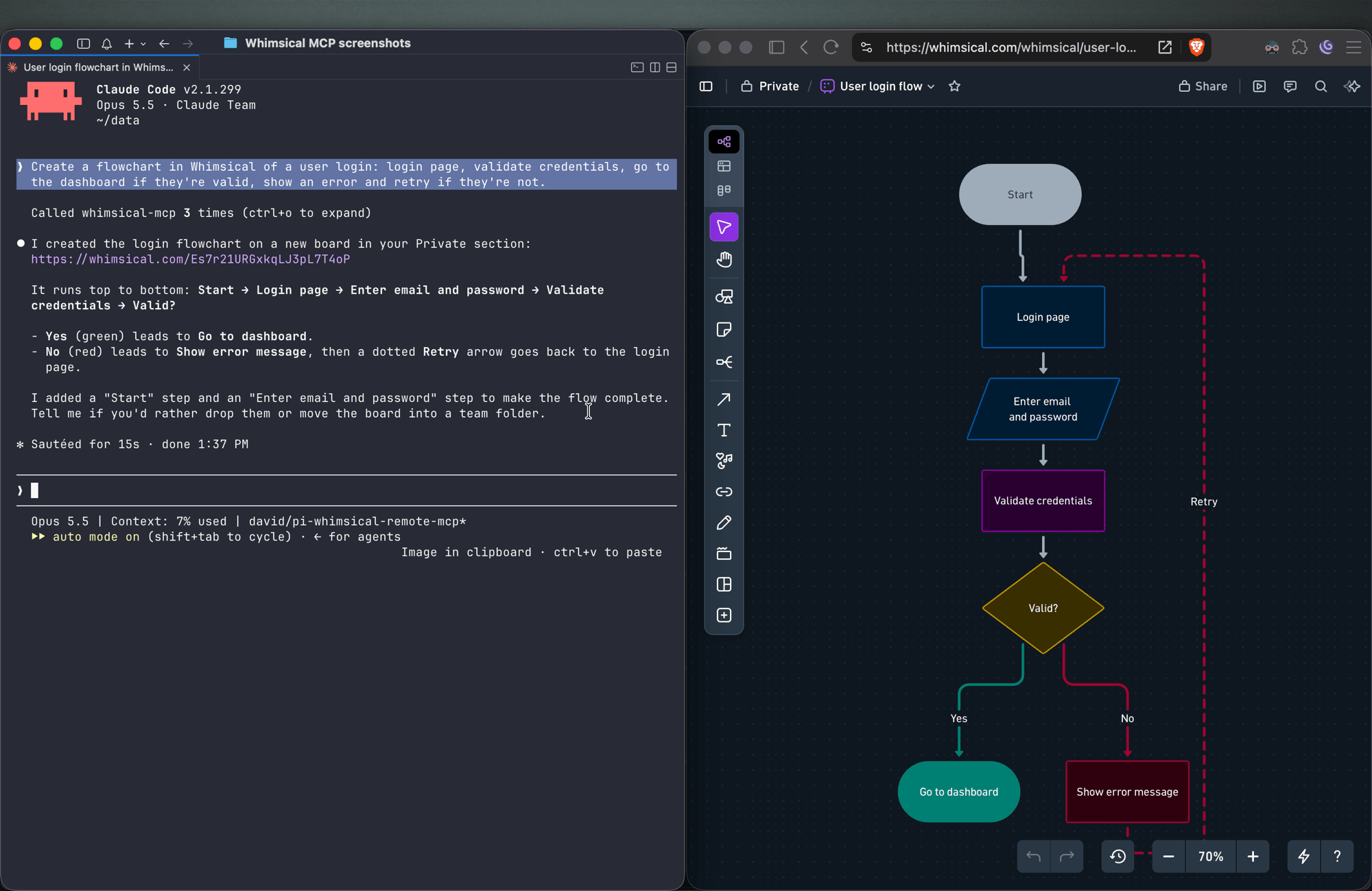
- 1Visualizar flujos de autenticación de usuariosPide a tu cliente de IA que genere un diagrama de flujo detallado que represente un proceso de inicio de sesión con nodos de decisión y conectores etiquetados.
- 2Diseñar wireframes de UI interactivosIndica a un agente que construya el diseño de una página de configuración utilizando contenedores, inputs y botones que sigan una estructura de flexbox.
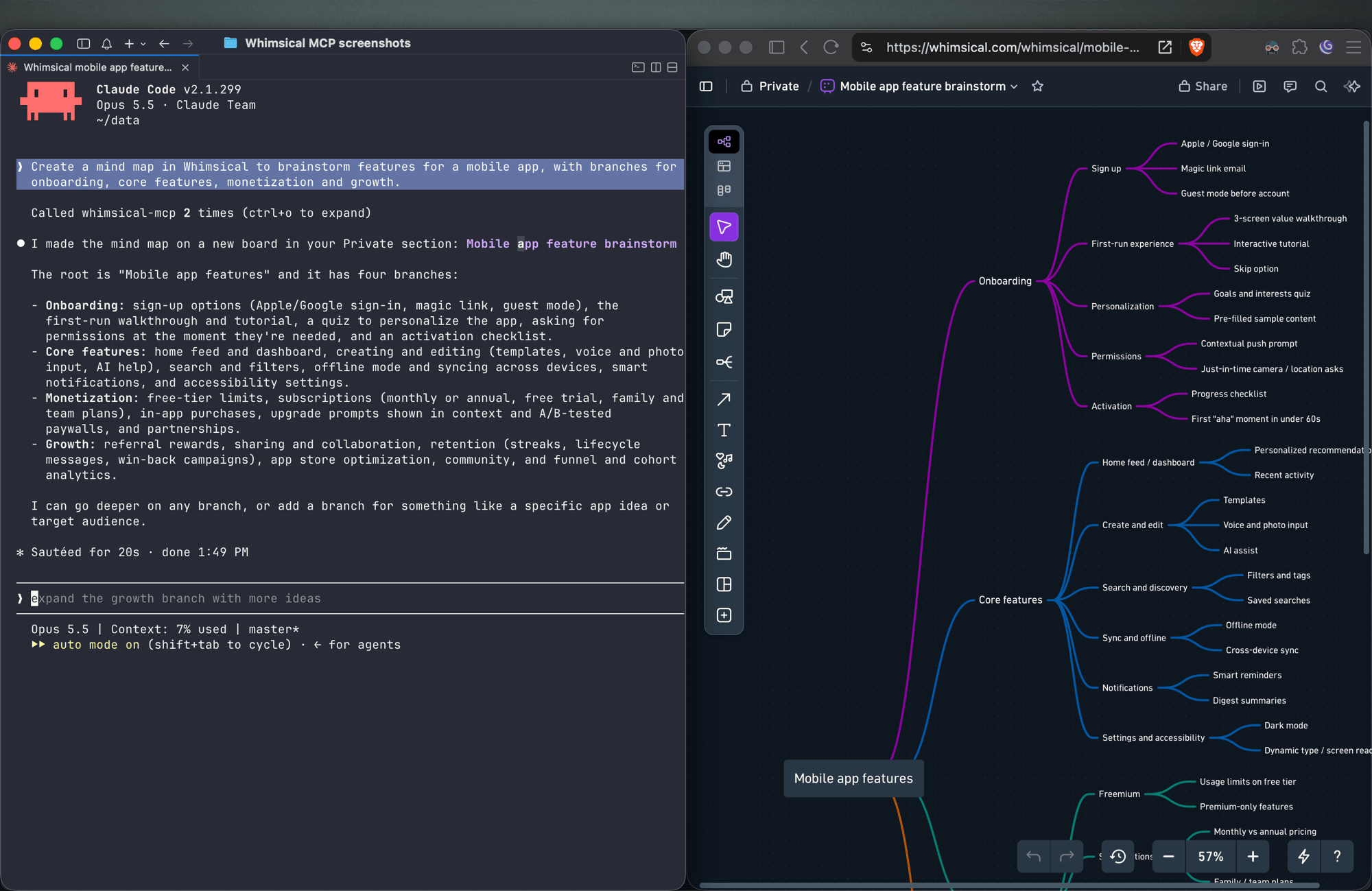
- 3Lluvia de ideas para funciones de un proyectoUsa el servidor para crear un mapa mental estructurado para organizar las funciones de una aplicación móvil en ramas específicas.
- 4Gestionar contenido existente en el espacio de trabajoSolicita a la IA que encuentre información específica dentro de tus tableros actuales y resuma los hallazgos.
Escrito a partir del README del proyecto. Cada caso de uso se verifica con una cita del mismo.
Cómo instalar Whimsical MCP
Formatos verificados el 10 nov 2026Añadir a CursorAñadir a GooseInstalar Whimsical MCP en Claude Code
$ claude mcp add --transport http mcp-server-guide https://mcp.whimsical.com/mcpInstalar Whimsical MCP en Cursor
~/.cursor/mcp.json
{
  "mcpServers": {
    "mcp-server-guide": {
      "url": "https://mcp.whimsical.com/mcp"
    }
  }
}Instalar Whimsical MCP en VS Code
.vscode/mcp.json
{
  "servers": {
    "mcp-server-guide": {
      "type": "http",
      "url": "https://mcp.whimsical.com/mcp"
    }
  }
}Instalar Whimsical MCP en VS Code CLI
$ code --add-mcp '{"name":"mcp-server-guide","type":"http","url":"https://mcp.whimsical.com/mcp"}'Instalar Whimsical MCP en Codex
$ codex mcp add mcp-server-guide --url https://mcp.whimsical.com/mcpInstalar Whimsical MCP en Codex config.toml
~/.codex/config.toml
[mcp_servers.mcp-server-guide]
url = "https://mcp.whimsical.com/mcp"
Instalar Whimsical MCP en Gemini CLI
$ gemini mcp add -s user --transport http mcp-server-guide https://mcp.whimsical.com/mcpInstalar Whimsical MCP en Gemini settings.json
~/.gemini/settings.json
{
  "mcpServers": {
    "mcp-server-guide": {
      "url": "https://mcp.whimsical.com/mcp",
      "type": "http"
    }
  }
}Herramientas de Whimsical MCP 14
Detectado desde el READMEsearchfetchfile_treehow_tocreate_fileadd_board_contentadd_doc_contenteditwireframe_editauto_layoutdeletemove
| search | — | |
| fetch | — | |
| file_tree | — | |
| how_to | — | |
| create_file | — | |
| add_board_content | — | |
| add_doc_content | — | |
| edit | — | |
| wireframe_edit | — | |
| auto_layout | — | |
| delete | — | |
| move | — |
Mostrar las 14 herramientasMostrar menos herramientas
comment_readcomment_edit
| comment_read | — | |
| comment_edit | — |
Verificaciones automáticas
Ejecutado 13 nov 2026Informe completo →Pasó nuestras verificaciones automáticas. Esto no es una auditoría de seguridad: lee el código y dale al servidor el acceso más limitado que necesite. Cómo funcionan las verificaciones

- Repositorio de origen vinculado y accesibleAprobado
- Licencia de código abierto (OSI)Aprobado
- Commit o lanzamiento en el último añoAprobado
- El nombre del paquete no es similar a un paquete popularNo verificado
- El endpoint remoto usa HTTPSAprobado
- Las herramientas destructivas están etiquetadasNo verificado
- Sin instrucciones ocultas para el modeloAprobado
- No hay avisos críticos en el paquete ni en sus dependenciasNo verificado
README
Ver en GitHubWhimsical MCP Server
The official Whimsical MCP server. Ask Claude, ChatGPT, Cursor or any MCP client for a flowchart, mind map, sequence diagram, wireframe or architecture diagram, and it builds an editable Whimsical board in your workspace. You get a real file your team can open, edit and comment on, not a static image. The server can also search, read, edit and comment on the boards and docs you already have.
- Endpoint:
https://mcp.whimsical.com/mcp(hosted by Whimsical, Streamable HTTP, nothing to install) - Authentication: OAuth 2.1 with PKCE. There's no API key to manage.
- Plan: every tool works on the free plan, which includes up to 50 board objects a month. Paid plans have no object limit.
- Clients: Claude, Claude Code, ChatGPT, Cursor, VS Code with GitHub Copilot, Grok, Codex, and any client that supports remote MCP servers.

Quick start
In Claude Code:
claude mcp add --transport http whimsical https://mcp.whimsical.com/mcp
In other clients that support remote MCP servers, add a server with this URL and sign in to Whimsical when prompted:
https://mcp.whimsical.com/mcp
Then try: "Create a flowchart in Whimsical of our user signup flow." Setup steps for each client are below.
What you can build
Each example below is a prompt you can try. The agent creates the file in your Whimsical workspace and replies with a link. Clients that support it also show a preview in the chat.
Flowcharts
Create a flowchart in Whimsical of a user login: login page, validate credentials, go to the dashboard if they're valid, show an error and retry if they're not.
You get an auto-laid-out flowchart with decision nodes, labeled connectors and a clean top-to-bottom layout. Ask for left-to-right and the agent re-runs the layout.
Sequence diagrams
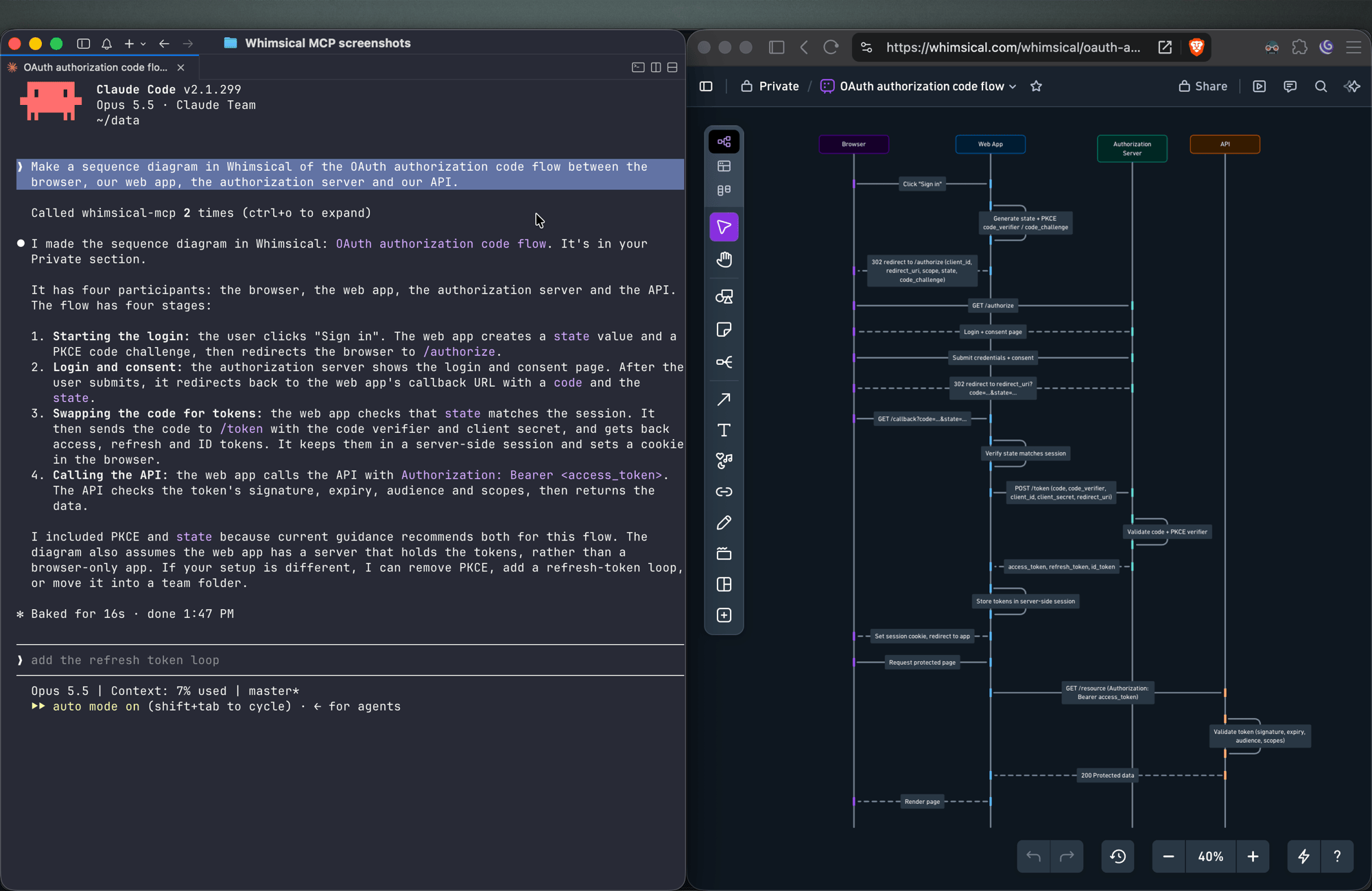
Make a sequence diagram in Whimsical of the OAuth authorization code flow between the browser, our web app, the authorization server and our API.
The agent creates a sequence diagram with one lifeline per actor and the messages between them in order.
Architecture diagrams
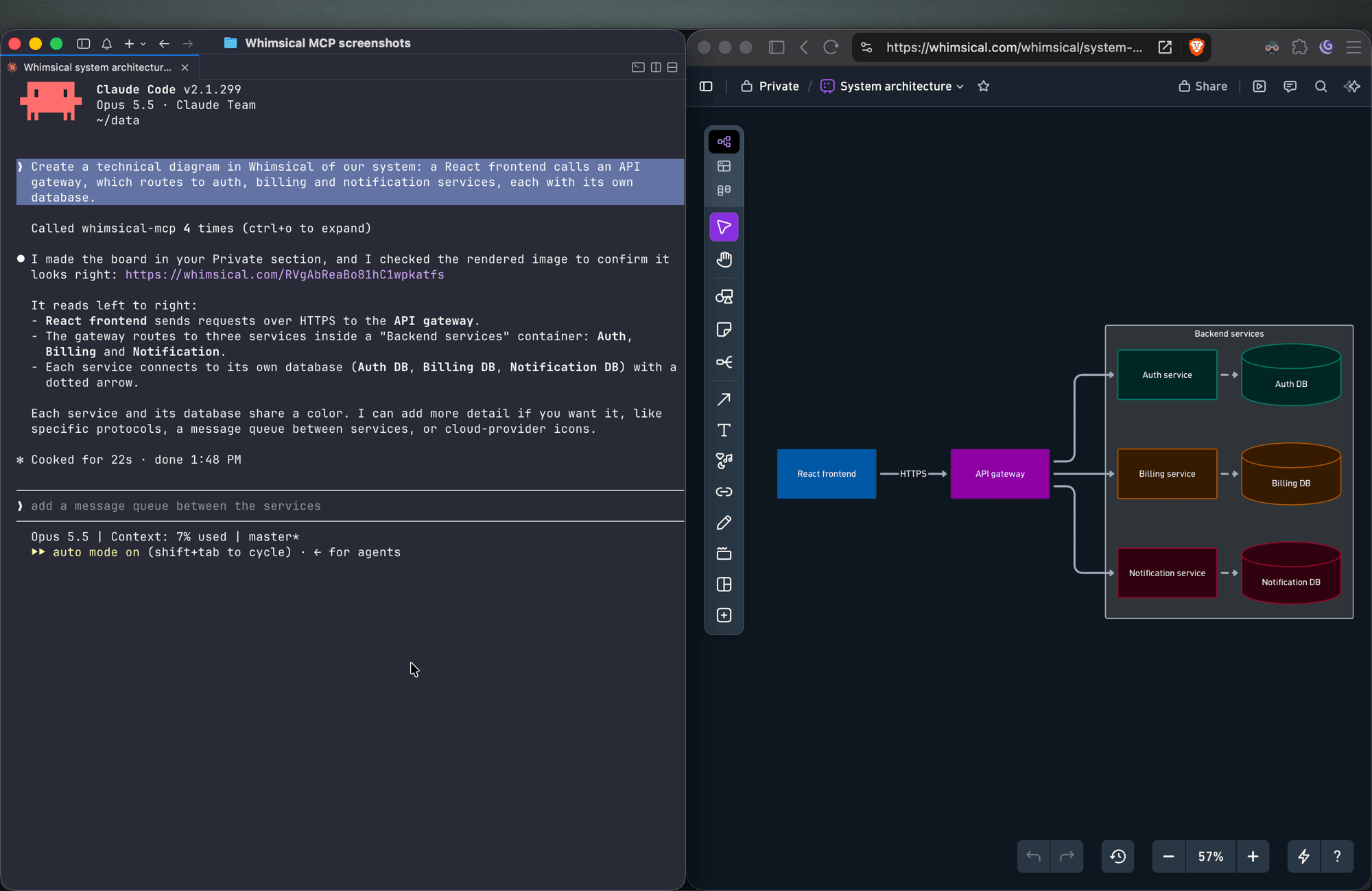
Create a technical diagram in Whimsical of our system: a React frontend calls an API gateway, which routes to auth, billing and notification services, each with its own database.
The agent lays out the components on a board with service boundaries and connectors showing how requests and data move between them.
Mind maps
Create a mind map in Whimsical to brainstorm features for a mobile app, with branches for onboarding, core features, monetization and growth.
You get a mind map with the central topic and its branches, laid out horizontally. Ask for a vertical layout to get a top-down tree.
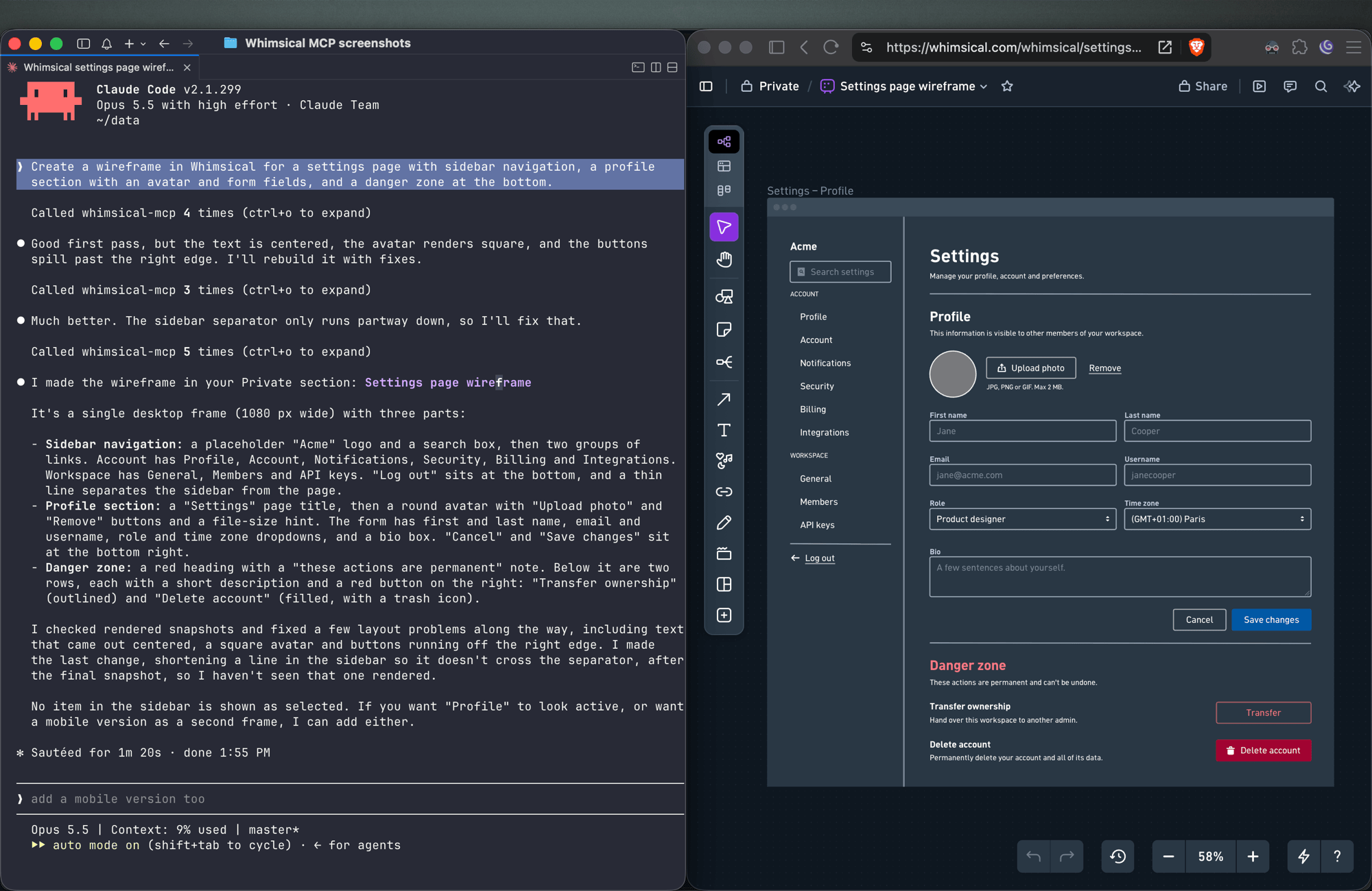
Wireframes
Create a wireframe in Whimsical for a settings page with sidebar navigation, a profile section with an avatar and form fields, and a danger zone at the bottom.
The agent builds the screen from wireframe elements (containers, inputs, buttons, icons) with a flexbox layout, so follow-ups like "make the primary button full width" keep everything aligned.
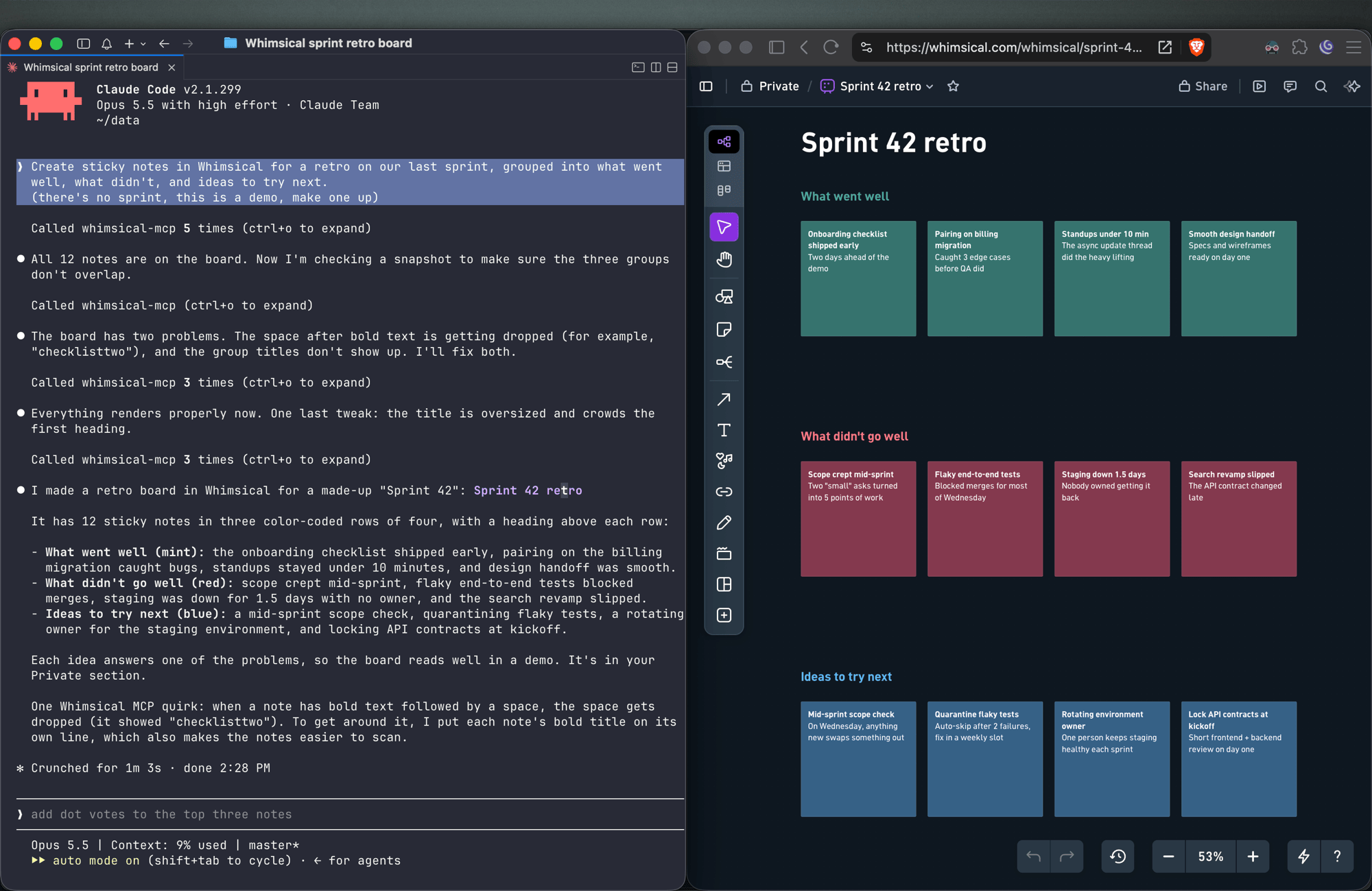
Sticky notes
Create sticky notes in Whimsical for a retro on our last sprint, grouped into what went well, what didn't, and ideas to try next.
You get sticky notes on a board, grouped into the clusters you asked for and laid out automatically, ready for your team to add to and vote on.
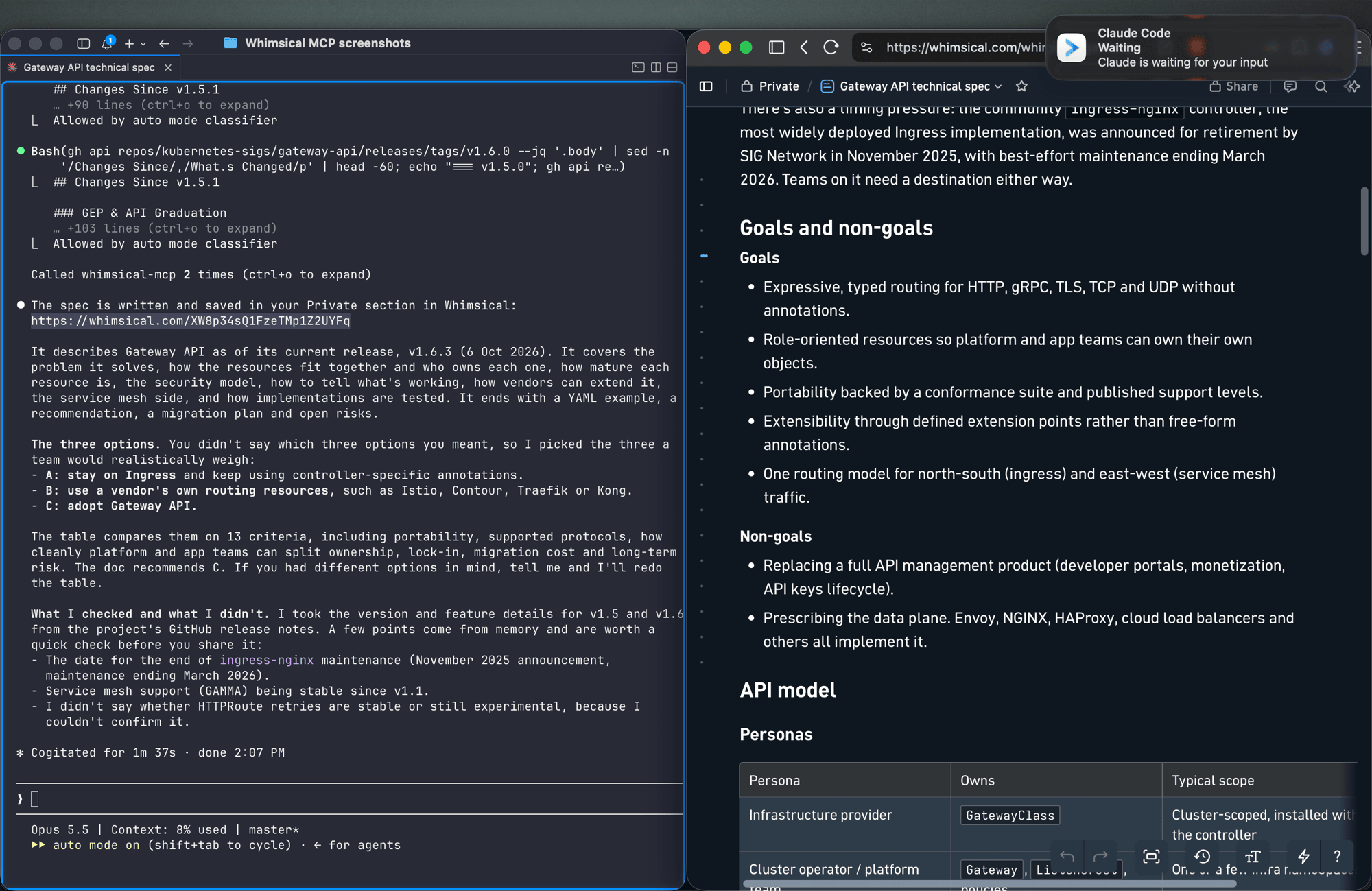
Docs and tables
Write up the technical spec for the new API as a Whimsical doc, with a table comparing the three options we discussed.
Docs support headings, lists, links, code blocks and tables. Tables can also go on a board.
Work with what's already in your workspace
Search my Whimsical workspace for anything about "API design" and summarize what you find.
Add a rate limiting step to the API flow diagram, then leave a comment asking the team to review it.
The agent can search your workspace, read boards and docs (including a PNG snapshot of a board), edit existing diagrams, move files between folders, and read, write and resolve comment threads.
Tools
| Tool | What it does |
|---|---|
search |
Search the workspace by text, creation date or update date |
fetch |
Read a board, doc or folder by ID, or get a PNG snapshot of a board |
file_tree |
Browse the Private, Shared and team sections and the folders inside them |
how_to |
Look up Whimsical syntax guides before creating flowcharts or wireframes (agents call this on their own) |
create_file |
Create a board, doc or folder, in your Private section unless you choose a folder |
add_board_content |
Add a flowchart, mind map, sequence diagram, sticky notes, table or wireframe to a board |
add_doc_content |
Append markdown to a doc |
edit |
Add, update or delete shapes, text and connectors on a board, edit mind map and sequence diagram nodes, or change blocks in a doc |
wireframe_edit |
Reflow or edit the elements of a wireframe |
auto_layout |
Re-run automatic layout on a flowchart, top to bottom, left to right or other directions |
delete |
Move a file, folder or doc to the trash |
move |
Move a file, folder or doc into another folder |
comment_read |
Read comment threads on a board or doc |
comment_edit |
Create, reply to, edit, resolve, reopen or delete comments |
See the tool reference for details and more example prompts.
Setup
Claude
Whimsical is a verified connector in Claude's connector directory. Open the Whimsical connector, click Connect and sign in to Whimsical.
Claude Code
claude mcp add --transport http whimsical https://mcp.whimsical.com/mcp
Run /mcp in Claude Code to sign in.
ChatGPT
Use the Whimsical app for ChatGPT:
- In ChatGPT, open Settings → Plugins.
- Search for Whimsical, or use the link above.
- Click Connect and complete the authorization.
Then type @Whimsical in any chat. See the ChatGPT guide for more.
Cursor
Or install the Whimsical plugin from Cursor's plugin directory, or add it by hand: open Cursor → Settings → Cursor Settings → Tools & MCP, add a new MCP server, and save this configuration:
{
  "mcpServers": {
    "whimsical": {
      "url": "https://mcp.whimsical.com/mcp"
    }
  }
}
See Cursor's MCP documentation for more.
VS Code (GitHub Copilot)
- Press
⌘ Shift P(orCtrl Shift P) and runMCP: Add Server. - Select
HTTP. - Paste
https://mcp.whimsical.com/mcpand pressEnter. - When prompted for a server ID, enter
whimsical. - Choose whether to add the server globally or only for the current workspace.
Grok
- Go to grok.com/connectors.
- Click New Connector, then select Custom.
- Enter
https://mcp.whimsical.com/mcpand sign in to Whimsical.
See the Grok guide for more.
Other clients
Any client that supports remote MCP servers over Streamable HTTP can connect with this configuration:
{
  "mcpServers": {
    "whimsical": {
      "url": "https://mcp.whimsical.com/mcp"
    }
  }
}
Authentication
The server uses OAuth 2.1 with PKCE. The first time you connect, your client opens a browser window where you sign in to Whimsical and approve access to your workspace. The agent then works in Whimsical as you, using the access you approved.
Remote and desktop MCP
This repository covers the remote MCP server, which Whimsical hosts and recommends for most people. Whimsical also offers a desktop MCP server that runs inside the Whimsical desktop app and works on the file you have open. To set it up, contact support.
FAQ
Is this the official Whimsical MCP server?
Yes. Whimsical builds, hosts and maintains it, and it's listed in the official MCP Registry as com.whimsical/mcp. Community-built Whimsical MCP servers also exist; this is the one maintained by Whimsical.
Do I need to install or run anything?
No. The server runs at https://mcp.whimsical.com/mcp. You add the URL to your client and sign in.
Do I need an API key? No. Sign-in uses OAuth, so there are no keys to create, store or rotate.
Does it make images or editable diagrams?
Editable diagrams. Everything the agent creates is a normal Whimsical file in your workspace that you and your team can open, change and comment on. The fetch tool can also return a PNG snapshot of a board.
Can it read and update diagrams I already have? Yes. It can search your workspace, read boards and docs, edit them, re-run the layout and work with comments.
Troubleshooting
- Sign-in doesn't open or fails. Run
/mcpin Claude Code, or use your client's reconnect action, to sign in again. The browser redirects back to your client once you've signed in to Whimsical. - Tools don't appear after install. Run
/reload-pluginsin Claude Code, or restart your editor in other clients. 401or "Missing Bearer token". Your session has expired. Sign in again via/mcpor your client's reconnect action.- No Whimsical account. Create one for free at https://whimsical.com. The server signs you in to your existing workspace.
Links
- Overview: https://whimsical.com/mcp
- Setup guide: https://whimsical.com/learn/integrations/mcp
- Tool reference: https://whimsical.com/learn/ai/mcp-tools
- Support: help@whimsical.com
- Privacy policy: https://whimsical.com/terms/privacy
Preguntas sobre Whimsical MCP
¿Cómo agrego Whimsical MCP a Claude Code?
Ejecuta claude mcp add --transport http mcp-server-guide https://mcp.whimsical.com/mcp en tu terminal. Añade --scope user para que esté disponible en todos los proyectos.
¿Cómo agrego Whimsical MCP a Cursor?
Abre ~/.cursor/mcp.json y añade el servidor en mcpServers, usando la configuración de Cursor que se muestra en la sección de instalación de arriba.
¿Qué herramientas proporciona Whimsical MCP?
Expone 14 herramientas, incluidas search, fetch, file_tree, how_to, create_file.
¿Es este el MCP server oficial de Whimsical?
Sí, este es el servidor oficial creado, alojado y mantenido por Whimsical.
¿Tengo que instalar o ejecutar algo?
No, el servidor está alojado por Whimsical y solo tienes que añadir la URL a tu cliente MCP.
¿Necesito una API key?
No, el servidor utiliza OAuth para la autenticación, por lo que no hay API keys que gestionar.
¿Genera imágenes o diagramas editables?
Crea diagramas editables que tu equipo puede abrir, editar y comentar, en lugar de imágenes estáticas.
¿Puede leer y actualizar diagramas que ya tengo?
Sí, el servidor puede buscar en tu espacio de trabajo, leer tableros y documentos existentes, editarlos y gestionar comentarios.