
Genera diagramas estructurados como mapas IBIS, mapas conceptuales y diagramas de bucle causal a partir de texto en Vithanco Graph Language.
También conocido como Vithanco/VGraph, vgraph, @vithanco/vgraph-mcp
- Stars
- 0
- Herramientas
- —
- Descargas, 30 días
- —
- Última versión
- 1.0.9
- Último commit
- 13 nov 2026
- Licencia
- Apache-2.0
¿Qué es VGraph MCP?
VGraph es un MCP server. Genera diagramas estructurados como mapas IBIS, mapas conceptuales y diagramas de bucle causal a partir de texto en Vithanco Graph Language.
Resumen generado a partir del README del proyecto
Acerca del MCP server de VGraph
Transformar texto en diagramas visuales estructurados es lo que vgraph-mcp permite a desarrolladores y pensadores. Mediante el uso de Vithanco Graph Language (VGL), los usuarios pueden definir grafos de red tipados donde cada nodo y arista tiene un significado específico. Esto permite la creación de herramientas de razonamiento complejo como mapas IBIS, diagramas de bucle causal y modelos C4 a través de un formato de texto sencillo.
Los usuarios pueden ejecutar este servidor localmente usando npx @vithanco/vgraph-mcp o conectarse a una versión alojada. El motor renderiza estas definiciones en formato SVG, asegurando que los diagramas se mantengan consistentes en diferentes entornos. Soporta una amplia variedad de notaciones integradas, incluyendo Impact Mapping, árboles de decisión, líneas de tiempo y árboles de ataque-defensa, permitiendo también la declaración de notaciones personalizadas.
Qué puedes hacer con él
- 1Generar mapas de razonamiento de decisionesCrea un mapa IBIS para visualizar preguntas, respuestas, pros y contras para una decisión de producto específica.
- 2Visualizar arquitecturas de sistemasConvierte descripciones de texto en diagramas C4 para representar la arquitectura de software.
- 3Modelar relaciones causalesRepresenta bucles de retroalimentación complejos utilizando diagramas de bucle causal.
Escrito a partir del README del proyecto. Cada caso de uso se verifica con una cita del mismo.
Cómo instalar VGraph MCP
Formatos verificados el 10 nov 2026Instalar VGraph MCP en Claude Code
$ claude mcp add vgraph -- npx -y @vithanco/vgraph-mcpInstalar VGraph MCP en Cursor
~/.cursor/mcp.json
{
  "mcpServers": {
    "vgraph": {
      "command": "npx",
      "args": [
        "-y",
        "@vithanco/vgraph-mcp"
      ]
    }
  }
}Instalar VGraph MCP en VS Code
.vscode/mcp.json
{
  "servers": {
    "vgraph": {
      "type": "stdio",
      "command": "npx",
      "args": [
        "-y",
        "@vithanco/vgraph-mcp"
      ]
    }
  }
}Instalar VGraph MCP en Claude Desktop
claude_desktop_config.json
{
  "mcpServers": {
    "vgraph": {
      "command": "npx",
      "args": [
        "-y",
        "@vithanco/vgraph-mcp"
      ]
    }
  }
}Instalar VGraph MCP en Codex
~/.codex/config.toml
[mcp_servers.vgraph]
command = "npx"
args = ["-y", "@vithanco/vgraph-mcp"]
Instalar VGraph MCP en Gemini CLI
~/.gemini/settings.json
{
  "mcpServers": {
    "vgraph": {
      "command": "npx",
      "args": [
        "-y",
        "@vithanco/vgraph-mcp"
      ]
    }
  }
}Verificaciones automáticas
Ejecutado 14 nov 2026Informe completo →Pasó nuestras verificaciones automáticas. Esto no es una auditoría de seguridad: lee el código y dale al servidor el acceso más limitado que necesite. Cómo funcionan las verificaciones

- Repositorio de origen vinculado y accesiblevithanco/vgraph is public and reachablegithub.com/vithanco/vgraph ↗Aprobado
- El paquete cita este repositorio como fuente@vithanco/vgraph-mcp names vithanco/vgraph as sourcenpmjs.com/package/@vithanco/vgraph-mcp ↗Aprobado
- Procedencia de la compilación (atestación Sigstore)No build attestation published for this releaseNo verificado
- Licencia de código abierto (OSI)Apache-2.0spdx.org/licenses/Apache-2.0.html ↗Aprobado
- Commit o lanzamiento en el último añoLast commit or release 2026-11-13github.com/vithanco/vgraph ↗Aprobado
- OpenSSF ScorecardNo verificado
- El nombre del paquete no es similar a un paquete popularNo popular package one edit away from @vithanco/vgraph-mcpAprobado
- Sin avisos críticos en el paquete ni en sus dependencias101 resolved dependencies checked; no critical advisoryosv.dev ↗Aprobado
- Sin instrucciones ocultas para el modelo0 tool descriptions and the README read; no override phrases, credential paths or hidden charactersAprobado
- Las herramientas destructivas están etiquetadasNo verificado
- El endpoint remoto responde al handshake MCPEndpoint did not answer initialize: HTTP 200Hallazgo
README
Ver en GitHubVGraph
Vithanco stands for Visual Thinking and Communication. It helps you think in a structured way by drawing typed network graphs. In a typed graph every node and every edge has a meaning of its own: in an IBIS map a Question, an Answer, a Pro and a Con are different things, and the notation says how they may be connected. The drawing becomes a way of reasoning, and a way of explaining that reasoning to someone else.
VGraph is the open-source engine behind it. It lays a typed graph out and draws it as SVG. The Vithanco Graph Language (VGL) is only the how: a small text format in which these diagrams are written down, stored and shared. The same Swift code runs natively and, compiled to WebAssembly, in the browser, in Obsidian, in VS Code and behind an MCP server, so a diagram looks the same everywhere.
vgraph decision: IBIS "Should we ship the plugin?" {
  node q1: Question "Should we ship?";
  node a1: Answer "Yes, soon";
  node p1: Pro "Users have asked for it";
  node c1: Con "Docs are still thin";
  edge q1 -> a1;
  edge a1 -> p1;
  edge a1 -> c1;
}
A notation is the vocabulary of a diagram: it fixes the node and edge types and how they look. Every document names one. These ship with VGraph: IBIS, BBS, Impact Mapping, Concept Map, Current Reality Tree, Evaporating Cloud, Future Reality Tree, Prerequisite Tree, Transition Tree, Attack-Defense Tree, Goal Tree, Causal Loop Diagram, Decision Tree, Timeline, C4 and Arithmetic. A document can also declare notations of its own. The VGL guide has the whole language.
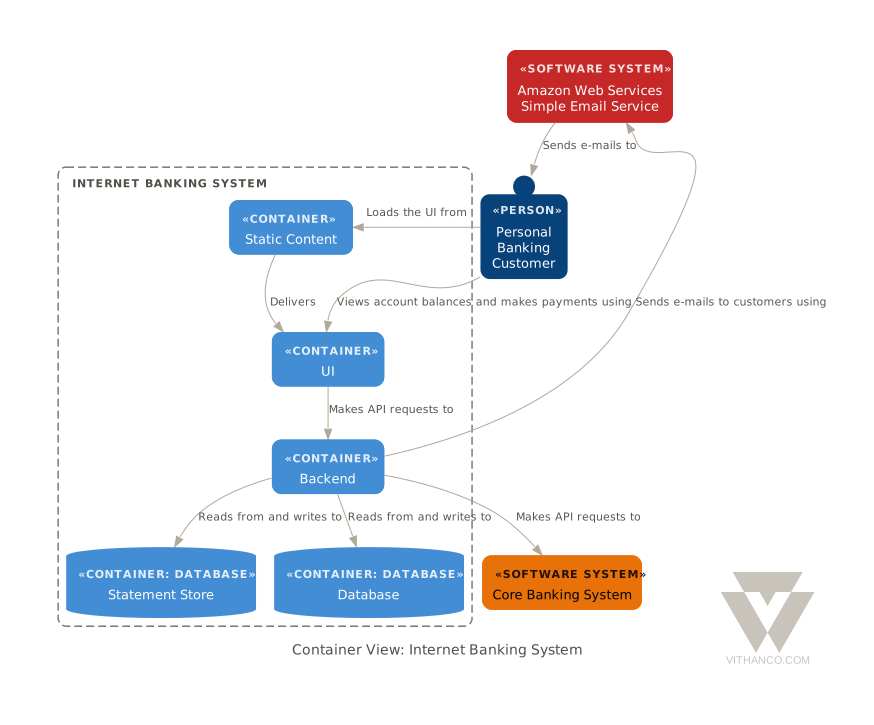
Ways to use it
| Web editor | vithanco.com/editor: write VGL, see the diagram, edit it on the canvas |
| Obsidian | obsidian-vithanco: a vgl code block becomes a diagram |
| VS Code | vscode-vithanco |
| MCP server | npx @vithanco/vgraph-mcp runs it locally; https://mcp.vithanco.com/mcp is hosted. Details |
| Command line | vgraph-cli, built from this repository |
| Swift package | the VGraph, VGLanguage and VGraphSVG libraries |
Building
Two tiers, so a parser fix does not send you through a toolchain install:
- Native only.
swift buildandswift testneed nothing but a Swift 6.4 toolchain. - With the wasm build.
just build,just test, the wasm smoke tests and the editor's browser tests also need Node,jq,binaryen,wabt,justand the Embedded Swift SDK that matches.swift-version.
Install the toolchain with swiftly, then
the SDK. One bundle holds both the plain and the -embedded SDK, and its version
must equal .swift-version. The checksum is per release; take it from
swift.org's WebAssembly guide.
V=$(cat .swift-version)
swiftly install "$V" && swiftly use "$V"
swift sdk install "https://download.swift.org/swift-$V-release/wasm-sdk/swift-$V-RELEASE/swift-$V-RELEASE_wasm.artifactbundle.tar.gz" \
    --checksum <checksum for $V from the guide>
just doctor lists what is missing; a missing SDK is reported but does not fail
it.
just build     # compile everything: wasm, command line, MCP server
just test      # build, then the full suite: Swift, wasm smoke tests, editor browser tests
just           # everything else
For most changes swift test is the quick loop. The Obsidian and VS Code
plugins are separate repositories; just plugins-setup clones them next to this
one, and the build and test recipes use them when they are there.
How it is organised
VGraph is built as hexagons: a pure domain at the centre, ports that name each conversation with the outside, and adapters at the edge. The parser, the SVG renderer and the Graphviz layout are separate targets that know only the core. Why it is shaped this way and where a change goes are written down, as are the decisions behind the design (ADRs) and the visual rules (design guide).
Contributing
Pull requests are welcome, and so are issues. Start with CONTRIBUTING.md.
Licence
Apache-2.0, see LICENSE. Third-party works, among them Graphviz and the DM Sans typeface, are listed in NOTICE. The Vithanco name and logo are not covered by the licence: the artwork is all rights reserved, and a fork should use a name and a logo of its own. See graphics/README.md for what is allowed.
Preguntas sobre VGraph MCP
¿Cómo agrego VGraph MCP a Claude Code?
Ejecuta claude mcp add vgraph -- npx -y @vithanco/vgraph-mcp en tu terminal. Añade --scope user para que esté disponible en todos los proyectos.
¿Cómo agrego VGraph MCP a Cursor?
Abre ~/.cursor/mcp.json y añade el servidor en mcpServers, usando la configuración de Cursor que se muestra en la sección de instalación de arriba.
¿Qué tipo de diagramas puede crear VGraph?
Soporta una gran variedad de notaciones, incluyendo IBIS, mapas conceptuales, diagramas de bucle causal, líneas de tiempo, C4 y árboles de decisión.
¿Cómo está estructurado el lenguaje VGraph?
El Vithanco Graph Language (VGL) es un formato de texto ligero utilizado para escribir, almacenar y compartir diagramas.
¿Puedo ejecutar VGraph localmente?
Sí, puedes ejecutarlo localmente mediante npx o como una herramienta de línea de comandos.