
Analiza textos en busca de problemas de prosa como la voz pasiva, palabras de relleno (weasel words) y patrones generados por IA para mejorar la calidad de la escritura.
También conocido como theserverlessdev/wsc, wsc, wsc-mcp
- Stars
- 9
- Herramientas
- 4
- Descargas, 30 días
- —
- Última versión
- 2.2.2
- Último commit
- 11 nov 2026
- Licencia
- MIT
¿Qué es Writing Style Checker MCP?
Writing Style Checker es un MCP server. Analiza textos en busca de problemas de prosa como la voz pasiva, palabras de relleno (weasel words) y patrones generados por IA para mejorar la calidad de la escritura. Expone 4 herramientas, como check_text, fix_duplicates, list_word_lists.
Resumen generado a partir del README del proyecto
Acerca del MCP server de Writing Style Checker
Writing Style Checker actúa como un linter de prosa diseñado para identificar problemas de escritura y patrones específicos que suelen encontrarse en textos generados por IA. Ayuda a los escritores a mejorar la calidad señalando la voz pasiva, weasel words, adverbios de relleno, lenguaje dubitativo (hedging), nominalizaciones y oraciones largas. También incluye un detector especializado para señales de IA, que identifica palabras y patrones estructurales específicos que aparecen con exceso en el contenido generado por máquinas.
Los desarrolladores pueden integrar este servicio a través de un MCP server remoto usando transporte streamable HTTP o instalar el servidor local basado en stdio mediante el paquete npm wsc-mcp. La versión local proporciona una herramienta adicional check_file para analizar archivos directamente desde tu disco. Los usuarios pueden personalizar las reglas de detección usando un archivo de configuración .wscrc.json para habilitar, deshabilitar o modificar listas de palabras y umbrales específicos.
Qué puedes hacer con él
- 1Detectar patrones de escritura generados por IAPide al asistente que identifique palabras o estructuras de oraciones específicas que sugieran que un texto fue escrito por una IA.
- 2Limpiar palabras duplicadasIndica al cliente que elimine palabras repetidas adyacentes en un bloque de texto.
- 3Auditar archivos markdown localesHaz que la IA lea y analice un archivo específico en tu computadora en busca de problemas de prosa.
- 4Revisar la calidad general de la prosaEnvía un párrafo para verificar la presencia de voz pasiva, weasel words y adverbios de relleno.
Escrito a partir del README del proyecto. Cada caso de uso se verifica con una cita del mismo.
Cómo instalar Writing Style Checker MCP
Formatos verificados el 10 nov 2026Añadir a CursorAñadir a GooseInstalar Writing Style Checker MCP en Claude Code
$ claude mcp add wsc -- npx -y wsc-mcpInstalar Writing Style Checker MCP en Cursor
~/.cursor/mcp.json
{
  "mcpServers": {
    "wsc": {
      "command": "npx",
      "args": [
        "-y",
        "wsc-mcp"
      ]
    }
  }
}Instalar Writing Style Checker MCP en VS Code
.vscode/mcp.json
{
  "servers": {
    "wsc": {
      "type": "stdio",
      "command": "npx",
      "args": [
        "-y",
        "wsc-mcp"
      ]
    }
  }
}Instalar Writing Style Checker MCP en VS Code CLI
$ code --add-mcp '{"name":"wsc","type":"stdio","command":"npx","args":["-y","wsc-mcp"]}'Instalar Writing Style Checker MCP en Claude Desktop
claude_desktop_config.json
{
  "mcpServers": {
    "wsc": {
      "command": "npx",
      "args": [
        "-y",
        "wsc-mcp"
      ]
    }
  }
}Instalar Writing Style Checker MCP en Codex
$ codex mcp add wsc -- npx -y wsc-mcpInstalar Writing Style Checker MCP en Codex config.toml
~/.codex/config.toml
[mcp_servers.wsc]
command = "npx"
args = ["-y", "wsc-mcp"]
Instalar Writing Style Checker MCP en Gemini CLI
$ gemini mcp add -s user wsc npx -- -y wsc-mcpInstalar Writing Style Checker MCP en Gemini settings.json
~/.gemini/settings.json
{
  "mcpServers": {
    "wsc": {
      "command": "npx",
      "args": [
        "-y",
        "wsc-mcp"
      ]
    }
  }
}Herramientas de Writing Style Checker MCP 4
Detectado desde el READMEcheck_textfix_duplicateslist_word_listscheck_file
| check_text | — | |
| fix_duplicates | — | |
| list_word_lists | — | |
| check_file | — |
Verificaciones automáticas
Ejecutado 12 nov 2026Informe completo →Pasó nuestras verificaciones automáticas. Esto no es una auditoría de seguridad: lee el código y dale al servidor el acceso más limitado que necesite. Cómo funcionan las verificaciones

- Repositorio de origen vinculado y accesibleAprobado
- Licencia de código abierto (OSI)Aprobado
- Commit o lanzamiento en el último añoAprobado
- El nombre del paquete no es similar a un paquete popularAprobado
- El endpoint remoto usa HTTPSAprobado
- Las herramientas destructivas están etiquetadasAprobado
- Sin instrucciones ocultas para el modeloAprobado
- No hay avisos críticos en el paquete ni en sus dependenciasAprobado
README
Ver en GitHubWriting Style Checker


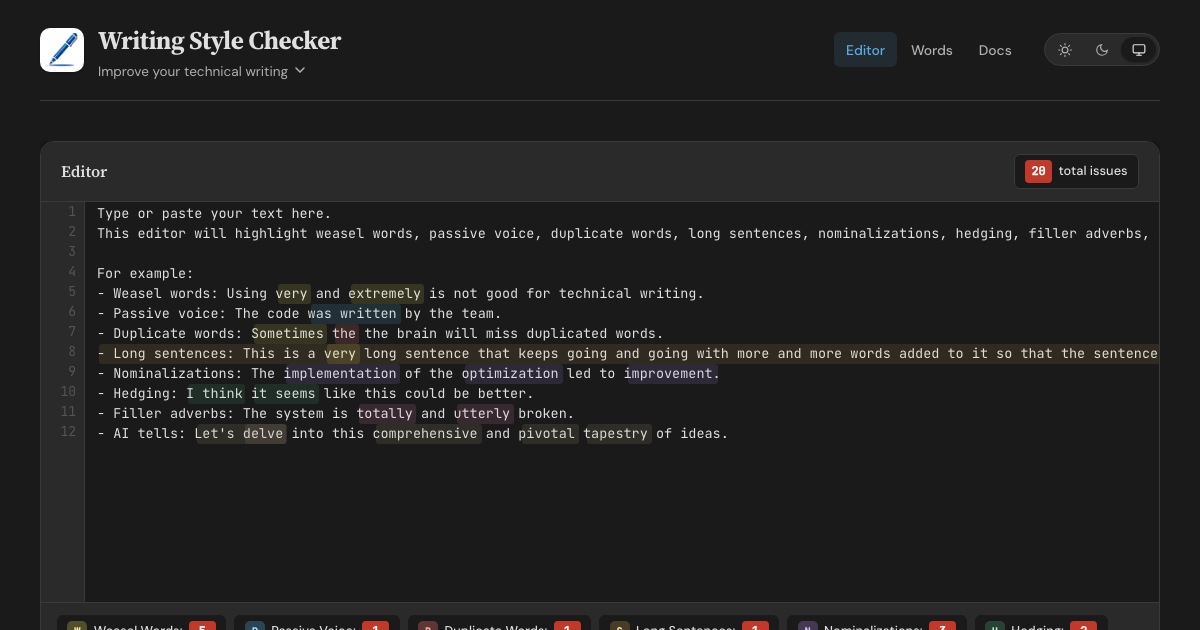
A prose linter and AI-slop detector. WSC finds AI tells — words, phrases, and sentence structures overrepresented in AI-generated text, each flag backed by a published corpus study. It also catches classic writing issues: weasel words, passive voice, duplicate words, long sentences, nominalizations, hedging, and filler adverbs. Available as a web editor, HTTP API, MCP server, CLI, and GitHub Action.
Features
- Web Editor - Real-time highlighting with inline fix buttons for all 8 detectors
- HTTP API - POST text with optional config, retrieve structured JSON responses
- MCP Server (Remote) - Connect AI assistants via Streamable HTTP transport
- MCP Server (Local) - Stdio-based server via
wsc-mcpon npm - CLI - Check files from the command line via
wsc-lint - GitHub Action - Run checks in CI with
::warningannotations - Configurable - Customize detectors with
.wscrc.jsonfiles
What WSC is (and isn't)
WSC flags patterns that research on AI-generated text finds overrepresented, and cites a source for every flag. It does not, and cannot, prove authorship. Classifier-based detectors carry a documented false-accusation risk: a Stanford study found that seven of them misflagged 61% of essays written by non-native English speakers. WSC avoids that trap by design — every flag is a specific, explainable edit that improves the text no matter who, or what, wrote it.
Detection Rules
| Detector | Items | Description |
|---|---|---|
| Weasel Words | 95 words/phrases | Vague terms like "very", "basically", "arguably", "numerous" |
| Passive Voice | 260 irregular verbs | Auxiliary verbs + past participles (regular -ed + irregular) |
| Duplicate Words | — | Adjacent repeated words across whitespace, case-insensitive |
| Long Sentences | threshold: 30 words | Sentences exceeding a configurable word count |
| Nominalizations | 245 word pairs | Nouns replaceable with verbs ("utilization" → "use") |
| Hedging | 100 phrases | Phrases that weaken assertions ("I think", "it seems") |
| Filler Adverbs | 139 words | Adverbs adding emphasis without substance ("totally", "utterly") |
| AI Tells | 98 words (+111 inflected forms) + 83 phrases + 12 structural patterns | Words, phrases, and sentence constructions overrepresented in AI-generated text (delve, rich tapestry, It's not just X — it's Y) |
Word lists sourced from Matt Might's shell scripts and expanded with additional entries. AI tells draw on published corpus studies: Kobak et al. 2025 (Science Advances), Juzek & Ward 2025 (COLING), Liang et al. 2024 (Stanford), and Reinhart et al. 2025 (PNAS). Wikipedia's editor-maintained Signs of AI writing catalogue and AI-detection vendor reports round out the sources.
Configuration
Create a .wscrc.json to customize detectors. All tools (API, MCP, CLI) support it.
{
  "$schema": "https://wsc.theserverless.dev/schema.json",
  "ignore": ["CHANGELOG.md", "docs/vendor/**"],
  "detectors": {
    "weaselWords": {
      "enabled": true,
      "add": ["synergy", "leverage"],
      "remove": ["very"]
    },
    "longSentences": { "maxWords": 25 },
    "adverbs": { "enabled": false }
  }
}
Every field is optional. Missing fields use defaults. JSON Schema provides autocompletion in VS Code.
ignore is an array of glob patterns relative to the working directory. The GitHub Action uses the repository root. The CLI adds these patterns to its built-in **/node_modules/** and **/.git/** skips, together with the Action exclude input and the CLI --ignore flag.
API Usage
POST /api/check
Analyze text for writing style issues. Accepts optional config object.
curl -X POST https://wsc.theserverless.dev/api/check \
  -H "Content-Type: application/json" \
  -d '{"text":"The code was written very quickly."}'
Response:
{
  "summary": {
    "total": 2,
    "weaselWords": 1,
    "passiveVoice": 1,
    "duplicateWords": 0,
    "longSentences": 0,
    "nominalizations": 0,
    "hedging": 0,
    "adverbs": 0
  },
  "issues": {
    "weaselWords": [{ "word": "very", "index": 21, "line": 1, "column": 22, "context": "..." }],
    "passiveVoice": [{ "phrase": "was written", "index": 9, "line": 1, "column": 10, "context": "..." }],
    "duplicateWords": [],
    "longSentences": [],
    "nominalizations": [],
    "hedging": [],
    "adverbs": []
  },
  "meta": { "characterCount": 34, "wordCount": 6, "sentenceCount": 1, "processingTimeMs": 2 }
}
With config:
curl -X POST https://wsc.theserverless.dev/api/check \
  -H "Content-Type: application/json" \
  -d '{"text":"The code was written very quickly.", "config":{"detectors":{"weaselWords":{"enabled":false}}}}'
GET /api/check
Returns API documentation as JSON.
GET /api/detectors
Returns the list of all 8 detectors with descriptions, configurability, and word counts.
GET /health
Runs a smoke test with known text and returns {"status":"healthy"} or 503.
Limits: Max 100,000 characters per request. CORS enabled for all origins.
MCP Server
The Writing Style Checker is available as an MCP server, letting AI assistants check your writing directly.
Tools
| Tool | Description |
|---|---|
check_text |
Analyze text for all 8 writing style issues. Accepts optional config. |
fix_duplicates |
Remove duplicate adjacent words and return cleaned text |
list_word_lists |
Return info about all detector word lists |
check_file |
(Local only) Read a file from disk and analyze it. Auto-discovers .wscrc.json. |
Remote MCP Server
Connect any MCP client to the hosted server - no installation required.
{
  "mcpServers": {
    "writing-style-checker": {
      "type": "url",
      "url": "https://wsc.theserverless.dev/mcp"
    }
  }
}
Local MCP Server (stdio)
Install via npm for local usage. Includes check_file for analyzing files on disk with auto-discovery of .wscrc.json.
npx wsc-mcp
Claude Desktop / Claude Code config:
{
  "mcpServers": {
    "writing-style-checker": {
      "command": "npx",
      "args": ["wsc-mcp"]
    }
  }
}
See the wsc-mcp npm page for full documentation.
CLI
Check files from the command line.
# Check all markdown files
npx wsc-lint check "**/*.md"

# Read from stdin
echo "The code was written very quickly." | npx wsc-lint check --stdin

# JSON output for scripting
npx wsc-lint check "**/*.md" --format json

# GitHub Actions annotations
npx wsc-lint check "**/*.md" --format github

# Create a config file
npx wsc-lint init
See the wsc-lint README for full documentation.
GitHub Action
- uses: theserverlessdev/wsc@v1
  with:
    files: '**/*.md'
    max-warnings: 20
    exclude: |
      CHANGELOG.md
      vendor/**
| Input | Default | Description |
|---|---|---|
files |
**/*.md |
Glob pattern for files to check |
config |
— | Path to .wscrc.json config file |
max-warnings |
unlimited | Max warnings before failing |
only-changed |
false |
On a pull request, check changed files that match files. If none match, skip the check. Other events check files. |
exclude |
— | Glob patterns to skip. Separate with a comma or a new line. Adds to config ignore. |
Privacy
The web editor runs in your browser - we never send text to any server. The API and MCP endpoints only process text you explicitly send to them.
Project Structure
.
├── src/
│   ├── core/                    # Shared detection engine
│   │   ├── detector.ts          # 8 detection algorithms
│   │   ├── words.ts             # Word/phrase lists (800+ entries)
│   │   ├── config.ts            # Config types, merging, validation
│   │   ├── config-node.ts       # Node-only: file loading, discovery
│   │   ├── analyzer.ts          # Unified analyzeText() entry point
│   │   └── index.ts             # Public API exports
│   ├── docs/                    # Documentation content (Markdown files)
│   ├── mcp/
│   │   └── handler.ts           # MCP JSON-RPC 2.0 handler
│   ├── lib/
│   │   ├── App.svelte           # Main editor page component
│   │   ├── stores/theme.ts      # Theme store (light/dark/system)
│   │   └── components/          # UI components (StatsBar, ConfigPanel, etc.)
│   ├── routes/
│   │   ├── +layout.svelte       # Shared layout (header, nav, footer)
│   │   ├── api/check/+server.ts # HTTP API endpoint
│   │   ├── mcp/+server.ts       # MCP endpoint
│   │   ├── health/+server.ts    # Health check endpoint
│   │   ├── docs/+page.svelte    # Documentation page
│   │   └── words/+page.svelte   # Word library browser
│   └── styles/
│       └── main.scss            # Global styles (light + dark themes)
├── mcp-server/                  # Standalone stdio MCP server (npm: wsc-mcp)
├── cli/                         # CLI tool (npm: wsc-lint)
├── action/                      # GitHub Action (composite)
├── tests/                       # 341 tests across 18 files
├── static/
│   ├── schema.json              # JSON Schema for .wscrc.json
│   ├── llms.txt                 # AI/LLM discovery file
│   └── llms-full.txt            # Detailed LLM context
├── wrangler.toml                # Cloudflare Workers config
└── svelte.config.js             # SvelteKit configuration
Local Development
git clone https://github.com/theserverlessdev/wsc.git
cd wsc
npm install
npm run dev
Visit http://localhost:5173. The API is at /api/check, MCP at /mcp, health at /health.
Commands
| Command | Description |
|---|---|
npm run dev |
Start dev server |
npm run build |
Build for production |
npm run check |
Type check with svelte-check |
npm test |
Run all 341 tests |
npm run test:coverage |
Coverage report |
Deployment
Deployed as a Cloudflare Worker at wsc.theserverless.dev.
npm run build
npx wrangler deploy
Contributing
See CONTRIBUTING.md for development setup, testing, and pull request guidelines.
For substantial changes, please open an issue first.
Acknowledgements
- Matt Might for the original shell scripts
- Built with SvelteKit and Svelte 5, deployed on Cloudflare Workers
- Logo made with DiffusionBee
License
Preguntas sobre Writing Style Checker MCP
¿Cómo agrego Writing Style Checker MCP a Claude Code?
Ejecuta claude mcp add wsc -- npx -y wsc-mcp en tu terminal. Añade --scope user para que esté disponible en todos los proyectos.
¿Cómo agrego Writing Style Checker MCP a Cursor?
Abre ~/.cursor/mcp.json y añade el servidor en mcpServers, usando la configuración de Cursor que se muestra en la sección de instalación de arriba.
¿Qué herramientas proporciona Writing Style Checker MCP?
Expone 4 herramientas, incluidas check_text, fix_duplicates, list_word_lists, check_file.
¿Esta herramienta demuestra si un texto fue escrito por una IA?
No, no demuestra la autoría. En su lugar, señala patrones y palabras específicas que están sobrerrepresentadas en textos generados por IA para ofrecer ediciones explicables.
¿Puedo personalizar las reglas de detección?
Sí, puedes personalizar los detectores usando un archivo de configuración .wscrc.json.
¿Mi texto es privado cuando uso el editor web?
Sí, el editor web se ejecuta completamente en tu navegador, por lo que el texto nunca se envía a un servidor.