
MCP server de Ternimal
Commit 14 nov 2026Provides a secure remote terminal that allows AI agents to execute commands and manage files on remote hosts via the Model Context Protocol.
También conocido como ternimal/tern
- Stars
- 1
- Herramientas
- —
- Descargas, 30 días
- —
- Última versión
- —
- Último commit
- 14 nov 2026
- Licencia
- AGPL-3.0
¿Qué es Ternimal MCP?
Ternimal es un MCP server. Provides a secure remote terminal that allows AI agents to execute commands and manage files on remote hosts via the Model Context Protocol.
Resumen generado a partir del README del proyecto
Acerca del MCP server de Ternimal
Managing remote servers through an AI interface is possible with Ternimal. This tool provides a secure remote terminal that allows AI agents to execute commands and manage files on remote hosts using the Model Context Protocol. It is designed for administrators who need to grant AI clients like Claude Desktop, Claude Code, or Cursor controlled access to their systems.
The setup involves running the ternd agent on the remote host and connecting via the tern client. Users can connect directly over a local network or use a ternr relay to traverse NAT without needing inbound ports. Security is maintained through end-to-end TLS encryption and mandatory authentication using either OpenSSH keys or shared tokens.
To prevent unauthorized actions, the MCP server operates under a specific policy and is read-only by default. It maintains an audit log of every call and requires manual approval before performing chosen actions. This ensures that while an AI agent can interact with the shell, exec, port forwarding, and file copy tools, the human user remains in control of the remote environment.
Qué puedes hacer con él
- 1Execute remote commands via AIAsk an AI agent to run specific shell commands on a remote host through the MCP interface.
- 2Audit AI administrative actionsReview a complete log of all commands and interactions performed by an AI agent on your system.
Escrito a partir del README del proyecto. Cada caso de uso se verifica con una cita del mismo.
Configuración
TERN_TOKEN
| Nombre | Descripción | Tipo |
|---|---|---|
| TERN_TOKEN | — |
Verificaciones automáticas
Ejecutado 15 nov 2026Informe completo →Aún no verificado. Un servidor necesita una puntuación de 80, ningún hallazgo grave y suficientes datos para que podamos revisarlo. Cómo funcionan las verificaciones · Qué corregir para obtener más puntos

- Repositorio de origen vinculado y accesibleternimal/tern is public and reachablegithub.com/ternimal/tern ↗Aprobado
- El paquete indica este repositorio como su origenNo verificado
- Procedencia de la compilación (atestación de Sigstore)No verificado
- Licencia de código abierto (OSI)AGPL-3.0spdx.org/licenses/AGPL-3.0.html ↗Aprobado
- Commit o lanzamiento en el último añoLast commit or release 2026-11-14github.com/ternimal/tern ↗Aprobado
- OpenSSF ScorecardNo verificado
- El nombre del paquete no es similar a un paquete popularNo verificado
- No hay avisos críticos en el paquete ni en sus dependenciasNo verificado
- Sin instrucciones ocultas para el modelo0 tool descriptions and the README read; no override phrases, credential paths or hidden charactersAprobado
- Las herramientas destructivas están etiquetadasNo verificado
- El endpoint remoto responde al handshake de MCPNo verificado
README
Ver en GitHubTernimal
+------------------------------------------------------------------+
| \\\_\                                                            |
| \\\( ^>     t e r n                                              |
|  \\\=/      A minimal, portable, secure remote terminal with MCP |
|  ~~~~~                                                           |
+------------------------------------------------------------------+


Ternimal (terminal + minimal) is a minimal, portable, secure remote terminal: SSH-style shells, command exec, port forwarding and file copy over end-to-end TLS, reached directly or through a relay for NAT traversal. One project, four small binaries:
| binary | role |
|---|---|
tern |
client: shells, exec, port forwarding, file copy, REST gateway, MCP server for AI agents |
ternd |
agent: hosts sessions for authenticated clients; listens directly or dials a relay |
ternr |
relay: bridges clients to agents behind NAT; a public rendezvous that only forwards opaque bytes |
rtern |
combined relay + client: catches an agent that dials in and drops you into its shell; one process instead of ternr + tern |
Client-to-agent traffic is end-to-end TLS (clients pin the agent's certificate) and authentication to the agent is mandatory. This is an administration tool, not a stealth tool: connections are logged and the agent has no unauthenticated mode. Only use it on systems you own or are authorized to access.
Installation
Download the zip for your OS and architecture from the
latest release, check it
against SHA256SUMS and, with the GitHub CLI, its
build provenance attestation, and put the four binaries on your PATH:
curl -LO https://github.com/ternimal/tern/releases/latest/download/ternimal-linux-amd64.zip
curl -LO https://github.com/ternimal/tern/releases/latest/download/SHA256SUMS
sha256sum --ignore-missing -c SHA256SUMS
gh attestation verify ternimal-linux-amd64.zip -R ternimal/tern
mkdir -p ~/.local/bin
unzip ternimal-linux-amd64.zip tern ternd ternr rtern -d ~/.local/bin
Or build them with Go 1.21 or later:
go install github.com/ternimal/tern/cmd/...@latest
Notes for macOS and Windows, building from source and the supported platforms are in docs/install.md.
Quick start
# agent: zero-config, listens on port 2222 on every IPv4 and IPv6 address,
# mints a token, prints its fingerprint
ternd

# client: connect by IP with the agent's fingerprint and token
TERN_TOKEN=<token> tern connect -a AGENT_IP:2222 -f <agent-fp>
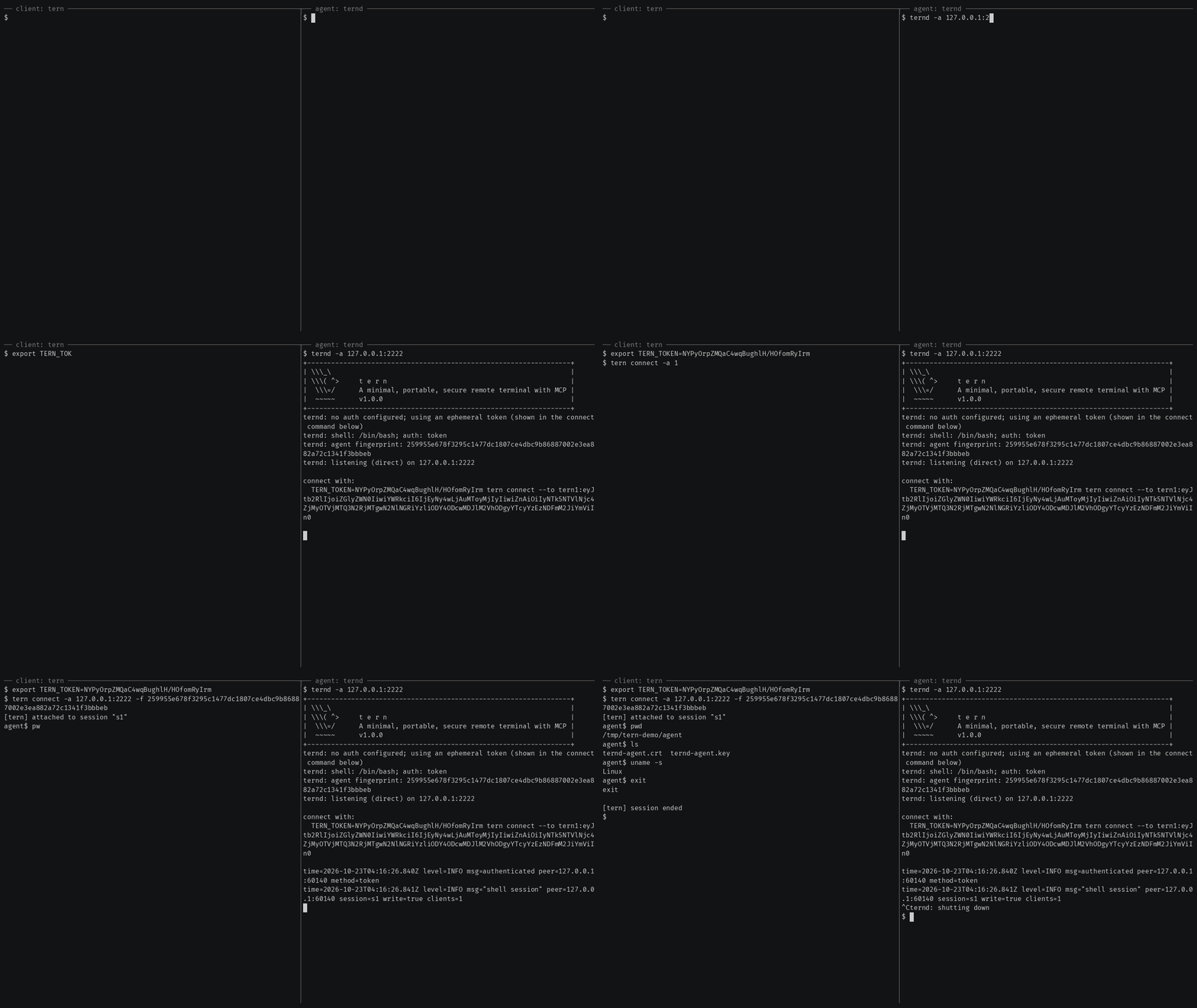
Getting started also covers reaching an agent
behind NAT through a relay, catching one with rtern and logging in with
OpenSSH keys instead of a token.
AI agents (tern mcp)
tern mcp lets an AI client such as Claude Code, Claude Desktop or Cursor work
on your agents through the
Model Context Protocol, under a policy you
set and with an audit log of every call. It is read-only by default, and asks
you before the actions you choose.
In Claude Code, install tern first, then the Ternimal plugin:
claude plugin marketplace add ternimal/tern
claude plugin install ternimal@ternimal
The plugin starts tern from your PATH and reads your hosts from a config
file, ~/.config/tern/mcp.json by default; its ternimal:setup skill walks
you through writing one. plugin/README.md says what it
runs and what it sends. Other clients, a one-line setup without a config
file, the tools and the safety model are in docs/mcp.md.
Features
- Direct or relay: reach an agent on your LAN directly, or reach one behind NAT through a relay, so that agent needs no inbound port.
- End-to-end encryption: TLS and authentication run between client and agent, so a relay only forwards ciphertext.
- Keys or tokens: OpenSSH public keys in
authorized_keysformat, or a shared token. - Resumable sessions:
tern connectreconnects on its own after a drop and resumes the session with scrollback replay; others can join it as read-only viewers. - One connection, many channels: one authenticated connection can carry a
shell,
exec, port forwards and file copy at once. - REST gateway and MCP server: run commands over HTTP, or let AI agents work under a policy.
- Recording: with
ternd --record-dir, the agent saves each session as an asciicast, playable withasciinema play. - Zero-config: run
terndwith no flags on a terminal and it mints a token and prints the line to connect with. - Portable: Linux, macOS, Windows and Android on amd64 and arm64.
All of them in detail: docs/features.md.
Documentation
- Getting started: direct, through a relay, with
rtern, with OpenSSH keys and the insecure flags for testing - Commands: every
terncommand, sharing and resuming sessions, copying files, port forwards - REST gateway: run commands on an agent over HTTP
- AI agents over MCP: the config file, profiles, tools, approvals and the audit log
- Install and build: checking a release, building from source, supported platforms
- Keys, tokens and files: the rules for the files tern reads
- Operating notes: listeners, shutdown, recordings and other details
- Security: the threat model, the dangerous flags and how to report a vulnerability
- Contributing: license terms, the CLA, development and the code layout
License
Ternimal is licensed under the GNU Affero General Public License v3.0 only (AGPL-3.0-only); see LICENSE. Running a modified version to provide a network service requires offering that version's source to its users.
A separate commercial license is available for uses that cannot comply with the AGPL, for example embedding Ternimal in a proprietary or hosted service; see NOTICE. Contributions are welcome; see CONTRIBUTING for the license terms and the CLA.
"Ternimal", the binary names (tern, ternd, ternr, rtern) and the
project logo are project trademarks and are not licensed under the AGPL; see
NOTICE.
Preguntas sobre Ternimal MCP
How can AI agents use Ternimal?
AI clients like Claude Code or Cursor can work on your agents through the Model Context Protocol (MCP) using the tern mcp command.
Is the connection secure?
Yes, client-to-agent traffic uses end-to-end TLS with mandatory authentication, ensuring relays only forward opaque ciphertext.
Can I use Ternimal to reach a machine behind a NAT?
Yes, you can reach an agent behind NAT by using a relay to bridge the connection.
What are the default permissions for AI agents?
By default, the MCP server is read-only and will ask for your approval before performing chosen actions.