
MCP server de tty-table
Commit 13 oct 2026Permite que un cliente de IA renderice datos como tablas de terminal en ASCII o Unicode para su uso en READMEs y otros archivos de texto.
También conocido como tecfu/tty-table
- Stars
- 311
- Herramientas
- 4
- Descargas, 30 días
- —
- Última versión
- —
- Último commit
- 13 oct 2026
- Licencia
- MIT
¿Qué es tty-table MCP?
tty-table es un MCP server. Permite que un cliente de IA renderice datos como tablas de terminal en ASCII o Unicode para su uso en READMEs y otros archivos de texto. Expone 4 herramientas, como render_table, header, rows.
Resumen generado a partir del README del proyecto
Acerca del MCP server de tty-table
tty-table permite que los clientes de IA conviertan datos sin formato en tablas de terminal con formato ASCII o Unicode. Los desarrolladores que utilizan Claude, Cursor u otros agentes de IDE pueden conectar este servidor vía stdio usando npx para transformar información estructurada en diseños de texto legibles. Esto es especialmente útil para generar documentación limpia, archivos README o reportes optimizados para la terminal directamente desde una conversación con la IA.
La herramienta render_table sirve como la interfaz principal, permitiendo a los usuarios pasar encabezados, filas y opciones de configuración específicas como width, borderStyle, align o compact mode. El servidor gestiona la lógica de formato compleja, incluyendo mediciones de ancho Unicode y ajuste de texto (text wrapping), para asegurar que las tablas se vean correctamente en un entorno de terminal. Requiere Node.js 22 o superior para ejecutar la implementación de MCP.
Escrito a partir del README del proyecto. Cada caso de uso se verifica con una cita del mismo.
Herramientas de tty-table MCP 4
Detectado desde el READMErender_tableheaderrowsoptions
| render_table | — | |
| header | — | |
| rows | — | |
| options | — |
Verificaciones automáticas
Ejecutado 13 nov 2026Informe completo →Aún no verificado. Un servidor necesita una puntuación de 80, ningún hallazgo grave y suficientes datos para que podamos revisarlo. Cómo funcionan las verificaciones · Qué corregir para obtener más puntos

- Repositorio de origen vinculado y accesibletecfu/tty-table is public and reachablegithub.com/tecfu/tty-table ↗Aprobado
- El paquete indica este repositorio como su origenNo verificado
- Procedencia de la compilación (atestación de Sigstore)No verificado
- Licencia de código abierto (OSI)MITspdx.org/licenses/MIT.html ↗Aprobado
- Commit o lanzamiento en el último añoLast commit or release 2026-10-13github.com/tecfu/tty-table ↗Aprobado
- OpenSSF ScorecardOpenSSF Scorecard 4.8 / 10; weakest: Code-Review 0, Pinned-Dependencies 0, CII-Best-Practices 0scorecard.dev/viewer/?uri=github.com/tecfu/tty-table ↗Parcial 7/15
- El nombre del paquete no es similar a un paquete popularNo verificado
- No hay avisos críticos en el paquete ni en sus dependenciasNo verificado
- Sin instrucciones ocultas para el modelo4 tool descriptions and the README read; no override phrases, credential paths or hidden charactersAprobado
- Las herramientas destructivas están etiquetadasNo tool named like delete, drop or execAprobado
- El endpoint remoto responde al handshake de MCPNo verificado
README
Ver en GitHubtty-table
A TypeScript-first terminal table renderer with a compatibility-oriented factory API.
Examples
See here for complete example list
To view all example output:
$ git clone https://github.com/tecfu/tty-table && cd tty-table && npm i
$ npm run view-examples
Terminal (Static)
examples/styles-and-formatting.js

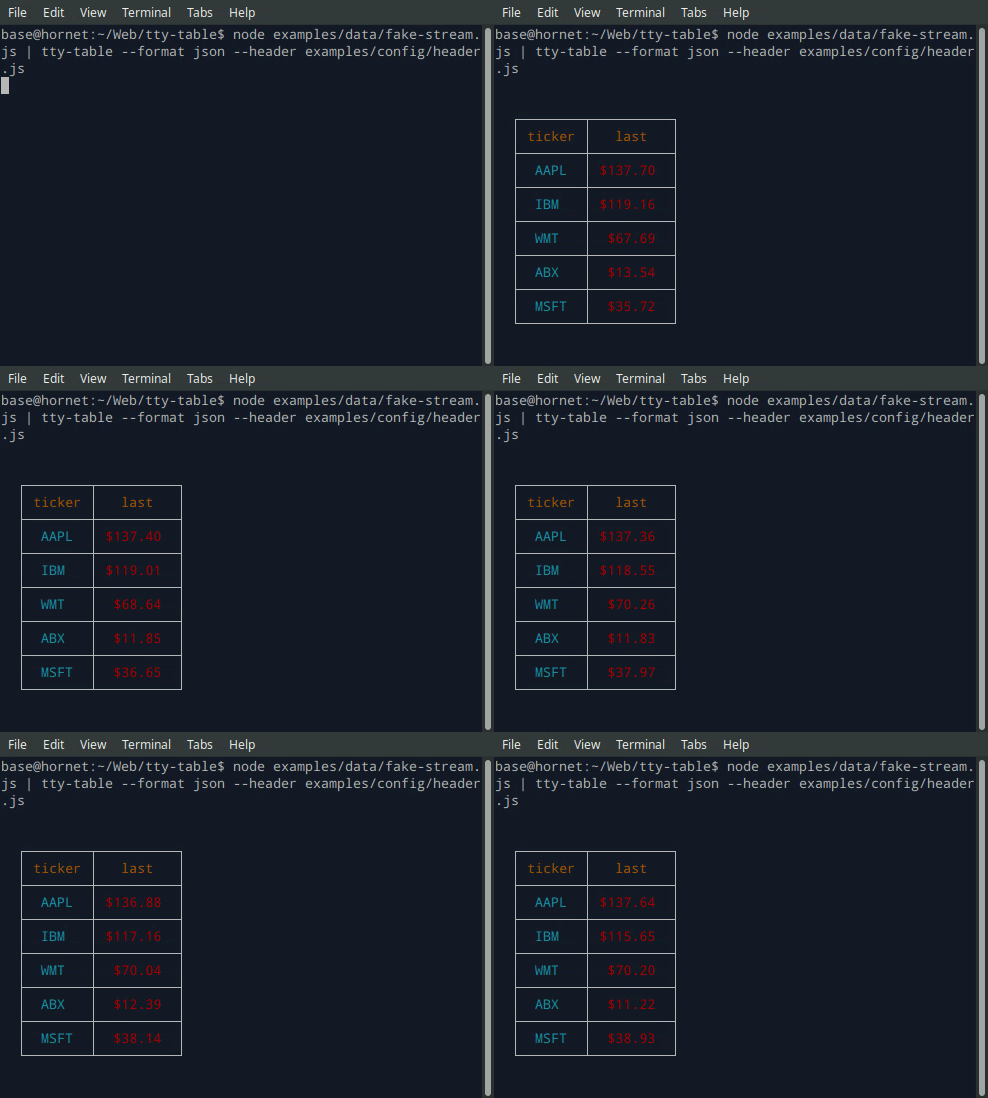
Terminal (Streaming)
$ node examples/data/fake-stream.js | tty-table --format json --header examples/config/header.js
- See the built-in help for the terminal version of tty-table with:
$ tty-table -h
MCP server
Expose tty-table to MCP clients (Claude, IDE agents, Cursor, etc.) over stdio.
Client configuration
{
  "mcpServers": {
    "tty-table": {
      "command": "npx",
      "args": ["-y", "--package=tty-table", "tty-table-mcp"]
    }
  }
}
Tools
| Tool | Description |
|---|---|
render_table |
Render data as an ASCII/Unicode terminal table. Accepts header, rows, and any tty-table options; returns the rendered table as text. |
Arguments for render_table:
| Name | Type | Required | Description |
|---|---|---|---|
header |
(string | {value, align?, width?})[] |
no | Column definitions |
rows |
(unknown[] | Record<string, unknown>)[] |
yes | Row data (arrays of cells, or objects keyed by column name) |
options |
object |
no | Any tty-table option (e.g. width, borderStyle, align, compact) |
Example tool call:
{
  "header": [{ "value": "name" }, { "value": "score", "align": "right" }],
  "rows": [["Ada", 100], ["Grace", 98]],
  "options": { "width": 40 }
}
Rendered result:
  ┌───────┬───────┐
  │ name  │ score │
  ├───────┼───────┤
  │  Ada  │   100 │
  ├───────┼───────┤
  │ Grace │    98 │
  └───────┴───────┘
Additional tools may be added in future releases under the same MCP server.
Browser & Browser Console
The published package ships a standalone IIFE bundle that exposes a TtyTable global. Load it directly from a CDN — no install or build step required:
<script src="https://cdn.jsdelivr.net/npm/tty-table@7/dist/browser/tty-table.global.js"></script>
<script>
  const Table = TtyTable.default
  console.log(Table([{ value: "name" }, { value: "score" }], [["Ada", 100]], null).render())
</script>
- Try it online before installing: live example on JSFiddle
- View the full example locally in Chrome or Chromium by opening examples/browser-example.html (e.g. served with
npx serve .or any static file server). - source: examples/browser-example.html

Compatibility
Node.js
Current releases require Node.js 22 or newer. This is a breaking change from the Node 20 baseline used by early v6 releases (and from the v5 line, which supported older Node.js releases). The floor was raised to match smartwrap@4 / breakword@2.1.0. If your application must remain on Node 20, stay on a prior tty-table release until you can upgrade.
The published package provides both ESM and CommonJS entry points for Node.js. The CLI requires Node.js 22+ as well.
API
import Table from "tty-table"

const table = Table(
  [{ value: "name" }, { value: "score", align: "right" }],
  [
    { name: "Ada", score: 100 },
    { name: "Grace", score: 98 }
  ],
  { borderStyle: "solid" }
)

console.log(table.render())
Legacy Table(header, rows, footer, options) and Table(rows, options) construction remains supported.
Formatter context
New code can use the explicit context form:
const formatter = (value: unknown) => String(value).toUpperCase()
The compatibility callback signature is still accepted. New integrations should prefer a formatter that accepts the documented context object and avoid relying on dynamic this mutation.
Width semantics
Widths are measured in terminal display columns, not JavaScript string length. ANSI escape sequences are ignored for measurement; Unicode code points are counted using breakword.width() (Unicode 18.0.0 East Asian Width + UAX #51 Emoji_Presentation). Wrapping and truncation operate on the same display-width semantics.
Compared with older releases that used wcwidth, some symbols that were previously treated as 1 cell are now 2 cells (for example ⚡ U+26A1). Tables containing those characters may reflow slightly; measurement is now aligned with the same library used for wrapping.
Development
npm install
npm run typecheck
npm run build
npm test
npm run test:unit
npm run lint
Preguntas sobre tty-table MCP
¿Qué herramientas proporciona tty-table MCP?
Expone 4 herramientas, incluidas render_table, header, rows, options.
¿Cómo puedo usar tty-table con Claude o Cursor?
Puedes exponerlo a clientes MCP como Claude, agentes de IDE o Cursor a través de stdio configurando los mcpServers en la configuración de tu cliente.
¿Qué herramientas están disponibles en el MCP server?
El servidor proporciona la herramienta render_table, que acepta encabezados, filas y varias opciones de tty-table para devolver una tabla ASCII/Unicode renderizada.
¿Qué versión de Node.js es necesaria?
Las versiones actuales requieren Node.js 22 o superior.