
MCP server de SyncSo
Commit 16 oct 2026Proporciona a los agentes de IA acceso en tiempo real a eventos en la ciudad de Nueva York, incluyendo música en vivo, teatro, clases, mercados y vida nocturna.
También conocido como SyncSo-Inc/syncso
- Stars
- 2
- Herramientas
- —
- Descargas, 30 días
- —
- Última versión
- 2.0.0
- Último commit
- 16 oct 2026
- Licencia
- MIT
¿Qué es SyncSo MCP?
SyncSo es un MCP server. Proporciona a los agentes de IA acceso en tiempo real a eventos en la ciudad de Nueva York, incluyendo música en vivo, teatro, clases, mercados y vida nocturna.
Resumen generado a partir del README del proyecto
Acerca del MCP server de SyncSo
SyncSo proporciona a los agentes de IA datos en tiempo real sobre lo que sucede localmente en la ciudad de Nueva York. Mientras que los modelos de lenguaje estándar dependen de datos de entrenamiento estáticos que funcionan como una guía, este MCP server conecta a los agentes con una base de datos en vivo de música, teatro, comedia, mercados, clases y vida nocturna. Ofrece detalles específicos como fechas, horarios, precios y enlaces de reserva para eventos que podrían no aparecer en los conjuntos de datos tradicionales.
Los desarrolladores pueden integrar este servicio en diversos entornos, incluyendo Claude Desktop, Claude Code, Cursor, Windsurf y VS Code. La conexión se establece mediante una URL de MCP remota o añadiendo un archivo de skill. Los usuarios deben iniciar sesión en syncso.com para autenticarse, y cada cuenta incluye una cuota mensual gratuita de búsquedas. El sistema utiliza dos herramientas principales, find_things_to_do y get_details, para recuperar información. Actualmente, la cobertura se limita a la ciudad de Nueva York, pero el servicio está diseñado para expandirse a más ciudades en el futuro.
Qué puedes hacer con él
- 1Planificar actividades locales para visitantesPide a un agente que busque actividades específicas para un familiar que está de visita un martes.
- 2Encontrar entretenimiento local inmediatoSolicita una lista de eventos gratuitos al aire libre que ocurran en las próximas cuatro horas.
- 3Programar salidas sociales futurasHaz que un agente busque actividades que una pareja pueda reservar con tres semanas de antelación.
- 4Descubrir eventos locales de nichoBusca eventos a pequeña escala como clases de cerámica o mercados nocturnos.
Escrito a partir del README del proyecto. Cada caso de uso se verifica con una cita del mismo.
Cómo instalar SyncSo MCP
Formatos verificados el 10 nov 2026Añadir a CursorAñadir a GooseInstalar SyncSo MCP en Claude Code
$ claude mcp add --transport http syncso https://rtdb.syncso.com/partner/mcpInstalar SyncSo MCP en Cursor
~/.cursor/mcp.json
{
  "mcpServers": {
    "syncso": {
      "url": "https://rtdb.syncso.com/partner/mcp"
    }
  }
}Instalar SyncSo MCP en VS Code
.vscode/mcp.json
{
  "servers": {
    "syncso": {
      "type": "http",
      "url": "https://rtdb.syncso.com/partner/mcp"
    }
  }
}Instalar SyncSo MCP en VS Code CLI
$ code --add-mcp '{"name":"syncso","type":"http","url":"https://rtdb.syncso.com/partner/mcp"}'Instalar SyncSo MCP en Codex
$ codex mcp add syncso --url https://rtdb.syncso.com/partner/mcpInstalar SyncSo MCP en Codex config.toml
~/.codex/config.toml
[mcp_servers.syncso]
url = "https://rtdb.syncso.com/partner/mcp"
Instalar SyncSo MCP en Gemini CLI
$ gemini mcp add -s user --transport http syncso https://rtdb.syncso.com/partner/mcpInstalar SyncSo MCP en Gemini settings.json
~/.gemini/settings.json
{
  "mcpServers": {
    "syncso": {
      "url": "https://rtdb.syncso.com/partner/mcp",
      "type": "http"
    }
  }
}Verificaciones automáticas
Ejecutado 14 nov 2026Informe completo →Aún no verificado. Un servidor necesita una puntuación de 80, ningún hallazgo grave y suficientes datos para que podamos revisarlo. Cómo funcionan las verificaciones · Qué corregir para obtener más puntos

- Repositorio de origen vinculado y accesiblesyncso-inc/syncso is public and reachablegithub.com/syncso-inc/syncso ↗Aprobado
- El paquete indica este repositorio como su origenNo verificado
- Procedencia de la compilación (atestación de Sigstore)No verificado
- Licencia de código abierto (OSI)MITspdx.org/licenses/MIT.html ↗Aprobado
- Commit o lanzamiento en el último añoLast commit or release 2026-10-16github.com/syncso-inc/syncso ↗Aprobado
- OpenSSF ScorecardNo verificado
- El nombre del paquete no es similar a un paquete popularNo verificado
- No hay avisos críticos en el paquete ni en sus dependenciasNo verificado
- Sin instrucciones ocultas para el modelo0 tool descriptions and the README read; no override phrases, credential paths or hidden charactersAprobado
- Las herramientas destructivas están etiquetadasNo verificado
- El endpoint remoto responde al handshake de MCPHTTPS endpoint answered 401 (sign-in required)Aprobado
README
Ver en GitHubSyncSo
Let your agents understand what's happening locally, in real time.
Ask a model what to do in New York and it names the Whitney. It is not wrong. It is just answering from a guidebook, because that is what it has — a city as a list of places, frozen whenever the training run ended.
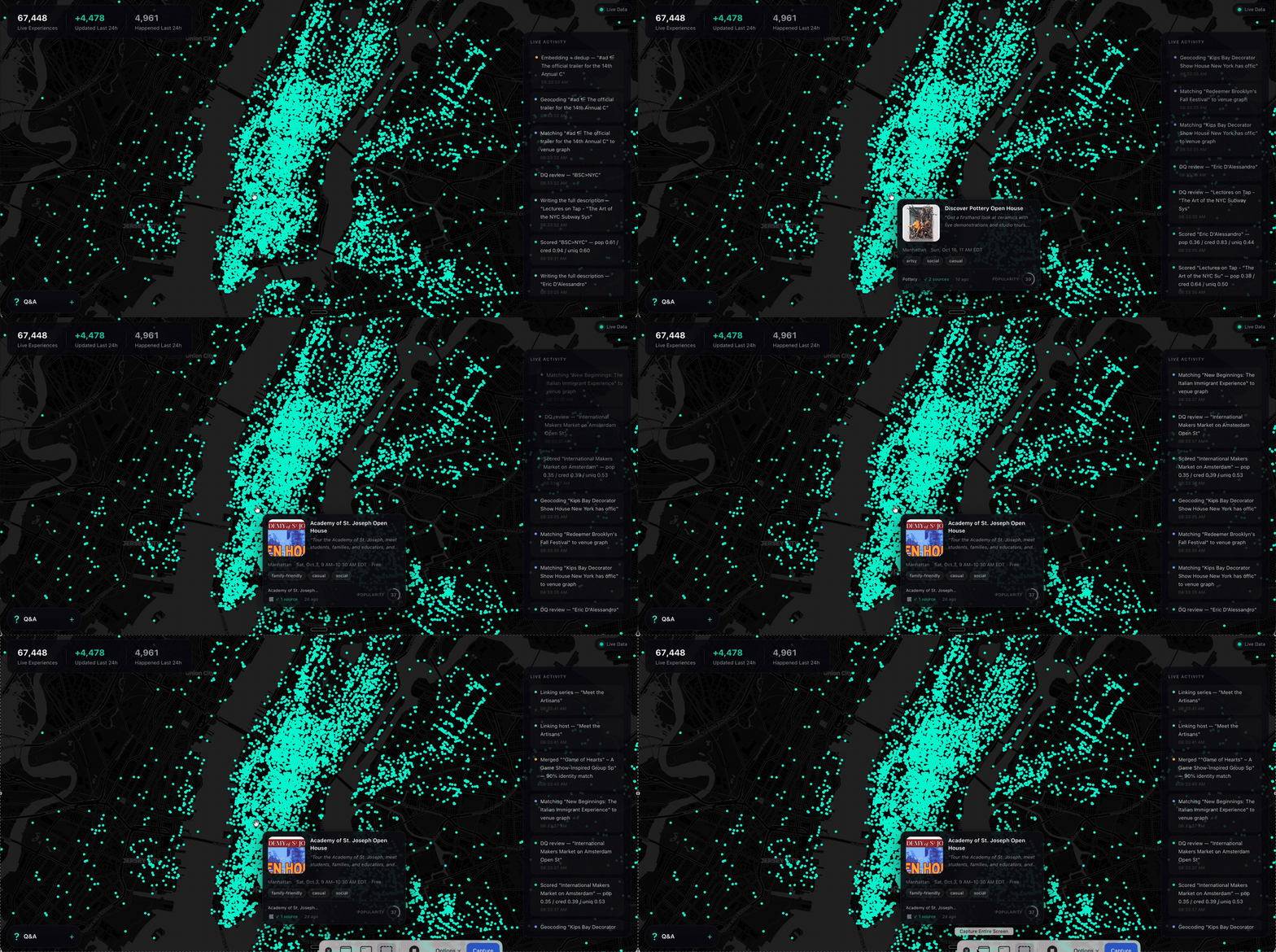
What it does not have is everything going on inside those places, and the thousand rooms that never make a guidebook. The Tuesday gig. The pottery class with two seats left. The night market under the bridge. Your model has never heard of any of it.
SyncSo is that missing half: live music, theater, comedy, film, art, sports, festivals, markets, food and drink, classes, tours, nightlife — the whole surface of a city, each thing carrying its dates, times, prices, booking links and images. Not one category. Not the famous parts.
Which means your agent can finally take the questions it used to hand back. Where to take a visiting parent on a Tuesday. What a couple could book three weeks out. What is free, outdoors, and happening in the next four hours. Real answers, with a link to book them.
Install
One catalogue, two doors. Assistants that speak MCP connect to
https://rtdb.syncso.com/partner/mcp. Anything else reads the skill file at
https://syncso.com/SKILL.md. Both open the same account: the first search
asks the person to sign in once at syncso.com, and every account starts with
a free monthly allowance of searches.
Claude
In Claude.ai or the Claude desktop app: Settings → Connectors → Add custom connector, paste the MCP URL, and ask. Claude also lists SyncSo in its directory, where it is one click.
In Claude Code, connect the MCP server:
claude mcp add --transport http syncso https://rtdb.syncso.com/partner/mcp
or install the skill as a plugin, which keeps itself current:
claude plugin marketplace add SyncSo-Inc/syncso
claude plugin install syncso@syncso
ChatGPT
Coming to the ChatGPT app directory. Until it is listed: Settings → Apps & Connectors → Advanced → Developer mode, add a connector, paste the MCP URL. Developer mode is not available on every plan.
Cursor, Windsurf, VS Code and other MCP clients
Add SyncSo to the client's MCP configuration:
{
  "mcpServers": {
    "syncso": { "url": "https://rtdb.syncso.com/partner/mcp" }
  }
}
OpenClaw
openclaw skills install @liangstl/syncso
Also on ClawHub, where
clawhub install syncso does the same.
Coding agents that read skill folders
Claude Code, Codex, Cursor, Copilot and the rest, one command:
npx skills add SyncSo-Inc/syncso
Anything else
Tell your assistant:
Set up SyncSo from https://syncso.com/SKILL.md
The file carries the guidance and the tool definitions, works with anything that can call a tool and make an HTTPS request, and the copy at that URL is always the current one. A person using it gets their sign-in code at syncso.com/connect.
Two tools do the work, find_things_to_do and get_details. That is the
whole surface.
Coverage
New York only, for now. More cities over the coming months.
Within it, everything: every category above, from the institutions down to the one-night thing in a room above a bar. Ask about anywhere else and the skill tells your model to say so rather than invent an answer — the same refusal to guess that makes the New York answers worth trusting.
Links
- syncso.com — what SyncSo is
- syncso.com/connect — where your user gets their code
- syncso.com/SKILL.md — the skill itself, always the current copy (also in this repo)
Questions
Something missing, wrong, or not working the way this page says? Open an issue, or email hello@syncso.com. And if there is a city you want open, tell us.
License
MIT. See LICENSE.
Preguntas sobre SyncSo MCP
¿Cómo agrego SyncSo MCP a Claude Code?
Ejecuta claude mcp add --transport http syncso https://rtdb.syncso.com/partner/mcp en tu terminal. Añade --scope user para que esté disponible en todos los proyectos.
¿Cómo agrego SyncSo MCP a Cursor?
Abre ~/.cursor/mcp.json y añade el servidor en mcpServers, usando la configuración de Cursor que se muestra en la sección de instalación de arriba.
¿Qué zonas cubre SyncSo?
Actualmente, el servicio solo cubre Nueva York, con más ciudades previstas para los próximos meses.
¿Cuánto cuesta usarlo?
Cada cuenta incluye una cuota mensual gratuita de búsquedas.
¿Qué tipo de información puedo encontrar?
Puedes encontrar detalles sobre música en vivo, teatro, comedia, cine, arte, deportes, festivales, mercados, comida, bebidas, clases, tours y vida nocturna.