
MCP server de Screen Browser
Commit 13 nov 2026Permite que los agentes de programación graben videos de demostración y tutoriales narrados de aplicaciones web siguiendo guías de recorrido generadas automáticamente.
También conocido como screenbrowser/skill, skill
- Stars
- 3
- Herramientas
- —
- Descargas, 30 días
- —
- Última versión
- 1.3.18
- Último commit
- 13 nov 2026
- Licencia
- MIT
¿Qué es Screen Browser MCP?
Screen Browser es un MCP server. Permite que los agentes de programación graben videos de demostración y tutoriales narrados de aplicaciones web siguiendo guías de recorrido generadas automáticamente.
Resumen generado a partir del README del proyecto
Acerca del MCP server de Screen Browser
Screen Browser permite que los agentes de programación generen tutoriales en video narrados y demostraciones de aplicaciones web. Al leer un codebase local, un agente puede escribir guías de recorrido que utilizan el texto real de los botones y campos. Luego, el servidor graba una sesión de navegador real siguiendo estas instrucciones en una URL desplegada, produciendo un archivo MP4 completo con subtítulos, capítulos y efectos en pantalla.
Este servicio funciona con varios clientes MCP, incluyendo Claude Code, Cursor, Codex y GitHub Copilot. Los usuarios pueden autenticarse mediante un flujo OAuth basado en el navegador o proporcionando una API key como bearer token. El servidor está alojado en mcp.screenbrowser.com y gestiona tareas como la creación de proyectos, la carga de guías, el inicio de ejecuciones y la obtención de videos terminados. Soporta grabaciones para diferentes dispositivos como iPhone, Android o iPad en varias relaciones de aspecto.
Para usar esto, debes proporcionar una URL desplegada y una cuenta de usuario de demostración que utilice autenticación por email y contraseña. El agente lee tu repositorio localmente para entender la interfaz de usuario, pero solo envía el texto de la guía generada al servidor. Los videos tienen un límite de cinco minutos de duración.
Qué puedes hacer con él
- 1Generar tutoriales de funcionesPide a tu agente de programación que cree un recorrido en video de una nueva función específica en tu aplicación.
- 2Automatizar actualizaciones de documentaciónCuando el código de tu aplicación cambia, puedes actualizar rápidamente tus guías de video editando una sola línea.
- 3Validar pasos de recorridoRevisa las instrucciones escritas de una guía de forma gratuita antes de comprometerte con una grabación de video completa.
Escrito a partir del README del proyecto. Cada caso de uso se verifica con una cita del mismo.
Cómo instalar Screen Browser MCP
Formatos verificados el 10 nov 2026Añadir a CursorAñadir a GooseInstalar Screen Browser MCP en Claude Code
$ claude mcp add --transport http skill https://mcp.screenbrowser.com/Instalar Screen Browser MCP en Cursor
~/.cursor/mcp.json
{
  "mcpServers": {
    "skill": {
      "url": "https://mcp.screenbrowser.com/"
    }
  }
}Instalar Screen Browser MCP en VS Code
.vscode/mcp.json
{
  "servers": {
    "skill": {
      "type": "http",
      "url": "https://mcp.screenbrowser.com/"
    }
  }
}Instalar Screen Browser MCP en VS Code CLI
$ code --add-mcp '{"name":"skill","type":"http","url":"https://mcp.screenbrowser.com/"}'Instalar Screen Browser MCP en Codex
$ codex mcp add skill --url https://mcp.screenbrowser.com/Instalar Screen Browser MCP en Codex config.toml
~/.codex/config.toml
[mcp_servers.skill]
url = "https://mcp.screenbrowser.com/"
Instalar Screen Browser MCP en Gemini CLI
$ gemini mcp add -s user --transport http skill https://mcp.screenbrowser.com/Instalar Screen Browser MCP en Gemini settings.json
~/.gemini/settings.json
{
  "mcpServers": {
    "skill": {
      "url": "https://mcp.screenbrowser.com/",
      "type": "http"
    }
  }
}Verificaciones automáticas
Ejecutado 14 nov 2026Informe completo →Aún no verificado. Un servidor necesita una puntuación de 80, ningún hallazgo grave y suficientes datos para que podamos revisarlo. Cómo funcionan las verificaciones · Qué corregir para obtener más puntos

- Repositorio de origen vinculado y accesiblescreenbrowser/skill is public and reachablegithub.com/screenbrowser/skill ↗Aprobado
- El paquete indica este repositorio como su origenNo verificado
- Procedencia de la compilación (atestación de Sigstore)No verificado
- Licencia de código abierto (OSI)MITspdx.org/licenses/MIT.html ↗Aprobado
- Commit o lanzamiento en el último añoLast commit or release 2026-11-13github.com/screenbrowser/skill ↗Aprobado
- OpenSSF ScorecardNo verificado
- El nombre del paquete no es similar a un paquete popularNo verificado
- No hay avisos críticos en el paquete ni en sus dependenciasNo verificado
- Sin instrucciones ocultas para el modelo0 tool descriptions and the README read; no override phrases, credential paths or hidden charactersAprobado
- Las herramientas destructivas están etiquetadasNo verificado
- El endpoint remoto responde al handshake de MCPHTTPS endpoint answered 401 (sign-in required)Aprobado
README
Ver en GitHubScreen Browser skill
Narrated demo and tutorial videos of your web app, from a guide or your coding agent.
Ask the agent that knows your codebase for a tutorial video of a feature. It writes the walkthrough in the words your buttons and fields use, Screen Browser records a real browser following it against your deployed app, narrates it, adds the on-screen effects, and the agent hands you the MP4 with a GIF, subtitles and chapters. When the app changes, edit a line and ask again.
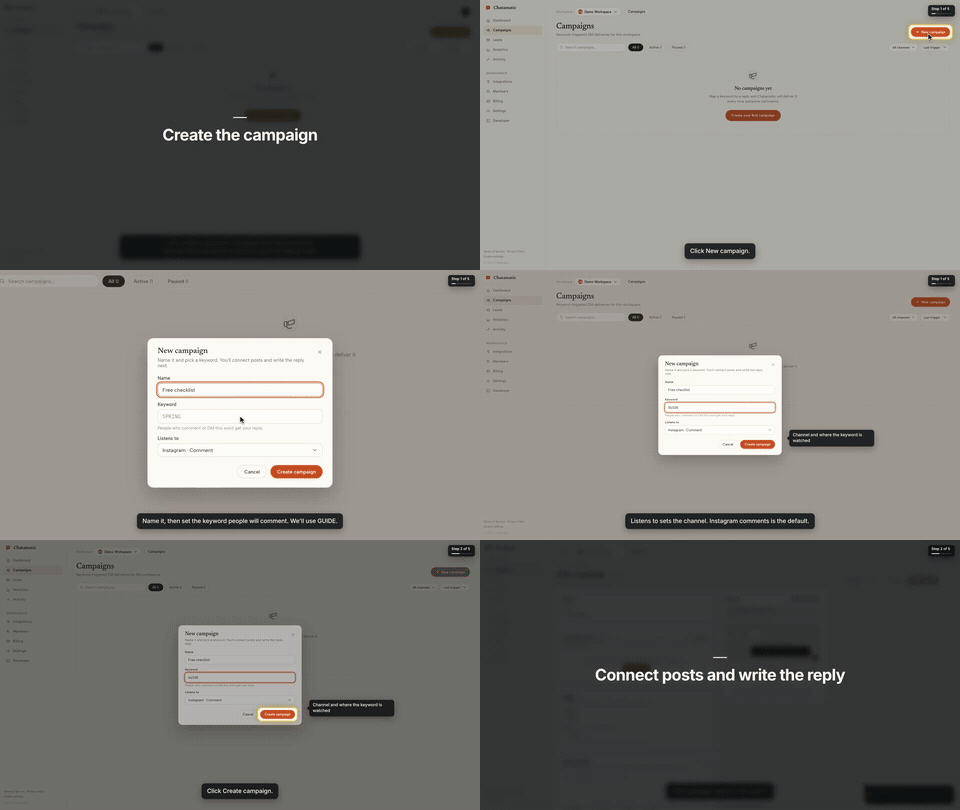
That is the first chapter of a 66-second video made from the request "make a tutorial video of creating a campaign". The whole session, from that sentence to the finished video with the exact prompt and every screen along the way, is in the Claude Code guide.
This repository gives your agent two things:
- The
screenbrowserskill — how to read your codebase and write the two guides Screen Browser needs (the login flow and the walkthrough), which effect fits which moment, how to check a guide for free before recording, and how to review the video before handing it over. - The MCP server configuration — the tools the agent calls: create the project, upload guides,
check them, start the run, poll it, fetch the video. The server itself is part of your Screen
Browser account at
https://mcp.screenbrowser.com.
Claude Code, Codex, Cursor or any MCP client can use it. Sign-in happens in the browser; there is no key to paste.
Install (Claude Code)
Add this repository as a plugin marketplace and install the plugin:
claude plugin marketplace add screenbrowser/skill
claude plugin install screenbrowser@screenbrowser
The first time the agent reaches for a Screen Browser tool, Claude Code opens your browser: sign in
to Screen Browser, approve the connection, and you are done. Nothing to copy. (If it does not
prompt, run /mcp and pick screenbrowser → Authenticate.)
Without the plugin system, register the server yourself and copy the skill:
claude mcp add --transport http screenbrowser https://mcp.screenbrowser.com
cp -r skills/screenbrowser ~/.claude/skills/
With an API key instead
If your agent cannot open a browser to sign in, create a key under Settings → API keys in Screen Browser and pass it as a bearer token:
claude mcp add --transport http screenbrowser https://mcp.screenbrowser.com \
  --header "Authorization: Bearer <your API key>"
Any MCP client works the same way: Streamable HTTP at https://mcp.screenbrowser.com, OAuth 2.1 with
dynamic client registration for interactive sign-in, or Authorization: Bearer <key>.
Other agents
The skill is a plain SKILL.md in the open Agent Skills format, and the server is standard MCP over
HTTP, so the same two pieces work outside Claude Code.
Cursor, VS Code, GitHub Copilot and other Agent Plugins clients — this repository is also an
Agent Plugins package (plugin.json, mcp.json, skills/), so
install it as a plugin from the repository URL and sign in when the client offers. Cursor without
the plugin: add the server to .cursor/mcp.json (or the global one in Cursor settings), click
Sign in next to it, and copy the skill into .cursor/skills/:
{
  "mcpServers": {
    "screenbrowser": { "url": "https://mcp.screenbrowser.com" }
  }
}
mkdir -p .cursor/skills && cp -r skills/screenbrowser .cursor/skills/
OpenAI Codex CLI — add the server to ~/.codex/config.toml, sign in once, and copy the skill
into Codex's skills folder:
[mcp_servers.screenbrowser]
url = "https://mcp.screenbrowser.com"
codex mcp login screenbrowser
mkdir -p ~/.codex/skills && cp -r skills/screenbrowser ~/.codex/skills/
Anything else (Gemini CLI, Windsurf, a custom agent) — register an HTTP MCP server with the URL
the way that tool documents it; a client that supports OAuth will sign you in, one that does not
takes the API key as an Authorization: Bearer header. Give the agent skills/screenbrowser/SKILL.md
as instructions (paste it, or point the tool's rules file at it). The MCP server itself also carries
the guide syntax as a resource and a write-tutorial-guide prompt, so a client with MCP prompts can
work without the skill file at all.
Use
Videos can be recorded on the desktop or as a phone or tablet (device: iphone, android, ipad,
…), in a phone frame on a vertical 9:16 or widescreen 16:9 canvas or as the bare screen; one run is
one device.
Open your app's repository in Claude Code and ask:
Make a tutorial video of creating a campaign.
The agent will check credits, create the project (it will ask you for the deployed URL, a demo user, and the legal attestation), write the guides from your routes and templates, validate them, show them to you, start the run, and give you the video link a few minutes later.
The MCP server also ships a get_guide_instructions tool with the same writing rules, for clients
without this skill, a write-tutorial-guide prompt that walks any client through the same flow, and
two resources: screenbrowser://guide-syntax and screenbrowser://example-guides.
What your app needs
- A demo user that signs in with email and password: no OAuth, no 2FA, no captcha. Seed it with realistic data.
- The deployed URL to record (staging is fine) and every host the app talks to (API subdomain, auth provider, CDN). An app that only runs on your computer works through a tunnel: ngrok or Cloudflare Tunnel (how).
- Confirmation that you are allowed to record the app (yours, a client's with permission, or an internal tool).
What it sends, and where
Everything the plugin does goes to one place: the Screen Browser MCP server at
https://mcp.screenbrowser.com, over HTTPS, signed in with your Screen Browser account. The
skill itself is instructions for the agent; it runs nothing on your machine and fetches nothing.
What the agent sends to Screen Browser when you ask for a video:
- the project's settings: your app's URL, the hosts it talks to, the sign-in check, narration language and voice;
- the guides it writes from your code: plain sentences naming buttons and fields as they appear on screen. Read them before they are saved; the agent shows them to you;
- the demo user's credentials, as project variables. Screen Browser stores them encrypted, uses them only to sign in during a recording, and never returns them through any tool. Values you give the agent pass through its conversation; to keep them out of chat, set them on the project's page in the Screen Browser dashboard instead;
- run commands: start, poll, cancel, and, only if you agree, a failure report with the recorder's screenshot and logs of a run that failed on Screen Browser's side.
It never sends your source code. The agent reads your repository locally to learn the labels; only the guide text leaves the machine. Nothing is sent to any other service. What Screen Browser keeps, and for how long, is in the privacy policy.
What it costs
Plans start at $49 a month, sized in minutes of finished video. Checking a guide before recording is free, and a run that fails is not charged. Videos are capped at five minutes. There is no free plan, but the first 100 accounts get 10 free minutes with no card. Current prices are on the pricing page.
Layout
plugin.json                        Agent Plugins manifest (Cursor, VS Code, Copilot, …)
mcp.json                           Agent Plugins MCP config (the URL; sign-in is OAuth)
.claude-plugin/plugin.json         Claude Code plugin manifest
.claude-plugin/marketplace.json    lets this repo act as its own Claude Code marketplace
.mcp.json                          Claude Code MCP server config
skills/screenbrowser/SKILL.md      the skill
skills/screenbrowser/references/   guide syntax reference, worked example
examples/chatamatic/               a real auth guide + main guide pair
What a guide looks like
Plain language, one step per line, naming things as they appear on screen. Screen Browser turns it into the script — the narration, the highlights, the pacing — and resolves each step against the live page:
Go to https://app.acme.test/campaigns
"Let's create a spring promotion."
Click "New campaign"
Type "Spring promo" into the Name field
Click "Save"
Confirm text "Campaign created" is visible
Ids and name= attributes are allowed when a step needs precision; class names generated by a build
tool are refused. The full reference, including the optional effect directives, is in
skills/screenbrowser/references/guide-syntax.md.
Documentation index for AI agents
The skill carries everything an agent needs to write a guide and run a recording. For anything else — prerequisites, costs, limitations, the API — https://screenbrowser.com/llms.txt is a Markdown index of the public documentation, and https://screenbrowser.com/docs/agents/ is the reference for this integration.
Support
Issues and ideas about the skill are welcome in this repository. Anything about your account or a particular recording: use the contact form at https://screenbrowser.com/contact/.
License
MIT. Screen Browser itself is a hosted service; this repository contains only the agent-facing skill, configuration and examples.
Preguntas sobre Screen Browser MCP
¿Cómo agrego Screen Browser MCP a Claude Code?
Ejecuta claude mcp add --transport http skill https://mcp.screenbrowser.com/ en tu terminal. Añade --scope user para que esté disponible en todos los proyectos.
¿Cómo agrego Screen Browser MCP a Cursor?
Abre ~/.cursor/mcp.json y añade el servidor en mcpServers, usando la configuración de Cursor que se muestra en la sección de instalación de arriba.
¿El servidor envía mi código fuente a Screen Browser?
No, el agente lee tu repositorio localmente para aprender las etiquetas, pero nunca envía tu código fuente al servicio.
¿Cuáles son los requisitos para mi aplicación web?
Tu aplicación necesita un usuario de demostración con inicio de sesión por email/contraseña (sin 2FA ni captcha), una URL desplegada, y todos los hosts asociados (API, auth, CDN) deben ser accesibles.
¿Hay algún plan gratuito disponible?
No hay un plan gratuito permanente, pero las primeras 100 cuentas reciben 10 minutos gratuitos, y revisar una guía antes de grabar es gratis.