
MCP server de ArchScript
Commit 11 nov 2026Permite que un cliente de IA planifique, edite y revise diagramas de arquitectura de software utilizando arquitectura como código en la aplicación ArchScript para Mac.
También conocido como schlummer13/archscript-mcp, archscript-mcp
- Stars
- 0
- Herramientas
- —
- Descargas, 30 días
- —
- Última versión
- 1.0.0
- Último commit
- 11 nov 2026
- Licencia
- MIT
¿Qué es ArchScript MCP?
ArchScript es un MCP server. Permite que un cliente de IA planifique, edite y revise diagramas de arquitectura de software utilizando arquitectura como código en la aplicación ArchScript para Mac.
Resumen generado a partir del README del proyecto
Acerca del MCP server de ArchScript
ArchScript MCP conecta clientes de IA como Claude Desktop y Claude Code con la aplicación ArchScript para Mac. Permite que un asistente de IA gestione la arquitectura de software mediante un enfoque de arquitectura como código. En lugar de reescribir archivos completos, el asistente utiliza operaciones estructuradas para añadir, renombrar o mover elementos como clusters, servidores y contenedores. Este método preserva tus comentarios y formato actuales mientras proporciona actualizaciones en vivo al diagrama renderizado.
Los usuarios deben tener instalado ArchScript para Mac en macOS 14+ para usar este servidor de uso exclusivo local. La configuración requiere habilitar el ajuste del asistente de IA dentro de la aplicación para generar un token de acceso personal para la autenticación. El servidor opera en localhost y no recopila telemetría, lo que garantiza que tus datos de arquitectura permanezcan privados. El conjunto de herramientas incluye funciones específicas para validar modelos contra reglas, revisar puntuaciones de arquitectura y exportar diseños a formatos como Terraform, Mermaid o PlantUML.
Qué puedes hacer con él
- 1Revisión de arquitectura automatizadaPide a la IA que analice el diseño actual de tu sistema para identificar cualquier violación de las reglas de arquitectura establecidas.
- 2Expansión iterativa del sistemaInstruye al asistente para añadir nuevos componentes, como workers en segundo plano o contenedores específicos, a tu infraestructura existente.
- 3Generación de código de infraestructuraSolicita la conversión de tu modelo de arquitectura visual en código Terraform funcional para el despliegue en la nube.
- 4Prototipado rápidoHaz que la IA genere una arquitectura completa de microservicios o basada en eventos a partir de una simple descripción de texto.
Escrito a partir del README del proyecto. Cada caso de uso se verifica con una cita del mismo.
Configuración
ARCHSCRIPT_TOKENObligatorioSecretoAccess token from ArchScript → Settings → AI
| Nombre | Descripción | Tipo |
|---|---|---|
| ARCHSCRIPT_TOKEN | Access token from ArchScript → Settings → AI | ObligatorioSecreto |
Verificaciones automáticas
Ejecutado 14 nov 2026Informe completo →Aún no verificado. Un servidor necesita una puntuación de 80, ningún hallazgo grave y suficientes datos para que podamos revisarlo. Cómo funcionan las verificaciones

- Repositorio de origen vinculado y accesibleschlummer13/archscript-mcp is public and reachablegithub.com/schlummer13/archscript-mcp ↗Aprobado
- El paquete cita este repositorio como fuenteNo verificado
- Procedencia de la compilación (atestación Sigstore)No verificado
- Licencia de código abierto (OSI)MITspdx.org/licenses/MIT.html ↗Aprobado
- Commit o lanzamiento en el último añoLast commit or release 2026-11-11github.com/schlummer13/archscript-mcp ↗Aprobado
- OpenSSF ScorecardNo verificado
- El nombre del paquete no es similar a un paquete popularNo verificado
- Sin avisos críticos en el paquete ni en sus dependenciasNo verificado
- Sin instrucciones ocultas para el modelo0 tool descriptions and the README read; no override phrases, credential paths or hidden charactersAprobado
- Las herramientas destructivas están etiquetadasNo verificado
- El endpoint remoto responde al handshake MCPNo verificado
README
Ver en GitHub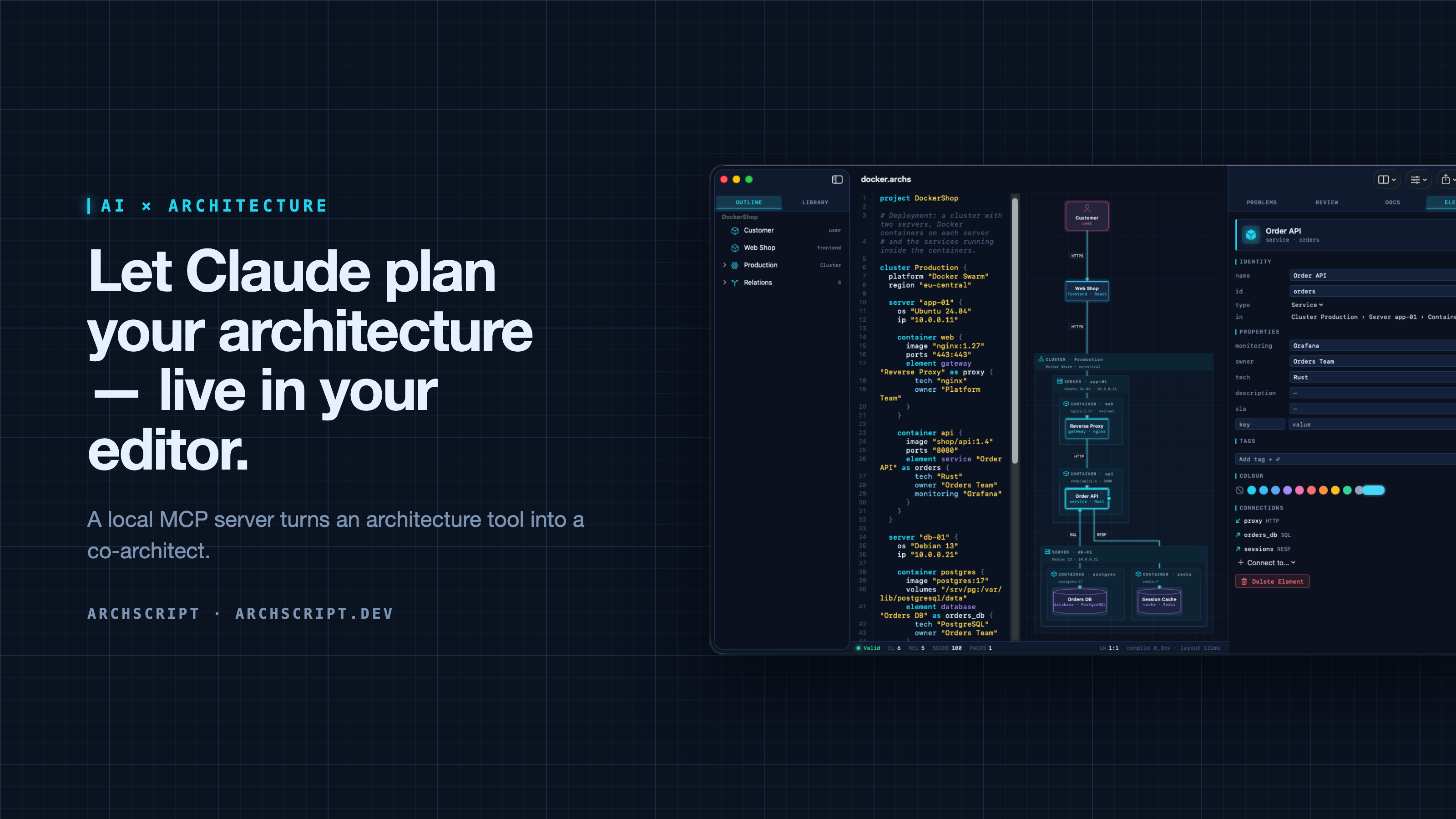
ArchScript is an architecture-as-code tool. You describe a system — domains, services, databases, queues, and deployments as cluster → server → Docker container — in a small language. ArchScript draws the diagram, checks the model against architecture rules and exports documentation, a PDF report, Mermaid, PlantUML and Terraform.
ArchScript for Mac includes an MCP server. Claude Desktop, Claude Code and other MCP clients can read the architectures you have open, change them with precise, structured edits, validate them and look at the rendered diagram. Every change appears live in the window and can be undone.
This repository contains the documentation, configuration examples, example models and a small open-source stdio bridge (
server/) for the ArchScript MCP server. ArchScript itself is a closed-source app, available on the Mac App Store. The browser Playground is free.
What Claude can do
| Tool | What it does |
|---|---|
archscript_guide |
Learns the language, element types and rules |
list_documents |
Lists the open documents (id, name, validity) |
get_document |
Reads a document with line numbers and a structure outline |
create_document |
Creates a new architecture from ArchScript source |
set_document_source |
Replaces a document's source |
edit_document |
Structured edits: add, rename, move and delete elements, relations and containers, and set properties, tags and colours |
validate |
Returns diagnostics |
review |
Returns the review score, grade and rule findings |
render_diagram |
Returns the diagram as an image, so the assistant can see the result |
export |
Exports Mermaid, PlantUML, Markdown, JSON or Terraform |
The assistant doesn't rewrite your file. It sends small operations (for example
add_element into cluster:Production/server:app-01/container:api). The
ArchScript core turns those into minimal text edits, so comments and formatting
stay intact. After each change the assistant gets the validation result and
review score back, the same feedback loop a human architect uses.
Example prompts
- "Read my architecture and tell me which rules it violates."
- "Add a background worker that sends order emails. Put it in its own container on app-01 and connect the Order API to it."
- "Create an event-driven architecture for a ticket shop with a payment provider and a read model."
- "Export the current model as Terraform for AWS and list what wasn't mapped."
Setup
Requirements: ArchScript for Mac (macOS 14+) with ArchScript Pro (14-day free trial).
- Open ArchScript → Settings → AI and turn on Allow AI assistants (MCP).
- Copy the snippet for your client from that screen. It already contains your personal access token.
Claude Desktop: one-click install (recommended)
- Download archscript.mcpb from the latest release.
- Double-click it, or drag it into Claude Desktop → Settings → Extensions.
- Paste the access token from ArchScript → Settings → AI.
The extension contains no ArchScript code. It holds a manifest and a small
launcher script (mcpb/server/archscript-mcp)
that finds ArchScript for Mac and starts its bundled helper.
Claude Code
claude mcp add --transport http archscript http://127.0.0.1:47621/mcp \
  --header "Authorization: Bearer <token from Settings → AI>"
Claude Desktop (manual)
Add the snippet to claude_desktop_config.json, then restart Claude:
{
  "mcpServers": {
    "archscript": {
      "command": "/Applications/ArchScript.app/Contents/MacOS/archscript-mcp",
      "args": ["--token", "<token from Settings → AI>", "--port", "47621"]
    }
  }
}
The bundled archscript-mcp helper bridges stdio to the app and starts
ArchScript when Claude needs it.
Other MCP clients
Any client that supports Streamable HTTP can connect to
http://127.0.0.1:47621/mcp with the header Authorization: Bearer <token>.
Clients that only support stdio can use the helper as shown above, or the
open-source Node bridge in server/ (Node 18+, no dependencies):
{
  "mcpServers": {
    "archscript": {
      "command": "node",
      "args": ["/path/to/archscript-mcp/server/index.js"],
      "env": { "ARCHSCRIPT_TOKEN": "<token from Settings → AI>" }
    }
  }
}
Privacy and security
- Local only. The server listens on
127.0.0.1and is never reachable from the network. - Token required. Every request needs your access token. You can regenerate it at any time in Settings → AI.
- Off by default. Nothing runs until you turn it on.
- No telemetry. ArchScript collects no data and sends nothing anywhere. Your AI client only sees what it reads through the tools.
- The helper is sandboxed and only forwards stdio to the local server.
Screenshots
| Visual editing | Review and rules |
|---|---|
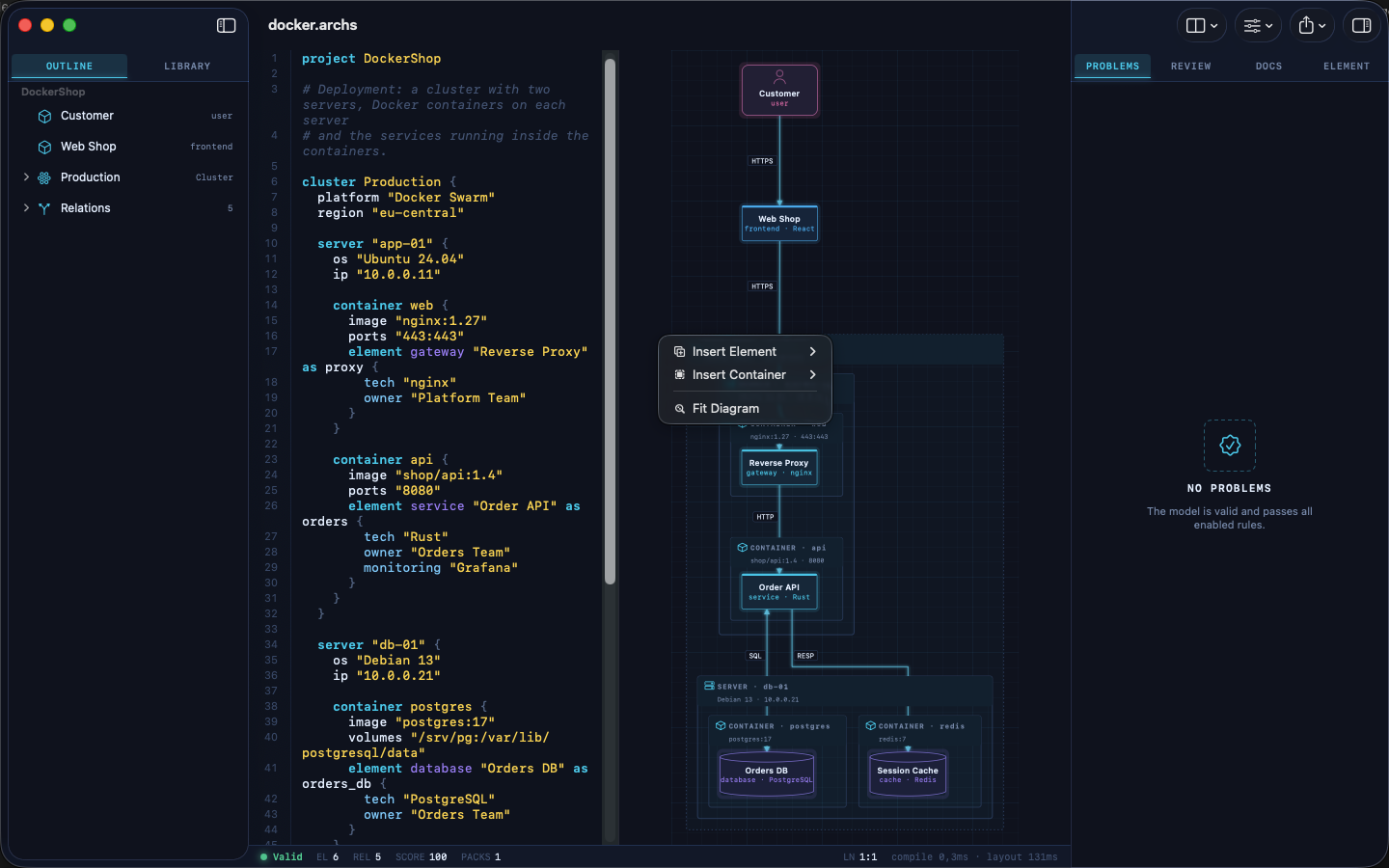 |
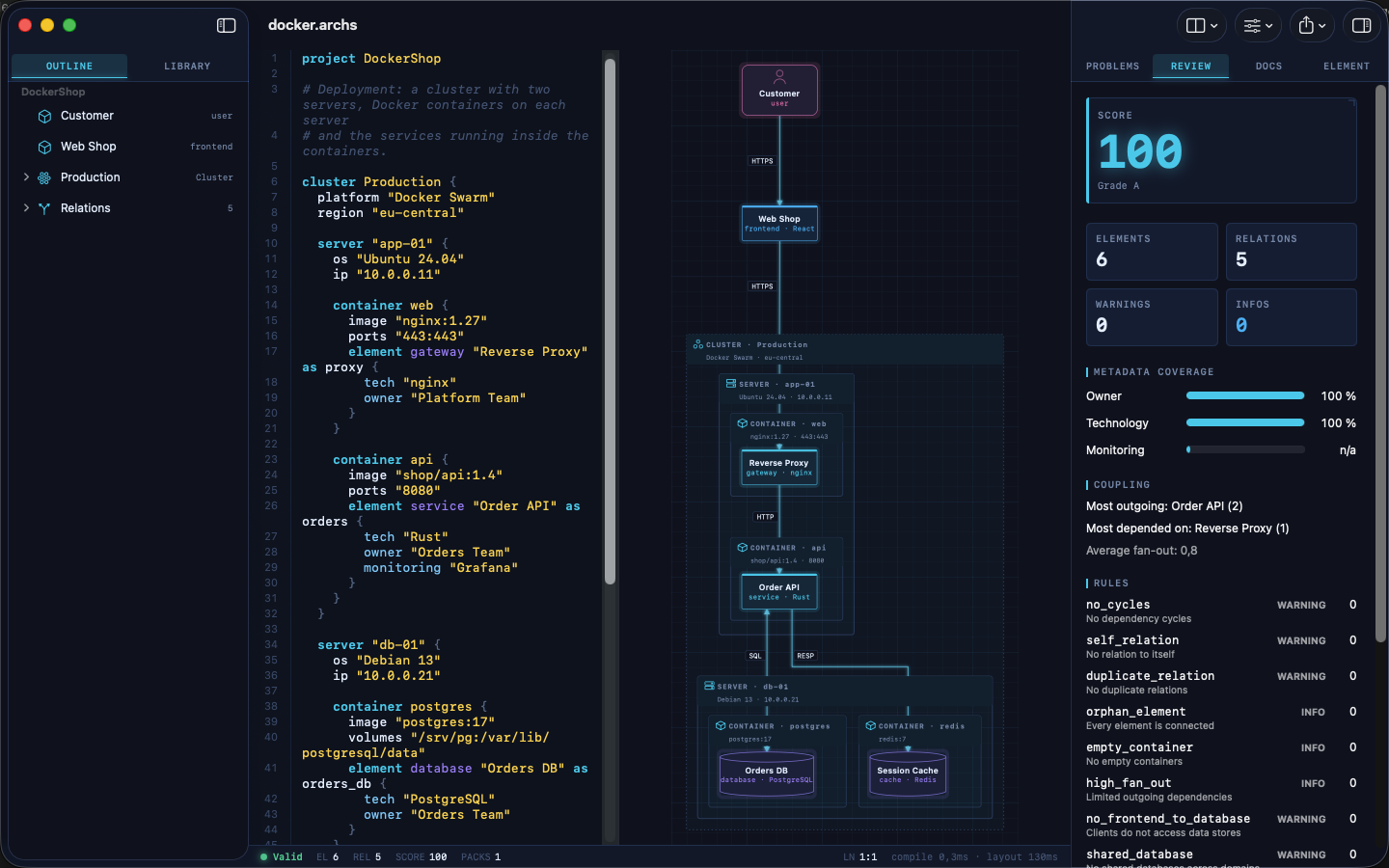 |
| Inspector | Element library |
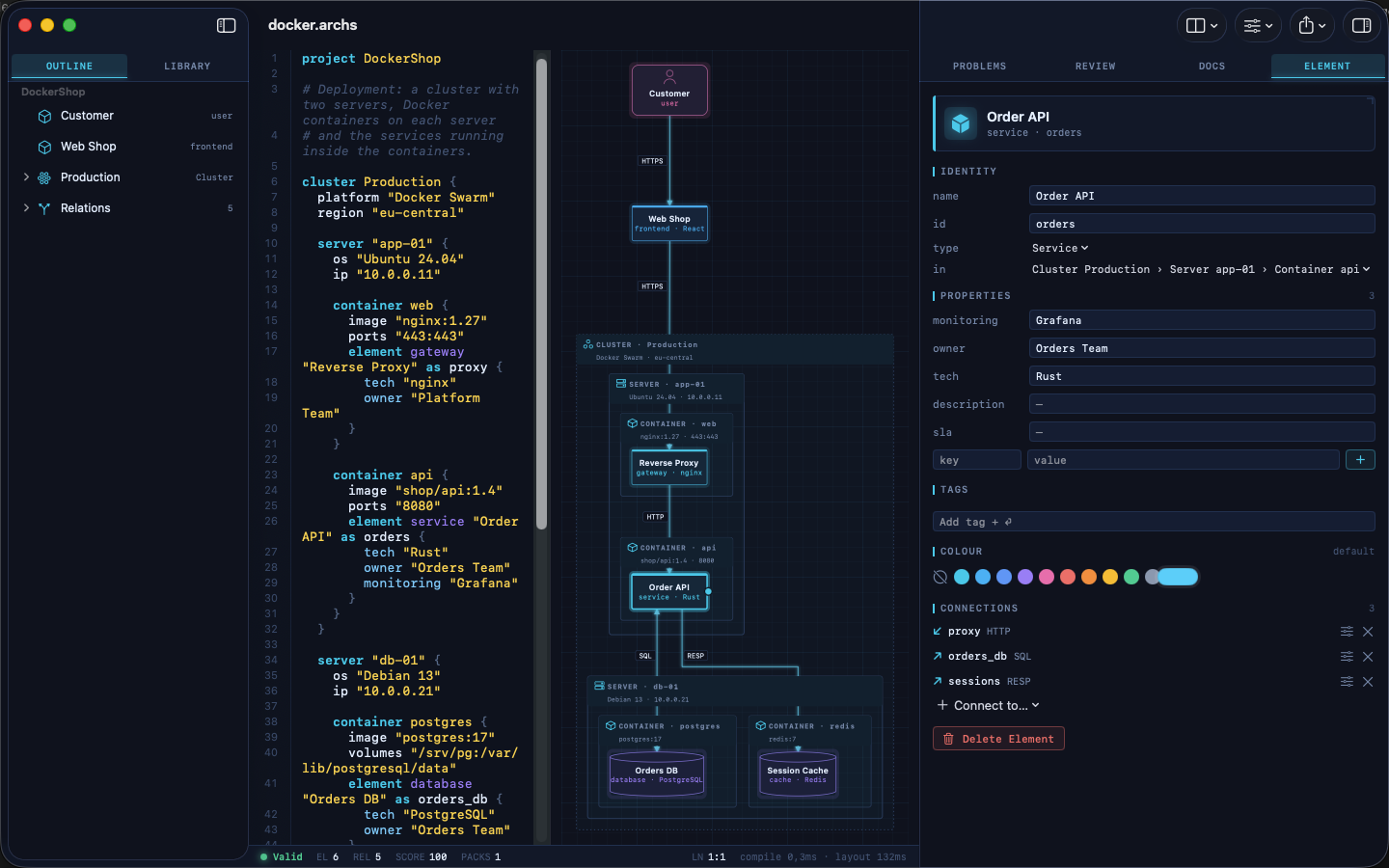 |
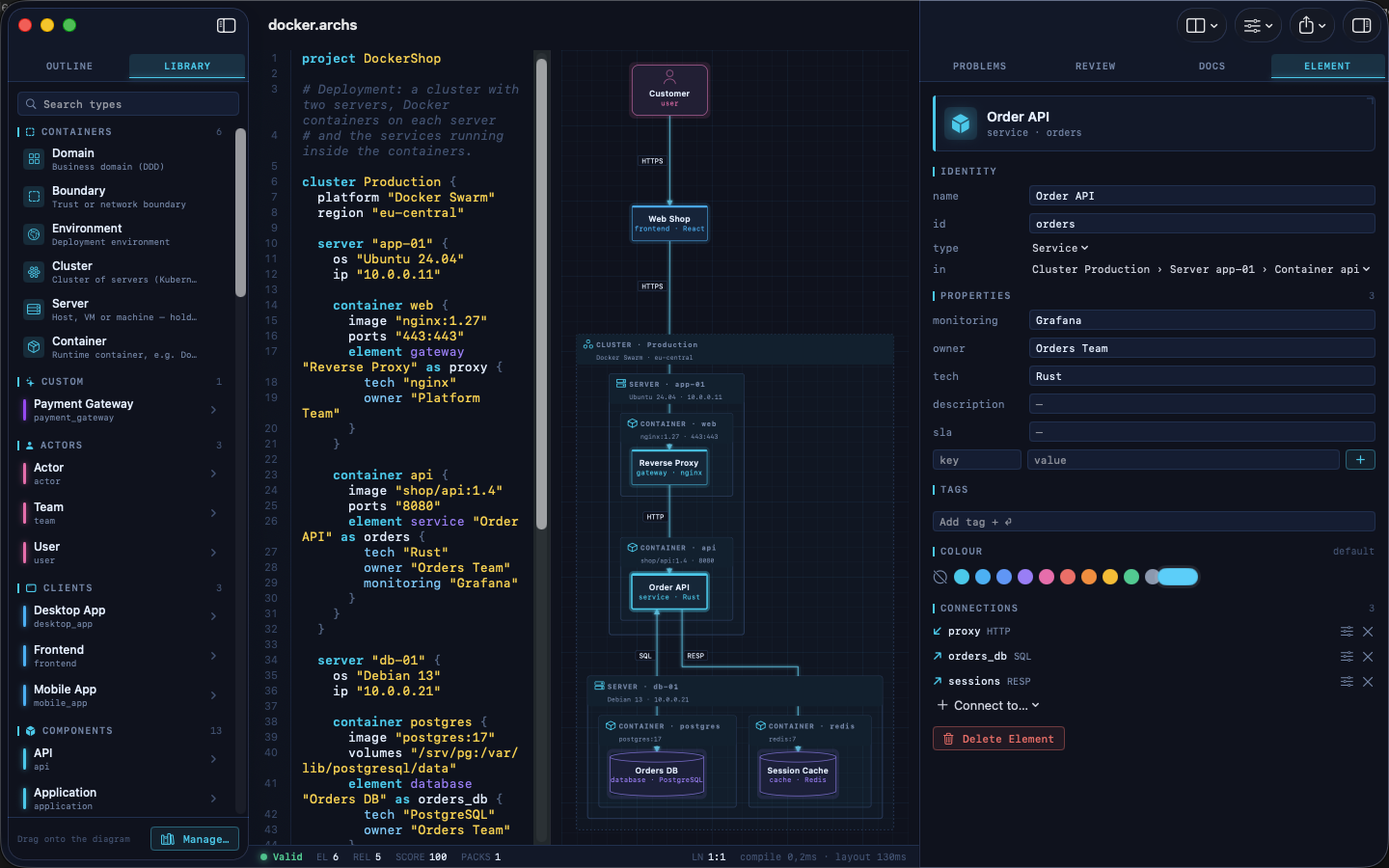 |
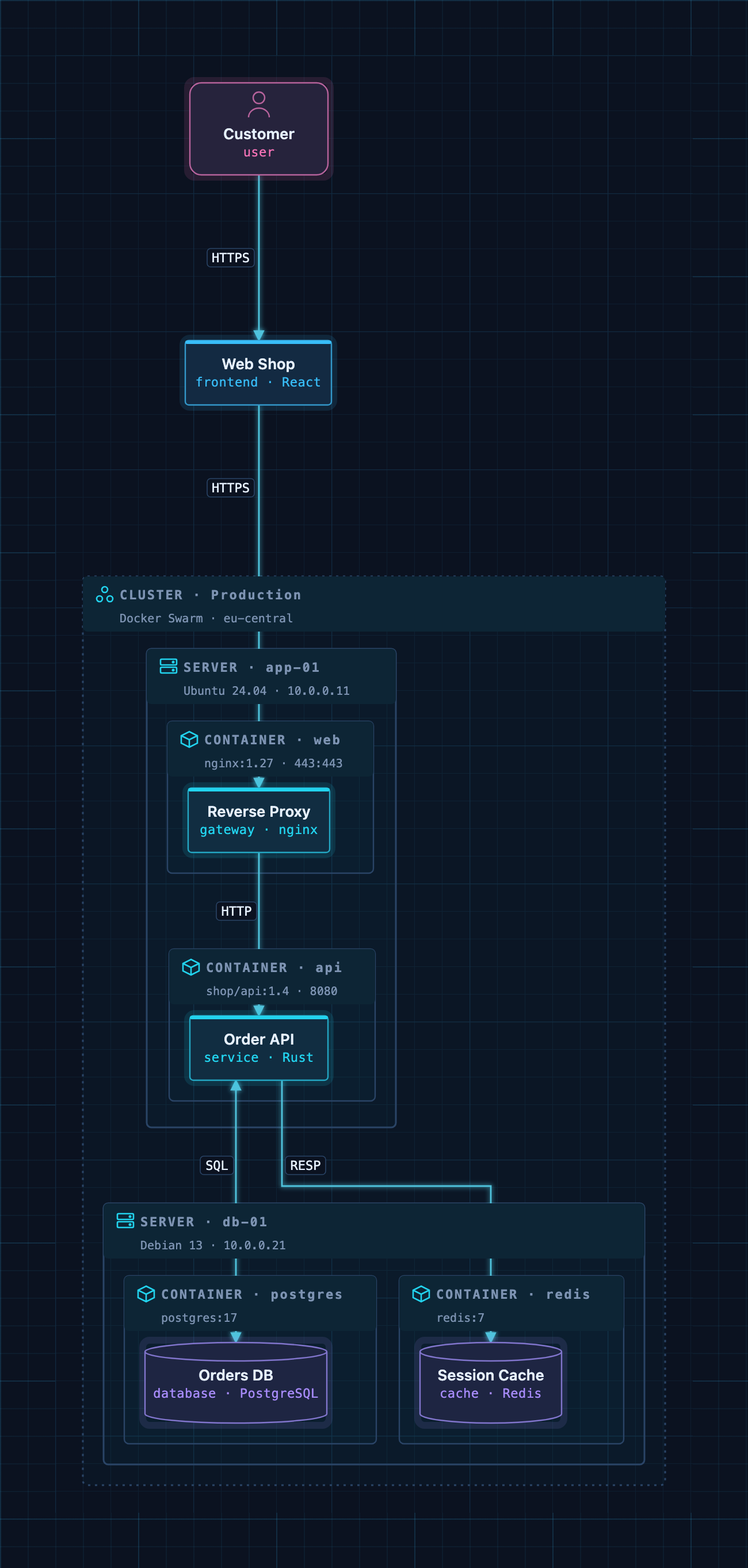
A Docker deployment as code: cluster → servers → containers → services.
Example models
The examples/ folder contains ready-to-use architectures. Open one
in ArchScript for Mac, or paste it into the
Playground:
| File | Architecture |
|---|---|
basic.archs |
The smallest useful model |
customer-management.archs |
One domain with web app, API and database |
webapp.archs |
Classic web application with boundaries |
microservices.archs |
Services with their own databases and an event bus |
ddd.archs |
Bounded contexts (domain-driven design) |
event.archs |
Event-driven, CQRS-style flow |
saas.archs |
Production SaaS with gateway and identity provider |
docker.archs |
Docker Swarm cluster, servers and containers |
A taste of the language:
project DockerShop

cluster Production {
  platform "Docker Swarm"

  server "app-01" {
    container api {
      image "shop/api:1.4"
      element service "Order API" as orders { tech "Rust"; owner "Orders Team" }
    }
  }
}

element frontend "Web Shop" as shop
relation shop -> orders : HTTPS
The full language reference is at archscript.dev/docs.
Feedback
Found a bug in the MCP integration or have an idea for a tool? Please open an issue. Feature requests for ArchScript itself are welcome too.
License
The documentation, configuration snippets, example models and the bridge in
server/ are available under the MIT License. ArchScript for Mac and the
ArchScript core are proprietary software.
Preguntas sobre ArchScript MCP
¿Qué puede hacer Claude con ArchScript?
Claude puede leer arquitecturas abiertas, realizar ediciones estructuradas como añadir o renombrar elementos, validar modelos según reglas, revisar puntuaciones de arquitectura y exportar diagramas a formatos como Terraform o Mermaid.
¿Mis datos son privados al usar el MCP server de ArchScript?
Sí, el servidor es solo local, escucha en 127.0.0.1 y no recopila telemetría ni envía datos a ningún lugar.
¿Cuáles son los requisitos del sistema para la configuración?
Necesitas tener ArchScript para Mac ejecutándose en macOS 14+ con ArchScript Pro.