
MCP server de Candor UI
Commit 14 nov 2026Proporciona documentación y sugerencias de componentes para construir interfaces de usuario honestas para agentes utilizando shadcn/ui.
También conocido como MethodicDev/candor, candor
- Stars
- 0
- Herramientas
- —
- Descargas, 30 días
- —
- Última versión
- 6.1.3
- Último commit
- 14 nov 2026
- Licencia
- MIT
¿Qué es Candor UI MCP?
Candor UI es un MCP server. Proporciona documentación y sugerencias de componentes para construir interfaces de usuario honestas para agentes utilizando shadcn/ui.
Resumen generado a partir del README del proyecto
Acerca del MCP server de Candor UI
Candor UI ofrece un conjunto especializado de componentes de interfaz y documentación diseñados para construir interfaces de usuario honestas para agentes de IA. Está creado para desarrolladores que utilizan shadcn/ui y ofrece componentes como hilos de chat, llamadas a herramientas (tool calls), visualización de razonamiento y prompts de permisos. Estos elementos están diseñados para seguir reglas de honestidad específicas, como asegurar que los botones de decisión (como permitir y denegar) no tengan ninguna opción preseleccionada, y garantizar que los datos desconocidos se marquen como no medidos en lugar de cero.
Los desarrolladores pueden integrar estas herramientas en sus proyectos mediante la CLI de candor-ui o instalando el paquete @candor-ui/react desde npm. El servidor funciona como una herramienta MCP de solo lectura que proporciona documentación y sugerencias de componentes sin necesidad de una API key o una cuenta de pago. Es compatible con varios frameworks e incluye adaptadores para Vercel AI SDK, Claude Agent SDK y AG-UI. El sistema también incluye un conjunto de herramientas de CLI para realizar linting, auditorías y verificar que tu interfaz cumpla con los principios de honestidad establecidos.
Qué puedes hacer con él
- 1Sugerir componentes de UI honestosUn agente de IA puede usar este servidor para encontrar el componente adecuado para una tarea específica siguiendo las reglas de honestidad.
- 2Auditar la honestidad de la interfazUn desarrollador puede ejecutar un comando para comprobar si su aplicación en ejecución sigue los principios de diseño requeridos.
Escrito a partir del README del proyecto. Cada caso de uso se verifica con una cita del mismo.
Cómo instalar Candor UI MCP
Formatos verificados el 10 nov 2026Añadir a CursorAñadir a GooseInstalar Candor UI MCP en Claude Code
$ claude mcp add --transport http candor https://candor.themethodic.com/mcpInstalar Candor UI MCP en Cursor
~/.cursor/mcp.json
{
  "mcpServers": {
    "candor": {
      "url": "https://candor.themethodic.com/mcp"
    }
  }
}Instalar Candor UI MCP en VS Code
.vscode/mcp.json
{
  "servers": {
    "candor": {
      "type": "http",
      "url": "https://candor.themethodic.com/mcp"
    }
  }
}Instalar Candor UI MCP en VS Code CLI
$ code --add-mcp '{"name":"candor","type":"http","url":"https://candor.themethodic.com/mcp"}'Instalar Candor UI MCP en Codex
$ codex mcp add candor --url https://candor.themethodic.com/mcpInstalar Candor UI MCP en Codex config.toml
~/.codex/config.toml
[mcp_servers.candor]
url = "https://candor.themethodic.com/mcp"
Instalar Candor UI MCP en Gemini CLI
$ gemini mcp add -s user --transport http candor https://candor.themethodic.com/mcpInstalar Candor UI MCP en Gemini settings.json
~/.gemini/settings.json
{
  "mcpServers": {
    "candor": {
      "url": "https://candor.themethodic.com/mcp",
      "type": "http"
    }
  }
}Verificaciones automáticas
Ejecutado 15 nov 2026Informe completo →Aún no verificado. Un servidor necesita una puntuación de 80, ningún hallazgo grave y suficientes datos para que podamos revisarlo. Cómo funcionan las verificaciones · Qué corregir para obtener más puntos

- Repositorio de origen vinculado y accesiblemethodicdev/candor is public and reachablegithub.com/methodicdev/candor ↗Aprobado
- El paquete indica este repositorio como su origenNo verificado
- Procedencia de la compilación (atestación de Sigstore)No verificado
- Licencia de código abierto (OSI)MITspdx.org/licenses/MIT.html ↗Aprobado
- Commit o lanzamiento en el último añoLast commit or release 2026-11-14github.com/methodicdev/candor ↗Aprobado
- OpenSSF ScorecardNo verificado
- El nombre del paquete no es similar a un paquete popularNo verificado
- No hay avisos críticos en el paquete ni en sus dependenciasNo verificado
- Sin instrucciones ocultas para el modelo0 tool descriptions and the README read; no override phrases, credential paths or hidden charactersAprobado
- Las herramientas destructivas están etiquetadasNo verificado
- El endpoint remoto responde al handshake de MCPinitialize answered with protocol 2025-06-18 in 124 msAprobado
README
Ver en GitHubCandor UI: the free tier
Honest agent UI for shadcn/ui: chat, tool calls and permission prompts that never overstate what an agent did. MIT.




Try the app demo · Honest against typical, side by side · Docs · Changelog
Interface components for agent apps: a thread, messages, a composer, tool calls, reasoning and citations, the
building blocks under them, a light, dark and high-contrast theme, and adapters for the Vercel AI SDK, the Claude
Agent SDK and AG-UI. For shadcn/ui projects, installed with the candor-ui CLI or shadcn's own, MIT licensed.
This repo is the source of Candor UI's 73 free items (version 4.0.2), the skill and plugins for coding agents and 3 starter apps. Docs and live examples: https://candor.themethodic.com.
The same free items are on npm as @candor-ui/react, for people who
would rather npm install than copy code in. That package changes only when a free item changes, so its version can be
behind the kit's after a release that changed only Pro items; the CLI, candor-ui, has a version of its own. The
changelog says which release changed what.
Try it in a minute, no key
npx degit MethodicDev/candor/starter-vite-ag-ui my-app
cd my-app
npm install
npm run dev
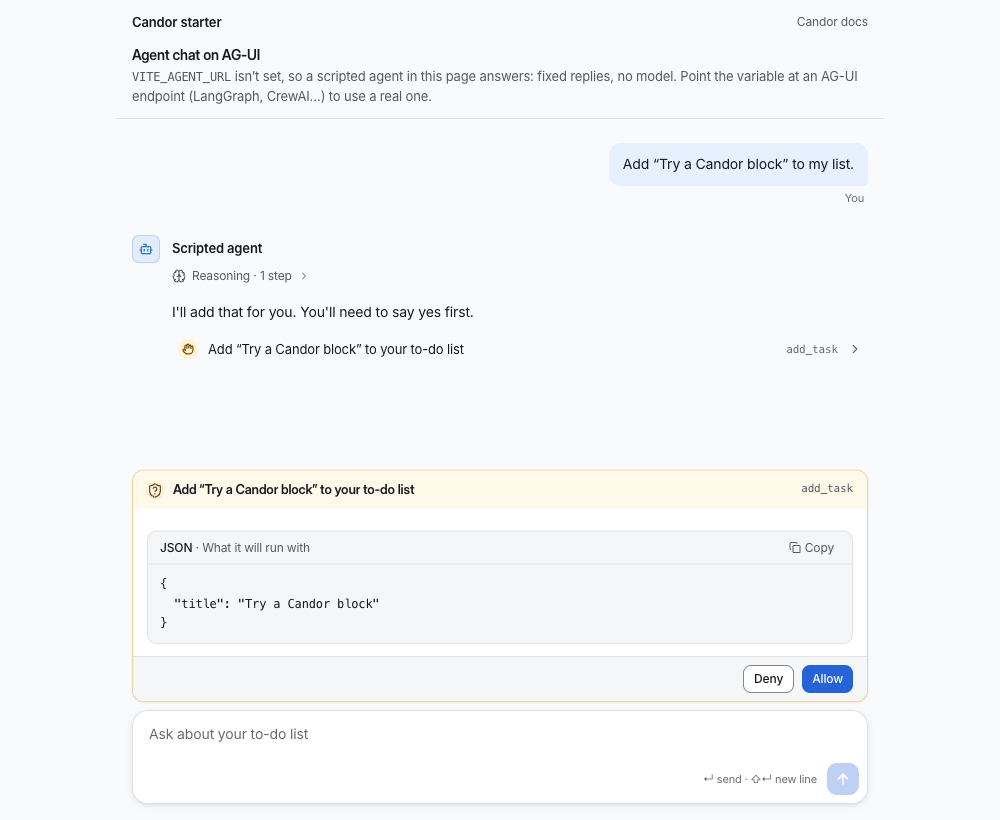
Open the address it prints. A scripted agent answers in the page: fixed replies, no model, no server and no API key,
and the page says so. Ask it to add "Try a Candor block" to your list and you'll see a line of its reasoning, a tool
call marked "Needs you", and a permission prompt that shows what it will run, with Deny and Allow and neither
chosen for you. That is what the image above shows. Point VITE_AGENT_URL at an AG-UI agent (LangGraph, CrewAI…)
when you want a real one.
Why Candor
An agent that acts on real systems can mislead without saying anything false: a spinner nobody has heard from, a total that treats a missing cost as zero, an approval that now applies to a different change. Candor's components keep these 9 rules. Where Honest against typical has a moment that shows one, the link goes to its Typical and Honest switch; the others go to Principles.
- Model output is text, never markup: Adapters read what a model writes as a small safe subset of markdown; a link becomes plain text with its address beside it.
- Unknown stays unknown: A cost or duration the service didn't report reads “not measured”, not zero, and an estimate says it is one.
- A control that can't be used says why: A control that can't be used carries its reason, on hover and focus and to screen readers.
- Nothing is pre-selected in a decision: Approve and reject, allow and deny start with neither chosen.
- Approve the exact change: A decision is tied to a hash of the change that was asked about; a change that moved since is refused.
- Reasoning is believed, not verified: Reasoning is shown as the model's own account and marked as unchecked; evidence is shown as evidence.
- The agent is always named, by the app: Every agent message names its agent from the app's data, never from model output.
- Say what can and can't be undone: Destructive actions say what they remove and whether it can be brought back.
- Motion follows the outcome: A success mark is drawn after the result settles; motion reports a change and never predicts one.
Install
npx candor-ui@latest init
npx candor-ui add thread message composer
candor-ui init adds the @candor registry to components.json and the theme to your CSS; in a project without
shadcn yet it runs shadcn's setup first (--yes sets it up with Base UI and shadcn's nova preset, no questions). Or add the registry by
hand: "@candor": "https://candor.themethodic.com/r/{name}.json". If shadcn asks to overwrite a primitive such as
ui/button.tsx, answer yes: Candor's button styles locked actions; without a terminal, pass --overwrite.
Or from npm
npm install @candor-ui/react
import { Thread, Message, Composer } from "@candor-ui/react"
Then @import "@candor-ui/react/styles.css" after Tailwind. The package holds the free tier only, and its version can be
behind the kit's; its README has the adapters and the entry points.
Tools
candor-ui also checks what you build, from the CLI's own docs:
lintchecks your.tsx,.ts,.jsxand.jsfiles against Candor's honesty rules and printspath:line:col rule messagefor each finding; it exits 1 on an error.auditislintplus a look at a running page:npx candor-ui audit http://localhost:3000runs axe and the honesty rules on it and writesAUDIT.md.updatemoves installed items to the latest version and keeps your changes: a file you edited gets a three-way merge, and where you and we changed the same lines it writes conflict markers.verifyis for CI: it checkscandor-lock.jsonagainst the registry's versioned snapshots and the files on disk.theme checkchecks your theme's colour contrast and its motion and sound values, and changes nothing.
candor-ui doctor explains an install that looks wrong. Every command is in the
CLI's README.
For coding agents
llms-install.md tells an agent how to set Candor up in a project by itself: the CLI, the docs MCP server, the skill
and the honesty rules to keep. The skill alone:
npx skills add MethodicDev/candor
installs two skills: skills/candor-ui (which component fits which job, the adapters, and the rules the components
keep, with a design-system reference read from the shipped CSS) and skills/candor-agent-ui (design fundamentals for
screens where an AI agent acts, with a review checklist to run after each screen; it works with or without Candor).
The plugins install the skill and the docs MCP server together. Claude Code: claude plugin marketplace add MethodicDev/candor, then claude plugin install candor-ui@candor (or, in a session,
/plugin install candor-ui --marketplace MethodicDev/candor). GitHub Copilot CLI: copilot plugin marketplace add MethodicDev/candor, then copilot plugin install candor-ui@candor. VS Code installs candor-ui from this repo's URL;
Cursor reads .cursor-plugin/marketplace.json; the Codex package is plugins/codex/candor-ui.
The MCP server at https://candor.themethodic.com/mcp serves docs and component suggestions only: read-only, no key,
never paid source. .mcp/server.json describes it for the MCP registry. Agents can also read
https://candor.themethodic.com/llms.txt.
Starters
Starter apps with a working agent chat built from these components (3 of them). Each installs and builds on its own:
| Folder | Stack | Agent |
|---|---|---|
starter-vite-ag-ui/ |
Vite and React, no server | a scripted one in the page (no key; see above), or any AG-UI agent (LangGraph, CrewAI…) |
starter/ |
Next.js 16 | Vercel AI SDK at /, Claude Agent SDK at /claude (needs an Anthropic API key) |
starter-tanstack-start-claude/ |
TanStack Start | Claude Agent SDK (needs an Anthropic API key) |
npx degit MethodicDev/candor/starter-vite-ag-ui my-agent-app
npx degit MethodicDev/candor/starter my-agent-app
npx degit MethodicDev/candor/starter-tanstack-start-claude my-agent-app
What's here
73 free items, each with a docs page that has its props and live examples. Install any of them by name:
npx candor-ui add <name>.
| Area | What it's for | Items |
|---|---|---|
| Chat (20) | A conversation with an agent: messages, the composer, tool calls, reasoning, citations. | agent-avatar, ai-disclosure, attachment-preview, card-registry, citation, composer, context-meter, entity-chip, folded-turns, message-actions, message-content, message, payload, permission-prompt, prompt-suggestions, reasoning, thread-divider, thread-event, thread, tool-call |
| Adapters (7) | Map an agent SDK's messages onto Candor's data: the Vercel AI SDK, the Claude Agent SDK and AG-UI. | ag-ui, ai-sdk, claude-agent-sdk, claude-agent-server, use-ag-ui, use-candor-chat, use-claude-agent |
| Building blocks (7) | Small pieces every screen uses: locked controls, status dots, step lists, relative times. | copy-field, degraded-panel, relative-time, status-dot, step-list, streaming-text, surface |
| App shell (2) | The app around the agent: layout, sidebar, command menu, sessions, notices. | page-header, page-state |
| Primitives (13) | The shadcn/ui primitives Candor's components are built on. | accordion, alert, button, checkbox, collapsible, label, locked, popover, progress, skeleton, slider, switch, tooltip |
| Themes (6) | The default theme and 5 gallery themes: colours, type, radius and motion as CSS variables, in light, dark and high contrast. | tokens, theme, theme-slate, theme-paper, theme-console, theme-signal |
Shared types and helpers (15): Types and pure functions the components share.
chat, fill-strings, format-elapsed, highlight, know, layer, locale, mcp-input, motion, safe-markdown, sound, status, use-copy, use-shortcut, use-virtual-list
Fonts (3): Self-hosted, and optional: without one the theme uses the system font.
font-inter, font-source-sans, font-ibm-plex
Pro, Premium and Team
One-time prices, no subscription. A licence includes every version Candor UI publishes, major ones included. You can ask for a full refund within 30 days of buying. The free tier here is MIT.
| Tier | Price | What's in it | Support |
|---|---|---|---|
| Free (this repo) | $0, MIT | 73 items: the chat core, building blocks, themes, adapters; 3 starters; the skill and plugins | public issues here |
| Pro | $149, one person | All 293 items, the free ones included: the app shell, plans, approvals, diffs, runs, evals and admin | none; the docs and examples |
| Premium | $249, one person | Pro, plus 11 full-stack blocks and 4 templates, each for the Vercel AI SDK and the Claude Agent SDK | email, best effort |
| Team | $999, up to 10 people in one company | Premium | email, a first reply within 2 business days |
Buy at https://candor.themethodic.com/#pricing. The terms are the Candor UI Commercial Licence; SUPPORT.md repeats the support each tier includes. Your key arrives in Polar's receipt email and customer portal; https://candor.themethodic.com/licence-key says where, and what a refund does to it. Then, in your project:
npx candor-ui key <your licence key>   # saves it to .env.local, checks it, and has the registry send it
npx candor-ui add approval-request     # a Pro item, installed like any other
In CI, set CANDOR_LICENSE_KEY as a secret, so installs and npx candor-ui verify can read paid items. Installed code
needs no key to run; the key is only for installing and updating. Never put a key in an issue, a pull request or a
repository.
How this repository works
- The source of truth is private. Candor UI's main repository holds the free items and the paid tiers together. This repository is generated from it on each release, so a change made here by hand would be overwritten.
- From 2.6.2, each release is a commit, a tag and a GitHub Release. The commit
Candor X.Y.Z, the tagvX.Y.Zand the release all carry that version's changelog section. - Issues are read. Use the forms. There is no promised reply time for the free tier; the support each paid tier includes is in SUPPORT.md. A vulnerability goes to SECURITY.md, not to an issue.
- A pull request isn't merged here. If it is accepted, it is applied upstream by hand, credited in that release's changelog entry, and closed with a link to the release that holds it. CONTRIBUTING.md has the rest.
- Every release is reviewed over its full diff by a separate review session that had no part in writing it, before the owner approves the merge. Most of the code is written with AI coding assistants, and the commits here say so in a Co-Authored-By line.
Licence
MIT, © Methodic LLC. See LICENSE. It covers this repository's free items; Candor UI's paid items are under the
Candor UI Commercial Licence.
Preguntas sobre Candor UI MCP
¿Cómo agrego Candor UI MCP a Claude Code?
Ejecuta claude mcp add --transport http candor https://candor.themethodic.com/mcp en tu terminal. Añade --scope user para que esté disponible en todos los proyectos.
¿Cómo agrego Candor UI MCP a Cursor?
Abre ~/.cursor/mcp.json y añade el servidor en mcpServers, usando la configuración de Cursor que se muestra en la sección de instalación de arriba.
¿Qué ofrece el MCP server de Candor UI?
El MCP server ofrece documentación y sugerencias de componentes para la librería Candor UI.
¿Puedo usar Candor UI con mi proyecto actual de shadcn/ui?
Sí, puedes instalar componentes de Candor UI en proyectos de shadcn/ui usando la CLI de candor-ui.