
Despliega sitios estáticos y archivos en URLs HTTPS activas directamente desde un agente de IA sin necesidad de repositorios ni pasos de compilación.
También conocido como hostsmith/mcp-server, @hostsmith/mcp-server
- Stars
- 0
- Herramientas
- 16
- Descargas, 30 días
- 1637
- Última versión
- 1.8.0
- Último commit
- 12 nov 2026
- Licencia
- MIT
¿Qué es Hostsmith MCP?
Hostsmith es un MCP server. Despliega sitios estáticos y archivos en URLs HTTPS activas directamente desde un agente de IA sin necesidad de repositorios ni pasos de compilación. Expone 16 herramientas, como list_sites, get_site, create_site.
Resumen generado a partir del README del proyecto
Acerca del MCP server de Hostsmith
Este servidor permite desplegar sitios web estáticos y archivos en URLs HTTPS activas directamente desde un agente de IA. Permite a los desarrolladores convertir archivos generados en páginas web públicas en cuestión de segundos, sin tener que gestionar repositorios, configuraciones de compilación o pipelines de CI.
Los usuarios pueden conectarse a través de Claude Desktop, claude.ai, Cursor, o mediante stdio para herramientas como Claude Code y Windsurf. La autenticación se gestiona mediante OAuth 2.0, lo que requiere un flujo de autorización basado en el navegador en lugar de tokens estáticos. El servidor admite tanto la instalación local vía npx como conexiones remotas a través de una URL alojada. Ofrece un control granular sobre la gestión de sitios, incluyendo herramientas para crear, eliminar y listar sitios, así como para gestionar redirecciones y despliegues de archivos. Los usuarios también pueden elegir entre la residencia de datos en EE. UU. o la UE para cumplir con requisitos arquitectónicos específicos.
Qué puedes hacer con él
- 1Publicación de demos web generadasUn agente de IA puede tomar un archivo HTML generado y alojarlo en una URL activa para una vista previa inmediata.
- 2Despliegue instantáneo de informes HTMLLos desarrolladores pueden usar Claude Code para enviar informes de datos directamente a una dirección HTTPS pública.
- 3Gestión de reglas de redirección de sitiosPuedes instruir a un agente para que añada, actualice o elimine reglas de redirección de URL específicas para tus dominios personalizados.
- 4Gestión de subidas de archivos binarios grandesEl servidor proporciona herramientas específicas para gestionar la subida directa de archivos grandes o binarios.
Escrito a partir del README del proyecto. Cada caso de uso se verifica con una cita del mismo.
Cómo instalar Hostsmith MCP
Formatos verificados el 10 nov 2026Añadir a CursorAñadir a GooseInstalar Hostsmith MCP en Claude Code
$ claude mcp add mcp-server -- npx -y @hostsmith/mcp-serverInstalar Hostsmith MCP en Cursor
~/.cursor/mcp.json
{
  "mcpServers": {
    "mcp-server": {
      "command": "npx",
      "args": [
        "-y",
        "@hostsmith/mcp-server"
      ]
    }
  }
}Instalar Hostsmith MCP en VS Code
.vscode/mcp.json
{
  "servers": {
    "mcp-server": {
      "type": "stdio",
      "command": "npx",
      "args": [
        "-y",
        "@hostsmith/mcp-server"
      ]
    }
  }
}Instalar Hostsmith MCP en VS Code CLI
$ code --add-mcp '{"name":"mcp-server","type":"stdio","command":"npx","args":["-y","@hostsmith/mcp-server"]}'Instalar Hostsmith MCP en Claude Desktop
claude_desktop_config.json
{
  "mcpServers": {
    "mcp-server": {
      "command": "npx",
      "args": [
        "-y",
        "@hostsmith/mcp-server"
      ]
    }
  }
}Instalar Hostsmith MCP en Codex
$ codex mcp add mcp-server -- npx -y @hostsmith/mcp-serverInstalar Hostsmith MCP en Codex config.toml
~/.codex/config.toml
[mcp_servers.mcp-server]
command = "npx"
args = ["-y", "@hostsmith/mcp-server"]
Instalar Hostsmith MCP en Gemini CLI
$ gemini mcp add -s user mcp-server npx -- -y @hostsmith/mcp-serverInstalar Hostsmith MCP en Gemini settings.json
~/.gemini/settings.json
{
  "mcpServers": {
    "mcp-server": {
      "command": "npx",
      "args": [
        "-y",
        "@hostsmith/mcp-server"
      ]
    }
  }
}Herramientas de Hostsmith MCP 16
Detectado desde el READMElist_sitesget_sitecreate_sitedelete_sitelist_domainsget_accountdeploy_filesdeploy_create_uploaddeploy_finalizelist_redirectsset_redirectsedit_redirects
| list_sites | — | |
| get_site | — | |
| create_site | — | |
| delete_site | — | |
| list_domains | — | |
| get_account | — | |
| deploy_files | — | |
| deploy_create_upload | — | |
| deploy_finalize | — | |
| list_redirects | — | |
| set_redirects | — | |
| edit_redirects | — |
Mostrar las 16 herramientasMostrar menos herramientas
add_redirectdelete_redirectswitch_file_redirectstest_redirect
| add_redirect | — | |
| delete_redirect | — | |
| switch_file_redirects | — | |
| test_redirect | — |
Configuración
HOSTSMITH_API_DOMAINOverride the upstream API domain across both partitions; 'us.api.' and 'eu.api.' are prepended to this value.
HOSTSMITH_BASE_URLOverride the API base URL with a single fixed value, bypassing partition selection entirely.
HOSTSMITH_URLHostsmith app URL (OAuth endpoints).
| Nombre | Descripción | Tipo |
|---|---|---|
| HOSTSMITH_API_DOMAIN | Override the upstream API domain across both partitions; 'us.api.' and 'eu.api.' are prepended to this value. | |
| HOSTSMITH_BASE_URL | Override the API base URL with a single fixed value, bypassing partition selection entirely. | |
| HOSTSMITH_URL | Hostsmith app URL (OAuth endpoints). |
Verificaciones automáticas
Ejecutado 13 nov 2026Informe completo →Pasó nuestras verificaciones automáticas. Esto no es una auditoría de seguridad: lee el código y dale al servidor el acceso más limitado que necesite. Cómo funcionan las verificaciones

- Repositorio de origen vinculado y accesibleAprobado
- Licencia de código abierto (OSI)Aprobado
- Commit o lanzamiento en el último añoAprobado
- El nombre del paquete no es similar a un paquete popularAprobado
- El endpoint remoto usa HTTPSAprobado
- Las herramientas destructivas están etiquetadasNo verificado
- Sin instrucciones ocultas para el modeloAprobado
- No hay avisos críticos en el paquete ni en sus dependenciasAprobado
README
Ver en GitHub@hostsmith/mcp-server



Official Model Context Protocol server for the Hostsmith hosting platform.
Static hosting for agents - give it a file, get a live URL. Claude Code shipping an HTML report. Cursor previewing a generated demo. Claude publishing a one-pager from claude.ai or Desktop. One MCP call → public HTTPS URL in seconds. No repo, no CI, no build step. Custom domains, private sites, EU or US data residency.
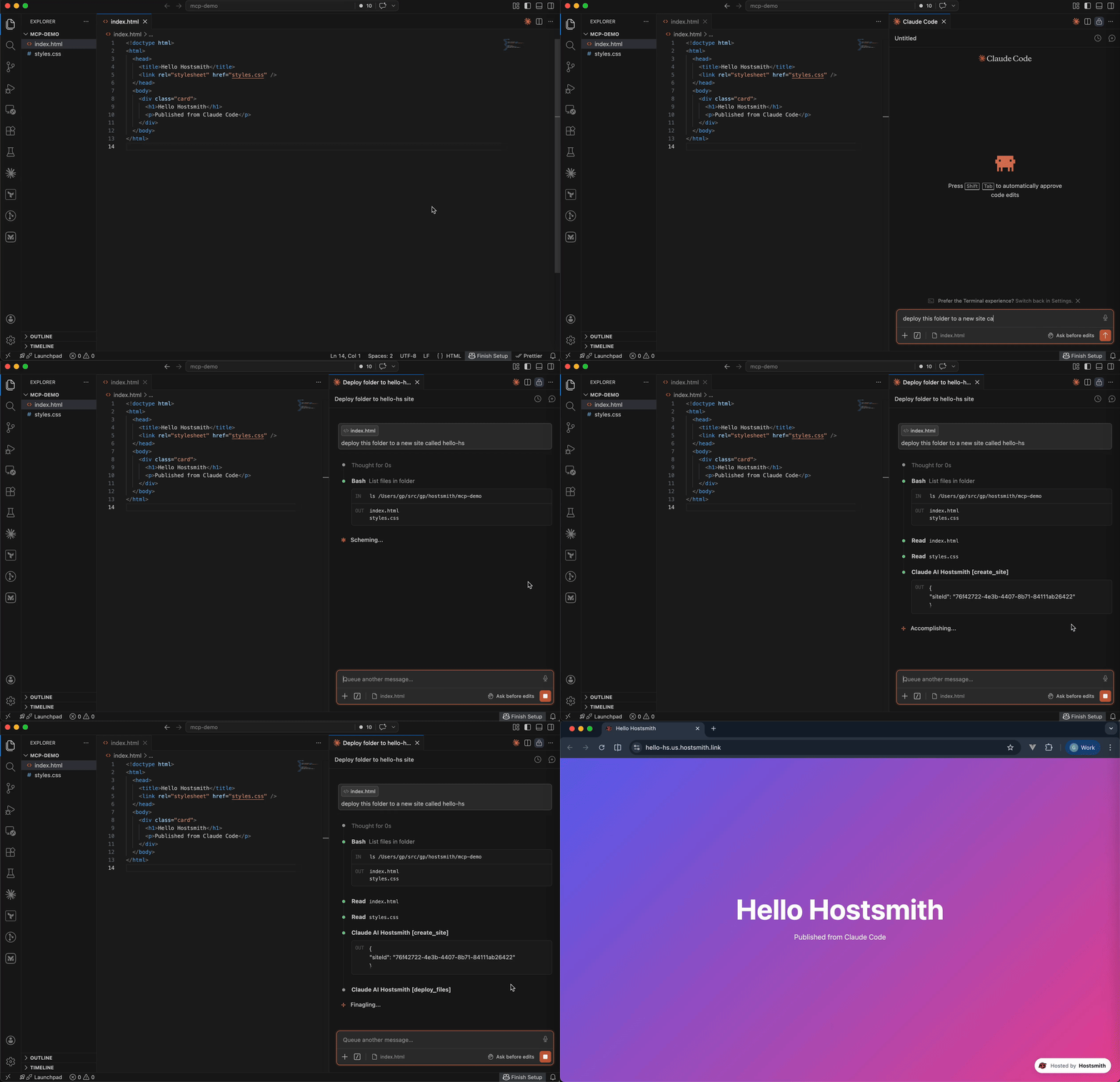
Why Hostsmith
- Artifact-first. No repo, no build config - drop a file (or have the agent generate one), get a URL.
- Built for agents. MCP-native, OAuth-scoped, structured tool descriptions agents can chain.
- EU or US data residency. Pick where the user's data lives, architecturally - not via a checkbox.
Tools
| Tool | Description |
|---|---|
list_sites |
List all sites in your account for a given data partition |
get_site |
Get details of a specific site |
create_site |
Create a new site, or a redirect host |
delete_site |
Delete a site |
list_domains |
List available domains (shared and custom) |
get_account |
Get account info, subscription plan, and usage |
deploy_files |
Deploy inline file contents to a site |
deploy_create_upload |
Start a direct upload for binaries / large files |
deploy_finalize |
Commit a deploy started with deploy_create_upload |
list_redirects |
List a site's redirect rules, in the order they are checked |
set_redirects |
Replace a site's user redirect rules, from rules or _redirects text |
edit_redirects |
Add, update and delete user redirect rules in one batch |
add_redirect |
Add one user redirect rule |
delete_redirect |
Delete one user redirect rule |
switch_file_redirects |
Switch the live deploy's _redirects rules off or back on |
test_redirect |
Test a path against the live or draft redirect rules |
Redirects apply only on your organization's own custom domains. User rules, kept on the hostname and changed through these tools, are checked before the live deploy's _redirects.
To forward a hostname with no content of its own, such as a retired domain or a campaign link, create a redirect host: create_site with kind: "redirect", then add its rules. A redirect host serves only its rules and takes no deploys. It doesn't count toward your plan's site limit; an organization can have up to 50.
Usage
Authentication is via OAuth 2.0. Static access tokens are not supported.
Claude (claude.ai, Desktop, Cowork, mobile)
Add Hostsmith once as a custom connector and it works in every Claude app on your account.
-
In Claude, open Customize > Connectors, click + Add, then Add custom connector.
-
Enter
Hostsmithas the name and paste the MCP server URL:https://mcp.hostsmith.net/mcp -
Click Continue, finish adding the connector, then connect it. Claude opens Hostsmith in your browser to authorize the connector against your Hostsmith account.
Free Claude plans allow one custom connector. On Team and Enterprise plans, an owner adds the connector under Organization settings > Connectors, and each member then clicks Connect next to Hostsmith under Customize > Connectors to sign in with their own Hostsmith account.
Claude asks for your approval before each tool call. To change that, open Hostsmith under Customize > Connectors and set its Tool permissions.
To revoke, open Hostsmith under Customize > Connectors, click ⋯, then Remove (Team and Enterprise owners: Organization settings > Connectors). To force a re-auth, click Disconnect, then Connect.
Stdio (Claude Code, Cursor, Cline, Windsurf, Zed)
Add this entry to your MCP client's config:
{
  "mcpServers": {
    "hostsmith": {
      "command": "npx",
      "args": ["-y", "@hostsmith/mcp-server"]
    }
  }
}
The first tool call triggers an OAuth flow in your browser to authorize the server against your Hostsmith account.
Remote URL (other clients)
Any MCP client that supports remote Streamable HTTP transport can point directly at the hosted server:
{
  "mcpServers": {
    "hostsmith": {
      "url": "https://mcp.hostsmith.net/mcp"
    }
  }
}
The client handles the OAuth flow automatically - you'll be redirected to Hostsmith to authorize access.
Claude Code can use the hosted server directly too:
claude mcp add --transport http hostsmith https://mcp.hostsmith.net/mcp
Cursor (one-click install)

Click the badge to add the remote Hostsmith server (https://mcp.hostsmith.net/mcp) to Cursor. The first tool call triggers OAuth in your browser.
Local HTTP (self-hosted)
Run the server in HTTP mode and have your MCP client perform OAuth against it:
npx @hostsmith/mcp-server http
{
  "mcpServers": {
    "hostsmith": {
      "url": "http://localhost:3100/mcp"
    }
  }
}
Embedding the HTTP handler
createFetchHandler returns a Web-Standard (req: Request) => Promise<Response> handler, for hosting the server in your own runtime (a Lambda, an edge worker, a Node server). It reads no environment variables; pass the configuration:
import { createFetchHandler } from "@hostsmith/mcp-server";

const handler = createFetchHandler({
  hostsmithUrl: "https://hostsmith.net",
  mcpBaseUrl: "https://mcp.example.com",
  // Optional: called for every authenticated MCP request with that
  // request's new McpServer and the access token's decoded claims,
  // before the server handles the request.
  onServer: async (server, { claims }) => {
    // e.g. attach your own instrumentation to `server`
  },
});
onServer is awaited. If it throws, the error is logged and the request is handled as if there were no hook. The claims are decoded, not verified; the Hostsmith API verifies the token on every tool call. Hostsmith's hosted server at mcp.hostsmith.net uses this hook for its usage analytics. The package itself contains no analytics client and sends no telemetry, and the CLI passes no hook.
Environment variables
| Variable | Default | Description |
|---|---|---|
HOSTSMITH_URL |
https://hostsmith.net |
Hostsmith app URL (OAuth endpoints). |
HOSTSMITH_API_DOMAIN |
- | Override the upstream API domain across both partitions. The server prepends us.api. and eu.api. to the value you set. Example: HOSTSMITH_API_DOMAIN=staging.example.com routes calls to https://us.api.staging.example.com and https://eu.api.staging.example.com. Use this to point at a staging or proxied API host. |
HOSTSMITH_BASE_URL |
- | Override the API base URL with a single fixed value, bypassing partition selection entirely. |
PORT |
3100 |
HTTP server port. |
MCP_BASE_URL |
http://localhost:$PORT |
Public URL of the MCP server, used in OAuth metadata. |
Network access
The MCP transport and OAuth flow run in your client's app process and need no agent-sandbox configuration - if your MCP client connected, those paths are working.
The one place sandboxed agents commonly fail is the upload PUT during deploy_create_upload + deploy_finalize: the bytes go from the agent's shell to the partition API host. From the agent terminal, allow outbound HTTPS (port 443) to:
us.api.hostsmith.net(for sites in theuspartition)eu.api.hostsmith.net(for sites in theeupartition)
Sandbox-specific snippets (Cursor sandbox.json, Claude Code settings.json, Codex config.toml, generic firewall guidance) live in the Network access docs.
The server's own calls to the Hostsmith API identify themselves with User-Agent: hostsmith-mcp-server/<version> hostsmith-js-sdk/<version>.
Troubleshooting
- Tool calls return 401: the OAuth session expired. Reconnect from your MCP client to re-authorize.
- OAuth redirect loops: confirm
MCP_BASE_URLmatches the URL your MCP client uses to reach the server. - Wrong partition: tool calls accept an explicit
partitionarg; if you omit it, the partition is inferred from your access token. - Upload PUT fails (DNS, refused, proxy, timeout): the agent's shell can't reach the partition API host. See Network access.
- Inspect the install:
npx @modelcontextprotocol/inspector npx -y @hostsmith/mcp-server httpto browse tools interactively.
Documentation
Deeper material lives at hostsmith.net/docs/mcp.
Contributing
See CONTRIBUTING.md (including the Releases section for the version-stamping flow). Security issues: see SECURITY.md.
License
Preguntas sobre Hostsmith MCP
¿Cómo agrego Hostsmith MCP a Claude Code?
Ejecuta claude mcp add mcp-server -- npx -y @hostsmith/mcp-server en tu terminal. Añade --scope user para que esté disponible en todos los proyectos.
¿Cómo agrego Hostsmith MCP a Cursor?
Abre ~/.cursor/mcp.json y añade el servidor en mcpServers, usando la configuración de Cursor que se muestra en la sección de instalación de arriba.
¿Qué herramientas proporciona Hostsmith MCP?
Expone 16 herramientas, incluidas list_sites, get_site, create_site, delete_site, list_domains.
¿Puedo elegir dónde se almacenan mis datos?
Sí, puedes elegir entre residencia de datos en la UE o en EE. UU. para tus sitios.