
Proporciona ciclos estructurados de planificación, construcción, revisión y lanzamiento para asistentes de codificación con IA, permitiendo mantener la dirección del proyecto y el historial de decisiones.
También conocido como getpapi/papi, papi, @papi-ai/server
- Stars
- 11
- Herramientas
- 15
- Descargas, 30 días
- —
- Última versión
- 0.402.225
- Último commit
- 5 nov 2026
- Licencia
- MIT
¿Qué es PAPI MCP?
PAPI es un MCP server. Proporciona ciclos estructurados de planificación, construcción, revisión y lanzamiento para asistentes de codificación con IA, permitiendo mantener la dirección del proyecto y el historial de decisiones. Expone 15 herramientas, como orient, setup, plan.
Resumen generado a partir del README del proyecto
Acerca del MCP server de PAPI
PAPI ofrece un marco de gestión estructurado diseñado específicamente para que los asistentes de codificación con IA mantengan la dirección del proyecto y el historial de decisiones. En lugar de perder el contexto en las ventanas de chat, el servidor implementa un bucle continuo de planificación, construcción, revisión y lanzamiento de tareas. Este sistema permite que un asistente rastree qué se eligió, qué se rechazó y por qué, creando un rastro de decisiones persistente que sobrevive a través de diferentes sesiones y herramientas.
Los usuarios conectan el servidor a clientes MCP como Cursor, Claude Code, Windsurf o VS Code. Aunque el motor está alojado, el paquete @papi-ai/server funciona como el runtime local. La configuración requiere una cuenta gratuita en getpapi.ai, que se puede vincular mediante un token de conexión o inicio de sesión con el navegador. El servicio es gratuito para hasta tres proyectos, ofreciendo un ciclo de vida completo desde la planificación inicial hasta el lanzamiento final sin necesidad de una tarjeta de crédito.
Qué puedes hacer con él
- 1Mantener el contexto del proyecto entre sesionesUn asistente de IA puede usar la herramienta orient para entender inmediatamente el ciclo actual y los siguientes pasos al iniciar una nueva conversación.
- 2Automatizar la gestión y ejecución de tareasEl asistente puede desglosar objetivos de alto nivel en tareas específicas y ejecutarlas mediante handoffs de construcción.
- 3Rastrear decisiones arquitectónicas y razonamientoLos desarrolladores pueden usar el sistema para registrar por qué se tomaron o abandonaron ciertos caminos técnicos para evitar la pérdida de la lógica aplicada.
- 4Realizar auditorías de proyecto de alto nivelLa herramienta de revisión de estrategia permite que la IA se detenga a evaluar la dirección general del proyecto en lugar de centrarse solo en la velocidad de las tareas.
Escrito a partir del README del proyecto. Cada caso de uso se verifica con una cita del mismo.
Cómo instalar PAPI MCP
Formatos verificados el 10 nov 2026Instalar PAPI MCP en Claude Code
$ claude mcp add papi -- npx -y @papi-ai/serverInstalar PAPI MCP en Cursor
~/.cursor/mcp.json
{
  "mcpServers": {
    "papi": {
      "command": "npx",
      "args": [
        "-y",
        "@papi-ai/server"
      ]
    }
  }
}Instalar PAPI MCP en VS Code
.vscode/mcp.json
{
  "servers": {
    "papi": {
      "type": "stdio",
      "command": "npx",
      "args": [
        "-y",
        "@papi-ai/server"
      ]
    }
  }
}Instalar PAPI MCP en Claude Desktop
claude_desktop_config.json
{
  "mcpServers": {
    "papi": {
      "command": "npx",
      "args": [
        "-y",
        "@papi-ai/server"
      ]
    }
  }
}Instalar PAPI MCP en Codex
~/.codex/config.toml
[mcp_servers.papi]
command = "npx"
args = ["-y", "@papi-ai/server"]
Instalar PAPI MCP en Gemini CLI
~/.gemini/settings.json
{
  "mcpServers": {
    "papi": {
      "command": "npx",
      "args": [
        "-y",
        "@papi-ai/server"
      ]
    }
  }
}Herramientas de PAPI MCP 15
Detectado desde el READMEorientsetupplanbuild_listbuild_executetutorial_modeboard_viewboard_editad_hocideabugstrategy_review
| orient | — | |
| setup | — | |
| plan | — | |
| build_list | — | |
| build_execute | — | |
| tutorial_mode | — | |
| board_view | — | |
| board_edit | — | |
| ad_hoc | — | |
| idea | — | |
| bug | — | |
| strategy_review | — |
Mostrar las 15 herramientasMostrar menos herramientas
strategy_changezoom_outjoin
| strategy_change | — | |
| zoom_out | — | |
| join | — |
Verificaciones automáticas
Ejecutado 12 nov 2026Informe completo →Pasó nuestras verificaciones automáticas. Esto no es una auditoría de seguridad: lee el código y dale al servidor el acceso más limitado que necesite. Cómo funcionan las verificaciones

- Repositorio de origen vinculado y accesibleAprobado
- Licencia de código abierto (OSI)Aprobado
- Commit o lanzamiento en el último añoAprobado
- El nombre del paquete no es similar a un paquete popularAprobado
- El endpoint remoto usa HTTPSAprobado
- Las herramientas destructivas están etiquetadasAprobado
- Sin instrucciones ocultas para el modeloAprobado
- Sin avisos críticos en el paquete ni en sus dependenciasAprobado
README
Ver en GitHubPAPI





End-to-end project management for AI builders.
Your AI starts every session from zero. Your project stays on course.
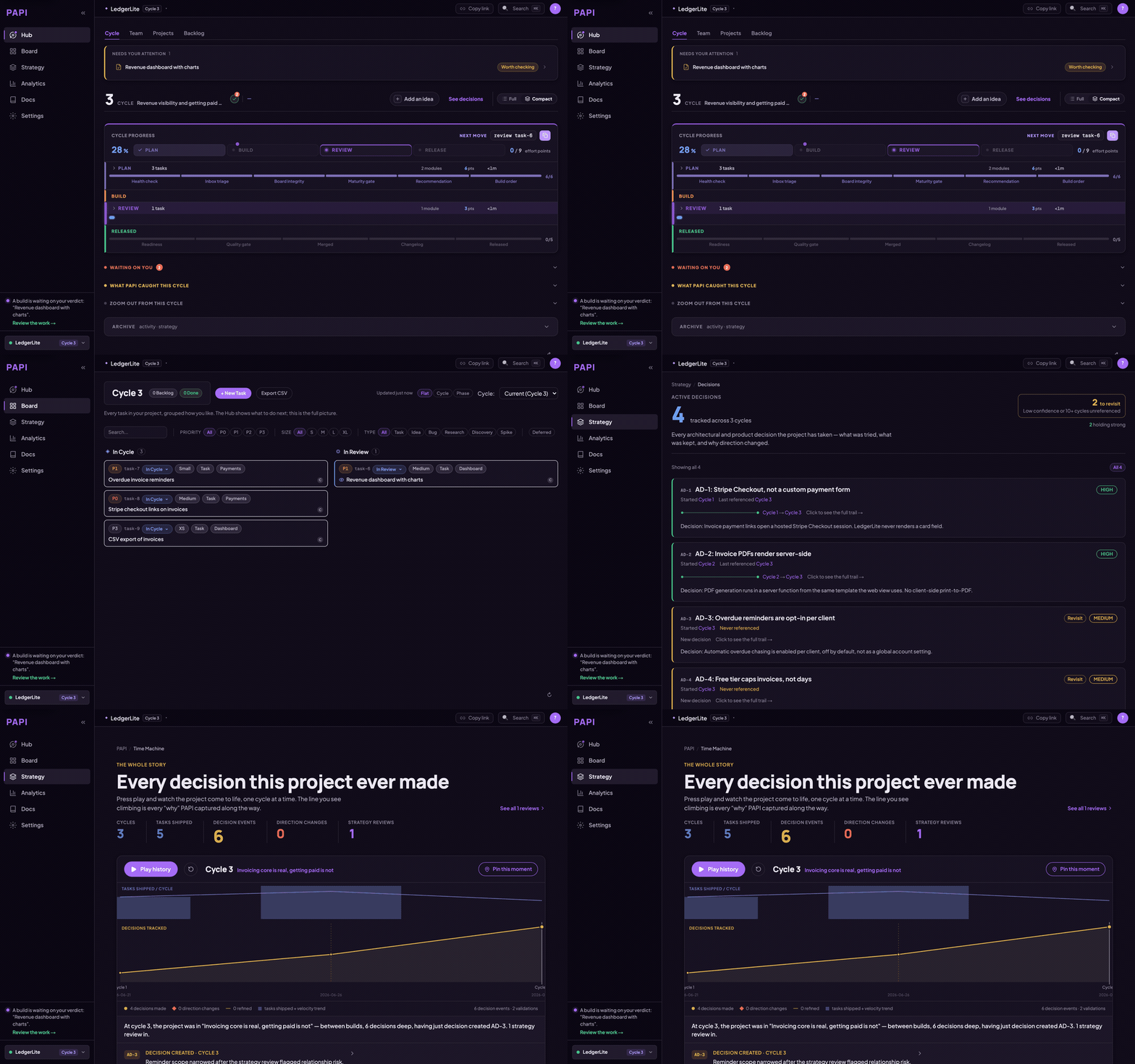
AI coding tools are great at writing code and terrible at holding a direction. Scope grows, plans change, and the decisions behind them get made in a chat window and lost there. PAPI keeps the project on course. It gives your assistant structured plan, build, review and release cycles, plus a decision trail recording what was chosen, what was dropped, and why. Your assistant writes and reads it while it works, so it stays current without anyone maintaining it.
You connect it once. From then on, your assistant starts every session knowing which cycle you're on, what's in flight, and what to do next.
If PAPI is useful, star the repo. It's how other people building with AI assistants find it.
Free to start. The whole plan → build → review → release loop, on up to three projects, no card. Free runs a real project start to finish; it isn't a trial. Pricing.
What this repo is. Documentation, install guides, plugin and extension manifests, the PAPI agent skills, and the issue tracker. PAPI's engine is closed source and hosted — you connect to it, you don't build it from here. The
@papi-ai/serverpackage on npm is the supported local runtime. The contents of this repo are MIT.
Quick start
Let your AI install it. Paste this to your assistant — Cursor, Claude Code, Windsurf, Codex, VS Code, or any other MCP client:
Read https://getpapi.ai/llms.txt and set up PAPI
Your assistant reads the runbook and walks you through the whole first run: checking it's in the right project folder, connecting, setting up your project, planning your first cycle, and building your first task. It works in coding tools and in chat apps like claude.ai and ChatGPT, and you don't need to be a developer. (The same runbook lives in this repo as llms.txt and llms-install.md if your assistant can't fetch URLs.)
The one thing only you can do. You need a free account at getpapi.ai. After that there are two ways to connect:
- Connection token (default). Open the Connect panel on getpapi.ai, copy the project id and connection token under "This is your project", and hand them to your assistant. It puts them in your tool's config and PAPI works straight away, with no browser step.
- Browser sign-in. Your assistant adds the server and you approve it in the browser. No assistant can click through that screen for you, and until you do the server shows
Needs authentication.
Most tools only load a new connection when a conversation starts, so open a fresh conversation after connecting and ask your assistant to run orient.
Prefer to wire it up yourself?
In Claude Code, the shortest path is the plugin — two lines, nothing to copy or edit:
/plugin marketplace add getpapi/papi
/plugin install papi@papi
The plugin carries the server config and the PAPI skills for each phase of the cycle: planning, building, reviewing and releasing. It also includes check-mcp, which diagnoses a connection that isn't working, and papi-verify, which health-checks the current cycle.
Every tool also takes the same streamable-HTTP endpoint directly, https://mcp.getpapi.ai/mcp. In Claude Code that's:
claude mcp add --transport http papi https://mcp.getpapi.ai/mcp
Either way, finish with /mcp → papi → Authenticate. Or skip the browser step entirely with the connection token from the Connect panel:
claude mcp add --transport http papi https://mcp.getpapi.ai/mcp --header "Authorization: Bearer YOUR_CONNECTION_TOKEN" --header "x-papi-project-id: YOUR_PROJECT_ID"
The DeepSeek Harness bundle is in this repo but is not yet published to npm, so the command below won't resolve until it is. After creating a PAPI connection token, it will install with:
dsh plugin --profile web add @papi-ai/deepseek-harness
See PAPI for DeepSeek Harness for token handling, verification, compatibility, and removal.
Per-tool config for Cursor, VS Code, Windsurf, Codex, and any generic MCP client is in docs/install.md.
What you get
- plan breaks your goals into a cycle of right-sized tasks, each with a build handoff your assistant can execute directly.
- build tracks what was built, what surprised you, and what was discovered along the way.
- review and release close the loop, so every cycle feeds the next plan.
- strategy reviews every few cycles step back and check direction, not just velocity.
- A dashboard at getpapi.ai shows your cycles, board, and decisions, so you can see the state of the project without asking.
The methodology is the product: a plan, build, review, release loop your assistant runs with you, where each cycle's learnings feed the next plan. PAPI has been built with PAPI for every cycle in the badge above.
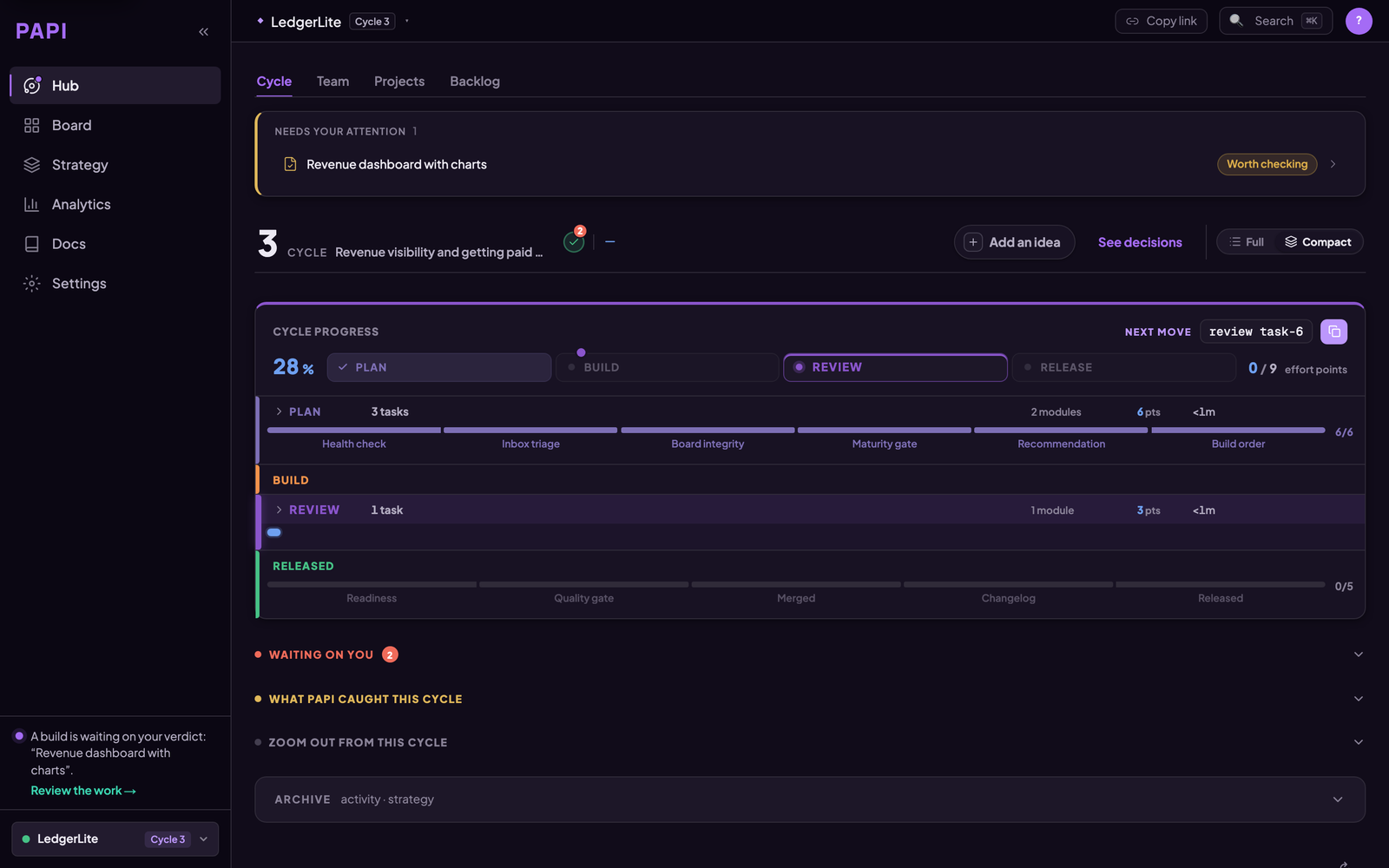
The hub opens on one question — what happens next. The cycle's progress through plan, build, review and release sits under it.
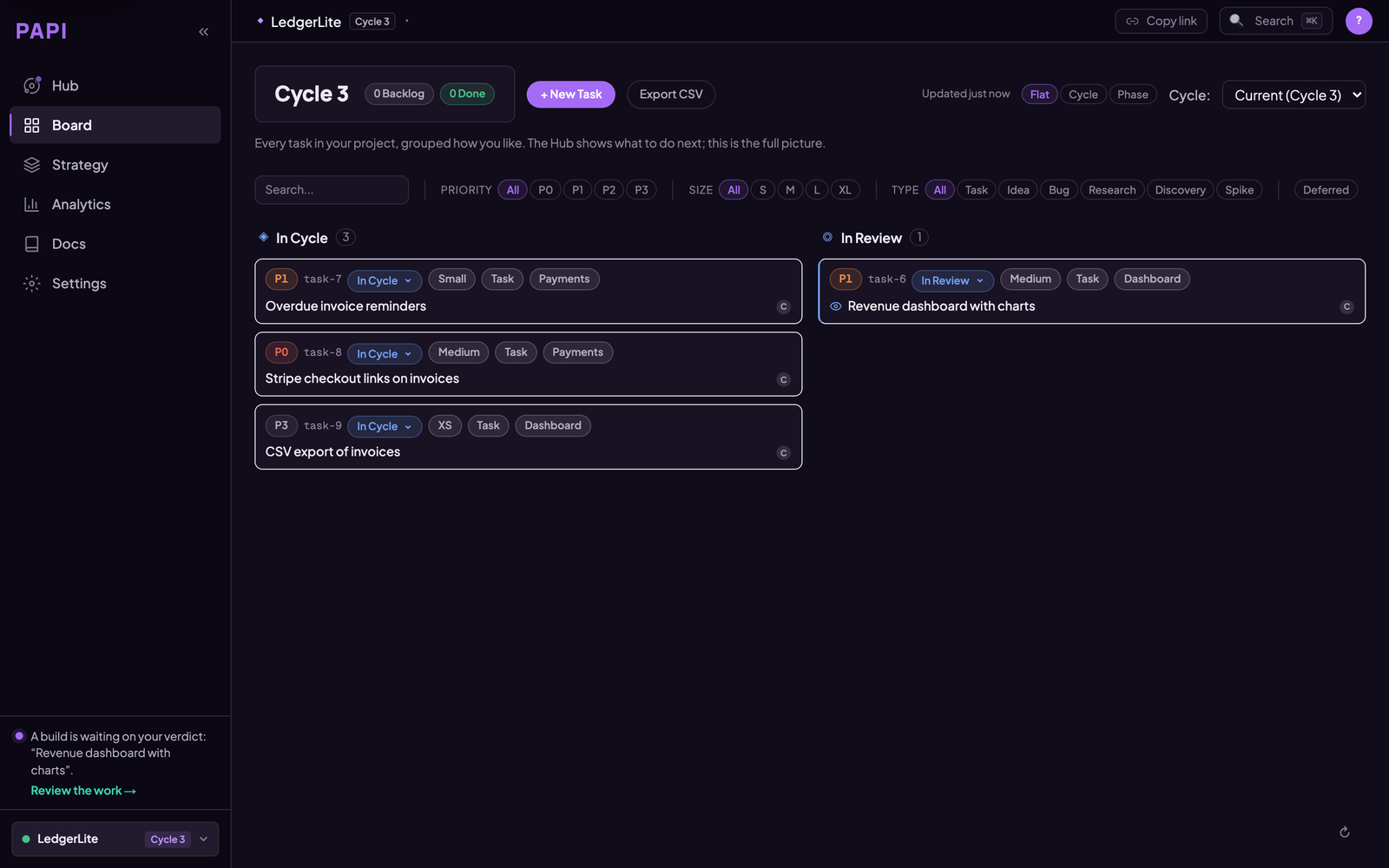
The board is the full picture. Your assistant writes to it as a side effect of working, so it is current without anyone maintaining it.
How PAPI differs from a tracker
Linear, Jira, Asana and Notion are built for people to write tickets and other people to read them. They suit that job well, and plenty of teams keep using them.
PAPI's board is written and read by your assistant as it works. Starting a build opens the task, finishing it files the report, and releasing closes the cycle. You approve the plan and sign off the review.
Taskmaster is a good way to break work into tasks inside a repo. PAPI adds state that lives outside the repo and persists across tools: cycles, build reports, review verdicts, and Active Decisions whose confidence changes as evidence arrives. The same project is available from Claude Code, Cursor, VS Code, Codex and the others, so switching tools doesn't reset it. Moving from Taskmaster? See PAPI vs Taskmaster.
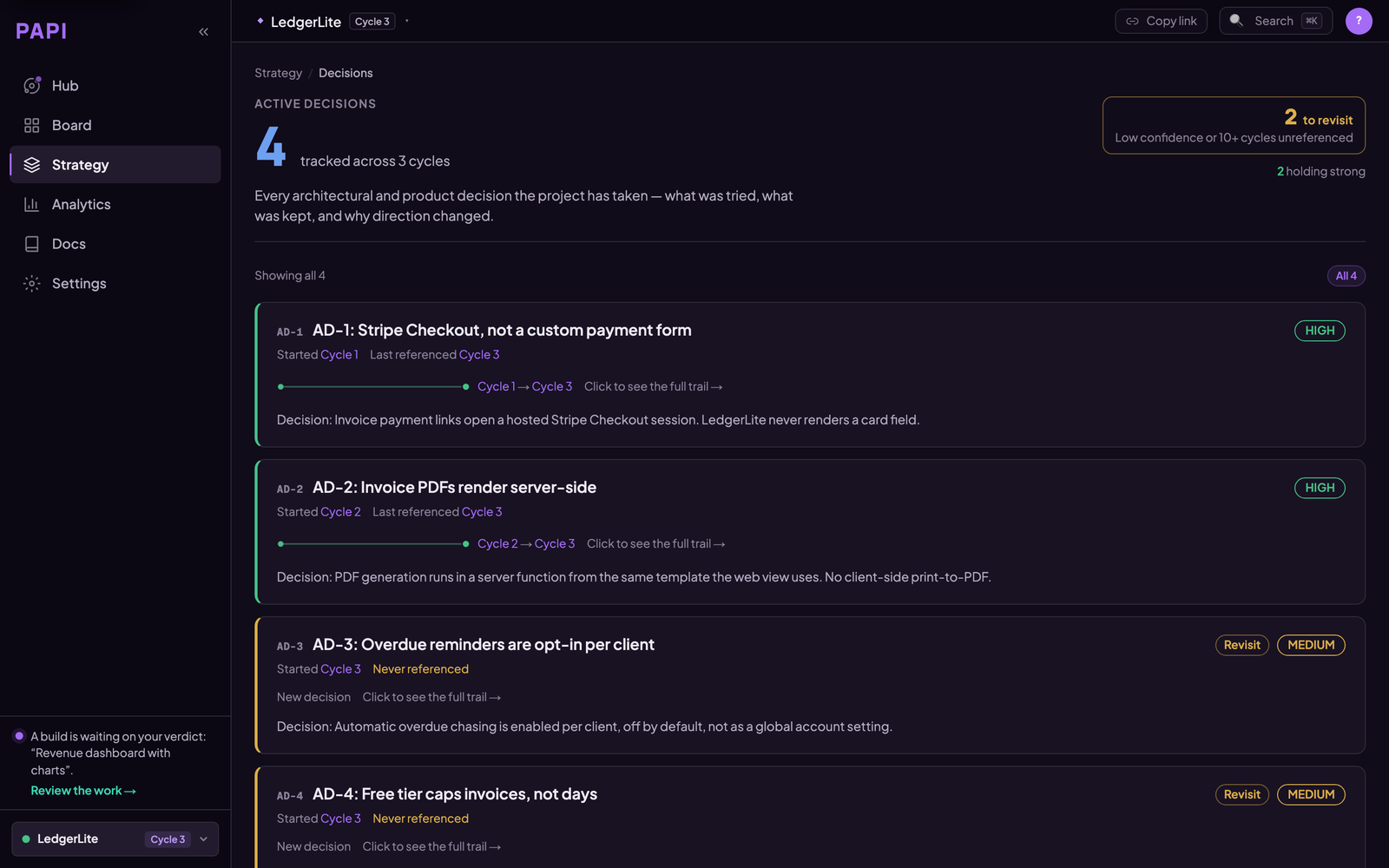
Active Decisions are the part a task tracker has no field for: what was decided, why, what was rejected, and when to revisit it. Confidence moves as evidence arrives.
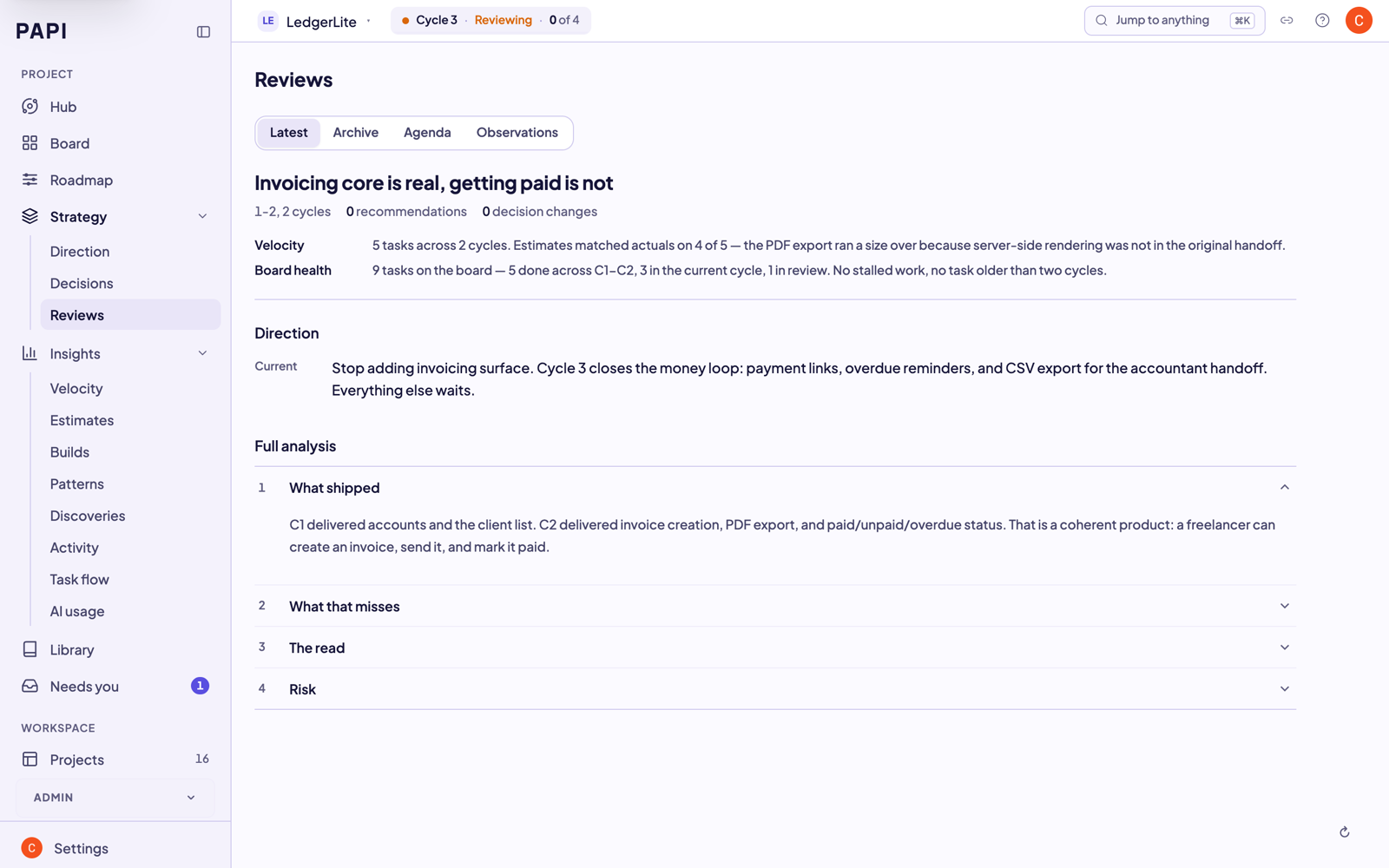
Every review leaves a trail, so the reasoning behind the project is still there months later, including for the assistant reading it back.
Tools
PAPI exposes these MCP tools to your assistant. The whole loop is a handful of calls. The server exposes more than these, including claims and sessions for teammates, conventions, document registration and project export. The Tool Reference lists all of them.
Core loop
- orient — one call returns the current cycle, what's in flight, and the recommended next action. Run it at the start of every session.
- setup — scaffold PAPI onto a new project.
- plan — break goals into a cycle of right-sized tasks, each with a build handoff your assistant can execute directly.
- build_list — list the current cycle's tasks and their handoffs.
- build_execute — start a task (creates a branch and handoff) and complete it (records the build report).
- review_list / review_submit — surface finished builds and record accept / request-changes / reject verdicts.
- release / close_cycle — finish the cycle, with a published version (
release) or without one (close_cycle). - tutorial_mode — turn on short explanations and one clear next step in every reply. Handy for your first few cycles.
Board and backlog
- board_view — read the project board and any task.
- board_edit — change a task's status, cycle, priority, or notes.
- ad_hoc — record quick work done outside the cycle so it shows in project history.
- idea — capture a feature, bug, or research note into the backlog.
- bug — file a bug against the board.
Strategy and intelligence
- strategy_review — step back every few cycles to check direction, not just velocity.
- strategy_change — record an Active Decision, with supersede history.
- zoom_out — a periodic retrospective across many cycles.
Docs and projects
- doc_register / doc_search — register and find project reference docs.
- project_list / project_switch / project_create — manage multiple PAPI projects.
Teams
- join — join a project a teammate invited you to.
- contributor_list / contributor_add — see and manage who works on the project.
Documentation
In this repo:
| Doc | What it covers |
|---|---|
| llms.txt | The agent runbook — point your AI at this (live version: getpapi.ai/llms.txt) |
| llms-install.md | Per-tool install instructions for AI assistants |
| docs/install.md | Install paths for every supported tool |
| docs/how-it-works.md | Cycles, handoffs, decisions, and how the pieces fit |
| docs/troubleshooting.md | Connection problems, project routing, common fixes |
Full documentation on the website — no account needed:
| Page | What it covers |
|---|---|
| Quick Start | Zero to your first cycle plan in under 5 minutes |
| Workflow | The full plan → build → review → release loop |
| Concepts | Cycles, handoffs, Active Decisions — the vocabulary |
| Cheat Sheet | Every command on one page |
| Tool Reference | Every PAPI MCP tool with parameters and use cases |
| Troubleshooting | Connection and auth first aid |
| Handbook | For teams: reading dashboards, cycle reports, review flow |
Community and support
Stuck, or something's broken? Open an issue — there are templates for each case, and the connection problem one is the one to reach for if PAPI won't connect or won't authenticate, which is where people get stuck most:
- Connection problem · Bug report · Question · Feature request
- Discord is faster for questions, and release notes land there first.
- CONTRIBUTING.md covers what a useful report looks like and what a docs PR can change.
- Found a vulnerability? Don't open an issue — SECURITY.md has the private channel.
Links
- Website and dashboard: getpapi.ai
- Pricing: getpapi.ai/pricing — free tier, no card
- What shipped in each cycle: getpapi.ai/changelog
- Data, access, and what PAPI doesn't have yet: getpapi.ai/trust
- Licence: the contents of this repo (docs, guides, config examples, Dockerfile) are MIT. That licence covers this repository only — not the PAPI engine, and not the PAPI name or logo, which are trademarks.
Preguntas sobre PAPI MCP
¿Cómo agrego PAPI MCP a Claude Code?
Ejecuta claude mcp add papi -- npx -y @papi-ai/server en tu terminal. Añade --scope user para que esté disponible en todos los proyectos.
¿Cómo agrego PAPI MCP a Cursor?
Abre ~/.cursor/mcp.json y añade el servidor en mcpServers, usando la configuración de Cursor que se muestra en la sección de instalación de arriba.
¿Qué herramientas proporciona PAPI MCP?
Expone 15 herramientas, incluidas orient, setup, plan, build_list, build_execute.
¿Cómo ayuda PAPI a los asistentes de codificación con IA?
Proporciona ciclos estructurados de planificación, construcción, revisión y lanzamiento, además de un registro de decisiones que documenta qué se eligió, qué se descartó y por qué.
¿Existe una versión gratuita de PAPI?
Sí, el ciclo completo de planificación, construcción, revisión y lanzamiento es gratuito para hasta tres proyectos sin necesidad de introducir una tarjeta de crédito.
¿Cómo conecto PAPI con mi asistente de IA?
Puedes usar un token de conexión desde el dashboard de getpapi.ai o iniciar sesión con el navegador para aprobar la conexión del servidor.