
Convierte auditorías de Google Lighthouse en paquetes de corrección estructurados y accionables para que agentes de codificación por IA mejoren el rendimiento web, el SEO y la accesibilidad.
También conocido como fullstackdegen/agent-audit, @fullstackdegen/agent-audit
- Stars
- 4
- Herramientas
- 2
- Descargas, 30 días
- 197
- Última versión
- 0.3.1
- Último commit
- 2 sept 2026
- Licencia
- MIT
¿Qué es agent-audit MCP?
agent-audit es un MCP server. Convierte auditorías de Google Lighthouse en paquetes de corrección estructurados y accionables para que agentes de codificación por IA mejoren el rendimiento web, el SEO y la accesibilidad. Expone 2 herramientas, como fast, reliable.
Resumen generado a partir del README del proyecto
Acerca del MCP server de agent-audit
Agent Audit es un MCP server diseñado para cerrar la brecha entre los diagnósticos de rendimiento brutos y la ejecución autónoma de código. Transforma los informes de Google Lighthouse en paquetes de corrección estructurados que los agentes de codificación pueden interpretar y ejecutar. En lugar de proporcionar datos no estructurados, entrega backlogs priorizados que contienen pasos de implementación, pistas de búsqueda en el repositorio y criterios de aceptación medibles para el rendimiento web, la accesibilidad y el SEO técnico.
Los desarrolladores pueden integrar este servidor con clientes MCP como Claude Code, Cursor, GitHub Copilot y Codex. Se ejecuta mediante Node.js y requiere Google Chrome o Chromium para realizar las auditorías. Los usuarios pueden elegir entre un modo rápido para ejecuciones únicas o un modo fiable que agrega múltiples ejecuciones para tener en cuenta la variabilidad. Aunque se enfoca principalmente en URLs públicas, los desarrolladores pueden habilitar la auditoría de localhost para entornos de desarrollo local mediante flags o variables de entorno específicas.
Qué puedes hacer con él
- 1Mejorar la accesibilidad web y el SEOIdentifica fallos de accesibilidad específicos y problemas de SEO técnico como metadatos faltantes o enlaces rotos.
- 2Verificar correcciones de rendimientoUtiliza criterios de aceptación medibles para asegurar que un cambio de código realmente haya resuelto el problema de rendimiento identificado.
Escrito a partir del README del proyecto. Cada caso de uso se verifica con una cita del mismo.
Cómo instalar agent-audit MCP
Formatos verificados el 10 nov 2026Añadir a CursorAñadir a GooseInstalar agent-audit MCP en Claude Code
$ claude mcp add agent-audit -- npx -y @fullstackdegen/agent-auditInstalar agent-audit MCP en Cursor
~/.cursor/mcp.json
{
  "mcpServers": {
    "agent-audit": {
      "command": "npx",
      "args": [
        "-y",
        "@fullstackdegen/agent-audit"
      ]
    }
  }
}Instalar agent-audit MCP en VS Code
.vscode/mcp.json
{
  "servers": {
    "agent-audit": {
      "type": "stdio",
      "command": "npx",
      "args": [
        "-y",
        "@fullstackdegen/agent-audit"
      ]
    }
  }
}Instalar agent-audit MCP en VS Code CLI
$ code --add-mcp '{"name":"agent-audit","type":"stdio","command":"npx","args":["-y","@fullstackdegen/agent-audit"]}'Instalar agent-audit MCP en Claude Desktop
claude_desktop_config.json
{
  "mcpServers": {
    "agent-audit": {
      "command": "npx",
      "args": [
        "-y",
        "@fullstackdegen/agent-audit"
      ]
    }
  }
}Instalar agent-audit MCP en Codex
$ codex mcp add agent-audit -- npx -y @fullstackdegen/agent-auditInstalar agent-audit MCP en Codex config.toml
~/.codex/config.toml
[mcp_servers.agent-audit]
command = "npx"
args = ["-y", "@fullstackdegen/agent-audit"]
Instalar agent-audit MCP en Gemini CLI
$ gemini mcp add -s user agent-audit npx -- -y @fullstackdegen/agent-auditInstalar agent-audit MCP en Gemini settings.json
~/.gemini/settings.json
{
  "mcpServers": {
    "agent-audit": {
      "command": "npx",
      "args": [
        "-y",
        "@fullstackdegen/agent-audit"
      ]
    }
  }
}Herramientas de agent-audit MCP 2
Detectado desde el READMEfastreliable
| fast | — | |
| reliable | — |
Configuración
LIGHTHOUSE_CHROME_NO_SANDBOXLIGHTHOUSE_MCP_ALLOW_LOCALHOST
| Nombre | Descripción | Tipo |
|---|---|---|
| LIGHTHOUSE_CHROME_NO_SANDBOX | — | |
| LIGHTHOUSE_MCP_ALLOW_LOCALHOST | — |
Verificaciones automáticas
Ejecutado 13 nov 2026Informe completo →Pasó nuestras verificaciones automáticas. Esto no es una auditoría de seguridad: lee el código y dale al servidor el acceso más limitado que necesite. Cómo funcionan las verificaciones

- Repositorio de origen vinculado y accesiblefullstackdegen/agent-audit is public and reachablegithub.com/fullstackdegen/agent-audit ↗Aprobado
- El paquete indica este repositorio como su origen@fullstackdegen/agent-audit names fullstackdegen/agent-audit as sourcenpmjs.com/package/@fullstackdegen/agent-audit ↗Aprobado
- Procedencia de la compilación (atestación de Sigstore)No build attestation published for this releaseNo verificado
- Licencia de código abierto (OSI)MITspdx.org/licenses/MIT.html ↗Aprobado
- Commit o lanzamiento en el último añoLast commit or release 2026-09-02github.com/fullstackdegen/agent-audit ↗Aprobado
- OpenSSF ScorecardNo verificado
- El nombre del paquete no es similar a un paquete popularNo popular package one edit away from @fullstackdegen/agent-auditAprobado
- No hay avisos críticos en el paquete ni en sus dependencias239 resolved dependencies checked; no critical advisoryosv.dev ↗Aprobado
- Sin instrucciones ocultas para el modelo2 tool descriptions and the README read; no override phrases, credential paths or hidden charactersAprobado
- Las herramientas destructivas están etiquetadasNo tool named like delete, drop or execAprobado
- El endpoint remoto responde al handshake de MCPNo verificado
README
Ver en GitHubAgent Audit
Lighthouse-powered MCP server for AI coding agents, Core Web Vitals, technical SEO, accessibility, and GEO/LLM visibility audits.
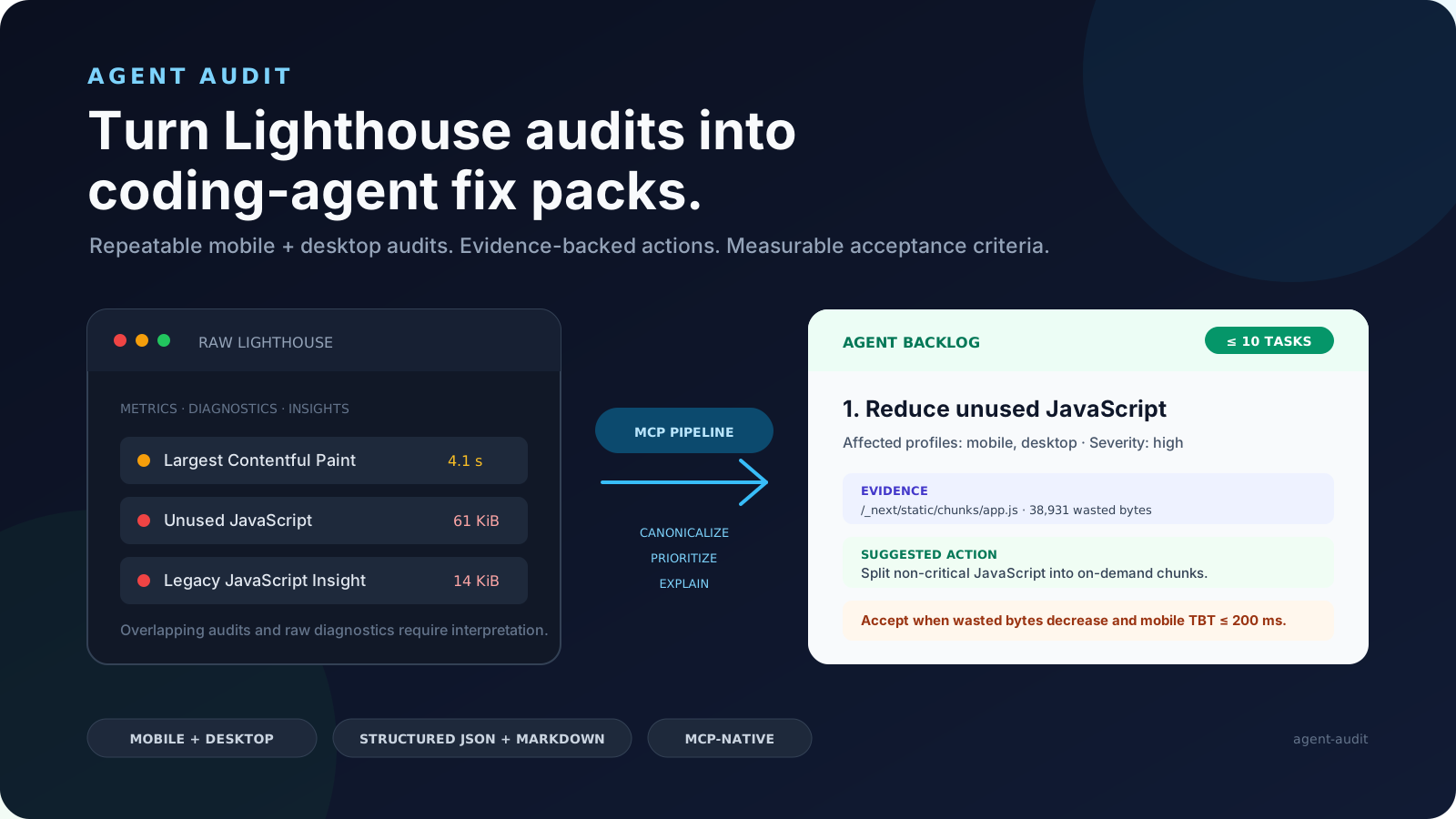
Agent Audit turns Google Lighthouse and bounded page-inspection results into structured fix packs that coding agents can actually execute. It gives Claude Code, Codex, Cursor, GitHub Copilot, and other MCP clients a prioritized, evidence-backed backlog instead of a raw performance report.
Turn Lighthouse audits into coding-agent fix packs.
npx -y @fullstackdegen/agent-audit


Why Agent Audit Exists
Lighthouse is excellent for diagnosis, but raw reports are not enough for an autonomous coding workflow. A coding agent still needs to know which issue is most important, whether it affects mobile, desktop, or both, which selectors or resources are evidence, what files to search for, how to verify the fix, and when it is safe to claim completion.
Agent Audit converts Lighthouse output into an implementation contract:
- Runs mobile and desktop Lighthouse audits.
- Aggregates repeated runs and exposes variability.
- Adds bounded same-page intelligence for technical SEO, links, metadata, structured data, images, assets, indexability, and AI discovery signals.
- Merges noisy audit output into a small prioritized issue list.
- Generates
fixPackswith repo search hints, implementation steps, and measurable acceptance criteria. - Returns strict MCP
structuredContentplus equivalent Markdown.
The goal is simple: give a coding agent a report it can read, reason about, fix, test, and verify.
What It Audits
Agent Audit is useful when people search for:
- Lighthouse-powered MCP server
- AI website audit tool
- coding agent Lighthouse report
- Core Web Vitals automation
- performance audit for Claude Code, Codex, Cursor, or Copilot
- technical SEO audit for AI agents
- accessibility fix packs
- LLM visibility audit
- GEO audit, generative engine optimization, AI search readiness
llms.txtreadiness and AI crawler visibility
Current checks include:
- Mobile and desktop Lighthouse scores for Performance, Accessibility, Best Practices, and SEO.
- FCP, Speed Index, LCP, TBT, and CLS metric distributions.
- Fast and reliable audit modes.
- Same-origin page inspection with bounded fetch limits.
- Broken links, missing link names, metadata, canonical tags, robots signals, JSON-LD, Open Graph, indexability, images, assets, and LLM visibility checks.
- Conservative
llms.txtdraft generation when page content is sufficient. - Prioritized issues with evidence, suggested actions, and acceptance criteria.
- Agent Fix Packs with repo search hints, implementation steps, and verification guidance.
- Strict MCP
outputSchemavalidation forstructuredContent. - Markdown generated from the same canonical report.
See a real CommaLabs JSON report and Markdown report.
Install
Requirements:
- Node.js 20 or later.
- Google Chrome or Chromium.
Run the MCP server:
npx -y @fullstackdegen/agent-audit
Useful links:
MCP Client Setup
Claude Desktop
Add a local MCP server:
{
  "mcpServers": {
    "agent-audit": {
      "command": "npx",
      "args": ["-y", "@fullstackdegen/agent-audit"]
    }
  }
}
Restart Claude Desktop after saving the configuration.
Claude Code
claude mcp add agent-audit -- npx -y @fullstackdegen/agent-audit
For local development audits:
claude mcp add agent-audit-local -- npx -y @fullstackdegen/agent-audit --local
Codex
codex mcp add agent-audit -- npx -y @fullstackdegen/agent-audit
Or add it to ~/.codex/config.toml:
[mcp_servers.agent-audit]
command = "npx"
args = ["-y", "@fullstackdegen/agent-audit"]
VS Code And GitHub Copilot
Create a workspace or user-level .mcp.json file:
{
  "servers": {
    "agent-audit": {
      "command": "npx",
      "args": ["-y", "@fullstackdegen/agent-audit"]
    }
  }
}
Or register it from a terminal:
code --add-mcp '{"name":"agent-audit","command":"npx","args":["-y","@fullstackdegen/agent-audit"]}'
Cursor
Configure a local stdio MCP server:
- name:
agent-audit - command:
npx - arguments:
-y,@fullstackdegen/agent-audit
Add --local to the arguments when you need localhost audits.
Tool
analyze_website_performance
Runs Lighthouse and site intelligence against a target URL:
{
  "url": "https://example.com",
  "mode": "reliable"
}
mode is optional:
fast: one mobile run and one desktop run.reliable: three runs per profile, medians, and variability ranges. This is the default.
Example Fix Pack
{
  "id": "fix-link-name",
  "priority": 2,
  "sourceIssueIds": ["link-name"],
  "goal": "Fix Links do not have a discernible name.",
  "category": "accessibility",
  "severity": "critical",
  "affectedProfiles": ["mobile", "desktop"],
  "repoSearchHints": [
    "div.border-t-2 > div.flex > div.flex > a.text-gray-600",
    "https://www.linkedin.com/company/commalabs"
  ],
  "implementationSteps": [
    "Inspect the repository for the evidence listed in repoSearchHints before editing.",
    "Give every link a discernible accessible name.",
    "Keep changes focused on source issue IDs: link-name."
  ],
  "acceptanceCriteria": [
    "All link elements pass the Lighthouse link-name audit.",
    "Raise the median accessibility score to at least 90/100."
  ],
  "verification": {
    "rerunMode": "reliable",
    "expectedAuditIds": ["link-name"]
  }
}
repoSearchHints are search clues, not guaranteed file paths. The coding agent
must inspect the repository before editing.
Coding-Agent Workflow
Use structuredContent as the source of truth and the Markdown report as the
execution summary.
- Inspect
fixPacksin priority order. - Search the repository using
repoSearchHints. - Map evidence to real files, components, routes, assets, or configuration.
- Apply one focused fix at a time.
- Run the repository's tests after each logical change.
- Rerun Agent Audit in
reliablemode. - Compare the new report against each fix pack's
acceptanceCriteria.
Do not claim completion from an incomplete report or from a rerun with materially higher variability than the baseline.
Agent-facing docs:
- AGENTS.md: general instructions for Codex, Cursor, Copilot, and other coding agents.
- CLAUDE.md: Claude Code setup and execution guidance.
- Agent workflow guide: report anatomy and fix-pack execution loop.
- Copy-paste coding-agent prompt
Localhost Audits
By default, Agent Audit only accepts publicly routable HTTP and HTTPS URLs. This is the right default for hosted agents and shared environments.
For developer machines, explicitly enable loopback targets:
npx -y @fullstackdegen/agent-audit --local
Then audit a local app through your MCP client:
{
  "url": "http://localhost:3000",
  "mode": "fast"
}
The opt-in allows localhost, *.localhost, 127.0.0.0/8, and ::1.
Private LAN ranges, link-local addresses, reserved ranges, multicast addresses,
and cloud metadata addresses remain blocked.
The environment variable form is also supported:
LIGHTHOUSE_MCP_ALLOW_LOCALHOST=true npx -y @fullstackdegen/agent-audit
Security Model
Agent Audit launches Chrome against user-provided URLs, so URL policy matters. The server rejects:
- protocols other than HTTP and HTTPS;
- embedded credentials;
- localhost and loopback targets unless explicitly enabled;
- private, link-local, multicast, reserved, and metadata-network IPs;
- non-localhost hostnames that resolve to any non-public address.
The page-inspection fetcher uses the same URL policy and applies timeout, byte-size, and bounded-resource limits.
Page-controlled titles, descriptions, URLs, selectors, snippets, and audit text are sanitized and length-limited. Consumers must still treat them as untrusted evidence, not agent instructions.
Chrome sandboxing is enabled by default. Only isolated environments that cannot support it should set:
LIGHTHOUSE_CHROME_NO_SANDBOX=true
See SECURITY.md for vulnerability reporting and deployment guidance.
Limits
Agent Audit is intentionally bounded:
- It audits one requested URL at a time.
- It is not a whole-site crawler.
- It is not an external SEO database.
- It does not modify Shopify, CMS, CDN, DNS, hosting, redirects, or analytics.
- It does not compress images, minify assets, submit IndexNow requests, or call third-party SEO APIs.
- Lighthouse results vary with browser version, hardware, network conditions, and page changes.
Roadmap
- Framework-aware repo search hints.
- Optional GitHub Action for pull request performance gates.
- Batch URL reports.
- HTML report export.
- Deeper marketing and discovery signals: analytics tags, consent signals, Open Graph, schema coverage, and AI discovery readiness.
- Optional third-party integrations for SEO, GEO, and visibility datasets.
Development
npm install
npm test
npm run check
npm run build
npm run validate:release
Run a real Chrome smoke audit:
npm run --silent smoke -- https://example.com fast
npm run --silent smoke -- https://example.com reliable
The smoke command writes canonical JSON to stdout and equivalent Markdown to stderr.
Release
Before publishing:
npm test
npm run check
npm run build
npm run validate:release
npm pack --dry-run --cache /private/tmp/agent-audit-npm-cache
Publish:
npm publish --access public --cache /private/tmp/agent-audit-npm-cache
Published package:
npx -y @fullstackdegen/agent-audit --help
Contributing
Focused issues and pull requests are welcome. Read CONTRIBUTING.md before changing the report contract, security policy, or MCP transport behavior.
License
Preguntas sobre agent-audit MCP
¿Cómo agrego agent-audit MCP a Claude Code?
Ejecuta claude mcp add agent-audit -- npx -y @fullstackdegen/agent-audit en tu terminal. Añade --scope user para que esté disponible en todos los proyectos.
¿Cómo agrego agent-audit MCP a Cursor?
Abre ~/.cursor/mcp.json y añade el servidor en mcpServers, usando la configuración de Cursor que se muestra en la sección de instalación de arriba.
¿Qué herramientas proporciona agent-audit MCP?
Expone 2 herramientas, incluidas fast, reliable.
¿Qué hace Agent Audit con los informes de Lighthouse?
Transforma los datos brutos de Lighthouse en
¿Qué tipo de métricas y auditorías web se incluyen?
Cubre Core Web Vitals (FCP, LCP, CLS, etc.), SEO técnico, accesibilidad, enlaces rotos, metadatos y señales de descubrimiento para IA como la preparación para llms.txt.
¿Esta herramienta rastrea todo mi sitio web?
No, la herramienta está diseñada para auditar una URL solicitada a la vez y no es un rastreador de sitios completos.