
Permite que los agentes de IA escriban, validen y reparen definiciones de formularios JSON para aplicaciones en React, Vue, Swift y Kotlin.
También conocido como formhaus-dev/formhaus, @formhaus/mcp
- Stars
- 8
- Herramientas
- —
- Descargas, 30 días
- 8002
- Última versión
- —
- Último commit
- 15 nov 2026
- Licencia
- MIT
¿Qué es formhaus MCP?
Permite que los agentes de IA escriban, validen y reparen definiciones de formularios JSON para aplicaciones en React, Vue, Swift y Kotlin.
Resumen generado a partir del README del proyecto
Acerca del MCP server de formhaus
Formhaus proporciona un sistema para crear definiciones JSON únicas que gestionan campos, validación y lógica de ramificación para formularios. Este enfoque permite a los desarrolladores escribir un formulario una sola vez y renderizarlo en diversas plataformas, incluyendo React, Vue, Swift y Kotlin. El motor principal es independiente del framework y puede utilizarse en entornos de Svelte o JavaScript puro.
Los desarrolladores pueden usar el MCP server localmente vía npx para permitir que agentes de IA como Claude Desktop, Cursor o Claude Code escriban, validen y reparen estas definiciones JSON. Para quienes necesiten una solución alojada, Formhaus Cloud ofrece un MCP server remoto que permite a los agentes publicar formularios y leer respuestas directamente. El sistema admite funciones complejas como ramificación de múltiples pasos, campos condicionales e internacionalización mediante catálogos de traducción.
Qué puedes hacer con él
- 1Validar y corregir definiciones JSONLos desarrolladores pueden usar el MCP server para asegurarse de que su JSON de formularios sea sintácticamente correcto y lógicamente sólido.
- 2Prototipar formularios en herramientas de diseñoLos diseñadores pueden convertir definiciones JSON en prototipos interactivos o mapas de flujo dentro de Figma.
Escrito a partir del README del proyecto. Cada caso de uso se verifica con una cita del mismo.
Cómo instalar formhaus MCP
Formatos verificados el 10 nov 2026Añadir a CursorAñadir a GooseInstalar formhaus MCP en Claude Code
$ claude mcp add formhaus -- npx -y @formhaus/mcpInstalar formhaus MCP en Cursor
~/.cursor/mcp.json
{
  "mcpServers": {
    "formhaus": {
      "command": "npx",
      "args": [
        "-y",
        "@formhaus/mcp"
      ]
    }
  }
}Instalar formhaus MCP en VS Code
.vscode/mcp.json
{
  "servers": {
    "formhaus": {
      "type": "stdio",
      "command": "npx",
      "args": [
        "-y",
        "@formhaus/mcp"
      ]
    }
  }
}Instalar formhaus MCP en VS Code CLI
$ code --add-mcp '{"name":"formhaus","type":"stdio","command":"npx","args":["-y","@formhaus/mcp"]}'Instalar formhaus MCP en Claude Desktop
claude_desktop_config.json
{
  "mcpServers": {
    "formhaus": {
      "command": "npx",
      "args": [
        "-y",
        "@formhaus/mcp"
      ]
    }
  }
}Instalar formhaus MCP en Codex
$ codex mcp add formhaus -- npx -y @formhaus/mcpInstalar formhaus MCP en Codex config.toml
~/.codex/config.toml
[mcp_servers.formhaus]
command = "npx"
args = ["-y", "@formhaus/mcp"]
Instalar formhaus MCP en Gemini CLI
$ gemini mcp add -s user formhaus npx -- -y @formhaus/mcpInstalar formhaus MCP en Gemini settings.json
~/.gemini/settings.json
{
  "mcpServers": {
    "formhaus": {
      "command": "npx",
      "args": [
        "-y",
        "@formhaus/mcp"
      ]
    }
  }
}Verificaciones automáticas
Ejecutado 14 nov 2026Informe completo →Pasó nuestras verificaciones automáticas. Esto no es una auditoría de seguridad: lee el código y dale al servidor el acceso más limitado que necesite. Cómo funcionan las verificaciones

- Repositorio de origen vinculado y accesibleformhaus-dev/formhaus is public and reachablegithub.com/formhaus-dev/formhaus ↗Aprobado
- El paquete indica este repositorio como su origen@formhaus/mcp names formhaus-dev/formhaus as sourcenpmjs.com/package/@formhaus/mcp ↗Aprobado
- Procedencia de la compilación (atestación de Sigstore)Sigstore attestation for @formhaus/mcpnpmjs.com/package/@formhaus/mcp/v/0.15.3#provenance ↗Aprobado
- Licencia de código abierto (OSI)MITspdx.org/licenses/MIT.html ↗Aprobado
- Commit o lanzamiento en el último añoLast commit or release 2026-11-08github.com/formhaus-dev/formhaus ↗Aprobado
- OpenSSF ScorecardNo verificado
- El nombre del paquete no es similar a un paquete popularNo popular package one edit away from @formhaus/mcpAprobado
- No hay avisos críticos en el paquete ni en sus dependenciasNo verificado
- Sin instrucciones ocultas para el modelo0 tool descriptions and the README read; no override phrases, credential paths or hidden charactersAprobado
- Las herramientas destructivas están etiquetadasNo verificado
- El endpoint remoto responde al handshake de MCPNo verificado
README
Ver en GitHubAdd Formhaus to your coding agent
npx formhaus
Adds the Formhaus MCP server to Claude Code, Codex, Cursor and Claude Desktop. Writes, checks and repairs definitions locally, with no account · Setup for each client
Two independent ways to use it:
-
Use the library. MIT, no account, no key. The core is framework-agnostic and runs the form in any app; React and Vue renderers are ready to use. Your submit handler sends the data wherever you want. CI tests React 18 and 19, and Vue 3.3 and 3.5.
npm install @formhaus/core # plus @formhaus/react or @formhaus/vue -
Use Formhaus Cloud. A hosted form backend: a submission endpoint with server validation, a dashboard and webhooks, plus hosted links, embeds and a visual builder. The first form needs no account.
Build in the browser at app.formhaus.dev, or add the remote MCP server and ask your agent: "Make me a waitlist form and give me the link."
claude mcp add --transport http formhaus https://api.formhaus.dev/mcp

What you get
| Feature | |
|---|---|
| One definition | Fields, validation, conditional fields, steps, branching routes, sections and repeatable groups in one JSON file you keep in git |
| React and Vue | Native renderers with accessible defaults, or your own components through components |
| Validation | Built-in rules and custom validators. validateSubmission() checks the same definition on the server |
| Agents | The MCP server writes, validates and fixes definitions. Remote MCP publishes forms and reads responses |
| i18n | Translation catalogs and keys for labels, messages and options |
| Accessibility | Labels, error summary, focus management and live regions built in |
| Small core | Zero dependencies, tree-shakable ESM |
| Figma | The plugin renders mockups, flow maps and prototypes from the same definition |
| Cloud, optional | Hosted links, embeds, a submission endpoint, CSV export and webhooks |
What it's for
- Multi-step forms with branching in React or Vue.
- Rendering a form from JSON with your own components.
- Designing the form in Figma from the same file.
- Generating and checking definitions with AI agents: Claude Code skills, the MCP server (
claude plugin marketplace add formhaus-dev/formhaus && claude plugin install formhaus@formhaus), the JSON Schema and the format specification. - Translated forms with your own catalogs, or with i18next, vue-i18n and Lokalise keys.
- A headless engine for Svelte or vanilla JS.
Example
Business accounts get a company step; everyone converges on review.
{
  "$schema": "https://formhaus.dev/schema/form-definition.json",
  "id": "signup",
  "title": "Sign up",
  "submit": { "label": "Create account" },
  "steps": [
    {
      "id": "account",
      "title": "Account",
      "fields": [
        { "key": "email", "type": "email", "label": "Email", "validation": { "required": true } },
        { "key": "kind", "type": "radio", "label": "Account type", "autoAdvance": true,
          "options": [{ "value": "personal", "label": "Personal" }, { "value": "business", "label": "Business" }] }
      ],
      "routes": [
        { "to": "company", "show": [{ "field": "kind", "eq": "business" }] },
        { "to": "review" }
      ]
    },
    { "id": "company", "title": "Company", "routes": [{ "to": "review" }],
      "fields": [{ "key": "company", "type": "text", "label": "Company name", "validation": { "required": true } }] },
    { "id": "review", "title": "Review",
      "fields": [{ "key": "terms", "type": "checkbox", "label": "I accept the terms", "validation": { "required": true } }] }
  ]
}
import { FormRenderer } from '@formhaus/react';
import definition from './signup.json';

<FormRenderer definition={definition} onSubmit={save} />;
Compare with react-hook-form, react-jsonschema-form, JSON Forms and SurveyJS →
Packages
| Package | Description | npm |
|---|---|---|
@formhaus/core |
Zero-dependency form engine: types, validation, visibility, multi-step | npm i @formhaus/core |
@formhaus/react |
React adapter with native HTML defaults and custom component support | npm i @formhaus/core @formhaus/react |
@formhaus/vue |
Vue 3 adapter with native HTML defaults and custom component support | npm i @formhaus/core @formhaus/vue |
@formhaus/mcp |
MCP server: validate definitions and simulate paths from AI agents | claude mcp add formhaus -- npx -y @formhaus/mcp |
@formhaus/figma generates form mockups on the Figma canvas. It is not on Figma Community yet; build it locally, then import packages/figma/manifest.json.
Svelte, Solid, or anything else: use @formhaus/core directly. See the Svelte recipe.
Install
npm install @formhaus/core
If you need a framework adapter:
npm install @formhaus/core @formhaus/react   # React
npm install @formhaus/core @formhaus/vue     # Vue
Or use @formhaus/core directly with any framework. See the Svelte recipe.
Quick start
Define a form
Write the JSON by hand, or use the /formhaus:formhaus-create-form Claude Code skill to generate it from a text description, a CSV table, or a screenshot of an existing form.
{
  "$schema": "https://formhaus.dev/schema/form-definition.json",
  "id": "contact",
  "title": "Contact Us",
  "submit": { "label": "Send" },
  "fields": [
    {
      "key": "name",
      "type": "text",
      "label": "Name",
      "placeholder": "Your name",
      "validation": { "required": true, "minLength": 2 }
    },
    {
      "key": "email",
      "type": "email",
      "label": "Email",
      "placeholder": "you@example.com",
      "validation": {
        "required": true,
        "pattern": "^[^\\s@]+@[^\\s@]+\\.[^\\s@]+$",
        "patternMessage": "Please enter a valid email address"
      }
    },
    {
      "key": "message",
      "type": "textarea",
      "label": "Message",
      "placeholder": "How can we help?",
      "rows": 4,
      "validation": { "required": true }
    }
  ]
}
React
npm install @formhaus/core @formhaus/react
import { FormRenderer } from '@formhaus/react';
import definition from './contact-form.json';

function ContactPage() {
  async function handleSubmit(values: Record<string, unknown>) {
    await fetch('/api/contact', {
      method: 'POST',
      body: JSON.stringify(values),
    });
  }

  return <FormRenderer definition={definition} onSubmit={handleSubmit} />;
}
Vue
npm install @formhaus/core @formhaus/vue
<script setup lang="ts">
import { FormRenderer } from '@formhaus/vue';
import definition from './contact-form.json';

async function handleSubmit(values: Record<string, unknown>) {
  await fetch('/api/contact', {
    method: 'POST',
    body: JSON.stringify(values),
  });
}
</script>

<template>
  <FormRenderer :definition="definition" @submit="handleSubmit" />
</template>
By default, both adapters render native HTML inputs. A step can hide Next with next: false, and cancellable async hooks run before and after navigation and submission. See lifecycle hooks.
Custom components
Both adapters accept a components prop (a FieldComponentMap) that lets you swap native HTML inputs for your own UI kit.
import type { FieldComponentMap, FieldComponentProps } from '@formhaus/react';

function MyTextInput({ field, value, error, onChange, onBlur }: FieldComponentProps) {
  return (
    <div>
      <label>{field.label}</label>
      <input
        type={field.type}
        value={(value as string) ?? ''}
        placeholder={field.placeholder}
        onChange={(e) => onChange(e.target.value)}
        onBlur={onBlur}
      />
      {error && <span className="error">{error}</span>}
    </div>
  );
}

const components: FieldComponentMap = {
  text: MyTextInput,
  email: MyTextInput,
};

<FormRenderer definition={definition} onSubmit={handleSubmit} components={components} />;
<!-- MyTextInput.vue -->
<script setup lang="ts">
import type { FieldComponentProps } from '@formhaus/vue';

const props = defineProps<FieldComponentProps>();
const emit = defineEmits<{ (e: 'update:modelValue', value: unknown): void }>();
</script>

<template>
  <label>{{ props.field.label }}</label>
  <input
    :value="(props.modelValue as string) ?? ''"
    @input="emit('update:modelValue', ($event.target as HTMLInputElement).value)"
  />
</template>
<!-- Usage -->
<script setup>
import { FormRenderer } from '@formhaus/vue';
import MyTextInput from './MyTextInput.vue';
</script>

<template>
  <FormRenderer
    :definition="definition"
    :components="{ text: MyTextInput, email: MyTextInput }"
    @submit="handleSubmit"
  />
</template>
Each field component receives the full FormField descriptor, the current value, and any validation error. Implement as many or as few field types as you need. Unmapped types fall back to native HTML.
Figma plugin
@formhaus/figma renders form definitions in Figma with built-in Material 3 and iOS-like kits or with your own components. Branching forms get a flow map, multi-step forms a clickable prototype, and a generated form can be selected, edited and updated in place.
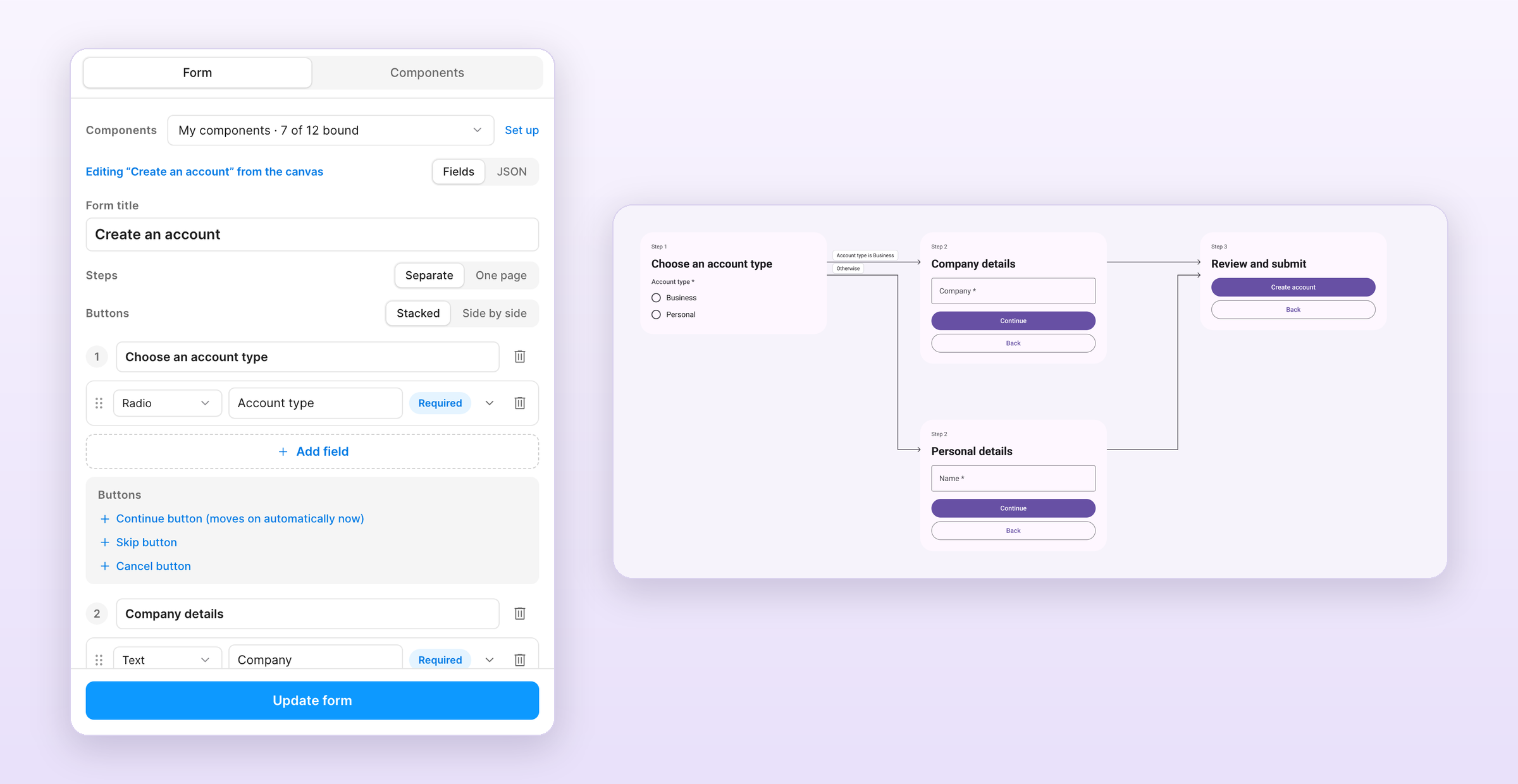
The /formhaus:formhaus-figma-connect Claude Code skill binds your library's components to the plugin. See the plugin guide for local installation.
Contributing
See CONTRIBUTING.md.
License
Preguntas sobre formhaus MCP
¿Cómo agrego formhaus MCP a Claude Code?
Ejecuta claude mcp add formhaus -- npx -y @formhaus/mcp en tu terminal. Añade --scope user para que esté disponible en todos los proyectos.
¿Cómo agrego formhaus MCP a Cursor?
Abre ~/.cursor/mcp.json y añade el servidor en mcpServers, usando la configuración de Cursor que se muestra en la sección de instalación de arriba.
¿Qué puede hacer el MCP server de Formhaus?
El MCP server permite que los agentes de IA escriban, verifiquen y reparen definiciones de formularios de forma local sin necesidad de una cuenta.
¿Puedo usar Formhaus con mis propios componentes de UI?
Sí, tanto los adaptadores de React como los de Vue te permiten sustituir los inputs nativos de HTML por tus propios componentes personalizados mediante una prop de componentes.
¿Soporta Formhaus formularios de varios pasos?
Sí, la definición JSON admite formularios de varios pasos, incluyendo campos, validación, campos condicionales, pasos y rutas de ramificación.