
Control los modelos de generación de video Veo e imagen Imagen de Google Flow a través de un cliente de IA o la terminal.
También conocido como ffroliva/gflow-cli
- Stars
- 396
- Herramientas
- 20
- Descargas, 30 días
- 9856
- Última versión
- 0.100.0
- Último commit
- 15 nov 2026
- Licencia
- MIT
¿Qué es gflow-cli MCP?
Control los modelos de generación de video Veo e imagen Imagen de Google Flow a través de un cliente de IA o la terminal. Expone 20 herramientas, como gflow_generate_image, gflow_generate_video, gflow_list_tools.
Resumen generado a partir del README del proyecto
Acerca del MCP server de gflow-cli
gflow-cli proporciona una interfaz basada en terminal y un MCP server para controlar los modelos generativos de Google Flow. Permite a los usuarios utilizar Veo para la generación de video e Imagen para la creación de imágenes mediante una línea de comandos o un cliente de IA. La herramienta funciona controlando un navegador Chromium con interfaz gráfica mediante un perfil persistente de Playwright, lo que ayuda a gestionar la autenticación de Google y los requisitos de reCAPTCHA.
Esta herramienta está diseñada para desarrolladores y creadores que necesitan automatizar la producción de medios mediante pipelines programados o procesamiento por lotes. Los usuarios deben tener una cuenta de Google con acceso activo a Flow, ya que todas las generaciones se cobran con los créditos de la propia cuenta del usuario. Mientras que las operaciones de imagen y composición son gratuitas, la generación de video con Veo consume créditos. El servidor puede ejecutarse localmente a través de la CLI o como un MCP server para integrarse con agentes de IA como Claude Code o Cursor.
Qué puedes hacer con él
- 1Generación de imágenes por lotesUn desarrollador puede iterar sobre un archivo de texto con prompts para generar múltiples imágenes de forma automática.
- 2Mantener la consistencia de personajesLos usuarios pueden crear una referencia de personaje específica para asegurar que la misma persona aparezca en diferentes generaciones.
- 3Extender clips de videoPuedes usar la herramienta para continuar un clip de video existente más allá del límite estándar de ocho segundos.
Escrito a partir del README del proyecto. Cada caso de uso se verifica con una cita del mismo.
Cómo instalar gflow-cli MCP
Formatos verificados el 10 nov 2026Añadir a CursorAñadir a GooseInstalar gflow-cli MCP en Claude Code
$ claude mcp add gflow-cli -- uvx gflow-cli mcp runInstalar gflow-cli MCP en Cursor
~/.cursor/mcp.json
{
  "mcpServers": {
    "gflow-cli": {
      "command": "uvx",
      "args": [
        "gflow-cli",
        "mcp",
        "run"
      ]
    }
  }
}Instalar gflow-cli MCP en VS Code
.vscode/mcp.json
{
  "servers": {
    "gflow-cli": {
      "type": "stdio",
      "command": "uvx",
      "args": [
        "gflow-cli",
        "mcp",
        "run"
      ]
    }
  }
}Instalar gflow-cli MCP en VS Code CLI
$ code --add-mcp '{"name":"gflow-cli","type":"stdio","command":"uvx","args":["gflow-cli","mcp","run"]}'Instalar gflow-cli MCP en Claude Desktop
claude_desktop_config.json
{
  "mcpServers": {
    "gflow-cli": {
      "command": "uvx",
      "args": [
        "gflow-cli",
        "mcp",
        "run"
      ]
    }
  }
}Instalar gflow-cli MCP en Codex
$ codex mcp add gflow-cli -- uvx gflow-cli mcp runInstalar gflow-cli MCP en Codex config.toml
~/.codex/config.toml
[mcp_servers.gflow-cli]
command = "uvx"
args = ["gflow-cli", "mcp", "run"]
Instalar gflow-cli MCP en Gemini CLI
$ gemini mcp add -s user gflow-cli uvx -- gflow-cli mcp runInstalar gflow-cli MCP en Gemini settings.json
~/.gemini/settings.json
{
  "mcpServers": {
    "gflow-cli": {
      "command": "uvx",
      "args": [
        "gflow-cli",
        "mcp",
        "run"
      ]
    }
  }
}Iniciado por HostedMCP el 16 nov 2026
Ejecutamos este comando para gflow-cli 0.100.0 en un contenedor aislado sin red ni claves. Respondió y listó 20 herramientas.
Herramientas de gflow-cli MCP 20
Leído del servidor con tools/listgflow_generate_imageGenerate an image using Google Flow's image models. Produces 1-4 images from a text prompt. out_file, if given, must resolve inside the configured output directory (output is deprecated: use out_file). Models: nano2 (Nano Banana 2.1, fast; 'nano2.1' also accepted), nano2-lite (Nano Banana 2 Lite), nano-pro (Nano Banana Pro), image4 (Imagen 4, no longer in Flow's menu). Aspects: 1:1, 9:16, 16:9, 4:3, 3:4. The prompt supports @AssetName mentions to tag saved project characters/assets by name (resolves to referenceEntities/referenceImages). Reference a SAVED named asset via @Name; reference an arbitrary one-off image via reference_images. See docs/REFERENCE_STRATEGIES.md. On accounts served from flow.google.com, use an existing project and local reference files. A character attaches there by name (@Name, or reference_entities paired with reference_entity_names); a UUID media reference the local catalog records in that same project is referenced in place (#995), but any other UUID, an entity id without a name, and image4 are not ported to that composer yet and fail before submit; retrying will not clear it. On an agent-only composer (#799) only text-to-image runs, so reference_images and character references fail there too. Returns local file paths to the generated images.
gflow_generate_videoGenerate a video using Google Flow's Veo model. Modes: t2v (text-to-video), i2v (image-to-video), r2v (reference-to-video). Aspects: 9:16, 16:9. Optional model (veo_lite/veo_fast/veo_quality/omni_flash/omni_1_2_flash), duration (seconds; omni_1_2_flash takes 3-15, at most 10 with an end_frame), and count select the Veo model, clip length, and batch size (CLI parity). The prompt supports @CharacterName mentions to tag saved project characters by name (resolves to referenceEntities; on flow.google.com a video @Name is not supported yet, exit 29 before submit, so pass reference_entities plus reference_entity_names to r2v). Reference a SAVED character via @Name; pass one-off ingredient images via reference_images. See docs/REFERENCE_STRATEGIES.md. Optional ui_mode ('classic'/'auto') verifies the classic editor pre-submit and aborts before spending credits if unreachable; 'agentic' is not supported for video. out_file, if given, must resolve inside the configured output directory (output is deprecated: use out_file). Returns the local file path to the generated video.
gflow_list_toolsList available gflow prompt tools (name, title, description, category).
gflow_list_modelsList the image and video models the generate tools accept: name, Flow's menu label (image), accepted aliases, reference cap, max duration (video), aspects and tiers. Static catalog, the same as `gflow models --json`; no browser, no spend.
gflow_get_creditsRead the current Google Flow credit balance for one saved profile or all profiles - the number Flow's account menu shows. Read directly from flow.google.com with the profile's saved session (no browser) when Flow accepts it; otherwise read in that profile's browser (one browser launch per profile, sequential for all_profiles). The direct read is off on macOS by default, behind a proxy, or with GFLOW_CLI_WIRE_READS=0. HTTP 429/503 returns a retryable error with no browser fallback: wait, do not loop. Spends no credits. Set all_profiles=true when choosing an account for generation; partial profile failures remain visible in the result. Set refresh=true to renew a signed-out session (rewrites that profile's saved cookies) in a headless browser and read again (slower - one more Chrome launch per signed-out profile; a revoked session still needs `gflow auth login`). The tier fields (sku, service_tier, user_paygate_tier, subscription_credits) are always null: flow.google.com does not report them.
gflow_character_listList the saved Flow CHARACTER entities in a project. Read-only, spends no credits. On flow.google.com, returns each character's entity_id, display_name, voice, personality, workflow_ids and thumbnail_media_id. Pass entity_id in reference_entities paired with display_name in reference_entity_names (image and video r2v). On flow.google.com, an image @Name still attaches the first word after @ by name via the @ picker without reading the character catalog, while video @Name is not supported yet (exit 29, mention index unavailable); video r2v takes reference_entities plus reference_entity_names. Drives a browser.
gflow_character_voicesList the preset voices available for a Flow Character's TTS. Static lookup — no network, no browser, no cost. Call it before creating a character to choose a valid voice name.
gflow_character_showShow one saved Flow CHARACTER entity by id or by exact display name. Read-only, spends no credits. On flow.google.com, returns the character's entity_id, display_name, voice, personality, workflow_ids and thumbnail_media_id. Exactly one of entity_id or name is required; ambiguous names fail. Drives a browser.
gflow_download_mediaFetch an already-generated VIDEO from Flow by its media ID and write it to disk. For a generation that finished and was billed but whose download failed — the clip is in the Flow project and the local catalog shows no file for it. Spends no credits: the generation was already paid for. The bytes are verified against the size Flow reports before the file is written. out_dir, if given, must resolve inside the configured output directory. Video only: an image media ID is refused immediately (exit 11) because the signed URL this needs comes from a record only a clip's route emits. See issue #877. The transfer already retries a dropped connection internally, so a failure marked retryable means wait a moment and call again — never immediately, and never in a tight loop: each call opens a browser under a per-profile lease, and a second concurrent call fails on that lease instead (exit 11).
gflow_upscale_imageUpscale a platform-generated Flow image to 2K or 4K and save it locally. media_id is the UUID of the image to upscale. scale is '2k' or '4k' (4k requires Ultra subscription; Pro/Plus accounts support 2k). project is optional (resolved from the local catalog when omitted). out_dir is the output directory (defaults to configured images directory; must resolve inside the configured output directory). profile selects the auth profile (defaults to the active profile). Spends no credits: image upscale is free.
gflow_upscale_videoUpscale or export a platform-generated Flow video to 1080p Full HD (or 270p GIF). media_id is the UUID of the video to upscale. scale is '1080p' (Full HD), '720p' (original), or '270p' (animated GIF). project is optional (resolved from the local catalog when omitted). out_dir is the output directory (defaults to configured videos directory; must resolve inside the configured output directory). profile selects the auth profile (defaults to the active profile). flow.google.com only (GFLOW_CLI_FLOW_HOST=labs.google refuses it). Measured free (1 observation, 2026-10-07): the 1080p export spent no credits.
gflow_list_projectsList all projects in the local gflow catalog. Returns project IDs, names, and creation dates from the SQLite database.
| gflow_generate_image | Generate an image using Google Flow's image models. Produces 1-4 images from a text prompt. out_file, if given, must resolve inside the configured output directory (output is deprecated: use out_file). Models: nano2 (Nano Banana 2.1, fast; 'nano2.1' also accepted), nano2-lite (Nano Banana 2 Lite), nano-pro (Nano Banana Pro), image4 (Imagen 4, no longer in Flow's menu). Aspects: 1:1, 9:16, 16:9, 4:3, 3:4. The prompt supports @AssetName mentions to tag saved project characters/assets by name (resolves to referenceEntities/referenceImages). Reference a SAVED named asset via @Name; reference an arbitrary one-off image via reference_images. See docs/REFERENCE_STRATEGIES.md. On accounts served from flow.google.com, use an existing project and local reference files. A character attaches there by name (@Name, or reference_entities paired with reference_entity_names); a UUID media reference the local catalog records in that same project is referenced in place (#995), but any other UUID, an entity id without a name, and image4 are not ported to that composer yet and fail before submit; retrying will not clear it. On an agent-only composer (#799) only text-to-image runs, so reference_images and character references fail there too. Returns local file paths to the generated images. | |
| gflow_generate_video | Generate a video using Google Flow's Veo model. Modes: t2v (text-to-video), i2v (image-to-video), r2v (reference-to-video). Aspects: 9:16, 16:9. Optional model (veo_lite/veo_fast/veo_quality/omni_flash/omni_1_2_flash), duration (seconds; omni_1_2_flash takes 3-15, at most 10 with an end_frame), and count select the Veo model, clip length, and batch size (CLI parity). The prompt supports @CharacterName mentions to tag saved project characters by name (resolves to referenceEntities; on flow.google.com a video @Name is not supported yet, exit 29 before submit, so pass reference_entities plus reference_entity_names to r2v). Reference a SAVED character via @Name; pass one-off ingredient images via reference_images. See docs/REFERENCE_STRATEGIES.md. Optional ui_mode ('classic'/'auto') verifies the classic editor pre-submit and aborts before spending credits if unreachable; 'agentic' is not supported for video. out_file, if given, must resolve inside the configured output directory (output is deprecated: use out_file). Returns the local file path to the generated video. | |
| gflow_list_tools | List available gflow prompt tools (name, title, description, category). | |
| gflow_list_models | List the image and video models the generate tools accept: name, Flow's menu label (image), accepted aliases, reference cap, max duration (video), aspects and tiers. Static catalog, the same as `gflow models --json`; no browser, no spend. | |
| gflow_get_credits | Read the current Google Flow credit balance for one saved profile or all profiles - the number Flow's account menu shows. Read directly from flow.google.com with the profile's saved session (no browser) when Flow accepts it; otherwise read in that profile's browser (one browser launch per profile, sequential for all_profiles). The direct read is off on macOS by default, behind a proxy, or with GFLOW_CLI_WIRE_READS=0. HTTP 429/503 returns a retryable error with no browser fallback: wait, do not loop. Spends no credits. Set all_profiles=true when choosing an account for generation; partial profile failures remain visible in the result. Set refresh=true to renew a signed-out session (rewrites that profile's saved cookies) in a headless browser and read again (slower - one more Chrome launch per signed-out profile; a revoked session still needs `gflow auth login`). The tier fields (sku, service_tier, user_paygate_tier, subscription_credits) are always null: flow.google.com does not report them. | |
| gflow_character_list | List the saved Flow CHARACTER entities in a project. Read-only, spends no credits. On flow.google.com, returns each character's entity_id, display_name, voice, personality, workflow_ids and thumbnail_media_id. Pass entity_id in reference_entities paired with display_name in reference_entity_names (image and video r2v). On flow.google.com, an image @Name still attaches the first word after @ by name via the @ picker without reading the character catalog, while video @Name is not supported yet (exit 29, mention index unavailable); video r2v takes reference_entities plus reference_entity_names. Drives a browser. | |
| gflow_character_voices | List the preset voices available for a Flow Character's TTS. Static lookup — no network, no browser, no cost. Call it before creating a character to choose a valid voice name. | |
| gflow_character_show | Show one saved Flow CHARACTER entity by id or by exact display name. Read-only, spends no credits. On flow.google.com, returns the character's entity_id, display_name, voice, personality, workflow_ids and thumbnail_media_id. Exactly one of entity_id or name is required; ambiguous names fail. Drives a browser. | |
| gflow_download_media | Fetch an already-generated VIDEO from Flow by its media ID and write it to disk. For a generation that finished and was billed but whose download failed — the clip is in the Flow project and the local catalog shows no file for it. Spends no credits: the generation was already paid for. The bytes are verified against the size Flow reports before the file is written. out_dir, if given, must resolve inside the configured output directory. Video only: an image media ID is refused immediately (exit 11) because the signed URL this needs comes from a record only a clip's route emits. See issue #877. The transfer already retries a dropped connection internally, so a failure marked retryable means wait a moment and call again — never immediately, and never in a tight loop: each call opens a browser under a per-profile lease, and a second concurrent call fails on that lease instead (exit 11). | |
| gflow_upscale_image | Upscale a platform-generated Flow image to 2K or 4K and save it locally. media_id is the UUID of the image to upscale. scale is '2k' or '4k' (4k requires Ultra subscription; Pro/Plus accounts support 2k). project is optional (resolved from the local catalog when omitted). out_dir is the output directory (defaults to configured images directory; must resolve inside the configured output directory). profile selects the auth profile (defaults to the active profile). Spends no credits: image upscale is free. | |
| gflow_upscale_video | Upscale or export a platform-generated Flow video to 1080p Full HD (or 270p GIF). media_id is the UUID of the video to upscale. scale is '1080p' (Full HD), '720p' (original), or '270p' (animated GIF). project is optional (resolved from the local catalog when omitted). out_dir is the output directory (defaults to configured videos directory; must resolve inside the configured output directory). profile selects the auth profile (defaults to the active profile). flow.google.com only (GFLOW_CLI_FLOW_HOST=labs.google refuses it). Measured free (1 observation, 2026-10-07): the 1080p export spent no credits. | |
| gflow_list_projects | List all projects in the local gflow catalog. Returns project IDs, names, and creation dates from the SQLite database. |
Mostrar las 20 herramientasMostrar menos herramientas
gflow_usage_statsSummarize local gflow-cli usage statistics over the last N weeks. Returns command invocation counts from local telemetry (when enabled) and generation counts from the local catalog. Like every gflow tool call, it may start the weekly background upload of usage totals when one is due (only on machines where a person has seen the usage notice; see the telemetry block's upload state).
gflow_auth_statusNon-interactive, credit-free Flow session probe (#497). Call this BEFORE a generation tool to fail fast on expired auth, before a long blocking generation call. Never starts an interactive login flow. May boot a short-lived headless browser, which on flow.google.com is the usual path, and may take up to ~2 min on a slow network. Every session result also carries `wire: {status, build}`, the health of the direct (browser-free) credits read, probed first with one GET and one POST to flow.google.com unless the direct read is off. `wire.status` is `accepted` (the saved cookies work), `signed_out_shell` or `http_401` (Flow refused the saved session), `store_unreadable` (the profile's cookies could not be read: Chrome has it open, or it has no saved session), `disabled` (GFLOW_CLI_WIRE_READS=0 or the macOS default), `proxy_configured`, `throttled`, `no_chrome_version`, `network`, `redirect`, `http_400`, `http_error`, `unparseable` or `unexpected`. With `accepted`, credit reads need no browser; any other status means they use the browser instead and does not change `status`, except `throttled`: Flow is rate-limiting the account, so the browser probe is skipped and the result is `status: throttled` with a retryable 429 `error` carrying `retry_after` seconds. `build` is Flow's build label when read, else null.
gflow_instructions_listList a Flow project's persistent Agent-Mode instruction cards (reads the live server brief). Credits-free.
gflow_instructions_addAdd a persistent instruction card to a Flow project's Agent-Mode brief (credits-free). Each ref is classified automatically: local image path → uploaded as an image reference; asset UUID → image reference; anything else → character id/name.
gflow_instructions_set_enabledEnable or disable one instruction card on a Flow project's brief, selected by title or card id (exactly one). Credits-free.
gflow_instructions_rmRemove one instruction card from a Flow project's brief, selected by title or card id (exactly one). Credits-free.
gflow_instructions_toggle_modeTurn a Flow project's brief master switch on or off. When off, NO cards apply even if individually enabled. Cards are left untouched. Credits-free.
gflow_instructions_applyDeclaratively FULL-SYNC a Flow project's brief: REPLACES all existing instruction cards with the given set (destructive — cards not listed are removed). Each card is {'title', 'text', 'ref': [...], 'enabled'}. Credits-free.
| gflow_usage_stats | Summarize local gflow-cli usage statistics over the last N weeks. Returns command invocation counts from local telemetry (when enabled) and generation counts from the local catalog. Like every gflow tool call, it may start the weekly background upload of usage totals when one is due (only on machines where a person has seen the usage notice; see the telemetry block's upload state). | |
| gflow_auth_status | Non-interactive, credit-free Flow session probe (#497). Call this BEFORE a generation tool to fail fast on expired auth, before a long blocking generation call. Never starts an interactive login flow. May boot a short-lived headless browser, which on flow.google.com is the usual path, and may take up to ~2 min on a slow network. Every session result also carries `wire: {status, build}`, the health of the direct (browser-free) credits read, probed first with one GET and one POST to flow.google.com unless the direct read is off. `wire.status` is `accepted` (the saved cookies work), `signed_out_shell` or `http_401` (Flow refused the saved session), `store_unreadable` (the profile's cookies could not be read: Chrome has it open, or it has no saved session), `disabled` (GFLOW_CLI_WIRE_READS=0 or the macOS default), `proxy_configured`, `throttled`, `no_chrome_version`, `network`, `redirect`, `http_400`, `http_error`, `unparseable` or `unexpected`. With `accepted`, credit reads need no browser; any other status means they use the browser instead and does not change `status`, except `throttled`: Flow is rate-limiting the account, so the browser probe is skipped and the result is `status: throttled` with a retryable 429 `error` carrying `retry_after` seconds. `build` is Flow's build label when read, else null. | |
| gflow_instructions_list | List a Flow project's persistent Agent-Mode instruction cards (reads the live server brief). Credits-free. | |
| gflow_instructions_add | Add a persistent instruction card to a Flow project's Agent-Mode brief (credits-free). Each ref is classified automatically: local image path → uploaded as an image reference; asset UUID → image reference; anything else → character id/name. | |
| gflow_instructions_set_enabled | Enable or disable one instruction card on a Flow project's brief, selected by title or card id (exactly one). Credits-free. | |
| gflow_instructions_rm | Remove one instruction card from a Flow project's brief, selected by title or card id (exactly one). Credits-free. | |
| gflow_instructions_toggle_mode | Turn a Flow project's brief master switch on or off. When off, NO cards apply even if individually enabled. Cards are left untouched. Credits-free. | |
| gflow_instructions_apply | Declaratively FULL-SYNC a Flow project's brief: REPLACES all existing instruction cards with the given set (destructive — cards not listed are removed). Each card is {'title', 'text', 'ref': [...], 'enabled'}. Credits-free. |
Configuración
GFLOW_CLI_HOMEWhere gflow keeps its Chrome profile, config and database. Defaults to a per-user directory.
| Nombre | Descripción | Tipo |
|---|---|---|
| GFLOW_CLI_HOME | Where gflow keeps its Chrome profile, config and database. Defaults to a per-user directory. |
Verificaciones automáticas
Ejecutado 16 nov 2026Informe completo →Pasó nuestras verificaciones automáticas. Esto no es una auditoría de seguridad: lee el código y dale al servidor el acceso más limitado que necesite. Cómo funcionan las verificaciones · Qué corregir para obtener más puntos

- Repositorio de origen vinculado y accesibleffroliva/gflow-cli is public and reachablegithub.com/ffroliva/gflow-cli ↗Aprobado
- El paquete indica este repositorio como su origengflow-cli names ffroliva/gflow-cli as sourcepypi.org/project/gflow-cli/ ↗Aprobado
- Procedencia de la compilación (atestación de Sigstore)Sigstore attestation for gflow-clipypi.org/project/gflow-cli/ ↗Aprobado
- Licencia de código abierto (OSI)MITspdx.org/licenses/MIT.html ↗Aprobado
- Commit o lanzamiento en el último añoLast commit or release 2026-11-15github.com/ffroliva/gflow-cli ↗Aprobado
- OpenSSF ScorecardOpenSSF Scorecard 6.8 / 10; weakest: Code-Review 0, CII-Best-Practices 0, SAST 0scorecard.dev/viewer/?uri=github.com/ffroliva/gflow-cli ↗Parcial 10/15
- El nombre del paquete no es similar a un paquete popularNo popular package one edit away from gflow-cliAprobado
- No hay avisos críticos en el paquete ni en sus dependenciasthe package checked; no critical advisoryosv.dev ↗Aprobado
- Sin instrucciones ocultas para el modelo20 tool descriptions and the README read; no override phrases, credential paths or hidden charactersAprobado
- Las herramientas destructivas están etiquetadasNo tool named like delete, drop or execAprobado
- El endpoint remoto responde al handshake de MCPNo verificado
README
Ver en GitHubgflow-cli
Python CLI and MCP server for Google Flow. Drive Veo (image-to-video, text-to-video) and Imagen (text-to-image) from your terminal: scripted, batched, pipeline-ready.


⚠️ Read this before you install. gflow-cli is alpha and reverse-engineered — not affiliated with Google. It drives a headed browser on your own Google Flow session, so treat it as your own account risk: automation is subject to Google's ToS, and endpoints or UI can change without notice. It works with any Google account that has Flow access, and every generation bills against your account's Flow credit allowance. Read the full DISCLAIMER.
🛡️ "Will this get my account flagged?" The honest, specific answer — what the tool does to stay unremarkable (headed real Chrome, randomised interaction timing, paced submissions), what it deliberately does not do (no proxies, no fingerprint spoofing, no pretending it isn't automation), what you can tune, and what we cannot promise — is in docs/ACCOUNT_SAFETY.md.
💳 What failure costs you. Credits are only spent on Veo video generation — images and composition ops are free, so most breakage costs nothing. When Flow's UI drifts mid-run, the CLI fails fast and loudly with distinct exit codes (e.g. selector drift = exit 23) instead of resubmitting, and batch items are recorded locally before submission so a broken run never silently burns credits on a stale state. See KNOWN_ISSUES for the current risk list.
🌐 Headed browser today. gflow drives Flow through a persistent Playwright Chromium profile, because Google's auth and reCAPTCHA gates require it. The Architecture section shows where you can help.
Why gflow-cli?
You have a Google account with Flow access, you have Veo credits, and you run real batch work. gflow-cli gives you:
- Batch generation. Loop prompts straight from the shell:
for p in $(cat prompts.txt); do gflow image t2i "$p"; done. Image batching plusgflow video t2v/i2v/r2vall ship today, andgflow video extendcontinues an existing clip past Flow's 8s ceiling. - Consistent subjects.
gflow character createmints a Flow Character (face and body reference) so the same person appears from one generation to the next. - Prompt tools.
--tool creative-directorrewrites a terse prompt into a vivid one (Google's 5-component formula) before generating — on any command. Bring your own with My Tools. - Pipelines. Wire Veo into your content automation, AI-video stack, or batch experiments.
- Terminal-native. After one
gflow auth login, you stay in the shell. No clicking through dialogs. A stale session renews headlessly withgflow auth renew.
Same Veo and Imagen models, same quality, same billing against your own Google account, now programmatic.
60-second quick start
# 1 · Install (uv recommended; also: pip install gflow-cli)
uv tool install gflow-cli
uv tool run --from gflow-cli playwright install chromium     # one-time, ~150 MB
# later: `gflow update` upgrades in place (every command shows a banner when a newer release is out)

# 2 · Authenticate (one-time, opens a real Chrome window)
# Behind a proxy (e.g. Clash)? Set GFLOW_CLI_BROWSER_PROXY=http://127.0.0.1:7897 first (docs/CONFIGURATION.md)
gflow auth login --browser chrome

# Check the session (spends nothing)
gflow auth status
gflow credits user          # Veo credit balance (no browser when the direct read is on and the saved session is accepted; spends nothing)
gflow capabilities          # what gflow can drive here: yes/no/partial per capability (no call to Flow)

# 3 · Generate
gflow image t2i "a hot air balloon over Tokyo at sunrise"
# or:
gflow video t2v "Slow cinematic push-in on a sunlit forest clearing" --aspect 16:9
# or mint a reusable Character (face + body reference):
gflow character create --project <id> --name "Aria" --face-prompt "..." --body-prompt "..."
Outputs land under $GFLOW_CLI_OUTPUT_DIR, or you can route them to S3, MinIO, or Google Cloud Storage with GFLOW_CLI_STORAGE_URI. The first call takes 30 to 90 seconds while Chromium warms up; later calls reuse the warm session.
Why
--browser chrome? It is the only strategy that marks the profile as a real-Chrome profile, which is what later generation runs open it with. The defaultautopicks it whenever Chrome is installed — see docs/AUTHENTICATION.md.
Installing from a local checkout?
uv tool install <path>ignoresuv.lockand resolves dependencies from thepyproject.tomlranges, so it can hand you a Playwright build this project has never tested. Playwright ships the browser driver, and an untested minor can wedge a generation silently. Carry the locked version explicitly:uv tool install --force --with playwright==1.59.0 .Installing from PyPI (
uv tool install gflow-cli) is unaffected — the published range is upper-bounded. Check what you actually have withuv tool run --from gflow-cli python -c "import importlib.metadata as m; print(m.version('playwright'))".
For the full 10-minute walkthrough with troubleshooting and multi-account setup, see USER_GUIDE: Journey 1.
Examples
One command in, real Flow output back. Left: gflow image t2i generating a photorealistic scene in your library. Right: a frame-to-frame transform.
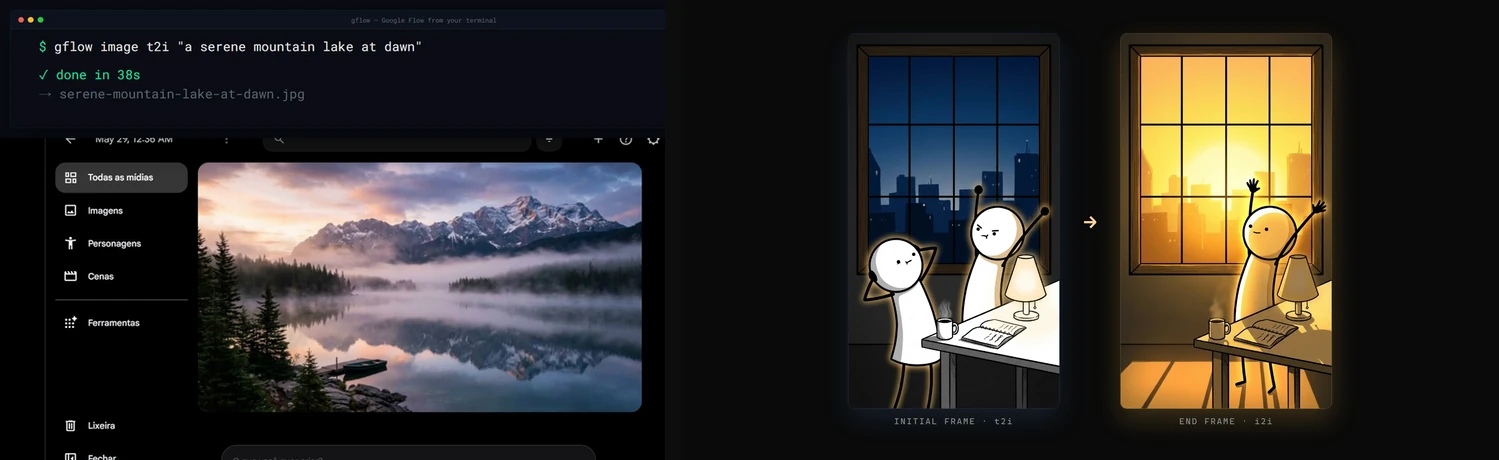
Demo
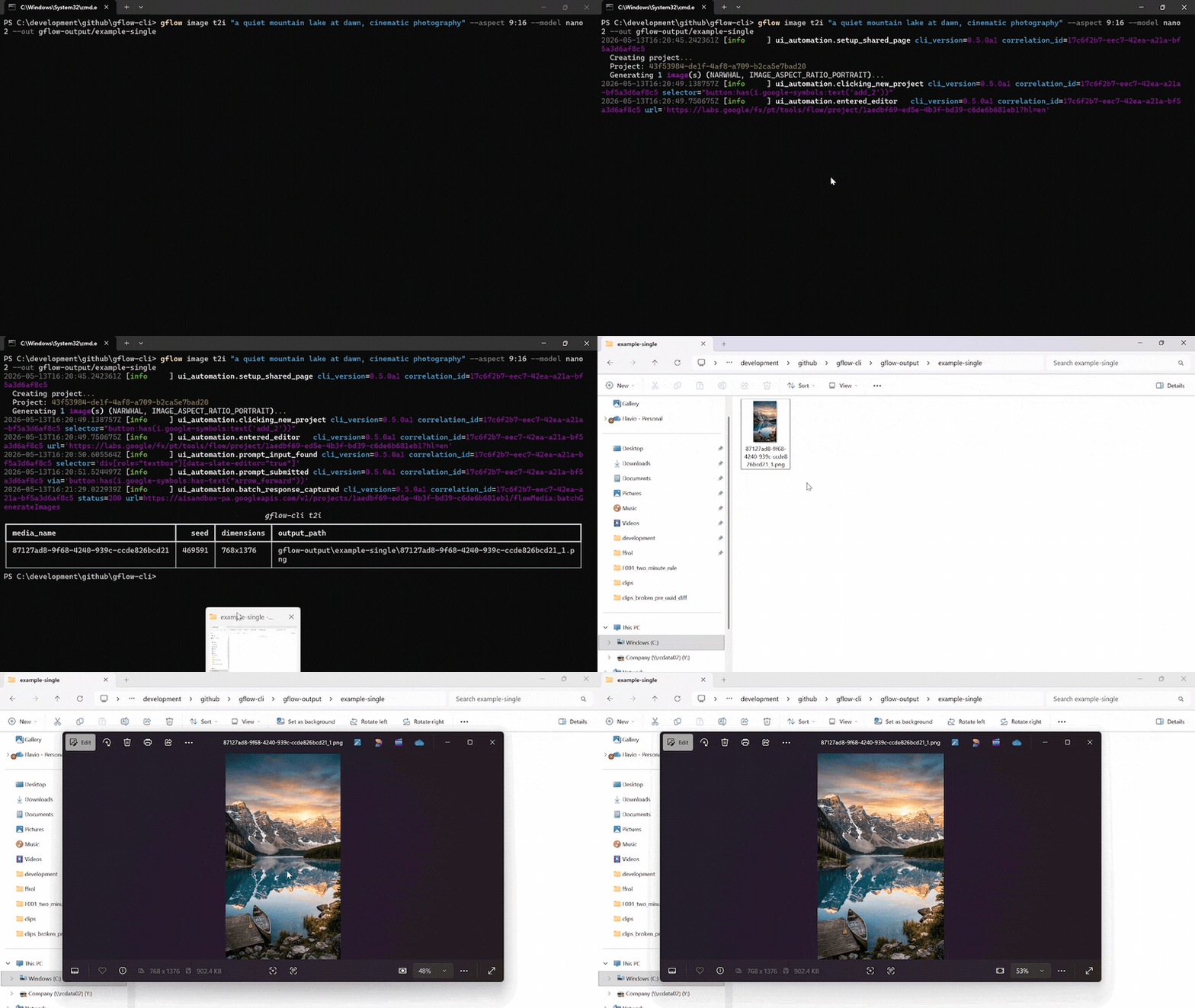
A single gflow image t2i "..." --aspect 9:16 --model nano2 call against a logged-in Flow profile. The terminal streams the run's structlog JSON, then lists the written PNG. Chromium drives the Flow editor silently in the background.
Reproduce the recording with scripts/record_demo.ps1 (Windows, OBS, ffmpeg, gifski). More formats, including the side-by-side split-screen: docs/DEMOS.md.
Documentation
docs/INDEX.md is the master routing layer. Quick links:
Usage data: gflow stores local usage counters and, after an interactive notice (and explicit consent in the EU/EEA), uploads weekly totals without an identifier. See the privacy notice and how to turn it off.
| Topic | Read |
|---|---|
| 🎯 Getting started | User Guide · Usage · Configuration |
| Storage & catalog | External Storage · Data Layer |
| 🎭 Characters | Characters, reusable subjects (gflow character) |
| 🤖 Agentic & automation | Instructions (gflow instructions, persistent brief cards) · Movie (gflow movie, multi-scene manifests) · Tools (--tool, prompt rewriting) · MCP server (gflow mcp run / gflow serve) |
| 🔐 Auth & sessions | Authentication · Known issues |
| 📣 Where to install from | Marketplaces (every channel and what each actually delivers) · Container (why the image introspects but cannot generate) |
| 🏗️ Internals | Architecture · Security · Usage data notice · Debugging |
| 📦 Releases | Changelog · Roadmap · Release protocol · Project status |
| 🤝 Contributing | Contributing · Development · GitHub workflow |
For AI agents & LLMs
gflow-cli ships four agent entry points. Pick the one your tool reads first.
| File | Audience | Tools |
|---|---|---|
| AGENTS.md | Universal coding-agent spec | Cursor · Codex · Aider · Antigravity · Jules · Devin · Windsurf · Zed · Warp · opencode · Copilot |
| CLAUDE.md | Claude Code's auto-loaded memory | Claude Code |
| llms.txt | LLM-readable summary (llmstxt.org format) | Paste into ChatGPT, Claude, or Gemini to onboard the model |
skills/gflow-cli/SKILL.md |
Claude Code Skill | Symlink into ~/.claude/skills/ |
Install the plugin (Claude Code)
One step, and you get the gflow-cli and video-production skills plus the MCP server:
/plugin marketplace add ffroliva/gflow-cli
/plugin install gflow@gflow-cli
The plugin ships disabled. Claude Code starts a plugin's MCP servers automatically once a
plugin is enabled, with no prompt of its own — and this server drives your own Google account,
where Veo video generation bills your credits. So installing it starts nothing, and enabling it
is a deliberate act. Images and composition are free; only video spends. For a hard guarantee,
register the server yourself with gflow mcp run --no-spend, which never registers the
credit-spending tools at all. See docs/MCP.md for the details, including which
revision /plugin marketplace add gives you.
Codex users: codex plugin marketplace add . then codex plugin add gflow@gflow-cli.
Onboard any agent in one line. Paste this into your agent of choice:
"Read AGENTS.md and docs/INDEX.md, then help me with my Flow batch."
Architecture & current limitations
gflow CLI  →  Provider (interchangeable)  →  Flow (ui_automation) / Mock (tests) / [planned: Official Veo]
                                              ↓
                                      Playwright Chromium (headed — login AND generation, by default)
                                              ↓
                              aisandbox-pa.googleapis.com  (Google's private Flow API)
Current transport: ui_automation drives Flow through a persistent Playwright Chromium profile. It is production-stable and verified end-to-end every release (see the per-release LIVE_VERIFICATION_* evidence files).
Two Flow frontends: Google is moving accounts from labs.google onto flow.google.com (#639) — same product, different widget toolkit and wire protocol (batchexecute instead of aisandbox-pa). The migrated driver covers text-to-video, image-to-video from a local start frame, reference-to-video from local files, text-to-image, image-to-image from local files, and a single-segment video extend. Image generation supports Nano Banana 2.1 (nano2, #958) / 2 Lite / Pro, the five aspect ratios measured on that host (16:9, 4:3, 1:1, 3:4, 9:16), and counts 1–4; an existing project is required at the transport boundary. Images can tag a character by @Name, and reference-to-video takes a named character with --reference-entity + --reference-entity-name (#723). An account served the agent-only composer (#799) gets text-to-image and text-to-video only. An image --ref <uuid> is referenced in place when the catalog records it in the same --project (#995). Other UUID media references, an entity id without a name, instructions, Imagen 4, and the rest of the matrix keep the labs driver until ported (GFLOW_CLI_FLOW_HOST, see CONFIGURATION).
What's blocked: a pure HTTP transport for video generation. The video upload endpoint returns HTTP 401 under non-Chrome browsers plus a reCAPTCHA mint we cannot reproduce headlessly. Three earlier HTTP strategies (evaluate_fetch, bearer, sapisidhash) live under src/gflow_cli/api/transports/experimental/ for research, off the production path.
How you can help: if you have driven aisandbox-pa.googleapis.com from outside a real Chrome session, or you understand Google's anti-bot stack here, please open an issue. A working REST transport would unlock serverless deployments, true horizontal concurrency, and roughly 10x the project's reach. Details: docs/ARCHITECTURE.md § Headed-browser dependency.
Project status
Alpha. Image (t2i, i2i, upload, upscale, batch) and video (t2v, i2v, r2v, chain, extend, upscale) run end-to-end on ui_automation, with a 5-model Veo picker plus --duration and --count. Beyond single generations: gflow movie renders multi-scene manifests, gflow instructions manages persistent Agent-Mode brief cards (credits-free), gflow character handles reusable subjects, gflow scene does credit-free server-side stitching, --tool applies prompt-rewriting tools, and an MCP server (gflow mcp run stdio / gflow serve Streamable HTTP) exposes the core surface to AI agents with a CI-enforced CLI↔MCP parity contract.
Full milestone history lives in CHANGELOG.md. Where the project is heading: ROADMAP.md.
Support gflow-cli
gflow-cli is built and maintained by one person. Every release is verified against real Google Flow, which spends real AI credits, and breakages get fixed fast because people run it in their pipelines. Sponsorship pays for both.


Relying on gflow-cli at work? The monthly company tiers put your logo here, and Silver and above also get priority issues. All tiers and what each one gets: docs/SPONSORS.md.
Patched gflow-cli in your fork? Please open an issue or a pull request — a fix that lands upstream helps everyone.
Hall of fame
No sponsors yet. Be the first — every public sponsor is listed here.
License & legal
MIT License © 2026 Flavio Oliva (ffroliva). The MIT license covers gflow-cli's code only. It grants no rights to Flow, Veo model output, or any Google service. Google's own terms (Labs Additional Terms and any plan-specific subscription terms) govern your generations. See the DISCLAIMER.
Acknowledgements
edge-tts, design inspiration for community SDKs over private cloud APIs.googleapis/python-genai, the official Veo SDK that a future provider release may alias.- Keysight, Google Labs – Flow AI with Veo3: A Network Traffic Analysis, an independent capture that helped validate the route patterns.
Stats






Star history
If gflow-cli saves you time, please ⭐ the repo. It is the cheapest way to support the project.
Preguntas sobre gflow-cli MCP
¿Cómo agrego gflow-cli MCP a Claude Code?
Ejecuta claude mcp add gflow-cli -- uvx gflow-cli mcp run en tu terminal. Añade --scope user para que esté disponible en todos los proyectos.
¿Cómo agrego gflow-cli MCP a Cursor?
Abre ~/.cursor/mcp.json y añade el servidor en mcpServers, usando la configuración de Cursor que se muestra en la sección de instalación de arriba.
¿Qué herramientas proporciona gflow-cli MCP?
Expone 20 herramientas, incluidas gflow_generate_image, gflow_generate_video, gflow_list_tools, gflow_list_models, gflow_get_credits.
¿Cómo gestiona la herramienta la autenticación?
Utiliza un perfil persistente de Playwright Chromium para gestionar la autenticación de Google y los controles de reCAPTCHA.