
MCP server de diffusers-workflow
Commit 14 nov 2026Ejecuta flujos de trabajo de generación de imagen, video y audio de Hugging Face Diffusers como tareas en tu propia GPU, impulsados por un agente de IA.
También conocido como dkackman/diffusers-workflow
- Stars
- 18
- Herramientas
- —
- Descargas, 30 días
- —
- Última versión
- —
- Último commit
- 14 nov 2026
- Licencia
- Apache-2.0
¿Qué es diffusers-workflow MCP?
diffusers-workflow es un MCP server. Ejecuta flujos de trabajo de generación de imagen, video y audio de Hugging Face Diffusers como tareas en tu propia GPU, impulsados por un agente de IA.
Resumen generado a partir del README del proyecto
Acerca del MCP server de diffusers-workflow
Generar contenido multimedia mediante agentes de IA en tu propio hardware es lo que diffusers-workflow permite a desarrolladores y creadores. Este MCP server permite que un agente controle pipelines de Hugging Face Diffusers para producir imágenes, video y audio directamente en tu GPU local o en una máquina remota. Es compatible con diversos hardware, incluyendo NVIDIA CUDA, Apple Silicon MPS y CPU, e integra con Claude Code u otros clientes MCP para gestionar tareas generativas complejas.
Los usuarios interactúan con el sistema a través de un agente que puede escribir, validar y ejecutar flujos de trabajo basados en JSON. El servidor proporciona una interfaz web donde puedes dirigir el proceso, editar variables mediante un formulario y ver una galería de resultados. Incluye herramientas específicas para estimar costos de GPU mediante validate_workflow y gestionar assets. Debido a que utiliza un worker persistente, los modelos permanecen cargados en memoria para acelerar ejecuciones consecutivas. Para modelos restringidos como FLUX o MiniMax, simplemente necesitas proporcionar tu autenticación de Hugging Face mediante hf auth login.
Qué puedes hacer con él
- 1Estimación de costos antes del renderizadoPuedes pedirle al agente que calcule el tiempo de GPU esperado para un flujo de trabajo específico antes de comprometerte con un renderizado largo.
Escrito a partir del README del proyecto. Cada caso de uso se verifica con una cita del mismo.
Verificaciones automáticas
Ejecutado 14 nov 2026Informe completo →Aún no verificado. Un servidor necesita una puntuación de 80, ningún hallazgo grave y suficientes datos para que podamos revisarlo. Cómo funcionan las verificaciones · Qué corregir para obtener más puntos

- Repositorio de origen vinculado y accesibledkackman/diffusers-workflow is public and reachablegithub.com/dkackman/diffusers-workflow ↗Aprobado
- El paquete indica este repositorio como su origenNo verificado
- Procedencia de la compilación (atestación de Sigstore)No verificado
- Licencia de código abierto (OSI)Apache-2.0spdx.org/licenses/Apache-2.0.html ↗Aprobado
- Commit o lanzamiento en el último añoLast commit or release 2026-11-12github.com/dkackman/diffusers-workflow ↗Aprobado
- OpenSSF ScorecardNo verificado
- El nombre del paquete no es similar a un paquete popularNo verificado
- No hay avisos críticos en el paquete ni en sus dependenciasNo verificado
- Sin instrucciones ocultas para el modelo0 tool descriptions and the README read; no override phrases, credential paths or hidden charactersAprobado
- Las herramientas destructivas están etiquetadasNo verificado
- El endpoint remoto responde al handshake de MCPNo verificado
README
Ver en GitHub
diffusers-workflow
Your GPU, as something an agent can drive.
diffusers-workflow runs Hugging Face Diffusers image, video and audio generation as jobs on your own GPU. An agent does the work. Claude Code, or any MCP client, picks or writes the workflow, checks what it will cost, runs it, and looks at what came back. You steer from the browser. Every workflow, run and output the agent made is in the web UI, where you can change a variable, run it again, compare takes and keep the one you like.
Python 3.12-3.14 | CUDA (NVIDIA) | MPS (Apple Silicon) | CPU
Getting started
1. Install. The script picks the right torch build for your platform, creates a virtual environment and installs everything, MCP server included.
bash ./install.sh && source ./activate      # Linux / macOS
.\install.ps1; .\venv\scripts\activate      # Windows
2. Start the engine. Leave it running; the agent and the browser both talk to it.
dw-serve # web UI on http://127.0.0.1:8765
3. Connect your agent. Register the MCP server with the absolute path to dw-mcp
in the venv you just made (a relative path is the setup detail that most often goes
wrong). Then add the dw plugin:
claude mcp add dw -- "$(pwd)/venv/bin/dw-mcp"
/plugin marketplace add dkackman/diffusers-workflow
/plugin install dw@diffusers-workflow
Most of the shipped models (Flux, LTX, MiniMax, ...) are gated. Request access on
the model's Hugging Face page and run hf auth login once. Without it a run fails
partway through with a 401/403 from the Hub. templates/text-to-image uses a small,
ungated model, so it makes a good first run.
Start the engine on the GPU box with --mcp and connect over HTTP. There is nothing
to install on the laptop:
# on the GPU box
dw-serve --host 0.0.0.0 --token "$DW_API_TOKEN" --mcp --workspace ~/studio

# on your laptop
claude mcp add --transport http dw http://gpu-box:8765/mcp \
  --header "Authorization: Bearer $DW_API_TOKEN"
The server's Status page writes that line for you. The whole setup is in Remote GPU server.
On Linux with an NVIDIA GPU, the
dkackman/diffusers-workflow
image runs the server with torch, the engine and the web UI built in. It shares the
model cache and workspace with a native install on the same box. See
Docker.
Ask the agent
Describe what you want. The agent has 65 tools covering the workflow catalog, the real diffusers pipeline signatures, the job queue, the gallery and the model cache, and it stays with a long render until it finishes:
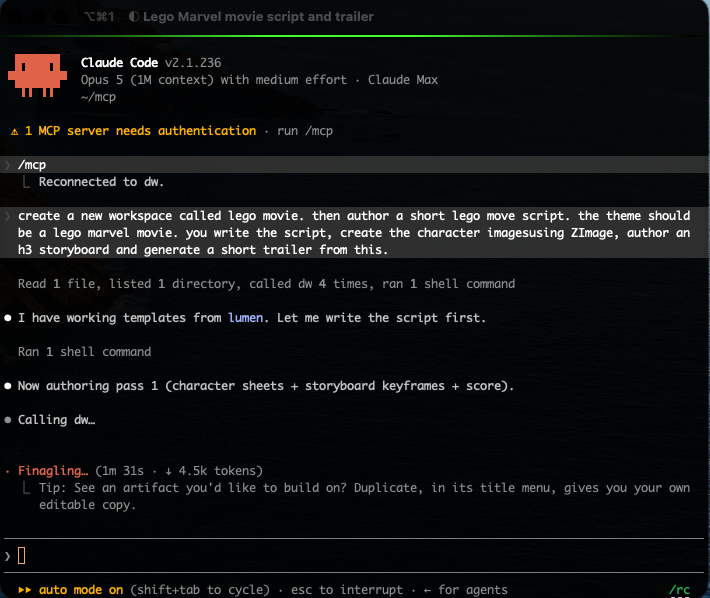
A session sounds like this:
- "Make a 30-second musical trailer: four men in boater hats, a giant eye, a
score under it." The agent picks a shape from the catalog (
list_workflows), breaks the brief into shots, writes each prompt to the prompt library, and builds the workflow that renders the shots and cuts them to the score. - "What will that cost?"
validate_workflowchecks the JSON against the schema and the real pipeline signatures, with no model loads, and quotes an estimate in GPU minutes from this box's own history. Anything that spends GPU time or disk refuses to run until the agent passesacknowledged_cost, so it has to tell you what it is about to spend first. - "How's it going?"
wait_for_jobwaits out a render without polling. Thenget_output_frames,get_output_imageandget_output_audiobring the result back into the conversation, so the agent judges what it made against what you asked for. - "Shot three is the one. Keep it and start the next scene from it."
keep_outputturns the file into a named asset, and the next workflow references it asasset:hero-frame.png.
The dw plugin adds what a general-purpose agent can't know on its own: one skill per model family (MiniMax H3 and Music 3, LTX-2.5, Kandinsky 6, FLUX 3 Klein) that picks the template for a request and states the rules that bite. Cross-cutting skills cover script-to-video, series with a consistent cast, storyboards and animatics, and a shared camera-and-look vocabulary.
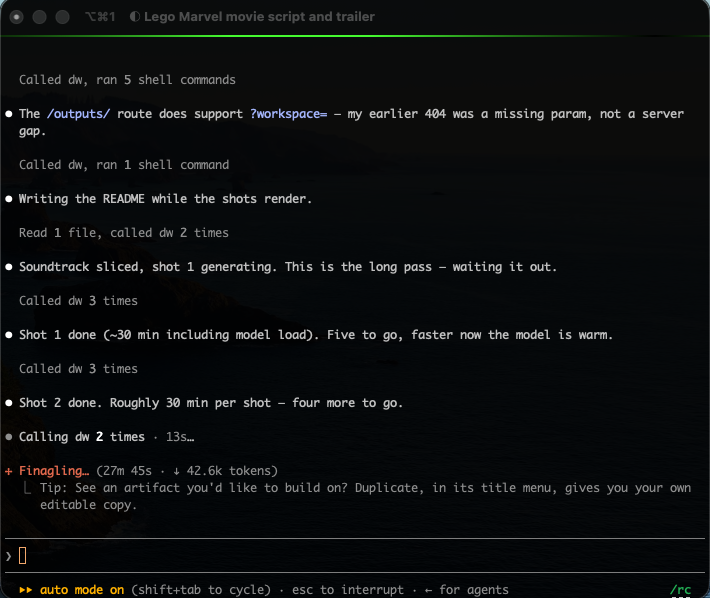
One server holds several workspaces, each with its own workflows, assets and outputs. Two agents, or an agent and you in the browser, can share one GPU without saving over each other's work.
The tool reference, setup for other MCP hosts and the troubleshooting table are in MCP Server.
Then tweak it in the browser
The web UI shows everything the agent made and lets you take over at any point. It runs on the same persistent GPU worker, so models stay loaded between runs.
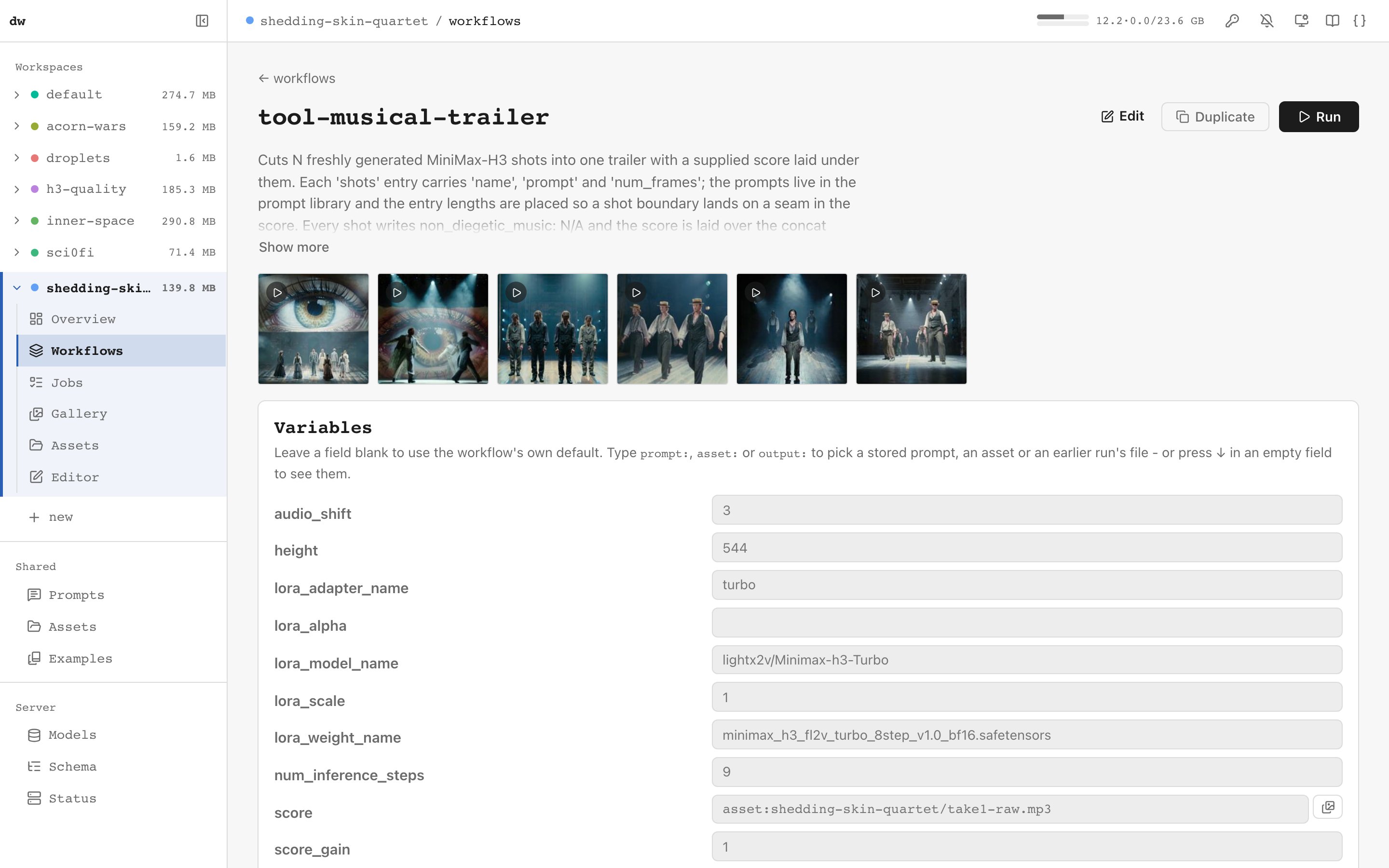
A workflow the agent wrote is a form you can edit. The workflow's description, recent outputs and variables are on one page. Change a prompt, a frame count or a LoRA scale and press Run.
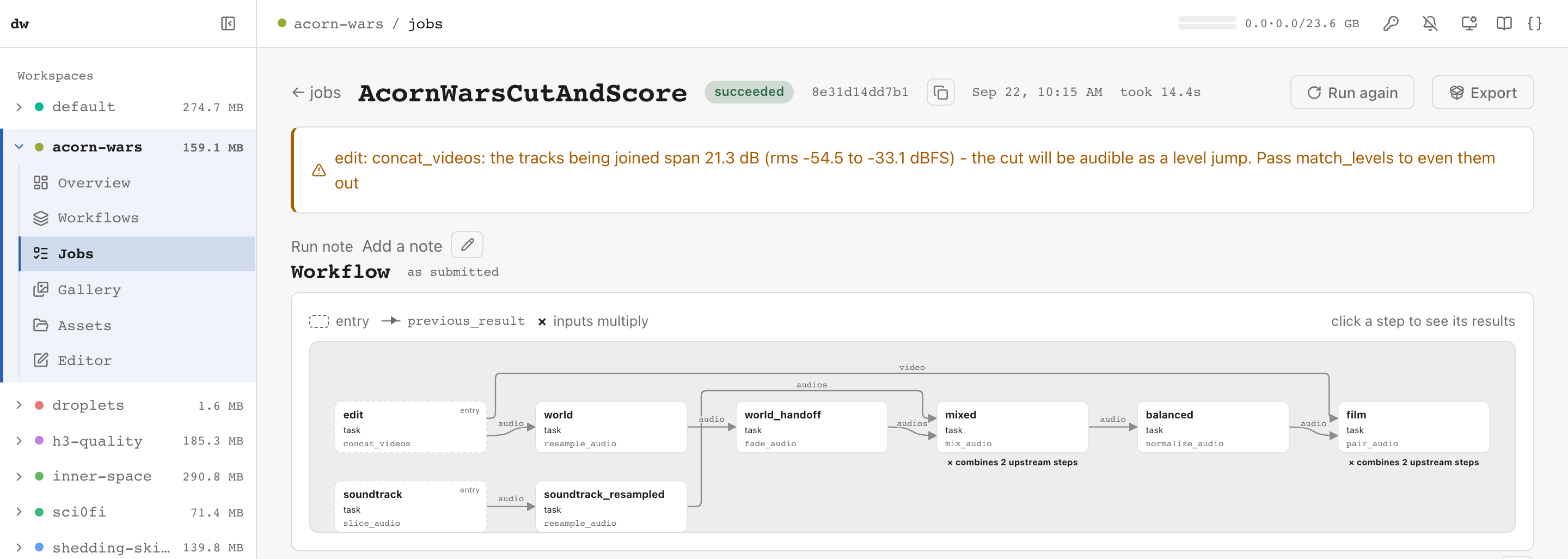
Every job is a recipe. A job keeps the exact workflow it ran and draws it as a graph of how data flows between steps. Click a step to see what it produced. The run's warnings sit above the graph, so a problem the agent missed, such as an audible level jump at a cut, is in front of you with the argument that fixes it. Run again repeats the job, and New seed gives you another take. Progress streams live for each denoising step, and a cancel stops the job cleanly at the next step.
The gallery groups outputs by the workflow that made them, with final and intermediate files kept apart. Any image reopens as the workflow that produced it. Keep as asset adds a file to the asset library for later workflows to use.
The editor works on the agent's JSON. You can view the workflow as a form, as JSON, side by side, or as a flow graph. The forms and autocomplete come from the real diffusers pipeline signatures, so every argument a pipeline takes is there with its documentation. Validate catches schema errors and argument typos before any model loads.
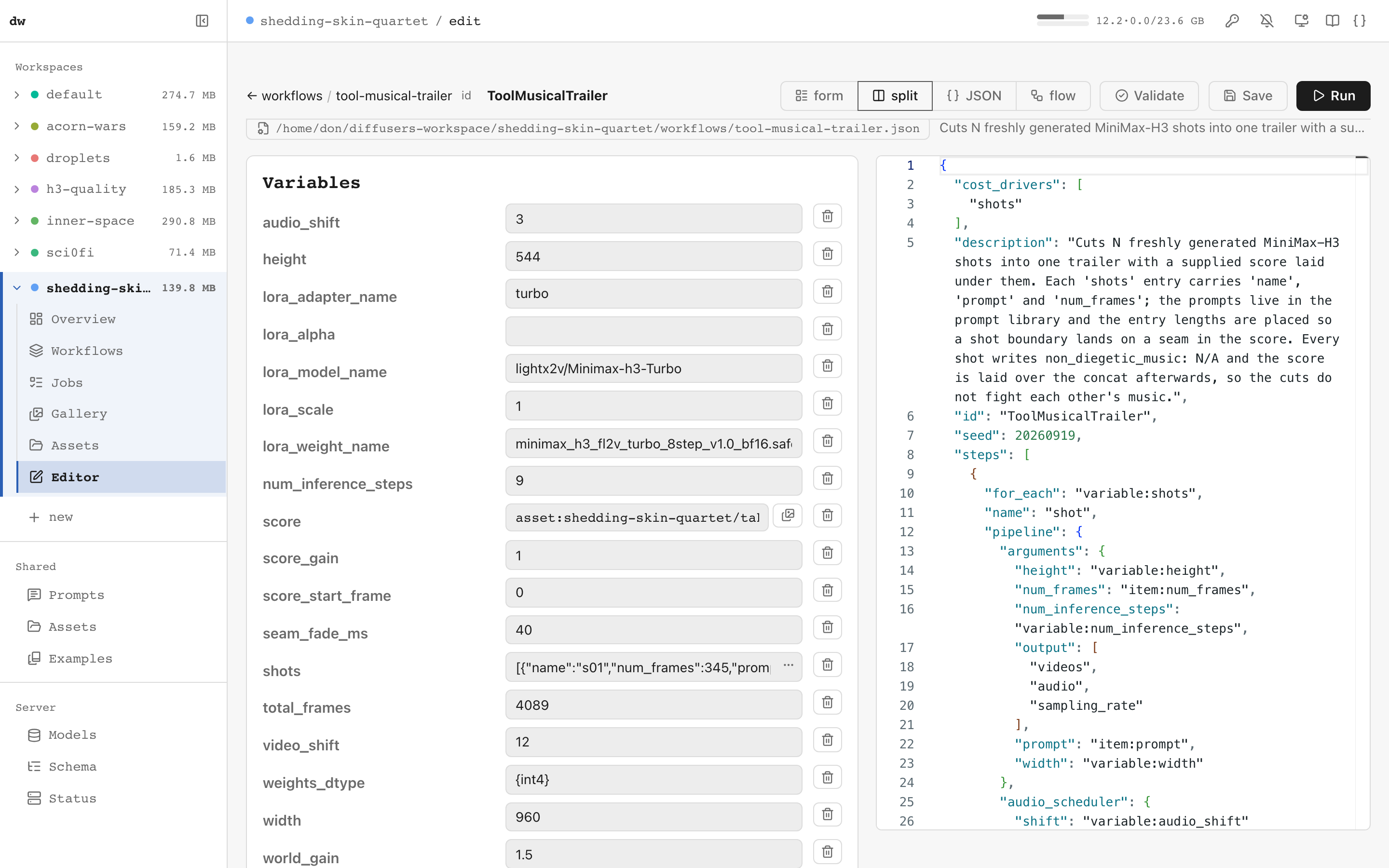
There is also a prompt library, with an Enhance with AI panel that expands an idea into a full prompt using a local language model. The model manager shows the Hugging Face cache (size, last use, free disk) and downloads or deletes models with live progress.
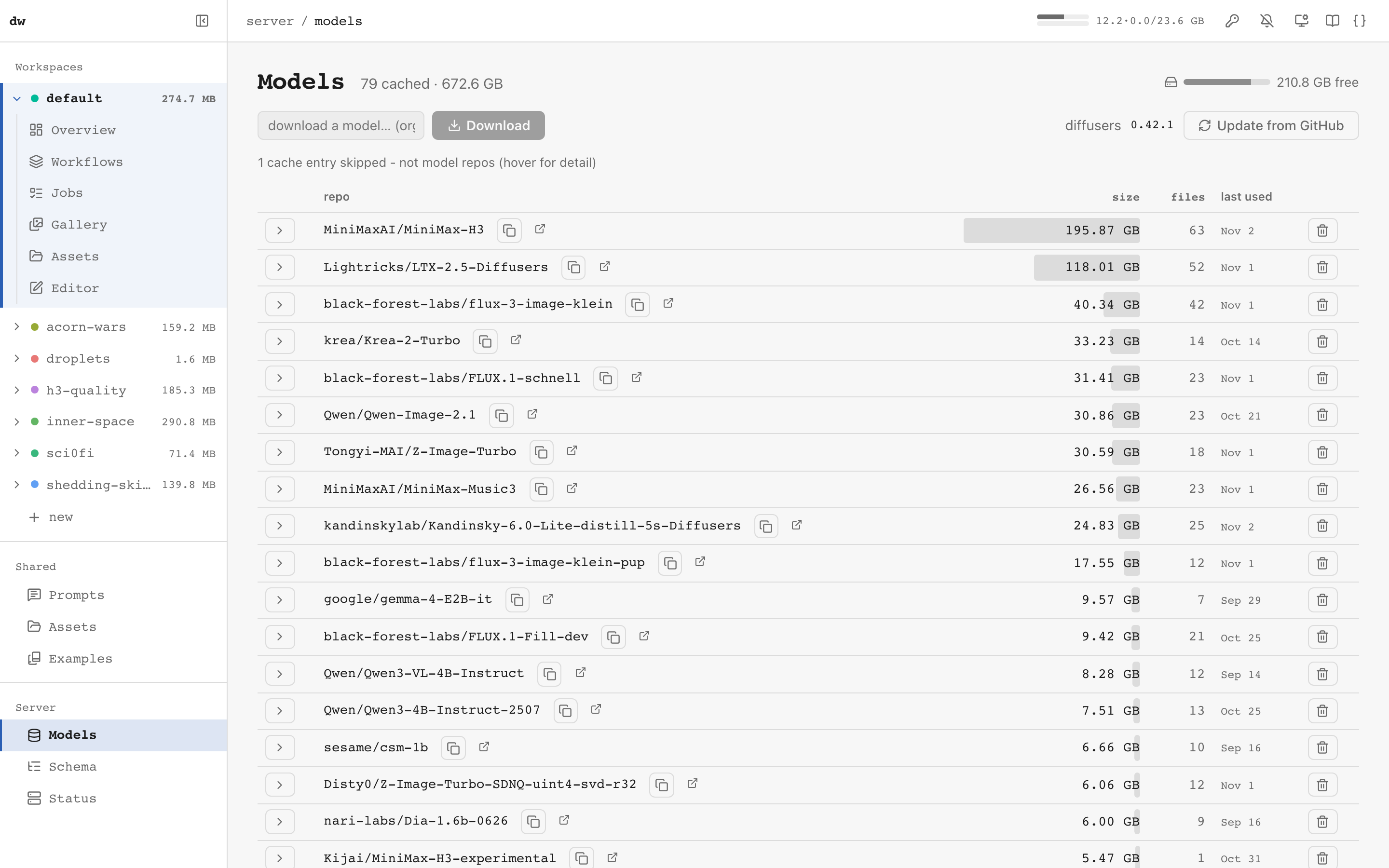
The pages are described in Server & Web UI. The UI and the agent
both use the server's HTTP API, which you can browse at /docs on a running server
(see The HTTP API).
Underneath
Every front end reads and writes the same thing: a JSON workflow of named steps,
each a diffusers pipeline or a utility task. Its arguments are references to
variables, earlier steps' results, stored prompts and assets, not hard-coded
values. That is how text-to-image chains into image-to-video, and how a generated
image reopens as the recipe that made it. You rarely need to write one by hand. When
you do, the Workflow Guide is the reference, the
JSON Schema is the exact structure, and
workflows/ has runnable examples for each model family. There is also
a command-line client, python -m dw.run workflow.json prompt="a cat", which queues
a job on a running server (see Server & Web UI).
The engine also covers:
- Quantization: BitsAndBytes, TorchAO, GGUF, SDNQ and optimum-quanto, set per component.
- Acceleration: FirstBlockCache, FasterCache, MagCache, TaylorSeerCache,
torch.compileand attention backends. - Adapters and prompts: LoRA, IP-Adapter and A1111-style prompt weighting.
- Long video and caching: long-video chaining with audio-driven length, and step-output caching, so re-running a fixed-seed workflow finishes instantly.
- Utility tasks: upscaling, face restoration, segmentation, captioning, frame interpolation, audio slicing, cut-and-score assembly and more.
A workflow can reach any diffusers pipeline or quantization backend by dynamic
import, so loading one can execute arbitrary Python. Treat a workflow file from
someone else the way you'd treat a .py script. See
Trust model.
Field reports. At the end of a session, ask the agent what got in its way, and
have it file each bug or gap as an issue on dkackman/diffusers-workflow with the
field-report label. The label marks a report as coming from real use. A report
from anyone but the maintainer is reviewed before the agent loop
acts on it.
Documentation
Using it
- MCP Server - the agent's tool surface (Claude Code, Claude Desktop, other MCP hosts)
- dw plugin - the model-family and composition skills
- Server & Web UI - the web UI, the command line, and the HTTP API with its OpenAPI spec
- Workspaces - where your content lives, run directories, several workspaces on one server
- Remote GPU server - the server, UI and MCP from another machine
- Docker - the server in a container on a Linux NVIDIA box
Workflows in depth
- Workflow Guide - JSON structure, variables, steps, data flow, references
- Tasks - image, video and audio utility tasks, ControlNet preprocessors
- Quantization - BitsAndBytes, TorchAO, GGUF, SDNQ
- Inference Acceleration - caches,
torch.compile, attention backends, MPS - Fast on 24GB - tested speed/memory settings per model family
- LoRA, IP-Adapter, Prompt Weighting
Reference
- Architecture - each concept, the module that owns it, and the check that enforces it
- Worker Guide - the persistent GPU worker and troubleshooting
- Security - validators and the trust gate (quick reference)
- Dependencies, Testing, Releasing
- Agent Loop - what the automated implementer/tester labels mean
- Attributions - code from other projects, and the projects whose ideas dw reimplemented
Preguntas sobre diffusers-workflow MCP
¿Cómo conecto el MCP server diffusers-workflow a Claude Code?
Registra el MCP server usando la ruta absoluta de dw-mcp en tu entorno virtual, por ejemplo: claude mcp add dw -- "$(pwd)/venv/bin/dw-mcp". Asegúrate de usar una ruta absoluta, ya que el uso de rutas relativas es el error de configuración más común.
¿Puedo ejecutar diffusers-workflow en una GPU remota o en Docker?
Sí. Inicia el motor en la máquina con GPU usando --mcp y conéctate vía HTTP; no es necesario instalar nada en el cliente. En Linux con una GPU NVIDIA, también puedes ejecutar la imagen de Docker.
¿Por qué falló mi ejecución con un error 401/403 de Hugging Face?
La mayoría de los modelos distribuidos son restringidos (gated). Solicita acceso en la página de Hugging Face del modelo y ejecuta hf auth login una vez. El flujo de trabajo templates/text-to-image utiliza un modelo pequeño sin restricciones, por lo que funciona como primera prueba.
¿Puede un agente estimar el costo de la GPU antes de iniciar una tarea?
Sí. validate_workflow verifica el flujo de trabajo contra el esquema y las firmas del pipeline sin cargar los modelos y proporciona una estimación en minutos de GPU. El trabajo que consuma tiempo de GPU o disco requiere que el agente pase primero por acknowledged_cost.
¿Qué es un MCP server para diffusers?
Permite que un cliente MCP como Claude Code cree, valide y ejecute flujos de trabajo de generación de imagen, video y audio de Diffusers en tu GPU, mientras tú revisas y editas los resultados en una interfaz web.