
Proporciona a los asistentes de codificación con IA grafos de dependencias deterministas para realizar análisis de impacto, escaneo de seguridad y simulaciones arquitectónicas.
También conocido como depwire/depwire, depwire-cli
- Stars
- 73
- Herramientas
- 24
- Descargas, 30 días
- —
- Última versión
- 1.29.0
- Último commit
- 10 nov 2026
- Licencia
- —
¿Qué es depwire MCP?
depwire es un MCP server. Proporciona a los asistentes de codificación con IA grafos de dependencias deterministas para realizar análisis de impacto, escaneo de seguridad y simulaciones arquitectónicas. Expone 24 herramientas, como connect_repo, get_architecture_summary, get_file_context.
Resumen generado a partir del README del proyecto
Acerca del MCP server de depwire
Depwire proporciona a los asistentes de codificación con IA un grafo de dependencias determinista para evitar puntos ciegos arquitectónicos. Al utilizar tree-sitter para el análisis estructural, construye relaciones a nivel de símbolo en 16 lenguajes de programación y plantillas de Angular. Esto permite que los agentes comprendan el impacto de los cambios antes de que se implementen, yendo más allá del simple contexto basado en archivos para lograr un conocimiento arquitectónico profundo.
Los desarrolladores utilizan el CLI de Depwire localmente para analizar bases de código sin enviar archivos fuente a un servidor remoto. El sistema ofrece 24 herramientas MCP que sirven datos de grafos precomputados, lo que lo hace más eficiente en tokens que el volcado masivo de archivos. Soporta escenarios complejos como la resolución entre módulos para proyectos Maven y Gradle, asegurando que las dependencias se rastreen a través de los límites de los módulos.
Los usuarios pueden realizar simulaciones What If para predecir el radio de impacto de eliminaciones, movimientos o renombramientos. La herramienta también incluye un escáner de seguridad para encontrar patrones y una puntuación de salud arquitectónica para monitorear la integridad estructural. Aunque el CLI se ejecuta localmente, puede conectarse a GitHub para clonar repositorios o contactar con registros de paquetes durante las auditorías de seguridad.
Qué puedes hacer con él
- 1Simular cambios de códigoUn agente de IA puede predecir el impacto de eliminar o mover un archivo específico antes de modificar la base de código.
- 2Realizar escaneo de seguridadLos desarrolladores pueden ejecutar comprobaciones automatizadas para identificar patrones de hallazgos compatibles y vulnerabilidades en las dependencias.
- 3Analizar la salud arquitectónicaUtiliza el grafo de dependencias para evaluar la integridad estructural y la puntuación de salud de un proyecto.
- 4Mapear dependencias entre módulosIdentifica cómo los cambios en un módulo afectan a otros módulos en proyectos grandes de Maven o Gradle.
Escrito a partir del README del proyecto. Cada caso de uso se verifica con una cita del mismo.
Cómo instalar depwire MCP
Formatos verificados el 10 nov 2026Añadir a CursorAñadir a GooseInstalar depwire MCP en Claude Code
$ claude mcp add depwire -- npx -y depwire-cliInstalar depwire MCP en Cursor
~/.cursor/mcp.json
{
  "mcpServers": {
    "depwire": {
      "command": "npx",
      "args": [
        "-y",
        "depwire-cli"
      ]
    }
  }
}Instalar depwire MCP en VS Code
.vscode/mcp.json
{
  "servers": {
    "depwire": {
      "type": "stdio",
      "command": "npx",
      "args": [
        "-y",
        "depwire-cli"
      ]
    }
  }
}Instalar depwire MCP en VS Code CLI
$ code --add-mcp '{"name":"depwire","type":"stdio","command":"npx","args":["-y","depwire-cli"]}'Instalar depwire MCP en Claude Desktop
claude_desktop_config.json
{
  "mcpServers": {
    "depwire": {
      "command": "npx",
      "args": [
        "-y",
        "depwire-cli"
      ]
    }
  }
}Instalar depwire MCP en Codex
$ codex mcp add depwire -- npx -y depwire-cliInstalar depwire MCP en Codex config.toml
~/.codex/config.toml
[mcp_servers.depwire]
command = "npx"
args = ["-y", "depwire-cli"]
Instalar depwire MCP en Gemini CLI
$ gemini mcp add -s user depwire npx -- -y depwire-cliInstalar depwire MCP en Gemini settings.json
~/.gemini/settings.json
{
  "mcpServers": {
    "depwire": {
      "command": "npx",
      "args": [
        "-y",
        "depwire-cli"
      ]
    }
  }
}Herramientas de depwire MCP 24
Detectado desde el READMEconnect_repoget_architecture_summaryget_file_contextget_dependenciesget_dependentsget_symbol_infosearch_symbolslist_filesimpact_analysisvisualize_graphget_health_scorefind_dead_code
| connect_repo | — | |
| get_architecture_summary | — | |
| get_file_context | — | |
| get_dependencies | — | |
| get_dependents | — | |
| get_symbol_info | — | |
| search_symbols | — | |
| list_files | — | |
| impact_analysis | — | |
| visualize_graph | — | |
| get_health_score | — | |
| find_dead_code | — |
Mostrar las 24 herramientasMostrar menos herramientas
get_project_docsupdate_project_docsget_temporal_graphsimulate_changesecurity_scanverify_changeclaim_filesrelease_filesget_active_claimsrecord_decisionget_decisionsaffected_files
| get_project_docs | — | |
| update_project_docs | — | |
| get_temporal_graph | — | |
| simulate_change | — | |
| security_scan | — | |
| verify_change | — | |
| claim_files | — | |
| release_files | — | |
| get_active_claims | — | |
| record_decision | — | |
| get_decisions | — | |
| affected_files | — |
Verificaciones automáticas
Ejecutado 12 nov 2026Informe completo →Pasó nuestras verificaciones automáticas. Esto no es una auditoría de seguridad: lee el código y dale al servidor el acceso más limitado que necesite. Cómo funcionan las verificaciones · Qué corregir para obtener más puntos

- Repositorio de origen vinculado y accesibleAprobado
- Licencia de código abierto (OSI)No licenseHallazgo
- Commit o lanzamiento en el último añoAprobado
- El nombre del paquete no es similar a un paquete popularAprobado
- El endpoint remoto usa HTTPSNo verificado
- Las herramientas destructivas están etiquetadasAprobado
- Sin instrucciones ocultas para el modeloAprobado
- No hay avisos críticos en el paquete ni en sus dependenciasAprobado
README
Ver en GitHubDepwire













Your AI doesn't know your architecture. Depwire does.
What makes Depwire different
16 programming languages, plus Angular templates. Depwire parses symbols and builds dependency relationships across the constructs it supports. It records relationships it cannot resolve instead of inventing an edge.
Depwire builds a deterministic dependency graph from source parsing, without embeddings or similarity search. For a proposed change, it traverses the relationships present in that graph to show known dependents, import chains, and health movement. Results depend on the language constructs and files the parser can analyze.
Not a build graph either. Depwire tracks symbol-level relationships for What If simulation, graph-aware security scanning, and blast radius analysis.
Contents
- What makes Depwire different
- Performance evidence
- The problem
- Start here
- The infrastructure layer
- Tested on real-world projects
- What If simulation
- Security scanner
- Pre-action verification
- Structural diff between commits
- Visualization
- Temporal graph
- All commands
- MCP server — AI integration
- Cross-language edge detection
- Architecture health score
- Language support
- SDK
- Cloud dashboard
- VSCode Extension
- GitHub Action — PR Impact Analysis
- pre-commit / prek hook
- Depwire Action Token (DAT)
- Roadmap
- Security posture
- Paths and file counts
Depwire provides graph context to AI coding assistants. Parse a project to inspect recorded relationships, assess health, and simulate a proposed change.
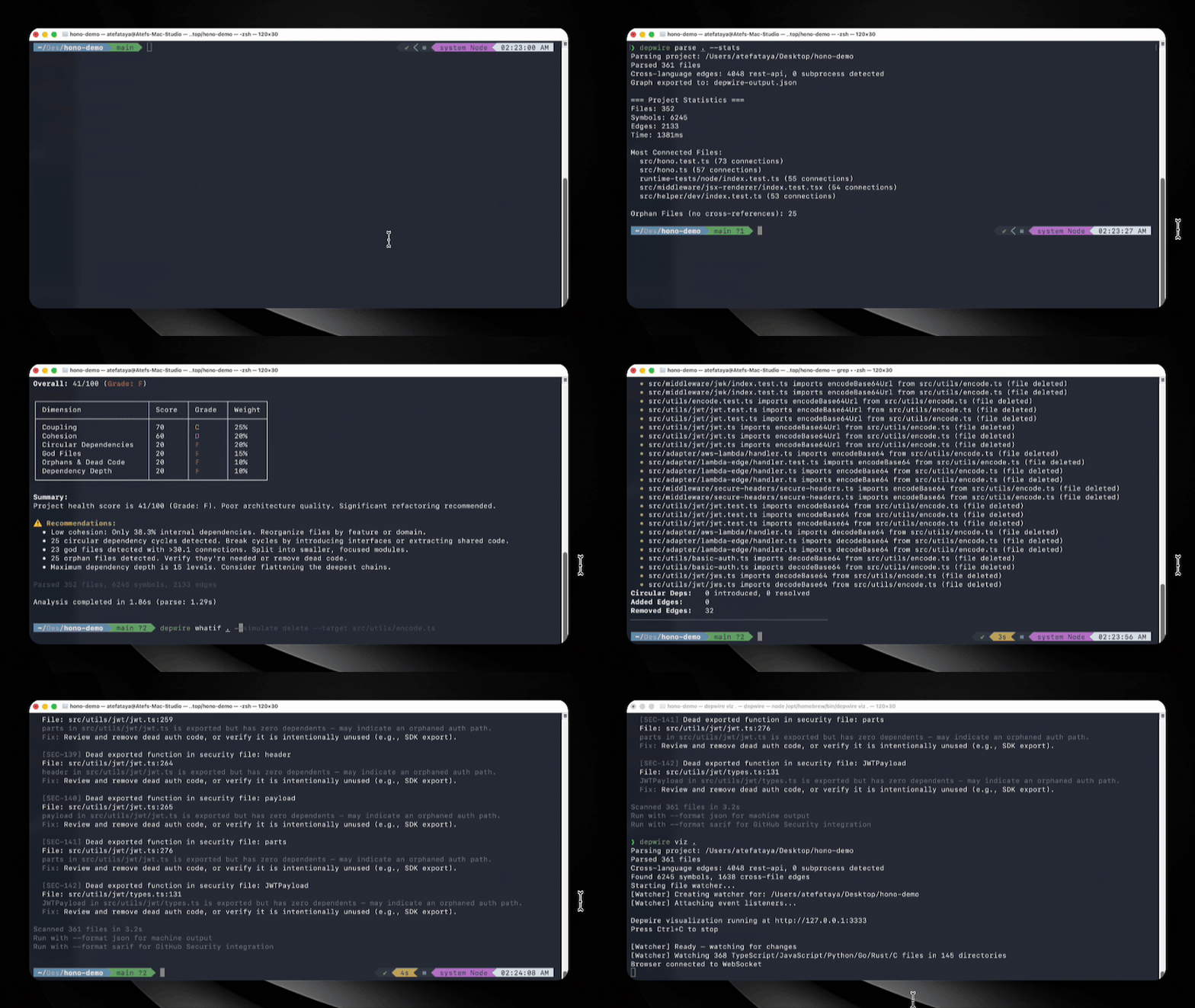
⭐ If Depwire saves you from a broken build, star the repo — it helps this project grow.
Performance evidence
The July agent-benchmark results and derived performance and correctness claims were withdrawn after an audit found an exposed answer key, an incomplete scored file set, and unequal working directories. The linked corrected report records three sessions per arm. These exploratory observations do not establish a general or causal performance advantage. Do not cite conclusions from the withdrawn runs.
The problem
AI coding tools are getting smarter. But they still have a fundamental blind spot: they don't know your architecture before they touch it.
For example, you ask an AI assistant to delete a utility file. It deletes it without warnings.
Then the build reveals downstream consumers that still import it.
The assistant saw one file without inspecting those consumers.
This isn't a model problem. It's a context problem. The AI is flying blind.
The infrastructure layer


Depwire is the context and safety layer for AI-generated code.
Depwire builds a dependency graph from supported source constructs using tree-sitter and serves it to AI assistants through 24 MCP tools.
How it works:
- Local — The Depwire CLI analyzes supported source files locally and collects no usage telemetry. It makes network requests only when you ask it to: connecting a GitHub URL clones or pulls that repository; and dependency checks, which run by default in security scans and security-enabled structural diffs, invoke external audit tools and may send dependency metadata to package registries and advisory services (npm advisory enrichment also contacts GitHub). The CLI never sends your source code or analysis to Depwire. MCP returns requested graph context and generated documentation to your MCP client; what that client forwards is governed by that client. Depwire Cloud is a separate hosted service that clones the repositories you connect.
- Security scanner — runs local code checks and applicable dependency audits by default; no Depwire API key is required.
- Token-efficient — Depwire serves pre-computed graph data so agents can request focused dependency context instead of broad file dumps.
- Deterministic — tree-sitter provides consistent structural parsing without relying on model inference.
Start here
npm install -g depwire-cli
Three commands for a supported codebase:
depwire whatif     # simulate a proposed change
depwire security   # scan for supported finding patterns
depwire viz        # view the recorded dependency graph
Node version note: Node.js 20 reached end of life on 2026-04-30. Node 22 or newer is recommended. On Node 20 the incremental parse cache may be unavailable (better-sqlite3 12.x ships no Node 20 prebuilt binaries); depwire then falls back to full parsing with identical results, and the CLI and MCP server are otherwise fully functional. A future major release will raise the engines floor to >=22.
Tested on real-world projects
| Project | Language | Files | Symbols | Edges | Health |
|---|---|---|---|---|---|
| google/guice | Java (multi-module, 13 modules) | 647 | 30,592 | 10,081 | 31/100 |
| honojs/hono | TypeScript | 352 | 6,462 | 2,194 | 41/100 |
| apache/commons-lang | Java (single-module) | 624 | 29,723 | 9,037 | — |
| pallets/flask | Python | 79 | 2,005 | 851 | — |
| dart-lang/shelf | Dart | 108 | 1,639 | 219 | — |
| rstudio/plumber | R | 197 | 1,194 | 219 | — |
| payloadcms/payload | TypeScript | 645 | 9,292 | 3,511 | — |
Historical
depwire parseruns on public repositories, last validated with v1.8.2 (June 2026).Pre-1.9.0 measurement. v1.9.0 fixed parser bugs (double-emitted symbols in the TypeScript/Python/C#/C++/Java parsers, dropped type-only-import edges, false orphans) that directly affect symbol counts, edge counts, and health scores. Later releases changed graph contents and health methodology again. These numbers have not been re-measured and are not current results.
What If simulation
Know the blast radius before you touch anything.
depwire whatif . --simulate delete --target src/utils/encode.ts
Real output on honojs/hono — 352 files, 6,245 symbols:
Health Score:    41 → 41  (+0 → unchanged)
Affected Nodes:  29
Broken Imports:  30
• src/utils/jwt/jwt.ts imports decodeBase64Url
• src/adapter/aws-lambda/handler.ts imports encodeBase64
• src/utils/basic-auth.ts imports decodeBase64
[27 more...]
Removed Edges:   32
Pre-1.9.0 measurement — captured before the v1.9.0 parser fixes; not re-measured.
The simulation operates on a loaded graph without changing source files; loading or parsing the graph requires file I/O.
Five operations:
depwire whatif . --simulate delete --target src/utils/encode.ts
depwire whatif . --simulate move --target src/utils/encode.ts --destination src/core/encode.ts
depwire whatif . --simulate rename --target src/utils/encode.ts --destination src/utils/encoder.ts
depwire whatif . --simulate split --target src/services/auth.ts --symbols "validateToken,refreshToken"
depwire whatif . --simulate merge --target src/utils/helpers.ts --merge-target src/utils/formatters.ts
Run without --simulate to open the browser UI — side-by-side arc diagrams showing current vs simulated state.
Cross-module dependency intelligence
For multi-module Maven and Gradle projects, Depwire resolves imports across module boundaries — not just within a single module.
Example: simulating deletion of Injector.java in google/guice (a 13-module Java DI framework):
$ depwire whatif . --simulate delete --target core/src/com/google/inject/Injector.java

Action:          DELETE core/src/com/google/inject/Injector.java
Affected Nodes:  128
Broken Imports:  124  (cross-module: 106 across 10 extension modules)
Pre-1.9.0 measurement — google/guice is a Java project; the Java parser's double-emission bug (fixed in v1.9.0) affects this figure. Not re-measured.
Cross-module resolution lets impact analysis report supported relationships across module boundaries.
Supported build systems:
- Maven (
pom.xmlwith<modules>declarations, recursive nested modules) - Gradle (
settings.gradle/settings.gradle.ktswithinclude()declarations)
Both standard (src/main/java) and non-standard (src/) source layouts are supported.
Security scanner
Depwire's security scanner reports findings locally and can fail a configured CI gate.
depwire security .                        # full repo scan
depwire security . --target src/auth.ts   # single file
depwire security . --format sarif         # GitHub Security tab integration
depwire security . --fail-on high         # CI gate — exit 1 if HIGH or above
depwire security . --class secrets         # specific check only
depwire security . --no-dependency-audit   # skip dependency checks and their network requests
Ten check modules emit twelve finding classes, including dependency and supply-chain findings. Individual checks are pattern-based and do not constitute a comprehensive security audit.
Applicable repository-wide security scans run dependency checks by default. To skip their network requests, use --no-dependency-audit, security_scan with dependencyAudit: false, or scanSecurity with dependencyAudit: false. --class secrets and targeted scans also skip dependency checks. Structural diff runs security scans by default; use --no-security to skip those scans and their dependency-audit traffic.
Graph-aware severity uses recorded reachability from MCP tools and HTTP routes when classifying findings.
Available as MCP tool security_scan and via depwire-cli/sdk.
Pre-action verification
CLI — Analyze a proposed change with depwire verify-change or the CLI MCP tool verify_change. Supplied replacement content is parsed to compare exported symbols with the loaded graph. Export-only comparisons and unified diffs do not provide a fully resolved after-graph: cyclicGroupChanges.status is not_comparable, and the result does not certify safety. Reports include potential broken imports, affected files, health movement, and security findings from files on disk. No build or tests are run.
depwire verify-change --file src/auth.ts --content-from new-auth.ts
depwire verify-change --diff changes.patch
depwire verify-change --file src/auth.ts --content-from new-auth.ts --json
cat new-auth.ts | depwire verify-change --file src/auth.ts
CI integration:
depwire verify-change --diff pr.patch --fail-on-warnings --quiet
# exits 1 for medium risk, 2 for high risk
Available as MCP tool verify_change and CLI command depwire verify-change.
Structural diff between commits
Compare the dependency graph between any two git refs — branches, tags, commit hashes, HEAD~N.
depwire diff main feature/auth-refactor
depwire diff HEAD~5 HEAD --verbose
depwire diff v1.5.0 v1.6.0 --json | jq
The diff uses graph comparisons without an LLM. It temporarily stashes uncommitted changes and attempts to restore them after analysis; a failed restore is reported for manual recovery.
Options: --json (machine-readable), --verbose (every symbol/edge by name), --no-security / --no-health (faster runs).
Visualization
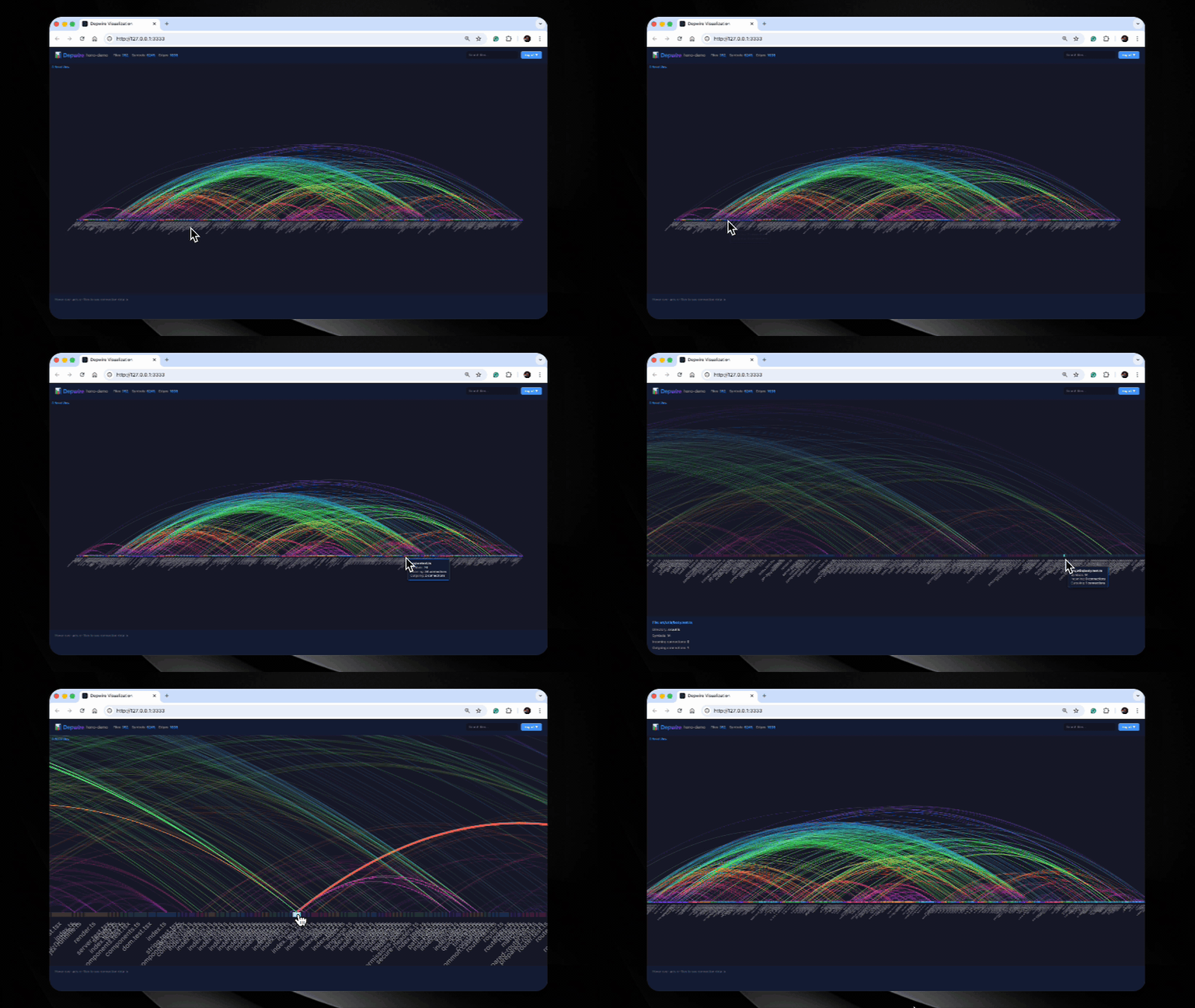
depwire viz
Interactive arc diagram of files and relationships present in the graph. Hover to inspect, click to filter, and export as PNG or SVG.
Temporal graph
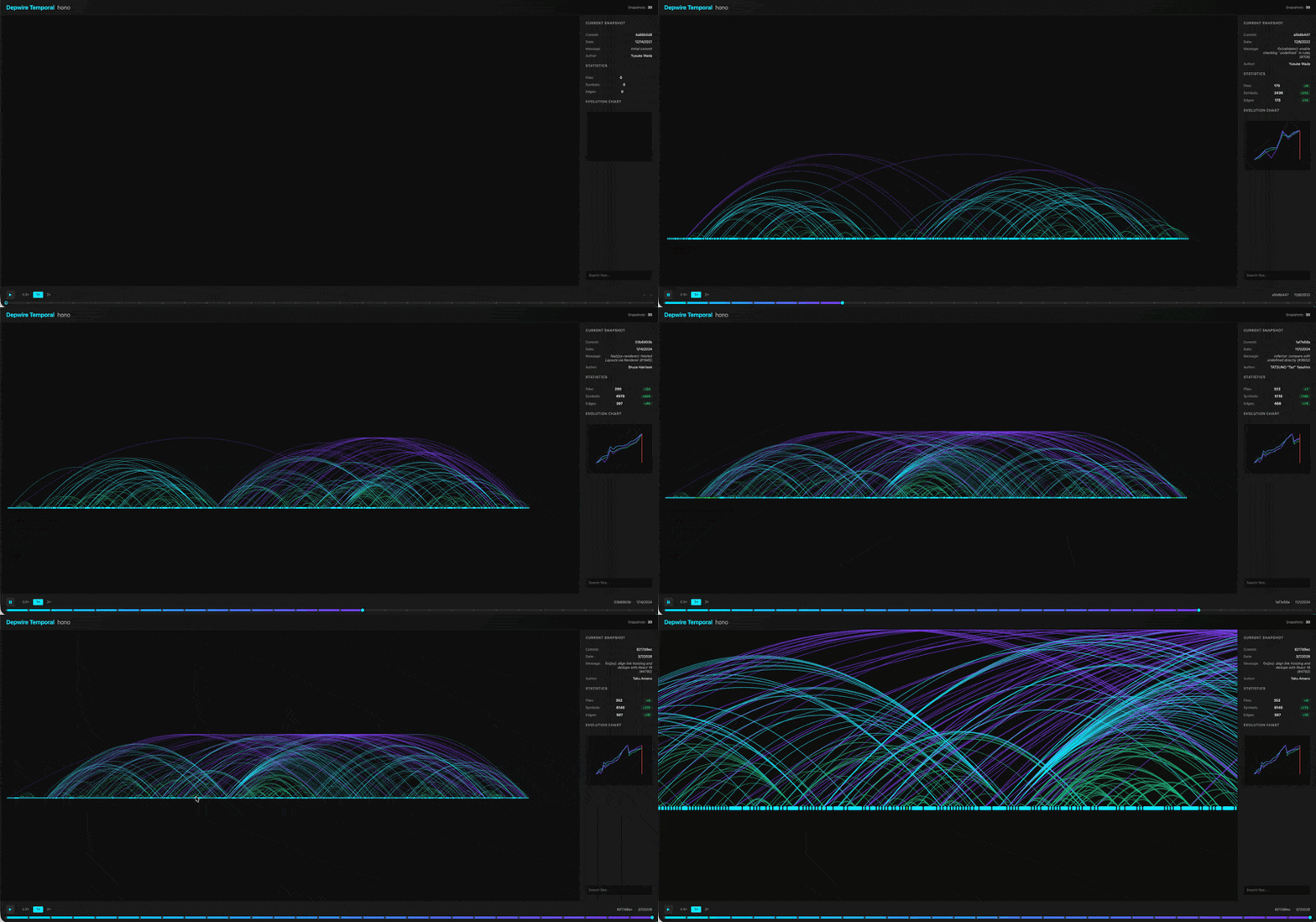
depwire temporal
Watch recorded architecture change over git history. A timeline slider moves through commits and updates the arc diagram.
All commands
| Command | Description |
|---|---|
depwire query |
Query recorded symbols and relationships |
depwire affected |
List affected files for a file or symbol |
depwire viz |
Interactive arc diagram in browser |
depwire whatif |
Simulate changes before touching code |
depwire verify-change |
Analyze a proposed change — broken imports, health delta, security, and comparison limits |
depwire security |
Scan for vulnerabilities — graph-aware severity |
depwire health |
0-100 architecture health score across 6 dimensions |
depwire dead-code |
Find dead-code candidates with confidence; JSON output includes reasonCode |
depwire docs |
Generate 13 architecture documents |
depwire temporal |
Visualize architecture evolution over git history |
depwire parse |
Parse and export dependency graph as JSON |
depwire prompt |
Get a graph-first workflow prompt for your AI agent |
depwire diff |
Structural diff between two git commits — symbols, edges, health, security |
depwire mcp |
Start MCP server for AI coding assistants |
Commands have command-specific arguments. parse accepts a project directory; diff requires two Git refs and supports --path for a subdirectory.
depwire prompt — graph-first workflow for AI agents
# Get the graph-first workflow prompt for your agent
depwire prompt                    # generic
depwire prompt --tool claude      # Claude Code optimized
depwire prompt --tool cline       # Cline optimized
depwire prompt --tool codex       # Codex optimized
Paste the output as your agent's system context before starting a complex task.
MCP server — AI integration
Connect Depwire to any MCP-compatible AI tool. Your AI gets 24 tools it can call autonomously.
Claude Desktop — add to ~/Library/Application Support/Claude/claude_desktop_config.json:
{
  "mcpServers": {
    "depwire": {
      "command": "npx",
      "args": ["-y", "depwire-cli", "mcp"]
    }
  }
}
Using a saved graph for MCP startup:
# Parse once (writes depwire-output.json)
depwire parse .

# Output defaults to the parsed project directory; --output takes precedence
depwire parse ./services/api --output ./artifacts

# MCP starts from the saved graph
depwire mcp .

# Flags:
depwire mcp . --from-cache   # error if no cache found
depwire mcp . --no-cache     # force full re-parse
depwire parse [directory] reads the specified directory, or cwd when omitted
(without walking up to an ancestor project). It writes depwire-output.json to
--output <dir> when provided, otherwise to [directory], otherwise cwd.
Relative paths are resolved from cwd; --output is a directory.
| Parse outcome | Exit code | Result |
|---|---|---|
| One or more files parsed successfully | 0 | Graph exported |
| Some files parsed, some failed | 0 | Partial graph exported; non-fatal warning on stderr |
| No files parsed (empty, unsupported, excluded, oversized, or all failed) | 2 | Clear stderr message; no graph exported |
| Directory traversal, graph construction, or output write failed | 1 | Error on stderr |
SDK callers receive per-file failures in parseProject(...).errorFiles and must
check both length and errorFiles. The exported graph format is unchanged;
partial-parse diagnostics are not embedded in the JSON graph. An unsuccessful
parse does not replace or delete a previous output file: CI must check the exit
code before consuming that file.
Cursor — Settings → Features → Experimental → Enable MCP → Add Server:
- Command:
npx - Args:
-y depwire-cli mcp
Auto-generated project context
After running depwire parse ., Depwire generates .depwire/AGENTS.md — a project-specific context file containing module structure, key files, health summary, and MCP quick-start commands.
To direct Claude Code to the generated context, reference it from your CLAUDE.md:
# In your project root CLAUDE.md:
echo "## Depwire Context" >> CLAUDE.md
echo "Read .depwire/AGENTS.md for codebase architecture." >> CLAUDE.md
The reference makes the generated project context available without an MCP tool call.
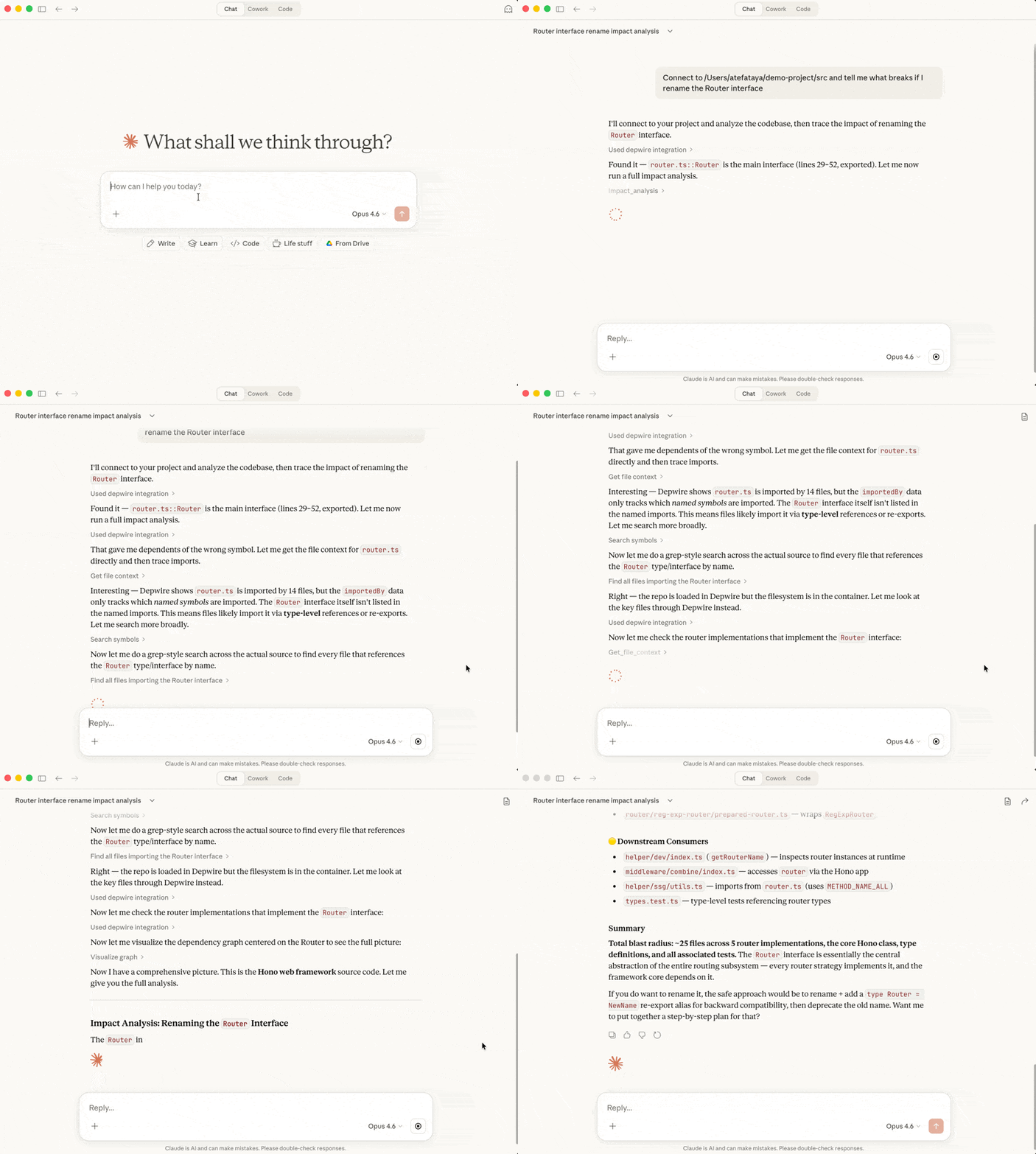
24 MCP tools
| Tool | Description |
|---|---|
connect_repo |
Connect to any local project or GitHub repo |
get_architecture_summary |
High-level project overview |
get_file_context |
Full context — imports, exports, dependents. Includes cross-language connections. |
get_dependencies |
What does a symbol depend on? |
get_dependents |
What depends on this symbol? |
get_symbol_info |
Look up any symbol's details |
search_symbols |
Find symbols by name across the codebase |
list_files |
List all files with stats |
impact_analysis |
What breaks if you change a symbol? Cross-language edges included. |
visualize_graph |
Generate interactive arc diagram |
get_health_score |
0-100 health score with recommendations |
find_dead_code |
Dead-code candidates with confidence and reasonCode evidence |
get_project_docs |
Retrieve auto-generated codebase documentation |
update_project_docs |
Regenerate documentation on demand |
get_temporal_graph |
Architecture evolution over git history |
simulate_change |
Simulate move/delete/rename/split/merge before touching code. Returns health delta, broken imports, affected nodes. Cross-language edges included. |
security_scan |
Scan for vulnerabilities with graph-aware severity elevation. No API key required. |
verify_change |
CLI export comparison and impact report with explicit comparison limits. Edited content and unified diffs return not_comparable for cyclic-group safety; no build or tests are run. Cloud has a separate existing-graph heuristic with assessment_under_revision. |
claim_files |
Record file-editing intent for cooperating clients; no filesystem lock is enforced. |
release_files |
Release a previously made file claim. |
get_active_claims |
Query who is currently working on what. |
record_decision |
Save a structured decision for future sessions to reference. |
get_decisions |
Retrieve past decisions by query, session, file, or tag. |
affected_files |
Find files and tests affected by changing a file or symbol. |
.depwire/ runtime state
The coordination tools read or append runtime records in .depwire/claims.jsonl and .depwire/decisions.jsonl. Add both files to your project’s .gitignore.
.depwire/claims.jsonl
.depwire/decisions.jsonl
Cross-language edge detection
Depwire detects connections between files written in different languages.
For example, a supported TypeScript fetch('/api/users') call can match a Python @app.get('/api/users') route definition by path. That recorded edge can inform impact analysis if the route changes.
Supported patterns:
- REST API edges — fetch/axios calls matched to Express, FastAPI, Flask, Gin route definitions
- Subprocess edges — execSync/subprocess.run calls matched to target files in the graph
Recorded cross-language edges are used by What If simulation, impact analysis, security scanning, and visualization.
Preguntas sobre depwire MCP
¿Cómo agrego depwire MCP a Claude Code?
Ejecuta claude mcp add depwire -- npx -y depwire-cli en tu terminal. Añade --scope user para que esté disponible en todos los proyectos.
¿Cómo agrego depwire MCP a Cursor?
Abre ~/.cursor/mcp.json y añade el servidor en mcpServers, usando la configuración de Cursor que se muestra en la sección de instalación de arriba.
¿Qué herramientas proporciona depwire MCP?
Expone 24 herramientas, incluidas connect_repo, get_architecture_summary, get_file_context, get_dependencies, get_dependents.
¿Depwire envía mi código fuente a la nube?
No, el CLI local analiza los archivos de código compatibles de forma local y nunca envía tu código fuente ni el análisis a Depwire.
¿Qué lenguajes de programación son compatibles?
Depwire es compatible con 16 lenguajes de programación además de plantillas de Angular, incluyendo TypeScript, Python, Go, Rust, Java, PHP, Ruby y Dart.
¿Cómo gestiona Depwire el escaneo de seguridad?
El escáner de seguridad ejecuta comprobaciones de código locales y auditorías de dependencias aplicables de forma predeterminada sin necesidad de una clave de API de Depwire.
¿Puedo simular cambios antes de aplicarlos?
Sí, puedes usar el comando 'whatif' para simular operaciones como eliminar, mover, renombrar, dividir o fusionar archivos para ver el radio de impacto.