
Indexa tu base de código para que los asistentes de IA puedan buscar en código, documentación y notas utilizando mucho menos contexto que grep.
También conocido como CSCSoftware/AiDex, aidex-mcp
- Stars
- 48
- Herramientas
- 31
- Descargas, 30 días
- —
- Última versión
- 1.8.0
- Último commit
- 14 nov 2026
- Licencia
- MIT
¿Qué es AiDex MCP?
Indexa tu base de código para que los asistentes de IA puedan buscar en código, documentación y notas utilizando mucho menos contexto que grep. Expone 31 herramientas, como exact, semantic, aidex_init.
Resumen generado a partir del README del proyecto
Acerca del MCP server de AiDex
AiDex permite indexar bases de código para dotar a los asistentes de IA de memoria semántica y una búsqueda eficiente. Sirve a desarrolladores que utilizan clientes compatibles con MCP como Claude Desktop, Cursor, Windsurf o VS Code Copilot, reemplazando las pesadas búsquedas basadas en grep por un índice ligero basado en identificadores. Este enfoque reduce significativamente el consumo de tokens, utilizando a menudo solo 50 tokens para una consulta que de otro modo requeriría miles.
Los usuarios pueden realizar búsquedas exactas, semánticas o híbridas en código, documentación y notas del espacio de trabajo. El servidor soporta 14 lenguajes, incluyendo TypeScript, Python, Rust y Go. Incluye herramientas especializadas para recuperar firmas de archivos sin leer el archivo completo, gestionar un backlog de tareas con elementos programados y mantener notas de sesión que persisten entre diferentes chats. Para depuración, cuenta con un Log Hub que recibe telemetría en vivo vía HTTP y una herramienta de capturas de pantalla optimizada para contexto visual.
La configuración es local-first y agnóstica al modelo. Aunque funciona totalmente offline usando embeddings locales, los usuarios pueden configurar opcionalmente una capa de LLM a través de Anthropic, OpenAI u Ollama para traducir consultas o reordenar resultados. Un interruptor de privacidad garantiza que el cuerpo del código permanezca local a menos que se habilite explícitamente.
Qué puedes hacer con él
- 1Navegación de código eficienteEncuentra definiciones específicas de clases o métodos sin saturar el contexto de la IA con coincidencias de texto irrelevantes.
- 2Análisis estructural de códigoRecupera las firmas de clases y métodos en un archivo para entender su estructura sin leer el contenido completo.
- 3Descubrimiento entre proyectosBusca identificadores o patrones específicos en todos los repositorios indexados de tu espacio de trabajo simultáneamente.
- 4Gestión de tareas persistenteCrea y realiza el seguimiento de tareas de programación con prioridades y etiquetas que la IA puede consultar en sesiones futuras.
- 5Monitoreo de aplicaciones en vivoEnvía logs de aplicaciones en tiempo real directamente a la IA para observar el comportamiento del código en vivo.
Escrito a partir del README del proyecto. Cada caso de uso se verifica con una cita del mismo.
Cómo instalar AiDex MCP
Formatos verificados el 10 nov 2026Añadir a CursorAñadir a GooseInstalar AiDex MCP en Claude Code
$ claude mcp add aidex -- npx -y aidex-mcpInstalar AiDex MCP en Cursor
~/.cursor/mcp.json
{
  "mcpServers": {
    "aidex": {
      "command": "npx",
      "args": [
        "-y",
        "aidex-mcp"
      ]
    }
  }
}Instalar AiDex MCP en VS Code
.vscode/mcp.json
{
  "servers": {
    "aidex": {
      "type": "stdio",
      "command": "npx",
      "args": [
        "-y",
        "aidex-mcp"
      ]
    }
  }
}Instalar AiDex MCP en VS Code CLI
$ code --add-mcp '{"name":"aidex","type":"stdio","command":"npx","args":["-y","aidex-mcp"]}'Instalar AiDex MCP en Claude Desktop
claude_desktop_config.json
{
  "mcpServers": {
    "aidex": {
      "command": "npx",
      "args": [
        "-y",
        "aidex-mcp"
      ]
    }
  }
}Instalar AiDex MCP en Codex
$ codex mcp add aidex -- npx -y aidex-mcpInstalar AiDex MCP en Codex config.toml
~/.codex/config.toml
[mcp_servers.aidex]
command = "npx"
args = ["-y", "aidex-mcp"]
Instalar AiDex MCP en Gemini CLI
$ gemini mcp add -s user aidex npx -- -y aidex-mcpInstalar AiDex MCP en Gemini settings.json
~/.gemini/settings.json
{
  "mcpServers": {
    "aidex": {
      "command": "npx",
      "args": [
        "-y",
        "aidex-mcp"
      ]
    }
  }
}Herramientas de AiDex MCP 31
Detectado desde el READMEexactsemanticaidex_initaidex_queryaidex_signatureaidex_signaturesaidex_updateaidex_removeaidex_summaryaidex_treeaidex_describeaidex_link
| exact | — | |
| semantic | — | |
| aidex_init | — | |
| aidex_query | — | |
| aidex_signature | — | |
| aidex_signatures | — | |
| aidex_update | — | |
| aidex_remove | — | |
| aidex_summary | — | |
| aidex_tree | — | |
| aidex_describe | — | |
| aidex_link | — |
Mostrar las 31 herramientasMostrar menos herramientas
aidex_unlinkaidex_linksaidex_statusaidex_scanaidex_filesaidex_noteaidex_sessionaidex_vieweraidex_taskaidex_tasksaidex_screenshotaidex_windowsaidex_global_initaidex_global_statusaidex_global_queryaidex_global_signaturesaidex_global_refreshaidex_global_guidelineaidex_log
| aidex_unlink | — | |
| aidex_links | — | |
| aidex_status | — | |
| aidex_scan | — | |
| aidex_files | — | |
| aidex_note | — | |
| aidex_session | — | |
| aidex_viewer | — | |
| aidex_task | — | |
| aidex_tasks | — | |
| aidex_screenshot | — | |
| aidex_windows | — | |
| aidex_global_init | — | |
| aidex_global_status | — | |
| aidex_global_query | — | |
| aidex_global_signatures | — | |
| aidex_global_refresh | — | |
| aidex_global_guideline | — | |
| aidex_log | — |
Verificaciones automáticas
Ejecutado 12 nov 2026Informe completo →Pasó nuestras verificaciones automáticas. Esto no es una auditoría de seguridad: lee el código y dale al servidor el acceso más limitado que necesite. Cómo funcionan las verificaciones

- Repositorio de origen vinculado y accesibleAprobado
- Licencia de código abierto (OSI)Aprobado
- Commit o lanzamiento en el último añoAprobado
- El nombre del paquete no es similar a un paquete popularAprobado
- El endpoint remoto usa HTTPSNo verificado
- Las herramientas destructivas están etiquetadasAprobado
- Sin instrucciones ocultas para el modeloAprobado
- No hay avisos críticos en el paquete ni en sus dependenciasAprobado
README
Ver en GitHubAiDex



The persistent brain for AI coding agents.
AiDex is an MCP server that gives AI coding assistants a memory, semantic search, and live telemetry — local-first, model-agnostic. Works with any MCP-compatible AI assistant: Claude Code, Claude Desktop, Cursor, Windsurf, Gemini CLI, VS Code Copilot, and more.
Three Pillars
🧠 Memory — Tasks, notes, and session-notes survive every chat. Auto-logged history, scheduled tasks, cross-session continuity. Your AI knows tomorrow what mattered today.
🔍 Search — Three modes: exact (identifier), semantic (concept), hybrid (RRF fusion of both). Embeds code, docs, and workspace items into one ranking. Cross-project — every repo in one query. Optional LLM layer translates non-English queries and reranks results.
🌐 Telemetry — LogHub receives live logs from any app via HTTP (no SDK). The AI watches what your code actually does, not just what it says. Live-streamed in the Viewer.
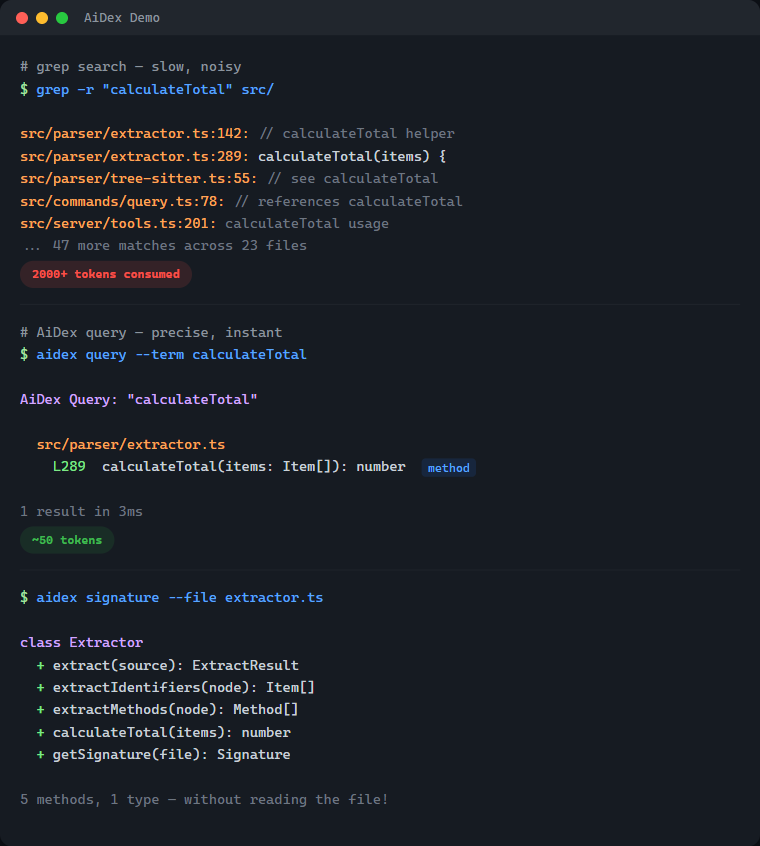
| Without AiDex | With AiDex | |
|---|---|---|
Find PlayerHealth |
Grep → 200 hits in 40 files → reads 5 files → 2,000+ tokens | 1 query → 3 exact locations → ~50 tokens |
| Get file structure | Reads entire 500-line file → 1,500 tokens | Signatures → classes + methods → ~80 tokens |
| What changed today? | git diff + grep + context → 3,000+ tokens |
Time-filtered query → ~50 tokens |
What's Inside — 33 Tools in One Server
| Category | Tools | What it does |
|---|---|---|
| Semantic Search 🆕 | search, settings |
Hybrid / semantic / exact retrieval over code, docs & workspace. Settings tab to configure embeddings + LLM layer |
| Index & Identifier Search | init, query, update, remove, status |
Index your project, search identifiers by name (exact/contains/starts_with), time-based filtering |
| Signatures | signature, signatures |
Get classes + methods of any file without reading it — single file or glob pattern |
| Project Overview | summary, tree, describe, files |
Entry points, language breakdown, file tree with stats, file listing by type |
| Cross-Project | link, unlink, links, scan |
Link dependencies, discover indexed projects |
| Global Search | global_init, global_query, global_signatures, global_status, global_refresh |
Search identifiers across ALL your projects — "Have I ever written X?" |
| Guidelines | global_guideline |
Persistent AI instructions & coding conventions — shared across all projects |
| Sessions | session, note |
Track sessions, detect external changes, leave notes for next session (with searchable history) |
| Task Backlog | task, tasks |
Built-in task management with priorities, tags, auto-logged history, and scheduled/recurring tasks |
| Log Hub | log |
Universal log receiver — any program sends logs via HTTP, queryable by the AI, live in Viewer |
| Screenshots | screenshot, windows |
Cross-platform screen capture with LLM optimization — scale + color reduction saves up to 95% tokens |
| Viewer | viewer |
Interactive browser UI with file tree, signatures, tasks, logs, search, and live reload |
14 languages — C#, TypeScript, JavaScript, Rust, Python, C, C++, Java, Go, PHP, Ruby, HCL/Terraform, Kotlin, Swift — plus Astro frontmatter
# Find where "PlayerHealth" is defined — 1 call, ~50 tokens
aidex_query({ term: "PlayerHealth" })
→ Engine.cs:45, Player.cs:23, UI.cs:156

# All methods in a file — without reading the whole file
aidex_signature({ file: "src/Engine.cs" })
→ class GameEngine { Update(), Render(), LoadScene(), ... }

# What changed in the last 2 hours?
aidex_query({ term: "render", modified_since: "2h" })

# Search across ALL your projects at once
aidex_global_query({ term: "TransparentWindow", mode: "contains" })
→ Found in: LibWebAppGpu (3 hits), DebugViewer (1 hit)

# Leave a note for your next session
aidex_note({ path: ".", note: "Test the parser fix after restart" })

# Create a task while working
aidex_task({ path: ".", action: "create", title: "Fix edge case in parser", priority: 1, tags: "bug" })
Table of Contents
- What's Inside
- Semantic Search & LLM Layer 🆕
- The Problem
- The Solution
- Why Not Just Grep?
- How It Works
- Features
- Supported Languages
- Quick Start
- Available Tools
- Time-based Filtering
- Project Structure
- Session Notes
- Task Backlog
- Global Search
- AI Guidelines
- Log Hub
- Debug Dashboard
- Screenshots — LLM-Optimized
- Interactive Viewer
- CLI Usage
- Performance
- Technology
- Contributing
- License
Semantic Search & LLM Layer
v2.0 added semantic search via locally-run embeddings — your AI can find a function even when it doesn't know the exact identifier.
Three modes — pick the right tool for the question
| Mode | What it does | When to use |
|---|---|---|
exact |
Identifier match (same as aidex_query) |
You know the name. PlayerHealth → 3 hits |
semantic |
Vector KNN over embedded code+docs+workspace | You know the concept. "how do we cache the model" → finds getQueryEmbedder |
hybrid (default) |
RRF fusion of both | Mixed queries. Robust by default |
What gets embedded
- Code — every method and type, three-tier chunking (signature + doc-comment + weighted identifier bag)
- Docs — Markdown sections (README, CHANGELOG, docs/, plan files), split at heading boundaries
- Workspace — tasks, task logs, session notes, archived note history
One ranking, all kinds. A query like "how to write logs from external programs" surfaces the README's ## Log Hub section first, then the log method in commands/log.ts, then any related task.
Setup
// Enable embeddings on a project (one-time, ~30s for AiDex itself, cached afterwards)
aidex_init({ path: ".", embeddings: true })

// Search
aidex_search({ query: "how do we batch requests to the LLM", path: "." })
aidex_search({ query: "retry with backoff", scope: "all" })  // across every embedded project
Or use the Settings tab in the Viewer (aidex_settings({ path: ".", open: true })) — toggles for embeddings, LLM provider, model, and the privacy switch.
Optional LLM layer
When an Anthropic / OpenAI / OpenRouter / Ollama / HuggingFace API key is configured, AiDex can:
- Translate non-English queries → "wie speichere ich Logs lokal" finds the right code
- Expand vague queries into 2-4 concrete subqueries (RRF-merged)
- Rerank top-N retrieval candidates
Privacy switch llm_send_code defaults to off — only your literal query and metadata (paths, names, anchors) are sent. Code bodies stay local. Per-project, easy to verify in Settings.
Local-first: works fully offline with pure embeddings. The LLM layer is opt-in, never required.
The Problem
Every time your AI assistant searches for code, it:
- Greps through thousands of files → hundreds of results flood the context
- Reads file after file to understand the structure → more context consumed
- Forgets everything when the session ends → repeat from scratch
A single "Where is X defined?" question can eat 2,000+ tokens. Do that 10 times and you've burned half your context on navigation alone.
The Solution
Index once, query forever:
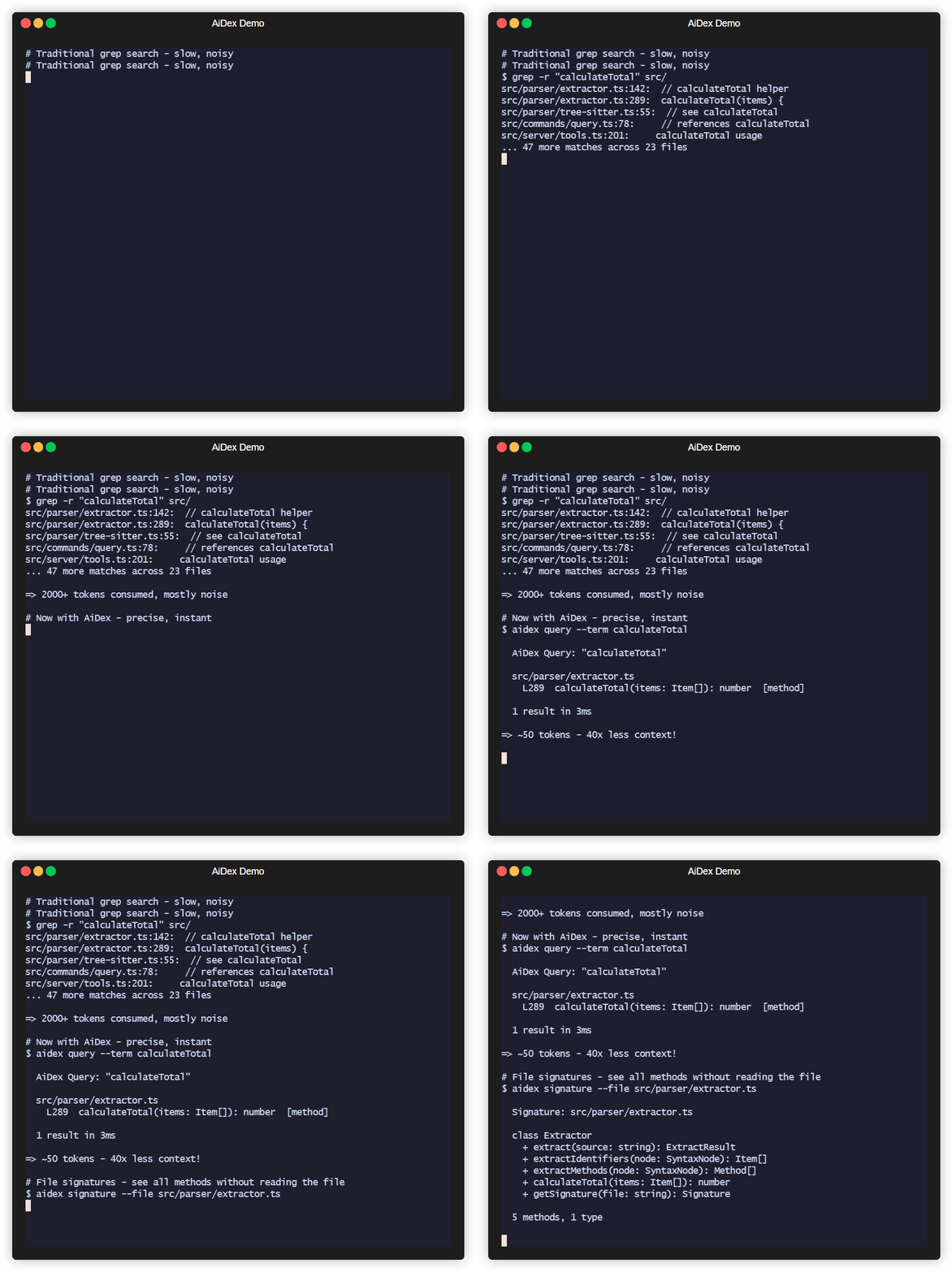
# Before: grep flooding your context
AI: grep "PlayerHealth" → 200 hits in 40 files
AI: read File1.cs, File2.cs, File3.cs...
→ 2000+ tokens consumed, 5+ tool calls

# After: precise results, minimal context
AI: aidex_query({ term: "PlayerHealth" })
→ Engine.cs:45, Player.cs:23, UI.cs:156
→ ~50 tokens, 1 tool call
Result: 50-80% less context used for code navigation.
Why Not Just Grep?
| Grep/Ripgrep | AiDex | |
|---|---|---|
| Context usage | 2000+ tokens per search | ~50 tokens |
| Results | All text matches | Only identifiers |
| Precision | log matches catalog, logarithm |
log finds only log |
| Persistence | Starts fresh every time | Index survives sessions |
| Structure | Flat text search | Knows methods, classes, types |
The real cost of grep: Every grep result includes surrounding context. Search for User in a large project and you'll get hundreds of hits - comments, strings, partial matches. Your AI reads through all of them, burning context tokens on noise.
AiDex indexes identifiers: It uses Tree-sitter to actually parse your code. When you search for User, you get the class definition, the method parameters, the variable declarations - not every comment that mentions "user".
How It Works
-
Index your project once (~1 second per 1000 files)
aidex_init({ path: "/path/to/project" }) -
AI searches the index instead of grepping
aidex_query({ term: "Calculate", mode: "starts_with" }) → All functions starting with "Calculate" + exact line numbers aidex_query({ term: "Player", modified_since: "2h" }) → Only matches changed in the last 2 hours -
Get file overviews without reading entire files
aidex_signature({ file: "src/Engine.cs" })
→ All classes, methods, and their signatures
The index lives in .aidex/index.db (SQLite) - fast, portable, no external dependencies.
Features
- Tree-sitter Parsing: Real code parsing, not regex — indexes identifiers, ignores keywords and noise
- ~50 Tokens per Search: vs 2000+ with grep — your AI keeps its context for actual work
- Persistent Index: Survives between sessions — no re-scanning, no re-reading
- Incremental Updates: Re-index single files after changes, not the whole project
- Time-based Filtering: Find what changed in the last hour, day, or week
- Auto-Cleanup: Excluded files (e.g., build outputs) are automatically removed from index
- Zero Dependencies: SQLite with WAL mode — single file, fast, portable
Supported Languages
| Language | Extensions |
|---|---|
| C# | .cs |
| TypeScript | .ts, .tsx |
| JavaScript | .js, .jsx, .mjs, .cjs |
| Rust | .rs |
| Python | .py, .pyw |
| C | .c, .h |
| C++ | .cpp, .cc, .cxx, .hpp, .hxx |
| Java | .java |
| Go | .go |
| PHP | .php |
| Ruby | .rb, .rake |
| HCL/Terraform | .tf, .tfvars, .hcl |
| Kotlin | .kt, .kts |
| Swift | .swift |
| Astro | .astro (TypeScript frontmatter) |
Quick Start
Prerequisites
- Node.js ≥ 20 (check with
node --version)- macOS:
brew install nodeornvm install 20 && nvm use 20 - Linux: use your package manager or nvm
- Windows: nodejs.org
- If you use
nvm, the repo ships a.nvmrc—nvm usepicks the right version automatically.
- macOS:
1. Install
npm install -g aidex-mcp
That's it. Setup runs automatically after install — it detects your installed AI clients (Claude Code, Claude Desktop, Cursor, Windsurf, Gemini CLI, VS Code Copilot) and registers AiDex as an MCP server. It also adds usage instructions to your AI's config (~/.claude/CLAUDE.md, ~/.gemini/GEMINI.md).
To re-run setup manually: aidex setup | To unregister: aidex unsetup | To skip auto-setup: AIDEX_NO_SETUP=1 npm install -g aidex-mcp
2. Or register manually with your AI assistant
For Claude Code (~/.claude/settings.json or ~/.claude.json):
{
  "mcpServers": {
    "aidex": {
      "type": "stdio",
      "command": "aidex",
      "env": {}
    }
  }
}
For Claude Desktop (%APPDATA%/Claude/claude_desktop_config.json on Windows):
{
  "mcpServers": {
    "aidex": {
      "command": "aidex"
    }
  }
}
Note: Both
aidexandaidex-mcpwork as command names.
Important: The server name in your config determines the MCP tool prefix. Use
"aidex"as shown above — this gives you tool names likeaidex_query,aidex_signature, etc. Using a different name (e.g.,"codegraph") would change the prefix accordingly.
For Gemini CLI (~/.gemini/settings.json):
{
  "mcpServers": {
    "aidex": {
      "command": "aidex"
    }
  }
}
For VS Code Copilot (run MCP: Open User Configuration in Command Palette):
{
  "servers": {
    "aidex": {
      "type": "stdio",
      "command": "aidex"
    }
  }
}
For other MCP clients: See your client's documentation for MCP server configuration.
3. Make your AI actually use it
Add to your AI's instructions (e.g., ~/.claude/CLAUDE.md for Claude Code, or the equivalent for your AI client). This tells the AI when and how to use AiDex instead of grepping:
## AiDex - Persistent Code Index (MCP Server)

AiDex provides fast, precise code search through a pre-built index.
**Always prefer AiDex over Grep/Glob for code searches.**

### REQUIRED: Before using Grep/Glob/Read for code searches
Do I want to search code? ├── .aidex/ exists → STOP! Use AiDex instead ├── .aidex/ missing → run aidex_init (don't ask), THEN use AiDex └── Config/Logs/Text → Grep/Read is fine
**NEVER do this when .aidex/ exists:**
- ❌ `Grep pattern="functionName"` → ✅ `aidex_query term="functionName"`
- ❌ `Grep pattern="class.*Name"` → ✅ `aidex_query term="Name" mode="contains"`
- ❌ `Read file.cs` to see methods → ✅ `aidex_signature file="file.cs"`
- ❌ `Glob pattern="**/*.cs"` + Read → ✅ `aidex_signatures pattern="**/*.cs"`

### Session-Start Rule (REQUIRED — every session, no exceptions)

1. Call `aidex_session({ path: "<project>" })` — detects external changes, auto-reindexes
2. If `.aidex/` does NOT exist → run `aidex_init` automatically (don't ask)
3. If a session note exists → **show it to the user** before continuing
4. **Before ending a session:** always leave a note about what to do next

### Question → Right Tool

| Question | Tool |
|----------|------|
| "Where is X defined?" | `aidex_query term="X"` |
| "Find anything containing X" | `aidex_query term="X" mode="contains"` |
| "All functions starting with X" | `aidex_query term="X" mode="starts_with"` |
| "What methods does file Y have?" | `aidex_signature file="Y"` |
| "Explore all files in src/" | `aidex_signatures pattern="src/**"` |
| "Project overview" | `aidex_summary` + `aidex_tree` |
| "What changed recently?" | `aidex_query term="X" modified_since="2h"` |
| "What files changed today?" | `aidex_files path="." modified_since="8h"` |
| "Have I ever written X?" | `aidex_global_query term="X" mode="contains"` |
| "Which project has class Y?" | `aidex_global_signatures term="Y" kind="class"` |
| "All indexed projects?" | `aidex_global_status` |

### Search Modes

- **`exact`** (default): Finds only the exact identifier — `log` won't match `catalog`
- **`contains`**: Finds identifiers containing the term — `render` matches `preRenderSetup`
- **`starts_with`**: Finds identifiers starting with the term — `Update` matches `UpdatePlayer`, `UpdateUI`

### All Tools (30)

| Category | Tools | Purpose |
|----------|-------|---------|
| Search & Index | `aidex_init`, `aidex_query`, `aidex_update`, `aidex_remove`, `aidex_status` | Index project, search identifiers (exact/contains/starts_with), time filter |
| Signatures | `aidex_signature`, `aidex_signatures` | Get classes + methods without reading files |
| Overview | `aidex_summary`, `aidex_tree`, `aidex_describe`, `aidex_files` | Entry points, file tree, file listing by type |
| Cross-Project | `aidex_link`, `aidex_unlink`, `aidex_links`, `aidex_scan` | Link dependencies, discover projects |
| Global Search | `aidex_global_init`, `aidex_global_query`, `aidex_global_signatures`, `aidex_global_status`, `aidex_global_refresh` | Search across ALL projects |
| Guidelines | `aidex_global_guideline` | Persistent AI instructions & conventions (key-value, global) |
| Sessions | `aidex_session`, `aidex_note` | Track sessions, leave notes (with searchable history) |
| Tasks | `aidex_task`, `aidex_tasks` | Built-in backlog with priorities, tags, summaries, auto-logged history, scheduled/recurring tasks |
| Log Hub | `aidex_log` | Universal log receiver — any program sends logs via HTTP, AI queries them, live in Viewer |
| Screenshots | `aidex_screenshot`, `aidex_windows` | Screen capture with LLM optimization (scale + color reduction, no index needed) |
| Viewer | `aidex_viewer` | Interactive browser UI with file tree, signatures, tasks, and live logs |

**14 languages:** C#, TypeScript, JavaScript, Rust, Python, C, C++, Java, Go, PHP, Ruby, HCL/Terraform, Kotlin, Swift — plus Astro frontmatter

### Session Notes

Leave notes for the next session — they persist in the database:
aidex_note({ path: ".", note: "Test the fix after restart" }) # Write aidex_note({ path: ".", note: "Also check edge cases", append: true }) # Append aidex_note({ path: "." }) # Read aidex_note({ path: ".", search: "parser" }) # Search history aidex_note({ path: ".", clear: true }) # Clear
- **Before ending a session:** automatically leave a note about next steps
- **User says "remember for next session: ..."** → write it immediately

### Task Backlog

Track TODOs, bugs, and features right next to your code index:
aidex_task({ path: ".", action: "create", title: "Fix bug", priority: 1, tags: "bug" }) aidex_task({ path: ".", action: "update", id: 1, status: "done" }) aidex_task({ path: ".", action: "log", id: 1, note: "Root cause found" }) aidex_tasks({ path: ".", status: "active" })
Scheduled & recurring tasks
aidex_task({ path: ".", action: "create", title: "Check PR status", due: "3d", interval: "3d", task_action: "gh pr list" })
Priority: 1=high, 2=medium, 3=low | Status: `backlog → active → done | cancelled`

### Global Search (across all projects)
aidex_global_init({ path: "/path/to/all/repos" }) # Scan & register aidex_global_init({ path: "...", index_unindexed: true }) # + auto-index small projects aidex_global_query({ term: "TransparentWindow", mode: "contains" }) # Search everywhere aidex_global_signatures({ term: "Render", kind: "method" }) # Find methods everywhere aidex_global_status({ sort: "recent" }) # List all projects
### Screenshots
aidex_screenshot() # Full screen aidex_screenshot({ mode: "active_window" }) # Active window aidex_screenshot({ mode: "window", window_title: "VS Code" }) # Specific window aidex_screenshot({ scale: 0.5, colors: 2 }) # B&W, half size (ideal for LLM) aidex_screenshot({ colors: 16 }) # 16 colors (UI readable) aidex_windows({ filter: "chrome" }) # Find window titles
No index needed. Returns file path → use `Read` to view immediately.

**LLM optimization strategy:** Always start with aggressive settings, then retry if unreadable:
1. First try: `scale: 0.5, colors: 2` (B&W, half size — smallest possible)
2. If unreadable: retry with `colors: 16` (adds shading for UI elements)
3. If still unclear: `scale: 0.75` or omit `colors` for full quality
4. **Remember** what works for each window/app during the session — don't retry every time.
4. Index your project
Ask your AI: "Index this project with AiDex"
Or manually in the AI chat:
aidex_init({ path: "/path/to/your/project" })
Available Tools
| Tool | Description |
|---|---|
aidex_init |
Index a project (creates .aidex/) |
aidex_query |
Search by term (exact/contains/starts_with) |
aidex_signature |
Get one file's classes + methods |
aidex_signatures |
Get signatures for multiple files (glob) |
aidex_update |
Re-index a single changed file |
aidex_remove |
Remove a deleted file from index |
aidex_summary |
Project overview |
aidex_tree |
File tree with statistics |
aidex_describe |
Add documentation to summary |
aidex_link |
Link another indexed project |
aidex_unlink |
Remove linked project |
aidex_links |
List linked projects |
aidex_status |
Index statistics |
aidex_scan |
Find indexed projects in directory tree |
aidex_files |
List project files by type (code/config/doc/asset) |
aidex_note |
Read/write session notes (persists between sessions) |
aidex_session |
Start session, detect external changes, auto-reindex |
aidex_viewer |
Open interactive project tree in browser |
aidex_task |
Create, read, update, delete tasks with priority and tags |
aidex_tasks |
List and filter tasks by status, priority, or tag |
aidex_screenshot |
Take a screenshot (fullscreen, window, region) with optional scale + color reduction |
aidex_windows |
List open windows for screenshot targeting |
aidex_global_init |
Scan directory tree, register all indexed projects in global DB |
aidex_global_status |
List all registered projects with stats |
aidex_global_query |
Search terms across ALL registered projects |
aidex_global_signatures |
Search methods/types by name across all projects |
aidex_global_refresh |
Update stats and remove stale projects from global DB |
aidex_global_guideline |
Store/retrieve AI guidelines and coding conventions (key-value, global) |
aidex_log |
Universal log receiver — start HTTP server, query logs, live stream in Viewer |
Time-based Filtering
Track what changed recently with modified_since and modified_before:
aidex_query({ term: "render", modified_since: "2h" })   # Last 2 hours
aidex_query({ term: "User", modified_since: "1d" })     # Last day
aidex_query({ term: "API", modified_since: "1w" })      # Last week
Supported formats:
- Relative:
30m(minutes),2h(hours),1d(days),1w(weeks) - ISO date:
2026-01-27or2026-01-27T14:30:00
Perfect for questions like "What did I change in the last hour?"
Project Structure
AiDex indexes ALL files in your project (not just code), letting you query the structure:
aidex_files({ path: ".", type: "config" })  # All config files
aidex_files({ path: ".", type: "test" })    # All test files
aidex_files({ path: ".", pattern: "**/*.md" })  # All markdown files
aidex_files({ path: ".", modified_since: "30m" })  # Changed this session
File types: code, config, doc, asset, test, other, dir
Use modified_since to find files changed in this session - perfect for "What did I edit?"
Preguntas sobre AiDex MCP
¿Cómo agrego AiDex MCP a Claude Code?
Ejecuta claude mcp add aidex -- npx -y aidex-mcp en tu terminal. Añade --scope user para que esté disponible en todos los proyectos.
¿Cómo agrego AiDex MCP a Cursor?
Abre ~/.cursor/mcp.json y añade el servidor en mcpServers, usando la configuración de Cursor que se muestra en la sección de instalación de arriba.
¿Qué herramientas proporciona AiDex MCP?
Expone 31 herramientas, incluidas exact, semantic, aidex_init, aidex_query, aidex_signature.
¿Qué lenguajes indexa AiDex?
Soporta 14 lenguajes, incluyendo C#, TypeScript, JavaScript, Rust, Python, C, C++, Java, Go, PHP, Ruby, HCL/Terraform, Kotlin y Swift.
¿Requiere AiDex una API key o conexión a internet?
No; la búsqueda semántica funciona totalmente offline con embeddings locales, y la capa de LLM es opcional y bajo consentimiento.
¿Dónde se almacena el índice de AiDex?
El índice se almacena como un archivo de base de datos SQLite dentro del proyecto en .aidex/index.db.
¿Qué modos de búsqueda ofrece AiDex?
Ofrece coincidencia exacta de identificadores, búsqueda semántica por vectores y un modo híbrido que combina ambos rankings.