
Proporciona feedback de la interfaz de usuario de Jetpack Compose y entrega el contexto del código fuente a agentes de codificación con IA mediante un MCP server local.
También conocido como beyondwin/FixThis, @beyondwin/fixthis
- Stars
- 5
- Herramientas
- —
- Descargas, 30 días
- 357
- Última versión
- 1.5.0
- Último commit
- 28 oct 2026
- Licencia
- MIT
¿Qué es FixThis MCP?
FixThis es un MCP server. Proporciona feedback de la interfaz de usuario de Jetpack Compose y entrega el contexto del código fuente a agentes de codificación con IA mediante un MCP server local.
Resumen generado a partir del README del proyecto
Acerca del MCP server de FixThis
Los desarrolladores de Android que trabajan con Jetpack Compose pueden usar FixThis para cerrar la brecha entre los errores visuales de la interfaz de usuario y el contexto del código fuente. Al adjuntar un asistente de depuración a una aplicación Compose, la herramienta permite a los usuarios señalar elementos específicos de la interfaz en una consola de navegador local y anotar los cambios deseados. Este proceso genera una entrega compacta que contiene los límites de la captura de pantalla, la semántica y los candidatos de código fuente que pueden enviarse directamente a agentes de codificación.
Este MCP server local se ejecuta mediante ADB y localhost, lo que garantiza que no se envíen datos a APIs externas. Está diseñado para usarse con agentes como Claude Code o Codex, que pueden automatizar la instalación del plugin de Gradle y la configuración de MCP. Los usuarios pueden optar por copiar manualmente los prompts para interfaces de chat o usar la función Save to MCP para adjuntar diagnósticos de Android anonimizados a sus solicitudes. El sistema proporciona detalles técnicos específicos, como números de línea y sugerencias de editSurface, para ayudar a los agentes a identificar los componentes composable correctos.
Qué puedes hacer con él
- 1Instalación automatizada de agentesUn agente de IA puede configurar automáticamente un proyecto de Jetpack Compose ejecutando el comando install-agent y aplicando el plugin de Gradle necesario.
- 2Depuración visual de la interfaz de usuarioLos desarrolladores pueden seleccionar componentes específicos o arrastrar áreas en una consola basada en navegador para describir cambios de diseño o espaciado.
- 3Entrega de código contextualEn lugar de simples capturas de pantalla, la herramienta proporciona a los agentes los mejores candidatos de código fuente y números de línea para una edición precisa.
- 4Adjuntar datos de diagnósticoLos usuarios pueden incluir diagnósticos de Android delimitados y anonimizados al guardar una sesión en un cliente MCP.
Escrito a partir del README del proyecto. Cada caso de uso se verifica con una cita del mismo.
Cómo instalar FixThis MCP
Formatos verificados el 10 nov 2026Añadir a CursorAñadir a GooseInstalar FixThis MCP en Claude Code
$ claude mcp add fixthis -- npx -y @beyondwin/fixthisInstalar FixThis MCP en Cursor
~/.cursor/mcp.json
{
  "mcpServers": {
    "fixthis": {
      "command": "npx",
      "args": [
        "-y",
        "@beyondwin/fixthis"
      ]
    }
  }
}Instalar FixThis MCP en VS Code
.vscode/mcp.json
{
  "servers": {
    "fixthis": {
      "type": "stdio",
      "command": "npx",
      "args": [
        "-y",
        "@beyondwin/fixthis"
      ]
    }
  }
}Instalar FixThis MCP en VS Code CLI
$ code --add-mcp '{"name":"fixthis","type":"stdio","command":"npx","args":["-y","@beyondwin/fixthis"]}'Instalar FixThis MCP en Claude Desktop
claude_desktop_config.json
{
  "mcpServers": {
    "fixthis": {
      "command": "npx",
      "args": [
        "-y",
        "@beyondwin/fixthis"
      ]
    }
  }
}Instalar FixThis MCP en Codex
$ codex mcp add fixthis -- npx -y @beyondwin/fixthisInstalar FixThis MCP en Codex config.toml
~/.codex/config.toml
[mcp_servers.fixthis]
command = "npx"
args = ["-y", "@beyondwin/fixthis"]
Instalar FixThis MCP en Gemini CLI
$ gemini mcp add -s user fixthis npx -- -y @beyondwin/fixthisInstalar FixThis MCP en Gemini settings.json
~/.gemini/settings.json
{
  "mcpServers": {
    "fixthis": {
      "command": "npx",
      "args": [
        "-y",
        "@beyondwin/fixthis"
      ]
    }
  }
}Verificaciones automáticas
Ejecutado 14 nov 2026Informe completo →Pasó nuestras verificaciones automáticas. Esto no es una auditoría de seguridad: lee el código y dale al servidor el acceso más limitado que necesite. Cómo funcionan las verificaciones

- Repositorio de origen vinculado y accesiblebeyondwin/fixthis is public and reachablegithub.com/beyondwin/fixthis ↗Aprobado
- El paquete indica este repositorio como su origen@beyondwin/fixthis names beyondwin/fixthis as sourcenpmjs.com/package/@beyondwin/fixthis ↗Aprobado
- Procedencia de la compilación (atestación de Sigstore)Sigstore attestation for @beyondwin/fixthisnpmjs.com/package/@beyondwin/fixthis/v/1.5.0#provenance ↗Aprobado
- Licencia de código abierto (OSI)MITspdx.org/licenses/MIT.html ↗Aprobado
- Commit o lanzamiento en el último añoLast commit or release 2026-10-28github.com/beyondwin/fixthis ↗Aprobado
- OpenSSF ScorecardNo verificado
- El nombre del paquete no es similar a un paquete popularNo popular package one edit away from @beyondwin/fixthisAprobado
- No hay avisos críticos en el paquete ni en sus dependencias1 resolved dependencies checked; no critical advisoryosv.dev ↗Aprobado
- Sin instrucciones ocultas para el modelo0 tool descriptions and the README read; no override phrases, credential paths or hidden charactersAprobado
- Las herramientas destructivas están etiquetadasNo verificado
- El endpoint remoto responde al handshake de MCPNo verificado
README
Ver en GitHubFixThis for Android Compose


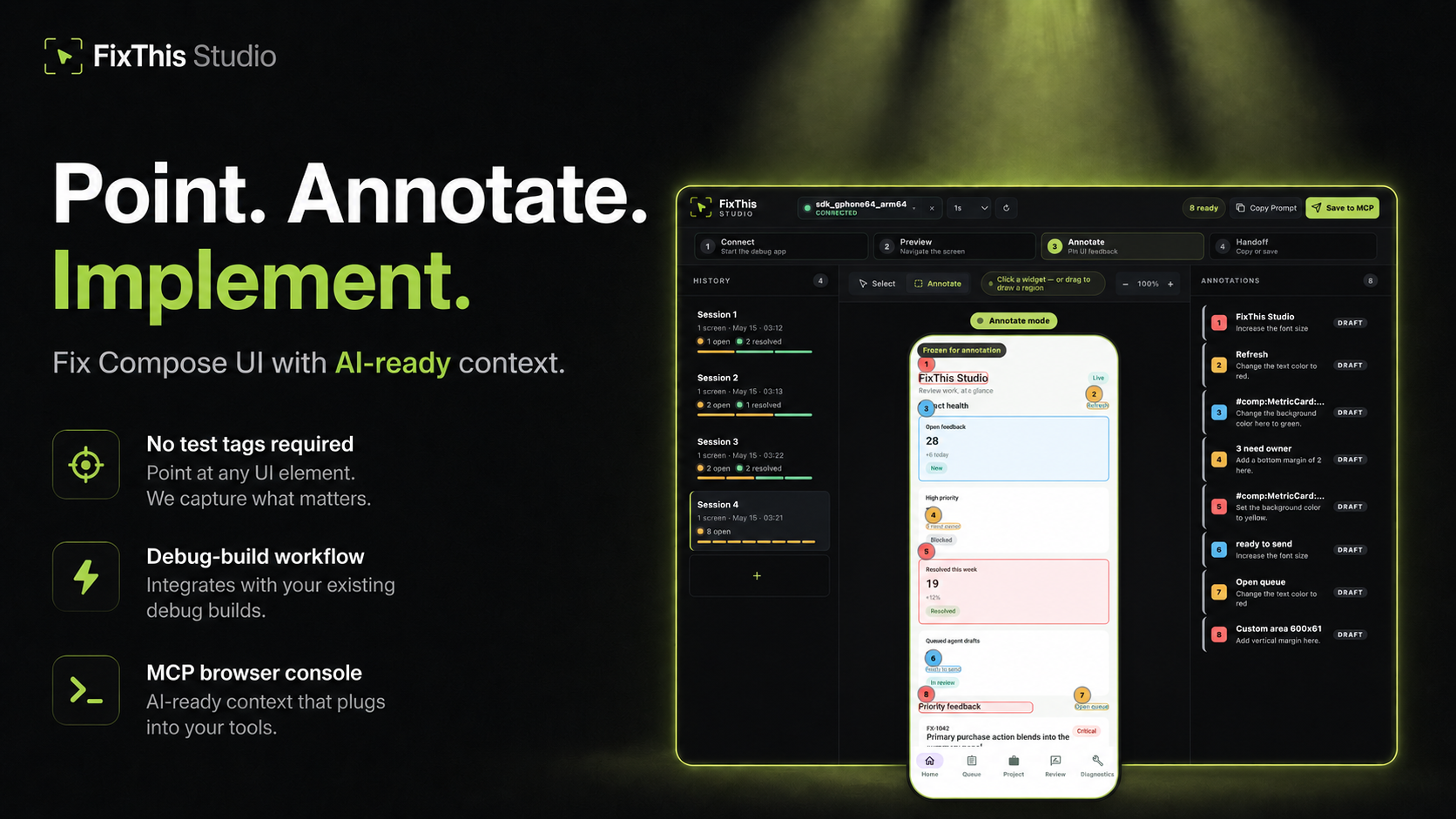
Point at a Jetpack Compose UI, write the change, and hand Claude, Codex, Cursor, or another coding agent the source context it needs.
FixThis is debug-only. It attaches a sidekick to a Compose debug app, mirrors the screen into a local browser console, and turns annotations into a compact handoff: screenshot bounds, semantics, source candidates, and confidence warnings.
Click a component to select it. Drag when the target is spacing, empty room, or something that is not a clean Compose node.
Works Today
- Try the sample app in about five minutes.
- Install the desktop CLI/MCP with Homebrew, npm, or GitHub Releases.
- Add it to an external app with the Gradle plugin
io.github.beyondwin.fixthis.compose. - Let Claude Code or Codex configure the sample with
./scripts/bootstrap-mcp.sh --sample. - Let an agent configure your app with
fixthis install-agent. - Use Copy Prompt with Cursor, ChatGPT, or any chat agent.
- Use Save to MCP with Claude Code or Codex.
- Save to MCP can attach a bounded, redacted Android diagnostics baseline. Switch the session to Manual or Off if you do not want that. Copy Prompt never starts collection.
- Runs locally over ADB and
127.0.0.1. No external API calls.
Quick Start: Agent Installs FixThis in Your App
Claude Code / Codex Bootstrap Prompt
Paste this into Claude Code or Codex from the root of a Jetpack Compose Android app:
Install FixThis in this project and configure it for this agent.

Use this order:
1. Run `fixthis install-agent --project-dir . --target all --verify --json`.
2. Use the JSON `readiness.state` and `actions[]` as the source of truth.
3. If `requiresUserAction` is true, tell me the exact blocking action.
4. Do not call `fixthis_open_feedback_console` until `readyForMcpTooling` is true, or until the report's `agent_after_restart` action is reached after restart.

Restart Claude Code or Codex if the report asks for it.
Do not configure release builds. Do not commit `.fixthis/`.
The agent should run:
# macOS
brew install beyondwin/tools/fixthis

# Node
npm install -g @beyondwin/fixthis

# macOS/Linux fallback
curl -fsSL https://raw.githubusercontent.com/beyondwin/FixThis/main/scripts/install-fixthis.sh \
  | bash -s -- --version v1.5.0

fixthis install-agent --project-dir . --target all --verify --json
If Homebrew already has it, run
brew update && brew upgrade beyondwin/tools/fixthis and check
fixthis --version.
fixthis install-agent applies the Gradle plugin, writes MCP config, and
writes .fixthis/project.json plus .fixthis/agent-setup.*. If doctor
reports NEEDS_INSTALL or metadata is missing, run ./gradlew fixthisSetup
and rerun fixthis install-agent --project-dir . --target all --verify --json.
Restart Claude Code or Codex when the report asks, then call
fixthis_open_feedback_console. For a manual check, use
fixthis doctor --project-dir . --json.
Published plugin:
plugins {
    id("io.github.beyondwin.fixthis.compose") version "1.5.0"
}
The plugin adds the debug-only sidekick and keeps release builds out.
Quick Start: Sample App to Agent Handoff
git clone <this-repo> && cd FixThis
./gradlew :fixthis-cli:installDist :fixthis-mcp:installDist
fixthis-cli/build/install/fixthis/bin/fixthis doctor --package io.github.beyondwin.fixthis.sample
fixthis-cli/build/install/fixthis/bin/fixthis run --package io.github.beyondwin.fixthis.sample
fixthis run installs the sample debug APK, launches it, and opens FixThis
Studio at http://127.0.0.1:<port>.
In the console:
- Click Annotate.
- Click a UI element, or drag an area.
- Type the change you want.
- Repeat for other spots on this screen.
- Copy Prompt for a chat agent, or Save to MCP for Claude Code / Codex.
You are done when a numbered annotation is visible and you have copied Markdown or saved a local MCP handoff.
Maintainers can prove that Copy Prompt path on a connected device:
npm run real-copy-prompt:smoke -- --strict
Pick Your Path
| Goal | Start here |
|---|---|
| Try it without touching your app | Sample quick start |
| Add it to your debug build | Add to your app |
| Connect an agent | Connect your agent |
| Bootstrap MCP from this repo | MCP.md |
| Use the console | Console tour |
| Understand the product | Product |
| Diagnose a failure | Troubleshooting |
| Inspect contracts | Docs index |
| Contribute | CONTRIBUTING.md |
| Reader | Start here |
|---|---|
| First-time user | Sample quick start |
| External app developer | Add to your app |
| Agent in this repo | AGENTS.md and project map |
| Maintainer | Docs index and project map |
| Contract or CLI change | Reference contracts |
Why not just a screenshot?
A screenshot is enough when the target is obvious. FixThis helps when the UI is dense, list-rendered, or named mostly by composable:
- Top-3 source candidates with line numbers and match reasons
editSurfacehints for call site vs component vs copy vs layout vs interop- Instance grouping so identical cards stay distinct
- Screen fingerprint so a rotated or changed screen cannot sneak into a save
- Honest confidence: visual-only, stale, or possible AndroidView/WebView
- Bounded runtime diagnostics on Save to MCP
- Retry-safe batches that do not duplicate work
Modules
| Module | Role |
|---|---|
:app (sample/) |
Validation sample |
:fixthis-compose-core |
Pure Kotlin domain |
:fixthis-compose-sidekick |
Debug Android runtime |
:fixthis-gradle-plugin |
Source index and debug wiring |
:fixthis-cli |
Desktop CLI |
:fixthis-mcp |
MCP server and local console |
More: Product, decisions, architecture.
Status
Public install paths:
- Gradle plugin
io.github.beyondwin.fixthis.compose - Maven
io.github.beyondwin:fixthis-compose-sidekickandfixthis-compose-core - Homebrew
brew install beyondwin/tools/fixthis - GitHub Release
fixthis-cli-mcp-vX.Y.Z.tar.gz - npm
@beyondwin/fixthis - MCP Registry
io.github.beyondwin/fixthis
Live dashboard: Release readiness.
main may be ahead of the latest tag. See CHANGELOG
and release notes.
Agents in this repo should read AGENTS.md.
Trust
FixThis stays on your machine. The sidekick talks over ADB, the console binds
to localhost, and Save to MCP writes under .fixthis/. Screenshots can
still contain sensitive pixels. Review them before sharing. Do not commit
.fixthis/.
Details: Privacy, Security, Threat model.
V1 stays narrow: Compose debug builds, local ADB, MCP-first handoff, best-effort source candidates, no cloud upload. See Roadmap.
License
Preguntas sobre FixThis MCP
¿Cómo agrego FixThis MCP a Claude Code?
Ejecuta claude mcp add fixthis -- npx -y @beyondwin/fixthis en tu terminal. Añade --scope user para que esté disponible en todos los proyectos.
¿Cómo agrego FixThis MCP a Cursor?
Abre ~/.cursor/mcp.json y añade el servidor en mcpServers, usando la configuración de Cursor que se muestra en la sección de instalación de arriba.
¿FixThis envía datos a la nube?
No, se ejecuta localmente a través de ADB y localhost sin realizar llamadas a APIs externas.
¿Cómo puedo usar FixThis con Claude Code o Codex?
Puedes usar la función 'Save to MCP' o utilizar el prompt de arranque proporcionado para configurar el agente.