
Permite a los desarrolladores de React exponer la funcionalidad tipada de sus aplicaciones como herramientas WebMCP que los agentes de IA pueden descubrir y ejecutar.
También conocido como agentcathq/webmcp-react
- Stars
- 92
- Herramientas
- —
- Descargas, 30 días
- —
- Última versión
- —
- Último commit
- 27 oct 2026
- Licencia
- MIT
¿Qué es webmcp-react MCP?
webmcp-react es un MCP server. Permite a los desarrolladores de React exponer la funcionalidad tipada de sus aplicaciones como herramientas WebMCP que los agentes de IA pueden descubrir y ejecutar.
Resumen generado a partir del README del proyecto
Acerca del MCP server de webmcp-react
webmcp-react se encarga de exponer partes de una aplicación React como herramientas ejecutables para agentes de IA, mediante hooks que registran cada herramienta en document.modelContext. Los desarrolladores de React envuelven su aplicación en un WebMCPProvider y declaran las herramientas con useMcpTool, asignando a cada una un nombre, descripción, entrada y un manejador asíncrono. Las entradas se definen con Zod para la inferencia de tipos en los manejadores, o con JSON Schema puro mediante inputSchema cuando no se utiliza Zod. Se requiere React 18 o superior, y Zod 3.25 o superior (o Zod 4) es una peer dependency cuando se usa Zod.
La librería instala un polyfill ligero cuando el navegador carece de soporte nativo de WebMCP y, de lo contrario, utiliza la API nativa. Es segura para SSR y viene con la directiva "use client", por lo que Next.js y Remix no requieren configuración adicional, además de proteger contra registros duplicados bajo StrictMode. Las herramientas se registran al montar el componente y se desregistran al desmontarlo, permitiendo que el renderizado condicional controle lo que los agentes pueden ver. useMcpTool devuelve el estado de ejecución (isExecuting, lastResult, error), cada llamada recibe su propio AbortSignal, y los callbacks onSuccess y onError ejecutan efectos secundarios. Cuatro anotaciones (readOnlyHint, untrustedContentHint, consequentialHint, debugging) describen el comportamiento a los agentes.
Los agentes con soporte nativo de WebMCP, como Codex, llaman a las herramientas directamente desde la página; Claude Code, Cursor y otros clientes MCP se conectan a través de una extensión de navegador Bridge. Un playground de Wordle y Agent Skills instalados con la CLI de skills sirven para demostrar y generar herramientas.
Qué puedes hacer con él
- 1Herramienta de búsqueda de catálogo para agentesRegistra una herramienta de búsqueda que reciba una cadena de consulta y devuelva resultados de catálogo coincidentes para que un cliente de IA pueda llamarla.
- 2Obtención de informes cancelablePermite que un agente obtenga un informe por ID conectando el AbortSignal proporcionado al fetch, para que una llamada cancelada detenga la petición.
- 3Confirmación de pedidosMarca una herramienta de checkout con un hint para que los agentes sepan que deben consultar al usuario antes de ejecutar una acción difícil de revertir.
- 4Herramientas de administración tras renderizado condicionalExpón herramientas exclusivas de administración solo cuando el usuario actual sea administrador, dejando que el montaje y desmontaje gestionen el registro.
- 5Estado de ejecución de la herramienta en la UIControla el estado deshabilitado de un botón y sus mensajes basándote en el estado de ejecución devuelto por un hook de herramienta de traducción.
Escrito a partir del README del proyecto. Cada caso de uso se verifica con una cita del mismo.
Cómo instalar webmcp-react MCP
Formatos verificados el 10 nov 2026Añadir a CursorAñadir a GooseInstalar webmcp-react MCP en Claude Code
$ claude mcp add webmcp-react -- npx -y webmcp-reactInstalar webmcp-react MCP en Cursor
~/.cursor/mcp.json
{
  "mcpServers": {
    "webmcp-react": {
      "command": "npx",
      "args": [
        "-y",
        "webmcp-react"
      ]
    }
  }
}Instalar webmcp-react MCP en VS Code
.vscode/mcp.json
{
  "servers": {
    "webmcp-react": {
      "type": "stdio",
      "command": "npx",
      "args": [
        "-y",
        "webmcp-react"
      ]
    }
  }
}Instalar webmcp-react MCP en VS Code CLI
$ code --add-mcp '{"name":"webmcp-react","type":"stdio","command":"npx","args":["-y","webmcp-react"]}'Instalar webmcp-react MCP en Claude Desktop
claude_desktop_config.json
{
  "mcpServers": {
    "webmcp-react": {
      "command": "npx",
      "args": [
        "-y",
        "webmcp-react"
      ]
    }
  }
}Instalar webmcp-react MCP en Codex
$ codex mcp add webmcp-react -- npx -y webmcp-reactInstalar webmcp-react MCP en Codex config.toml
~/.codex/config.toml
[mcp_servers.webmcp-react]
command = "npx"
args = ["-y", "webmcp-react"]
Instalar webmcp-react MCP en Gemini CLI
$ gemini mcp add -s user webmcp-react npx -- -y webmcp-reactInstalar webmcp-react MCP en Gemini settings.json
~/.gemini/settings.json
{
  "mcpServers": {
    "webmcp-react": {
      "command": "npx",
      "args": [
        "-y",
        "webmcp-react"
      ]
    }
  }
}Verificaciones automáticas
Ejecutado 13 nov 2026Informe completo →Pasó nuestras verificaciones automáticas. Esto no es una auditoría de seguridad: lee el código y dale al servidor el acceso más limitado que necesite. Cómo funcionan las verificaciones

- Repositorio de origen vinculado y accesibleAprobado
- Licencia de código abierto (OSI)Aprobado
- Commit o lanzamiento en el último añoAprobado
- El nombre del paquete no es similar a un paquete popularAprobado
- El endpoint remoto usa HTTPSNo verificado
- Las herramientas destructivas están etiquetadasNo verificado
- Sin instrucciones ocultas para el modeloAprobado
- No hay avisos críticos en el paquete ni en sus dependenciasNo verificado
README
Ver en GitHubwebmcp-react
React hooks for exposing typed tools on document.modelContext, aligned with the current WebMCP specification.




- Zod-first. Define inputs with Zod and get full type inference in handlers
- JSON Schema support. Pass raw JSON Schema when you do not use Zod
- Built-in polyfill. Installs a lightweight polyfill when native WebMCP is unavailable
- SSR-safe. Works with Next.js, Remix, and other server-rendering frameworks
- StrictMode-safe. Prevents duplicate registrations and orphaned tools
- Spec-aligned. Tracks the WebMCP specification and native Chrome behavior release by release
Requirements
- React 18 or later
- Zod 3.25 or later, or Zod 4, as a peer dependency. Tools can also be defined with JSON Schema.
Install
npm install webmcp-react zod
Quick start
Wrap your app in <WebMCPProvider> and register tools with useMcpTool:
import { WebMCPProvider, useMcpTool } from "webmcp-react";
import { z } from "zod";

function SearchTool() {
  useMcpTool({
    name: "search",
    description: "Search the catalog",
    input: z.object({ query: z.string() }),
    handler: async ({ query }) => ({
      content: [{ type: "text", text: `Results for: ${query}` }],
    }),
  });
  return null;
}

export default function App() {
  return (
    <WebMCPProvider name="my-app" version="1.0">
      <SearchTool />
    </WebMCPProvider>
  );
}
The tool is now registered on document.modelContext and any WebMCP-compatible agent can call it.
Agent skills
This repository ships agent skills that install webmcp-react and scaffold tools for you. Install them with the skills CLI:
npx skills add agentcathq/webmcp-react
The skills work with Cursor, Claude Code, GitHub Copilot, Cline, and 18+ other agents.
Playground
Try it live: WebMCP Wordle Demo
The playground is a fully playable Wordle clone built on webmcp-react hooks. Tools register and unregister as the game moves through its phases (idle, playing, won, lost). You can make guesses with the keyboard or through an AI agent. A DevPanel shows the current tool state, and an easy-mode toggle enables a hint tool.
To play with an AI agent:
- Codex. Open the demo in Codex and ask it to play. Codex discovers and calls the page's WebMCP tools directly.
- Claude, Cursor, and other MCP clients. Install the WebMCP Bridge extension, open the demo in Chrome, and activate the extension for the page.
How it works
WebMCP is a proposed web standard from the W3C Web Machine Learning Community Group. It adds document.modelContext to the browser, an API that lets any page expose typed, callable tools to AI agents. Chrome ships the API in Early Preview.
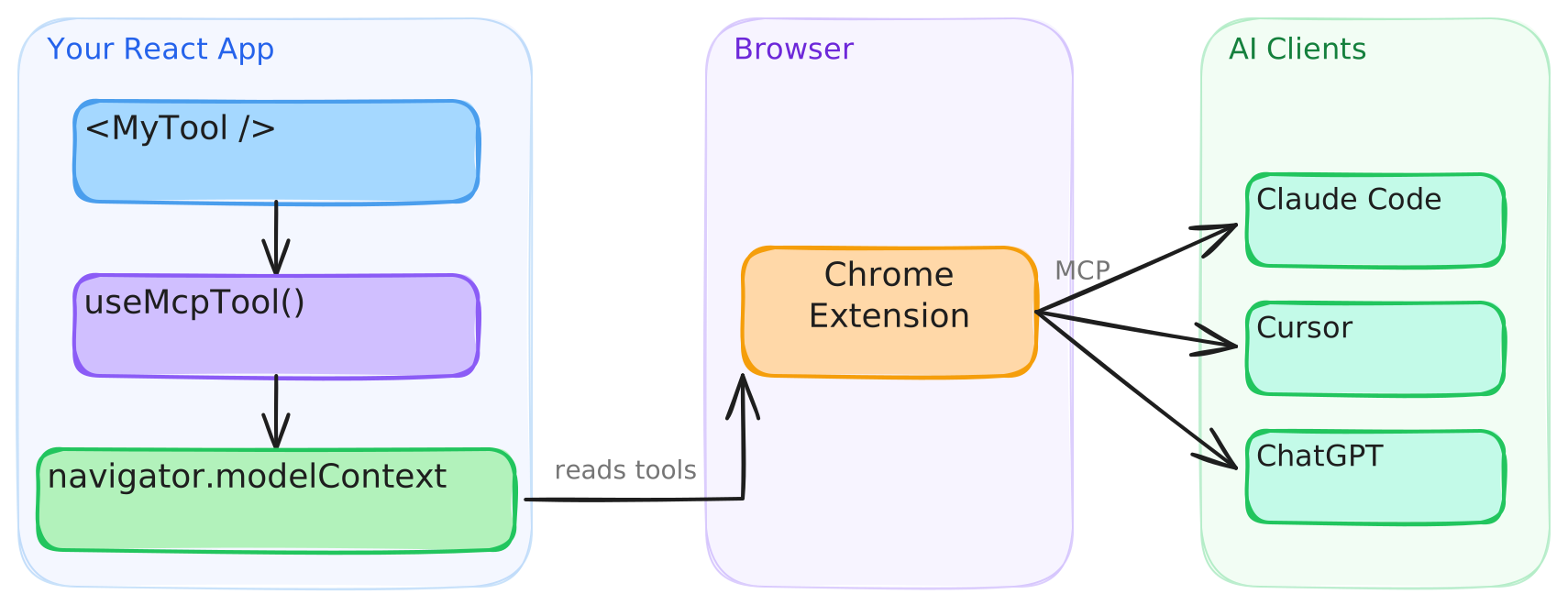
This library provides the React bindings for that API. <WebMCPProvider> installs a polyfill when native support is absent, and each useMcpTool call registers a tool that agents can discover and execute.
Connect to AI clients
Agents with built-in WebMCP browser support, such as Codex, discover and call tools directly from the page. Clients that cannot access document.modelContext directly, such as Claude Code and Cursor, connect through the WebMCP Bridge extension, which exposes your registered tools to any MCP client.
- Install the extension from the Chrome Web Store.
- Configure your MCP client. See the extension setup guide for details.
The extension will be deprecated when Chrome provides native bridging to desktop clients.
Testing in Chrome
Google's WebMCP extension lists a page's tools and runs an agent against them from a side panel, which is handy while building tools. It only sees tools registered through Chrome's native API, so on a page running the polyfill it finds nothing. Turn on chrome://flags/#enable-webmcp-testing (the extension needs Chrome 155 or newer) and <WebMCPProvider> will use the native API instead of the polyfill.
Usage
Execution state
useMcpTool returns reactive state you can use to build UI around tool execution:
function TranslateTool() {
  const { state, execute } = useMcpTool({
    name: "translate",
    description: "Translate text to Spanish",
    input: z.object({ text: z.string() }),
    handler: async ({ text }) => {
      const result = await translate(text, "es");
      return { content: [{ type: "text", text: result }] };
    },
  });

  return (
    <div>
      <button onClick={() => execute({ text: "Hello" })} disabled={state.isExecuting}>
        {state.isExecuting ? "Translating..." : "Translate"}
      </button>
      {state.lastResult && <p>{state.lastResult.content[0].text}</p>}
      {state.error && <p className="error">{state.error.message}</p>}
    </div>
  );
}
Cancellation
Each execution receives its own AbortSignal. Pass it to fetch and other cancellable work. Chrome 153+ aborts the signal when the agent cancels the call. On older browsers the library substitutes a never-aborting signal, so the second argument is always safe to use:
useMcpTool({
  name: "fetch_report",
  description: "Fetch a report by ID",
  input: z.object({ id: z.string() }),
  handler: async ({ id }, { signal }) => {
    const res = await fetch(`/api/reports/${id}`, { signal });
    return { content: [{ type: "text", text: await res.text() }] };
  },
});
Title and annotations
Give a tool a human-friendly display title, and describe its behavior to agents with annotations. The current WebMCP specification defines four annotations: readOnlyHint, untrustedContentHint, consequentialHint and debugging. Set consequentialHint on tools that do something hard to undo, like placing an order, so agents know to check with the user first.
useMcpTool({
  name: "search_users",
  title: "Search users",
  description: "Find users by name or email",
  input: z.object({ query: z.string() }),
  annotations: {
    readOnlyHint: true,
  },
  handler: async ({ query }) => { /* ... */ },
});
Dynamic tools
Tools register on mount and unregister on unmount. Render them conditionally like any React component:
function App({ user }) {
  return (
    <WebMCPProvider name="app" version="1.0">
      <PublicTools />
      {user.isAdmin && <AdminTools />}
    </WebMCPProvider>
  );
}
Callbacks
Run side effects on success or failure:
useMcpTool({
  name: "checkout",
  description: "Complete a purchase",
  input: z.object({ cartId: z.string() }),
  handler: async ({ cartId }) => { /* ... */ },
  onSuccess: (result) => analytics.track("checkout_complete"),
  onError: (error) => toast.error(error.message),
});
onError fires when the handler throws. A handler that returns { isError: true } on its own still counts as a success, so onSuccess fires for it.
JSON Schema
Pass inputSchema directly to define a tool without Zod:
useMcpTool({
  name: "calculate",
  description: "Basic arithmetic",
  inputSchema: {
    type: "object",
    properties: {
      a: { type: "number" },
      b: { type: "number" },
      op: { type: "string", enum: ["add", "subtract", "multiply", "divide"] },
    },
    required: ["a", "b", "op"],
  },
  handler: async (args) => {
    const { a, b, op } = args as { a: number; b: number; op: string };
    const result = { add: a + b, subtract: a - b, multiply: a * b, divide: a / b }[op];
    return { content: [{ type: "text", text: String(result) }] };
  },
});
TypeScript
webmcp-react already types document.modelContext, so theres no need to add Google's webmcp-types as well. The two packages declare the same global differently and clash if you install both, see TypeScript and webmcp-types for details and a workaround.
SSR
The library works with Next.js, Remix, and any server-rendering framework. The build includes a "use client" banner, so no extra configuration is needed.
Browser support
| Environment | Behavior |
|---|---|
Chrome with native document.modelContext |
The library uses the native API. The polyfill is not installed. |
| All other browsers | The library installs its polyfill, which implements the registration and consumer APIs. |
The polyfill follows native Chrome behavior. See the polyfill section of the API reference for the exact Chrome versions each behavior tracks.
Versioning and stability
webmcp-react follows Semantic Versioning. Breaking changes to the public API bump the major version. Every release is documented in the changelog, including the WebMCP specification and Chrome changes it tracks.
outputSchema and structuredContent are documented library extensions to the WebMCP specification. They are part of the public API and follow the same versioning policy.
API
See the full API reference.
Contributing
Bug reports, feature requests, and pull requests are welcome. Read the contributing guide before you open a pull request. This project follows the Contributor Covenant Code of Conduct.
License
Preguntas sobre webmcp-react MCP
¿Cómo agrego webmcp-react MCP a Claude Code?
Ejecuta claude mcp add webmcp-react -- npx -y webmcp-react en tu terminal. Añade --scope user para que esté disponible en todos los proyectos.
¿Cómo agrego webmcp-react MCP a Cursor?
Abre ~/.cursor/mcp.json y añade el servidor en mcpServers, usando la configuración de Cursor que se muestra en la sección de instalación de arriba.
¿Para qué se utiliza webmcp-react?
Proporciona hooks de React para registrar herramientas tipadas en document.modelContext, de modo que los agentes de IA puedan llamar a la funcionalidad de tu aplicación web.
¿Funciona webmcp-react sin soporte nativo de WebMCP en el navegador?
Sí. Instala un polyfill ligero cuando el soporte nativo de WebMCP no está disponible y utiliza la API nativa cuando está presente.
¿Puedo definir herramientas con JSON Schema en lugar de Zod?
Sí, puedes pasar un inputSchema directamente para definir una herramienta sin usar Zod.
¿Es webmcp-react seguro para SSR?
Sí, funciona con Next.js, Remix y otros frameworks de renderizado en servidor, y el build incluye una directiva "use client".
¿Cómo se desregistran las herramientas?
Las herramientas se registran al montar el componente y se desregistran al desmontarlo, por lo que puedes renderizarlas condicionalmente como cualquier componente de React.