Ermöglicht Coding Agents semantische Suchen über lokale, GitHub- und Bitbucket-Repositories hinweg mithilfe eines lokalen Embedding-Modells.
Auch bekannt als markdorof/delphi-code, delphi-code
- Stars
- 0
- Tools
- —
- Downloads, 30 Tage
- 1.332
- Neueste Version
- 0.3.4
- Letzter Commit
- 18. Okt. 2026
- Lizenz
- Apache-2.0
Was ist Delphi Code MCP?
Delphi Code ist ein MCP server. Ermöglicht Coding Agents semantische Suchen über lokale, GitHub- und Bitbucket-Repositories hinweg mithilfe eines lokalen Embedding-Modells.
Zusammenfassung generiert aus dem README des Projekts
Über Delphi Code MCP server
Delphi Code bietet semantische Suchfunktionen für Coding Agents, indem es lokale Verzeichnisse zusammen mit GitHub- und Bitbucket-Repositories indiziert. Es nutzt ein lokales Embedding-Modell, um relevanten Code basierend auf der Bedeutung statt durch exakte Keyword-Matches zu finden. Das ermöglicht es Entwicklern, Logik über mehrere Projekte hinweg zu lokalisieren, selbst wenn spezifische Begriffe nicht in den Quelldateien vorkommen. Der Server läuft vollständig auf deiner Maschine, sodass dein Code privat bleibt und deine lokale Umgebung nie verlässt.
Das Tool wurde für macOS-Nutzer auf Apple Silicon entwickelt und lässt sich in verschiedene AI Clients wie Claude Code, Cursor, VS Code und Gemini CLI integrieren. Nutzer können ihre Codebase über ein Command Line Interface oder ein lokales Web-UI verwalten. Das Setup erfordert nur einen einmaligen Download des Modells, danach laufen Suchen nahezu verzögerungsfrei ab, ohne dass eine GPU oder ein Cloud-Provider benötigt wird. Um auf Remote-Repositories zuzugreifen, kannst du einen GITHUB_TOKEN oder Bitbucket-Credentials angeben, aber die eigentlichen Indexing- und Suchprozesse bleiben offline.
Was du damit machen kannst
- 1Logik-Entdeckung über Repositories hinwegLass einen AI Agent suchen, wo spezifische Backend-Logik Anfragen über verschiedene Repositories hinweg verarbeitet.
- 2Semantische Code-SucheFinde Code-Snippets, indem du deren Zweck beschreibst, anstatt spezifische Textstrings zu verwenden.
- 3Automatisches Projekt-IndexingFüge lokale Pfade oder Remote-Git-Repositories einem durchsuchbaren Index für deinen Coding Assistant hinzu.
Geschrieben aus dem README des Projekts. Jeder Use Case wurde gegen ein Zitat daraus geprüft.
So installierst du Delphi Code MCP
Formate geprüft am 10. Nov. 2026Delphi Code MCP in Claude Code installieren
$ claude mcp add delphi-code -- uvx delphi-codeDelphi Code MCP in Cursor installieren
~/.cursor/mcp.json
{
  "mcpServers": {
    "delphi-code": {
      "command": "uvx",
      "args": [
        "delphi-code"
      ]
    }
  }
}Delphi Code MCP in VS Code installieren
.vscode/mcp.json
{
  "servers": {
    "delphi-code": {
      "type": "stdio",
      "command": "uvx",
      "args": [
        "delphi-code"
      ]
    }
  }
}Delphi Code MCP in Claude Desktop installieren
claude_desktop_config.json
{
  "mcpServers": {
    "delphi-code": {
      "command": "uvx",
      "args": [
        "delphi-code"
      ]
    }
  }
}Delphi Code MCP in Codex installieren
~/.codex/config.toml
[mcp_servers.delphi-code]
command = "uvx"
args = ["delphi-code"]
Delphi Code MCP in Gemini CLI installieren
~/.gemini/settings.json
{
  "mcpServers": {
    "delphi-code": {
      "command": "uvx",
      "args": [
        "delphi-code"
      ]
    }
  }
}Automatisierte Checks
Geluften am 13. Nov. 2026Vollständiger Bericht →Unsere automatisierten Checks bestanden. Das ist kein Security-Audit: Lies den Code und gib dem Server nur den minimal notwendigen Zugriff. Wie die Checks funktionieren

- Source Repository verknüpft und erreichbarBestanden
- Open Source Lizenz (OSI)Bestanden
- Commit oder Release im letzten JahrBestanden
- Package-Name ähnelt keinem populären PackageBestanden
- Remote Endpoint nutzt HTTPSNicht geprüft
- Destruktive Tools sind markiertNicht geprüft
- Keine versteckten Anweisungen an das ModellBestanden
- Kein kritischer Hinweis im Paket oder seinen AbhängigkeitenBestanden
README
Auf GitHub ansehenDelphi Code
Let your coding agent browse code across all your repositories. Index local projects and GitHub or Bitbucket repositories, then ask "where does the backend handle the refund the web app requests?" and get the right files from every repository at once, even when no file contains those words.
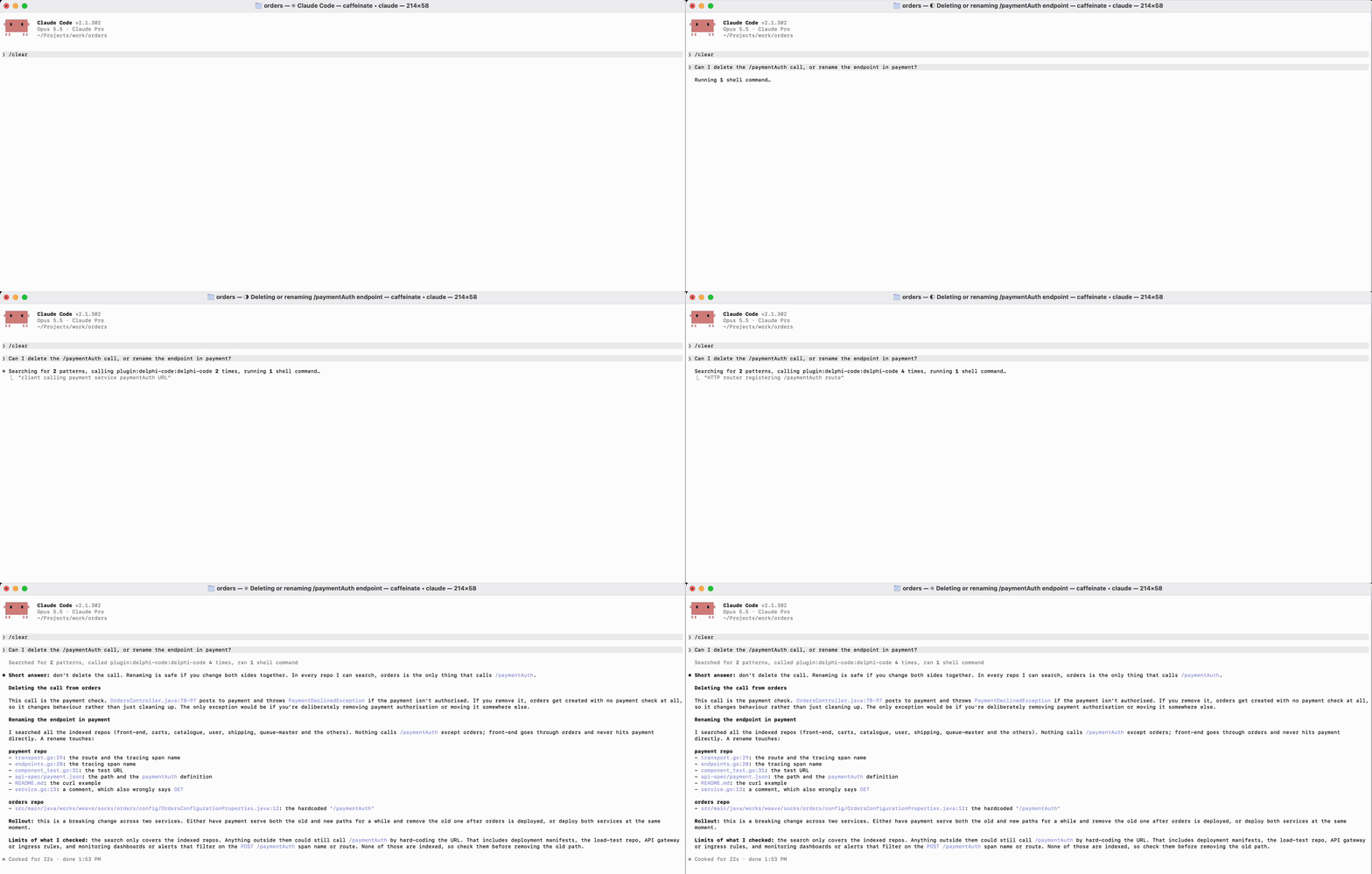
- Private: your code never leaves your machine. Indexing and search run offline with a local model; no account, cloud provider, or background daemon.
- Fast: the MCP server keeps the model loaded, so repeated searches are near-instant. No GPU needed.
- Works with your agents: Claude Code, Claude Desktop, Codex, Cursor, VS Code, Gemini CLI, and OpenCode.
Install
curl -LsSf https://github.com/markdorof/delphi-code/releases/latest/download/install.sh | sh
The script installs uv if needed, then runs setup, which downloads the embedding model once and connects every agent it finds. Options go after sh -s --: --no-setup, --no-connect, --version VERSION. With uv already installed:
uv tool install --managed-python --python 3.14 delphi-code
delphi-code setup
Requires macOS 14+ on Apple silicon (Linux is untested, Windows unsupported). delphi-code doctor checks the installation.
Use
delphi-code add ~/src/api github.com/octo/tools   # track and index projects
delphi-code search 'where are user passwords checked?'
delphi-code ui                                     # or do it all in the browser
Your agent calls the same search through MCP. After installing a new agent, run delphi-code connect. To connect one by hand:
| Agent | Setup |
|---|---|
| Claude Code | claude plugin marketplace add markdorof/delphi-code, then claude plugin install delphi-code@delphi-code |
| Codex | codex plugin marketplace add markdorof/delphi-code, then codex plugin add delphi-code@delphi-code |
| Cursor | Add {"mcpServers": {"delphi-code": {"type": "stdio", "command": "delphi-code", "args": ["mcp"]}}} to ~/.cursor/mcp.json |
| VS Code (Copilot) | code --add-mcp '{"name": "delphi-code", "command": "delphi-code", "args": ["mcp"]}' |
| Gemini CLI | gemini mcp add delphi-code delphi-code mcp |
| OpenCode | Add {"mcp": {"delphi-code": {"type": "local", "command": ["delphi-code", "mcp"]}}} to ~/.config/opencode/opencode.json |
For agents other than Claude Code and Codex, also copy the skill into the agent's skills folder so it knows when to search by meaning instead of grep.
Commands
| Command | What it does |
|---|---|
setup |
Downloads the model (or imports it with --from DIR on an offline machine) and connects agents. |
add [SOURCE ...] |
Tracks and indexes local paths or remote repositories (--ref picks a branch or tag). Without sources, picks repositories from your GitHub or Bitbucket account. |
sync [PROJECT ...] |
Updates tracked projects, re-embedding only what changed. |
index -p PATH |
Indexes a project once without tracking it. |
search QUERY |
Searches every index, or one with -p. Filter with --language, --path, --limit. |
list, status, remove NAME |
Show tracked projects, show a project's index, stop tracking a project. |
connect, disconnect |
Add or remove Delphi Code in your agents' configs. |
ui |
Opens a local web UI for search, projects, and setup checks. |
doctor |
Checks the model and storage. |
mcp |
Serves the commands as MCP tools over stdio. |
-p takes a path or an indexed project's name. index and add skip .gitignored files and accept --ignore, --path, and --language. Every command takes --help, and most take --json for scripts. Only setup, add, and sync use the network.
Settings
| Variable | Purpose |
|---|---|
GITHUB_TOKEN / GH_TOKEN |
GitHub access for remote repositories (falls back to gh auth token, then git's credentials) |
BITBUCKET_APP_PASSWORD with BITBUCKET_EMAIL or BITBUCKET_USERNAME |
Bitbucket access (an API token works) |
DELPHI_CODE_MODEL |
Use another local SentenceTransformers model instead of the default all-MiniLM-L6-v2 |
DELPHI_CODE_INDEX_ROOT, DELPHI_CODE_REGISTRY, DELPHI_CODE_LOG_FILE |
Move indexes, the tracked-project list, or the log |
DELPHI_CODE_LOG_LEVEL |
DEBUG, INFO, WARNING, ERROR, or OFF |
Data lives in ~/Library/Application Support/delphi-code on macOS and ~/.local/share/delphi-code on Linux.
Upgrade and uninstall
uv tool upgrade delphi-code
Your model and indexes are kept. If a command fails with index_incompatible, delete the index directory it names and run sync again. See releases for changes.
delphi-code disconnect
uv tool uninstall delphi-code
rm -rf ~/Library/Application\ Support/delphi-code
uv cache clean   # frees about 900 MB of downloaded packages
If the install script installed uv and you don't need it, uninstall uv and its Python too.
License
Apache-2.0. See THIRD_PARTY_NOTICES.md. To contribute, see CONTRIBUTING.md.
Delphi Code MCP Fragen
Wie füge ich Delphi Code MCP zu Claude Code hinzu?
Führe claude mcp add delphi-code -- uvx delphi-code in deinem Terminal aus. Füge --scope user hinzu, damit der Server in jedem Projekt verfügbar ist.
Wie füge ich Delphi Code MCP zu Cursor hinzu?
Öffne ~/.cursor/mcp.json und füge den Server unter mcpServers hinzu, mit der Cursor-Config aus dem Installationsabschnitt oben.
Bleibt mein Code privat?
Ja, dein Code verlässt deine Maschine nie, da das Indexing und die Suche offline mit einem lokalen Modell laufen.
Welche AI Agents sind mit Delphi Code kompatibel?
Es funktioniert mit Claude Code, Claude Desktop, Codex, Cursor, VS Code, Gemini CLI und OpenCode.
Welche Betriebssysteme werden unterstützt?
Es wird macOS 14+ auf Apple Silicon benötigt; Linux ist aktuell nicht getestet und Windows wird nicht unterstützt.
Wie füge ich ein neues Repository zum Index hinzu?
Du kannst den 'add' Befehl nutzen, um lokale Pfade oder Remote-Repositories zu tracken.